
Qt - 视频采集程序
Qt 摄像头视频数据采集(编码数据)
使用了QMediaRecorder来录制视频。QMediaRecorder默认会使用编码器(如H.264)对视频进行编码,然后保存到文件(如MP4)。因此,这个程序保存的是已经编码的视频数据,而不是原始视频数据(如YUV)
QMediaRecorder是Qt Multimedia模块中的一个类,它用于录制音频和视频。在Qt中,QMediaRecorder本身并不直接包含编码器,而是依赖于底层的多媒体框架(如Windows上的DirectShow、Linux上的GStreamer等)来提供编码功能。
在程序中,通过以下步骤设置编码器:
-
在setupRecorder函数中,创建了QMediaRecorder对象,并设置了视频和音频编码设置。
-
通过recorder->supportedAudioCodecs()、recorder->supportedVideoCodecs()和recorder->supportedContainers()来获取系统支持的编码器和容器格式。
-
然后设置视频编码参数(如编码格式、质量、帧率、分辨率)和音频编码参数(如编码格式、质量、通道数、采样率、比特率)以及容器格式。
所以,这个程序使用的是Qt Multimedia模块中基于当前系统多媒体框架的编码器。Qt本身不提供编码器,而是调用系统支持的编码器。
具体代码在setupRecorder函数中:
QVideoEncoderSettings videoSettings;
// 尝试设置视频编码器
QStringList videoCodecs = recorder->supportedVideoCodecs();
if (videoCodecs.contains("video/mp4") || videoCodecs.contains("avc1")) {
    videoSettings.setCodec("video/mp4");
} else if (videoCodecs.contains("video/x-msvideo")) {
    videoSettings.setCodec("video/x-msvideo"); // AVI
} else if (!videoCodecs.isEmpty()) {
    videoSettings.setCodec(videoCodecs.first()); // 使用第一个支持的编码
}

// 同样,设置音频编码器
QAudioEncoderSettings audioSettings;
QStringList audioCodecs = recorder->supportedAudioCodecs();
if (!audioCodecs.isEmpty()) {
    if (audioCodecs.contains("audio/mpeg") || audioCodecs.contains("mp3")) {
        audioSettings.setCodec("audio/mpeg");
    } else {
        audioSettings.setCodec(audioCodecs.first());
    }
}
因此,这个程序使用的是系统提供的编码器,而不是Qt自带的编码器。Qt在这里扮演了一个封装和调用系统多媒体功能的作用。
注意:不同的平台和系统环境支持的多媒体编码器可能不同,因此程序会先检查系统支持的编码器,然后选择其中一个进行设置。
如果系统没有安装任何视频编码器,那么录制视频可能会失败。这也是为什么程序中有错误处理的原因。
所以,这个程序保存的视频数据是经过系统编码器编码后的数据(例如MP4格式),而不是原始YUV数据。
1. widget.h
#ifndef WIDGET_H
#define WIDGET_H

#include <QWidget>
#include <QCamera>
#include <QCameraInfo>
#include <QCameraViewfinder>
#include <QCameraImageCapture>
#include <QMediaRecorder>
#include <QComboBox>
#include <QPushButton>
#include <QLabel>
#include <QVBoxLayout>
#include <QHBoxLayout>
#include <QGroupBox>
#include <QTimer>
#include <QTime>
#include <QAudioEncoderSettings>
#include <QVideoEncoderSettings>

class Widget : public QWidget
{
    Q_OBJECT

public:
    Widget(QWidget *parent = nullptr);
    ~Widget();

public slots:
    void on_openCamera_clicked();

private slots:
    void on_closeCamera_clicked();
    void on_captureBt_clicked();
    void save_pic(int id, const QImage &preview);
    void onActivated(int index);
    void onResolutionChanged(int index);
    void on_recordButton_clicked();
    void updateRecordingTime();
    void onRecorderStateChanged(QMediaRecorder::State state);
    void onRecorderError(QMediaRecorder::Error error);

private:
    // UI 控件
    QComboBox *cameraComboBox;
    QComboBox *resolutionComboBox;
    QPushButton *openCameraButton;
    QPushButton *closeCameraButton;
    QPushButton *captureButton;
    QPushButton *recordButton;
    QLabel *imageLabel;
    QLabel *recordingTimeLabel;
    QLabel *statusLabel;
    QWidget *viewfinderContainer;

    // 布局
    QVBoxLayout *mainLayout;
    QHBoxLayout *controlLayout;
    QHBoxLayout *displayLayout;

    // 摄像头相关
    QList<QCameraInfo> cameraList;
    QCamera* myCamera;
    QCameraImageCapture* cp;
    QCameraViewfinder* vf;
    QMediaRecorder* recorder;
    QList<QSize> mResSize;
    int m_index;

    // 录制相关
    QTimer *recordingTimer;
    QTime recordingTime;
    bool isRecording;

    void initUI();
    void initResolutionComboBox();
    void setupRecorder();
    void showSupportedFormats();
};
#endif // WIDGET_H
2. widget.cpp
#include "widget.h"
#include <QDebug>
#include <QCameraViewfinderSettings>
#include <QDateTime>
#include <QMessageBox>
#include <QFileDialog>
#include <QStandardPaths>
#include <QAudioInput>
#include <QAudioDeviceInfo>

Widget::Widget(QWidget *parent)
    : QWidget(parent)
    , cameraComboBox(nullptr)
    , resolutionComboBox(nullptr)
    , openCameraButton(nullptr)
    , closeCameraButton(nullptr)
    , captureButton(nullptr)
    , recordButton(nullptr)
    , imageLabel(nullptr)
    , recordingTimeLabel(nullptr)
    , statusLabel(nullptr)
    , viewfinderContainer(nullptr)
    , mainLayout(nullptr)
    , controlLayout(nullptr)
    , displayLayout(nullptr)
    , myCamera(nullptr)
    , cp(nullptr)
    , vf(nullptr)
    , recorder(nullptr)
    , m_index(0)
    , recordingTimer(nullptr)
    , isRecording(false)
{
    // 初始化分辨率列表
    mResSize << QSize(160, 120)   // QQVGA
             << QSize(320, 240)   // QVGA
             << QSize(640, 480)   // VGA
             << QSize(800, 600)   // SVGA
             << QSize(1024, 768)  // XGA
             << QSize(1280, 720)  // 720p HD
             << QSize(1920, 1080) // 1080p Full HD
             << QSize(3840, 2160); // 4K UHD

    initUI();
}

Widget::~Widget()
{
    if (myCamera) {
        myCamera->stop();
    }
    if (recordingTimer) {
        recordingTimer->stop();
    }
}

void Widget::initUI()
{
    // 创建控件
    cameraComboBox = new QComboBox(this);
    resolutionComboBox = new QComboBox(this);
    openCameraButton = new QPushButton("打开摄像头", this);
    closeCameraButton = new QPushButton("关闭摄像头", this);
    captureButton = new QPushButton("拍照", this);
    recordButton = new QPushButton("开始录制", this);
    imageLabel = new QLabel("拍照预览", this);
    recordingTimeLabel = new QLabel("", this);
    statusLabel = new QLabel("就绪", this);
    viewfinderContainer = new QWidget(this);

    // 设置控件属性
    viewfinderContainer->setMinimumSize(640, 480);
    viewfinderContainer->setStyleSheet("background-color: black; border: 1px solid gray;");

    imageLabel->setMinimumSize(320, 240);
    imageLabel->setStyleSheet("background-color: white; border: 1px solid gray;");
    imageLabel->setAlignment(Qt::AlignCenter);

    openCameraButton->setMinimumHeight(30);
    closeCameraButton->setMinimumHeight(30);
    captureButton->setMinimumHeight(30);
    recordButton->setMinimumHeight(30);

    recordingTimeLabel->setStyleSheet("color: red; font-weight: bold;");
    recordingTimeLabel->setAlignment(Qt::AlignCenter);
    recordingTimeLabel->hide(); // 初始隐藏

    statusLabel->setStyleSheet("color: blue; font-weight: bold;");
    statusLabel->setAlignment(Qt::AlignCenter);

    // 初始时禁用录制按钮
    recordButton->setEnabled(false);

    // 初始化分辨率下拉框
    initResolutionComboBox();

    // 获取摄像头列表
    cameraList = QCameraInfo::availableCameras();
    if (cameraList.count() > 0) {
        foreach(QCameraInfo info, cameraList) {
            cameraComboBox->addItem(info.description());
            qDebug() << "Camera:" << info.description() << info.deviceName();
        }
    } else {
        statusLabel->setText("未检测到摄像头");
    }

    // 创建布局
    mainLayout = new QVBoxLayout(this);

    // 控制区域布局
    QGroupBox *controlGroup = new QGroupBox("摄像头控制", this);
    controlLayout = new QHBoxLayout(controlGroup);

    controlLayout->addWidget(new QLabel("摄像头:", this));
    controlLayout->addWidget(cameraComboBox);
    controlLayout->addWidget(new QLabel("分辨率:", this));
    controlLayout->addWidget(resolutionComboBox);
    controlLayout->addWidget(openCameraButton);
    controlLayout->addWidget(closeCameraButton);
    controlLayout->addWidget(captureButton);
    controlLayout->addWidget(recordButton);
    controlLayout->addStretch(1); // 添加弹性空间

    // 状态栏
    QHBoxLayout *statusLayout = new QHBoxLayout();
    statusLayout->addWidget(new QLabel("状态:", this));
    statusLayout->addWidget(statusLabel);
    statusLayout->addStretch(1);

    // 显示区域布局
    QGroupBox *displayGroup = new QGroupBox("预览窗口", this);
    displayLayout = new QHBoxLayout(displayGroup);

    // 左侧摄像头预览区域
    QVBoxLayout *cameraLayout = new QVBoxLayout();
    cameraLayout->addWidget(viewfinderContainer, 1);
    cameraLayout->addWidget(recordingTimeLabel);

    // 右侧布局
    QVBoxLayout *rightLayout = new QVBoxLayout();
    rightLayout->addWidget(new QLabel("拍照预览:", this));
    rightLayout->addWidget(imageLabel);

    displayLayout->addLayout(cameraLayout, 2); // 2/3的空间给摄像头预览
    displayLayout->addLayout(rightLayout, 1); // 1/3的空间给拍照预览

    // 主布局
    mainLayout->addWidget(controlGroup);
    mainLayout->addLayout(statusLayout);
    mainLayout->addWidget(displayGroup);

    // 设置窗口属性
    setWindowTitle("摄像头应用");
    setMinimumSize(800, 600);

    // 连接信号和槽
    connect(cameraComboBox, SIGNAL(activated(int)), this, SLOT(onActivated(int)));
    connect(resolutionComboBox, SIGNAL(activated(int)), this, SLOT(onResolutionChanged(int)));
    connect(openCameraButton, SIGNAL(clicked()), this, SLOT(on_openCamera_clicked()));
    connect(closeCameraButton, SIGNAL(clicked()), this, SLOT(on_closeCamera_clicked()));
    connect(captureButton, SIGNAL(clicked()), this, SLOT(on_captureBt_clicked()));
    connect(recordButton, SIGNAL(clicked()), this, SLOT(on_recordButton_clicked()));

    // 初始化录制计时器
    recordingTimer = new QTimer(this);
    connect(recordingTimer, &QTimer::timeout, this, &Widget::updateRecordingTime);
}

void Widget::initResolutionComboBox()
{
    resolutionComboBox->clear();

    foreach (QSize size, mResSize) {
        QString resolution = QString("%1 x %2").arg(size.width()).arg(size.height());
        resolutionComboBox->addItem(resolution);
    }

    // 默认选择 VGA 分辨率 (640x480)
    resolutionComboBox->setCurrentIndex(2);
}

void Widget::showSupportedFormats()
{
    if (!recorder) return;

    qDebug() << "Supported audio codecs:" << recorder->supportedAudioCodecs();
    qDebug() << "Supported video codecs:" << recorder->supportedVideoCodecs();
    qDebug() << "Supported containers:" << recorder->supportedContainers();
}

void Widget::setupRecorder()
{
    if (!myCamera) return;

    // 创建录制器
    recorder = new QMediaRecorder(myCamera, this);

    // 连接录制器信号
    connect(recorder, &QMediaRecorder::stateChanged, this, &Widget::onRecorderStateChanged);
    connect(recorder, QOverload<QMediaRecorder::Error>::of(&QMediaRecorder::error),
            this, &Widget::onRecorderError);

    // 显示支持的格式(用于调试)
    showSupportedFormats();

    // 设置视频编码
    QVideoEncoderSettings videoSettings;

    // 尝试多种视频编码格式
    QStringList videoCodecs = recorder->supportedVideoCodecs();
    if (videoCodecs.contains("video/mp4") || videoCodecs.contains("avc1")) {
        videoSettings.setCodec("video/mp4");
    } else if (videoCodecs.contains("video/x-msvideo")) {
        videoSettings.setCodec("video/x-msvideo"); // AVI
    } else if (!videoCodecs.isEmpty()) {
        videoSettings.setCodec(videoCodecs.first()); // 使用第一个支持的编码
    }

    videoSettings.setQuality(QMultimedia::NormalQuality);
    videoSettings.setFrameRate(30.0);

    // 根据选择的分辨率设置录制分辨率
    int resolutionIndex = resolutionComboBox->currentIndex();
    if (resolutionIndex >= 0 && resolutionIndex < mResSize.size()) {
        QSize selectedSize = mResSize[resolutionIndex];
        videoSettings.setResolution(selectedSize);
        qDebug() << "Setting video resolution to:" << selectedSize;
    }

    // 设置音频编码
    QAudioEncoderSettings audioSettings;
    QStringList audioCodecs = recorder->supportedAudioCodecs();
    if (!audioCodecs.isEmpty()) {
        if (audioCodecs.contains("audio/mpeg") || audioCodecs.contains("mp3")) {
            audioSettings.setCodec("audio/mpeg");
        } else {
            audioSettings.setCodec(audioCodecs.first());
        }
        audioSettings.setQuality(QMultimedia::NormalQuality);
        audioSettings.setChannelCount(2);
        audioSettings.setSampleRate(44100);
        audioSettings.setBitRate(128000);
    }

    // 设置容器格式
    QStringList containers = recorder->supportedContainers();
    if (containers.contains("mp4") || containers.contains("video/mp4")) {
        recorder->setContainerFormat("mp4");
    } else if (containers.contains("avi")) {
        recorder->setContainerFormat("avi");
    } else if (!containers.isEmpty()) {
        recorder->setContainerFormat(containers.first());
    }

    recorder->setEncodingSettings(audioSettings, videoSettings);

    qDebug() << "Recorder setup complete";
    qDebug() << "Audio codec:" << audioSettings.codec();
    qDebug() << "Video codec:" << videoSettings.codec();
    qDebug() << "Container:" << recorder->containerFormat();
}

void Widget::on_openCamera_clicked()
{
    // 检查摄像头列表是否为空
    if (cameraList.isEmpty() || m_index < 0 || m_index >= cameraList.count()) {
        qDebug() << "No camera available or invalid index";
        statusLabel->setText("错误: 没有可用的摄像头");
        QMessageBox::warning(this, "警告", "没有可用的摄像头或索引无效");
        return;
    }

    // 如果已存在摄像头对象,先清理
    if (myCamera) {
        myCamera->stop();
        delete myCamera;
        myCamera = nullptr;
    }

    // 创建新的摄像头对象
    myCamera = new QCamera(cameraList[m_index], this);

    // 检查摄像头状态
    if (myCamera->error() != QCamera::NoError) {
        qDebug() << "Camera error:" << myCamera->errorString();
        statusLabel->setText("错误: " + myCamera->errorString());
        QMessageBox::critical(this, "错误", QString("摄像头错误: %1").arg(myCamera->errorString()));
        delete myCamera;
        myCamera = nullptr;
        return;
    }

    // 设置分辨率
    int resolutionIndex = resolutionComboBox->currentIndex();
    if (resolutionIndex >= 0 && resolutionIndex < mResSize.size()) {
        QSize selectedSize = mResSize[resolutionIndex];
        QCameraViewfinderSettings settings;
        settings.setResolution(selectedSize);
        myCamera->setViewfinderSettings(settings);
        qDebug() << "Set resolution to:" << selectedSize;
    }

    // 设置录制器
    setupRecorder();

    // 创建图像捕获对象
    cp = new QCameraImageCapture(myCamera, this);
    connect(cp, &QCameraImageCapture::imageCaptured, this, &Widget::save_pic);

    // 创建取景器
    if (vf) {
        delete vf;
        vf = nullptr;
    }
    vf = new QCameraViewfinder(viewfinderContainer);
    vf->resize(viewfinderContainer->size());
    myCamera->setViewfinder(vf);
    vf->show();

    // 启动摄像头
    myCamera->start();

    // 启用录制按钮
    recordButton->setEnabled(true);
    statusLabel->setText("摄像头已启动");

    qDebug() << "Camera started successfully";
}

void Widget::on_closeCamera_clicked()
{
    // 如果正在录制,先停止录制
    if (isRecording && recorder) {
        recorder->stop();
        recordingTimer->stop();
        recordingTimeLabel->hide();
        isRecording = false;
        recordButton->setText("开始录制");
        statusLabel->setText("录制已停止,摄像头已关闭");
    }

    if (myCamera) {
        myCamera->stop();
        qDebug() << "Camera stopped";
    }

    if (vf) {
        vf->close();
    }

    // 禁用录制按钮
    recordButton->setEnabled(false);
}

void Widget::on_captureBt_clicked()
{
    if (cp && myCamera && myCamera->state() == QCamera::ActiveState) {
        QString filename = QString("./capture_%1.jpg").arg(QDateTime::currentDateTime().toString("yyyyMMdd_hhmmss"));
        cp->capture(filename);
        statusLabel->setText("照片已保存: " + filename);
        qDebug() << "Capture image:" << filename;
    } else {
        qDebug() << "Cannot capture image: camera not ready";
        statusLabel->setText("错误: 摄像头未准备好");
        QMessageBox::warning(this, "警告", "摄像头未准备好,无法拍照");
    }
}

void Widget::on_recordButton_clicked()
{
    if (!recorder || !myCamera) {
        statusLabel->setText("错误: 录制器未初始化");
        QMessageBox::warning(this, "警告", "摄像头未打开,无法录制");
        return;
    }

    if (!isRecording) {
        // 开始录制
        QString videosDir = QStandardPaths::writableLocation(QStandardPaths::MoviesLocation);
        if (videosDir.isEmpty()) {
            videosDir = ".";
        }

        QString filename = QString("%1/video_%2.mp4").arg(videosDir).arg(QDateTime::currentDateTime().toString("yyyyMMdd_hhmmss"));
        recorder->setOutputLocation(QUrl::fromLocalFile(filename));

        qDebug() << "Starting recording to:" << filename;
        statusLabel->setText("开始录制: " + filename);

        recorder->record();
            if (recorder->state() != QMediaRecorder::RecordingState) {
        QMessageBox::warning(this, "警告", "无法开始录制,可能缺少编码器支持");
        return;
    }
    } else {
        // 停止录制
        qDebug() << "Stopping recording";
        statusLabel->setText("停止录制中...");
        recorder->stop();
    }
}

void Widget::updateRecordingTime()
{
    recordingTime = recordingTime.addSecs(1);
    recordingTimeLabel->setText("录制中: " + recordingTime.toString("hh:mm:ss"));
}

void Widget::onRecorderStateChanged(QMediaRecorder::State state)
{
    qDebug() << "Recorder state changed to:" << state;

    switch (state) {
    case QMediaRecorder::StoppedState:
        recordingTimer->stop();
        recordingTimeLabel->hide();
        recordButton->setText("开始录制");
        isRecording = false;
        statusLabel->setText("录制已停止,视频已保存");
        QMessageBox::information(this, "信息", "视频录制已保存");
        break;

    case QMediaRecorder::RecordingState:
        recordingTime = QTime(0, 0, 0);
        recordingTimer->start(1000); // 每秒更新一次
        recordingTimeLabel->show();
        recordButton->setText("停止录制");
        isRecording = true;
        statusLabel->setText("正在录制...");
        break;

    case QMediaRecorder::PausedState:
        recordingTimer->stop();
        recordButton->setText("继续录制");
        statusLabel->setText("录制已暂停");
        break;
    }
}

void Widget::onRecorderError(QMediaRecorder::Error error)
{
    QString errorMsg;
    switch (error) {
    case QMediaRecorder::ResourceError:
        errorMsg = "资源错误";
        break;
    case QMediaRecorder::FormatError:
        errorMsg = "格式错误";
        break;
    case QMediaRecorder::OutOfSpaceError:
        errorMsg = "存储空间不足";
        break;
    default:
        errorMsg = "未知错误";
        break;
    }

    statusLabel->setText("录制错误: " + errorMsg);
    QMessageBox::critical(this, "录制错误",
                         QString("录制过程中发生错误: %1 - %2").arg(errorMsg).arg(recorder->errorString()));
    qDebug() << "Recorder error:" << error << recorder->errorString();

    // 重置录制状态
    if (isRecording) {
        recordingTimer->stop();
        recordingTimeLabel->hide();
        recordButton->setText("开始录制");
        isRecording = false;
    }
}

// 保存图片槽函数
void Widget::save_pic(int id, const QImage &preview)
{
    qDebug() << "Image captured with id:" << id;
    QPixmap mmp = QPixmap::fromImage(preview);
    mmp = mmp.scaled(imageLabel->size(), Qt::KeepAspectRatio, Qt::SmoothTransformation);
    imageLabel->setPixmap(mmp);
    imageLabel->setText(""); // 清除文本,显示图片
}

void Widget::onActivated(int index)
{
    m_index = index;
    qDebug() << "Selected camera index:" << index;
}

void Widget::onResolutionChanged(int index)
{
    qDebug() << "Resolution changed to:" << mResSize[index];

    // 如果摄像头正在运行,重新启动以应用新的分辨率
    if (myCamera && myCamera->state() == QCamera::ActiveState) {
        qDebug() << "Restarting camera to apply new resolution...";

        // 如果正在录制,先停止录制
        if (isRecording && recorder) {
            recorder->stop();
            recordingTimer->stop();
            recordingTimeLabel->hide();
            isRecording = false;
            recordButton->setText("开始录制");
        }

        myCamera->stop();

        // 设置新的分辨率
        QSize selectedSize = mResSize[index];
        QCameraViewfinderSettings settings;
        settings.setResolution(selectedSize);
        myCamera->setViewfinderSettings(settings);

        // 重新设置录制器
        setupRecorder();

        myCamera->start();
    }
}
获取系统支持的编码参数
在实际应用中,我们通常需要先查询系统支持的编码参数,然后选择合适的设置。可以通过以下方法获取:
// 获取支持的视频编码器列表
QStringList codecs = recorder->supportedVideoCodecs();

// 获取支持的 resolutions
QList<QSize> resolutions = recorder->supportedResolutions();

// 获取支持的帧率范围
QList<qreal> frameRates = recorder->supportedFrameRates();

// 获取指定编码器支持的 resolutions 和 frame rates
QList<QSize> resForCodec = recorder->supportedResolutions("video/mp4");
QList<qreal> frameRatesForCodec = recorder->supportedFrameRates("video/mp4");
检查系统编码器支持
void Widget::checkEncoderSupport()
{
    if (!recorder) return;

    qDebug() << "=== 系统编码器支持情况 ===";
    qDebug() << "视频编码器:" << recorder->supportedVideoCodecs();
    qDebug() << "音频编码器:" << recorder->supportedAudioCodecs();
    qDebug() << "容器格式:" << recorder->supportedContainers();

    // 如果没有H.264编码器,可能需要安装额外的编解码器包
    if (recorder->supportedVideoCodecs().isEmpty()) {
        QMessageBox::warning(this, "警告",
            "系统没有可用的视频编码器。\n"
            "Windows: 安装K-Lite Codec Pack\n"
            "Linux: 安装GStreamer插件\n"
            "macOS: 确保系统完整");
    }
}
3. VideoCaptureApp.pro
确保包含所有必要的模块:
QT += core gui multimedia multimediawidgets

CONFIG += c++11

TARGET = CameraApp
TEMPLATE = app

SOURCES += \
    main.cpp \
    widget.cpp

HEADERS += \
widget.h注意:Qt本身不提供完整的音视频编码器实现,而是作为一个封装层,调用系统底层的多媒体框架。
Qt的多媒体架构-后端多媒体框架
Qt通过不同的后端调用系统编码器:
-
Windows: DirectShow, Media Foundation
-
Linux: GStreamer, PulseAudio
-
macOS: AVFoundation
-
Android: MediaCodec, OpenSL ES
运行效果:
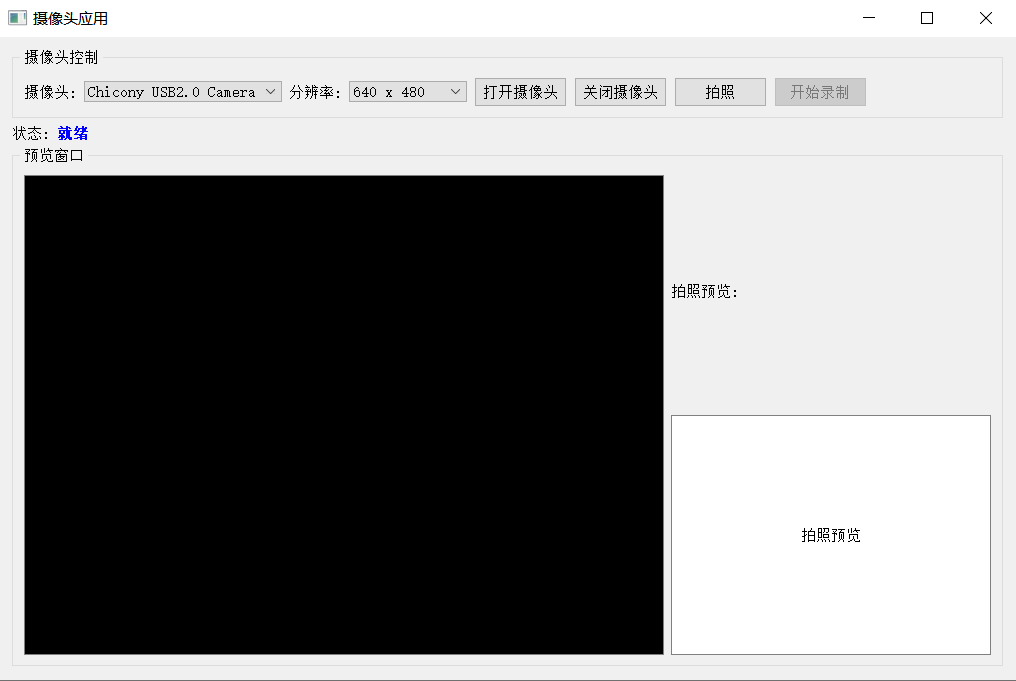
总结:
当前程序保存的是经过编码压缩的MP4视频文件,不是原始YUV数据。要保存原始YUV数据,需要使用QVideoProbe来获取原始视频帧,然后直接写入文件。
-
Qt不提供内置编码器,而是封装系统编码器
-
程序确实使用了编码器,通过QMediaRecorder调用系统编码器
-
录制问题通常源于:
-
系统缺少相应编码器
-
编码器配置不兼容
-
权限或资源问题
-
推荐使用原始YUV数据录制方案,这样可以避免编码器兼容性问题,同时获得原始视频数据用于后续处理。
Qt 摄像头视频数据采集(原始数据)
我们将使用Qt5.14.2来编写一个简单的摄像头应用程序。这个应用程序将包含以下功能:
-
打开摄像头并显示视频流
-
关闭摄像头
-
拍照(保存为图片)
-
录制视频(保存为YUV格式)
-
在界面上显示控制按钮和状态信息
注意:录制视频时,我们将使用原始数据(即YUV格式)保存。Qt的QCameraViewfinderFrame可以获取到视频帧,但是获取原始数据需要访问底层视频帧。
由于Qt的摄像头模块可能不直接提供原始YUV数据的访问,我们需要通过QAbstractVideoSurface或自定义的QVideoFrame处理来获取原始数据。
但是,在Qt5.14.2中,我们可以使用QCameraViewfinder来显示,同时使用QCameraImageCapture来捕获图像,而录制视频则可以使用QMediaRecorder。但是QMediaRecorder通常保存为压缩格式,如果我们想要原始YUV数据,可能需要直接处理视频帧。
另一种方法是使用QVideoProbe来捕获视频帧,然后将其保存为YUV格式。
由于要求保存为原始YUV文件,我们将使用QVideoProbe来获取每一帧,然后写入文件。
步骤:
-
创建Qt应用程序,包含必要的按钮和标签。
-
使用QCamera和QVideoProbe来捕获视频帧。
-
当点击录制按钮时,开始将视频帧的YUV数据写入文件,再次点击停止录制。
注意:不同的摄像头可能支持不同的像素格式,我们假设使用YUV420P(即YUV420Planar)格式。如果摄像头不支持,可能需要转换。
由于我们使用原始数据,所以需要知道帧的尺寸和格式。在QVideoFrame中,我们可以获取到这些信息。
我们将创建一个简单的界面,包含以下按钮:
-
打开摄像头
-
关闭摄像头
-
拍照
-
录制
状态信息可以显示在标签上。
由于YUV文件很大,我们只录制一段时间,并保存为.yuv文件。
实现步骤:
-
创建项目,并在.pro文件中加入:
QT += core gui multimedia multimediawidgets -
设计界面,使用QPushButton和QLabel。
-
在头文件中,包含必要的类。
-
实现功能:
-
打开摄像头:初始化QCamera,设置Viewfinder,启动摄像头。
-
关闭摄像头:停止摄像头。
-
拍照:使用QCameraImageCapture捕获图片并保存。
-
录制:使用QVideoProbe捕获视频帧,当录制按钮点击时,开始录制,再次点击停止录制,并将数据写入文件。
-
-
注意:录制过程中,我们需要将每一帧的YUV数据写入文件。但是,QVideoFrame可能不是连续的YUV数据,可能有不同的布局(比如平面或打包),我们需要根据其格式来写入。
由于YUV420P是三个平面,我们需要分别写入Y、U、V三个部分。
但是,注意:QVideoFrame::map()函数可以让我们访问帧的数据。
我们将使用QVideoProbe来捕获视频帧,当有视频帧时,我们将其写入文件(如果正在录制)。
注意:不同的摄像头可能输出不同的格式,我们假设为YUV420P。如果格式不同,我们需要进行转换,或者根据实际格式写入。
由于时间关系,我们假设摄像头输出Format_YUV420P。
如果格式不是YUV420P,我们可以尝试转换,或者提示错误。
由于转换比较复杂,我们这里只处理YUV420P格式。
实现:
我们创建一个类,继承自QMainWindow,然后实现上述功能。
下面是一个简单的实现示例:
以下是一个使用Qt5.14.2编写的简单摄像头应用程序,可以捕获原始YUV数据并保存到文件:
// main.cpp
#include <QApplication>
#include "camerawidget.h"

int main(int argc, char *argv[])
{
    QApplication a(argc, argv);

    CameraWidget w;
    w.show();

    return a.exec();
}// camerawidget.h
#ifndef CAMERAWIDGET_H
#define CAMERAWIDGET_H
#include <QWidget>
#include <QCamera>
#include <QCameraViewfinder>
#include <QCameraImageCapture>
#include <QVBoxLayout>
#include <QHBoxLayout>
#include <QPushButton>
#include <QLabel>
#include <QFile>
#include <QTimer>
#include <QDebug>
#include <QComboBox> // 添加下拉框头文件
class CameraWidget : public QWidget
{
Q_OBJECT
public:
CameraWidget(QWidget *parent = nullptr);
~CameraWidget();
private slots:
void openCamera();
void closeCamera();
void takePhoto();
void toggleRecording();
void updateFrame(const QVideoFrame &frame);
void updateStatus();
void onCameraChanged(int index); // 添加摄像头切换槽函数
private:
void setupUI();
void setupCamera();
void refreshCameraList(); // 添加刷新摄像头列表函数
void writeYUVFrame(const QVideoFrame &frame);
void convertRGB32ToYUV420P(const uchar *rgbData, int width, int height, int bytesPerLine);
QCamera *camera;
QCameraViewfinder *viewfinder;
QComboBox *cameraComboBox; // 添加摄像头下拉框
QPushButton *btnOpen;
QPushButton *btnClose;
QPushButton *btnPhoto;
QPushButton *btnRecord;
QLabel *statusLabel;
QFile *yuvFile;
bool isRecording;
int frameCount;
QTimer *statusTimer;
QSize videoResolution;
QList<QCameraInfo> availableCameras; // 存储可用的摄像头列表
};
#endif // CAMERAWIDGET_H// camerawidget.cpp
#include "CameraWidget.h"
#include <QCameraInfo>
#include <QVideoProbe>
#include <QMessageBox>
#include <QDateTime>
#include <QVideoSurfaceFormat>
#include <QUrl>
CameraWidget::CameraWidget(QWidget *parent)
: QWidget(parent)
, camera(nullptr)
, viewfinder(nullptr)
, cameraComboBox(nullptr)
, yuvFile(nullptr)
, isRecording(false)
, frameCount(0)
{
setupUI();
refreshCameraList(); // 初始化摄像头列表
}
CameraWidget::~CameraWidget()
{
if (isRecording) {
yuvFile->close();
delete yuvFile;
}
if (camera) {
camera->stop();
delete camera;
}
}
void CameraWidget::setupUI()
{
setWindowTitle("摄像头采集程序");
setFixedSize(800, 600);
// 创建视图
viewfinder = new QCameraViewfinder(this);
viewfinder->setMinimumSize(640, 480);
// 创建摄像头选择下拉框
cameraComboBox = new QComboBox(this);
cameraComboBox->setMinimumWidth(200);
// 创建按钮
btnOpen = new QPushButton("打开摄像头", this);
btnClose = new QPushButton("关闭摄像头", this);
btnPhoto = new QPushButton("拍照", this);
btnRecord = new QPushButton("开始录制", this);
// 状态标签
statusLabel = new QLabel("状态: 摄像头未开启", this);
// 设置布局
QVBoxLayout *mainLayout = new QVBoxLayout(this);
QHBoxLayout *cameraLayout = new QHBoxLayout(); // 添加摄像头选择布局
QHBoxLayout *buttonLayout = new QHBoxLayout();
QHBoxLayout *statusLayout = new QHBoxLayout();
// 摄像头选择布局
cameraLayout->addWidget(new QLabel("选择摄像头:", this));
cameraLayout->addWidget(cameraComboBox);
cameraLayout->addStretch();
buttonLayout->addWidget(btnOpen);
buttonLayout->addWidget(btnClose);
buttonLayout->addWidget(btnPhoto);
buttonLayout->addWidget(btnRecord);
buttonLayout->addStretch();
statusLayout->addWidget(statusLabel);
statusLayout->addStretch();
mainLayout->addLayout(cameraLayout); // 添加摄像头选择布局
mainLayout->addWidget(viewfinder);
mainLayout->addLayout(buttonLayout);
mainLayout->addLayout(statusLayout);
// 连接信号槽
connect(btnOpen, &QPushButton::clicked, this, &CameraWidget::openCamera);
connect(btnClose, &QPushButton::clicked, this, &CameraWidget::closeCamera);
connect(btnPhoto, &QPushButton::clicked, this, &CameraWidget::takePhoto);
connect(btnRecord, &QPushButton::clicked, this, &CameraWidget::toggleRecording);
connect(cameraComboBox, QOverload<int>::of(&QComboBox::currentIndexChanged),
this, &CameraWidget::onCameraChanged);
// 状态更新定时器
statusTimer = new QTimer(this);
connect(statusTimer, &QTimer::timeout, this, &CameraWidget::updateStatus);
statusTimer->start(1000); // 每秒更新一次状态
// 初始状态
btnClose->setEnabled(false);
btnPhoto->setEnabled(false);
btnRecord->setEnabled(false);
}
void CameraWidget::refreshCameraList()
{
cameraComboBox->clear();
availableCameras = QCameraInfo::availableCameras();
if (availableCameras.isEmpty()) {
cameraComboBox->addItem("未找到摄像头");
statusLabel->setText("状态: 未找到摄像头");
btnOpen->setEnabled(false);
} else {
for (const QCameraInfo &cameraInfo : availableCameras) {
cameraComboBox->addItem(cameraInfo.description(), cameraInfo.deviceName());
}
statusLabel->setText("状态: 请选择摄像头并打开");
btnOpen->setEnabled(true);
}
}
void CameraWidget::onCameraChanged(int index)
{
// 如果当前有摄像头在运行,先关闭
if (camera && camera->status() == QCamera::ActiveStatus) {
closeCamera();
}
// 更新UI状态
if (index >= 0 && index < availableCameras.size()) {
btnOpen->setEnabled(true);
} else {
btnOpen->setEnabled(false);
}
}
void CameraWidget::setupCamera()
{
if (!camera) {
return;
}
camera->setViewfinder(viewfinder);
// 尝试设置摄像头使用 YUV 格式
QCameraViewfinderSettings settings;
QList<QVideoFrame::PixelFormat> formats = camera->supportedViewfinderPixelFormats();
qDebug() << "支持的像素格式:";
for (const auto &format : formats) {
qDebug() << " " << format;
}
// 优先选择 YUV 格式
if (formats.contains(QVideoFrame::Format_YUV420P)) {
settings.setPixelFormat(QVideoFrame::Format_YUV420P);
} else if (formats.contains(QVideoFrame::Format_NV12)) {
settings.setPixelFormat(QVideoFrame::Format_NV12);
} else if (formats.contains(QVideoFrame::Format_NV21)) {
settings.setPixelFormat(QVideoFrame::Format_NV21);
}
camera->setViewfinderSettings(settings);
QVideoProbe *probe = new QVideoProbe(this);
if (probe->setSource(camera)) {
connect(probe, &QVideoProbe::videoFrameProbed, this, &CameraWidget::updateFrame);
}
}
void CameraWidget::openCamera()
{
int currentIndex = cameraComboBox->currentIndex();
if (currentIndex < 0 || currentIndex >= availableCameras.size()) {
QMessageBox::warning(this, "警告", "请选择有效的摄像头!");
return;
}
// 如果已有摄像头在运行,先释放
if (camera) {
camera->stop();
delete camera;
camera = nullptr;
}
// 创建新的摄像头对象
QCameraInfo selectedCamera = availableCameras.at(currentIndex);
camera = new QCamera(selectedCamera, this);
setupCamera();
if (camera)
{
camera->start();
btnOpen->setEnabled(false);
btnClose->setEnabled(true);
btnPhoto->setEnabled(true);
btnRecord->setEnabled(true);
cameraComboBox->setEnabled(false); // 打开摄像头后禁用下拉框
statusLabel->setText(QString("状态: 摄像头已开启 - %1").arg(selectedCamera.description()));
}
}
void CameraWidget::closeCamera()
{
if (isRecording) {
toggleRecording(); // 如果正在录制,先停止录制
}
if (camera) {
camera->stop();
btnOpen->setEnabled(true);
btnClose->setEnabled(false);
btnPhoto->setEnabled(false);
btnRecord->setEnabled(false);
cameraComboBox->setEnabled(true); // 关闭摄像头后启用下拉框
statusLabel->setText("状态: 摄像头已关闭");
}
}
void CameraWidget::takePhoto()
{
if (!camera || camera->status() != QCamera::ActiveStatus) {
QMessageBox::warning(this, "警告", "摄像头未开启!");
return;
}
// 这里可以添加拍照功能
statusLabel->setText("状态: 拍照完成");
}
void CameraWidget::toggleRecording()
{
if (!isRecording) {
// 开始录制
QString fileName = QString("video_%1.yuv").arg(QDateTime::currentDateTime().toString("yyyyMMdd_hhmmss"));
yuvFile = new QFile(fileName);
if (!yuvFile->open(QIODevice::WriteOnly)) {
QMessageBox::critical(this, "错误", "无法创建文件: " + fileName);
delete yuvFile;
yuvFile = nullptr;
return;
}
isRecording = true;
frameCount = 0;
btnRecord->setText("停止录制");
statusLabel->setText("状态: 正在录制...");
qDebug() << "开始录制到文件:" << fileName;
} else {
// 停止录制
if (yuvFile) {
yuvFile->close();
delete yuvFile;
yuvFile = nullptr;
}
isRecording = false;
btnRecord->setText("开始录制");
statusLabel->setText(QString("状态: 录制完成,共 %1 帧").arg(frameCount));
qDebug() << "录制停止,总帧数:" << frameCount;
}
}
void CameraWidget::updateFrame(const QVideoFrame &frame)
{
if (isRecording && yuvFile && yuvFile->isOpen()) {
writeYUVFrame(frame);
frameCount++;
}
}
void CameraWidget::updateStatus()
{
if (isRecording) {
statusLabel->setText(QString("状态: 正在录制... 已录制 %1 帧").arg(frameCount));
}
}
void CameraWidget::writeYUVFrame(const QVideoFrame &frame)
{
QVideoFrame cloneFrame(frame);
if (cloneFrame.map(QAbstractVideoBuffer::ReadOnly)) {
QVideoFrame::PixelFormat pixelFormat = cloneFrame.pixelFormat();
QSize size = cloneFrame.size();
if (frameCount == 0) {
videoResolution = size;
qDebug() << "视频分辨率:" << size << "格式:" << pixelFormat;
}
const uchar *bits = cloneFrame.bits();
int bytes = cloneFrame.mappedBytes();
if (pixelFormat == QVideoFrame::Format_YUV420P ||
pixelFormat == QVideoFrame::Format_NV12 ||
pixelFormat == QVideoFrame::Format_NV21) {
// 写入原始YUV数据
yuvFile->write((const char*)bits, bytes);
} else if (pixelFormat == QVideoFrame::Format_RGB32) {
// 将 RGB32 转换为 YUV420P
convertRGB32ToYUV420P(bits, size.width(), size.height(), cloneFrame.bytesPerLine());
} else {
qDebug() << "不支持的视频格式:" << pixelFormat;
}
cloneFrame.unmap();
}
}
// 此方法录制的图像是倒过来的
//void CameraWidget::convertRGB32ToYUV420P(const uchar *rgbData, int width, int height, int bytesPerLine)
//{
// // 计算 YUV 数据大小
// int ySize = width * height;
// int uvSize = ySize / 4;
// QByteArray yuvData(ySize + uvSize * 2, 0);
// uchar *yPlane = (uchar*)yuvData.data();
// uchar *uPlane = yPlane + ySize;
// uchar *vPlane = uPlane + uvSize;
// // RGB32 到 YUV420P 转换
// for (int y = 0; y < height; y++) {
// const uchar *rgbLine = rgbData + y * bytesPerLine;
// for (int x = 0; x < width; x++) {
// int r = rgbLine[x * 4 + 2]; // R
// int g = rgbLine[x * 4 + 1]; // G
// int b = rgbLine[x * 4 + 0]; // B
// // 计算 Y 分量
// int yValue = ((66 * r + 129 * g + 25 * b + 128) >> 8) + 16;
// yPlane[y * width + x] = qBound(0, yValue, 255);
// // 只在 2x2 块的中心像素计算 UV 分量
// if ((y % 2 == 0) && (x % 2 == 0)) {
// int uValue = ((-38 * r - 74 * g + 112 * b + 128) >> 8) + 128;
// int vValue = ((112 * r - 94 * g - 18 * b + 128) >> 8) + 128;
// int uvIndex = (y / 2) * (width / 2) + (x / 2);
// uPlane[uvIndex] = qBound(0, uValue, 255);
// vPlane[uvIndex] = qBound(0, vValue, 255);
// }
// }
// }
// // 写入转换后的 YUV 数据
// yuvFile->write(yuvData);
//}
void CameraWidget::convertRGB32ToYUV420P(const uchar *rgbData, int width, int height, int bytesPerLine)
{
// 计算 YUV 数据大小
int ySize = width * height;
int uvSize = ySize / 4;
QByteArray yuvData(ySize + uvSize * 2, 0);
uchar *yPlane = (uchar*)yuvData.data();
uchar *uPlane = yPlane + ySize;
uchar *vPlane = uPlane + uvSize;
// RGB32 到 YUV420P 转换,同时进行垂直翻转
for (int y = 0; y < height; y++) {
// 从底部开始读取,实现垂直翻转
const uchar *rgbLine = rgbData + (height - 1 - y) * bytesPerLine;
for (int x = 0; x < width; x++) {
int r = rgbLine[x * 4 + 2]; // R
int g = rgbLine[x * 4 + 1]; // G
int b = rgbLine[x * 4 + 0]; // B
// 计算 Y 分量
int yValue = ((66 * r + 129 * g + 25 * b + 128) >> 8) + 16;
yPlane[y * width + x] = qBound(0, yValue, 255);
// 只在 2x2 块的中心像素计算 UV 分量
if ((y % 2 == 0) && (x % 2 == 0)) {
int uValue = ((-38 * r - 74 * g + 112 * b + 128) >> 8) + 128;
int vValue = ((112 * r - 94 * g - 18 * b + 128) >> 8) + 128;
int uvIndex = (y / 2) * (width / 2) + (x / 2);
uPlane[uvIndex] = qBound(0, uValue, 255);
vPlane[uvIndex] = qBound(0, vValue, 255);
}
}
}
// 写入转换后的 YUV 数据
yuvFile->write(yuvData);
}# CameraRecorder.pro
QT += core gui widgets multimedia multimediawidgets
CONFIG += c++11
TARGET = CameraRecorder
TEMPLATE = app
SOURCES += \
main.cpp \
camerawidget.cpp
HEADERS += \
camerawidget.h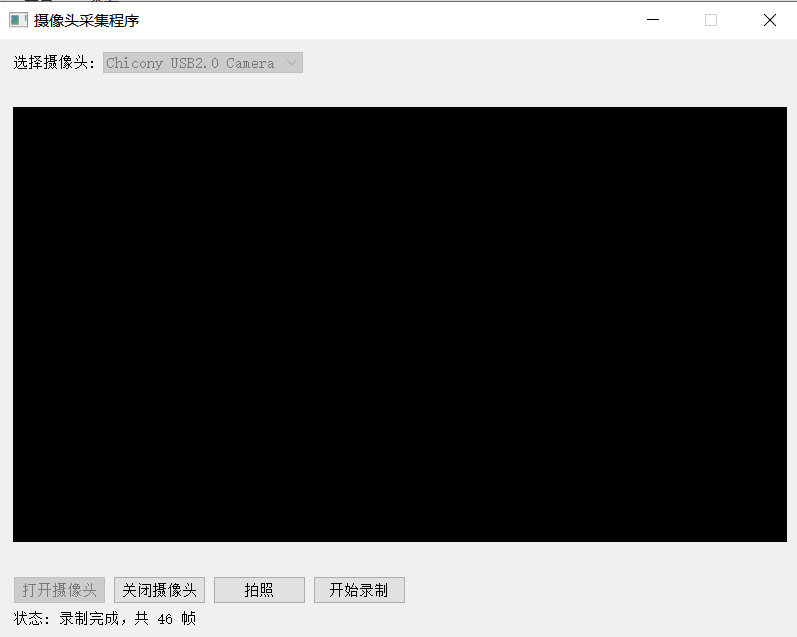
功能说明:
-
主要功能:
-
打开/关闭摄像头
-
实时显示摄像头画面
-
录制原始YUV数据到文件
-
显示录制状态和帧数
-
-
文件格式:
-
保存为原始YUV格式文件
-
文件名包含时间戳:
video_yyyyMMdd_hhmmss.yuv
-
-
界面控件:
-
打开摄像头按钮
-
关闭摄像头按钮
-
拍照按钮(功能待扩展)
-
录制按钮(开始/停止)
-
状态显示标签
-
使用说明:
-
编译运行程序
-
点击"打开摄像头"启动摄像头
-
点击"开始录制"开始保存YUV数据
-
再次点击"停止录制"结束录制
-
录制文件保存在程序运行目录
注意事项:
-
需要系统有可用的摄像头设备
-
YUV文件可能会很大,请确保有足够的磁盘空间
-
实际支持的YUV格式取决于摄像头驱动和系统支持
-
可以根据需要扩展拍照功能和其他视频格式支持
这个程序提供了基本的摄像头采集和YUV数据保存功能,可以根据具体需求进一步扩展和完善。
使用VLC播放YUV原始视频文件需要正确设置参数,因为YUV文件是原始数据,没有包含格式信息。
以下是几种播放方法:
使用VLC播放YUV原始视频:
-
打开VLC
-
菜单:媒体 → 打开文件
-
选择你的YUV文件
-
点击"显示更多选项"
-
在"编辑选项"中输入:
:demux=rawvideo :rawvid-fps=30 :rawvid-width=640 :rawvid-height=480 :rawvid-chroma=I420 -
点击播放
参数说明:
-
--demux=rawvideo:指定解复用器为原始视频 -
--rawvid-fps=30:设置帧率(根据实际情况调整) -
--rawvid-width=640:设置宽度(根据实际情况调整) -
--rawvid-height=480:设置高度(根据实际情况调整) -
--rawvid-chroma=I420:设置颜色格式(I420就是YUV420P)

 浙公网安备 33010602011771号