
Qt - 实现程序启动画面
方法1:
使用QMovie实现动画,此方法最简单。不过这个方法需要gif动态图片。
	//loading图片
	m_labelLoading = new QLabel(this);
	m_movie = new QMovie(":/Leawo/Resources/Skin/SplashScreen/loading.gif", "gif", m_labelLoading);
	m_labelLoading->setMovie(m_movie);
	m_movie->start();
方法2:
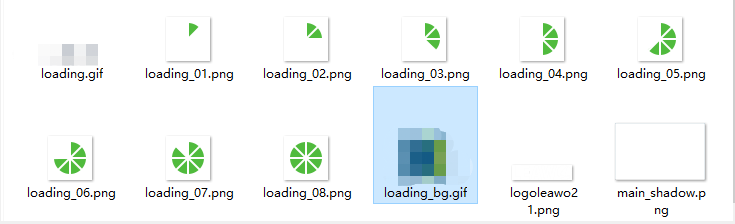
使用QTimer实现动画
mysplashscreen.h
#ifndef MYSPLASHSCREEN_H
#define MYSPLASHSCREEN_H

#include <QIcon>
#include <QGuiApplication>
#include <QScreen>
#include <QHBoxLayout>
#include <QMouseEvent>
#include <QTimer>
#include <QLabel>


class MySplashScreen : public QWidget
{
    Q_OBJECT

public:
    void initUI();

public slots:
    void slots_StartAnimation();

public:
    MySplashScreen(QWidget *parent = 0, Qt::WindowFlags f = Qt::FramelessWindowHint);
    ~MySplashScreen();

private:
    int m_Flag;//图片名称
    QTimer* m_Timer;//定时器
    QPixmap m_Pixmap;//用来存放图片
    QLabel* m_Label;//用来显示图片

protected:
    void mousePressEvent(QMouseEvent *event);
};
#endif // MYSPLASHSCREEN_H
mysplashscreen.cpp
#include "mysplashscreen.h"
#include <QDebug>


double g_dscale = 1;

MySplashScreen::MySplashScreen(QWidget *parent, Qt::WindowFlags f) : QWidget(parent, f)
{
    setWindowFlags(Qt::Widget | Qt::WindowStaysOnTopHint);
    setFixedSize(574 * g_dscale, 332 * g_dscale);

    initUI();

    m_Flag = 1;
    m_Timer = new QTimer(this);
    m_Timer->start(100);
    connect(m_Timer, SIGNAL(timeout()), this, SLOT(slots_StartAnimation()));

    //移动窗体到屏幕中央
    QRect rect = frameGeometry();
    QScreen* screen = QGuiApplication::screens()[0];
    QPoint centerPoint = screen->availableGeometry().center();
    rect.moveCenter(centerPoint);
    move(rect.topLeft());
}

void MySplashScreen::slots_StartAnimation()//启动动画
{

    if (m_Flag > 8)
    {
        m_Flag = 1;
    }
    m_Pixmap.load(QString(":/image/SplashScreen/loading_0%1.png").arg(m_Flag));
    m_Label->setPixmap(m_Pixmap.scaled(QSize(44 * g_dscale, 44 * g_dscale)));
    m_Flag++;
    qDebug()<<"启动动画"<<m_Flag;
}

MySplashScreen::~MySplashScreen()
{
}


void MySplashScreen::initUI()
{
    m_Label = new QLabel(this);
    m_Label->setFixedSize(44 * g_dscale, 44 * g_dscale);
    //m_Label->setStyleSheet("background-color: rgb(255,0,0)");

    //布局
    QVBoxLayout *pVlayout = new QVBoxLayout(this);

    pVlayout->addWidget(m_Label);
    pVlayout->setContentsMargins(100 * g_dscale, 0 * g_dscale, 0 * g_dscale, 0 * g_dscale);

    //将 layout 添加到 widget 窗口中
    this->setLayout(pVlayout);
}

void MySplashScreen::mousePressEvent(QMouseEvent *event)
{
    event->ignore();
}
dialog.h
#ifndef DIALOG_H
#define DIALOG_H

#include <QDialog>

QT_BEGIN_NAMESPACE
namespace Ui { class Dialog; }
QT_END_NAMESPACE

class Dialog : public QDialog
{
    Q_OBJECT

public:
    Dialog(QWidget *parent = nullptr);
    ~Dialog();

    void caretTimer(int msec);

private:
    Ui::Dialog *ui;
};
#endif // DIALOG_H
dialog.cpp
#include "dialog.h"
#include "ui_dialog.h"
#include <QTime>

Dialog::Dialog(QWidget *parent): QDialog(parent), ui(new Ui::Dialog)
{
    ui->setupUi(this);

    caretTimer(1000);
}

Dialog::~Dialog()
{
    delete ui;
}

void Dialog::caretTimer(int msec)
{
    QTime time1;
    time1.start();
    while(time1.elapsed() < msec)   //等待时间7秒钟
    {
        QCoreApplication::processEvents();   //不停地处理事件,让程序保持响应
    }
}
main.cpp
#include "dialog.h"

#include <QApplication>
#include "mysplashscreen.h"

int main(int argc, char *argv[])
{
    QApplication a(argc, argv);

    //启动窗体==
    MySplashScreen* splash = new MySplashScreen();
    splash->show();
    a.processEvents();
    //a.setActivationWindow(&splash);//激活实例

    Dialog w;

    w.caretTimer(1000);
    splash->close();
    delete splash;

    w.show();

    return a.exec();
}
图片资源:
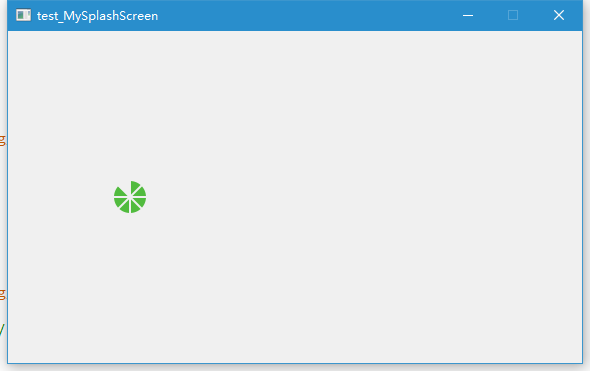
运行效果:
方法3:
继承自QSplashScreen类,自己实现程序启动图。此方法是手动控制进度值的,需要在程序的代码里调用SetSplashScreenProcess()函数控制程序的启动进度。
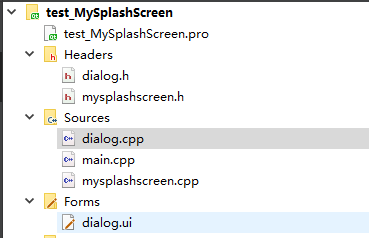
dialog.h
#ifndef DIALOG_H
#define DIALOG_H

#include <QDialog>
#include <QSplashScreen>

QT_BEGIN_NAMESPACE
namespace Ui { class Dialog; }
QT_END_NAMESPACE

class Dialog : public QDialog
{
    Q_OBJECT

public:
    Dialog(QSplashScreen* sp, QWidget *parent = nullptr);
    ~Dialog();

    void caretTimer(int msec);

private:
    Ui::Dialog *ui;
};
#endif // DIALOG_H
dialog.cpp
#include "dialog.h"
#include "ui_dialog.h"
#include <QTime>
#include "mysplashscreen.h"

Dialog::Dialog(QSplashScreen* sp, QWidget *parent): QDialog(parent), ui(new Ui::Dialog)
{
    ui->setupUi(this);

    MySplashScreen* MySp = dynamic_cast<MySplashScreen*>(sp);//类指针转换

    MySp->SetSplashScreenProcess(1);
    caretTimer(1000);
    MySplashScreen::GetInstance().SetSplashScreenProcess(2);
    caretTimer(1000);
    MySplashScreen::GetInstance().SetSplashScreenProcess(6);
}

Dialog::~Dialog()
{
    delete ui;
}

void Dialog::caretTimer(int msec)
{
    QTime time1;
    time1.start();
    while(time1.elapsed() < msec)   //等待时间7秒钟
    {
        QCoreApplication::processEvents();   //不停地处理事件,让程序保持响应
    }
}
mysplashscreen.h
#ifndef MYSPLASHSCREEN_H
#define MYSPLASHSCREEN_H

#include <QSplashScreen>
#include <QProgressBar>
#include <QIcon>
#include <QGuiApplication>
#include <QScreen>
#include <QHBoxLayout>
#include <QMouseEvent>


class MySplashScreen : public QSplashScreen
{
    Q_OBJECT

public:
    static MySplashScreen& GetInstance();// 获取单实例对象
    void SetSplashScreenProcess(int iProcess);// 设置启动画面进度
    void initUI();
    void CSetFixedSize();

public slots:


private:
    MySplashScreen(QWidget *parent = 0, const QPixmap & pixmap = QPixmap(), Qt::WindowFlags f = Qt::FramelessWindowHint);
    ~MySplashScreen();

    QProgressBar *m_pProgressBar;

protected:
    void mousePressEvent(QMouseEvent *event);
};
#endif // MYSPLASHSCREEN_H
mysplashscreen.cpp
#include "mysplashscreen.h"


double g_dscale = 1;

MySplashScreen::MySplashScreen(QWidget *parent, const QPixmap &pixmap, Qt::WindowFlags f) : QSplashScreen(parent, pixmap, f)
{
    setWindowFlags(Qt::Widget | Qt::WindowStaysOnTopHint | Qt::FramelessWindowHint);
    setFixedSize(574 * g_dscale, 332 * g_dscale);

    initUI();
    CSetFixedSize();

    //移动窗体到屏幕中央
    QRect rect = frameGeometry();
    QScreen* screen = QGuiApplication::screens()[0];
    QPoint centerPoint = screen->availableGeometry().center();
    rect.moveCenter(centerPoint);
    move(rect.topLeft());
}

MySplashScreen::~MySplashScreen()
{
}

MySplashScreen& MySplashScreen::GetInstance()
{
    static MySplashScreen single;
    return single;
}

void MySplashScreen::SetSplashScreenProcess(int iProcess)
{
    if (!isVisible())
    {
        return;
    }
    m_pProgressBar->setValue(iProcess);//设置进度值
    repaint();
    QCoreApplication::processEvents();
}

void MySplashScreen::initUI()
{
    //进度条
    m_pProgressBar = new QProgressBar(this);

    //布局
    QVBoxLayout *pVlayout = new QVBoxLayout(this);


    pVlayout->addWidget(m_pProgressBar);
    pVlayout->setContentsMargins(0 * g_dscale, 0 * g_dscale, 0 * g_dscale, 0 * g_dscale);

    //将 layout 添加到 widget 窗口中
    this->setLayout(pVlayout);
}

void MySplashScreen::CSetFixedSize()
{
    m_pProgressBar->setFixedSize(574 * g_dscale, 8 * g_dscale);
    m_pProgressBar->setMaximum(10);
    m_pProgressBar->setOrientation(Qt::Horizontal);  // 水平方向
    m_pProgressBar->setTextVisible(false);
}

void MySplashScreen::mousePressEvent(QMouseEvent *event)
{
    event->ignore();
}
main.cpp
#include "dialog.h"

#include <QApplication>
#include "mysplashscreen.h"

int main(int argc, char *argv[])
{
    QApplication a(argc, argv);

    //启动窗体==
    MySplashScreen& splash = MySplashScreen::GetInstance();
    splash.show();
    a.processEvents();
    //a.setActivationWindow(&splash);//激活实例


    Dialog w(&splash);

    w.caretTimer(1000);
    splash.SetSplashScreenProcess(10);
    splash.finish(&w); //在主体对象初始化完成后结束启动动画

    w.show();

    return a.exec();
}
运行效果:


 浙公网安备 33010602011771号