

SortableJS 实现 Element UI Table行拖拽排序功能
Element UI Table组件基本使用(官方文档)
Sortable.js 官方文档
实现步骤
1. 安装SortableJS
通过npm安装:
npm install sortablejs --save
或使用国内CDN(推荐):
<script src="https://cdn.jsdelivr.net/npm/sortablejs@1.14.0/Sortable.min.js"></script>
2. 基础拖拽功能实现
在Vue组件中,通过ref获取Table的body部分,初始化Sortable实例:
<template>
  <el-table
    ref="dragTable"
    :data="tableData"
    row-key="id"
    border
    style="width: 100%">
    <el-table-column type="index" width="50"></el-table-column>
    <el-table-column prop="name" label="名称"></el-table-column>
    <el-table-column prop="order" label="排序"></el-table-column>
  </el-table>
</template>

<script>
import Sortable from 'sortablejs'

export default {
  data() {
    return {
      tableData: [
        { id: 1, name: '项目A', order: 1 },
        { id: 2, name: '项目B', order: 2 },
        { id: 3, name: '项目C', order: 3 }
      ],
      sortable: null
    }
  },
  mounted() {
    this.initSortable()
  },
  beforeDestroy() {
    if (this.sortable) {
      this.sortable.destroy()
    }
  },
  methods: {
    initSortable() {
      // 获取Table的tbody元素
      const tbody = this.$refs.dragTable.$el.querySelector('.el-table__body-wrapper tbody')

      this.sortable = new Sortable(tbody, {
        // 拖拽时的动画效果
        animation: 150,
        // 拖拽结束后的回调
        onEnd: (evt) => {
          // 原索引
          const oldIndex = evt.oldIndex
          // 新索引
          const newIndex = evt.newIndex
          // 处理数据排序
          this.handleDataSort(oldIndex, newIndex)
        }
      })
    },
    handleDataSort(oldIndex, newIndex) {
      // 复制原数组
      const newArray = [...this.tableData]
      // 删除原位置元素并插入新位置
      const [removed] = newArray.splice(oldIndex, 1)
      newArray.splice(newIndex, 0, removed)
      // 更新排序号
      newArray.forEach((item, index) => {
        item.order = index + 1
      })
      // 更新数据
      this.tableData = newArray
      // 这里可以添加保存到后端的API调用
      // this.saveSortOrder(newArray)
    }
  }
}
</script>
3. 实现原理详解
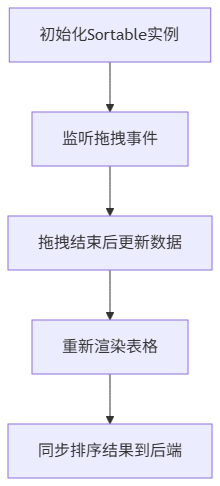
拖拽排序功能的实现主要分为三个核心步骤:
3.1 初始化Sortable实例
在Vue的mounted生命周期钩子中,通过Table组件的ref获取到表格的DOM元素,并找到包含行数据的tbody元素。SortableJS通过监听这个tbody元素来实现拖拽功能。
关键代码位于packages/table/src/table.vue的渲染结构中,表格主体使用了.el-table__body-wrapper类包裹,其中的tbody就是我们需要监听的目标元素。
3.2 拖拽事件处理
SortableJS提供了丰富的事件回调,我们主要使用onEnd事件在拖拽结束后触发数据更新。拖拽过程中,SortableJS会自动处理DOM元素的位置变化,我们只需要关注数据层面的调整。
3.3 数据排序与同步
当拖拽结束后,通过oldIndex和newIndex确定数据移动的方向和距离,然后调整数据数组中元素的顺序,并更新排序号。最后可以选择将新的排序结果同步到后端数据库。
4. 高级功能扩展
4.1 禁用特定行拖拽
有时我们需要禁止某些行的拖拽功能,可以通过Sortable的filter配置实现:
initSortable() {
  const tbody = this.$refs.dragTable.$el.querySelector('.el-table__body-wrapper tbody')

  this.sortable = new Sortable(tbody, {
    animation: 150,
    // 过滤不可拖拽的行
    filter: '.no-drag',
    // 拖拽结束后的回调
    onEnd: (evt) => {
      this.handleDataSort(evt.oldIndex, evt.newIndex)
    }
  })
}
然后在Table组件中为特定行添加no-drag类:
<el-table
  ref="dragTable"
  :data="tableData"
  row-key="id"
  :row-class-name="rowClassName"
  border
  style="width: 100%">
  <!-- 列定义 -->
</el-table>
methods: {
  rowClassName({row}) {
    // 对id为2的行禁用拖拽
    return row.id === 2 ? 'no-drag' : ''
  }
}
4.2 拖拽时样式自定义
通过CSS可以自定义拖拽过程中的样式:
/* 拖拽过程中的行样式 */
.el-table__body tr.sortable-ghost {
  opacity: 0.8;
  background-color: #f5f5f5;
}

/* 拖拽时的占位符样式 */
.el-table__body tr.sortable-placeholder {
  background-color: #e9f7ef;
  border: 1px dashed #409eff;
}

/* 禁止拖拽的行样式 */
.el-table__body tr.no-drag {
  opacity: 0.6;
  cursor: not-allowed;
}
4.3 结合后端实现持久化
在实际应用中,我们需要将排序结果保存到后端,实现数据持久化:
methods: {
  async handleDataSort(oldIndex, newIndex) {
    // 处理数据排序(同上)
    // ...

    // 保存到后端
    try {
      await this.$api.saveSortOrder(newArray.map(item => ({
        id: item.id,
        order: item.order
      })))
      this.$message.success('排序已保存')
    } catch (error) {
      this.$message.error('保存失败,请重试')
      // 保存失败时恢复原排序
      this.tableData = [...this.originalData]
    }
  }
}
5. 性能优化建议
对于数据量较大的表格,建议添加以下优化措施:
- 虚拟滚动:结合Element UI的InfiniteScroll(packages/infinite-scroll)实现虚拟滚动,只渲染可见区域的行。
- 节流处理:如果需要在拖拽过程中实时更新某些数据,可以对更新函数进行节流处理:
import { throttle } from 'throttle-debounce'

// 在methods中
updateDuringDrag: throttle(100, function(row, position) {
  // 实时更新逻辑
})
- 禁用不必要的动画:对于数据量超过100行的表格,可以考虑关闭Sortable的animation选项以提高性能。
6. 常见问题解决方案
6.1 拖拽后表格行高度异常
这通常是由于Table组件的高度计算问题导致的,可以在数据更新后调用Table的doLayout方法重新计算布局:
this.$nextTick(() => {
  this.$refs.dragTable.doLayout()
})
相关代码位于packages/table/src/table.vue的doLayout方法:
doLayout() {
  if (this.shouldUpdateHeight) {
    this.layout.updateElsHeight();
  }
  this.layout.updateColumnsWidth();
}
6.2 固定列(fixed)拖拽问题
当表格使用了fixed列时,拖拽可能会出现视觉错位。解决方案是同时监听固定列和主表格的拖拽事件:
initSortable() {
  // 主表格tbody
  const mainTbody = this.$refs.dragTable.$el.querySelector('.el-table__body-wrapper tbody')
  // 左侧固定列tbody
  const fixedLeftTbody = this.$refs.dragTable.$el.querySelector('.el-table__fixed-body-wrapper tbody')
  // 右侧固定列tbody
  const fixedRightTbody = this.$refs.dragTable.$el.querySelector('.el-table__fixed-right-body-wrapper tbody')

  // 为三个tbody都初始化Sortable
  [mainTbody, fixedLeftTbody, fixedRightTbody].forEach(tbody => {
    if (tbody) {
      new Sortable(tbody, {
        // 配置同上,但只在主表格上处理数据更新
        onEnd: (evt) => {
          if (tbody === mainTbody) {
            this.handleDataSort(evt.oldIndex, evt.newIndex)
          }
        }
      })
    }
  })
}

 浙公网安备 33010602011771号