

Java 容器里 Spring Boot 接口“卡死”:curl 一直不返回的真实原因与排查实战(Tomcat 线程耗尽)
我在容器里跑 Spring Boot 时遇到过这种现象:
docker logs看着应用还在输出日志- 进入容器
curl http://localhost:8080/health没有输出,一直卡住 - 偶尔还能看到日志里出现
http-nio-8080-exec-XX的线程号越来越大
明明健康检查接口只返回一个常量,为什么会卡死?这篇文章用一个真实案例,带你一步步定位根因,并给出正确的修复方式。
1. 现象复现:健康检查接口很简单,却一直卡住
示例代码(非常简单):
@RestController
@RequestMapping("/health")
public class HealthController {
    @GetMapping
    public Integer health() {
        return 0;
    }
}
理论上它不可能卡住。但容器内执行:
curl http://localhost:8080/health
却一直没有输出。
与此同时,日志里还经常出现OkHttp查询日志(说明 HTTP 请求线程正在做外部调用)
2. 关键理解:健康检查“卡住”,通常不是接口逻辑卡,而是线程池被耗尽
Spring Boot 默认使用 Tomcat(Servlet 模型)时,每个请求需要占用一个 Tomcat 工作线程(常见线程名:http-nio-8080-exec-*)。
当以下情况出现时:
- 大量请求在 Tomcat 线程里做 阻塞操作
- 或者外部调用没超时导致线程一直卡住
- 导致 Tomcat 线程池逐渐被占满
那么新的请求(包括健康检查)就会出现:
TCP 连接建立了,但一直拿不到可用线程处理 → curl 就会一直“卡住”
这就是为什么“健康检查只是 return 0”也会卡的根本原因:请求根本没机会执行到 Controller。
3. 快速判断:curl 卡在哪一步(建议新手必做)
进入容器执行(一定要加超时):
curl -v --max-time 3 http://127.0.0.1:8080/health
两种典型结果:
情况 A:Connection refused / Trying 一直卡住
说明端口没监听或网络不通(应用没启动好)。
情况 B:显示 Connected 但一直不返回
说明端口有服务,但应用层没返回,多数是 线程池耗尽/阻塞。
4. 实战排查:容器里没有 pgrep 怎么办?照样抓线程栈
很多生产镜像很精简(alpine/busybox),没有 pgrep。没关系,有 jcmd 就够了。
4.1 先确认 Java 进程 PID(常见就是 1 或 7)
ps -ef | grep '[j]ava'
假设 PID 是 7。
4.2 导出线程 dump
jcmd 7 Thread.print -l > /tmp/th.txt
-l 会把锁信息也打出来,排查死锁/阻塞很有用。
4.3 快速统计:Tomcat 工作线程有多少
grep -c '^"http-nio-8080-exec' /tmp/th.txt
grep '^"http-nio-8080-exec' /tmp/th.txt | head
如果数量接近你配置的 server.tomcat.threads.max,基本可以判定:线程池已满。
4.4 汇总每个 http-nio 线程的状态
awk '
/^"http-nio-8080-exec-/ {name=$1}
/java.lang.Thread.State:/ && name!="" {print name, $0; name=""}
' /tmp/th.txt | head -n 120
重点关注:
BLOCKED(锁竞争/死锁)WAITING/TIMED_WAITING(在等某个条件/队列)RUNNABLE但栈里是 socketRead0(实际上在等网络 IO)
4.5 把某一个卡住的 http-nio 线程完整栈打出来
例如http-nio-8080-exec-54,用下面命令截取它的块:
sed -n '/"http-nio-8080-exec-54"/,/^$/p' /tmp/th.txt
你也可以把所有 http-nio 里“包含 RestTemplate/OkHttp”的线程名先找出来:
grep -n '"http-nio-8080-exec' -n /tmp/th.txt | head
grep -n 'RestTemplate\|OkHttp\|socketRead0\|RoundRobinLoadBalancer\|nacos' /tmp/th.txt | head -n 80
4.6 直接搜卡死关键词
egrep -n 'socketRead0|OkHttp|RestTemplate|postForEntity|Hikari|Jedis|Lettuce|nacos|RoundRobinLoadBalancer|deadlock|BLOCKED' /tmp/th.txt | head -n 200
如果你看到大量 http-nio-8080-exec-* 线程栈里包含:
java.net.SocketInputStream.socketRead0org.springframework.web.client.RestTemplate.postForEntityokhttp3.RealCall.execute
那几乎就是:外部 HTTP 调用没设置超时,导致线程被卡死。
4.6 查有没有死锁
jcmd 7 Thread.find_deadlock
5. 解决办法:拆分两个 RestTemplate:@LoadBalanced 和 直连 IP 的普通 RestTemplate
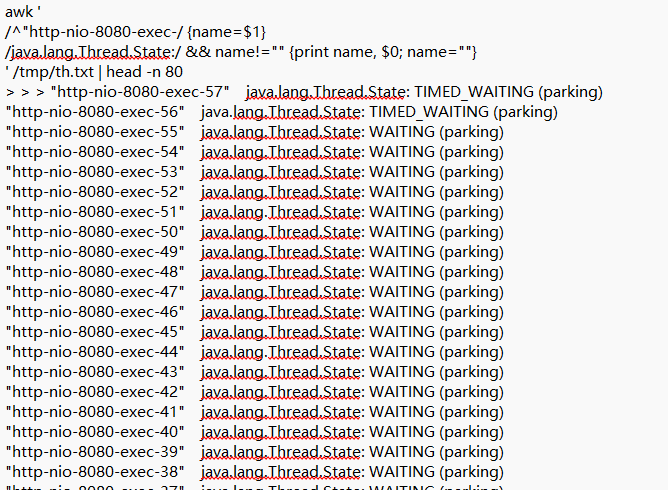
从thread dump 看,根因已经非常明确:Tomcat 的大量 http-nio-8080-exec-* 线程不是在处理业务逻辑,而是卡在 RestTemplate 的 Apache HttpClient 连接池里“等连接”
- 直连IP:PORT,带连接池+超时
<dependency>
  <groupId>org.apache.httpcomponents</groupId>
  <artifactId>httpclient</artifactId>
</dependency>
@Bean
public RestTemplate directRestTemplate(RestTemplateBuilder b) {
   // 1) 连接池
   PoolingHttpClientConnectionManager cm = new PoolingHttpClientConnectionManager();
   cm.setMaxTotal(200);
   cm.setDefaultMaxPerRoute(30);

   // 2) 超时(connectionRequestTimeout 防止“等连接池卡死”)
   RequestConfig rc = RequestConfig.custom()
           .setConnectionRequestTimeout(1_000) // 等连接池 1s
           .setConnectTimeout(5_000)           // 建连 5s
           .setSocketTimeout(60_000)            // 读 60s(服务名调用一般稍长点)
           .build();

   CloseableHttpClient httpClient = HttpClients.custom()
           .setConnectionManager(cm)
           .setDefaultRequestConfig(rc)
           .evictIdleConnections(30, TimeUnit.SECONDS)
           .disableAutomaticRetries()
           .build();

   HttpComponentsClientHttpRequestFactory factory = new HttpComponentsClientHttpRequestFactory(httpClient);
   factory.setConnectTimeout(5_000);
   factory.setReadTimeout(60_000);
   // 3) 用 builder 构建,便于继承 Boot 的 messageConverters 等
   return b
           .requestFactory(() -> factory)
           .setConnectTimeout(Duration.ofSeconds(5)) // Spring 层兜底
           .setReadTimeout(Duration.ofSeconds(60))
           .build();
}
- 服务名调用
<dependency>
  <groupId>org.springframework.cloud</groupId>
  <artifactId>spring-cloud-starter-loadbalancer</artifactId>
</dependency>
<dependency>
  <groupId>org.apache.httpcomponents</groupId>
  <artifactId>httpclient</artifactId>
</dependency>
@Bean
@LoadBalanced
public RestTemplate lbRestTemplate(RestTemplateBuilder b) {
    // 1) 连接池
    PoolingHttpClientConnectionManager cm = new PoolingHttpClientConnectionManager();
    cm.setMaxTotal(200);
    cm.setDefaultMaxPerRoute(50);

    // 2) 超时(关键:connectionRequestTimeout 防止“等连接池卡死”)
    RequestConfig rc = RequestConfig.custom()
            .setConnectionRequestTimeout(1_000) // 等连接池 1s
            .setConnectTimeout(1_000)           // 建连 1s
            .setSocketTimeout(5_000)            // 读 5s(服务名调用一般稍长点)
            .build();

    CloseableHttpClient httpClient = HttpClients.custom()
            .setConnectionManager(cm)
            .setDefaultRequestConfig(rc)
            .evictIdleConnections(30, TimeUnit.SECONDS)
            .disableAutomaticRetries()
            .build();

    HttpComponentsClientHttpRequestFactory factory = new HttpComponentsClientHttpRequestFactory(httpClient);
    factory.setConnectTimeout(1_000);
    factory.setReadTimeout(5_000);

    // 3) 用 builder 构建,便于继承 Boot 的 messageConverters 等
    return b
            .requestFactory(() -> factory)
            .setConnectTimeout(Duration.ofSeconds(1)) // Spring 层兜底
            .setReadTimeout(Duration.ofSeconds(5))
            .build();
}
使用
@Resource(name = "lbRestTemplate")
private RestTemplate lbRestTemplate;

@Resource(name = "directRestTemplate")
private RestTemplate directRestTemplate;
关掉 LoadBalancer Retry(避免请求风暴)
spring.cloud.loadbalancer.retry.enabled=false
不同版本属性略有差异
6. 让健康检查永远可用:管理端口隔离
即使你修复了超时,生产环境仍建议把健康检查放到独立端口,避免业务流量影响探活。
management.server.port=8081
management.endpoints.web.exposure.include=health,metrics,threaddump
management.endpoint.health.probes.enabled=true
探活改用:
curl --max-time 2 http://127.0.0.1:8081/actuator/health
这样业务 8080 再忙,健康检查也更稳定。

 浙公网安备 33010602011771号