
03.矩阵的掩膜操作
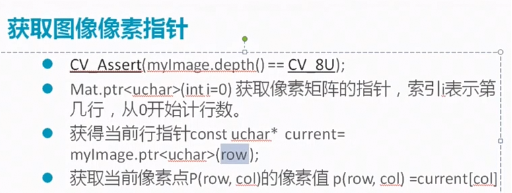
1、获取图像像素指针
2、掩膜操作解释
3、代码演示
1、获取图像像素指针
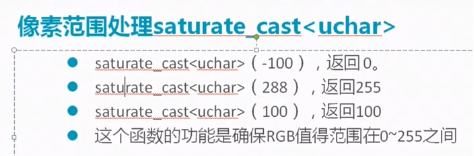
2、掩膜操作解释
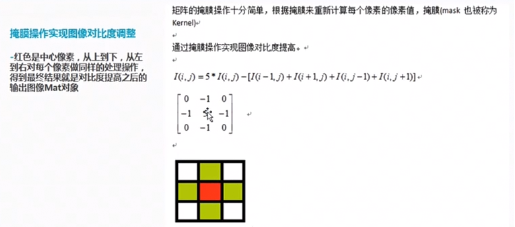
掩膜操作实现图像对比度调整。
获取图像的行数和列数代码:
int rows = picture1.rows;
int cols = picture1.cols * picture1.channels();
3、代码演示
未进行像素范围处理的掩膜操作图片:
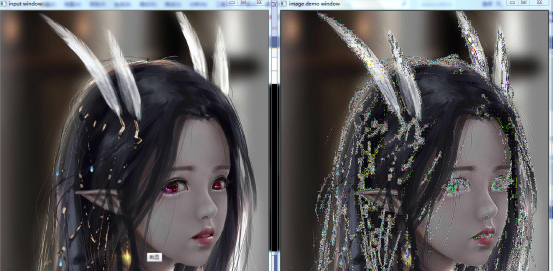
进行像素范围处理的掩膜操作图片:
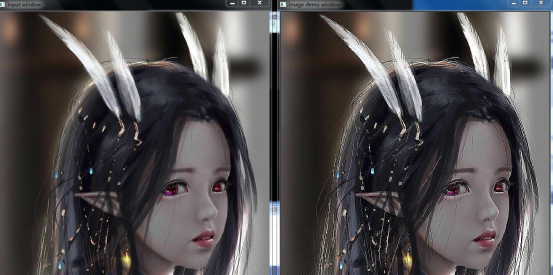
加强了对比度的提高,从图片上看立体感更加强烈了
编写进行掩膜操作的代码:
#include <opencv2/opencv.hpp>
#include <iostream>
#include <math.h>

using namespace cv;
using namespace std;

int main(int agrc, char** agrv)
{
	Mat picture1,picture2;
	picture1 = imread("F://opencvpicture//1.jpg");
	if (picture1.empty())
	{
		printf("图片加载失败..\n.");
		return -1;
	}
	namedWindow("input window", WINDOW_AUTOSIZE);
	imshow("input window", picture1);

	int cols =( picture1.cols-1) * picture1.channels();
	int rows = picture1.rows;
	int offsetx = picture1.channels();
	picture2 = Mat::zeros(picture1.size(),picture1.type());
	for (int row = 1;row<(rows-1);row++)
	{
		const uchar* previous = picture1.ptr<uchar>(row-1);
		const uchar* current = picture1.ptr<uchar>(row);
		const uchar* next = picture1.ptr<uchar>(row+1);
		uchar* p2current = picture2.ptr<uchar>(row);
		for (int col=offsetx;col<cols;col++)
		{
			p2current[col] = saturate_cast<uchar>(5 * current[col] - (current[col - offsetx] + current[col + offsetx] + previous[col] + next[col]));
		}
	}


	namedWindow("image demo window", WINDOW_AUTOSIZE);
	imshow("image demo window",picture2);

	waitKey(0);
	return 0;
}
利用函数进行掩膜操作:
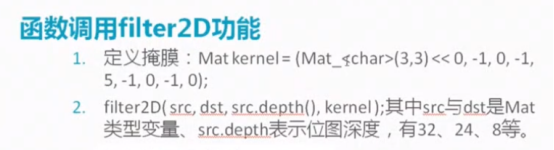
完整代码:
#include <opencv2/opencv.hpp>
#include <iostream>
#include <math.h>

using namespace cv;
using namespace std;

int main(int agrc, char** agrv)
{
	Mat picture1, picture2;
	picture1 = imread("F://opencvpicture//1.jpg");
	if (picture1.empty())
	{
		printf("图片加载失败..\n.");
		return -1;
	}
	namedWindow("input window", WINDOW_AUTOSIZE);
	imshow("input window", picture1);

	Mat kernel = (Mat_<char>(3,3)<<0,-1,0,-1,5,-1,0,-1,0);
	filter2D(picture1,picture2,picture1.depth(),kernel);

	namedWindow("image demo window", WINDOW_AUTOSIZE);
	imshow("image demo window", picture2);

	waitKey(0);
	return 0;
}
获取程序执行时间代码:
        double t = getTickCount();
	Mat kernel = (Mat_<char>(3,3)<<0,-1,0,-1,5,-1,0,-1,0);
	filter2D(picture1,picture2,-1,kernel);//-1取和原图片同深度
	double timeconsume = (getTickCount() - t) / getTickFrequency();
	printf("timeconsume: %.2f\n",timeconsume);

 浙公网安备 33010602011771号