

MaxKb自定义函数连接Oracle 11g数据库
首先你得在Maxkb的docker 环境下连通数据库,https://www.cnblogs.com/zhoushusheng/p/18777368。
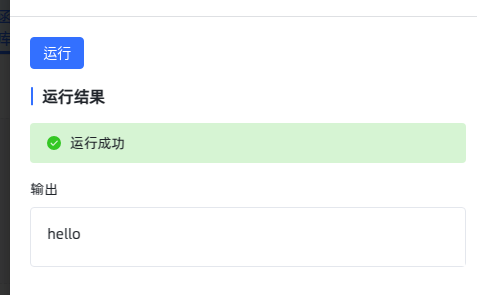
先写一个测试函数看看MaxKb函数是否正常用
def test():
    result = f"hello"
    return result
报错:
/bin/sh: 1: ldd: Permission denied
Traceback (most recent call last):
  File "/opt/maxkb/app/sandbox/bc9f841a-086f-11f0-ac10-0242ac120003.py", line 17, in <module>
    cache = Cache('/opt/maxkb/app/sandbox')
            ^^^^^^^^^^^^^^^^^^^^^^^^^^^^^^^
  File "/opt/py3/lib/python3.11/site-packages/diskcache/core.py", line 499, in __init__
    sql(query, (key, value))
  File "/opt/py3/lib/python3.11/site-packages/diskcache/core.py", line 666, in _execute_with_retry
    return sql(statement, *args, **kwargs)
           ^^^^^^^^^^^^^^^^^^^^^^^^^^^^^^^
sqlite3.OperationalError: attempt to write a readonly database

During handling of the above exception, another exception occurred:

Traceback (most recent call last):
  File "/opt/maxkb/app/sandbox/bc9f841a-086f-11f0-ac10-0242ac120003.py", line 21, in <module>
    cache = Cache('/opt/maxkb/app/sandbox')
            ^^^^^^^^^^^^^^^^^^^^^^^^^^^^^^^
  File "/opt/py3/lib/python3.11/site-packages/diskcache/core.py", line 499, in __init__
    sql(query, (key, value))
  File "/opt/py3/lib/python3.11/site-packages/diskcache/core.py", line 666, in _execute_with_retry
    return sql(statement, *args, **kwargs)
           ^^^^^^^^^^^^^^^^^^^^^^^^^^^^^^^
sqlite3.OperationalError: attempt to write a readonly database
在docker 环境里修改目录权限
chmod -R 777 /opt/maxkb/app/sandbox
然后运行成功
import os
import sys
import traceback
import oracledb
import ctypes

def connect_oracle():
    result = "🔍【Web UI Oracle 连接调试】\n\n"

    client_path = "/opt/instantclient_11_2"

    try:
        # 1️⃣ Python 基本信息
        result += f"🟢 Python 版本: {sys.version}\n"
        result += f"🟢 Python 解释器路径: {sys.executable}\n"

        # 2️⃣ 检查 Oracle Instant Client
        result += f"\n📂【检查 Oracle Client 目录】\n"
        if os.path.exists(client_path):
            result += f"✅ Oracle Instant Client 存在: {client_path}\n"
        else:
            raise Exception(f"❌ Oracle Instant Client 未找到: {client_path}")

        # 3️⃣ 检查 LD_LIBRARY_PATH,若不含 client_path,则重启进程
        ld_library_path = os.environ.get("LD_LIBRARY_PATH", "")
        if client_path not in ld_library_path:
            result += f"⚠️ 当前进程 LD_LIBRARY_PATH 不包含 {client_path},将重新设置并重启...\n"
            os.environ["LD_LIBRARY_PATH"] = client_path
            result += f"🔁 正在重启 Python 进程...\n\n"
            os.execv(sys.executable, [sys.executable] + sys.argv)

        result += f"✅ `LD_LIBRARY_PATH` 已设置: {os.environ['LD_LIBRARY_PATH']}\n"

        # 4️⃣ 检查 libclntsh.so
        libclntsh_path = os.path.join(client_path, "libclntsh.so")
        result += f"\n📂【检查 Oracle 共享库】\n"
        if os.path.exists(libclntsh_path):
            result += f"✅ 共享库 `libclntsh.so` 存在: {libclntsh_path}\n"
            result += f"📏 大小: {os.path.getsize(libclntsh_path)} 字节\n"
        else:
            raise Exception(f"❌ 未找到 libclntsh.so: {libclntsh_path}")

        # 5️⃣ ldd 依赖检查
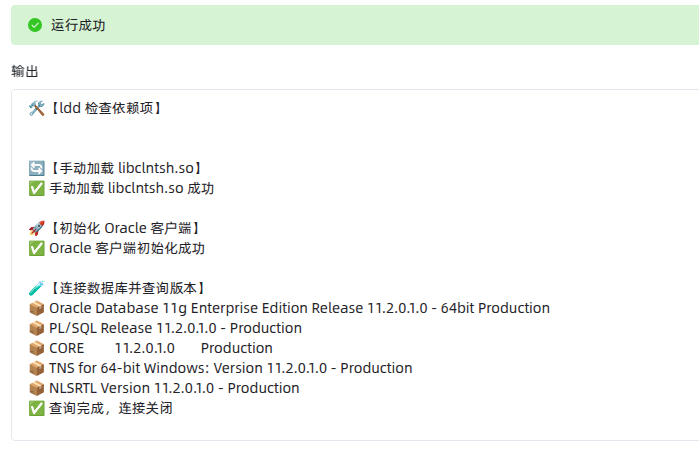
        result += f"\n🛠️【ldd 检查依赖项】\n"
        ldd_output = os.popen(f"ldd {libclntsh_path}").read()
        result += ldd_output + "\n"
        if "not found" in ldd_output or "No such file" in ldd_output:
            raise Exception("❌ ldd 显示依赖缺失,请检查")

        # 6️⃣ 手动加载
        result += "\n🔄【手动加载 libclntsh.so】\n"
        ctypes.CDLL(libclntsh_path)
        result += "✅ 手动加载 libclntsh.so 成功\n"

        # 7️⃣ 初始化 Oracle 客户端
        result += "\n🚀【初始化 Oracle 客户端】\n"
        oracledb.init_oracle_client(lib_dir=client_path)
        result += "✅ Oracle 客户端初始化成功\n"

        # 8️⃣ Oracle 数据库连接与查询
        result += "\n🧪【连接数据库并查询版本】\n"

        # 请替换为你的实际账号信息
        username = "system"
        password = "orcl"
        dsn = "(DESCRIPTION=(ADDRESS=(PROTOCOL=TCP)(HOST=10.19.136.161)(PORT=1521))(CONNECT_DATA=(SERVICE_NAME=orcl.localdomain)))"

        try:
            conn = oracledb.connect(user=username, password=password, dsn=dsn)
            cursor = conn.cursor()
            cursor.execute("SELECT * FROM v$version")
            rows = cursor.fetchall()
            for row in rows:
                result += f"📦 {row[0]}\n"
            cursor.close()
            conn.close()
            result += "✅ 查询完成,连接关闭\n"
        except Exception as qe:
            result += f"❌ 查询失败: {qe}\n"

    except Exception as e:
        result += f"\n❌ 发生错误: {str(e)}\n"
        result += f"📜 详细错误信息:\n{traceback.format_exc()}\n"

    return result
动态库的搜索路径(LD_LIBRARY_PATH)必须在 Python 进程启动时就设置好,才能真正影响到后续的 ctypes.CDLL 或 oracledb.init_oracle_client() 调用。
之前这样写过:
os.environ["LD_LIBRARY_PATH"] = "/opt/instantclient_11_2"
oracledb.init_oracle_client(lib_dir="/opt/instantclient_11_2")
从逻辑上看这没问题,但实际上这段代码是在当前进程已经加载动态链接器之后执行的,LD_LIBRARY_PATH 改了也没用。
os.execv(...) 直接重启当前 Python 脚本,让新的 LD_LIBRARY_PATH 生效,相当于你从 shell 命令行这样执行:
LD_LIBRARY_PATH=/opt/instantclient_11_2 python your_script.py
本文来自博客园,作者:z_s_s,转载请注明原文链接:https://www.cnblogs.com/zhoushusheng/p/18789642

 浙公网安备 33010602011771号