

SPM12之fMRI批量预处理——DICOM格式转NII格式
运行说明:subjectsdir换成自己的文件夹地址, 有多少个受试者的DICOM就有多少个subjects子元素 。
代码地址:https://github.com/zhoushusheng/fMRI_preprocessing/blob/main/stupid_batch_dicom_formal.m
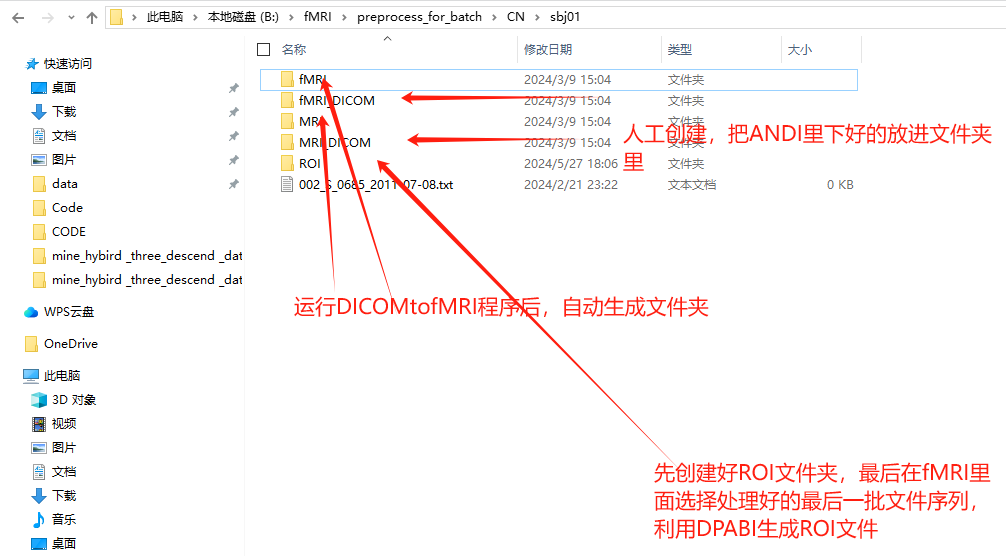
准备工作:建立好fMRI_DICOM文件夹和MRI_DICOM文件夹,把下载好的数据输入进去
%-----------------------------------------------------------------------
% Job saved on 02-Sep-2019 18:21:16 by cfg_util (rev $Rev: 6942 $)
% spm SPM - SPM12 (7219)
% cfg_basicio BasicIO - Unknown
%-----------------------------------------------------------------------
%%
% 这个m文件用来运行spm的matlabbatch
% 该文件中的文件位置是基于linux系统的,如果是windows系统需要修改/为\
clear
% spm_path = '~\spm12';      %设置spm12的位置(这里填的是安装=spm12的绝对位置) 我这里已经安装好了
% addpath(spm_path);
spm('defaults', 'fmri');
spm_jobman('initcfg');

%%
subjectsdir = {'B:\fMRI\preprocess_for_batch\CN'};% 这里是data文件夹的绝对位置
subjects = {'sbj01','sbj02','sbj03','sbj04','sbj05','sbj06','sbj07','sbj08','sbj09','sbj10','sbj11','sbj12','sbj13','sbj14','sbj15','sbj16','sbj17','sbj18','sbj19','sbj20','sbj21','sbj22','sbj23','sbj24','sbj25','sbj26','sbj27','sbj28','sbj29','sbj30','sbj31','sbj32','sbj33','sbj34','sbj35','sbj36'};          % 单个或多个被试的文件夹
funcdir  =  fullfile('fMRI_DICOM');              % 第一个Session的文件夹(由于preprocessing.mat中只添加了一个Session,所以这里也只使用一个Session。)
%   F = fullfile(FOLDERNAME1, FOLDERNAME2, ..., FILENAME) builds a full
%   file specification F from the folders and file name specified. Input
%   arguments FOLDERNAME1, FOLDERNAME2, etc. and FILENAME can be strings,
%   character vectors, or cell arrays of character vectors. Non-scalar
%   strings and cell arrays of character vectors must all be the same size.

%   FULLFILE collapses inner repeated file separators unless they appear at
%   the beginning of the full file specification. FULLFILE also collapses
%   relative folders indicated by the dot symbol, unless they appear at
%   the end of the full file specification. Relative folders indicated
%   by the double-dot symbol are not collapsed.
%


% funcdir2  =  fullfile('Session2');             % 第二个Session的文件夹
anatdir =  fullfile('MRI_DICOM');              % 结构像的文件夹

nsubj = length(subjects);   % 被试的数量
jobs_fMRI = cell(1,1);       % job的数量,每个被试一个job
jobs_MRI = cell(1,1);
nsubj =2;
inputs = cell(0,1);

nrun=1;  % session的数量
%ntimepoint=190;  %删除了前面的10个时间点后剩余的时间点
%%
for csubj_fMRI = 1:36
    subjdir = {spm_select('CPath',subjects{csubj_fMRI}, subjectsdir)};%Cpath 的c = canonical

    % Session1文件夹
    fdir =  {spm_select('CPath', funcdir, subjdir)};    %选择当前被试(csubj_fMRI)的Session1文件夹
    ffiles = spm_select('List', fdir, '\\*.dcm');   %选择这个文件夹中所有.nii结尾的文件,即Session1的所有原始功能像文件
    %如果没有功能像文件就报错
    nimage = size(ffiles,1);
    if nimage == 0
        warning(sprintf('No functional file found for %s', subjects{csubj_fMRI}))
        return
    end

    cffiles = cellstr(ffiles);
    ntimepoint = length(cffiles);

    funcfiles = cell(1, nrun);
    sessionfiles = cell(nrun,ntimepoint);

    for i = 1:nrun
        for j = 1:ntimepoint
            sessionfiles{i,j}=strcat(fdir{1},'\',cffiles{j});   % 在这里在每一个功能像文件的绝对路径后面添加,1
        end
        funcfiles{1,i} = {sessionfiles{i,:}}';    % 如果有多个Sessions,funcfiles中就会有多个sessionfiles
    end
    clear matlabbatch


    % preprocessing job
    display 'Creating preprocessing job'  %在matlab的命令行窗口显示Creating preprocessing job

    goalDirectory = {'B:\fMRI\preprocess_for_batch\CN'};%这样生成的cell 没有'' ,没有显示内容的类型
    goalDirectory_subj = {spm_select('CPath', subjects{csubj_fMRI} ,goalDirectory)};% 这样生成的也 没有
    goalDirectory_subj = char(goalDirectory_subj);%这样生成的也没有'' 但是会显示类型

    if ~exist(goalDirectory_subj, 'dir')
%         mkdir goalDirectory subjects{csubj_fMRI}%这里十分可恶 goalDirectory 不能识别为变量
          goalDirectory = goalDirectory{1};
%           mkdir [goalDirectory] subjects{csubj_fMRI}
          mkdir([goalDirectory '\' subjects{csubj_fMRI}]);%这就是真理 上matlab 网站找着了
%%     else
%         warning(sprintf('Folder has been created and make sure if files needed has exited', subjects{csubj_fMRI}))
%         return
    end

    goalDirectory_subj = {goalDirectory_subj};%没有前面一行代码 这样显示的会有''  ,加上前面一行的话 会变成""

    goalDirectory_subj_fMRI = {spm_select('CPath', 'fMRI' ,goalDirectory_subj)}; %这个会自动合并 connonical {'fMRI'} 把 {}去了
    goalDirectory_subj_fMRI = char(goalDirectory_subj_fMRI);%为什么这里要加1在花括号里?为甚这样就行?可能因为前面的代码,生成的就是一个cell。那更前面不也是嘛,为什么就行?原因出来了在上一行。


    if ~exist(goalDirectory_subj_fMRI, 'dir')%经过这里一手  就会把goalDirectory 变成cell下面就不能用了
        %string  = convertCharsToStrings(goalDirectory_subj_fMRI);
           goalDirectory_subj = goalDirectory_subj{1};
%           mkdir [goalDirectory] subjects{csubj_fMRI}
          mkdir([goalDirectory_subj '\' 'fMRI']);%这就是真理 上matlab 网站找着了
    else
        warning(sprintf('Folder has been created and make sure if files needed has exited', subjects{csubj_fMRI}))
        return
    end

    matlabbatch{1}.spm.util.import.dicom.data = funcfiles{1,1}(:,1);
    matlabbatch{1}.spm.util.import.dicom.root = 'flat';
    matlabbatch{1}.spm.util.import.dicom.outdir = {goalDirectory_subj_fMRI};
    matlabbatch{1}.spm.util.import.dicom.protfilter = '.*';
    matlabbatch{1}.spm.util.import.dicom.convopts.format = 'nii';
    matlabbatch{1}.spm.util.import.dicom.convopts.meta = 0;
    matlabbatch{1}.spm.util.import.dicom.convopts.icedims = 0;

    matfile = sprintf('preprocess_fMRI_%s.mat', subjects{csubj_fMRI});
%     save(matfile,'matlabbatch');
    jobs_fMRI{csubj_fMRI} = matfile;  %jobs这个变量中存储了所有被试的matlabbatch
spm_jobman('run',matlabbatch);
end


for csubj_MRI = 1:36
    subjdir = {spm_select('CPath',subjects{csubj_MRI}, subjectsdir)};%Cpath 的c = canonical

    % Session1文件夹
    fdir =  {spm_select('CPath', anatdir, subjdir)};    %选择当前被试(csubj_fMRI)的Session1文件夹
    ffiles = spm_select('List', fdir, '\\*.dcm');   %选择这个文件夹中所有.nii结尾的文件,即Session1的所有原始功能像文件
    %如果没有功能像文件就报错
    nimage = size(ffiles,1);
    if nimage == 0
        warning(sprintf('No functional file found for %s', subjects{csubj_MRI}))
        return
    end

    cffiles = cellstr(ffiles);
    ntimepoint = length(cffiles);

    funcfiles = cell(1, nrun);
    sessionfiles = cell(nrun,ntimepoint);

    for i = 1:nrun
        for j = 1:ntimepoint
            sessionfiles{i,j}=strcat(fdir{1},'\',cffiles{j});   % 在这里在每一个功能像文件的绝对路径后面添加,1
        end
        funcfiles{1,i} = {sessionfiles{i,:}}';    % 如果有多个Sessions,funcfiles中就会有多个sessionfiles
    end
    clear matlabbatch


    % preprocessing job
    display 'Creating preprocessing job'  %在matlab的命令行窗口显示Creating preprocessing job

    goalDirectory = {'B:\fMRI\preprocess_for_batch\CN'};
    goalDirectory_subj = {spm_select('CPath', subjects{csubj_MRI} ,goalDirectory)};
    goalDirectory_subj = char(goalDirectory_subj);


    if ~exist(goalDirectory_subj, 'dir')
        goalDirectory = goalDirectory{1};
        mkdir([goalDirectory '\' subjects{csubj_MRI}]);
    end

    goalDirectory_subj = {goalDirectory_subj};


    goalDirectory_MRI = {spm_select('CPath', 'MRI' ,goalDirectory_subj)};
    goalDirectory_MRI = char(goalDirectory_MRI);
    if ~exist(goalDirectory_MRI, 'dir')
       % mkdir 'B:\fMRI\preprocess_for_batch\AD' MRI
       goalDirectory_subj = goalDirectory_subj{1};
       mkdir([goalDirectory_subj '\' 'MRI']);
    else
        warning(sprintf('Folder has been created and make sure if files needed has exited', subjects{csubj_MRI}))
        return
    end

    matlabbatch{1}.spm.util.import.dicom.data = funcfiles{1,1}(:,1);
    matlabbatch{1}.spm.util.import.dicom.root = 'flat';
    matlabbatch{1}.spm.util.import.dicom.outdir = {goalDirectory_MRI};
    matlabbatch{1}.spm.util.import.dicom.protfilter = '.*';
    matlabbatch{1}.spm.util.import.dicom.convopts.format = 'nii';
    matlabbatch{1}.spm.util.import.dicom.convopts.meta = 0;
    matlabbatch{1}.spm.util.import.dicom.convopts.icedims = 0;

    matfile = sprintf('preprocess_MRI_%s.mat', subjects{csubj_MRI});
%     save(matfile,'matlabbatch');

    jobs_MRI{csubj_MRI} = matfile;  %jobs这个变量中存储了所有被试的matlabbatch
spm_jobman('run',matlabbatch);
end
本文来自博客园,作者:z_s_s,转载请注明原文链接:https://www.cnblogs.com/zhoushusheng/p/18321667

 浙公网安备 33010602011771号