

AngularJS基础学习笔记
AngularJS基础笔记
- 一、简介
AngularJS 是比较新的技术,版本 1.0 是在 2012 年发布的。AngularJS 是由 Google 的员工 Miško Hevery 从 2009 年开始着手开发。AngularJS 通过新的属性和表达式扩展了 HTML。AngularJS 可以构建一个单一页面应用程序(SPAs:Single Page Applications)。AngularJS有着诸多特性,最为核心的是:MVVM、模块化、自动化双向数据绑定、语义化标签、依赖注入等等。
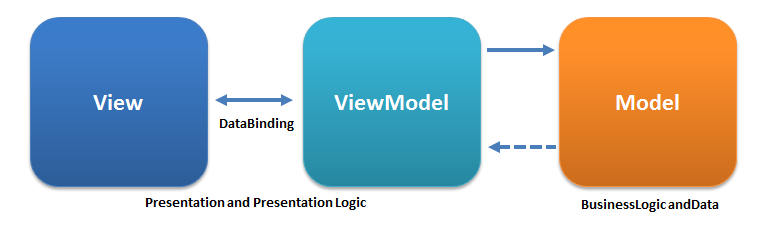
- 二、表达式
{{expression}}就是一个表达式。当$watch监听,表达式被运算。$digest循环解析表达式。手动也可解析表达式,我们将$parse服务注入controller中便可实现。
举一个栗子:
HTML code:

<div ng-controller="MyController">

 <input ng-model="expr" type="text" placeholder="Enter an expression" />

    <h2>{{ parseValue }}</h2>
</div>
JS code:

angular.module("myApp", []).controller('MyController',function($scope,$parse) {

$scope.$watch('expr', function(newVal, oldVal, scope) {

if (newVal !== oldVal) {

var parseFun = $parse(newVal);//用该表达式设置parseFun

$scope.parsedValue = parseFun(scope);//获取经解析后的表达式值
}
});
});
- 三、指令
指令的本质就是AngularJS扩展具有自定义功能的HTML元素的途径。
<my-directive></my-directive>
驼峰法则
angular.module('myApp',[]) .directive('myDirective', function() {
return {
     restrict: 'E',
     template: ' Click me to go to Google' };
}); //指令的定义
调用指令则调用相关的JavaScript代码。默认情况下,angularjs将生成的HTML代码嵌套进自定义标签内部。
指令可以指定E(element)、A(attribute)、C(class)、M(注释)来调用它。
angular.module('myApp', [])
.directive('myDirective', function() {
return {
restrict: 'EAC',
replace: true,
template: '<a href="http://google.com">Click me to go to Google</a>'
};
});
greeting的属性值设为 Hello World 的表达式赋给ng-init 。然后计算{{}}内的greeting。
<h1 ng-init="greeting='HelloWorld'">
The greeting is: {{ greeting }}
</h1>
表达式申明指令
<my-directive="someExpression">
</my-directive>
<div my-directive="someExpression">
</div>
<div class="my-directive:someExpression">
</div>
<!-- directive: my-directive someExpression -->
当前作用域介绍
<p>We can access: {{ rootProperty }}</p>
<div ng-controller="ParentController">
<p>We can access: {{ rootProperty }}
and {{ parentProperty }}</p>
<div ng-controller="ChildController">
<p>
We can access:
{{ rootProperty }} and
{{ parentProperty }} and
{{ childProperty }}
</p>
<p>{{ fullSentenceFromChild }}</p>
</div>
</div>
angular.module('myApp', [])
.run(function($rootScope) {
// 使用.run访问rootScope
$rootScope.rootProperty = 'root scope';
})
.controller('ParentController', function($scope) {
// 使用.controller访问“ng-controller”内部属性
//在DOM中,根据当前控制器进行推断
$scope.parentProperty = 'parent scope';
})
.controller('ChildController', function($scope) {
$scope.childProperty = 'child scope';
// 同在DOM中一样,我们可以通过当前$scope直接访问原型中的任意属性
$scope.fullSentenceFromChild = 'Same $scope: We can access: ' +
$scope.rootProperty + ' and ' +
$scope.parentProperty + ' and ' +
$scope.childProperty
});
向指令中传递数据
使用由所属控制器提供的已经存在的作用域会导致代码间耦合过高。当移除了controller,或者定义了相同属性则要被迫修改代码。故AngularJS允许创建子作用域或者隔离作用域来解决此问题。隔离作用域同当前DOM的作用域是完全分隔开的。我们须要显式地通过属性传递数据。
<div my-directive
some-property="someProperty with @ binding">
</div>
scope: {
someProperty: '@'
}
//@绑定策略使angularJS将DOM中some-property属性复制给新作用域对象的someproperty
<div my-directive
some-attr="someProperty with @ binding">
</div>
scope: {
someProperty: '@someAttr'
}
//显式绑定 将someAttri 的值复制给新作用域的someProperty
<div my-directive
my-url="http://google.com"
my-link-text="Click me to go to Google"></div>
angular.module('myApp', [])
.directive('myDirective', function() {
return {
    restrict: 'A',
    replace: true,
    scope: {
        myUrl: '@',
        myLinkText: '@'
    },
    template: '<a href="{{myUrl}}">' +
        '{{myLinkText}}</a>'
    };
});
默认情况下约定DOM属性和JS中的对象属性同名,除非对象属性采用驼峰法则
作用域中的属性是私有的,我们可以任意指定内助属性与DOM属性绑定。如上显示绑定。
- 四、模型
- 五、Scope
- 六、控制器
- 七、过滤器
直接举栗子:
1.表达式中:
{{name|uppercase}}
2.$filter中:
app.controller('DemoController', ['$scope', '$filter',
function($scope, $filter) {
$scope.name = $filter('lowercase')('Ari');
}]);
3.内置过滤器
1.
{{ 123 | currency }} //123转货币
2.
{{ today | date:'medium' }} <!-- Aug 09, 2013 12:09:02 PM -->
{{ today | date:'short' }} <!-- 8/9/1312:09PM -->
{{ today | date:'fullDate' }} <!-- Thursday, August 09, 2013 -->
{{ today | date:'longDate' }} <!-- August 09, 2013 -->
3.filter过滤器可以从给定数组中选择一个子集,并将其生成一个新数组返回。过滤器的第一个参数可以是字符串、对象或者是一个从数组中选择元素的函数
{{ ['Ari','Lerner','Likes','To','Eat','Pizza'] | filter:'e' }}
<!-- ["Lerner","Likes","Eat"] -->


{{ ['Ari','likes','to','travel'] | filter:isCapitalized }}

$scope.isCapitalized = function(str) { return str[0] == str[0].toUpperCase(); };


{{ [{ 'name': 'Ari', 'City': 'San Francisco', 'favorite food': 'Pizza' },{ 'name': 'Nate', 'City': 'San Francisco', 'favorite food': 'indian food' }] | filter:{'favorite food': 'Pizza'} }}
4.自定义过滤器
angular.module('myApp.filters', []) .filter('capitalize', function() { return function(input) {}; });

angular.module('myApp.filters', []) .filter('capitalize', function() { return function(input) {  if (input) { return input[0].toUpperCase() + input.slice(1); } });
5.表单验证
<input type="text" required />

<input type="text" ng-minlength="5" />

<input type="text" ng-pattern="[a-zA-Z]" />

<input type="email" name="email" ng-model="user.email" />
- 八、Service
- 九、Http
- 十、Select
- 十一、表格
- 十二、SQL
- 十三、HTML DOM
- 十四、事件
- 十五、module
- 十六、表单
- 十七、输入验证
- 十八、API
- 十九、Bootstrap
- 二十、Include指令
- 二十一、Animation
- 二十二、Dependency Injection
- 二十三、Router
本文来自博客园,作者:z_s_s,转载请注明原文链接:https://www.cnblogs.com/zhoushusheng/p/12196578.html

 浙公网安备 33010602011771号