我的Dojo中有一个Mojo(如何编写Maven插件)
https://blog.csdn.net/Luck_ZZ/article/details/105458573?utm_medium=distribute.pc_relevant.none-task-blog-baidujs_title-0&spm=1001.2101.3001.4242
https://blog.csdn.net/dnc8371/article/details/106703597
http://c.biancheng.net/view/4720.html
我一直忙于在工作中使用Maven的腋窝。 对于很多开发人员,我会听到:“那又怎样。” 不同之处在于,我通常在无法直接访问Internet的环境中工作。 因此,当我说我经常使用Maven时,这意味着某些事情。
依赖地狱
公平地说,我在示例中一直在随意使用Maven。 我发现下载依赖项并避免“依赖关系地狱”更为方便。 我必须为正在使用的库下载库的情况。 例如,必须下载Hamcrest才能使用JUnit。 在家里,放入对JUnit的依赖关系,而Maven为我下载Hamcrest,因为它是JUnit的依赖关系。 如果存在Hamcrest的依赖关系,Maven也会下载该依赖关系。 在工作时,我需要研究JUnit具有哪些依赖关系,然后研究这些依赖关系具有哪些依赖关系。 由于这种情况,我避免使用库。
形势变化
更改是因为我在工作中使用Spring Roo。 Roo使用Maven来管理它需要合并的Spring依赖项。 由于此更改,我在开发网络上设置了Nexus服务器,并开始了将依赖项从Internet转移到开发网络的过程。 这使我了解了Maven。
我对Maven的了解
在阅读了《 Maven入门》和《 Maven Build Customization》两本书之后,我对Maven以及如何创建本文的主题有了一个很好的了解。 我可以继续学习我所学到的东西,但是我将继续专注于学习Maven插件所需的知识。 我确实假设一个人看到了一个pom文件并从现在开始运行了一些Maven构建。 如果还没有,请购买我读过的书,或者先去http://maven.apache.org 。
Maven插件丰富
Maven基于插件架构。 在Maven中执行任何操作的都是插件。 从诸如编译之类的核心功能到创建网站。 可以想象,每个插件都有某些共同点。
Maven是面向包,生命周期,阶段和目标的
Maven以将某种内容构建到某种打包项目(例如jar文件)中而闻名。 显而易见,这是pom文件的第一行。 可能不知道的是,有一系列“阶段”或“生命周期”恰巧完成了构建程序包的过程(请参阅我在其中所做的事情)。 实际上,这些阶段之一被称为“打包”。 生命周期中的默认阶段列表如下:
- 验证
- 产生源
- 过程源
- 产生资源
- 流程资源
- 编译
- 过程类
- 生成测试源
- 流程测试源
- 生成测试资源
- 流程测试资源
- 测试编译
- 过程测试类
- 测试
- 准备包装
- 包
- 整合前测试
- 整合测试
- 整合后测试
- 校验
- 安装
- 部署
Maven构建中正在进行很多工作! 所有这些都由某种插件运行。 每个插件都是由可以设置为在生命周期的特定阶段运行的目标组成的。 例如,将maven-jar-plugin的jar目标设置为在打包阶段运行。
制作插件
现在,您已经对构建过程进行了更深入的了解,是时候解释创建Maven插件所需的内容了。
插件充满了Mojos
什么是魔力? Mojo是Maven普通的Old Java Objects的缩写。 它是Maven识别的插件的最小单位。 所有插件均由mojos制成。 每个mojo与一个目标相关联。 因此,要使一个插件具有多个目标,就需要多个mojo。 令人遗憾的是,我将显示的示例只有一个mojo,但是该示例还将显示测试插件的最佳实践。
最佳做法是唯一允许的做法
看看我在标题中与Dojo交易相关的工作吗? 如果有兴趣,编写插件涉及命名约定,单元测试和集成测试。 命名约定是最重要的
- 您不会破坏Apache商标
- 其他人知道一个人做了一个插件。
名称中有什么?
Apache插件的命名约定为maven- <title> -plugin。 例如,jar插件名为maven-jar-plugin。 对于其他所有人,命名约定为<title> -maven-plugin。 例如,我创建的示例名为hinter-maven-plugin。 发表本文时使用的另一个示例是Spring Boot的插件,它名为spring-boot-maven-plugin。 Spring Boot的源代码在这里 。 我分叉了它,所以我可以细读和滥用代码。 我的叉子可以在这里找到。 如果您想一起滥用它,请在完成您特定的滥用行为后,将我的副本分叉并发送给我请求请求。 无论如何,如果使用Apache的命名约定,那就是商标侵权。 你被警告了。
单元测试
自动化的单元和集成测试也很重要。 单元测试所遵循的目录模式与普通单元测试略有不同,因此请耐心等待。
对插件进行单元测试时的目录结构为
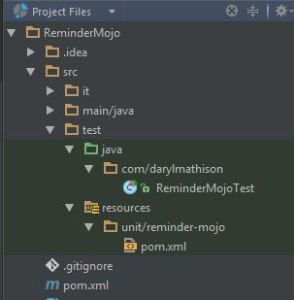
请注意,所有测试目录都组织在测试目录下。 一个正在制作的是将使用该插件的项目的一个小版本。 测试资源目录下是一个单元目录,后跟子目录中单元的名称。 目标是一次测试一个Mojo。 由于我的示例只有一个mojo,因此我仅设置了一个测试。 除了目录设置以外,还有其他区别,但示例部分将进行介绍。
整合测试
我发现该测试将使您最大程度地了解一个人的特定插件及其工作方式。 目的是测试某种情况,就像它是实际项目构建的一部分一样。 当我指的是实际项目构建时,我的意思是甚至有一个仅用于集成构建的临时存储库。 在阅读了有关如何设置测试的信息之后,我大量借鉴了spring-boot-maven-plugin的集成测试设置和mini pom文件。 好的,我将一些文件复制到示例代码中。 只是通知一个人Spring Boot做得对。 只是为了安全起见,克隆是只读的,或者为了安全起见请分叉其代码。 目录结构如下所示。

集成测试不在test目录下,而是位于it目录下src目录下。 我本可以进行更多的集成测试,但到目前为止已经足够了。
例
该示例插件的灵感来自于我心不在and,需要提醒我所做的一切。 我曾想创建一个洗狗提醒插件,但是我决定使用一个普通的提醒插件,因为这样我就可以用它提醒我需要做的任何事情。
Pom文件
-
<project xmlns="http://maven.apache.org/POM/4.0.0" xmlns:xsi="http://www.w3.org/2001/XMLSchema-instance"
-
xsi:schemaLocation="http://maven.apache.org/POM/4.0.0 http://maven.apache.org/maven-v4_0_0.xsd">
-
<modelVersion>4.0.0</modelVersion>
-
<groupId>com.darylmathison</groupId>
-
<artifactId>reminder-maven-plugin</artifactId>
-
<packaging>maven-plugin</packaging>
-
<version>1.0-SNAPSHOT</version>
-
<name>reminder-maven-plugin Maven Mojo</name>
-
<url>http://maven.apache.org</url>
-
-
<properties>
-
<mavenVersion>3.2.1</mavenVersion>
-
<project.build.sourceEncoding>UTF-8</project.build.sourceEncoding>
-
<maven.compiler.source>1.8</maven.compiler.source>
-
<maven.compiler.target>1.8</maven.compiler.target>
-
</properties>
-
-
<dependencies>
-
<!-- Maven dependencies -->
-
<dependency>
-
<groupId>org.apache.maven</groupId>
-
<artifactId>maven-plugin-api</artifactId>
-
<version>${mavenVersion}</version>
-
</dependency>
-
<dependency>
-
<groupId>org.apache.maven</groupId>
-
<artifactId>maven-core</artifactId>
-
<version>${mavenVersion}</version>
-
</dependency>
-
<dependency>
-
<groupId>org.apache.maven.plugin-tools</groupId>
-
<artifactId>maven-plugin-annotations</artifactId>
-
<version>3.2</version>
-
<scope>provided</scope>
-
</dependency>
-
<dependency>
-
<groupId>org.apache.maven</groupId>
-
<artifactId>maven-compat</artifactId>
-
<version>3.2.1</version>
-
<scope>test</scope>
-
</dependency>
-
<dependency>
-
<groupId>org.apache.maven.plugin-testing</groupId>
-
<artifactId>maven-plugin-testing-harness</artifactId>
-
<version>3.1.0</version>
-
<scope>test</scope>
-
</dependency>
-
<dependency>
-
<groupId>junit</groupId>
-
<artifactId>junit</artifactId>
-
<version>3.8.1</version>
-
<scope>test</scope>
-
</dependency>
-
</dependencies>
-
<build>
-
<pluginManagement>
-
<plugins>
-
<plugin>
-
<groupId>org.apache.maven.plugins</groupId>
-
<artifactId>maven-compiler-plugin</artifactId>
-
<configuration>
-
<source>1.8</source>
-
<target>1.8</target>
-
</configuration>
-
</plugin>
-
<plugin>
-
<groupId>org.apache.maven.plugins</groupId>
-
<artifactId>maven-plugin-plugin</artifactId>
-
<version>3.2</version>
-
<executions>
-
<execution>
-
<id>mojo-descriptor</id>
-
<goals>
-
<goal>descriptor</goal>
-
</goals>
-
</execution>
-
</executions>
-
<configuration>
-
<skipErrorNoDescriptorsFound>true</skipErrorNoDescriptorsFound>
-
</configuration>
-
</plugin>
-
</plugins>
-
</pluginManagement>
-
</build>
-
<profiles>
-
<profile>
-
<id>run-its</id>
-
<build>
-
<plugins>
-
<plugin>
-
<groupId>org.apache.maven.plugins</groupId>
-
<artifactId>maven-invoker-plugin</artifactId>
-
<version>1.7</version>
-
<configuration>
-
<debug>true</debug>
-
<cloneProjectsTo>${project.build.directory}/it</cloneProjectsTo>
-
<cloneClean>true</cloneClean>
-
<pomIncludes>
-
<pomInclude>*/pom.xml</pomInclude>
-
</pomIncludes>
-
<addTestClassPath>true</addTestClassPath>
-
<postBuildHookScript>verify</postBuildHookScript>
-
<localRepositoryPath>${project.build.directory}/local-repo</localRepositoryPath>
-
<settingsFile>src/it/settings.xml</settingsFile>
-
<goals>
-
<goal>clean</goal>
-
<goal>compile</goal>
-
<goal>package</goal>
-
</goals>
-
</configuration>
-
<executions>
-
<execution>
-
<id>integration-test</id>
-
<goals>
-
<goal>install</goal>
-
<goal>run</goal>
-
</goals>
-
</execution>
-
</executions>
-
</plugin>
-
</plugins>
-
</build>
-
</profile>
-
</profiles>
-
</project>
可以看到,构建一个插件需要很多插件和依赖项。 这里有一个注释依赖项。 这是Junit的版本。 该版本必须为3.8.1。 这是因为Maven扩展了TestCase类,以使其更易于进行单元测试。 很快就会看到。 注意两个插件,一个是maven-plugin-plugin,另一个是maven-invoker-plugin。 maven-plugin-plugin可以自动为插件创建帮助目标。 maven-invoker-plugin用于集成测试。 它的功能是运行Maven项目,如果一个人正在测试pom中运行它就很方便。
提醒Mojo.java
-
package com.darylmathison;
-
-
import org.apache.maven.plugin.AbstractMojo;
-
import org.apache.maven.plugin.MojoExecutionException;
-
import org.apache.maven.plugins.annotations.LifecyclePhase;
-
import org.apache.maven.plugins.annotations.Mojo;
-
import org.apache.maven.plugins.annotations.Parameter;
-
-
import java.io.File;
-
import java.io.FileReader;
-
import java.io.FileWriter;
-
import java.io.IOException;
-
import java.time.LocalDateTime;
-
import java.time.format.DateTimeFormatter;
-
import java.time.temporal.ChronoUnit;
-
-
-
defaultPhase = LifecyclePhase.PACKAGE,
-
requiresOnline = false, requiresProject = true,
-
threadSafe = false)
-
public class ReminderMojo extends AbstractMojo {
-
-
-
protected File basedir;
-
-
-
protected String message;
-
-
-
protected int numOfWeeks;
-
-
public void execute() throws MojoExecutionException {
-
-
File timestampFile = new File(basedir, "timestamp.txt");
-
getLog().debug("basedir is " + basedir.getName());
-
if(!timestampFile.exists()) {
-
basedir.mkdirs();
-
getLog().info(message);
-
timestamp(timestampFile);
-
} else {
-
LocalDateTime date = readTimestamp(timestampFile);
-
date.plus(numOfWeeks, ChronoUnit.WEEKS);
-
if(date.isBefore(LocalDateTime.now())) {
-
getLog().info(message);
-
timestamp(timestampFile);
-
}
-
}
-
}
-
-
private void timestamp(File file) throws MojoExecutionException {
-
try(FileWriter w = new FileWriter(file)) {
-
LocalDateTime localDateTime = LocalDateTime.now();
-
w.write(localDateTime.format(DateTimeFormatter.ISO_LOCAL_DATE_TIME));
-
} catch (IOException e) {
-
throw new MojoExecutionException("Error creating file " + file, e);
-
}
-
}
-
-
private LocalDateTime readTimestamp(File file) throws MojoExecutionException {
-
try(FileReader r = new FileReader(file)) {
-
char[] buffer = new char[1024];
-
int len = r.read(buffer);
-
LocalDateTime date = LocalDateTime.parse(String.valueOf(buffer, 0, len));
-
return date;
-
} catch(IOException ioe) {
-
throw new MojoExecutionException("Error reading file " + file, ioe);
-
}
-
}
-
}
这是插件中唯一的Mojo,并且可以找到,它非常简单,但是显示了Mojo api提供的一些很酷的功能。 类注释定义目标的名称为“ remind”,并且它不是线程安全的。 它还定义了默认阶段为打包阶段。 我要提到的最后一件事是任何成员变量都可以成为参数。 这成为目标插件的参数。
提醒MojoTest
-
package com.darylmathison;
-
-
import org.apache.maven.plugin.testing.AbstractMojoTestCase;
-
-
import java.io.File;
-
-
/**
-
* Created by Daryl on 3/31/2015.
-
*/
-
public class ReminderMojoTest extends AbstractMojoTestCase {
-
-
-
protected void setUp() throws Exception {
-
super.setUp();
-
}
-
-
-
protected void tearDown() throws Exception {
-
super.tearDown();
-
}
-
-
public void testJustMessage() throws Exception {
-
File pom = getTestFile("src/test/resources/unit/reminder-mojo/pom.xml");
-
assertNotNull(pom);
-
assertTrue(pom.exists());
-
ReminderMojo myMojo = (ReminderMojo) lookupMojo("remind", pom);
-
assertNotNull(myMojo);
-
myMojo.execute();
-
}
-
}
这是mojo的基本单元测试用例。 测试类扩展AbstractMojoTestCase以获得诸如getTestFile和lookupMojo之类的功能。 以下是测试pom文件。
单元测试Pom文件
-
<project xmlns="http://maven.apache.org/POM/4.0.0" xmlns:xsi="http://www.w3.org/2001/XMLSchema-instance"
-
xsi:schemaLocation="http://maven.apache.org/POM/4.0.0 http://maven.apache.org/maven-v4_0_0.xsd">
-
<modelVersion>4.0.0</modelVersion>
-
<groupId>com.darylmathison.test</groupId>
-
<artifactId>reminder-maven-plugin-test-reminder</artifactId>
-
<packaging>jar</packaging>
-
<version>1.0-SNAPSHOT</version>
-
<name>reminder-maven-plugin Maven Mojo</name>
-
-
<dependencies>
-
<dependency>
-
<groupId>junit</groupId>
-
<artifactId>junit</artifactId>
-
<version>3.8.1</version>
-
<scope>test</scope>
-
</dependency>
-
</dependencies>
-
<build>
-
<plugins>
-
<plugin>
-
<groupId>com.darylmathison</groupId>
-
<artifactId>reminder-maven-plugin</artifactId>
-
<version>1.0-SNAPSHOT</version>
-
<configuration>
-
<basedir>target/test-classes/unit/reminder-mojo</basedir>
-
<message>Wash the doggies</message>
-
</configuration>
-
</plugin>
-
</plugins>
-
</build>
-
</project>
只是定义插件的主pom文件的迷你版本。
整合测试
这是值得的,因为它实际上是Maven项目中的一个单独的Maven项目。 本练习的主要重点是查看插件将执行的操作,而不是其他操作。 示例应用程序很简单,就可以在其中构建Maven项目。 要注意的另一件事是,pom文件使用一些过滤来匹配groupId,artifactId和主插件pom的版本。
Pom文件
-
-
<project xmlns="http://maven.apache.org/POM/4.0.0" xmlns:xsi="http://www.w3.org/2001/XMLSchema-instance"
-
xsi:schemaLocation="http://maven.apache.org/POM/4.0.0 http://maven.apache.org/xsd/maven-4.0.0.xsd">
-
<modelVersion>4.0.0</modelVersion>
-
<groupId>com.darylmathison.it</groupId>
-
<artifactId>new-timestamp</artifactId>
-
<version>0.0.1.BUILD-SNAPSHOT</version>
-
<properties>
-
<project.build.sourceEncoding>UTF-8</project.build.sourceEncoding>
-
</properties>
-
<build>
-
<plugins>
-
<plugin>
-
<groupId>@project.groupId@</groupId>
-
<artifactId>@project.artifactId@</artifactId>
-
<version>@project.version@</version>
-
<executions>
-
<execution>
-
<id>blah</id>
-
<goals>
-
<goal>remind</goal>
-
</goals>
-
</execution>
-
</executions>
-
<configuration>
-
<message>Wash the doggies</message>
-
</configuration>
-
</plugin>
-
</plugins>
-
</build>
-
</project>
SampleApp
-
package java.test;
-
-
/**
-
* Created by Daryl on 4/5/2015.
-
*/
-
public class SampleApp {
-
public static void Main(String[] args) {
-
System.out.println("out");
-
}
-
}
验证
-
System.out.println(basedir);
-
def file = new File(basedir, "timestamp.txt");
-
return file.exists();
验证脚本是为了确保插件能够完成其预期的工作。 它只是检查timestamp.txt文件是否存在,因为该插件在找不到时间戳文件时会创建一个。 Maven检查验证脚本的输出是对还是错。
结论
哇! 我在这篇文章中介绍了很多内容。 我去举了一个如何创建一个Maven插件的例子。 我还展示了如何使用最佳实践来测试该插件。 我得到了两本书之间的信息,以及一个正在进行的开源项目的实例。 示例代码在GitHub上托管这里 。 这代表了我的新示例主页中的第一个示例


 浙公网安备 33010602011771号