
Aspose.Words 使用根据传入参数再word中生成多行列表数据(一)
word中根据数据 生成列表数据 ![image]()
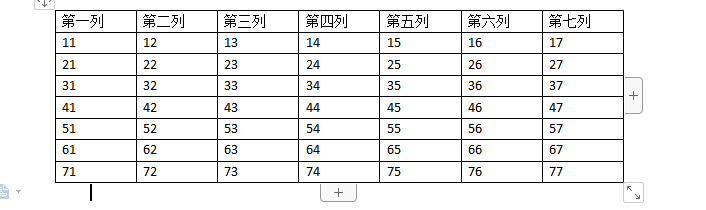
可根据传入参数自定义向下自动新加行并将数据赋值进去。 修改后模板上标记为 我习惯用 标记前面@ 符号

主要是因为 如果word模板中 其他地方也有域标签和表格的域标签一样了,这里的值就会和非表格里面的域标签的值保持一致。 一.单行单行插入数据 、

1.下列代码用于程序实现 根据数据将表格样子生成出来
word中根据数据 生成列表数据
可根据传入参数自定义向下自动新加行并将数据赋值进去。 修改后模板上标记为 我习惯用 标记前面@ 符号
主要是因为 如果word模板中 其他地方也有域标签和表格的域标签一样了,这里的值就会和非表格里面的域标签的值保持一致。 一.单行单行插入数据 、
1.下列代码用于程序实现 根据数据将表格样子生成出来
region 组织数据 生成对应的数据
Dictionary<string, string> dic;
List<Dictionary<string, string>> listdic = new List<Dictionary<string, string>>();
for (int i = 1; i < 8; i++)
{
dic = new Dictionary<string, string>();
for (int j = 1; j < 8; j++)
{
string key = "sp" + j;
string value = i + "" + j;
dic.Add(key, value);
}
listdic.Add(dic);
}
#endregion
int tableIndex = 0;//默认插入word文档中的第几个表格 word 中插入表格数量,这个表示你要插入数据的表格 是那个表格
int tableRowIndex = 1;//插入word文档列表中的第几行开始插入
int tableRowCount = 1;//插入word 需要连续插入几行。
//获取表格中所有的表格
NodeCollection allTable = doc.GetChildNodes(NodeType.Table, true);
//判单当前文档中表格是否大于0
if (allTable.Count > 0)
{
Table tableModel = (Table)doc.GetChild(NodeType.Table, tableIndex, true);//获取设置的表格位置
Row rowCopy = tableModel.Rows[tableRowIndex];//需要复制替换的行 表格行
for (int i = 0; i < listdic.Count; i++)//循环需要替换的数据
{
Dictionary<string, string> dicModel = listdic[i];//获取当前行的数据
Node rowInsert = rowCopy.Clone(true);//克隆当前行的数据
List
//替换克隆行中标记的名称
//这里需要将克隆行中的域代码标签进行一次替换。
//如不做替换 复制的行中的域代码和被复制的行内的标签值一致
//再进行域标签替换值时 会将被复制行中域标签 替换成相应的值
//会导致最后生成出来的word文件 与预想的不一致
foreach (Aspose.Words.Fields.Field item in rowInsert.Range.Fields)
{
string fieldName = item.Result;
if (string.IsNullOrWhiteSpace(fieldName))
{
continue;
}
if (fieldName.LastIndexOf("@") == -1)
{
continue;
}
//验证行类标记类型为域标签类型 才复制
if (item.Type == FieldType.FieldMergeField)
{
fieldName = fieldName.Substring(1, fieldName.Length - 2);
//移动到当前域标签处 true 为当前标签后面 false 为当前标签后面
//当前标记最后都会被移除。
builder.MoveToField(item,true);
item.Remove();
//移除掉远标签中的@ 符号(@:根据自己需求)
fieldName = fieldName.Replace("@", "");
//创建一个新的域标签再此处
string newFieldName = "tables" + i + "&" + fieldName;
Field newFiledModel = builder.InsertField("MERGEFIELD " + newFieldName + " \* MERGEFORMAT");
//域标签跟新到表格上去
newFiledModel.Update();
}
}
//插入新行
tableModel.Rows.Insert(tableRowIndex + i, rowInsert);
//新行内数据替换
}
//设置 换页 表格自动补全 表格下方横线
tableModel.SetBorder(BorderType.Bottom, LineStyle.Single, 1, System.Drawing.Color.Black, true);
//移除原始标记行
tableModel.Rows.Remove(rowCopy);
}
上诉代码生成的wrod格式为;
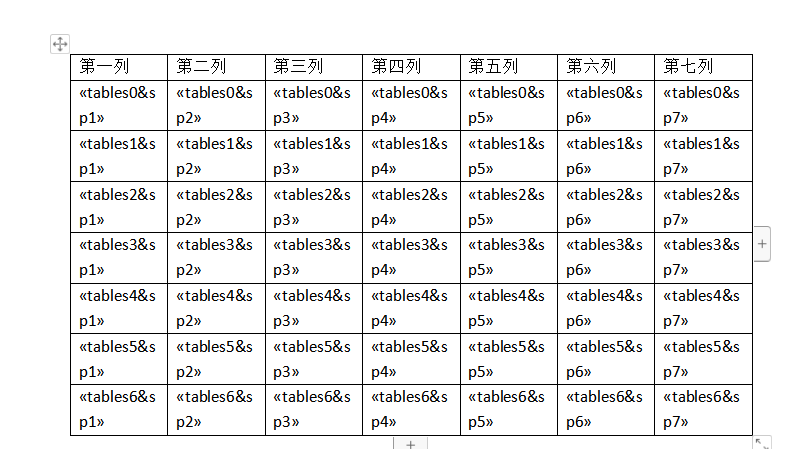
根据数据生成的对应域标签数据 在进行数据的替换。
下面代码 将上面新行内代码替换掉
//新行内数据替换
foreach (Aspose.Words.Fields.Field item in listField)
{
string fileName = item.Result;
if (string.IsNullOrWhiteSpace(fileName))
{
continue;
}
if (item.Type == FieldType.FieldMergeField)
{
var replaceName = fileName.Substring(1, fileName.Length - 2);
if (string.IsNullOrWhiteSpace(replaceName))
continue;
var replaceNames = replaceName.Substring(replaceName.IndexOf("&") + 1);
builder.MoveToField(item, true);
builder.InsertHtml(dicModel[replaceNames].ToString());
builder.MoveToMergeField(replaceName, false, true);
}
}
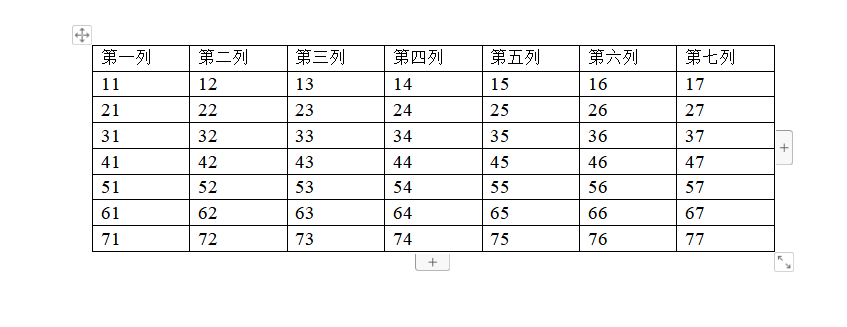
生成后的word为

 浙公网安备 33010602011771号