
OpenCV—python 基于透视的图像矫正
基于透视的图像矫正
- 以灰度图读入
- 腐蚀膨胀,闭合等操作
- 二值化图像
- 获取图像顶点
- 透视矫正
该方法不具有普适性,只针对比较干净对比度高的图像,只提供参考
from imutils.perspective import four_point_transform
import imutils
import cv2

def Get_Outline(input_dir):
    image = cv2.imread(input_dir)
    gray = cv2.cvtColor(image, cv2.COLOR_BGR2GRAY)
    blurred = cv2.GaussianBlur(gray, (5,5),0)
    edged = cv2.Canny(blurred,75,200)
    return image,gray,edged

def Get_cnt(edged):
    cnts = cv2.findContours(edged.copy(), cv2.RETR_EXTERNAL,cv2.CHAIN_APPROX_SIMPLE)
    cnts = cnts[0] if  imutils.is_cv2()  else   cnts[1]
    docCnt =None

    if len(cnts) > 0:
        cnts =sorted(cnts,key=cv2.contourArea,reverse=True)
        for c in cnts:
            peri = cv2.arcLength(c,True)                   # 轮廓按大小降序排序
            approx = cv2.approxPolyDP(c,0.02 * peri,True)  # 获取近似的轮廓
            if len(approx) ==4:                            # 近似轮廓有四个顶点
                docCnt = approx
                break
    return docCnt

if __name__=="__main__":
    input_dir = "gongjiaoka.png"
    image,gray,edged = Get_Outline(input_dir)
    docCnt = Get_cnt(edged)
    result_img = four_point_transform(image, docCnt.reshape(4,2)) # 对原始图像进行四点透视变换
    cv2.imshow("original", image)
    cv2.imshow("gray", gray)
    cv2.imshow("edged", edged)
    cv2.imshow("result_img", result_img)

    cv2.waitKey(0)
    cv2.destroyAllWindows()
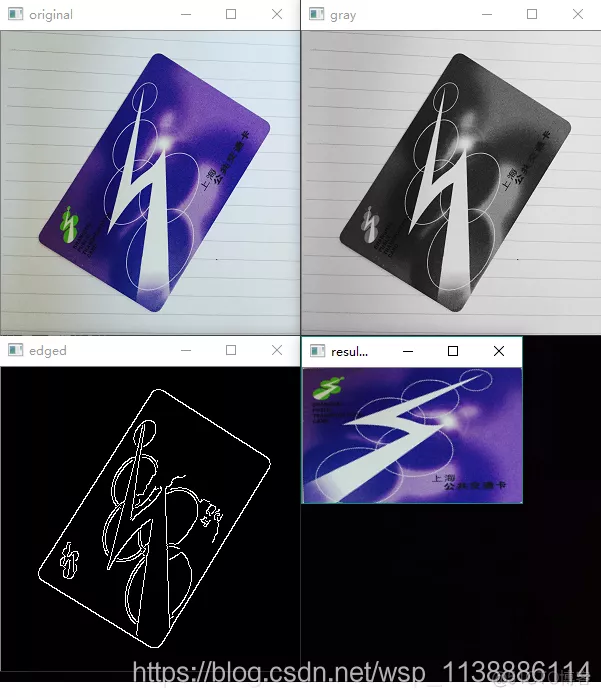
运行结果

 浙公网安备 33010602011771号