
Day92-Swagger
日期:2020/4/14
#第一节课
##001前后端分离
- 前端:前端控制层,视图层【前端团队 】
- 伪造后端数据,json,已经存在了,不需要后端,前端工程依旧能够跑越来
- 前端后如何交互?==》API
- 前后端相对独立,松耦合;
- 前后端甚至可以部署在不同的服务器上;
#1.2产生一个问题:
- 前后端集合联调,前端人员和后端人员无法做到 “ 快速协商 ,迟早解决 ”,最终导致问题集中爆发
解决方案:
- 首先指定schema【计划的提纲】,实时更新API,降低集成的风险;
- 早些年:指定word计划
- 前后端分离:
- 前端测试后端接口:postman
- 后端提供接口,需要实时更新的消息及改动
前端和后端的唯一联系,变成了API接口;API文档变成了前后端开发人员联系的纽带,变得越来越重要,
swagger就是一款让你更好的书写API文档的框架Swagger 是一个规范和完整的框架,用于生成、描述、调用和可视化 RESTful 风格的 Web 服务。总体目标是使客户端和文件系统作为服务器以同样的速度来更新。文件的方法,参数和模型紧密集成到服务器端的代码,允许API来始终保持同步。
作用:
1. 接口的文档在线自动生成。
2. 功能测试。
Swagger是一组开源项目,其中主要要项目如下:
1. Swagger-tools:提供各种与Swagger进行集成和交互的工具。例如模式检验、Swagger 1.2文档转换成Swagger 2.0文档等功能。
2. Swagger-core: 用于Java/Scala的的Swagger实现。与JAX-RS(Jersey、Resteasy、CXF...)、Servlets和Play框架进行集成。
3. Swagger-js: 用于JavaScript的Swagger实现。
4. Swagger-node-express: Swagger模块,用于node.js的Express web应用框架。
5. Swagger-ui:一个无依赖的HTML、JS和CSS集合,可以为Swagger兼容API动态生成优雅文档。
6. Swagger-codegen:一个模板驱动引擎,通过分析用户Swagger资源声明以各种语言生成客户端代码。
#第二节课
##002Swagger
- 号称世界上最流行的API框架
- RestFul Api文档在线生成工具 ==> API文档与API定义同步更新
- 直接运行,可以在线测试API接口
- 支持多种语言:(java,PHP)
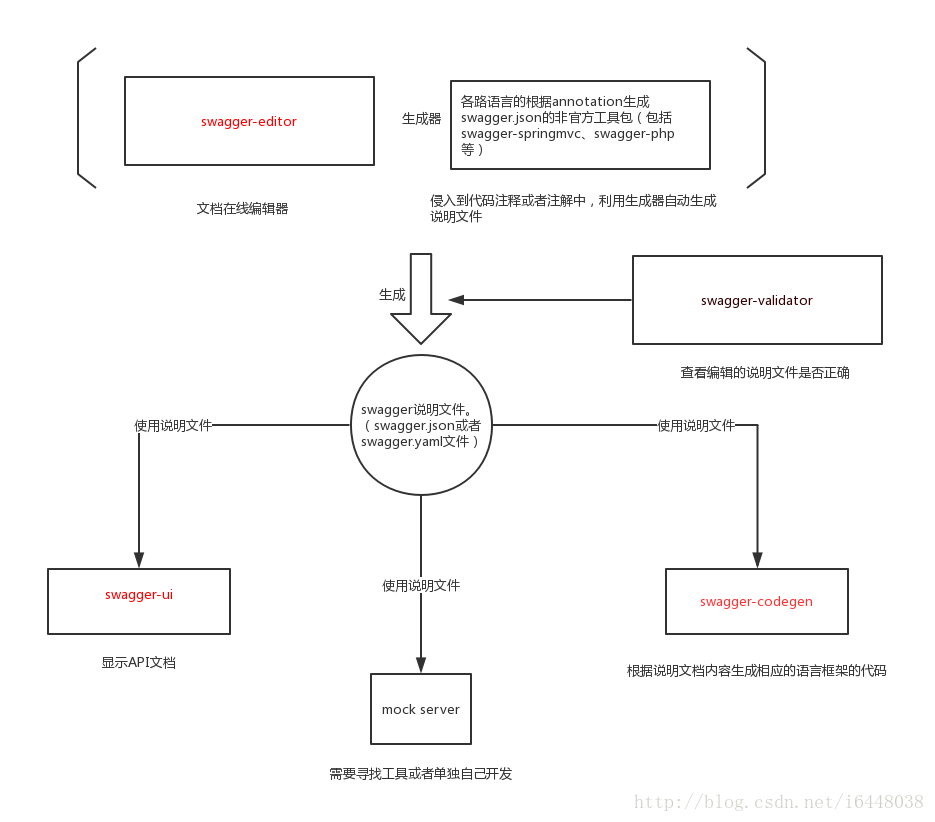
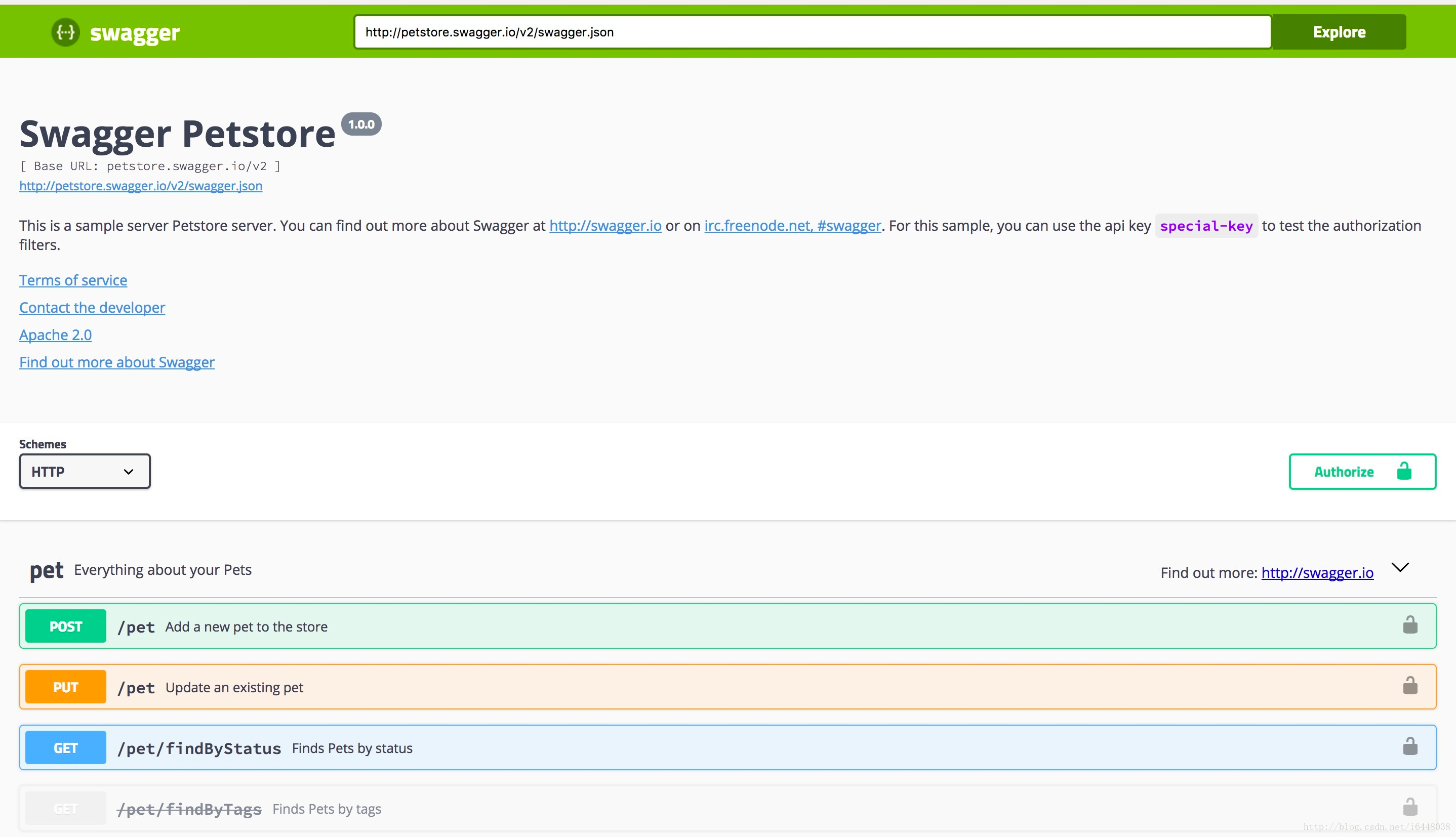
swagger-ui
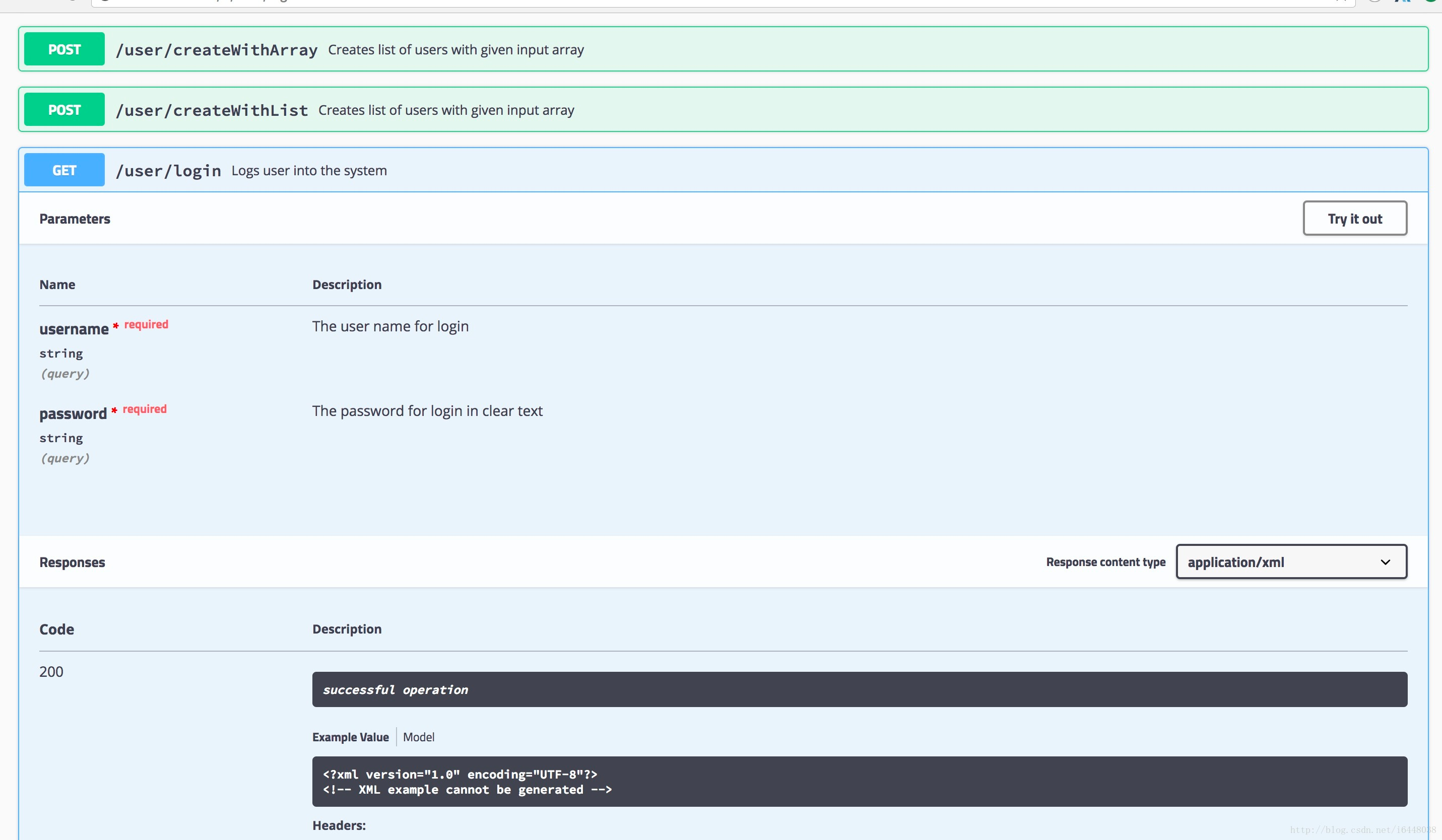
swagger-editor
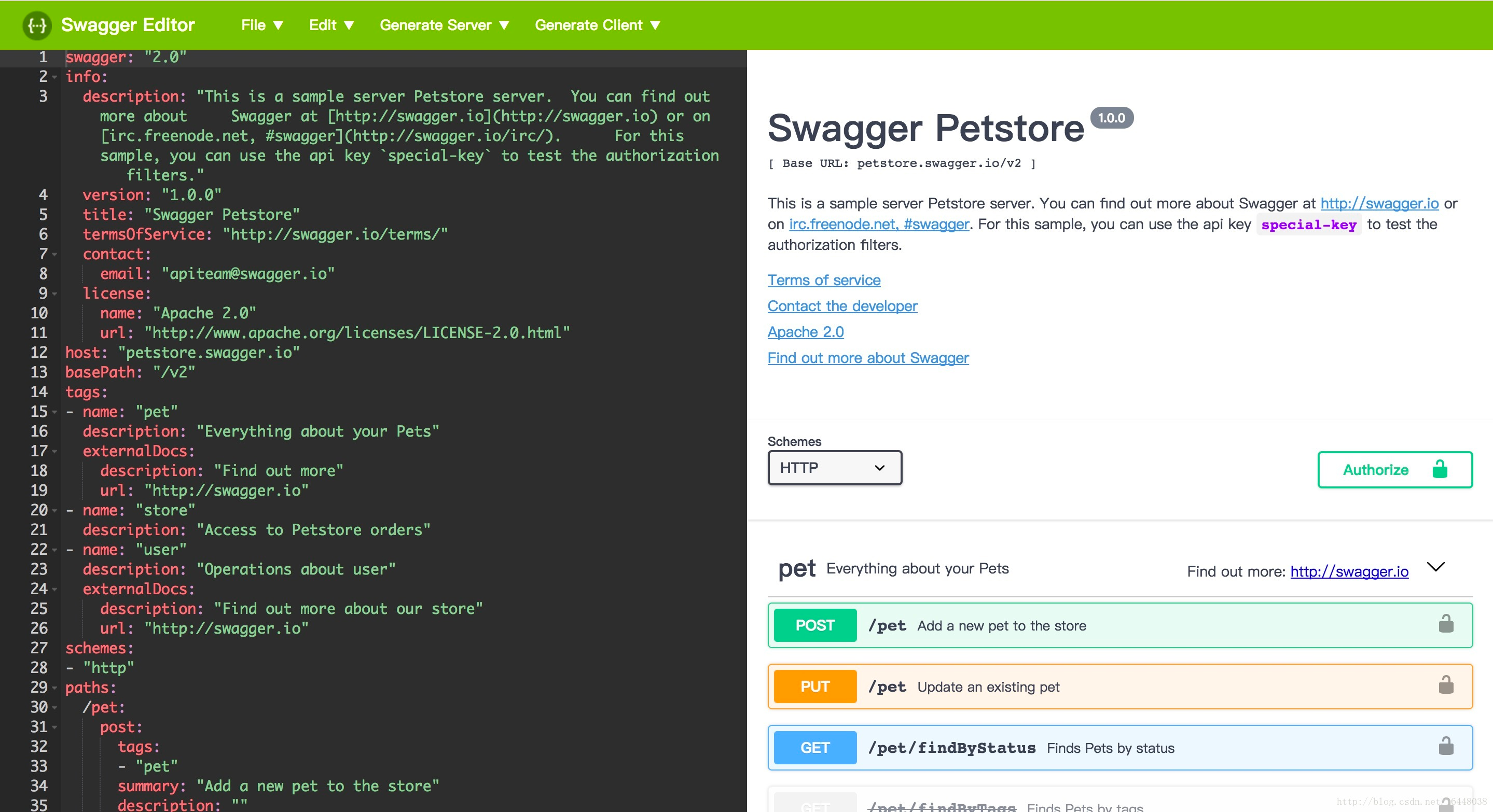
各种语言版本的根据annotation或者注释生成swagger说明文档的工具#
目前最流行的做法,就是在代码注释中写上swagger相关的注释,然后,利用小工具生成swagger.json或者swagger.yaml文件。
目前官方没有推出。
在项目使用Swagger需要springbox;
- swagger2
- UI
#第三节课
##003SpringBoot集成Swagger
#3.1新建一个SpringBoot 只构选springweb 项目![]() 2.导入相关依赖
2.导入相关依赖
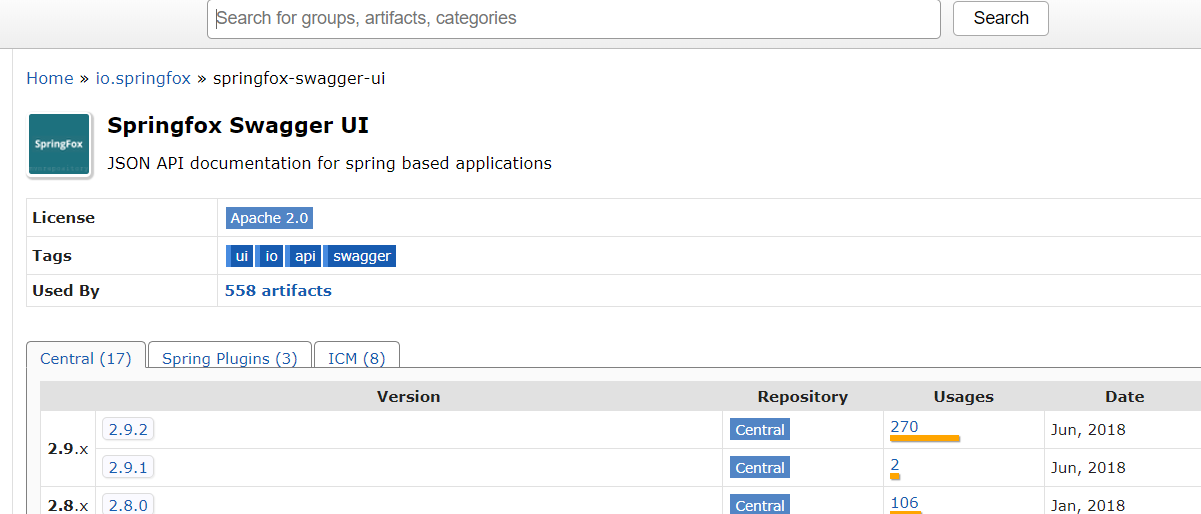
<!-- https://mvnrepository.com/artifact/io.springfox/springfox-swagger2 -->
<dependency>
    <groupId>io.springfox</groupId>
    <artifactId>springfox-swagger2</artifactId>
    <version>2.9.2</version>
</dependency>


<!-- https://mvnrepository.com/artifact/io.springfox/springfox-swagger-ui -->
<dependency>
    <groupId>io.springfox</groupId>
    <artifactId>springfox-swagger-ui</artifactId>
    <version>2.9.2</version>
</dependency>
<!-- https://mvnrepository.com/artifact/io.springfox/springfox-swagger2 --><dependency> <groupId>io.springfox</groupId> <artifactId>springfox-swagger2</artifactId> <version>2.9.2</version></dependency><!-- https://mvnrepository.com/artifact/io.springfox/springfox-swagger-ui --><dependency> <groupId>io.springfox</groupId> <artifactId>springfox-swagger-ui</artifactId> <version>2.9.2</version></dependency>3.编写一个Hello工程
@RestController
@RequestMapping("/user")
public class HelloController  {

    @RequestMapping("/hello")
    public String hello(){

        return "hello";
    }
}("/user")public class HelloController { ("/hello") public String hello(){ return "hello"; }}4.配置Swagger==>Configuration
@Configuration
@EnableSwagger2  //开启Swagger2
public class SwaggerConfig {


} //开启Swagger2public class SwaggerConfig {}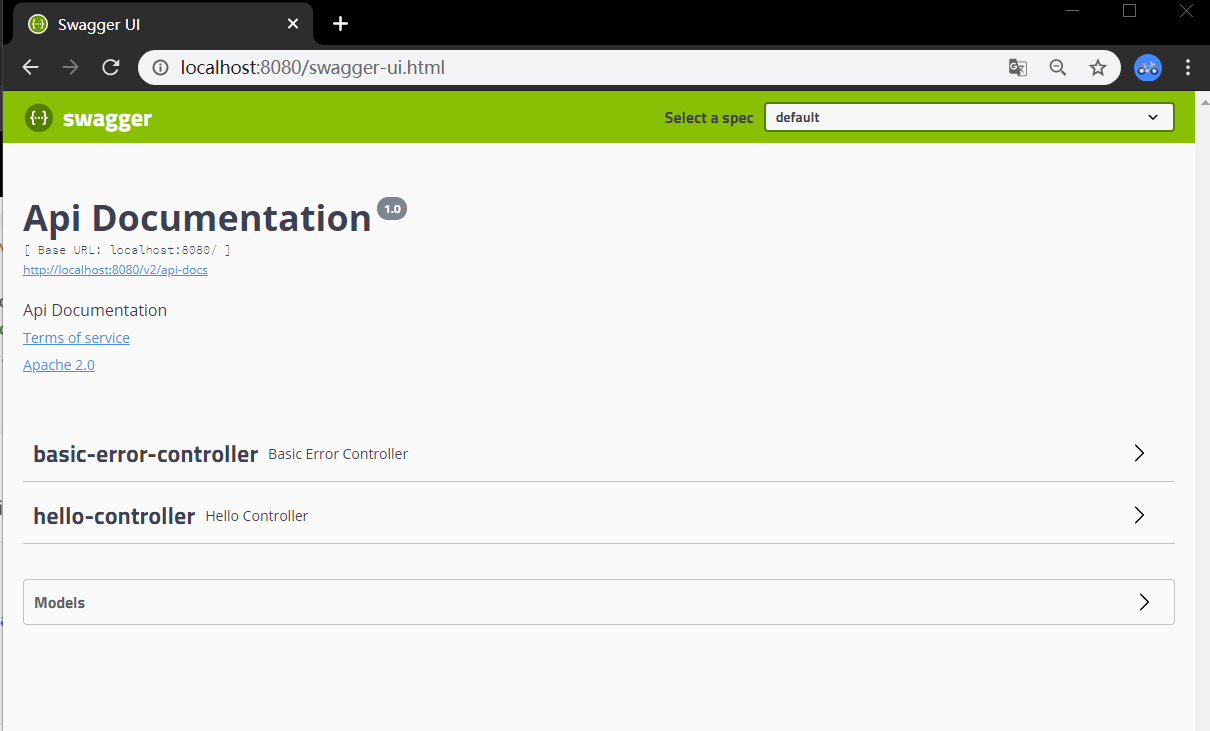
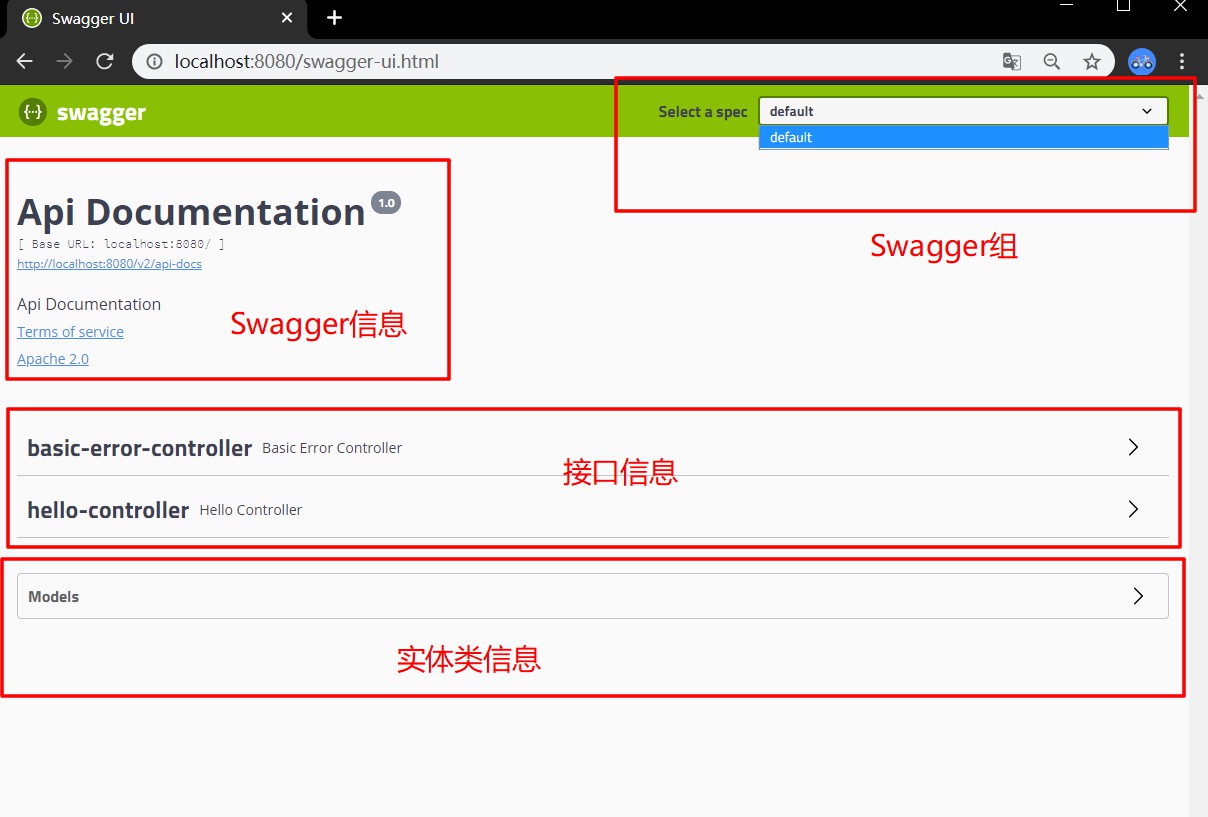
#第四节课
##004配置Swagger
#4.1Swagger的bean实例Docket
package com.kuang.config;

import org.springframework.context.annotation.Bean;
import org.springframework.context.annotation.Configuration;
import springfox.documentation.service.ApiInfo;
import springfox.documentation.service.Contact;
import springfox.documentation.service.VendorExtension;
import springfox.documentation.spi.DocumentationType;
import springfox.documentation.spring.web.plugins.Docket;
import springfox.documentation.swagger2.annotations.EnableSwagger2;

import java.util.ArrayList;

@Configuration
@EnableSwagger2  //开启Swagger2
public class SwaggerConfig {

    //配置了Swagger的Docket的bean实例
    @Bean
    public Docket docket(){

        return new Docket(DocumentationType.SWAGGER_2).apiInfo(apiInfo());
    }

    //配置Swagger信息=apiInfo
    private ApiInfo apiInfo(){
        //作者信息
        Contact contact = new Contact("zhj", "http://www.baidu.com", "1142450816@qq.com");
        return new ApiInfo("狂神的SwaggerAPI文档",
                "365天 x 努力",
                "1.0",
                "http://www.baidu.com",
                contact,
                "Apache 2.0",
                "http://www.apache.org/licenses/LICENSE-2.0",
                new ArrayList<>());
    }

}
package com.kuang.config;import org.springframework.context.annotation.Bean;import org.springframework.context.annotation.Configuration;import springfox.documentation.service.ApiInfo;import springfox.documentation.service.Contact;import springfox.documentation.service.VendorExtension;import springfox.documentation.spi.DocumentationType;import springfox.documentation.spring.web.plugins.Docket;import springfox.documentation.swagger2.annotations.EnableSwagger2;import java.util.ArrayList; //开启Swagger2public class SwaggerConfig { //配置了Swagger的Docket的bean实例 public Docket docket(){ return new Docket(DocumentationType.SWAGGER_2).apiInfo(apiInfo()); } //配置Swagger信息=apiInfo private ApiInfo apiInfo(){ //作者信息 Contact contact = new Contact("zhj", "http://www.baidu.com", "1142450816@qq.com"); return new ApiInfo("狂神的SwaggerAPI文档", "365天 x 努力", "1.0", "http://www.baidu.com", contact, "Apache 2.0", "http://www.apache.org/licenses/LICENSE-2.0", new ArrayList<>()); }}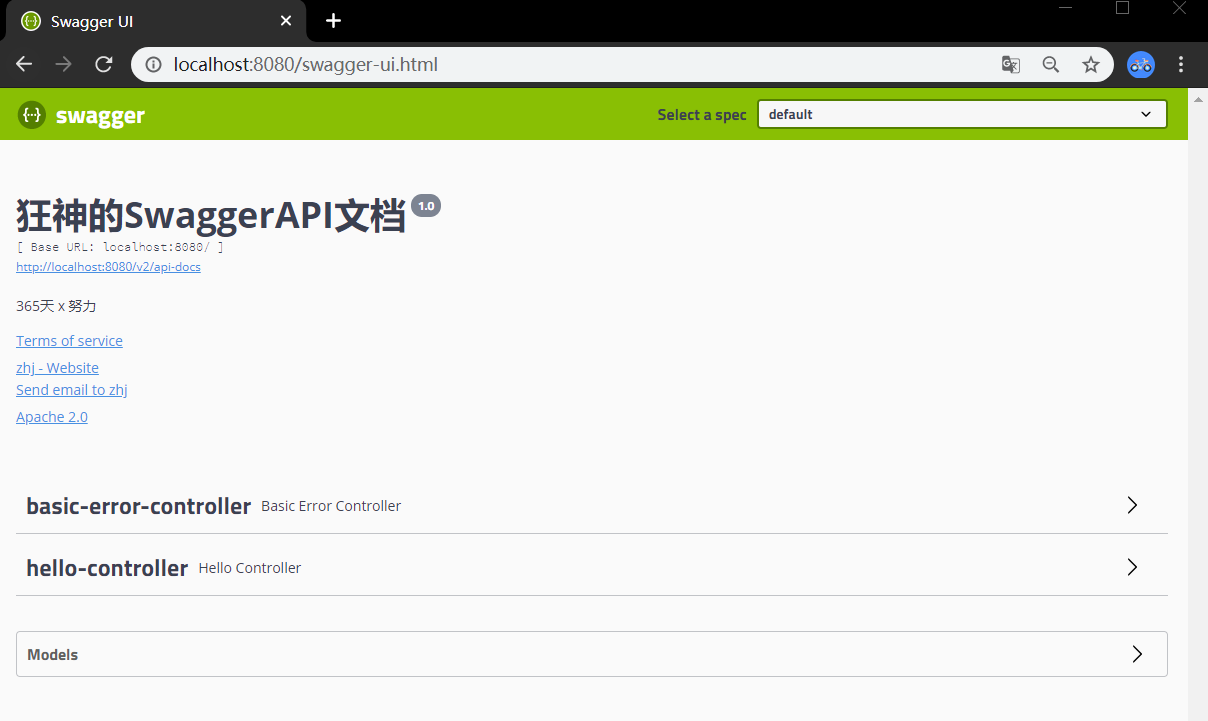
##00源码

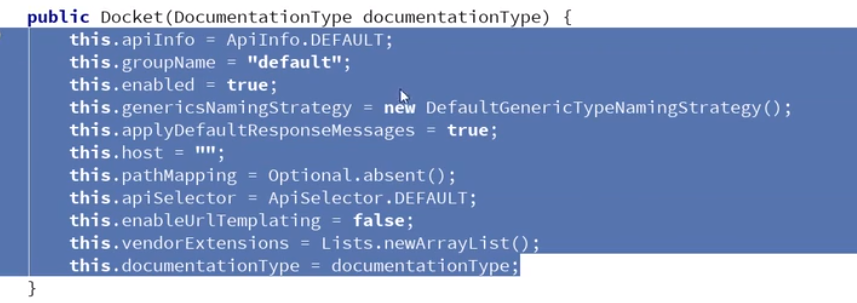
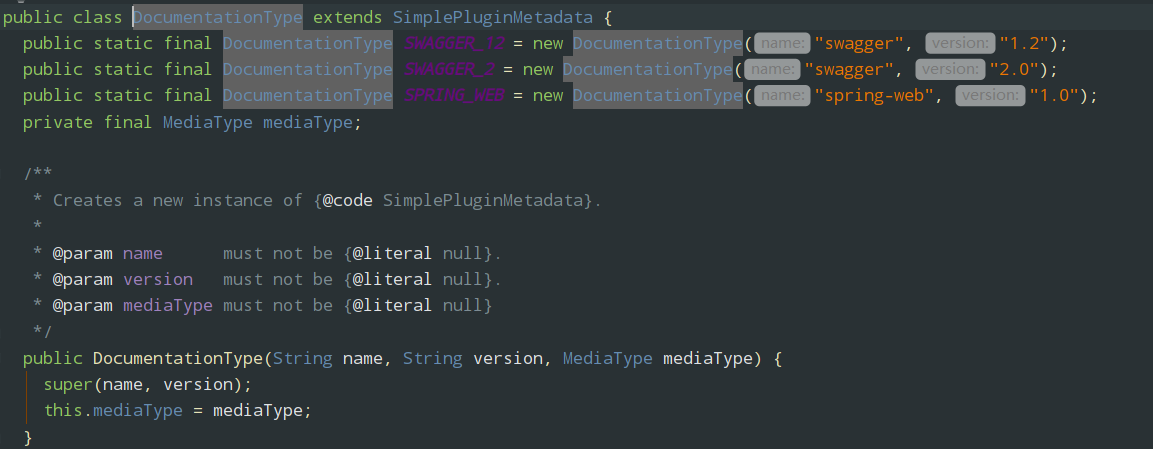
#第五节课
##005Swagger配置扫描接口及开关
Docket.select()
    //配置了Swagger的Docket的bean实例
    @Bean
    public Docket docket(){

        return new Docket(DocumentationType.SWAGGER_2)
                .apiInfo(apiInfo())
                .select()
                .apis(RequestHandlerSelectors.basePackage("com.kuang.Controller"))
                .paths(PathSelectors.ant("/kuang/service"))
                .build();
} //配置了Swagger的Docket的bean实例 public Docket docket(){ return new Docket(DocumentationType.SWAGGER_2) .apiInfo(apiInfo()) .select() .apis(RequestHandlerSelectors.basePackage("com.kuang.Controller")) .paths(PathSelectors.ant("/kuang/service")) .build(); }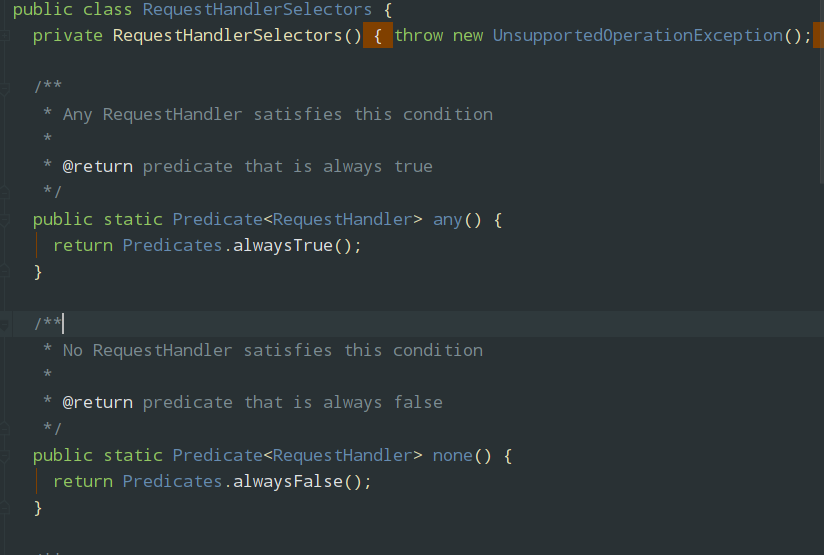
配置是否启动Swagger

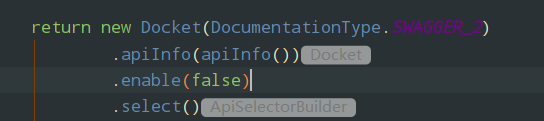
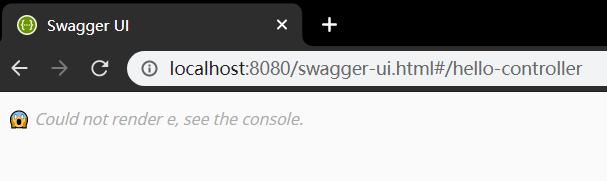
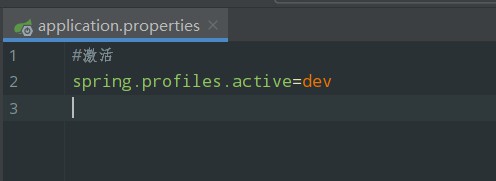
- 判断是不是生产环境 flase = false
- 注入enable(flag)


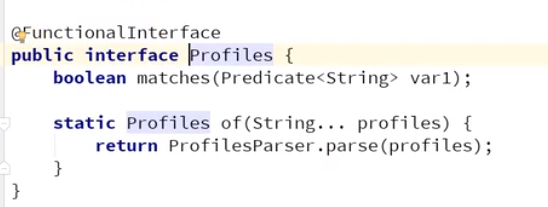
public class SwaggerConfig {

    //配置了Swagger的Docket的bean实例
    @Bean
    public Docket docket(Environment environment){

        //设置要显示的Swagger环境
        Profiles profiles = Profiles.of("dev","test");

        //获取项目的环境:
        //.getActiveProfiles()
        //.getDefaultProfiles()
        //通过acceptsProfiles()监听判断是否在自己设定的环境当中
        boolean flag = environment.acceptsProfiles(profiles);

        return new Docket(DocumentationType.SWAGGER_2)
                .apiInfo(apiInfo())
                .enable(flag)//监听
                .select()
                .apis(RequestHandlerSelectors.basePackage("com.kuang.Controller"))
                //.paths(PathSelectors.ant("/kuang/service"))
                .build();
}public class SwaggerConfig { //配置了Swagger的Docket的bean实例 public Docket docket(Environment environment){ //设置要显示的Swagger环境 Profiles profiles = Profiles.of("dev","test"); //获取项目的环境: //.getActiveProfiles() //.getDefaultProfiles() //通过acceptsProfiles()监听判断是否在自己设定的环境当中 boolean flag = environment.acceptsProfiles(profiles); return new Docket(DocumentationType.SWAGGER_2) .apiInfo(apiInfo()) .enable(flag)//监听 .select() .apis(RequestHandlerSelectors.basePackage("com.kuang.Controller")) //.paths(PathSelectors.ant("/kuang/service")) .build(); }#第六节课
##006配置API文档的分组


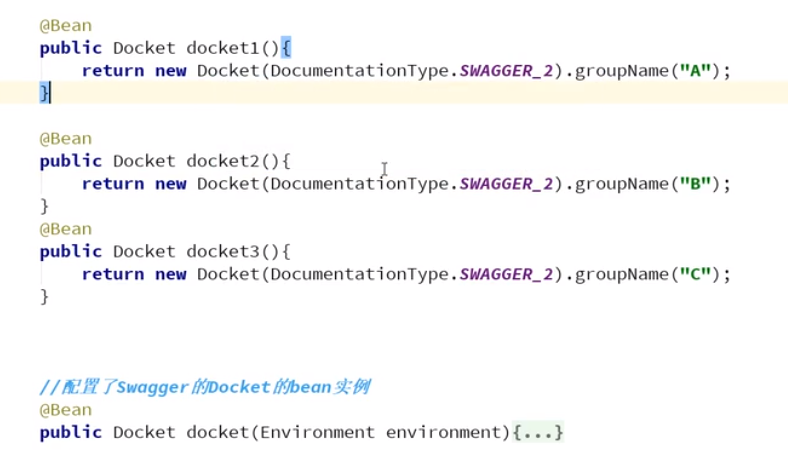
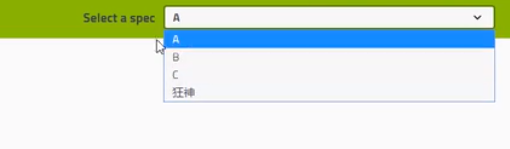
实体类配置:
public class User {

    private String username;
    private String password;

get/set方法public class User { private String username; private String password; get/set方法 //只有我们的接口中,返回值中存在实体类,他就会被扫描到swagger中
@PostMapping("/users")
public User user(){
return new User();
} //只有我们的接口中,返回值中存在实体类,他就会被扫描到swagger中 ("/users") public User user(){ return new User(); }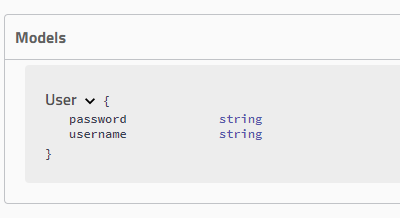
@ApiModel("用户实体类")
public class User {

    @ApiModelProperty("用户名")
    private String username;
    @ApiModelProperty("密码")
    private String password;

get/set方法("用户实体类")public class User { ("用户名") private String username; ("密码") private String password; get/set方法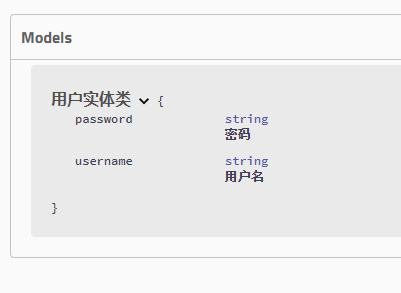
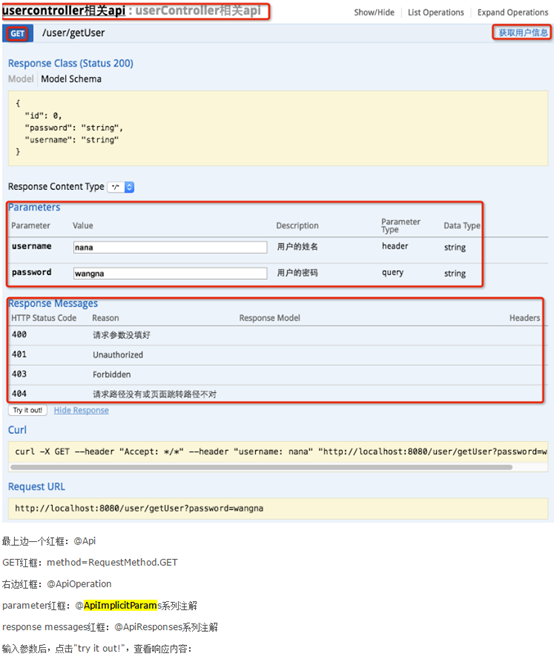
Swagger使用的注解及其说明:
@Api:用在类上,说明该类的作用。
@ApiParam:在要传递的参数上
@ApiOperation:注解来给API增加方法说明。
@ApiImplicitParams : 用在方法上包含一组参数说明。
@ApiImplicitParam:用来注解来给方法入参增加说明。
@ApiResponses:用于表示一组响应
@ApiResponse:用在@ApiResponses中,一般用于表达一个错误的响应信息
l code:数字,例如400
l message:信息,例如"请求参数没填好"
l response:抛出异常的类
@ApiModel:描述一个Model的信息(一般用在请求参数无法使用@ApiImplicitParam注解进行描述的时候)
l @ApiModelProperty:描述一个model的属性
注意:@ApiImplicitParam的参数说明:
paramType:指定参数放在哪个地方 | header:请求参数放置于Request Header,使用@RequestHeader获取 query:请求参数放置于请求地址,使用@RequestParam获取 path:(用于restful接口)-->请求参数的获取:@PathVariable body:(不常用) form(不常用) |
name:参数名 |
|
dataType:参数类型 |
|
required:参数是否必须传 | true | false |
value:说明参数的意思 |
|
defaultValue:参数的默认值 |
|
练习
package com.kuang.Controller;

import com.kuang.entity.User;
import io.swagger.annotations.*;
import org.springframework.stereotype.Controller;
import org.springframework.util.StringUtils;
import org.springframework.web.bind.annotation.*;

/**
 * @program: swagger-demo
 * @description:
 * @author: zhj
 * @create: 2020-04-14 16:47
 */
@Controller
@RequestMapping("/say")
@Api(value = "一个用来测试swagger的Controller")
public class HelloController  {

    @ResponseBody
    @ApiOperation("无参测试类,返回hello")
    @GetMapping(value = "/hello")
    public String hello(){

        return "hello";
    }


    @ResponseBody
    @ApiOperation("实体类User测试类")
    @PostMapping(value = "/postt")
    public User hellouser(User user){

        return user;
    }

    @ResponseBody
    @ApiOperation("post测试类")
    @PostMapping(value = "/posttt")
    public String hellousers(@ApiParam(value = "用户名") String username){

        return "username"+username;
    }

    @ResponseBody
    @GetMapping(value = "/getUserName")
    @ApiOperation(value = "根据用户名编号获取用户姓名",notes = "test:仅1和2正确返回")
    @ApiImplicitParam(paramType = "query",name = "userNumber",value = "用户编号",required = true,dataType = "Integer")
    public String getUserName(@RequestParam Integer userNumber){
        if(userNumber == 1){
            return "张三丰";
        }
        else if(userNumber ==2){
            return "张无忌";
        }else{
            return "未知";
        }
    }


    @ResponseBody
    @GetMapping("/updatePassword")
    @ApiOperation(value = "修改用户密码",notes = "根据用户ID修改密码")
    @ApiImplicitParams({
            @ApiImplicitParam(paramType = "query",name = "userId",value = "用户ID",required = true,dataType = "Integer"),
            @ApiImplicitParam(paramType = "query",name = "password",value = "旧密码",required = true,dataType = "String"),
            @ApiImplicitParam(paramType = "query",name = "newPassword",value = "新密码",required = true,dataType = "String")
    })
    public String updatePassword(@RequestParam(value = "userId")Integer userId,
       @RequestParam(value = "password") String password,
       @RequestParam(value = "newPassword")String newPasswrod){
        if(userId <=0 ||userId >2){
            return "未知的用户";
        }
        if(StringUtils.isEmpty(password) || StringUtils.isEmpty(newPasswrod)){
            return "密码不能为空";
        }
        if(password.equals(newPasswrod)){
            return "新密码不能和旧密码相同";
        }

        return "密码修改成功";
    }

}
x
package com.kuang.Controller;import com.kuang.entity.User;import io.swagger.annotations.*;import org.springframework.stereotype.Controller;import org.springframework.util.StringUtils;import org.springframework.web.bind.annotation.*;/** * @program: swagger-demo * @description: * @author: zhj * @create: 2020-04-14 16:47 */("/say")(value = "一个用来测试swagger的Controller")public class HelloController { ("无参测试类,返回hello") (value = "/hello") public String hello(){ return "hello"; } ("实体类User测试类") (value = "/postt") public User hellouser(User user){ return user; } ("post测试类") (value = "/posttt") public String hellousers((value = "用户名") String username){ return "username"+username; } (value = "/getUserName") (value = "根据用户名编号获取用户姓名",notes = "test:仅1和2正确返回") (paramType = "query",name = "userNumber",value = "用户编号",required = true,dataType = "Integer") public String getUserName( Integer userNumber){ if(userNumber == 1){ return "张三丰"; } else if(userNumber ==2){ return "张无忌"; }else{ return "未知"; } } ("/updatePassword") (value = "修改用户密码",notes = "根据用户ID修改密码") ({ (paramType = "query",name = "userId",value = "用户ID",required = true,dataType = "Integer"), (paramType = "query",name = "password",value = "旧密码",required = true,dataType = "String"), (paramType = "query",name = "newPassword",value = "新密码",required = true,dataType = "String") }) public String updatePassword((value = "userId")Integer userId, (value = "password") String password, (value = "newPassword")String newPasswrod){ if(userId <=0 ||userId >2){ return "未知的用户"; } if(StringUtils.isEmpty(password) || StringUtils.isEmpty(newPasswrod)){ return "密码不能为空"; } if(password.equals(newPasswrod)){ return "新密码不能和旧密码相同"; } return "密码修改成功"; }}两个注意点:
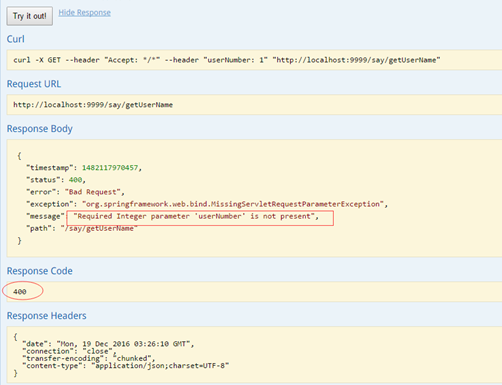
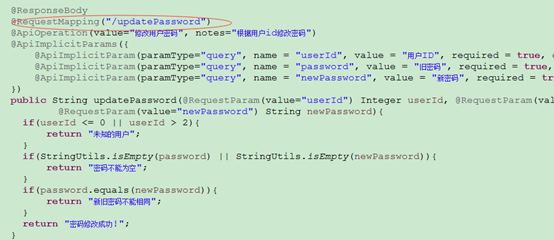
1. paramType会直接影响程序的运行期,如果paramType与方法参数获取使用的注解不一致,会直接影响到参数的接收。
例如:
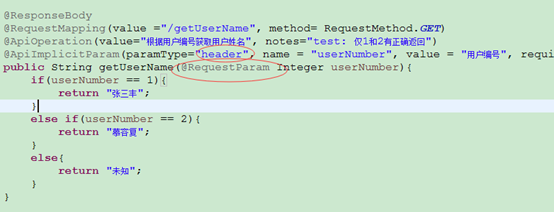
使用Sawgger UI进行测试,接收不到!
2. 还有一个需要注意的地方:
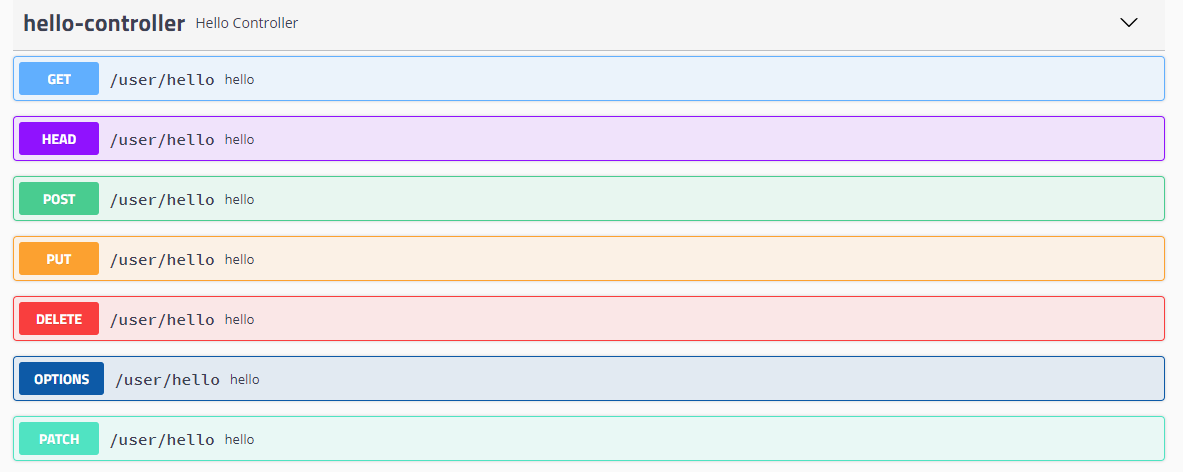
Conntroller中定义的方法必须在@RequestMapper中显示的指定RequestMethod类型,否则SawggerUi会默认为全类型皆可访问, API列表中会生成多条项目。
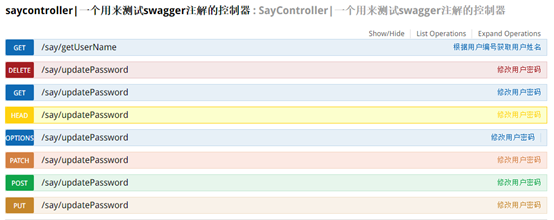
如上图:updatePassword()未指定requestMethod,结果生成了7条API信息。所以如果没有特殊需求,建议根据实际情况加上requestMethod。
接收对象值参的例子
@ApiModel(value="医生对象模型")
public class DemoDoctor{
    @ApiModelProperty(value="id" ,required=true)
    private Integer id;
    @ApiModelProperty(value="医生姓名" ,required=true)
private String name;(value="医生对象模型")public class DemoDoctor{ (value="id" ,required=true) private Integer id; (value="医生姓名" ,required=true) private String name;package com.zhongying.api.controller.app;
import java.util.ArrayList;
import java.util.List;
import javax.servlet.http.HttpServletRequest;
import org.springframework.stereotype.Controller;
import org.springframework.web.bind.annotation.RequestBody;
import org.springframework.web.bind.annotation.RequestMapping;
import org.springframework.web.bind.annotation.RequestMethod;
import org.springframework.web.bind.annotation.RequestParam;
import org.springframework.web.bind.annotation.ResponseBody;
import com.github.pagehelper.PageInfo;
import com.zhongying.api.exception.HttpStatus401Exception;
import com.zhongying.api.model.base.DemoDoctor;
import io.swagger.annotations.Api;
import io.swagger.annotations.ApiImplicitParam;
import io.swagger.annotations.ApiImplicitParams;
import io.swagger.annotations.ApiOperation;
/**
* 医生类(模拟)
* @author SUNF
*/
@RequestMapping("/api/v1")
@Controller
@Api(value = "DoctorTestController-医生信息接口模拟")
public class DoctorTestController {
/**
* 添加医生
*
* 在使用对象封装参数进行传参时,需要在该对象添加注解,将其注册到swagger中
* @link com.zhongying.api.model.base.DemoDoctor
*
* 注意: 在后台采用对象接收参数时,Swagger自带的工具采用的是JSON传参,
* 测试时需要在参数上加入@RequestBody,正常运行采用form或URL提交时候请删除。
*
* @param doctor 医生类对象
* @return
* @throws Exception
*/
@ResponseBody
@RequestMapping(value="/doctor", method= RequestMethod.POST )
@ApiOperation(value="添加医生信息", notes="")
public String addDoctor(@RequestBody DemoDoctor doctor) throws Exception{
if(null == doctor || doctor.getId() == null){
throw new HttpStatus401Exception("添加医生失败","DT3388","未知原因","请联系管理员");
}
try {
System.out.println("成功----------->"+doctor.getName());
} catch (Exception e) {
throw new HttpStatus401Exception("添加医生失败","DT3388","未知原因","请联系管理员");
}
return doctor.getId().toString();
}
/**
* 删除医生
* @param doctorId 医生ID
* @return
*/
@ResponseBody
@RequestMapping(value="/doctor/{doctorId}", method= RequestMethod.DELETE )
@ApiOperation(value="删除医生信息", notes="")
@ApiImplicitParam(paramType="query", name = "doctorId", value = "医生ID", required = true, dataType = "Integer")
public String deleteDoctor(@RequestParam Integer doctorId){
if(doctorId > 2){
return "删除失败";
}
return "删除成功";
}
/**
* 修改医生信息
* @param doctorId 医生ID
* @param doctor 医生信息
* @return
* @throws HttpStatus401Exception
*/
@ResponseBody
@RequestMapping(value="/doctor/{doctorId}", method= RequestMethod.POST )
@ApiOperation(value="修改医生信息", notes="")
@ApiImplicitParam(paramType="query", name = "doctorId", value = "医生ID", required = true, dataType = "Integer")
public String updateDoctor(@RequestParam Integer doctorId, @RequestBody DemoDoctor doctor) throws HttpStatus401Exception{
if(null == doctorId || null == doctor){
throw new HttpStatus401Exception("修改医生信息失败","DT3391","id不能为空","请修改");
}
if(doctorId > 5 ){
throw new HttpStatus401Exception("医生不存在","DT3392","错误的ID","请更换ID");
}
System.out.println(doctorId);
System.out.println(doctor);
return "修改成功";
}
/**
* 获取医生详细信息
* @param doctorId 医生ID
* @return
* @throws HttpStatus401Exception
*/
@ResponseBody
@RequestMapping(value="/doctor/{doctorId}", method= RequestMethod.GET )
@ApiOperation(value="获取医生详细信息", notes="仅返回姓名..")
@ApiImplicitParam(paramType="query", name = "doctorId", value = "医生ID", required = true, dataType = "Integer")
public DemoDoctor getDoctorDetail(@RequestParam Integer doctorId) throws HttpStatus401Exception{
System.out.println(doctorId);
if(null == doctorId){
throw new HttpStatus401Exception("查看医生信息失败","DT3390","未知原因","请联系管理员");
}
if(doctorId > 3){
throw new HttpStatus401Exception("医生不存在","DT3392","错误的ID","请更换ID");
}
DemoDoctor doctor = new DemoDoctor();
doctor.setId(1);
doctor.setName("测试员");
return doctor;
}
/**
* 获取医生列表
* @param pageIndex 当前页数
* @param pageSize 每页记录数
* @param request
* @return
* @throws HttpStatus401Exception
*/
@ResponseBody
@RequestMapping(value="/doctor", method= RequestMethod.GET )
@ApiOperation(value="获取医生列表", notes="目前一次全部取,不分页")
@ApiImplicitParams({
@ApiImplicitParam(paramType="header", name = "token", value = "token", required = true, dataType = "String"),
@ApiImplicitParam(paramType="query", name = "pageIndex", value = "当前页数", required = false, dataType = "String"),
@ApiImplicitParam(paramType="query", name = "pageSize", value = "每页记录数", required = true, dataType = "String"),
})
public PageInfo<DemoDoctor> getDoctorList(@RequestParam(value = "pageIndex", required = false, defaultValue = "1") Integer pageIndex,
@RequestParam(value = "pageSize", required = false) Integer pageSize,
HttpServletRequest request) throws HttpStatus401Exception{
String token = request.getHeader("token");
if(null == token){
throw new HttpStatus401Exception("没有权限","SS8888","没有权限","请查看操作文档");
}
if(null == pageSize){
throw new HttpStatus401Exception("每页记录数不粗安在","DT3399","不存在pageSize","请查看操作文档");
}
DemoDoctor doctor1 = new DemoDoctor();
doctor1.setId(1);
doctor1.setName("测试员1");
DemoDoctor doctor2 = new DemoDoctor();
doctor2.setId(2);
doctor2.setName("测试员2");
List<DemoDoctor> doctorList = new ArrayList<DemoDoctor>();
doctorList.add(doctor1);
doctorList.add(doctor2);
return new PageInfo<DemoDoctor>(doctorList);
}
package com.zhongying.api.controller.app; import java.util.ArrayList;import java.util.List; import javax.servlet.http.HttpServletRequest; import org.springframework.stereotype.Controller;import org.springframework.web.bind.annotation.RequestBody;import org.springframework.web.bind.annotation.RequestMapping;import org.springframework.web.bind.annotation.RequestMethod;import org.springframework.web.bind.annotation.RequestParam;import org.springframework.web.bind.annotation.ResponseBody; import com.github.pagehelper.PageInfo;import com.zhongying.api.exception.HttpStatus401Exception;import com.zhongying.api.model.base.DemoDoctor; import io.swagger.annotations.Api;import io.swagger.annotations.ApiImplicitParam;import io.swagger.annotations.ApiImplicitParams;import io.swagger.annotations.ApiOperation; /** * 医生类(模拟) * @author SUNF */("/api/v1")(value = "DoctorTestController-医生信息接口模拟")public class DoctorTestController { /** * 添加医生 * * 在使用对象封装参数进行传参时,需要在该对象添加注解,将其注册到swagger中 * @link com.zhongying.api.model.base.DemoDoctor * * 注意: 在后台采用对象接收参数时,Swagger自带的工具采用的是JSON传参, * 测试时需要在参数上加入@RequestBody,正常运行采用form或URL提交时候请删除。 * * @param doctor 医生类对象 * @return * @throws Exception */ (value="/doctor", method= RequestMethod.POST ) (value="添加医生信息", notes="") public String addDoctor( DemoDoctor doctor) throws Exception{ if(null == doctor || doctor.getId() == null){ throw new HttpStatus401Exception("添加医生失败","DT3388","未知原因","请联系管理员"); } try { System.out.println("成功----------->"+doctor.getName()); } catch (Exception e) { throw new HttpStatus401Exception("添加医生失败","DT3388","未知原因","请联系管理员"); } return doctor.getId().toString(); } /** * 删除医生 * @param doctorId 医生ID * @return */ (value="/doctor/{doctorId}", method= RequestMethod.DELETE ) (value="删除医生信息", notes="") (paramType="query", name = "doctorId", value = "医生ID", required = true, dataType = "Integer") public String deleteDoctor( Integer doctorId){ if(doctorId > 2){ return "删除失败"; } return "删除成功"; } /** * 修改医生信息 * @param doctorId 医生ID * @param doctor 医生信息 * @return * @throws HttpStatus401Exception */ (value="/doctor/{doctorId}", method= RequestMethod.POST ) (value="修改医生信息", notes="") (paramType="query", name = "doctorId", value = "医生ID", required = true, dataType = "Integer") public String updateDoctor( Integer doctorId, DemoDoctor doctor) throws HttpStatus401Exception{ if(null == doctorId || null == doctor){ throw new HttpStatus401Exception("修改医生信息失败","DT3391","id不能为空","请修改"); } if(doctorId > 5 ){ throw new HttpStatus401Exception("医生不存在","DT3392","错误的ID","请更换ID"); } System.out.println(doctorId); System.out.println(doctor); return "修改成功"; } /** * 获取医生详细信息 * @param doctorId 医生ID * @return * @throws HttpStatus401Exception */ (value="/doctor/{doctorId}", method= RequestMethod.GET ) (value="获取医生详细信息", notes="仅返回姓名..") (paramType="query", name = "doctorId", value = "医生ID", required = true, dataType = "Integer") public DemoDoctor getDoctorDetail( Integer doctorId) throws HttpStatus401Exception{ System.out.println(doctorId); if(null == doctorId){ throw new HttpStatus401Exception("查看医生信息失败","DT3390","未知原因","请联系管理员"); } if(doctorId > 3){ throw new HttpStatus401Exception("医生不存在","DT3392","错误的ID","请更换ID"); } DemoDoctor doctor = new DemoDoctor(); doctor.setId(1); doctor.setName("测试员"); return doctor; } /** * 获取医生列表 * @param pageIndex 当前页数 * @param pageSize 每页记录数 * @param request * @return * @throws HttpStatus401Exception */ (value="/doctor", method= RequestMethod.GET ) (value="获取医生列表", notes="目前一次全部取,不分页") ({ (paramType="header", name = "token", value = "token", required = true, dataType = "String"), (paramType="query", name = "pageIndex", value = "当前页数", required = false, dataType = "String"), (paramType="query", name = "pageSize", value = "每页记录数", required = true, dataType = "String"), }) public PageInfo<DemoDoctor> getDoctorList((value = "pageIndex", required = false, defaultValue = "1") Integer pageIndex, (value = "pageSize", required = false) Integer pageSize, HttpServletRequest request) throws HttpStatus401Exception{ String token = request.getHeader("token"); if(null == token){ throw new HttpStatus401Exception("没有权限","SS8888","没有权限","请查看操作文档"); } if(null == pageSize){ throw new HttpStatus401Exception("每页记录数不粗安在","DT3399","不存在pageSize","请查看操作文档"); } DemoDoctor doctor1 = new DemoDoctor(); doctor1.setId(1); doctor1.setName("测试员1"); DemoDoctor doctor2 = new DemoDoctor(); doctor2.setId(2); doctor2.setName("测试员2"); List<DemoDoctor> doctorList = new ArrayList<DemoDoctor>(); doctorList.add(doctor1); doctorList.add(doctor2); return new PageInfo<DemoDoctor>(doctorList); } 增加header:
现在很多请求需要在header增加额外参数,可以参考getDoctorList()的做法,使用request接收。
总结 :
- 我们可以通过Swagger给一些比较难理解的属性和接口,增加注释信息
- 接口文档实时更新
- 可以在线测试

 浙公网安备 33010602011771号