
图布局
图布局是指节点的排布方式,根据图的数据结构不同,
布局可以分为两类:一般图布局、树图布局。
G6为这两类图都内置了一些常用的图布局算法。使用内置的图布局可以完成布局的参数、方法、数据的切换等。G6还提供了一般图布局的Web-Worker机制,在大规模数据布局中使用该机制可以使布局计算不阻塞页面。
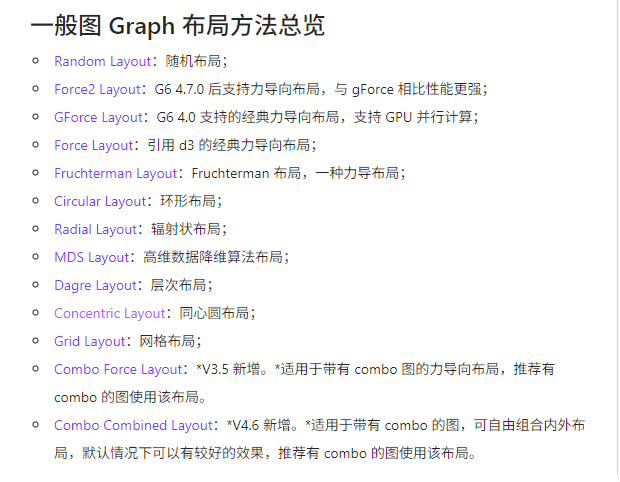
文档路径-教程-核心概念-图布局https://g6-v4.antv.vision/manual/middle/layout/graph-layout
const graph = new G6.Graph({
     // ...
     // 其他配置项
    layout: {
        // Object,可选,布局的方法及其配置项,默认为 random 布局。
        type: 'force',
        preventOverlap: true,
        nodeSize: 30,
        // workerEnabled: true, // 是否启用 webworker
       // gpuEnabled: true // 是否使用 gpu 版本的布局算法,G6 4.0 支持,目前仅支持 gForce 及 fruchterman
       // ...
       // 其他配置
}, });
介绍下web worker
mdn地址:https://developer.mozilla.org/zh-CN/docs/Web/API/Web_Workers_API/Using_web_workers
Web Worker为Web内容在后台线程中进行脚本提供了一种简单的方法。线程可以执行任务而不干扰用户界面。
它们还可以使用XMLHttpRequest执行I/O。一旦创建,一个worker可以将消息发送到创建它的Javascript代码,通过将消息发布到该代码指定的时间处理器


/**主线程 */
const worker = new Worker('worker.js'); //创建Web Worker
worker.postMessage('Hello World!'); //主线程向Worker线程发送消息
worker.onmessage = function(event){
  console.log("message from worker:",event.data)
}
//错误处理
worker.onerror = function(event){
  console.log("error from worker:",event.message)
}
//关闭Worker
worker.terminate()

/**Worker线程(worker.js) */
//接收主线程的消息
worker.onmessage = function(event){
  console.log("message from main:",event.data)
  doSomething()
}
function doSomething(){
  //执行任务
  worker.postMessage('Work done!')
}
// 这里的worker.onmessage 也可以换成self.addEventListener
// self代表子线程自身,即子线程的全局对象
self.addEventListener('message', function(e){
  self.postMessage('You said: ' + e.data)
}, false)
插件Plugins
// 实例化 Grid 插件
const grid = new G6.Grid();
const minimap = new G6.Minimap();
const graph = new G6.Graph({
//... 其他配置项
plugins: [grid, minimap],
// 配置 Grid 插件和 Minimap 插件
});
Legend 用于说明图中不同类型的节点和边所代表的含义并可以通过与图例的交互做简单的高亮和过滤
SnapLine 是G6的对齐线插件 实例化时可以通过配置项调整SnapLine的样式和功能
Grid Grid插件在画布上绘制网格
Minimap Minimap是用于快速预览和探索图的工具
Image Minimap
Edge Bundling 在关系复杂、繁多的大规模图上,通过边绑定可以降低视觉复杂度
Menu 用于配置节点上的右键菜单
ToolBar 用在在节点和边上显示一些辅助信息
TimeBar 配合播放、快进、后退等控制按钮组使用
Graph常用api
graph.data(data) //设置图初始化数据
graph.save() //获取图数据
graph.read(data) //接收数据,并进行渲染
graph.changeData(data,stack) //更新数据源,根据新的数据重新渲染视图
stack 参数操作是否入 undo & redo栈
graph.render() //根据提供的数据渲染视图
graph.refresh() //当源数据中现有节点/边/Combo的数据项发生配置的变更时,根据新数据刷新视图
graph.getContainer() //获取Graph的DOM容器
graph.getGroup() //获取Graph根图形分组
graph.getWidth() //获取graph当前的宽度
graph.getHeight() //获取graph当前的高度
graph.getZoom() //获取当前视口的缩放比例
graph.zoom(ratio, center, animate, animateCfg) //改变视口的缩放比例,在当前画布比例下缩放,是相对比例
graph.zoomTo(toRatio, center, animate, animateCfg) //缩放视窗窗口到一个固定比例
graph.changeSize(width, height) //改变画布大小
graph.fitView(padding, rules, animate, animateCfg) //让画布内容适应视口
graph.fitCenter(animate, animateCfg) //平移图到中心将对齐到画布中心,但不缩放。优先级低于fitView
graph.focusItem(item, animate, animateCfg) //移动图,使得item对齐到视口中心,该方法用于做搜索后的缓存动画
graph.addItem(type, model, stack) //新增元素(节点和边)
graph.removeItem(item,stack) //删除元素,当item为group ID时候,则删除分组
graph.updateItem(item, model, stack) //更新元素
graph.refreshItem(item) //刷新指定元素
graph.refreshPositions() //当节点位置发生变化时,刷新所有节点位置,并重新计算边的位置
graph.updateCombos() //更新所有combos
graph.updateCombo(combo) //进攻性combo及其所有祖先combo
graph.updateComboTree(item, parentId) //更新Combo结构,例如移动子数等
graph.node(nodeFn) //设置各个节点样式及其他配置,以及在各个状态下节点的KeyShape的样式,该方法必须在render之前调用,否则不起作用 //效率低不建议使用
graph.edge(edgeFn) //设置各个边样式及其他配置,以及在各个状态节点的KeyShape的样式,该方法必须在render之前调用,否则不起作用 //效率低不建议使用
graph.combo(comboFn) //设置各个combo样式及其他配置,以及在各个状态节点的KeyShape的样式,该方法必须在render之前调用,否则不起作用 //效率低不建议使用
graph.showItem(item,stack) //显示指定的元素。若item为节点,则相关边也会随之显示
graph.hideItem(item,stack) //隐藏指定的元素。若item为节点,则相关边也会随之隐藏
graph.setItemState(item,state,value) //设置元素状态,支持单个状态多值的情况
graph.clearItemStates(item, states) //清除元素状态,可以一次性清除多个状态
graph.on(eventName, handler) //为图绑定事件监听
graph.emit(eventName, params) //手动触发某个事件
graph.off(eventName, handler) // 为图解除指定的事件监听
graph.layout() //重新以当前配置的属性进行一次布局
graph.updateLayout(cfg) //更新布局配置项
graph.destroyLayout() //销毁布局方法,在此之后调用changeData等方法不会按照原有布局算法进行布局
graph.addBehaviors(behaviors,modes) //新增行为,将单个或多个行为添加到单个或多个模式中
graph.removeBehaviors(behaviors, modes) //移除行为,将单个或多个行为从单个或多个模式中去除
graph.updateBehavior(behavior, mode) //更新某个模式下behavior的参数
graph.getPointByClient(clientX,clientY) //将屏幕/页面坐标转换为渲染坐标
graph.getClientByPoint(x,y) //将渲染坐标转换为屏幕/页面坐标
graph.getPointByCanvas(canvasX,canvasY) //将canvas画布转换为渲染坐标
graph.getCanvasByPoint(x,y) //将渲染坐标转换为Canvas画布坐标
graph.getGraphCenterPoint() //获取图内容中心绘制坐标
graph.getViewPortCenterPoint() //获取视口中心绘制坐标
graph.setTextWaterMarker(texts,config) //为画布添加文字水印
graph.setImageWaterMarker(imgURL,config) //为画布添加图片水印
graph.downloadFullImage(name,type,imageConfig) //将画布上的元素导出为图片(整个画布)
graph.downloadImage(name, type, backgroundColor) //将画布上的元素导出为图片。(当前视口)
graph.toFullDataURL(callback, type, imageConfig) //将画布上元素生成为图片的 URL。
graph.toDataURL(type, backgroundColor) //将画布上元素生成为图片的 URL。
graph.clear() //清除画布元素,该方法一般用于清空数据源,重新render的场景
graph.destroy() //销毁画布

 浙公网安备 33010602011771号