
数据分析之描述性统计
1 导入数据
import pandas as pd
import numpy as np
import matplotlib.pyplot as plt
import seaborn as sns

iris = sns.load_dataset('iris')
<class 'pandas.core.frame.DataFrame'>
RangeIndex: 150 entries, 0 to 149
Data columns (total 5 columns):
 #   Column        Non-Null Count  Dtype
---  ------        --------------  -----
 0   sepal_length  150 non-null    float64
 1   sepal_width   150 non-null    float64
 2   petal_length  150 non-null    float64
 3   petal_width   150 non-null    float64
 4   species       150 non-null    object
dtypes: float64(4), object(1)
memory usage: 6.0+ KB
2 查新数据概况
2.1 查看总体统计信息
# 查看数据基本信息
iris.info()

# 查看前几行
iris.head()

# 查看后几行
iris.tail()

# 查看连续变量数据的统计特征,
iris.describe()

# 查看分类变量的统计特征
iris.species.value_counts()
<class 'pandas.core.frame.DataFrame'>
RangeIndex: 150 entries, 0 to 149
Data columns (total 5 columns):
 #   Column        Non-Null Count  Dtype
---  ------        --------------  -----
 0   sepal_length  150 non-null    float64
 1   sepal_width   150 non-null    float64
 2   petal_length  150 non-null    float64
 3   petal_width   150 non-null    float64
 4   species       150 non-null    object
dtypes: float64(4), object(1)
memory usage: 6.0+ KB


setosa        50
versicolor    50
virginica     50
Name: species, dtype: int64
# 计算各变量的方差(variance)
iris.var()

# 考察各变量之间的相关系数矩阵
iris.corr()
| sepal_length | sepal_width | petal_length | petal_width | |
|---|---|---|---|---|
| sepal_length | 1.000000 | -0.117570 | 0.871754 | 0.817941 |
| sepal_width | -0.117570 | 1.000000 | -0.428440 | -0.366126 |
| petal_length | 0.871754 | -0.428440 | 1.000000 | 0.962865 |
| petal_width | 0.817941 | -0.366126 | 0.962865 | 1.000000 |
结果显示,花萼宽度(sepal_width)与其他三个变量花萼长度(sepal_length)、花瓣长度(petal_length)、花瓣宽度(petal_width)均为负相关,似乎有些奇怪。但这可能是因为样本中混杂了三种不同的鸢尾花品种。为此,将iris数据框按照变量species的取值进行分组。
2.2 查看分组统计信息
iris_grouped = iris.groupby('species')

# 查看相关系数
iris_grouped.corr()

# 显示所有列
pd.set_option("display.max_columns", None)

# 查看所有分组的统计指标
iris_grouped.describe()

# 查看petal_length变量的统计指标
iris_grouped.petal_length.describe()
| sepal_length | sepal_width | petal_length | petal_width | ||
|---|---|---|---|---|---|
| species | |||||
| setosa | sepal_length | 1.000000 | 0.742547 | 0.267176 | 0.278098 |
| sepal_width | 0.742547 | 1.000000 | 0.177700 | 0.232752 | |
| petal_length | 0.267176 | 0.177700 | 1.000000 | 0.331630 | |
| petal_width | 0.278098 | 0.232752 | 0.331630 | 1.000000 | |
| versicolor | sepal_length | 1.000000 | 0.525911 | 0.754049 | 0.546461 |
| sepal_width | 0.525911 | 1.000000 | 0.560522 | 0.663999 | |
| petal_length | 0.754049 | 0.560522 | 1.000000 | 0.786668 | |
| petal_width | 0.546461 | 0.663999 | 0.786668 | 1.000000 | |
| virginica | sepal_length | 1.000000 | 0.457228 | 0.864225 | 0.281108 |
| sepal_width | 0.457228 | 1.000000 | 0.401045 | 0.537728 | |
| petal_length | 0.864225 | 0.401045 | 1.000000 | 0.322108 | |
| petal_width | 0.281108 | 0.537728 | 0.322108 | 1.000000 |
结果显示,在控制了鸢尾花品种之后,所有变量之间的相关系数均为正数。对于此分组数据,使用describe()方法,可得到每个品种的统计指标。
# 查看所有变量的分组平均值
iris_grouped.mean()

# 计算所有变量的分组平均值与分组标准差,使用agg()方差(表示aggregate,即合计)
iris_grouped.agg(['mean', 'median', 'std'])

# 计算不同变量的统计值
iris_grouped.agg({'sepal_length': 'mean', 'sepal_width': 'mean', 'petal_length': 'std', 'petal_width': 'std'})

# 自定义四分位距指标
def iqr(x):
    return x.quantile(0.75) - x.quantile(0.25)
iris_grouped.agg(iqr)
| sepal_length | sepal_width | petal_length | petal_width | |||||||||
|---|---|---|---|---|---|---|---|---|---|---|---|---|
| mean | std | median | mean | std | median | mean | std | median | mean | std | median | |
| species | ||||||||||||
| setosa | 5.006 | 0.352490 | 5.0 | 3.428 | 0.379064 | 3.4 | 1.462 | 0.173664 | 1.50 | 0.246 | 0.105386 | 0.2 |
| versicolor | 5.936 | 0.516171 | 5.9 | 2.770 | 0.313798 | 2.8 | 4.260 | 0.469911 | 4.35 | 1.326 | 0.197753 | 1.3 |
| virginica | 6.588 | 0.635880 | 6.5 | 2.974 | 0.322497 | 3.0 | 5.552 | 0.551895 | 5.55 | 2.026 | 0.274650 | 2.0 |
# 对原始数据进行分组标准化,使得每组数据的均值均为0而标准差为1
def zscore(x):
    return (x-x.mean()) / x.std()

transformed = iris_grouped.transform(zscore)
transformed.head(3)

# 对变换后的数据框transformed,考察期均值与标准差
transformed.groupby(iris.species).agg(['mean', 'std'])
| sepal_length | sepal_width | petal_length | petal_width | |||||
|---|---|---|---|---|---|---|---|---|
| mean | std | mean | std | mean | std | mean | std | |
| species | ||||||||
| setosa | 1.872044e-15 | 1.0 | -2.167155e-15 | 1.0 | -1.159073e-15 | 1.0 | 9.192647e-16 | 1.0 |
| versicolor | 7.882583e-17 | 1.0 | -1.513234e-15 | 1.0 | 4.640732e-16 | 1.0 | 8.204548e-16 | 1.0 |
| virginica | 2.766676e-15 | 1.0 | 7.413514e-16 | 1.0 | 6.283862e-16 | 1.0 | 6.639134e-16 | 1.0 |
3 直观展示
画图的库主要有:Matplotlib与seaborn,另外pandas自带的也有画图工具,下面结合使用:
3.1 使用pandas的hist()方法画直方图
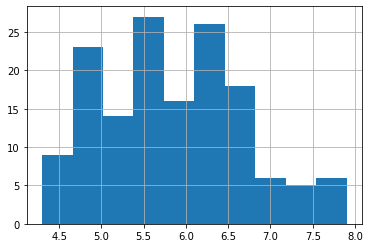
# 查看sepal_length的分布情况,即查看直方图
iris.sepal_length.hist()  #默认分为10组
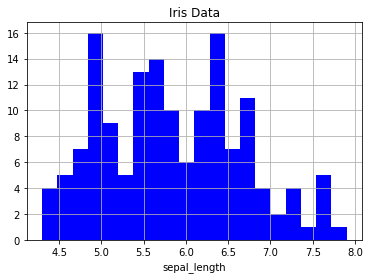
# 直方图,将数据分为20组,使用蓝色画图,并添加标签与标题
iris.sepal_length.hist(bins=20, color='b')
plt.xlabel('sepal_length')
plt.title('Iris Data')
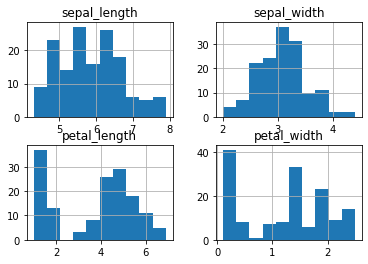
# 画所有变量的直方图
iris.hist()
3.2 核密度图
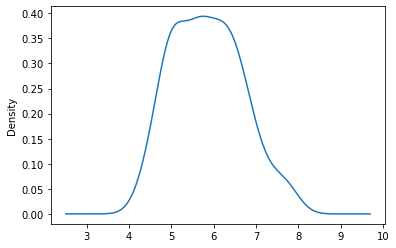
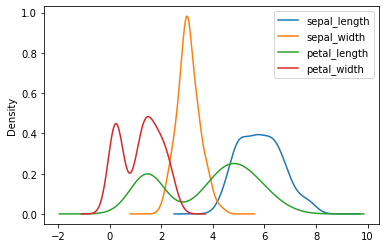
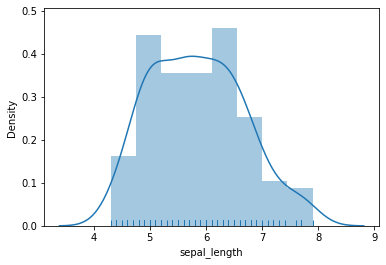
直方图估计其概率密度分布的密度函数(density function),所得结果既不光滑也不连续,因而使用核密度图进行估计。
iris.sepal_length.plot.density()
# 画所有变量的和密度图
iris.plot.density()
# 每个变量画在不同的图中
iris.plot.density(subplots=True)
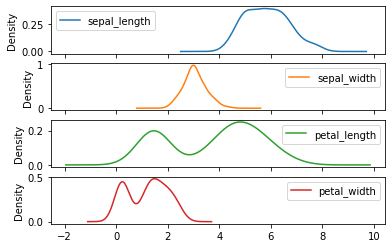
如图所示,花萼长度(sepal_length)与宽度(sepal_width)的核密度为单峰分布,而花瓣长度(petal_length)与宽度(petal_width)的核密度图则呈现双峰分布。
# 同时画sepal_length的直方图与核密度图
sns.distplot(iris.sepal_length, rug=True)
3.3 箱型图
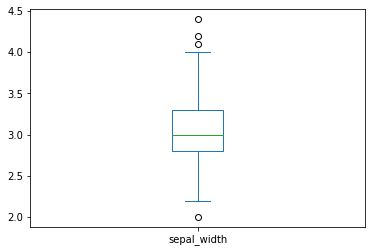
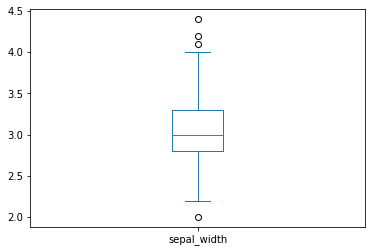
箱型图主要用于查看数据的异常值分布
箱体的上边界为四分之三分位数(upper quartile),下边界为四分之一分位数(lower quartile),而箱体中部的横线为中位数(median)。箱体上方的横线为“上边缘”(upper hinge),其到箱体上边界(upper quartile)的距离为箱体高度的1.5倍;而箱体下方的横线为“下边缘”(lower hinger),其到箱体下边界(lower quartile)的距离也是箱体高度的1.5倍。所有上边缘与下边缘之外的观测值均可视为“极端值”或“离群值”(outliers),在图中以空心小圆点表示。箱型图可以非常简洁地概括出一个变量的分布特征。
iris.sepal_width.plot.box()
# 画所有变量的箱型图
iris.plot.box()
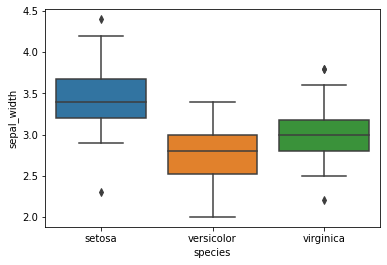
# 由于四个特征变量的取值分布与波动幅度不尽相同,因此同时画三个不同品种(species)的鸢尾花的花萼宽度(sepal_width)的箱型图,这需要使用seaborn库
sns.boxplot(x='species', y='sepal_width', data=iris)
3.4 散点图
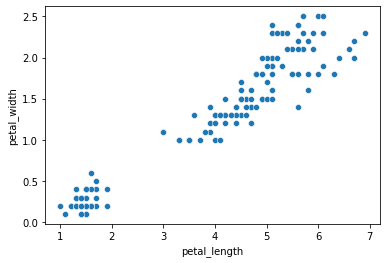
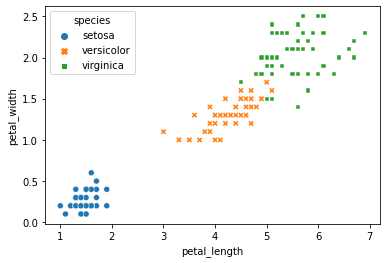
如果我们更关心变量之间的关系,而两个变量之间的散点图(scatter plot)是常用的画图工具。可用seaborn的scatterplot()函数画散点图。
sns.scatterplot(x='petal_length', y='petal_width', data=iris)
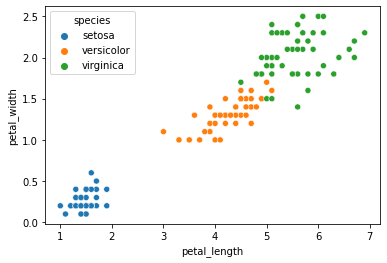
# 用不同的颜色表示不同的鸢尾花品种
sns.scatterplot(x='petal_length', y='petal_width', data=iris, hue='species')
# 以不同颜色和不同图标区分鸢尾花品种
sns.scatterplot(x='petal_length', y='petal_width', data=iris, style='species', hue='species')
3.5 综合画图
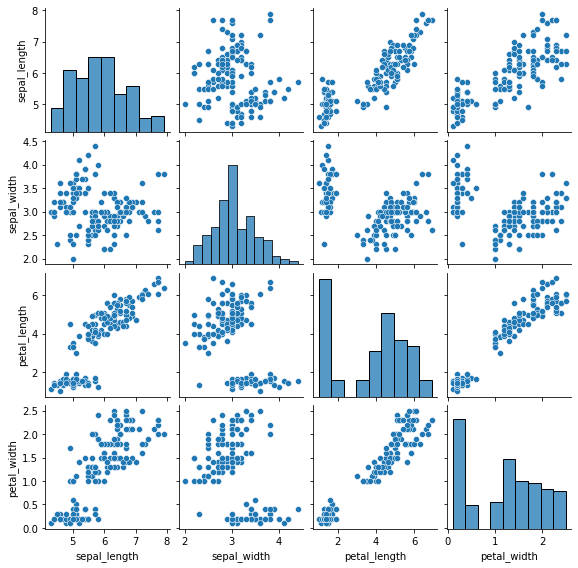
sns.pairplot(data=iris, height=2)
# 画部分变量的散点图,并在主对角线上画核密度图
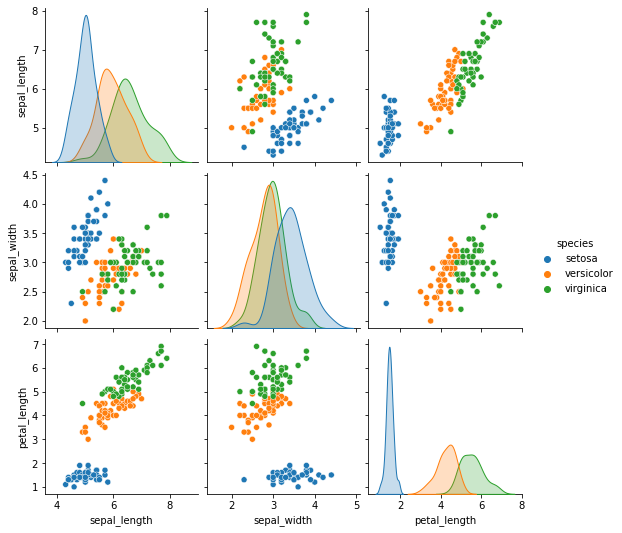
sns.pairplot(iris, diag_kind='kde', vars=['sepal_length', 'sepal_width', 'petal_length'], hue='species')

 浙公网安备 33010602011771号