

2024/05/30
学习时长:3小时
代码行数:未统计
博客数量:1篇
今天主要是完成计网的实验一:实验一vlan的创建与划分
Switch>enable
Switch#config
Configuring from terminal, memory, or network [terminal]?
Enter configuration commands, one per line. End with CNTL/Z.
Switch(config)#hostname S1
创建虚拟局域网VLAN11和VLAN22:
S1(config)#vlan 22
S1(config-vlan)#name T22
S1(config-vlan)#exit
S1(config)#vlan 11
S1(config-vlan)#name T11
S1(config-vlan)#exit
S1(config)#exit
验证测试:验证虚拟局域网VLAN11和VLAN22已创建成功
S1#show vlan
VLAN Name Status Ports
---- -------------------------------- --------- -------------------------------
1 default active Fa0/1, Fa0/2, Fa0/3, Fa0/4
Fa0/5, Fa0/6, Fa0/7, Fa0/8
Fa0/9, Fa0/10, Fa0/11, Fa0/12
Fa0/13, Fa0/14, Fa0/15, Fa0/16
Fa0/17, Fa0/18, Fa0/19, Fa0/20
Fa0/21, Fa0/22, Fa0/23, Fa0/24
Gig0/1, Gig0/2
11 T11 active
22 T22 active
1002 fddi-default active
1003 token-ring-default active
1004 fddinet-default active
1005 trnet-default active
VLAN Type SAID MTU Parent RingNo BridgeNo Stp BrdgMode Trans1 Trans2
---- ----- ---------- ----- ------ ------ -------- ---- -------- ------ ------
1 enet 100001 1500 - - - - - 0 0
11 enet 100011 1500 - - - - - 0 0
22 enet 100022 1500 - - - - - 0 0
--More—
为局域网VLAN11和VLAN22分配端口
S1#config
Configuring from terminal, memory, or network [terminal]?
Enter configuration commands, one per line. End with CNTL/Z.
S1(config)#interface vlan 11
S1(config-if)#interface fastethernet 0/9
S1(config-if)#switchport access vlan 11
S1(config-if)#exit
S1(config)#interface vlan 11
S1(config-if)#interface fastethernet 0/16
S1(config-if)#switchport access vlan 11
S1(config-if)#exit
S1(config)#interface vlan 22
S1(config-if)#interface fastethernet 0/24
S1(config-if)#switchport access vlan 22
S1(config-if)#exit
S1(config)#interface vlan 22
S1(config-if)#interface fastethernet 0/2
S1(config-if)#switchport access vlan 22
S1(config-if)#exit
验证测试:验证为VLAN11和VLAN22分配端口成功
S1(config)#exit
S1#show vlan
VLAN Name Status Ports
---- -------------------------------- --------- -------------------------------
1 default active Fa0/1, Fa0/3, Fa0/4, Fa0/5
Fa0/6, Fa0/7, Fa0/8, Fa0/10
Fa0/11, Fa0/12, Fa0/13, Fa0/14
Fa0/15, Fa0/17, Fa0/18, Fa0/19
Fa0/20, Fa0/21, Fa0/22, Fa0/23
Gig0/1, Gig0/2
11 T11 active Fa0/9, Fa0/16
22 T22 active Fa0/2, Fa0/24
1002 fddi-default active
1003 token-ring-default active
1004 fddinet-default active
1005 trnet-default active
VLAN Type SAID MTU Parent RingNo BridgeNo Stp BrdgMode Trans1 Trans2
---- ----- ---------- ----- ------ ------ -------- ---- -------- ------ ------
1 enet 100001 1500 - - - - - 0 0
11 enet 100011 1500 - - - - - 0 0
22 enet 100022 1500 - - - - - 0 0
1002 fddi 101002 1500 - - - - - 0 0
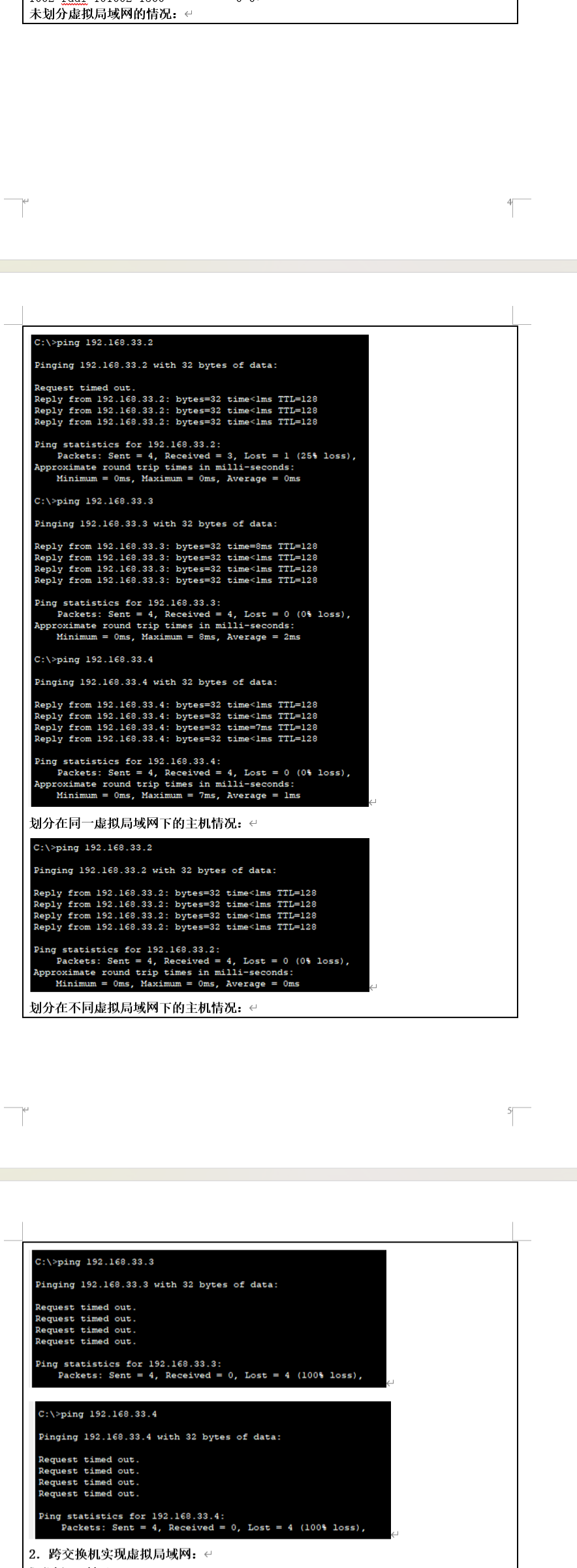
未划分虚拟局域网的情况:
划分在同一虚拟局域网下的主机情况:
划分在不同虚拟局域网下的主机情况:
2.跨交换机实现虚拟局域网:
Switch1>enable
在S1上创建虚拟局域网VLAN11和VLAN22并为之分配端口
Switch1>enable
Switch1#config
Configuring from terminal, memory, or network [terminal]?
Enter configuration commands, one per line. End with CNTL/Z.
Switch1(config)#hostname S1
S1(config)#vlan 11
S1(config-vlan)#name T11
S1(config-vlan)#exit
S1(config)#interface fastethernet0/21
S1(config-if)#switchport access vlan 11
S1(config-if)#exit
S1(config)#exit
S1#show vlan id 11
VLAN Name Status Ports
---- -------------------------------- --------- -------------------------------
11 T11 active Fa0/21
VLAN Type SAID MTU Parent RingNo BridgeNo Stp BrdgMode Trans1 Trans2
---- ----- ---------- ----- ------ ------ -------- ---- -------- ------ ------
11 enet 100011 1500 - - - - - 0 0
S1#config
Configuring from terminal, memory, or network [terminal]?
Enter configuration commands, one per line. End with CNTL/Z.
S1(config)#vlan 22
S1(config-vlan)#name T22
S1(config-vlan)#exit
S1(config)#interface fastethernet 0/22
S1(config-if)#switchport access vlan 22
S1(config-if)#exit
S1(config)#exit
S1#show vlan id 22
VLAN Name Status Ports
---- -------------------------------- --------- -------------------------------
22 T22 active Fa0/22
VLAN Type SAID MTU Parent RingNo BridgeNo Stp BrdgMode Trans1 Trans2
---- ----- ---------- ----- ------ ------ -------- ---- -------- ------ ------
22 enet 100022 1500 - - - - - 0 0
将S1的F0/7端口设置为trunk模式
S1#config
Configuring from terminal, memory, or network [terminal]?
Enter configuration commands, one per line. End with CNTL/Z.
S1(config)#interface fastethernet 0/7
S1(config-if)#switchport mode trunk
S1(config-if)#exit
S1(config)#exit
S1#show interfaces fastethernet 0/7 switchport
Name: Fa0/7
Switchport: Enabled
Administrative Mode: trunk
Operational Mode: down
Administrative Trunking Encapsulation: dot1q
Operational Trunking Encapsulation: dot1q
Negotiation of Trunking: On
Access Mode VLAN: 1 (default)
Trunking Native Mode VLAN: 1 (default)
Voice VLAN: none
Administrative private-vlan host-association: none
Administrative private-vlan mapping: none
Administrative private-vlan trunk native VLAN: none
Administrative private-vlan trunk encapsulation: dot1q
Administrative private-vlan trunk normal VLANs: none
Administrative private-vlan trunk private VLANs: none
Operational private-vlan: none
Trunking VLANs Enabled: All
Pruning VLANs Enabled: 2-1001
Capture Mode Disabled
Capture VLANs Allowed: ALL
Protected: false
Unknown unicast blocked: disabled
Unknown multicast blocked: disabled
Appliance trust: none
在S2上创建虚拟局域网VLAN11和VLAN22并为之分配端口
Switch2>enable
Switch2#config
Configuring from terminal, memory, or network [terminal]?
Enter configuration commands, one per line. End with CNTL/Z.
Switch2(config)#hostname S2
S2(config)#vlan 11
S2(config-vlan)#name T11
S2(config-vlan)#exit
S2(config)#exit
S2#config
Configuring from terminal, memory, or network [terminal]?
Enter configuration commands, one per line. End with CNTL/Z.
S2(config)#interface fastethernet 0/16
S2(config-if)#switchport access vlan 11
S2(config-if)#exit
S2(config)#exit
S2#show vlan id 11
VLAN Name Status Ports
---- -------------------------------- --------- -------------------------------
11 T11 active Fa0/16
VLAN Type SAID MTU Parent RingNo BridgeNo Stp BrdgMode Trans1 Trans2
---- ----- ---------- ----- ------ ------ -------- ---- -------- ------ ------
11 enet 100011 1500 - - - - - 0 0
S2#config
Configuring from terminal, memory, or network [terminal]?
Enter configuration commands, one per line. End with CNTL/Z.
S2(config)#vlan 22
S2(config-vlan)#name T22
S2(config-vlan)#exit
S2(config)#inter fastethernet 0/24
S2(config-if)#switchport access vlan 22
S2(config-if)#exit
S2(config)#exit
S2#show vlan id 22
VLAN Name Status Ports
---- -------------------------------- --------- -------------------------------
22 T22 active Fa0/24
VLAN Type SAID MTU Parent RingNo BridgeNo Stp BrdgMode Trans1 Trans2
---- ----- ---------- ----- ------ ------ -------- ---- -------- ------ ------
22 enet 100022 1500 - - - - - 0 0
将S2的F0/7端口设置为trunk模式
S2#config
Configuring from terminal, memory, or network [terminal]?
Enter configuration commands, one per line. End with CNTL/Z.
S2(config)#interface fastEthernet 0/7
S2(config-if)#switchport mode trunk
S2(config-if)#exit
S2(config)#exit
S2#show interfaces fastethernet 0/7 switchport
Name: Fa0/7
Switchport: Enabled
Administrative Mode: trunk
Operational Mode: down
Administrative Trunking Encapsulation: dot1q
Operational Trunking Encapsulation: dot1q
Negotiation of Trunking: On
Access Mode VLAN: 1 (default)
Trunking Native Mode VLAN: 1 (default)
Voice VLAN: none
Administrative private-vlan host-association: none
Administrative private-vlan mapping: none
Administrative private-vlan trunk native VLAN: none
Administrative private-vlan trunk encapsulation: dot1q
Administrative private-vlan trunk normal VLANs: none
Administrative private-vlan trunk private VLANs: none
Operational private-vlan: none
Trunking VLANs Enabled: All
Pruning VLANs Enabled: 2-1001
Capture Mode Disabled
Capture VLANs Allowed: ALL
Protected: false
Unknown unicast blocked: disabled
Unknown multicast blocked: disabled
Appliance trust: none
划分虚拟局域网之前的网络情况:
划分在同一虚拟局域网之后的网络情况:
划分在不同局域网之后的情况:
1.一个交换机上实虚拟局域网配置如下:
Switch>enable
Switch#config
Configuring from terminal, memory, or network [terminal]?
Enter configuration commands, one per line. End with CNTL/Z.
Switch(config)#hostname S1
创建虚拟局域网VLAN11和VLAN22:
S1(config)#vlan 22
S1(config-vlan)#name T22
S1(config-vlan)#exit
S1(config)#vlan 11
S1(config-vlan)#name T11
S1(config-vlan)#exit
S1(config)#exit
验证测试:验证虚拟局域网VLAN11和VLAN22已创建成功
S1#show vlan
VLAN Name Status Ports
---- -------------------------------- --------- -------------------------------
1 default active Fa0/1, Fa0/2, Fa0/3, Fa0/4
Fa0/5, Fa0/6, Fa0/7, Fa0/8
Fa0/9, Fa0/10, Fa0/11, Fa0/12
Fa0/13, Fa0/14, Fa0/15, Fa0/16
Fa0/17, Fa0/18, Fa0/19, Fa0/20
Fa0/21, Fa0/22, Fa0/23, Fa0/24
Gig0/1, Gig0/2
11 T11 active
22 T22 active
1002 fddi-default active
1003 token-ring-default active
1004 fddinet-default active
1005 trnet-default active
VLAN Type SAID MTU Parent RingNo BridgeNo Stp BrdgMode Trans1 Trans2
---- ----- ---------- ----- ------ ------ -------- ---- -------- ------ ------
1 enet 100001 1500 - - - - - 0 0
11 enet 100011 1500 - - - - - 0 0
22 enet 100022 1500 - - - - - 0 0
--More—
为局域网VLAN11和VLAN22分配端口
S1#config
Configuring from terminal, memory, or network [terminal]?
Enter configuration commands, one per line. End with CNTL/Z.
S1(config)#interface vlan 11
S1(config-if)#interface fastethernet 0/9
S1(config-if)#switchport access vlan 11
S1(config-if)#exit
S1(config)#interface vlan 11
S1(config-if)#interface fastethernet 0/16
S1(config-if)#switchport access vlan 11
S1(config-if)#exit
S1(config)#interface vlan 22
S1(config-if)#interface fastethernet 0/24
S1(config-if)#switchport access vlan 22
S1(config-if)#exit
S1(config)#interface vlan 22
S1(config-if)#interface fastethernet 0/2
S1(config-if)#switchport access vlan 22
S1(config-if)#exit
验证测试:验证为VLAN11和VLAN22分配端口成功
S1(config)#exit
S1#show vlan
VLAN Name Status Ports
---- -------------------------------- --------- -------------------------------
1 default active Fa0/1, Fa0/3, Fa0/4, Fa0/5
Fa0/6, Fa0/7, Fa0/8, Fa0/10
Fa0/11, Fa0/12, Fa0/13, Fa0/14
Fa0/15, Fa0/17, Fa0/18, Fa0/19
Fa0/20, Fa0/21, Fa0/22, Fa0/23
Gig0/1, Gig0/2
11 T11 active Fa0/9, Fa0/16
22 T22 active Fa0/2, Fa0/24
1002 fddi-default active
1003 token-ring-default active
1004 fddinet-default active
1005 trnet-default active
VLAN Type SAID MTU Parent RingNo BridgeNo Stp BrdgMode Trans1 Trans2
---- ----- ---------- ----- ------ ------ -------- ---- -------- ------ ------
1 enet 100001 1500 - - - - - 0 0
11 enet 100011 1500 - - - - - 0 0
22 enet 100022 1500 - - - - - 0 0
1002 fddi 101002 1500 - - - - - 0 0
2.跨交换机实现虚拟局域网:
Switch1>enable
在S1上创建虚拟局域网VLAN11和VLAN22并为之分配端口
Switch1>enable
Switch1#config
Configuring from terminal, memory, or network [terminal]?
Enter configuration commands, one per line. End with CNTL/Z.
Switch1(config)#hostname S1
S1(config)#vlan 11
S1(config-vlan)#name T11
S1(config-vlan)#exit
S1(config)#interface fastethernet0/21
S1(config-if)#switchport access vlan 11
S1(config-if)#exit
S1(config)#exit
S1#show vlan id 11
VLAN Name Status Ports
---- -------------------------------- --------- -------------------------------
11 T11 active Fa0/21
VLAN Type SAID MTU Parent RingNo BridgeNo Stp BrdgMode Trans1 Trans2
---- ----- ---------- ----- ------ ------ -------- ---- -------- ------ ------
11 enet 100011 1500 - - - - - 0 0
S1#config
Configuring from terminal, memory, or network [terminal]?
Enter configuration commands, one per line. End with CNTL/Z.
S1(config)#vlan 22
S1(config-vlan)#name T22
S1(config-vlan)#exit
S1(config)#interface fastethernet 0/22
S1(config-if)#switchport access vlan 22
S1(config-if)#exit
S1(config)#exit
S1#show vlan id 22
VLAN Name Status Ports
---- -------------------------------- --------- -------------------------------
22 T22 active Fa0/22
VLAN Type SAID MTU Parent RingNo BridgeNo Stp BrdgMode Trans1 Trans2
---- ----- ---------- ----- ------ ------ -------- ---- -------- ------ ------
22 enet 100022 1500 - - - - - 0 0
将S1的F0/7端口设置为trunk模式
S1#config
Configuring from terminal, memory, or network [terminal]?
Enter configuration commands, one per line. End with CNTL/Z.
S1(config)#interface fastethernet 0/7
S1(config-if)#switchport mode trunk
S1(config-if)#exit
S1(config)#exit
S1#show interfaces fastethernet 0/7 switchport
Name: Fa0/7
Switchport: Enabled
Administrative Mode: trunk
Operational Mode: down
Administrative Trunking Encapsulation: dot1q
Operational Trunking Encapsulation: dot1q
Negotiation of Trunking: On
Access Mode VLAN: 1 (default)
Trunking Native Mode VLAN: 1 (default)
Voice VLAN: none
Administrative private-vlan host-association: none
Administrative private-vlan mapping: none
Administrative private-vlan trunk native VLAN: none
Administrative private-vlan trunk encapsulation: dot1q
Administrative private-vlan trunk normal VLANs: none
Administrative private-vlan trunk private VLANs: none
Operational private-vlan: none
Trunking VLANs Enabled: All
Pruning VLANs Enabled: 2-1001
Capture Mode Disabled
Capture VLANs Allowed: ALL
Protected: false
Unknown unicast blocked: disabled
Unknown multicast blocked: disabled
Appliance trust: none
在S2上创建虚拟局域网VLAN11和VLAN22并为之分配端口
Switch2>enable
Switch2#config
Configuring from terminal, memory, or network [terminal]?
Enter configuration commands, one per line. End with CNTL/Z.
Switch2(config)#hostname S2
S2(config)#vlan 11
S2(config-vlan)#name T11
S2(config-vlan)#exit
S2(config)#exit
S2#config
Configuring from terminal, memory, or network [terminal]?
Enter configuration commands, one per line. End with CNTL/Z.
S2(config)#interface fastethernet 0/16
S2(config-if)#switchport access vlan 11
S2(config-if)#exit
S2(config)#exit
S2#show vlan id 11
VLAN Name Status Ports
---- -------------------------------- --------- -------------------------------
11 T11 active Fa0/16
VLAN Type SAID MTU Parent RingNo BridgeNo Stp BrdgMode Trans1 Trans2
---- ----- ---------- ----- ------ ------ -------- ---- -------- ------ ------
11 enet 100011 1500 - - - - - 0 0
S2#config
Configuring from terminal, memory, or network [terminal]?
Enter configuration commands, one per line. End with CNTL/Z.
S2(config)#vlan 22
S2(config-vlan)#name T22
S2(config-vlan)#exit
S2(config)#inter fastethernet 0/24
S2(config-if)#switchport access vlan 22
S2(config-if)#exit
S2(config)#exit
S2#show vlan id 22
VLAN Name Status Ports
---- -------------------------------- --------- -------------------------------
22 T22 active Fa0/24
VLAN Type SAID MTU Parent RingNo BridgeNo Stp BrdgMode Trans1 Trans2
---- ----- ---------- ----- ------ ------ -------- ---- -------- ------ ------
22 enet 100022 1500 - - - - - 0 0
将S2的F0/7端口设置为trunk模式
S2#config
Configuring from terminal, memory, or network [terminal]?
Enter configuration commands, one per line. End with CNTL/Z.
S2(config)#interface fastEthernet 0/7
S2(config-if)#switchport mode trunk
S2(config-if)#exit
S2(config)#exit
S2#show interfaces fastethernet 0/7 switchport
Name: Fa0/7
Switchport: Enabled
Administrative Mode: trunk
Operational Mode: down
Administrative Trunking Encapsulation: dot1q
Operational Trunking Encapsulation: dot1q
Negotiation of Trunking: On
Access Mode VLAN: 1 (default)
Trunking Native Mode VLAN: 1 (default)
Voice VLAN: none
Administrative private-vlan host-association: none
Administrative private-vlan mapping: none
Administrative private-vlan trunk native VLAN: none
Administrative private-vlan trunk encapsulation: dot1q
Administrative private-vlan trunk normal VLANs: none
Administrative private-vlan trunk private VLANs: none
Operational private-vlan: none
Trunking VLANs Enabled: All
Pruning VLANs Enabled: 2-1001
Capture Mode Disabled
Capture VLANs Allowed: ALL
Protected: false
Unknown unicast blocked: disabled
Unknown multicast blocked: disabled
Appliance trust: none


 浙公网安备 33010602011771号