JDBC基础梳理
JDBC
JDBC可以说是一系列规范的接口 给开发者带来只用面向接口编程的优势
JDBC落地步骤
1. 注册驱动
2. 获取连接
5种常见方式
@Test
//way 1
public void connect01() throws SQLException {
Driver driver = new Driver();
String url = "jdbc:mysql://localhost:3306/zhc_db02";
//将用户名和密码放进Properties对象
Properties properties = new Properties();
//user password 规定好 后面的值根据实际情况写
properties.setProperty("user", "root");
properties.setProperty("password", "zhc");
Connection connect = driver.connect(url, properties);
System.out.println(connect);
}
@Test
//way 2
public void connect02() throws Exception {
Class<?> aClass = Class.forName("com.mysql.jdbc.Driver");
Driver driver = (Driver)aClass.getDeclaredConstructor().newInstance();
String url = "jdbc:mysql://localhost:3306/zhc_db02";
//将用户名和密码放进Properties对象
Properties properties = new Properties();
//user password 规定好 后面的值根据实际情况写
properties.setProperty("user", "root");
properties.setProperty("password", "zhc");
Connection connect = driver.connect(url, properties);
System.out.println("方式2 = " + connect);
}
@Test
//way 3 使用DriverManager 替代 Driver 进行统一管理
public void connect03() throws Exception {
Class<?> aClass = Class.forName("com.mysql.jdbc.Driver");
Driver driver = (Driver) aClass.getDeclaredConstructor().newInstance();
String url = "jdbc:mysql://localhost:3306/zhc_db02";
String user = "root";
String password = "zhc";
DriverManager.registerDriver(driver);//注册Driver驱动
Connection connection = DriverManager.getConnection(url,user,password);
System.out.println("方式3 = " + connection);
}
@Test
public void connect04() throws Exception {
//反射加载 Driver类
//加载 Driver类时 完成注册
/*
静态代码块 在类加载时 会执行一次
DriverManager.registerDriver(new Driver())
注册driver的工作已经完成
static {
try {
DriverManager.registerDriver(new Driver());
} catch (SQLException var1) {
throw new RuntimeException("Can't register driver!");
}
}
*/
Class.forName("com.mysql.jdbc.Driver");
String url = "jdbc:mysql://localhost:3306/zhc_db02";
String user = "root";
String password = "zhc";
Connection connection = DriverManager.getConnection(url,user,password);
System.out.println("方式4~ = " + connection);
}
// way 5 在 4 的基础上改进 增加配置文件 让连接mysql更加灵活
@Test
public void connect05() throws IOException, ClassNotFoundException, SQLException {
//通过Properties对象获取配置文件的信息
Properties properties = new Properties();
properties.load(new FileInputStream("C:\let's get it\JAVA\JDBC\src\mysql.properties"));
String user = properties.getProperty("user");
String password = properties.getProperty("password");
String driver = properties.getProperty("driver");
String url = properties.getProperty("url");
Class.forName(driver);
Connection connection = DriverManager.getConnection(url, user, password);
System.out.println("way 5 " + connection);
}
3. CRUD
4. 关闭连接
ResultSet结果集
表示数据库结果集的数据表,通常通过执行查询数据库的语句生成
ResultSet对象保持一个光标指向其当前的数据行。 最初,光标位于行之前
next方法将光标移动到下一行,并且由于在ResultSet对象中没有返回false,因此可以在while循环中使用循环来遍历结果集
Statement
- Statement对象用于执行静态SQL语句并返回其生成的结果的对象
- 执行SQL语句 可以有这三种
Statement
PreparedStatement
CallableStatement - Statement可能回存在SQL注入现象
SQL注入现象是某些系统没有对用户的输入数据进行充分地检查 而在用户输入数据中注入非法的SQL语句段或者命令 恶意攻击数据库
-- SQL
-- 输入用户名 为 1' or
-- 输入万能密码 为 or '1'= '1
SELECT *
FROM admin
WHERE NAME = '1' OR' AND pwd = 'OR '1'= '1' - PreparedStatement可以防范SQL注入
PreparedStatement
- PreparedStatement执行的SQL语句中的参数用问号(?)来表示,调用PreparedStatement 对象的 setXxx() 方法来设置这些参数. setXxx() 方法两个参数,第一个参数是要设置的 SQL 语句中的参数的索引(从 1 开始)第二个是设置的 SQL 语句中的参数的值
- 调用 executeQuery(),返回ResultSet 对象
- 调用 executeUpdate():执行更新,包括增、删、修改
预处理好处
-
不再使用+ 拼接sql语句,减少语法错误
-
有效的解决了sql注入问题!
-
大大减少了编译次数,效率较高
public static void main(String[] args) throws Exception {
Scanner scanner = new Scanner(System.in);
//让用户输入管理员名和密码
System.out.print("请输入管理员的名字: ");
String admin_name = scanner.nextLine(); // next() 接收到空格或者 ' 就是表示结束
System.out.print("请输入管理员的密码: ");
String admin_pwd = scanner.nextLine(); // 如果希望看到SQL注入 这里需要用nextLineProperties properties = new Properties();
properties.load(new FileInputStream("C:\let's get it\JAVA\JDBC\src\mysql.properties"));String user = properties.getProperty("user");
String password = properties.getProperty("password");
String url = properties.getProperty("url");
String driver = properties.getProperty("driver");//1. 注册驱动
Class.forName(driver);
//2.得到连接
Connection connection = DriverManager.getConnection(url, user, password);//3 得到 PreparedStatement
//4.组织Sql Sql语句 的 ? 是 占位符
String sql = "select name , pwd from admin where name = ? and pwd = ?";
PreparedStatement preparedStatement = connection.prepareStatement(sql);
//给 ? 赋值
preparedStatement.setString(1,admin_name);
preparedStatement.setString(2,admin_pwd);ResultSet resultSet = preparedStatement.executeQuery();
if (resultSet.next()) { //如果
System.out.println("恭喜 连接成功");
} else {
System.out.println("fail");
}resultSet.close();
preparedStatement.close();
connection.close();
}
封装JDBCUtils
获取连接 释放连接 是必须操作 可以封装成工具类
public class JDBCUtils {
private static String user;
private static String password;
private static String url;
private static String driver;
static {
try {
Properties properties = new Properties();
properties.load(new FileInputStream("src\mysql.properties"));
//读取相关属性值
user = properties.getProperty("user");
password = properties.getProperty("password");
url = properties.getProperty("url");
properties.getProperty("driver");
} catch (IOException e) {
throw new RuntimeException(e);
// 编译异常转成运行异常
// 调用者可以选择捕获该异常 也可以选择默认处理该异常
}
}
//连接数据库 返回Connection
public static Connection getConnection() {
try {
return DriverManager.getConnection(url, user, password);
} catch (SQLException e) {
throw new RuntimeException(e);
}
}
//关闭相关资源
public static void close(ResultSet set, Statement statement, Connection connection) {
try {
if (set != null) {
set.close();
}
if (statement != null) {
statement.close();
}
if (connection != null) {
connection.close();
}
} catch (SQLException e) {
throw new RuntimeException(e);
}
}
}
事务
JDBC程序中当一个Connection对象创建时 默认情况下自动提交事务 每次执行一个 SQL 语句时,如果执行成功,就会向数据库自动提交 而不能回滚
JDBC程序中为了让多个 SQL 语句作为一个整体执行,需要使用事务
调用Connection的setAutoCommit(false)可以取消自动提交事务
在所有的SQL预计都成功执行后 调用 Connection 的 commit() 方法提交事务
在中某个操作失败或出现异常时,调用 Connection 的 rollback(); 方法回滚事务
public void noTransaction() {
//1. 得到连接
Connection connection = null;
//2.组织一个SQL
String sql1 = "update account set balance = balance - 100 where id = 1";
String sql2 = "update account set balance = balance + 100 where id = 2";
PreparedStatement preparedStatement = null;
try {
connection = JDBCUtils.getConnection();
//将connection 设置为不自动提交
connection.setAutoCommit(false);//开启事务
//3.创建preparedstatement对象
preparedStatement = connection.prepareStatement(sql1);
//执行
preparedStatement.executeUpdate();
int i = 1 / 0;
preparedStatement = connection.prepareStatement(sql2);
//执行
preparedStatement.executeUpdate();
//提交事务
connection.commit();
} catch (Exception e) {
System.out.println("异常 撤销SQL语句");
try {
connection.rollback();
} catch (SQLException throwables) {
throwables.printStackTrace();
}
throw new RuntimeException(e);
} finally {
JDBCUtils.close(null, preparedStatement, connection);
}
}
批处理

public void Batch() throws Exception {
Connection connection = JDBCUtils.getConnection();
String sql = "insert into admin values(? , ?)";
PreparedStatement preparedStatement = connection.prepareStatement(sql);
System.out.println("begin");
long start = System.currentTimeMillis();
for (int i = 0; i < 5000; i++) {
preparedStatement.setString(1, "heihei");
preparedStatement.setString(2, "heihei");
preparedStatement.addBatch();
if ((i + 1) % 1000 == 0){
preparedStatement.executeBatch();
preparedStatement.clearBatch();
}
}
long end = System.currentTimeMillis();
System.out.println("批量的方式 耗时 = " + (end - start));
JDBCUtils.close(null, preparedStatement, connection);
}
数据库连接池
传统Connection弊端

常用数据库连接池
C3P0
基本操作 读取properties文件
public static void main(String[] args) throws Exception {
//1. 创建一个数据源对象
ComboPooledDataSource comboPooledDataSource = new ComboPooledDataSource();
//2. 配置文件获取连接信息
Properties properties = new Properties();
properties.load(new FileInputStream("src\mysql.properties"));
//读取相关属性值
String user = properties.getProperty("user");
String password = properties.getProperty("password");
String url = properties.getProperty("url");
String driver = properties.getProperty("driver");
//给数据源设置参数
comboPooledDataSource.setDriverClass(driver);
comboPooledDataSource.setJdbcUrl(url);
comboPooledDataSource.setUser(user);
comboPooledDataSource.setPassword(password);
//设置初始化连接数
comboPooledDataSource.setInitialPoolSize(10);
//最大连接数
comboPooledDataSource.setMaxPoolSize(50);
//测试连接池效率 连接Mysql 5000次操作
}
XML配置文件做模板
public void testC3P0_02() throws Exception {
ComboPooledDataSource comboPooledDataSource = new ComboPooledDataSource("zhc_edu");
long start = System.currentTimeMillis();
for (int i = 0; i < 500000; i++) {
Connection connection = comboPooledDataSource.getConnection();//这个方法从 DataSource 接口实现
connection.close();
}
long end = System.currentTimeMillis();
System.out.println("cp30 ----> mysql time = " + (end - start));
}
Druid德鲁伊连接池
德鲁伊配置文件
#key=value
driverClassName=com.mysql.jdbc.Driver
url=jdbc:mysql://localhost:3306/zhc_db02?rewriteBatchedStatements=true
username=root
password=zhc
#initial connection Size
initialSize=10
#min idle connecton size
minIdle=5
#max active connection size
maxActive=50
#max wait time (5000 mil seconds)
maxWait=5000
public void testDruid_() throws Exception {
//1. 加入 Druid jar
//2. 加入配置文件 druid.properties
//3. 创建Properties对象 读取配置文件
Properties properties = new Properties();
properties.load(new FileInputStream("src\druid.properties"));
//4. 创建一个指定参数的数据库连接池
DataSource dataSource = DruidDataSourceFactory.createDataSource(properties);
long start = System.currentTimeMillis();
for (int i = 0; i < 500000; i++) {
Connection connection = dataSource.getConnection();
connection.close();
}
long end = System.currentTimeMillis();
System.out.println(end - start);
}
JDBCUtils工具类德鲁伊实现
public class JDBCUtilsByDruid {
private static DataSource ds;
static {
Properties properties = new Properties();
try {
properties.load(new FileInputStream("src\druid.properties"));
ds = DruidDataSourceFactory.createDataSource(properties);
} catch (Exception e) {
e.printStackTrace();
}
}
public static Connection getConnection() throws SQLException {
return ds.getConnection();
}
//连接放回到连接池 不是真的断掉
public static void close(ResultSet resultSet , Statement statement , Connection connection) {
try {
if (resultSet!=null){
resultSet.close();
}
if (statement!=null){
statement.close();
}
if (connection!=null){
connection.close();
}
} catch (SQLException throwables) {
throwables.printStackTrace();
}
}
}
Apache--DBUtils

public void testQueryMany() throws Exception {
//1.得到 连接
Connection connection = JDBCUtilsByDruid.getConnection();
//2.使用 DBUtils 类和接口 先引入 DBUtils jar
QueryRunner queryRunner = new QueryRunner();
String sql = "select * from actor where id >= ?";
//1. query 方法就是执行一个sql语句 得到resultset -----> 封装到 ArrayList 集合中
//2. 返回集合
//3. connection: 连接
//4. sql
//5. new BeanListHandler<>(Actor.class) resultset --> Actor 对象 --> 封装到 ArrayList
// 底层使用反射机制 去获取Actor 类的属性 然后进行封装
//6. 1 给 sql 语句中的 ? 赋值 可以有多个值 因为是可变参数
/**
* public
* Object... params) throws SQLException {
* PreparedStatement stmt = null;
* ResultSet rs = null;
* T result = null;
* try {
* stmt = this.prepareStatement(conn, sql);//创建PreparedStatement
* this.fillStatement(stmt, params);//对sql 进行 ? 赋值
* rs = this.wrap(stmt.executeQuery());//执行sql 返回resultset
* result = rsh.handle(rs);//返回的resultset ---> arrayList[result] 使用反射
* } catch (SQLException e) {
* this.rethrow(e, sql, params);
* } finally {
* try {
* close(rs);//关闭resultset
* } finally {
* close(stmt);//关闭preparedstatement
* }
* }
* return result;
* }
*/
List
for(Actor actor : list) {
System.out.println(actor);
}
JDBCUtilsByDruid.close(null,null,connection);
}
//演示 apache-dbutils + druid 返回的结果时单行记录
@Test
public void testQuerySingle() throws Exception {
//1.得到 连接
Connection connection = JDBCUtilsByDruid.getConnection();
//2.使用 DBUtils 类和接口 先引入 DBUtils jar
QueryRunner queryRunner = new QueryRunner();
//3.返回单个对象
String sql = "select * from actor where id = ?";
Actor actor = queryRunner.query(connection,sql,new BeanHandler<>(Actor.class),2);
System.out.println(actor);
JDBCUtilsByDruid.close(null,null,connection);
}
@Test
public void testScalar() throws SQLException {
Connection connection = JDBCUtilsByDruid.getConnection();
//2.使用 DBUtils 类和接口 先引入 DBUtils jar
QueryRunner queryRunner = new QueryRunner();
//3.返回单个对象
String sql = "select name from actor where id = ?";
Object o = queryRunner.query(connection,sql,new ScalarHandler(),2);
System.out.println(o);
JDBCUtilsByDruid.close(null,null,connection);
}
@Test
public void testDML() throws SQLException {
Connection connection = JDBCUtilsByDruid.getConnection();
//2.使用 DBUtils 类和接口 先引入 DBUtils jar
QueryRunner queryRunner = new QueryRunner();
//3.返回单个对象
// String sql = "update actor set name = ? where id = ? ";
// String sql = "insert into actor values(null,?,?,?,?)";
String sql = "delete from actor where id = ?";
int affectedRow = queryRunner.update(connection, sql,4);
System.out.println(affectedRow > 0 ? "suc" : "fail");
JDBCUtilsByDruid.close(null,null,connection);
}
DAO & BasicDao
apache-dbutils + Druid 还有不足
sql语句不能通过参数传入 CRUD不灵活
select返回类型不能确定 最好能是使用泛型

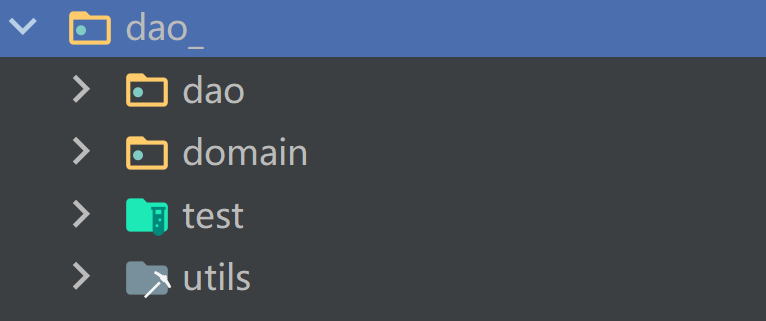
domain--->Javabean
以一张表Actor为例子
Actor是一个类
BasicDao
public class BasicDAO
private QueryRunner qr = new QueryRunner();
//开发通用的dml方法 针对任意的表
public int update(String sql, Object... parameters) {
Connection connection = null;
try {
connection = JDBCUtilsByDruid.getConnection();
int update = qr.update(connection, sql, parameters);
return update;
} catch (SQLException e) {
throw new RuntimeException(e); //将编译异常->运行异常
} finally {
JDBCUtilsByDruid.close(null, null, connection);
}
}
//返回多个对象(即查询的结果是多行) 针对任意表
/**
* @param sql 可以是多个
* @param clazz 传入一个Class对象
* @param parameters 传入?具体的值
* @return
*/
public List
Connection connection = null;
try {
connection = JDBCUtilsByDruid.getConnection();
return qr.query(connection, sql, new BeanListHandler
} catch (SQLException e) {
throw new RuntimeException(e);
} finally {
JDBCUtilsByDruid.close(null, null, connection);
}
}
//查询单行结果的通用方法
public T querySingle(String sql, Class
Connection connection = null;
try {
connection = JDBCUtilsByDruid.getConnection();
return qr.query(connection, sql, new BeanHandler
} catch (SQLException e) {
throw new RuntimeException(e);
} finally {
JDBCUtilsByDruid.close(null, null, connection);
}
}
//查询单行单列 即返回单值的方法
public Object queryScalar(String sql , Object... parameters) {
Connection connection = null;
try {
connection = JDBCUtilsByDruid.getConnection();
return qr.query(connection, sql, new ScalarHandler(), parameters);
} catch (SQLException e) {
throw new RuntimeException(e);
} finally {
JDBCUtilsByDruid.close(null, null, connection);
}
}
}
ActorDao直接继承BasicDao


 浙公网安备 33010602011771号