|
|
Posted on
2009-09-11 20:43
大漠、天使、飞烟
阅读( 2507)
评论()
收藏
举报
这两天看了WebCast上的一节关于生成验证码的课程,觉得不错,自己动手做了一遍,修改了部分代码,现拿出来大家分享一下: Silverlight中生成验证码一般有三种方式,以下分别介绍。 准备工作:新...
这两天看了WebCast上的一节关于生成验证码的课程,觉得不错,自己动手做了一遍,修改了部分代码,现拿出来大家分享一下: Silverlight中生成验证码一般有三种方式,以下分别介绍。 准备工作:新建一个Silverlight应用程序项目。在MainPage.xaml中加入三个image控件和三个button控件,用来测试三种方式生产的验证码,代码如下 <StackPanel>
<Image x:Name="source1" Stretch="None"/>
<Button x:Name="HanderButton" Content="Data from Hander" Click="HanderButton_Click" />
<Image x:Name="source2" Stretch="None"/>
<Button x:Name="WcfButton" Content="Data from WCFServices" Click="WcfButton_Click" />
<Image x:Name="source3" Stretch="None"/>
<Button x:Name="SlButton" Content="Data from Silverlight" Click="SlButton_Click" />
</StackPanel> |
(一)通过一般处理程序ashx在服务器端生成Silverlight客户端调用
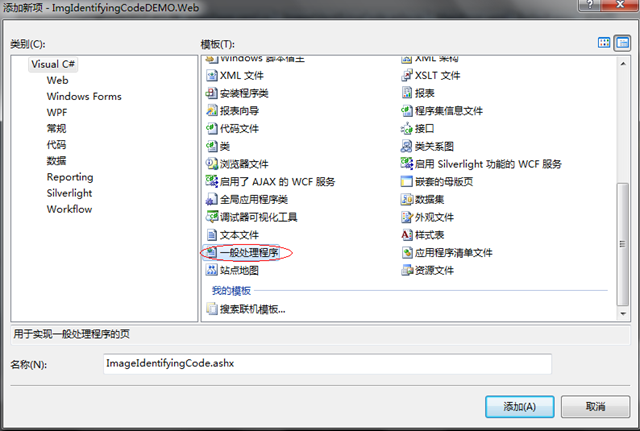
1、在web站点新建一般处理程序ImageIdentifyingCode1.ashx
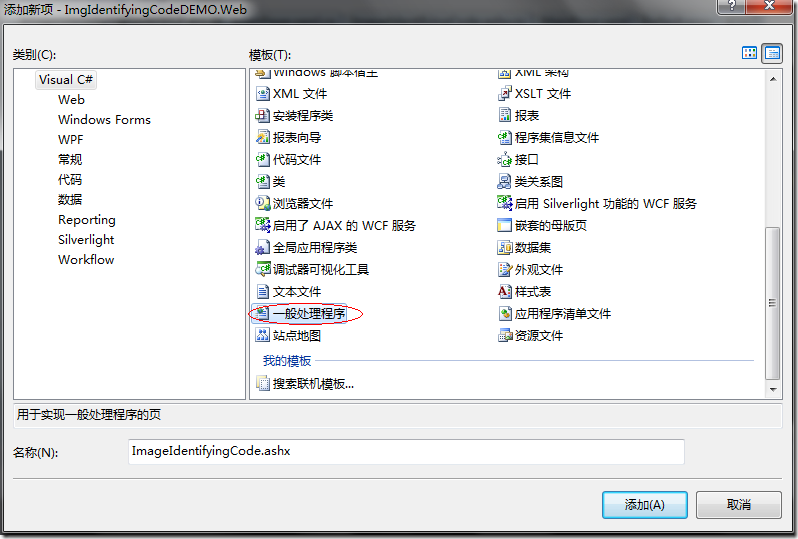
2、添加代码,通过GDI+实现验证码绘制,代码如下:
using System.Web.Services;
using System.Drawing;
using System.Drawing.Drawing2D;
using System.IO; |
public void ProcessRequest(HttpContext context)
{
    string code = context.Request.Params["code"];//验证码字符
    int w = Convert.ToInt32(context.Request.Params["w"]);//图片宽度
    int h = Convert.ToInt32(context.Request.Params["h"]);//图片高度
    float fs = (float)(h / 2);//字体高度
    Bitmap b = new Bitmap(w, h);
    Graphics g = Graphics.FromImage(b);
    Random r = new Random(DateTime.Now.Millisecond);

    g.RotateTransform((float)r.Next(-4, 4));
    LinearGradientBrush LGB = new LinearGradientBrush(new Point(0, 0), new Point(100, 100),
        Color.FromArgb(r.Next(0, 255), r.Next(0, 255), r.Next(0, 255)),
        Color.FromArgb(r.Next(0, 255), r.Next(0, 255), r.Next(0, 255)));
    g.DrawString(code, new Font(FontFamily.GenericSansSerif, fs), LGB, new PointF(0f, 0f));
    LGB.Dispose();
    for (int i = 0; i < 150; i++)
    {
        g.FillEllipse(new SolidBrush(Color.FromArgb(r.Next(0, 255), r.Next(0, 255), r.Next(0, 255))),
            new Rectangle(r.Next(0, b.Width), r.Next(0, b.Height), r.Next(1, 5), r.Next(1, 5)));
    }
    g.Dispose();
    MemoryStream S = new MemoryStream();
    b.Save(S, System.Drawing.Imaging.ImageFormat.Png);
    b.Dispose();
    context.Response.OutputStream.Write(S.ToArray(), 0, S.ToArray().Length);
}
|
3、新建一个类IndentifyCodeClass.cs,用来生成验证码字符串
public string CreateIndentifyCode(int count)
{
string allchar = "1,2,3,4,5,6,7,8,9,0,A,a,B,b,C,c,D,d,E,e,F,f," +
    "G,g,H,h,I,i,J,j,K,k,L,l,M,m,N,n,O,o,P,p,Q,q,R,r,S,s," +
    "T,t,U,u,V,v,W,w,X,x,Y,y,Z,z";
    string[] allchararray = allchar.Split(',');
    string randomcode = "";
    int temp = -1;
    Random rand = new Random();
    for (int i = 0; i < count; i++)
    {
        if (temp != -1)
        {
            rand = new Random(i * temp * ((int)DateTime.Now.Ticks));
        }
        int t = rand.Next(61);
        if (temp == t)
        {
            return CreateIndentifyCode(count);
        }
        temp = t;
        randomcode += allchararray[t];
    }
    return randomcode;
} |
4、在MainPage.xaml.cs中添加客户端引用代码
using System.Windows.Media.Imaging; |
private void HanderButton_Click(object sender, RoutedEventArgs e)
{
    WebClient wc = new WebClient();
    wc.OpenReadCompleted += new OpenReadCompletedEventHandler(wc_OpenReadCompleted);
    wc.OpenReadAsync(new Uri(
        string.Format("http://localhost:3365/ImageIdentifyingCode.ashx?code={0}&w=150&h=50",
        new IndentifyCodeClass().CreateIndentifyCode(6))));
}

void wc_OpenReadCompleted(object sender, OpenReadCompletedEventArgs e)
{
    BitmapImage b = new BitmapImage();
    b.SetSource(e.Result);
    source1.Source = b;
} |
(二)通过WCF服务在服务器端生成Silverlight客户端调用
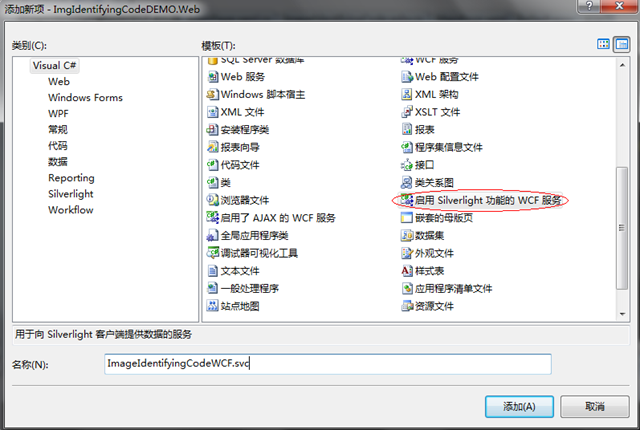
1、新建启用Silverlight功能的WCF服务ImageIdentifyingCodeWCF.svc。
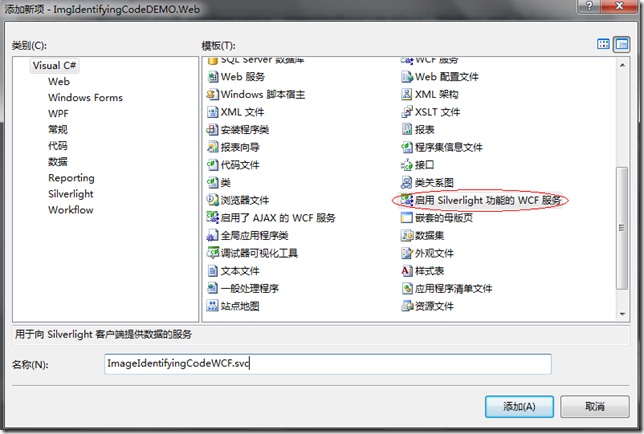
2、添加WCF服务代码
using System.Drawing;
using System.Drawing.Drawing2D;
using System.IO; |
[OperationContract]
public object CreateImageValidateCode(string Code, int imgWidth, int imgHeight)
{
    Bitmap b = new Bitmap(imgWidth, imgHeight);
    Graphics g = Graphics.FromImage(b);
    Random r = new Random(DateTime.Now.Millisecond);
    g.RotateTransform((float)r.Next(-3, 3));
    for (int i = 0; i < imgWidth * 2; i++)
    {
        g.FillEllipse(new SolidBrush(Color.FromArgb(r.Next(0, 255), r.Next(0, 255), r.Next(0, 255))),
            new Rectangle(r.Next(0, b.Width), r.Next(0, b.Height), r.Next(1, 4), r.Next(1, 3)));
    }
    LinearGradientBrush LGB = new LinearGradientBrush(new Point(0, 0),
        new Point(imgHeight, imgHeight), Color.FromArgb(r.Next(0, 255), r.Next(0, 255), r.Next(0, 255)),
        Color.FromArgb(r.Next(0, 255), r.Next(0, 255), r.Next(0, 255)));
    g.DrawString(Code, new Font(FontFamily.GenericSansSerif, fs), LGB, new PointF(0f, 0f));
    LGB.Dispose();
    g.Dispose();
    MemoryStream S = new MemoryStream();
    b.Save(S, System.Drawing.Imaging.ImageFormat.Png);
    b.Dispose();
    return S.ToArray();
}
|
3、编译生成项目,在Silverlight应用中添加服务引用,具体操作略过,不清楚的朋友请自己到网上查阅相关资料。
4、在MainPage.xaml.cs中添加客户端引用代码
using System.IO; |
private void WcfButton_Click(object sender, RoutedEventArgs e)
{
    ImageIdentifyingCodeWCFRef.ImageIdentifyingCodeWCFClient ic =
        new ImgIdentifyingCodeDEMO.ImageIdentifyingCodeWCFRef.ImageIdentifyingCodeWCFClient();
    ic.CreateImageValidateCodeCompleted +=
        new EventHandler<ImgIdentifyingCodeDEMO.ImageIdentifyingCodeWCFRef.CreateImageValidateCodeCompletedEventArgs>(ic_CreateImageValidateCodeCompleted);
    ic.CreateImageValidateCodeAsync(new IndentifyCodeClass().CreateIndentifyCode(6), 150, 50);
}

void ic_CreateImageValidateCodeCompleted(object sender,
    ImgIdentifyingCodeDEMO.ImageIdentifyingCodeWCFRef.CreateImageValidateCodeCompletedEventArgs e)
{
    BitmapImage b = new BitmapImage();
    MemoryStream m = new MemoryStream();
    m.Write((byte[])e.Result, 0, ((byte[])e.Result).Length);
    b.SetSource(m);
    source2.Source = b;
} |
(三)在Silverlight客户端使用控件生成矢量图形
1、在类IndentifyCodeClass.cs添加生成验证码代码
using System.Windows.Media.Imaging; |
Random r = new Random(DateTime.Now.Millisecond);
public void CreatImage(string Text, Image imgsource, int iw, int ih)
{
    Grid Gx = new Grid();
    Canvas cv1 = new Canvas();
    for (int i = 0; i < 6; i++)
    {
        Polyline p = new Polyline();
        for (int ix = 0; ix < r.Next(3, 6); ix++)
        {
            p.Points.Add(new Point(r.NextDouble() * iw,
                r.NextDouble() * ih));
        }
        byte[] Buffer = new byte[3];
        r.NextBytes(Buffer);
        SolidColorBrush SC = new SolidColorBrush(Color.FromArgb(255,
            Buffer[0], Buffer[1], Buffer[2]));
        p.Stroke = SC;
        p.StrokeThickness = 0.5;
        cv1.Children.Add(p);
    }
    Canvas cv2 = new Canvas();
    int y = 0;
    int lw = 6;
    double w = (iw - lw) / Text.Length;
    int h = (int)ih;
    foreach (char x in Text)
    {
        byte[] Buffer = new byte[3];
        r.NextBytes(Buffer);
        SolidColorBrush SC = new SolidColorBrush(Color.FromArgb(255,
            Buffer[0], Buffer[1], Buffer[2]));
        TextBlock t = new TextBlock();
        t.TextAlignment = TextAlignment.Center;
        t.FontSize = r.Next(h - 3, h);
        t.Foreground = SC;
        t.Text = x.ToString();
        t.Projection = new PlaneProjection()
        {
            RotationX = r.Next(-30, 30),
            RotationY = r.Next(-30, 30),
            RotationZ = r.Next(-10, 10)
        };
        cv2.Children.Add(t);
        Canvas.SetLeft(t, lw / 2 + y * w);
        Canvas.SetTop(t, 0);
        y++;
    }
    Gx.Children.Add(cv1);
    Gx.Children.Add(cv2);
    WriteableBitmap W = new WriteableBitmap(Gx, new TransformGroup());
    W.Render(Gx, new TransformGroup());
    imgsource.Source = W;
} |
2、在MainPage.xaml.cs中添加引用代码
private void SlButton_Click(object sender, RoutedEventArgs e)
{
    IndentifyCodeClass icc = new IndentifyCodeClass();
    icc.CreatImage(icc.CreateIndentifyCode(6), source3, 150, 50);
} |
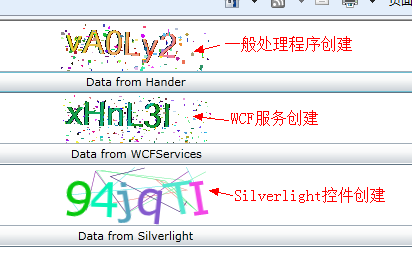
最后运行结果:
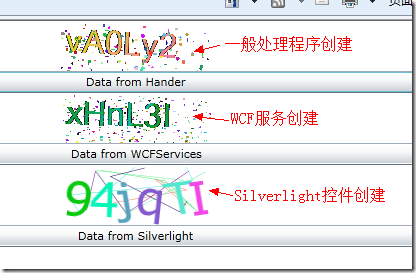
小结:从运行速度上看,采用一般处理程序创建的验证码图片速度随着变换次数的增加会变慢,采用WCFServices创建的图片第一次加载速度较慢,但后面再次加载的的速度最快,Silverlight控件绘图的方法速度略低于WCFServices再次加载的速度,且加载速度始终不变,但由于是矢量图形字符串显示非常清晰。个人比较喜欢第三种方法,因为为了使用图形验证码而增加一个Web服务个人觉得不太值得。
|




 浙公网安备 33010602011771号