


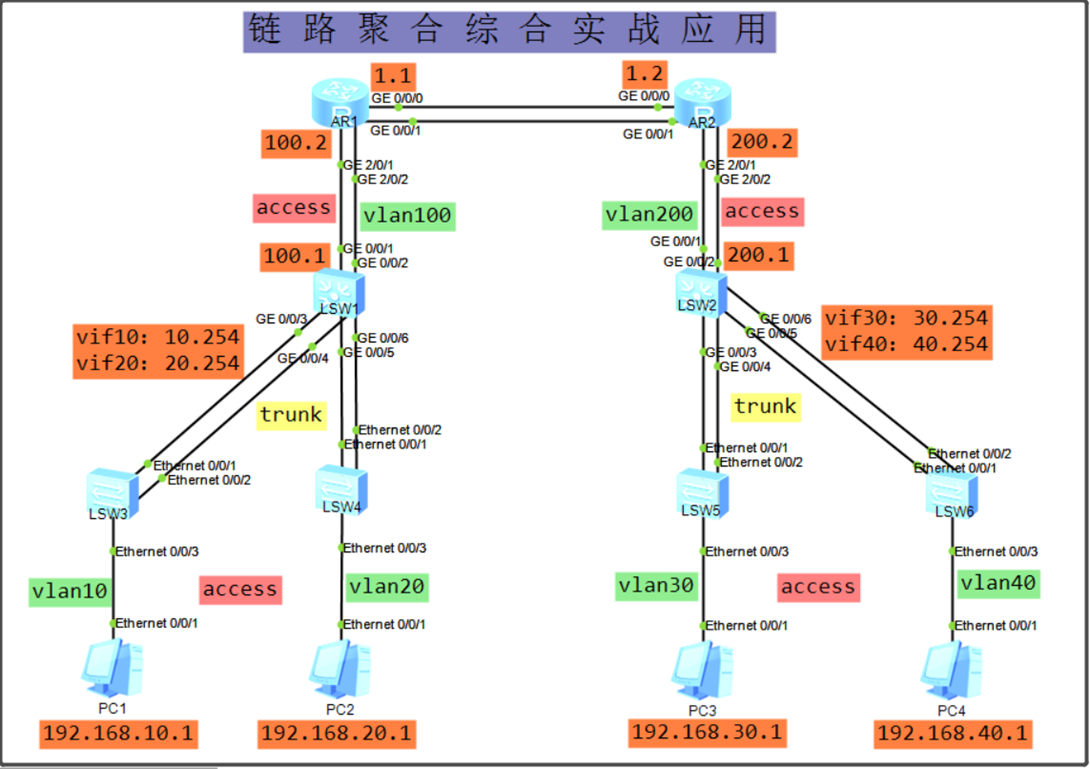
一、如上图所示,首先配置左边二层交换机设备,其次三层交换机
SW3配置:
配置: 从左到右,从下到上。
<Huawei>
<Huawei>u t m //基本配置
<Huawei>sys
[Huawei]sys sw3
[sw3]vlan b 10 //创建vlan
[sw3]int e 0/0/3 //更改接口模式
[sw3-Ethernet0/0/3]port link-type access
[sw3-Ethernet0/0/3]port def vlan 10
[sw3-Ethernet0/0/3]q
[sw3]int Eth-Trunk 1 //设置链路捆绑
[sw3-Eth-Trunk1]mode lacp-static //配置为LACP模式
[sw3-Eth-Trunk1]trunkport e0/0/1 //将物理接口加入端口组
[sw3-Eth-Trunk1]trunkport e0/0/2
[sw3-Eth-Trunk1]port link-type trunk //改接口模式
[sw3-Eth-Trunk1]port trunk allow-pass vlan all
SW4配置:与SW3基本一致
Huawei>u t m
<Huawei>sys
[Huawei]sys sw4
[sw4]vlan 20
[sw4]int e 0/0/3
[sw4-Ethernet0/0/3]port link-type access
[sw4-Ethernet0/0/3]port def vlan 20
[sw4-Ethernet0/0/3]q
[sw4]int Eth-Trunk 2
[sw4-Eth-Trunk2]mode lacp-static
[sw4-Eth-Trunk2]trunkport e0/0/1
[sw4-Eth-Trunk2]trunkport e0/0/2
[sw4-Eth-Trunk2]port link-type trunk
[sw4-Eth-Trunk2]port trunk allow-pass vlan all
SW1配置:
<Huawei>u t m
<Huawei>sys //基本设置
[Huawei]sys sw1
[sw1]vlan b 10 20 100 //创建vlan
[sw1]int Eth-Trunk 1 //捆绑链路
[sw1-Eth-Trunk1]mode lacp-static //配置为LACP模式
[sw1-Eth-Trunk1]trunkport g0/0/3 //将物理接口加入端口组
[sw1-Eth-Trunk1]trunkport g0/0/4
[sw1-Eth-Trunk1]port link-type trunk //改接口
[sw1-Eth-Trunk1]port trunk allow-pass vlan all
[sw1-Eth-Trunk1]q
[sw1]int Eth-Trunk 2 //捆绑链路
[sw1-Eth-Trunk2]mode lacp-static //配置为LACP模式
[sw1-Eth-Trunk2]trunkport g0/0/5 //将物理接口加入端口组
[sw1-Eth-Trunk2]trunkport g0/0/6
[sw1-Eth-Trunk2]port link-type trunk //改接口
[sw1-Eth-Trunk2]port trunk allow-pass vlan all
[sw1-Eth-Trunk2]q
[sw1]int Eth-Trunk 3 //捆绑链路
[sw1-Eth-Trunk3]mode lacp-static //配置为LACP模式
[sw1-Eth-Trunk3]trunkport g0/0/1 //将物理接口加入端口组
[sw1-Eth-Trunk3]trunkport g0/0/2
[sw1-Eth-Trunk3]port link-type access //改接口
[sw1-Eth-Trunk3]port def vlan 100
[sw1-Eth-Trunk3]q
[sw1]int vlan 10 //设置vlanifIP地址
[sw1-Vlanif10]ip ad 192.168.10.254 24
[sw1-Vlanif10]int vlan 20
[sw1-Vlanif20]ip ad 192.168.20.254 24
[sw1-Vlanif20]int vlan 100
[sw1]int vlan 100
[sw1-Vlanif100]ip ad 192.168.100.1 24
二、如上图所示,接着配置右边二层交换机设备,其次三层交换机
SW5配置:
<Huawei>u t m
<Huawei>sys
[Huawei]sys sw5
[sw5]vlan 30
[sw5]int e 0/0/3
[sw5-Ethernet0/0/3]port link-type access
[sw5-Ethernet0/0/3]port def vlan 30
[sw5-Ethernet0/0/3]q
[sw5]int Eth-Trunk 1
[sw5-Eth-Trunk1]mode lacp-static
[sw5-Eth-Trunk1]trunkport e0/0/1
[sw5-Eth-Trunk1]trunkport e0/0/2
[sw5-Eth-Trunk1]port link-type trunk
[sw5-Eth-Trunk1]port trunk allow-pass vlan all
SW6配置:
<Huawei>u t m
<Huawei>sys
[Huawei]sys sw6
[sw6]vlan 40
[sw6]int e 0/0/3
[sw6-Ethernet0/0/3]port link-type access
[sw6-Ethernet0/0/3]port def vlan 40
[sw6-Ethernet0/0/3]q
[sw6]int Eth-Trunk 2
[sw6-Eth-Trunk2]mode lacp-static
[sw6-Eth-Trunk2]trunkport e0/0/1
[sw6-Eth-Trunk2]trunkport e0/0/2
[sw6-Eth-Trunk1]port link-type trunk
[sw6-Eth-Trunk2]port trunk allow-pass vlan all
SW2配置:
<Huawei>u t m
<Huawei>sys
[Huawei]sys sw2
[sw2]vlan b 30 40 200
[sw2]int Eth-Trunk 1
[sw2-Eth-Trunk1]mode lacp-static
[sw2-Eth-Trunk1]trunkport g0/0/3
[sw2-Eth-Trunk1]trunkport g0/0/4
[sw2-Eth-Trunk1]port link-type trunk
[sw2-Eth-Trunk1]port trunk allow-pass vlan all
[sw2-Eth-Trunk1]q
[sw2]int Eth-Trunk 2
[sw2-Eth-Trunk2]mode lacp-static
[sw2-Eth-Trunk2]trunkport g0/0/5
[sw2-Eth-Trunk2]trunkport g0/0/6
[sw2-Eth-Trunk2]port link-type trunk
[sw2-Eth-Trunk2]port trunk allow-pass vlan all
[sw2-Eth-Trunk2]q
[sw2]int Eth-Trunk 3
[sw2-Eth-Trunk3]mode lacp-static
[sw2-Eth-Trunk3]trunkport g0/0/1
[sw2-Eth-Trunk3]trunkport g0/0/2
[sw2-Eth-Trunk3]port link-type access
[sw2-Eth-Trunk3]port def vlan 200
[sw2-Eth-Trunk3]q
[sw2]int vlan 30
[sw2-Vlanif30]ip ad 192.168.30.254 24
[sw2-Vlanif30]int vlan 40
[sw2-Vlanif40]ip ad 192.168.40.254 24
[sw2-Vlanif40]int vlan 200
[sw2-Vlanif200]ip ad 192.168.200.1 24
三、如图配置路由器
R1配置:
<Huawei>u t m
<Huawei>sys //基本配置
[Huawei]sys r1
[r1]int Eth-Trunk 1 //捆绑链路
[r1-Eth-Trunk1]undo portswitch //开启路由模式(此命令不打设置不了IP地址,配置也会报错)
[r1-Eth-Trunk1]mode lacp-static //配置为LACP模式
[r1-Eth-Trunk1]trunkport g0/0/0
[r1-Eth-Trunk1]trunkport g0/0/1
[r1-Eth-Trunk1]ip ad 192.168.1.1 24 //设置IP地址
[r1-Eth-Trunk1]q
[r1]int Eth-Trunk 2 //捆绑链路
[r1-Eth-Trunk2]undo portswitch //开启路由模式(此命令不打设备不了IP地址)
[r1-Eth-Trunk2]mode lacp-static //配置为LACP模式
[r1-Eth-Trunk2]trunkport g2/0/1
[r1-Eth-Trunk2]trunkport g2/0/2
[r1-Eth-Trunk2] ip ad 192.168.100.2 24 //设置IP地址
R2配置:
<Huawei>u t m
<Huawei>sys
[Huawei]sys r2
[r2]int Eth-Trunk 1
[r2-Eth-Trunk1]undo portswitch
[r2-Eth-Trunk1]mode lacp-static
[r2-Eth-Trunk1]trunkport g0/0/0
[r2-Eth-Trunk1]trunkport g0/0/1
[r2-Eth-Trunk1]ip ad 192.168.1.2 24
[r2-Eth-Trunk1]q
[r2]int Eth-Trunk 2
[r2-Eth-Trunk2]undo portswitch
[r2-Eth-Trunk2]mode lacp-static
[r2-Eth-Trunk2]trunkport g2/0/1
[r2-Eth-Trunk2]trunkport g2/0/2
[r2-Eth-Trunk2]ip ad 192.168.200.2 24
四、配置三层交换机、路由器静态路由
SW1配置:
[sw1]ip route-static 192.168.1.0 24 192.168.100.2
[sw1]ip route-static 192.168.200.0 24 192.168.100.2
[sw1]ip route-static 192.168.30.0 24 192.168.100.2
[sw1]ip route-static 192.168.40.0 24 192.168.100.2
SW2配置:
[sw2]ip route-static 192.168.1.0 24 192.168.200.2
[sw2]ip route-static 192.168.100.0 24 192.168.200.2
[sw2]ip route-static 192.168.10.0 24 192.168.200.2
[sw2]ip route-static 192.168.20.0 24 192.168.200.2
R1配置:
[r1]ip route-static 192.168.200.0 24 192.168.1.2
[r1]ip route-static 192.168.30.0 24 192.168.1.2
[r1]ip route-static 192.168.40.0 24 192.168.1.2
[r1]ip route-static 192.168.10.0 24 192.168.100.1
[r1]ip route-static 192.168.20.0 24 192.168.100.1
R2配置:
[r2]ip route-static 192.168.30.0 24 192.168.200.1
[r2]ip route-static 192.168.40.0 24 192.168.200.1
[r2]ip route-static 192.168.100.0 24 192.168.1.1
[r2]ip route-static 192.168.10.0 24 192.168.1.1
[r2]ip route-static 192.168.20.0 24 192.168.1.1
五、测试连接:
PC>ping 192.168.20.1 //PC1连接PC2测试
Ping 192.168.20.1: 32 data bytes, Press Ctrl_C to break
From 192.168.20.1: bytes=32 seq=1 ttl=127 time=78 ms
PC>ping 192.168.30.1 //PC1连接PC3测试
Ping 192.168.30.1: 32 data bytes, Press Ctrl_C to break
From 192.168.30.1: bytes=32 seq=1 ttl=124 time=94 ms
PC>ping 192.168.40.1 //PC1连接PC4测试
Ping 192.168.40.1: 32 data bytes, Press Ctrl_C to break
Request timeout!
From 192.168.40.1: bytes=32 seq=2 ttl=124 time=125 ms
本文来自博客园,作者:叶落秋,转载请注明原文链接:https://www.cnblogs.com/zhaoqy/articles/17661954.html

 浙公网安备 33010602011771号