

Redis实现分布式锁
说到redis就不得不提到jedis和redisson,这两个对于redis的操作各有优劣,具体的分析可以百度搜索,本文通过redisson来实现分布式锁。
1、引入依赖
<dependency>
    <groupId>org.redisson</groupId>
    <artifactId>redisson</artifactId>
    <version>3.17.0</version>
</dependency>
具体使用的版本可以去maven中心搜索,我这边使用的是3.17.0,使用的redis版本是3.2.100,由于是自己下载的windows版本,所以是单实例的redis,后续的文章会涉及到主从、哨兵和集群模式
2、配置Redisson
Config config = new Config();
RedissonClient redisClient = Redisson.create(config);
RLock lock = redissonClient.getLock("this is lock");
大致的用法如上,先进行配置,然后创建RedissonClient,再获取锁,但是这样会有一个问题,我们一般不需要每次都去生成一个RedissonClient,所以我们可以将其注入到Spring的容器中去管理,配置如下。
这里是将集群、哨兵和单机的配置放到了一块。
package com.example.moonlight.common.config.redis;

import org.redisson.Redisson;
import org.redisson.api.RedissonClient;
import org.redisson.config.ClusterServersConfig;
import org.redisson.config.Config;
import org.redisson.config.SentinelServersConfig;
import org.redisson.config.SingleServerConfig;
import org.springframework.beans.factory.annotation.Value;
import org.springframework.boot.autoconfigure.condition.ConditionalOnMissingBean;
import org.springframework.boot.context.properties.EnableConfigurationProperties;
import org.springframework.context.annotation.Bean;
import org.springframework.context.annotation.Configuration;
import org.springframework.util.StringUtils;

@Configuration
@EnableConfigurationProperties({RedissonProperties.class})
public class RedissonConfig {

    /**
     * 主机名
     */
    @Value("${spring.redis.host:}")
    private String host;

    /**
     * 密码
     */
    @Value("${spring.redis.password:}")
    private String password;

    /**
     * 端口
     */
    @Value("${spring.redis.port:}")
    private String port;

    /**
     * 集群节点
     */
    @Value("${spring.redis.cluster.nodes:}")
    private String clusterNodes;

    /**
     * 哨兵节点
     */
    @Value("${spring.redis.sentinel.nodes:}}")
    private String sentinelNodes;

    @Value("${spring.redis.sentinel.master:}")
    private String masterName;

    private static final String redisAddressPrefix = "redis://";

    /**
     * 针对每次都要获取RedissonClient的问题,这里注入一个bean,实现单例
     */
    @Bean
    @ConditionalOnMissingBean//该注解保证当前bean只能被注入一次,实现单例
    public RedissonClient getRedissonClient(RedissonProperties redissonProperties) {
        //创建redisson的配置
        Config config = new Config();

        //这里需要区分redis是单机部署、主从模式、哨兵模式还是集群模式,
        //对应Config中的,SingleServerConfig、MasterSlaveServersConfig、SentinelServersConfig、ClusterServersConfig
        if (!StringUtils.isEmpty(clusterNodes)) {//集群模式

            ClusterServersConfig clusterServersConfig = config.useClusterServers();

            //设置集群节点
            String[] nodes = clusterNodes.split(",");
            for (String node : nodes) {
                //若是配置的节点包含了redis://,则不用拼接
                if (node.contains(redisAddressPrefix)) {
                    clusterServersConfig.addNodeAddress(node);
                } else {
                    clusterServersConfig.addNodeAddress(redisAddressPrefix + node);
                }
            }

            clusterServersConfig.setScanInterval(2000);
            clusterServersConfig.setPassword(password);
            //设置密码
            clusterServersConfig.setPassword(password);

            //如果当前连接池里的连接数量超过了最小空闲连接数,而同时有连接空闲时间超过了该数值,那么这些连接将会自动被关闭,
            // 并从连接池里去掉。时间单位是毫秒。
            clusterServersConfig.setIdleConnectionTimeout(redissonProperties.getIdleConnectionTimeout());

            //同任何节点建立连接时的等待超时。时间单位是毫秒。
            clusterServersConfig.setConnectTimeout(redissonProperties.getConnectTimeout());

            //等待节点回复命令的时间。该时间从命令发送成功时开始计时。
            clusterServersConfig.setTimeout(redissonProperties.getTimeout());
            clusterServersConfig.setPingConnectionInterval(redissonProperties.getPingTimeout());

            //当与某个节点的连接断开时,等待与其重新建立连接的时间间隔。时间单位是毫秒。
            clusterServersConfig.setFailedSlaveReconnectionInterval(redissonProperties.getReconnectionTimeout());

        } else if (StringUtils.isEmpty(sentinelNodes)) {//哨兵模式
            SentinelServersConfig sentinelServersConfig = config.useSentinelServers();
            //哨兵模式本质还是主从模式,所有的数据存在一个redis实例上,从服务器上只是主服务的备份
            sentinelServersConfig.setDatabase(0);
            sentinelServersConfig.setMasterName(masterName);
            sentinelServersConfig.setScanInterval(2000);
            sentinelServersConfig.setPassword(password);
            String[] nodes = sentinelNodes.split(",");
            for (String node : nodes) {
                sentinelServersConfig.addSentinelAddress(node);
            }
        } else {//单机模式

            //指定使用单节点部署方式
            SingleServerConfig singleServerConfig = config.useSingleServer();

            singleServerConfig.setAddress("redis://" + host + ":" + port);

            //设置密码
            singleServerConfig.setPassword(password);

            //设置对于master节点的连接池中连接数最大为500
            singleServerConfig.setConnectionPoolSize(redissonProperties.getConnectionPoolSize());

            //如果当前连接池里的连接数量超过了最小空闲连接数,而同时有连接空闲时间超过了该数值,那么这些连接将会自动被关闭,
            // 并从连接池里去掉。时间单位是毫秒。
            singleServerConfig.setIdleConnectionTimeout(redissonProperties.getIdleConnectionTimeout());

            //同任何节点建立连接时的等待超时。时间单位是毫秒。
            singleServerConfig.setConnectTimeout(redissonProperties.getConnectTimeout());

            //等待节点回复命令的时间。该时间从命令发送成功时开始计时。
            singleServerConfig.setTimeout(redissonProperties.getTimeout());
            singleServerConfig.setPingConnectionInterval(redissonProperties.getPingTimeout());
        }
        RedissonClient redisClient = Redisson.create(config);
        return redisClient;
    }

}
自己写了一个redisson的配置类,如下:
package com.example.moonlight.common.config.redis;

import lombok.Data;
import org.springframework.boot.context.properties.ConfigurationProperties;

@Data
@ConfigurationProperties(prefix = "demo.boot.redisson")//批量配置,前缀相同则可以自动设置,具体用到了beanPostProcess,设置了默认值,不配置参数也可以
public class RedissonProperties {

    /**
     * 设置对于master节点的连接池中连接数最大为500
     */
    private Integer connectionPoolSize = 500;

    /**
     * 如果当前连接池里的连接数量超过了最小空闲连接数,而同时有连接空闲时间超过了该数值,
     * 那么这些连接将会自动被关闭,并从连接池里去掉。时间单位是毫秒。
     */
    private Integer idleConnectionTimeout = 10000;

    /**
     * 同任何节点建立连接时的等待超时。时间单位是毫秒。
     */
    private Integer connectTimeout = 30000;

    /**
     * 等待节点回复命令的时间。该时间从命令发送成功时开始计时。
     */
    private Integer timeout = 3000;

    /**
     * ping不通的时间
     */
    private Integer pingTimeout = 30000;

    /**
     * 当与某个节点的连接断开时,等待与其重新建立连接的时间间隔。时间单位是毫秒。
     */
    private Integer reconnectionTimeout = 3000;
}
application.properties的配置如下,主要是redis的信息
#redis配置
# Redis数据库索引(默认为0)
spring.redis.database=0
# Redis服务器地址
spring.redis.host=127.0.0.1
# Redis服务器连接端口
spring.redis.port=6379
# Redis服务器连接密码(默认为空,填写redis的密码就可以)
spring.redis.password=12345
# 连接池最大连接数(使用负值表示没有限制)
spring.redis.pool.max-active=200
# 连接池最大阻塞等待时间(使用负值表示没有限制)
spring.redis.pool.max-wait=-1
# 连接池中的最大空闲连接
spring.redis.pool.max-idle=10
# 连接池中的最小空闲连接
spring.redis.pool.min-idle=0
3、使用
前面的配置完成后,如果没有问题,此时就可以正常的在代码中使用了,下面给出使用例子:
两个方法一个是tryLock()一个是lock(),tryLock()会有返回值,如果加锁失败会返回false,此时可以根据返回值做一些事情,而lock()会一直阻塞,直到自己获取到锁,具体使用哪种,看具体情况而定。
package com.example.moonlight.modules.user.examples.redis;

import org.redisson.api.RLock;
import org.redisson.api.RedissonClient;
import org.slf4j.Logger;
import org.slf4j.LoggerFactory;
import org.springframework.beans.factory.annotation.Autowired;
import org.springframework.data.redis.core.RedisTemplate;
import org.springframework.stereotype.Service;
import java.util.concurrent.CountDownLatch;
import java.util.concurrent.TimeUnit;

@Service
public class RedisService {

    private static final Logger logger = LoggerFactory.getLogger(RedisService.class);

    @Autowired
    private RedissonClient redissonClient;

    /**
     * 测试redis分布式锁
     */
    public void testRedisTryLock(CountDownLatch countDownLatch) {
        RLock lock = redissonClient.getLock("this is lock");
        try {
            //考虑加锁异常,但是实际加锁成功这种情况,所以lock时需要在try-catch里面,不然会出现异常没有被捕获而无法解锁的问题
            boolean isSuccess = lock.tryLock(10L, 30000, TimeUnit.MILLISECONDS);
            if (isSuccess) {
                logger.info(Thread.currentThread().getName() + " get lock is success");
                //模拟执行业务代码
                Thread.sleep(100);
            } else {
                logger.info(Thread.currentThread().getName() + " get lock is failed");
            }
        } catch (Exception e) {
            logger.error("lock lock error", e);
        } finally {
            //判断是否被当前线程持有
            if (lock.isLocked() && lock.isHeldByCurrentThread()) {
                lock.unlock();
                logger.info(Thread.currentThread().getName() + " unlock is success");
            }
            countDownLatch.countDown();
        }
    }

    /**
     * 测试redis分布式锁
     */
    public void testRedisLock(CountDownLatch countDownLatch) {
        RLock lock = redissonClient.getLock("this is lock");
        try {
            //考虑加锁异常,但是实际加锁成功这种情况,所以lock时需要在try-catch里面,不然会出现异常没有被捕获而无法解锁的问题
            lock.lock(30000, TimeUnit.MILLISECONDS);
            logger.info(Thread.currentThread().getName() + " get lock is success");
            //模拟执行业务代码
            Thread.sleep(100);
        } catch (Exception e) {
            logger.error("lock lock error", e);
        } finally {
            //判断是否被当前线程持有
            if (lock.isLocked() && lock.isHeldByCurrentThread()) {
                lock.unlock();
                logger.info(Thread.currentThread().getName() + " unlock is success");
            }
            countDownLatch.countDown();
        }
    }
}
然后写一个Test测试一下,代码如下:
package com.example.moonlight.start;

import com.example.moonlight.modules.user.examples.multithreading.count_down_latch.TCountDownLatch;
import com.example.moonlight.modules.user.examples.redis.RedisService;
import lombok.extern.slf4j.Slf4j;
import org.junit.jupiter.api.Test;
import org.springframework.beans.factory.annotation.Autowired;
import org.springframework.boot.test.context.SpringBootTest;
import org.springframework.scheduling.concurrent.ThreadPoolTaskExecutor;

import java.util.concurrent.CountDownLatch;

@Slf4j
@SpringBootTest
class StartApplicationTests {

    @Autowired
    TCountDownLatch tCountDownLatch;

    @Autowired
    ThreadPoolTaskExecutor taskExecutor;

    @Autowired
    private RedisService redisService;

    /**
     * 测试redis的分布式锁
     */
    @Test
    void testRedisTryLock() throws Exception {
        CountDownLatch countDownLatch = new CountDownLatch(6);
        for (int i = 0; i < 6; i++) {
            taskExecutor.submit(() -> {
                try {
                    redisService.testRedisTryLock(countDownLatch);
                } catch (Exception e) {
                    log.error("error ", e);
                }
            });
        }
        //等待主线程中的子线程执行完,不然这个Test执行完,程序就关闭了,会报异常,在正常的程序中不会出现这个问题
        countDownLatch.await();
    }

    /**
     * 测试redis的分布式锁
     */
    @Test
    void testRedisLock() throws Exception {
        CountDownLatch countDownLatch = new CountDownLatch(6);
        for (int i = 0; i < 6; i++) {
            //多线程调用
            taskExecutor.submit(() -> {
                try {
                    redisService.testRedisLock(countDownLatch);
                } catch (Exception e) {
                    log.error("error ", e);
                }
            });
        }
        //等待主线程中的子线程执行完,不然这个Test执行完,程序就关闭了,会报异常,在正常的程序中不会出现这个问题
        countDownLatch.await();
    }
}
这里采用了线程池去调用方法,模拟多线程调用。
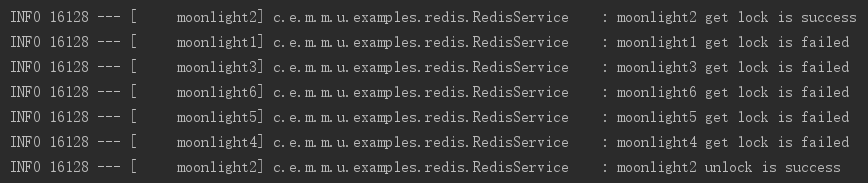
testRedisTryLock()运行结果如下图,因为tryLock()到时间就会返回,所以根据返回结果执行了不同的代码,只有线程moonlight2获取锁成功,其他的线程获取锁失败,最后moonlight2解锁成功。
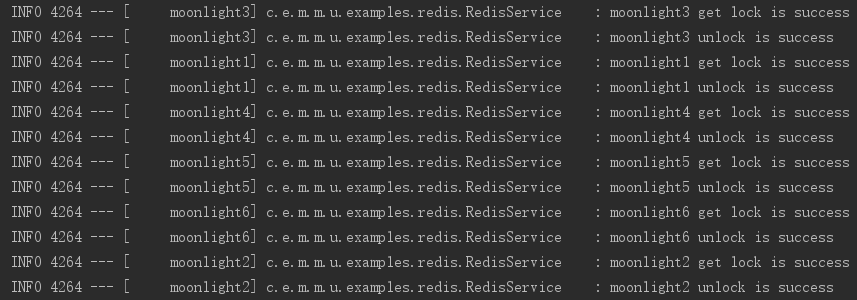
testRedisLock()运行结果如下图,因为lock()会一直阻塞,所以线程依次的加锁和解锁成功。
注意:在解锁时,加了一个if判断,代码如下:
//判断是否被当前线程持有
if (lock.isLocked() && lock.isHeldByCurrentThread()) {
    lock.unlock();
    logger.info(Thread.currentThread().getName() + " unlock is success");
}
其中isHeldByCurrentThread()判断锁是否被当前线程持有,防止锁被其他的线程解锁,如果不加这个判断,其他线程也是无法解锁的,redisson已经做了这个处理,但是非持有锁的线程解锁时,会抛出异常,异常截图如下:

所以要不就是解锁前先判断一下,或者对解锁捕获异常并处理,不然程序可能会出现问题。
好啦!基本的使用就是这些,水平有限,如有错误及时指正。

 浙公网安备 33010602011771号