
在使用maven进行编译测试时,显示了 不支持源选项 1.5。请使用 1.6 或更高版本 的错误信息
查询后 发现有两种解决方式:
1. 在pom.xml中加入下记内容,指定编译器的版本:
    <properties>
        <project.build.sourceEncoding>UTF-8</project.build.sourceEncoding>
        <maven.compiler.source>1.9</maven.compiler.source>
        <maven.compiler.target>1.9</maven.compiler.target>
    </properties>
2. 在idea中进行设定,指定该模块的编译器版本:
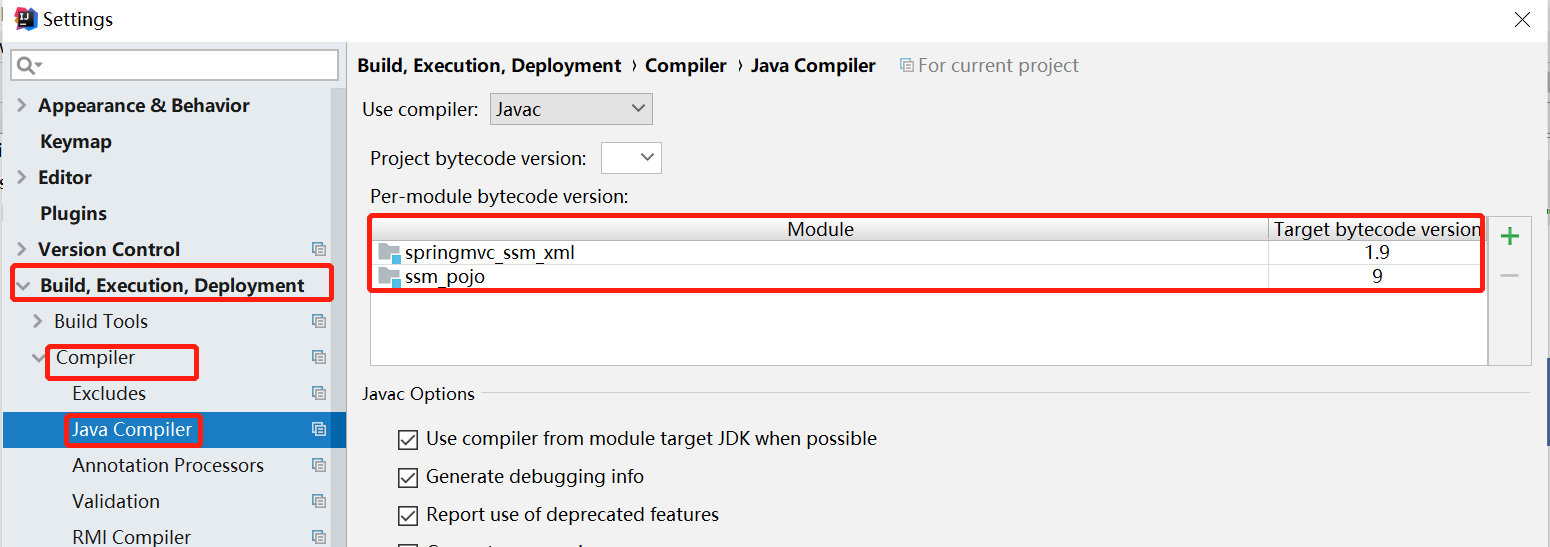
3. 在maven指定的setting.xml中的<profiles></profiles>中进行全局配置
    <profile>
        <id>jdk-1.9</id>
        <activation>
            <activeBydefault>true</activeBydefault>
            <jdk>1.9</jdk>
        </activation>
        <properties>
            <project.build.sourceEncoding>UTF-8</project.build.sourceEncoding>
            <maven.compiler.source>1.9</maven.compiler.source>
            <maven.compiler.target>1.9</maven.compiler.target>
        </properties>
    </profile>
4. 在maven中相关项目的pom.xml文件中进行插件配置
            <plugin>
              <groupId>org.apache.maven.plugins</groupId>
              <artifactId>maven-compiler-plugin</artifactId>
              <configuration>
                <target>1.9</target>
                <source>1.9</source>
                <encoding>utf-8</encoding>
              </configuration>
            </plugin>

 浙公网安备 33010602011771号