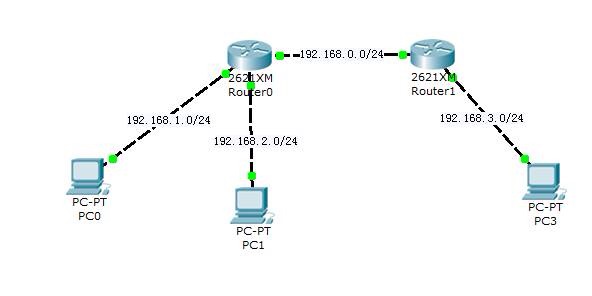
//手动配置PC0的IP、子网掩码、网管

   //R1
ena  //进入特权模式
conf t // 进入全局配置模式
host name R1  //为路由器改名字
int f0/0  //进去f0/0端口
ip add 192.168.1.254 255.255.255.0
no shut
int f0/1
ip add 192.168.2.254 255.255.255.0
no shut
int f1/1
ip add 192.168.0.1 255.255.255.0
no shut
           //PC0已经手动设置
设置 DHCP
ip dhcp pool R1
network 192.168.2.0 255.255.255.0  //设置DHCP应用池网段
de 192.168.2.254   //设置网关
dns 222.88.88.88   //设置DNS
exit
ip dhcp exc 192.168.2.254 //排除IP


  //R2
ena
conf t
host name R2
int f0/1
ip add 192.168.0.2 255.255.255.0
no shut
int f0/0
ip add 192.168.3.254 255.255.255.0
  做DHCP
ip dhcp pool R2
network 192.168.3.0 255.255.255.0  //设置DHCP应用池网段
default 192.168.3.254   //设置网关
dns 222.88.88.88  设置DNS
exit
ip dhcp exc 192.168.3.254  //排除IP

  查看静态路由
show ip route //查看路由

R1#show ip route
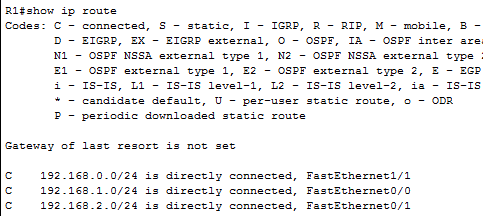
少了 192.168.3.0段  所以R1不能访问3.0段
     继续设置路由
conf t
ip route 192.168.3.0 255.255.255.0 192.168.0.2  //设置目标IP 子网掩码  下一跳IP
同理做R2


 浙公网安备 33010602011771号