http协议之于servlet
恕吾不才,http协议之于servlet的一篇英文文章,我基本上没看懂什么。但是还是贴上来,好帮助给位理解servletAPI,也让自己能在日后再次学习英文文档。
HTTP Servlets
A servlet is a ``module'' that can be integrated into a server application to respond to client requests. Although a servlet need not use a specific protocol, we will use the HTTP protocol for communication (see figure 21.1). In practice, the term servlet refers to an HTTP servlet.
The classic method of constructing dynamic HTML pages on a server is to use CGI (Common Gateway Interface) commands. These take as argument a URL which can contain data coming from an HTML form. The execution then produces a new HTML page which is sent to the client. The following links describe the HTTP and CGI protocols.
Link
http://www.cis.ohio-state.edu/cgi-bin/rfc/rfc1945.html
Link
http://hoohoo.ncsa.uiuc.edu/docs/cgi/overview.html
It is a slightly heavyweight mechanism because it launches a new program for each request.
HTTP servlets are launched just once, and can can decode arguments in CGI format to execute a request. Servlets can take advantage of the Web browser's capabilities to construct a graphical interface for an application.
Figure 21.1: communication between a browser and an Objective CAMLserver
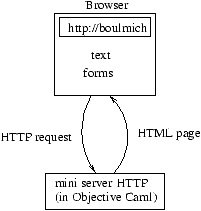
In this section we will define a server for the HTTP protocol. We will not handle the entire specification of the protocol, but instead will limit ourselves to those functions necessary for the implementation of a server that mimics the behavior of a CGI application.
At an earlier time, we defined a generic server module Gsd. Now we will give the code to create an application of this generic server for processing part of the HTTP protocol.
HTTP and CGI Formats
We want to obtain a server that imitates the behavior of a CGI application. One of the first tasks is to decode the format of HTTP requests with CGI extensions for argument passing.
The clients of this server can be browsers such as Netscape or Internet Explorer.
Receiving Requests
Requests in the HTTP protocol have essentially three components: a method, a URL and some data. The data must follow a particular format.
In this section we will construct a collection of functions for reading, decomposing and decoding the components of a request. These functions can raise the exception:
# exceptionHttp_errorofstring;;exception Http_error of string
Decoding
The function decode, which uses the helper function rep_xcode, attempts to restore the characters which have been encoded by the HTTP client: spaces (which have been replaced by +), and certain reserved characters which have been replaced by their hexadecimal code.
# letrecrep_xcodesi=letxs="0x00"inString.blits(i+1)xs22;String.setsi(char_of_int(int_of_stringxs));String.blits(i+3)s(i+1)((String.lengths)-(i+3));String.sets((String.lengths)-2)'\000';Printf.printf"rep_xcode1(%s)\n"s;;val rep_xcode : string -> int -> unit = <fun>
# exceptionEnd_of_decodeofstring;;exception End_of_decode of string
# letdecodes=tryfori=0topred(String.lengths)domatchs.[i]with'+'->s.[i]<-' '|'%'->rep_xcodesi|'\000'->raise(End_of_decode(String.subs0i))|_->()done;swithEnd_of_decodes->s;;val decode : string -> string = <fun>
String manipulation functions
The module String_plus contains some functions for taking apart character strings:
- prefix and suffix, which extract the substrings to either side of an index;
- split, which returns the list of substrings determined by a separator character;
- unsplit, which concatenates a list of strings, inserting separator characters between them.
# moduleString_plus=structletprefixsn=tryString.subs0nwithInvalid_argument("String.sub")->sletsuffixsi=tryString.subsi((String.lengths)-i)withInvalid_argument("String.sub")->""letrecsplitcs=tryleti=String.indexscinlets1,s2=prefixsi,suffixs(i+1)ins1::(splitcs2)withNot_found->[s]letunsplitcss=letfs1s2=matchs2with""->s1|_->s1^(Char.escapedc)^s2inList.fold_rightfss""end;;
Decomposing data from a form
Requests typically arise from an HTML page containing a form. The contents of the form are transmitted as a character string containing the names and values associated with the fields of the form. The function get_field_pair transforms such a string into an association list.
# letget_field_pairs=matchString_plus.split'='swith[n;v]->n,v|_->raise(Http_error("Bad field format : "^s));;val get_field_pair : string -> string * string = <fun>
# letget_form_contents=letss=String_plus.split'&'sinList.mapget_field_pairss;;val get_form_content : string -> (string * string) list = <fun>
Reading and decomposing
The function get_query extracts the method and the URL from a request and stores them in an array of character strings. One can thus use a standard CGI application which retrieves its arguments from the array of command-line arguments. The function get_query uses the auxiliary function get. We arbitrarily limit requests to a maximum size of 2555 characters.
# letget=letbuff_size=2555inletbuff=String.createbuff_sizein(funic->String.subbuff0(inputicbuff0buff_size));;val get : in_channel -> string = <fun>
# letquery_stringhttp_frame=tryleti0=String.indexhttp_frame' 'inletq0=String_plus.prefixhttp_framei0inmatchq0with"GET"->beginleti1=succi0inleti2=String.index_fromhttp_framei1' 'inletq=String.subhttp_framei1(i2-i1)intryleti=String.indexq'?'inletq1=String_plus.prefixqiinletq=String_plus.suffixq(succi)inArray.of_list(q0::q1::(String_plus.split' '(decodeq)))withNot_found->[|q0;q|]end|_->raise(Http_error("Unsupported method: "^q0))withe->raise(Http_error("Unknown request: "^http_frame));;val query_string : string -> string array = <fun>
# letget_query_stringic=lethttp_frame=geticinquery_stringhttp_frame;;val get_query_string : in_channel -> string array = <fun>
The Server
To obtain a CGI pseudo-server, able to process only the GET method, we write the class http_servlet, whose argument fun_serv is a function for processing HTTP requests such as might have been written for a CGI application.
# moduleText_Server=Server(structtypet=stringletto_stringx=xletof_stringx=xend);;
# moduleP_Text_Server(P:PROTOCOL)=structmoduleInternal_Server=Server(P)classhttp_servletnnpfun_serv=object(self)inherit[P.t]Internal_Server.servernnpmethodreceive_hfd=letic=Unix.in_channel_of_descrfdininput_lineicmethodprocessfd=letoc=Unix.out_channel_of_descrfdin(tryletrequest=self#receive_hfdinletargs=query_stringrequestinfun_servocargs;withHttp_errors->Printf.fprintfoc"HTTP error : %s <BR>"s|_->Printf.fprintfoc"Unknown error <BR>");flushoc;Unix.shutdownfdUnix.SHUTDOWN_ALLendend;;
As we do not expect the servlet to communicate using Objective CAML's special internal values, we choose the type string as the protocol type. The functions of_string and to_string do nothing.
# moduleSimple_http_server=P_Text_Server(structtypet=stringletof_stringx=xletto_stringx=xend);;
Finally, we write the primary function to launch the service and construct an instance of the class http_servlet.
# letcgi_like_serverport_numfun_serv=letsv=newSimple_http_server.http_servletport_num3fun_servinsv#start;;val cgi_like_server : int -> (out_channel -> string array -> unit) -> unit =<fun>
Testing the Servlet
It is always useful during development to be able to test the parts that are already built. For this purpose, we build a small HTTP server which sends the file specified in the HTTP request as is. The function simple_serv sends the file whose name follows the GET request (the second element of the argument array). The function also displays all of the arguments passed in the request.
# letsend_fileocf=letic=open_in_binfintrywhiletruedooutput_byteoc(input_byteic)donewithEnd_of_file->close_inic;;val send_file : out_channel -> string -> unit = <fun>
# letsimple_servocargs=tryArray.iter(funx->print_string(x^" "))args;print_newline();send_fileocargs.(1)with_->Printf.printf"error\n";;val simple_serv : out_channel -> string array -> unit = <fun>
# letrunn=cgi_like_servernsimple_serv;;val run : int -> unit = <fun>
The command run 4003 launches this servlet on port 4003. In addition, we launch a browser to issue a request to load the page baro.html on port 4003. The figure 21.2 shows the display of the contents of this page in the browser.
Figure 21.2: HTTP request to an Objective CAML servlet
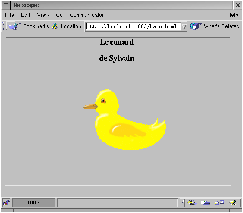
The browser has sent the request GET /baro.html to load the page, and then the request GET /canard.gif to load the image.
HTML Servlet Interface
We will use a CGI-style server to build an HTML-based interface to the database of chapter 6 (see page ??).
The menu of the function main will now be displayed in a form on an HTML page, providing the same selections. The responses to requests are also HTML pages, generated dynamically by the servlet. The dynamic page construction makes use of the utilities defined below.
Application Protocol
Our application will use several elements from several protocols:
- Requests are transmitted from a Web browser to our application server in the HTTP request format.
- The data items within a request are encoded in the format used by CGI applications.
- The response to the request is presented as an HTML page.
- Finally, the nature of the request is specified in a format specific to the application.
We wish to respond to three kinds of request: queries for the list of mail addresses, queries for the list of email addresses, and queries for the state of received fees between two given dates. We give these query types respectively the names:mail_addr, email_addr and fees_state. In the last case, we will also transmit two character strings containing the desired dates. These two dates correspond to the values of the fields start and endon an HTML form.
When a client first connects, the following page is sent. The names of the requests are encoded within it in the form of HTML anchors.
<HTML>
<TITLE> association </TITLE>
<BODY>
<HR>
<H1 ALIGN=CENTER>Association</H1>
<P>
<HR>
<UL>
<LI>List of
<A HREF="http://freres-gras.ufr-info-p6.jussieu.fr:12345/mail_addr">
mail addresses
</A>
<LI>List of
<A HREF="http://freres-gras.ufr-info-p6.jussieu.fr:12345/email_addr">
email addresses
</A>
<LI>State of received fees<BR>
<FORM
 method="GET"
 action="http://freres-gras.ufr-info-p6.jussieu.fr:12345/fees_state">
Start date : <INPUT type="text" name="start" value="">
End date : <INPUT type="text" name="end" value="">
<INPUT name="action" type="submit" value="Send">
</FORM>
</UL>
<HR>
</BODY>
</HTML>
We assume that this page is contained in the file assoc.html.
HTML Primitives
The HTML utility functions are grouped together into a single class called print. It has a field specifying the output channel. Thus, it can be used just as well in a CGI application (where the output channel is the standard output) as in an application using the HTTP server defined in the previous section (where the output channel is a network socket).
The proposed methods essentially allow us to encapsulate text within HTML tags. This text is either passed directly as an argument to the method in the form of a character string, or produced by a function. For example, the principal method page takes as its first argument a string corresponding to the header of the page1, and as its second argument a function that prints out the contents of the page. The method page produces the tags corresponding to the HTML protocol.
The names of the methods match the names of the corresponding HTML tags, with additional options added in some cases.
# class(oc0:out_channel)=object(self)valoc=oc0methodflush()=flushocmethodstr=Printf.fprintfoc"%s"methodpageheader(body:unit->unit)=Printf.fprintfoc"<HTML><HEAD><TITLE>%s</TITLE></HEAD>\n<BODY>"header;body();Printf.fprintfoc"</BODY>\n</HTML>\n"methodp()=Printf.fprintfoc"\n<P>\n"methodbr()=Printf.fprintfoc"<BR>\n"methodhr()=Printf.fprintfoc"<HR>\n"methodhr()=Printf.fprintfoc"\n<HR>\n"methodhis=Printf.fprintfoc"<H%d>%s</H%d>"isimethodh_centeris=Printf.fprintfoc"<H%d ALIGN=\"CENTER\">%s</H%d>"isimethodformurl(form_content:unit->unit)=Printf.fprintfoc"<FORM method=\"post\" action=\"%s\">\n"url;form_content();Printf.fprintfoc"</FORM>"methodinput_text=Printf.fprintfoc"<INPUT type=\"text\" name=\"%s\" size=\"%d\" value=\"%s\">\n"methodinput_hidden_text=Printf.fprintfoc"<INPUT type=\"hidden\" name=\"%s\" value=\"%s\">\n"methodinput_submit=Printf.fprintfoc"<INPUT name=\"%s\" type=\"submit\" value=\"%s\">"methodinput_radio=Printf.fprintfoc"<INPUT type=\"radio\" name=\"%s\" value=\"%s\">\n"methodinput_radio_checked=Printf.fprintfoc"<INPUT type=\"radio\" name=\"%s\" value=\"%s\" CHECKED>\n"methodoption=Printf.fprintfoc"<OPTION> %s\n"methodoption_selectedopt=Printf.fprintfoc"<OPTION SELECTED> %s"optmethodselectnameoptionsselected=Printf.fprintfoc"<SELECT name=\"%s\">\n"name;List.iter(funs->ifs=selectedthenself#option_selectedselseself#options)options;Printf.fprintfoc"</SELECT>\n"methodoptionsselected=List.iter(funs->ifs=selectedthenself#option_selectedselseself#options)end;;
We will assume that these utilities are provided by the module Html_frame.
Dynamic Pages for Managing the Association Database
For each of the three kinds of request, the application must construct a page in response. For this purpose we use the utility module Html_frame given above. This means that the pages are not really constructed, but that their various components are emitted sequentially on the output channel.
We provide an additional (virtual) page to be returned in response to a request that is invalid or not understood.
Error page
The function print_error takes as arguments a function for emitting an HTML page (i.e., an instance of the class print) and a character string containing the error message.
# letprint_error:Html_frame.print)s=letprint_body()=print#strs;print#br()inprint#page"Error"print_body;;val print_error : Html_frame.print -> string -> unit = <fun>
All of our functions for emitting responses to requests will take as their first argument a function for emitting an HTML page.
List of mail addresses
To obtain the page giving the response to a query for the list of mail addresses, we will format the list of character strings obtained by the function mail_addresses, which was defined as part of the database (see page ??). We will assume that this function, and all others directly involving requests to the database, have been defined in a module named Assoc.
To emit this list, we use a function for outputting simple lines:
# letprint_lines:Html_frame.print)ls=letprint_linel=print#strl;print#br()inList.iterprint_linels;;val print_lines : Html_frame.print -> string list -> unit = <fun>
The function for responding to a query for the list of mail addresses is:
# letprint_mail_addressesdb=print#page"Mail addresses"(fun()->print_lines(Assoc.mail_addressesdb));;val print_mail_addresses : Html_frame.print -> Assoc.data_base -> unit =<fun>
In addition to the parameter for emitting a page, the function print_mail_addresses takes the database as its second parameter.
List of email addresses
This function is built on the same principles as that giving the list of mail addresses, except that it calls the function email_addresses from the module Assoc:
# letprint_email_addressesdb=print#page"Email addresses"(fun()->print_lines(Assoc.email_addressesdb));;val print_email_addresses : Html_frame.print -> Assoc.data_base -> unit =<fun>
State of received fees
The same principle also governs the definition of this function: retrieving the data corresponding to the request (which here is a pair), then emitting the corresponding character strings.
# letprint_fees_statedbd1d2=letls,t=Assoc.fees_statedbd1d2inletpage_body()=print_linesls;print#str("Total : "^(string_of_floatt));print#br()inprint#page"State of received fees"page_body;;val print_fees_state :Html_frame.print -> Assoc.data_base -> string -> string -> unit = <fun>
Analysis of Requests and Response
We define two functions for producing responses based on an HTTP request. The first (print_get_answer) responds to a request presumed to be formulated using the GET method of the HTTP protocol. The second alters the production of the answer according to the actual method that the request used.
These two functions take as their second argument an array of character strings containing the elements of the HTTP request as analyzed by the function get_query_string (see page ??). The first element of the array contains the method, the second the name of the database request.
In the case of a query for the state of received fees, the start and end dates for the request are contained in the two fields of the form associated with the query. The data from the form are contained in the third field of the array, which must be decomposed by the function get_form_content (see page ??).
# letprint_get_answerqdb=matchq.(1)with|"/mail_addr"->print_mail_addressesdb|"/email_addr"->print_email_addressesdb|"/fees_state"->letnvs=get_form_contentq.(2)inletd1=List.assoc"start"nvsandd2=List.assoc"end"nvsinprint_fees_statedbd1d2|_->print_error("Unknown request: "^q.(1));;val print_get_answer :Html_frame.print -> string array -> Assoc.data_base -> unit = <fun>
# letprint_answerqdb=trymatchq.(0)with"GET"->print_get_answerqdb|_->print_error("Unsupported method: "^q.(0))withe->lets=Array.fold_right(^)q""inprint_error("Something wrong with request: "^s);;val print_answer :Html_frame.print -> string array -> Assoc.data_base -> unit = <fun>
Main Entry Point and Application
The application is a standalone executable that takes the port number as a parameter. It reads in the database before launching the server. The main function is obtained from the function print_answerdefined above and from the generic HTTP server function cgi_like_server defined in the previous section (see page ??). The latter function is located in the module Servlet.
# letget_port_num()=if(Array.lengthSys.argv)<2then12345elsetryint_of_stringSys.argv.(1)with_->12345;;val get_port_num : unit -> int = <fun>
# letmain()=letdb=Assoc.read_base"assoc.dat"inletassoc_answerocq=print_answer(newHtml_frame.printoc)qdbinServlet.cgi_like_server(get_port_num())assoc_answer;;val main : unit -> unit = <fun>
To obtain a complete application, we combine the definitions of the display functions into a file httpassoc.ml. The file ends with a call to the function main:
main() ;;
We can then produce an executable named assocd using the compilation command:
ocamlc -thread -custom -o assocd unix.cma threads.cma \
       gsd.cmo servlet.cmo html_frame.cmo string_plus.cmo assoc.cmo \
       httpassoc.ml -cclib -lunix -cclib -lthreads
All that's left is to launch the server, load the HTML page2 contained in the file assoc.html given at the beginning of this section (page ??), and click.
The figure 21.3 shows an example of the application in use.
Figure 21.3: HTTP request to an Objective CAML servlet
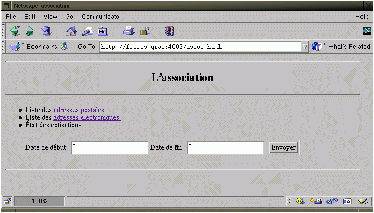
The browser establishes an initial connection with the servlet, which sends it the menu page. Once the entry fields are filled in, the user sends a new request which contains the data entered. The server decodes the request and calls on the association database to retrieve the desired information. The result is translated into HTML and sent to the client, which then displays this new page.


 浙公网安备 33010602011771号