


python 采集网站数据,本教程用的是scrapy蜘蛛
1、安装Scrapy框架
命令行执行:
pip install scrapy
安装的scrapy依赖包和原先你安装的其他python包有冲突话,推荐使用Virtualenv安装
安装完成后,随便找个文件夹创建爬虫
scrapy startproject 你的蜘蛛名称
文件夹目录
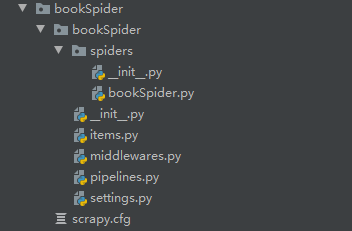
爬虫规则写在spiders目录下
items.py ——需要爬取的数据
pipelines.py ——执行数据保存
settings —— 配置
middlewares.py——下载器
下面是采集一个小说网站的源码
先在items.py定义采集的数据
# 2019年8月12日17:41:08
# author zhangxi<1638844034@qq.com>

import scrapy


class BookspiderItem(scrapy.Item):
    # define the fields for your item here like:
    i = scrapy.Field()
    book_name = scrapy.Field()
    book_img = scrapy.Field()
    book_author = scrapy.Field()
    book_last_chapter = scrapy.Field()
    book_last_time = scrapy.Field()
    book_list_name = scrapy.Field()
    book_content = scrapy.Field()
    pass
编写采集规则
# 2019年8月12日17:41:08
# author zhangxi<1638844034@qq.com>
import scrapy
from ..items import BookspiderItem
class Book(scrapy.Spider):
    name = "BookSpider"
    start_urls = [
        'http://www.xbiquge.la/xiaoshuodaquan/'
    ]

    def parse(self, response):
        bookAllList = response.css('.novellist:first-child>ul>li')

        for all in bookAllList:
            booklist = all.css('a::attr(href)').extract_first()
            yield scrapy.Request(booklist,callback=self.list)

    def list(self,response):
        book_name = response.css('#info>h1::text').extract_first()
        book_img = response.css('#fmimg>img::attr(src)').extract_first()
        book_author = response.css('#info p:nth-child(2)::text').extract_first()
        book_last_chapter = response.css('#info p:last-child::text').extract_first()
        book_last_time = response.css('#info p:nth-last-child(2)::text').extract_first()
        bookInfo = {
            'book_name':book_name,
            'book_img':book_img,
            'book_author':book_author,
            'book_last_chapter':book_last_chapter,
            'book_last_time':book_last_time
        }
        list = response.css('#list>dl>dd>a::attr(href)').extract()
        i = 0
        for var in list:
            i += 1
            bookInfo['i'] = i # 获取抓取时的顺序,保存数据时按顺序保存
            yield scrapy.Request('http://www.xbiquge.la'+var,meta=bookInfo,callback=self.info)

    def info(self,response):
        self.log(response.meta['book_name'])
        content = response.css('#content::text').extract()
        item = BookspiderItem()
        item['i'] = response.meta['i']
        item['book_name'] = response.meta['book_name']
        item['book_img'] = response.meta['book_img']
        item['book_author'] = response.meta['book_author']
        item['book_last_chapter'] = response.meta['book_last_chapter']
        item['book_last_time'] = response.meta['book_last_time']
        item['book_list_name'] = response.css('.bookname h1::text').extract_first()

        item['book_content'] = ''.join(content)
        yield item
保存数据
import os
class BookspiderPipeline(object):

    def process_item(self, item, spider):

        curPath = 'E:/小说/'
        tempPath = str(item['book_name'])

        targetPath = curPath + tempPath
        if not os.path.exists(targetPath):
            os.makedirs(targetPath)
        book_list_name = str(str(item['i'])+item['book_list_name'])
        filename_path = targetPath+'/'+book_list_name+'.txt'
        print('------------')
        print(filename_path)

        with open(filename_path,'a',encoding='utf-8') as f:
            f.write(item['book_content'])
        return item
执行
scrapy crawl BookSpider
即可完成一个小说程序的采集
这里推荐使用
scrapy shell 爬取的网页url
然后 response.css('') 测试规则是否正确
本教程程序源码:github:https://github.com/zhangxi-key/py-book.git

 浙公网安备 33010602011771号