Python turtle学习笔记
Python turtle学习笔记
建立画布
turtle.screensize(canvwidth, canvheight, bg)
参数分别为画布的宽(单位像素), 高, 背景颜色
turtle.setup(width, height, startx, starty)
width, height: 输入宽和高为整数时, 表示像素; 为小数时, 表示占据电脑屏幕的比例
(startx, starty): 这一坐标表示 矩形窗口左上角顶点的位置, 如果为空,则窗口位于屏幕中心
turtle空间坐标体系
turtle.goto(x,y) 将画笔移动到坐标为x,y的位置
turtle.fd(d) turtle.forward(d) 向当前画笔方向移动d像素长
turtle.bk(d) turtle.backward(d) 向当前画笔相反方向移动d像素长度
turtle.circle(r,angle) 画圆,半径为正(负),表示圆心在画笔的左边(右边)画圆
turtle角度坐标体系
turtle.seth(angle) 改变运行方向但不行进,angle为绝对角度
turtle.left(angle) 顺时针移动
turtle.right(angle) 逆时针移动
画笔
turtle.pensize() 设置画笔宽度
turtle.pencolor() 没有参数传入返回当前画笔颜色;传入参数设置画笔颜色,可以是字符串如"green", "red",也可以是RGB 3元组
RGB色彩模式默认采用小数值,使用turtle.colormode()切换
turtle.speed() 设置画笔移动速度,画笔绘制的速度范围[0,10]整数, 数字越大越快
turtle.penup() 移动时不绘制图形,提起笔,用于另起一个地方绘制时用
turtle.pendown() 移动时绘制图形,缺省时也为绘制
turtle.fillcolor() 绘制图形的填充颜色
turtle.color(color1,color2) 同时设置pencolor=color1, fillcolor=color2
turtle.filling() 返回当前是否在填充状态
turtle.begin_fill() 准备开始填充图形
turtle.end_fill() 填充完成
turtle.write(s[,font=("font-name",font_size,"font_type")])
写文本,s为文本内容,font是字体的参数,里面分别为字体名称,大小和类型;font为可选项, font的参数也是可选项
绘制皮卡丘
from turtle import *
screensize(650,500,"yellow")
setup(800,550)
penup()
goto(-185,65)
pendown()
pensize(5)
color("black")
begin_fill()
circle(50,360)
end_fill()
penup()
goto(-210,110)
pendown()
pensize(5)
color("white")
begin_fill()
circle(20,360)
end_fill()

penup()
goto(185,65)
pendown()
pensize(5)
color("black")
begin_fill()
circle(50,360)
end_fill()
penup()
goto(160,110)
pendown()
pensize(5)
color("white")
begin_fill()
circle(20,360)
end_fill()

penup()
goto(-270,-130)
pendown()
color("red")
begin_fill()
circle(75,360)
end_fill()

penup()
goto(270,-130)
pendown()
color("red")
begin_fill()
circle(75,360)
end_fill()

penup()
color("black")
begin_fill()
pensize()
goto(0,30)
seth(30)
pendown()
fd(30)
penup()
seth(120)
pendown()
circle(30,120)
penup()
seth(150)
pendown()
color("black")
fd(-30)
end_fill()

penup()

goto(0,5)
seth(190)
pensize(3)
pendown()
fd(130)
seth(150)

circle(-30,50)
penup()
goto(0,5)
seth(-10)
pensize(3)
pendown()
fd(130)

seth(30)

circle(30,50)


penup()
goto(-100,-15)
seth(290)
pendown()
fd(180)
penup()
goto(100,-15)
seth(-110)
pendown()
fd(180)
circle(-40,140)
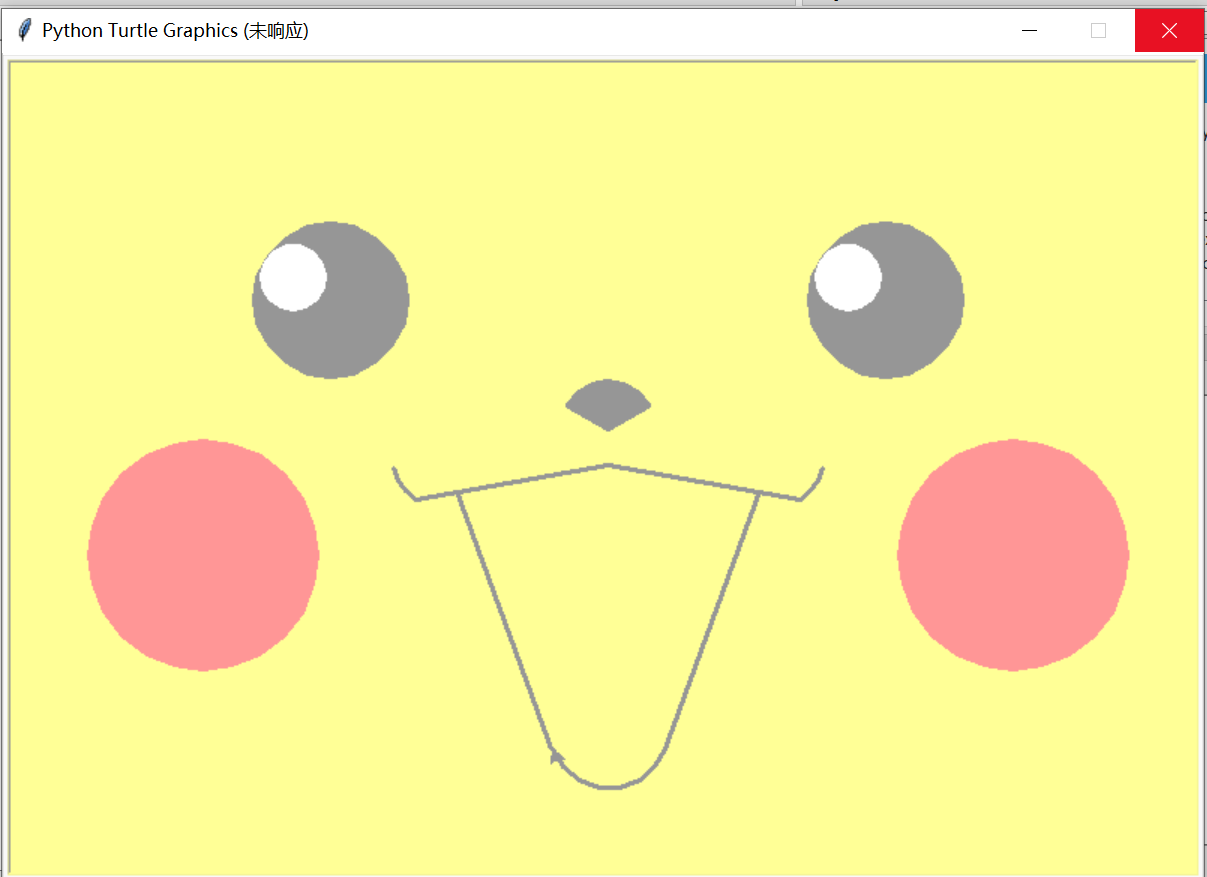
posted on 2020-03-22 22:28 zhangsijie 阅读(399) 评论(0) 收藏 举报

 浙公网安备 33010602011771号