


Numpy基础
一、输入向量与矩阵
方法1:
vector = numpy.array([1, 2, 3, 4])
print(vector.shape)

matrix = numpy.array([[5, 10, 15], [20, 25, 30]])
print(matrix.shape)
np.arange(12).reshape(4,3)


array([[ 0,  1,  2],
       [ 3,  4,  5],
       [ 6,  7,  8],
       [ 9, 10, 11]])
np.random.random((2,3))#两行三列随机数

输出结果:
array([[ 0.40130659,  0.45452825,  0.79776512],
       [ 0.63220592,  0.74591134,  0.64130737]])


from numpy import pi
np.linspace( 0, 2*pi, 100 )#从[0,2Π]中取100个数
方法2:
import numpy as np
a = np.arange(15).reshape(3, 5)
a

输出结果:
array([[ 0,  1,  2,  3,  4],
       [ 5,  6,  7,  8,  9],
       [10, 11, 12, 13, 14]])
方法3:全0元素
np.zeros ((3,4))


输出结果:
array([[ 0.,  0.,  0.,  0.],
       [ 0.,  0.,  0.,  0.],
       [ 0.,  0.,  0.,  0.]])
方法4:全1元素
np.ones( (2,3,4), dtype=np.int32 )


输出结果:
array([[[1, 1, 1, 1],
        [1, 1, 1, 1],
        [1, 1, 1, 1]],

       [[1, 1, 1, 1],
        [1, 1, 1, 1],
        [1, 1, 1, 1]]])
二、数据切片
1、常规切片
matrix = numpy.array([
                    [5, 10, 15],
                    [20, 25, 30],
                    [35, 40, 45]
                 ])
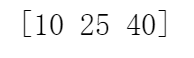
print(matrix[:,1])  #取第2列
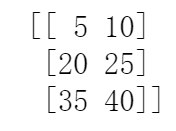
print(matrix[:,0:2])  #取第1列到第2列,左闭右开
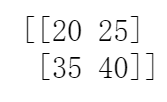
print(matrix[1:3,0:2])  #取第2、3行,第1、2列
结果图:
2、赋值切片
import numpy

matrix = numpy.array([
                    [5, 10, 15],
                    [20, 25, 30],
                    [35, 40, 45]
                 ])
matrix == 25

#输出结果:array([[False, False, False],
       [False,  True, False],
       [False, False, False]])

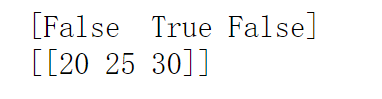
second_column_25 = (matrix[:,1] == 25)  #第2列中元素是否等于25
print(second_column_25)
print(matrix[second_column_25, :])  #输出含有元素25的那一行
结果:
三、查看元素类型、改变元素类型
vector = numpy.array(["1", "2", "3"])
print(vector.dtype)
print(vector)

vector = vector.astype(float)
print(vector.dtype)
print(vector)

输出结果:
<U1
['1' '2' '3']
float64
[1. 2. 3.]
四、矩阵运算
1、乘法
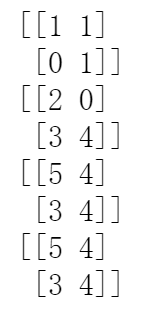
A = np.array( [[1,1],
               [0,1]] )
B = np.array( [[2,0],
               [3,4]] )
print(A)
print(B)
print(A*B )  #元素对应位置相乘
print(A.dot(B))  #矩阵的乘法
print(np.dot(A, B))   #矩阵的乘法
结果图;
2、拼接
a = np.floor(10*np.random.random((2,2)))
b = np.floor(10*np.random.random((2,2)))
print(a)
print('---')
print(b)
print('---')
print(np.hstack((a,b)))   # np.hstack((a,b))  #按行拼接
print('---')
print(np.vstack((a,b)))   # np.vstack((a,b))  #按列拼接
print('---')


结果:
[[2. 1.]
 [1. 2.]]
---
[[8. 1.]
 [0. 7.]]
---
[[2. 1. 8. 1.]
 [1. 2. 0. 7.]]
---
[[2. 1.]
 [1. 2.]
 [8. 1.]
 [0. 7.]]
---
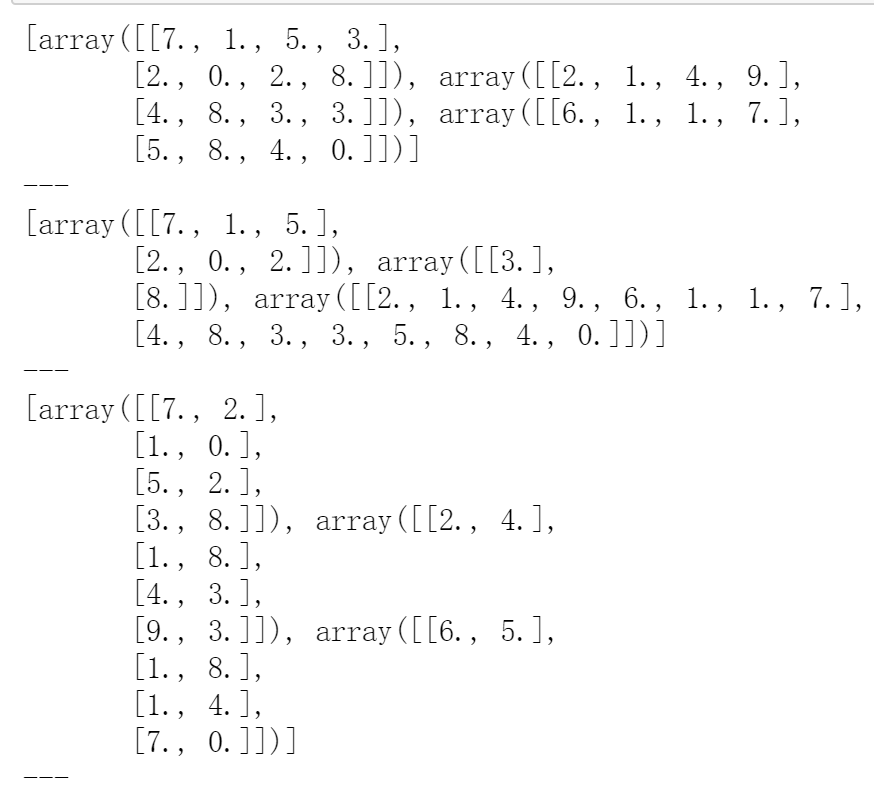
3、分割
np.hsplit(a,3)
np.hsplit(a,(3,4)) # Split a after the third and the fourth column,规定切的位置
np.vsplit(a,3)
a = np.floor(10*np.random.random((2,12)))
print(np.hsplit(a,3))
print('---')

print(np.hsplit(a,(3,4)))
print('---')

print(np.vsplit(a.T,3))
print('---')
结果:
4、改变形状:a.ravel()转换成向量;T转置;a.resize((2,6))重新变成2行6列;a.reshape(3,-1) 其中-1自动计算矩阵个数
import numpy as np
a = np.floor(10*np.random.random((3,4)))  #np.floor是向下取整
print(a)
print(a.ravel())   #ravel将矩阵转换成向量


结果:
[[0. 4. 0. 1.]
 [1. 9. 5. 9.]
 [2. 5. 8. 9.]]
[0. 4. 0. 1. 1. 9. 5. 9. 2. 5. 8. 9.]
五、排序
import numpy as np

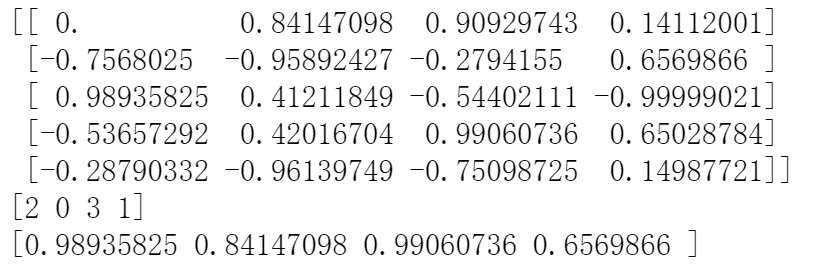
data = np.sin(np.arange(20)).reshape(5,4)
print(data)

ind = data.argmax(axis=0) #按列找出值最大的索引位置
print(ind)

data_max = data[ind, range(data.shape[1])]  #data.shape[1]代表四列
print(data_max)
结果:
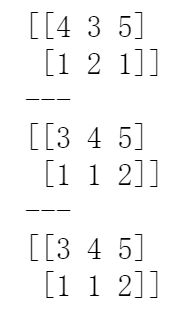
a = np.array([[4, 3, 5], [1, 2, 1]])
print(a)
a.sort(axis=1)
print(a)

b = np.sort(a, axis=1)  #按行进行值排序
print(b)
结果:
a = np.array([4, 3, 1, 2])
j = np.argsort(a)  #索引位置排序
print(j)
print(a[j])


结果:
[2 3 1 0]
[1 2 3 4]
六、矩阵扩充
a = np.arange(0, 40, 10)
print(a)

b = np.tile(a, (3, 5)) #行扩展成原来的3倍,列扩展成原来的5倍
print(b)


结果:
[ 0 10 20 30]
[[ 0 10 20 30  0 10 20 30  0 10 20 30  0 10 20 30  0 10 20 30]
 [ 0 10 20 30  0 10 20 30  0 10 20 30  0 10 20 30  0 10 20 30]
 [ 0 10 20 30  0 10 20 30  0 10 20 30  0 10 20 30  0 10 20 30]]

 浙公网安备 33010602011771号