

Dockerfile
Dockerfile介绍
dockerfile是用来构建docker镜像的文件:命令参数的脚本!
构建步骤:
1、编写一个dockerfile文件
2、docker build 构建成为一个镜像
4、docker push 发布镜像(dockerHUB、阿里云镜像仓库...)
查看一下官方是怎么做的
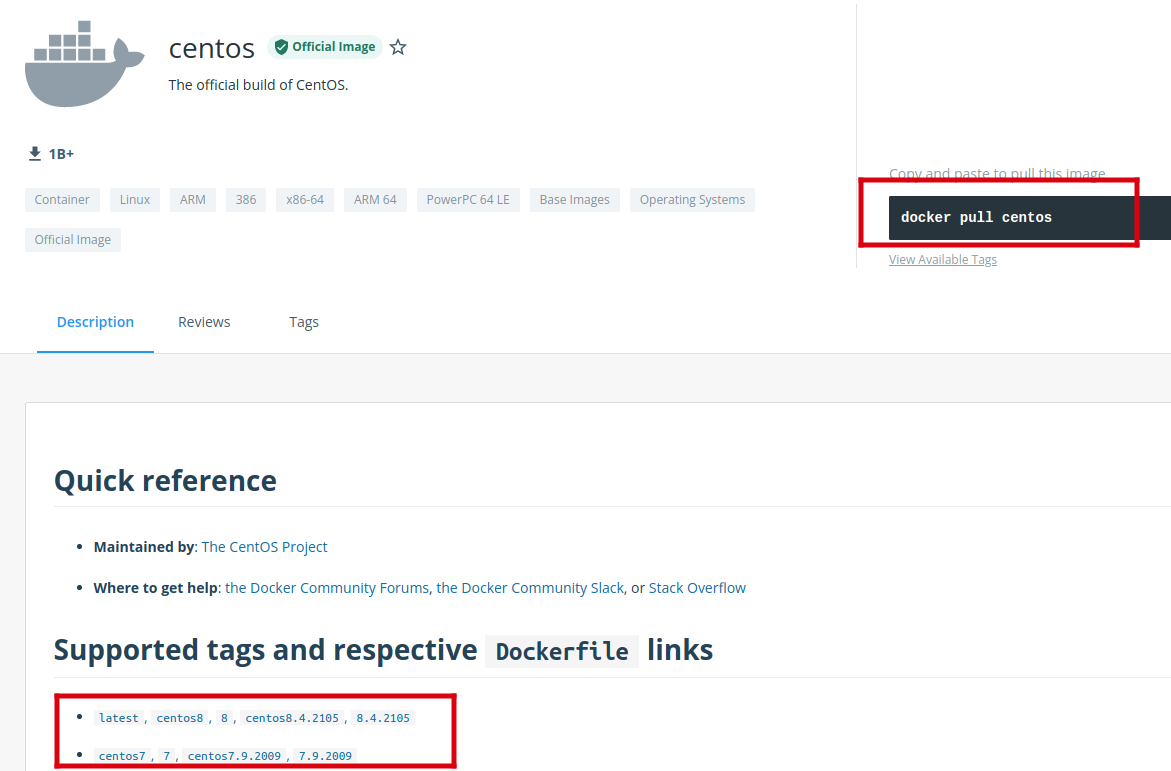
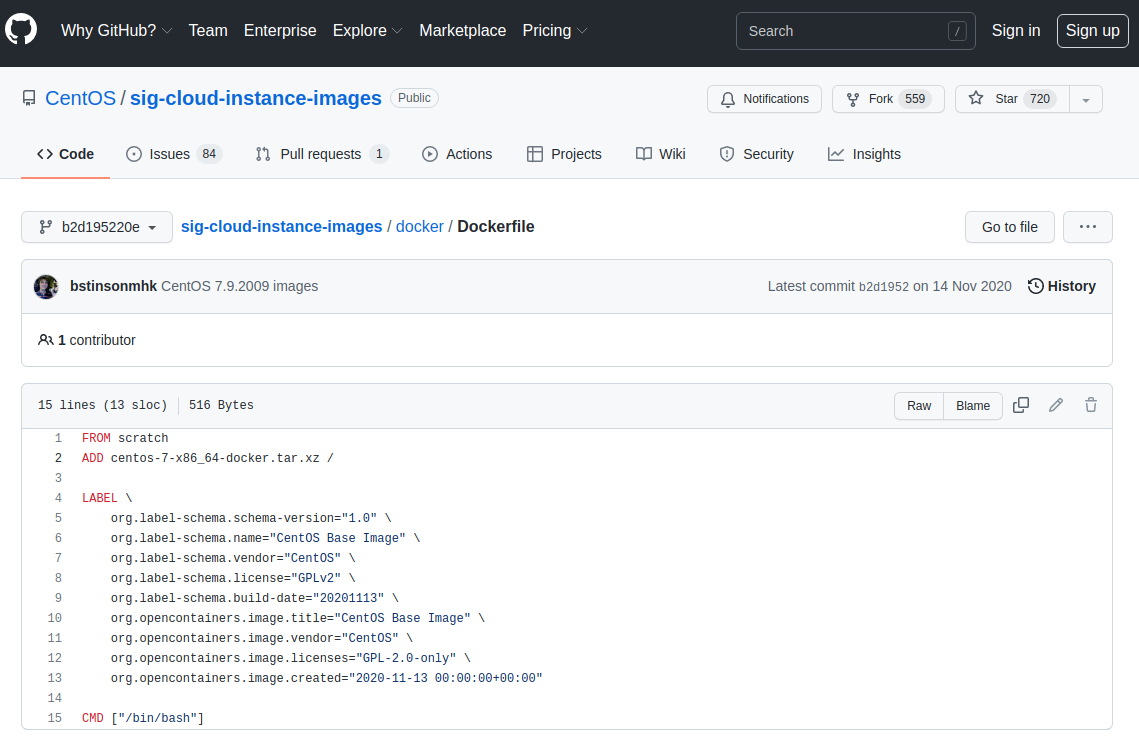
很多官方镜像都是基础包,很多功能都没有,我们通常会自己搭建自己的镜像!
Dockerfile构建过程
基础知识:
1、每个保留关键字(指令)都必须是大写字母
2、执行从上到下顺序执行
3、#表示注释
4、每一个指令都会创建提交一个新的镜像层,并提交!
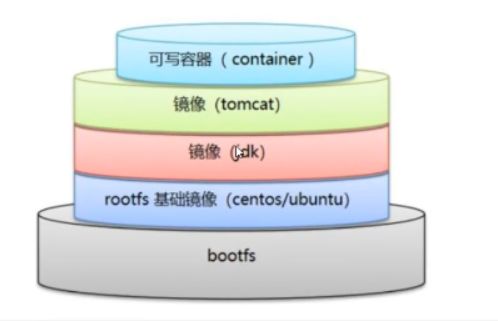
dockerfile是面向开发的,我们以后要发布项目,做镜像,就需要编写dockerfile文件,这个文件十分简单!
docker镜像逐渐成为企业交付的标准
步骤:开发,部署,运维....
dockerfile:构建文件,定义了一切的步骤,源代码
dockerimages:通过 dockerfile 构建生成的镜像,最终发布和运行的产品
docker容器:容器就是镜像运行起来提供服务的
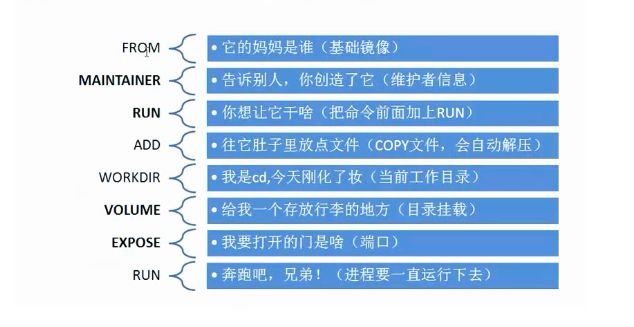
dockerfile指令
FROM            #   基础镜像,一切从这开始构建
MAINTAINER      #   镜像是谁写的,姓名+邮箱
RUN             #   镜像构建的时候需要运行的命令
ADD             #   步骤,比如搭建一个有tomcat的镜像,这个tomcat压缩包就是添加内容
WORKDIR         #   镜像的工作目录
VOLUME          #   挂载的目录
EXPOSE          #   保留端口配置
CMD             #   指定这个容器启动的时候要运行的命令,只有最后一个会生效,可被替代
ENTRYPOINT      #   指定这个容器启动的时候要运行的命令,可以追加命令
ONBUILD         #   当构建一个被继承 dockerfile 这个时候就会运行 ONBUILD 的指令,触发指令
COPY            #   类似ADD,将我们的文件拷贝到镜像中
ENV             #   构建的时候设置环境变量
实战测试
Docker Hub 中99%镜像都是从这个基础镜像过来的FROM search 然后配置需要的软件和配置来镜像构建的
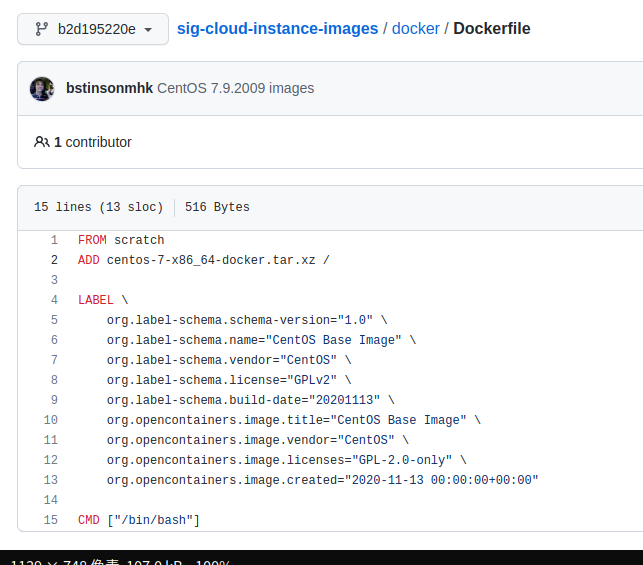
创建一个自己的centos
#1.编写Dockerfile的文件
[root@localhost dockerfile]# cat mydockerfile-centos
FROM centos
MAINTAINER zhangshan<1371742738@qq.com>
ENV MYPATH /usr/local
WORKDIR $MYPATH
RUN yum -y install vim
RUN yum -y install net-tools
EXPOSE 80
CMD echo $MYPTH
CMD echo "------------end------------"
CMD /bin/bash
# 2.通过这个文件构建镜像
# 命令 docker build -f dockerfile文件路径 -t 镜像名:[tag] .
Successfully built d6b68e39f503
Successfully tagged mycentos:0.1
# 3.测试运行
[root@localhost dockerfile]# docker build -f mydockerfile-centos -t mycentos:0.2 .
....
Successfully built 118d541e2f06
Successfully tagged mycentos:0.2
[root@localhost dockerfile]# docker images
REPOSITORY TAG IMAGE ID CREATED SIZE
mycentos 0.2 118d541e2f06 5 seconds ago 386MB
[root@localhost dockerfile]# docker run -it mycentos:0.2
[root@2b8f67dea1b4 local]# vi
vi view vigr vim vimdiff vimtutor vipw
[root@2b8f67dea1b4 local]# ifconfig
eth0: flags=4163<UP,BROADCAST,RUNNING,MULTICAST> mtu 1500
inet 172.17.0.3 netmask 255.255.0.0 broadcast 172.17.255.255
ether 02:42:ac:11:00:03 txqueuelen 0 (Ethernet)
RX packets 7 bytes 586 (586.0 B)
RX errors 0 dropped 0 overruns 0 frame 0
TX packets 0 bytes 0 (0.0 B)
TX errors 0 dropped 0 overruns 0 carrier 0 collisions 0
lo: flags=73<UP,LOOPBACK,RUNNING> mtu 65536
inet 127.0.0.1 netmask 255.0.0.0
loop txqueuelen 1000 (Local Loopback)
RX packets 0 bytes 0 (0.0 B)
RX errors 0 dropped 0 overruns 0 frame 0
TX packets 0 bytes 0 (0.0 B)
TX errors 0 dropped 0 overruns 0 carrier 0 collisions 0
对比:之前原生的centos,多了我们所安装的软件功能
centos容器镜像最新的centos8,使用yum会报错,类似如下
Error: Failed to download metadata for repo 'appstream': Cannot prepare internal mirrorlist: No URLs in mirrorlist这是因为centos8已经从官方镜像中移除所有包,你可以使用centos7或者替换centos8源地址
# sudo sed -i -e "s|mirrorlist=|#mirrorlist=|g" /etc/yum.repos.d/CentOS-*
# sudo sed -i -e "s|#baseurl=http://mirror.centos.org|baseurl=http://vault.centos.org|g" /etc/yum.repos.d/CentOS-*
我们可以列出本地进行的变更历史
# docker history 镜像ID
[root@localhost dockerfile]# docker history 118d541e2f06
IMAGE CREATED CREATED BY SIZE COMMENT
118d541e2f06 5 minutes ago /bin/sh -c #(nop) CMD ["/bin/sh" "-c" "/bin… 0B
4bc0f4393067 5 minutes ago /bin/sh -c #(nop) CMD ["/bin/sh" "-c" "echo… 0B
9bdd29191fdc 5 minutes ago /bin/sh -c #(nop) CMD ["/bin/sh" "-c" "echo… 0B
a21e1751a32e 5 minutes ago /bin/sh -c #(nop) EXPOSE 80 0B
e5d57cf866a1 5 minutes ago /bin/sh -c yum -y install net-tools 28.9MB
f1808ab763e2 5 minutes ago /bin/sh -c yum -y install vim 53.8MB
fe45ed03d428 13 minutes ago /bin/sh -c #(nop) WORKDIR /usr/local 0B
7aefa12dbc81 13 minutes ago /bin/sh -c #(nop) ENV MYPATH=/usr/local 0B
9ccddd7117dd 13 minutes ago /bin/sh -c #(nop) MAINTAINER zhangshan<1371… 0B
0cc4907b0d6b 13 minutes ago /bin/bash 72.1MB zhangshan
5d0da3dc9764 4 months ago /bin/sh -c #(nop) CMD ["/bin/bash"] 0B
<missing> 4 months ago /bin/sh -c #(nop) LABEL org.label-schema.sc… 0B
<missing> 4 months ago /bin/sh -c #(nop) ADD file:805cb5e15fb6e0bb0… 231MB
我们平时拿到一个镜像,可以看下他是怎么做的
CMD 和 ENTRYPOINT 区别
CMD             #   指定这个容器启动的时候要运行的命令,只有最后一个会生效,可被替代
ENTRYPOINT      #   指定这个容器启动的时候要运行的命令,可以追加命令
测试CMD
# 编写 dockerfile 文件
[root@localhost dockerfile]# cat dockerfile-cmd-test
FROM centos
CMD ["ls","-a"]
#构建镜像
[root@localhost dockerfile]# docker build -f dockerfile-cmd-test -t cmdtest .
Sending build context to Docker daemon 3.072kB
Step 1/2 : FROM centos
---> 5d0da3dc9764
Step 2/2 : CMD ["ls","-a"]
---> Running in b1028c56bb99
Removing intermediate container b1028c56bb99
---> 45562f5b8a48
Successfully built 45562f5b8a48
Successfully tagged cmdtest:latest
#run 运行
[root@localhost dockerfile]# docker run 45562f5b8a48
.
..
.dockerenv
bin
dev
etc
home
...
# 想追加一个命令 -l "ls -al"
[root@localhost dockerfile]# docker run 45562f5b8a48 -l
docker: Error response from daemon: OCI runtime create failed: container_linux.go:380: starting container process caused: exec: "-l": executable file not found in $PATH: unknown.
ERRO[0000] error waiting for container: context canceled
#只能这样
[root@localhost dockerfile]# docker run 45562f5b8a48 ls -la
total 0
drwxr-xr-x. 1 root root 6 Feb 8 09:29 .
drwxr-xr-x. 1 root root 6 Feb 8 09:29 ..
-rwxr-xr-x. 1 root root 0 Feb 8 09:29 .dockerenv
lrwxrwxrwx. 1 root root 7 Nov 3 2020 bin -> usr/bin
drwxr-xr-x. 5 root root 340 Feb 8 09:29 dev
drwxr-xr-x. 1 root root 66 Feb 8 09:29 etc
drwxr-xr-x. 2 root root 6 Nov 3 2020 home
...
测试 ENTRYPOINT
# 编写 dockerfile 文件
[root@localhost dockerfile]# cat dockerfile-entrypoint-test
FROM centos
ENTRYPOINT ["ls","-a"]
#构建镜像
[root@localhost dockerfile]# docker build -f dockerfile-entrypoint-test -t entrypoint-test .
Sending build context to Docker daemon 4.096kB
Step 1/2 : FROM centos
---> 5d0da3dc9764
Step 2/2 : ENTRYPOINT ["ls","-a"]
---> Running in 0fd89764ddba
Removing intermediate container 0fd89764ddba
---> 1534213f8fab
Successfully built 1534213f8fab
Successfully tagged entrypoint-test:latest
#run 运行
[root@localhost dockerfile]# docker run 1534213f8fab
.
..
.dockerenv
bin
dev
etc
home
...
# 想追加一个命令 -l "ls -al" (ENTRYPOINT 命令后面可以直接追加)
[root@localhost dockerfile]# docker run 1534213f8fab -l
total 0
drwxr-xr-x. 1 root root 6 Feb 8 09:34 .
drwxr-xr-x. 1 root root 6 Feb 8 09:34 ..
-rwxr-xr-x. 1 root root 0 Feb 8 09:34 .dockerenv
lrwxrwxrwx. 1 root root 7 Nov 3 2020 bin -> usr/bin
drwxr-xr-x. 5 root root 340 Feb 8 09:34 dev
drwxr-xr-x. 1 root root 66 Feb 8 09:34 etc
drwxr-xr-x. 2 root root 6 Nov 3 2020 home
...
Dockerfile网络

 浙公网安备 33010602011771号