
6-6 认证和权限-DRF认证自定义认证
目录:
- 初始化操作
- 逻辑图
- 自定义认证
一、初始化操作
1.1、模型
说明:我们自定义 用户表 和 用户Token表。关系是1对1关系
#自己定义的跟django自带的没有关系
class User(models.Model):
    username = models.CharField(max_length=32, unique=True)
    password = models.CharField(max_length=64)

#存放token表
class UserToken(models.Model):
    user = models.OneToOneField('User', models.CASCADE) #token跟user是1对1关系,一般都是放两张表做。
    token = models.CharField(max_length=64)
1.2、接入数据库
>python manage.py makemigrations

>python manage.py migrate
1.3、视图
说明:我们必须要有一个登录视图,以及如何获取 md5值的设置。=> 编辑 views.py
from rest_framework.views import APIView
from django.http import JsonResponse
from .models import User, UserToken
import time, hashlib


#获取MD5加密取值
def get_md5(user):
    ctime = str(time.time())
    m = hashlib.md5(bytes(user, encoding='utf-8'))
    m.update(bytes(ctime, encoding='utf-8'))
    return m.hexdigest()


class LoginView(APIView):

    def post(self,request, *args, **kwargs):
        ret = {'code': 1, 'msg': None, 'data': {}}
        #user = request._request.POST.get('username') #request已经被封装过了,成了drf的request了
        #pwd = request._request.POST.get("password")
        user = request.POST.get('username')  #原生的request,两种方式取值都可以
        pwd = request.POST.get("password")
        obj = User.objects.filter(username=user, password=pwd).first()

        if not obj:
            ret['code'] = -1
            ret['msg'] = "用户名或密码错误"

        token = get_md5(user)
        #update_or_create表示我们登陆操作可能不止一次,也可能多次,有的话就更新,没有就新建
        UserToken.objects.update_or_create(user=obj, defaults={'token': token})
        ret['token'] = token

        return JsonResponse(ret)
1.4、路由
说明:这边我们还需要配置一下子路由:
from django.urls import path
from app05 import views


urlpatterns = [
    path("cart/", views.CartView.as_view(), name="cart-list"),
    path("login/", views.LoginView.as_view(), name="login") #配置登录的路由
]
二、逻辑图
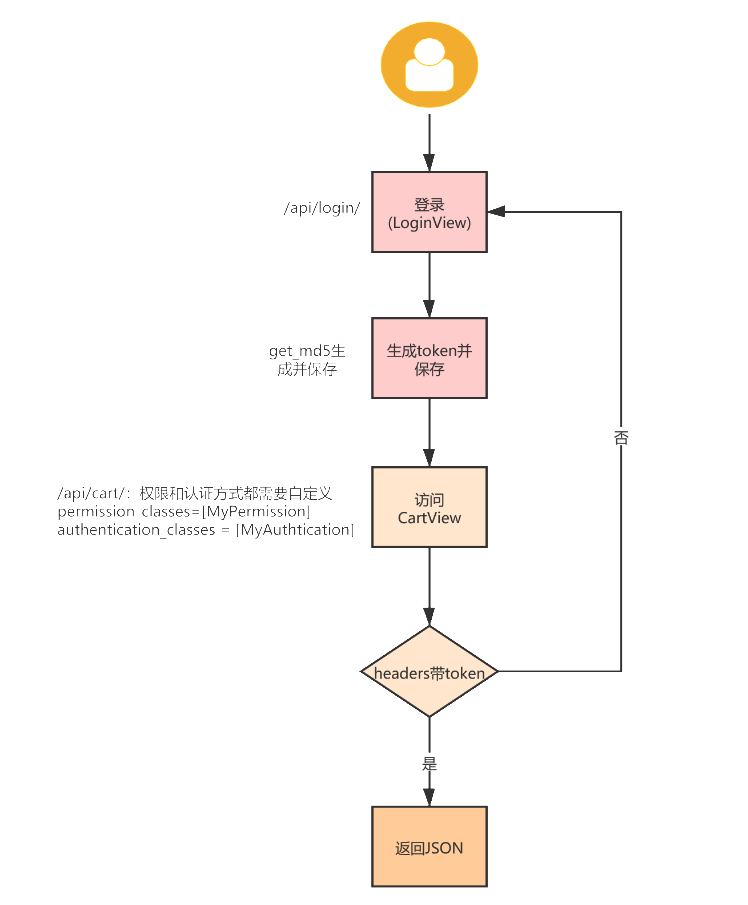
三、自定义认证
2.1、BaseAuthentication认证源码分析
说明:我们都知道我们验证有三种方式:asicAuthentication, TokenAuthentication, SessionAuthentication。他们都是继承的谁呐?他们都是继承的是 BaseAuthentication。好啦,我们去看下BaseAuthentication的源码:Ctrl + BasicAuthentication => BaseAuthentication:
class BaseAuthentication(object):
    """
    All authentication classes should extend BaseAuthentication.
    """

    def authenticate(self, request):   #哈哈,我们只要重写这个方法就行了,不重写这个方法就会报错
        """
        Authenticate the request and return a two-tuple of (user, token).
        """
        raise NotImplementedError(".authenticate() must be overridden.")

    def authenticate_header(self, request):
        """
        Return a string to be used as the value of the `WWW-Authenticate`
        header in a `401 Unauthenticated` response, or `None` if the
        authentication scheme should return `403 Permission Denied` responses.
        """
        pass
2.2、自定义认证类
说明:继续编辑视图views.py文件,继承BaseAuthentication类,重写authenticate方法。
from rest_framework.views import APIView
from django.http import JsonResponse
from rest_framework.permissions import IsAuthenticated
from .models import User, UserToken
import time, hashlib
from rest_framework.authentication import BaseAuthentication
from rest_framework import exceptions

# Create your views here.

#获取MD5加密取值
def get_md5(user):
    ....

# 自定义认证类
class MyAuthtication(BaseAuthentication):
    def authenticate(self, request):
        token = request.META.get("HTTP_TOKEN")  #请求头的META中获取token值
        obj = UserToken.objects.filter(token=token).first()

        if not obj:
            raise exceptions.AuthenticationFailed("验证失败")  #照着BasicAuthentication源码authenticate方法写抛出异常
        else:
            return (obj.user, obj)  #返回当前用户user,和 返回当前的模型对象


# login 视图
class LoginView(APIView):
  ...

#get方法
class CartView(APIView):
    # 基于什么登录认证的
    authentication_classes = [MyAuthtication]  #添加自定义认证
    # 只有登录才能访问
    permission_classes = [IsAuthenticated]
    def get(self, request, *args, **kwargs):
    ...
2.3、测试结果
1、测试登录:
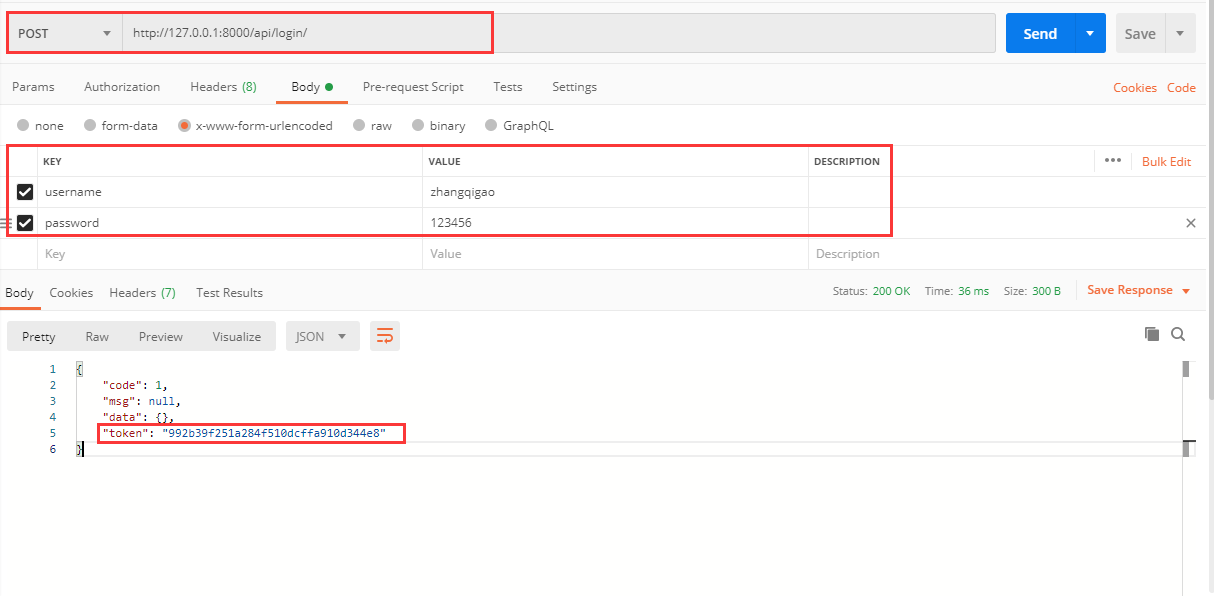
2、购物车链接
说明:我们拿到登录之后的 token 加到 header 中,然后请求访问:
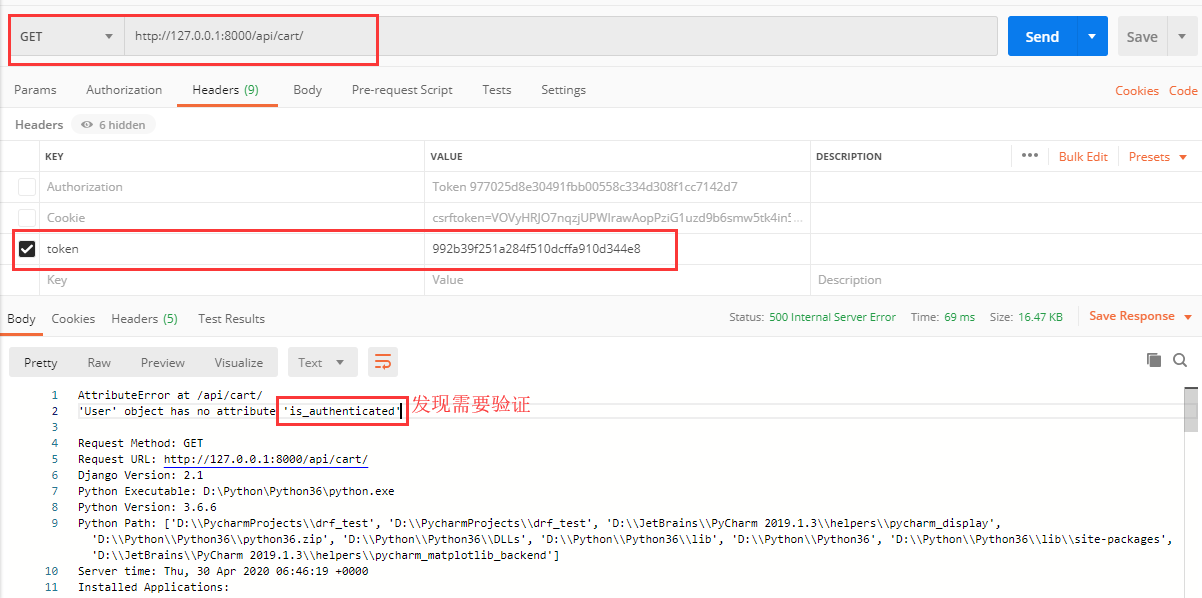
好像不行啊。自定义认证方式我觉得没啥问题,那我觉得问题是不是出在permission_classes = [IsAuthenticated] 这个上面呐。毕竟 用户(User)是我们自己定义的,并没有用它原生的。那我们来看看IsAuthenticated的源码:Ctrl + IsAuthenticated走你:
class IsAuthenticated(BasePermission):
    """
    Allows access only to authenticated users.
    """

    def has_permission(self, request, view):
        return bool(request.user and request.user.is_authenticated)  #我们自定义的模型类User并没有 is_authenticated方法,所以has_permission需要重写
2.4、自定义权限
说明:在app05下新建一个 permissions.py文件,来自定义我们的权限:
from rest_framework.permissions import BasePermission


class MyPermission(BasePermission):

    def has_permission(self, request, view):
        if not request.user:
            return False
        return True
然后我们在视图 Views.py 中的 CartView 视图中permission_classes换成自己的就行啦:
.....
from .permissions import MyPermission

# Create your views here.

#获取MD5加密取值
def get_md5(user):
    .....

# 自定义认证类
class MyAuthtication(BaseAuthentication):
    ....

# login 视图
class LoginView(APIView):
    ....

class CartView(APIView):
    # 基于什么登录认证的
    authentication_classes = [MyAuthtication]
    # 只有登录才能访问
    permission_classes = [MyPermission]  #换成自己定义的权限
    def get(self, request, *args, **kwargs):

        ....

        return JsonResponse(ctx)
来走你继续postman测试:
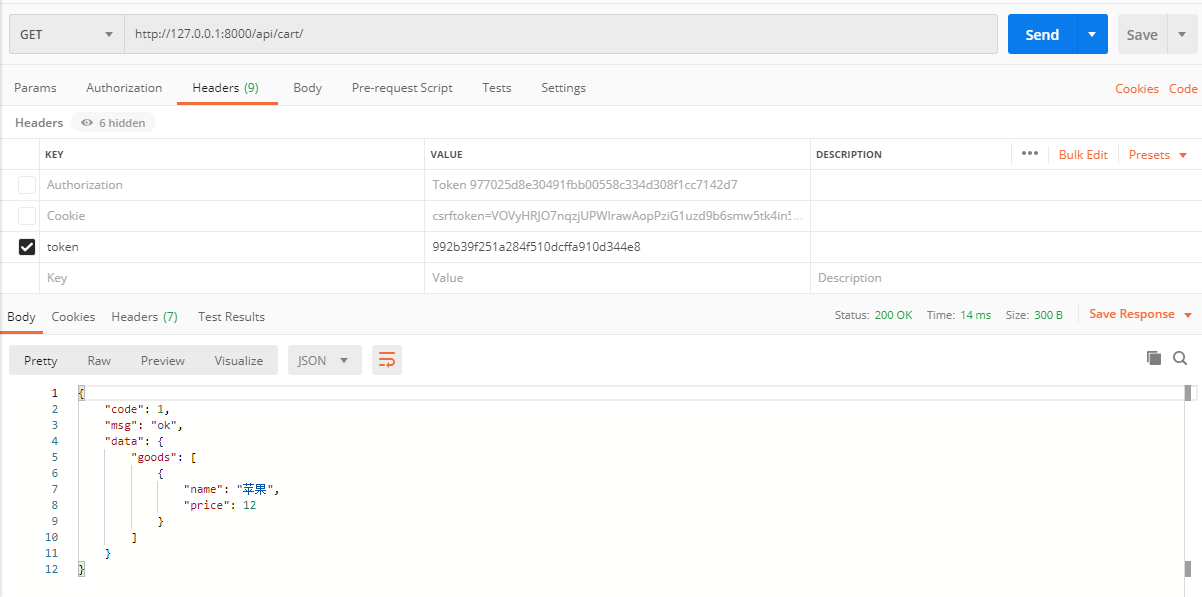
ok,成功。

 浙公网安备 33010602011771号