
7-3 通用表格组件封装及思路讲解
目录:
- 表格基本参数分析: data: 传入的数据列表、prop: 传入的数据字段、label:列名
- 表格可选参数分析: width:列宽、type: 类型
- 表格扩展: 分页参数=> total:数据条数统计、page:当前页数;加载状态:loading:布尔值
- 调整表格样式,固定表格高度、添加操作列、添加分页组件
一、实现效果图
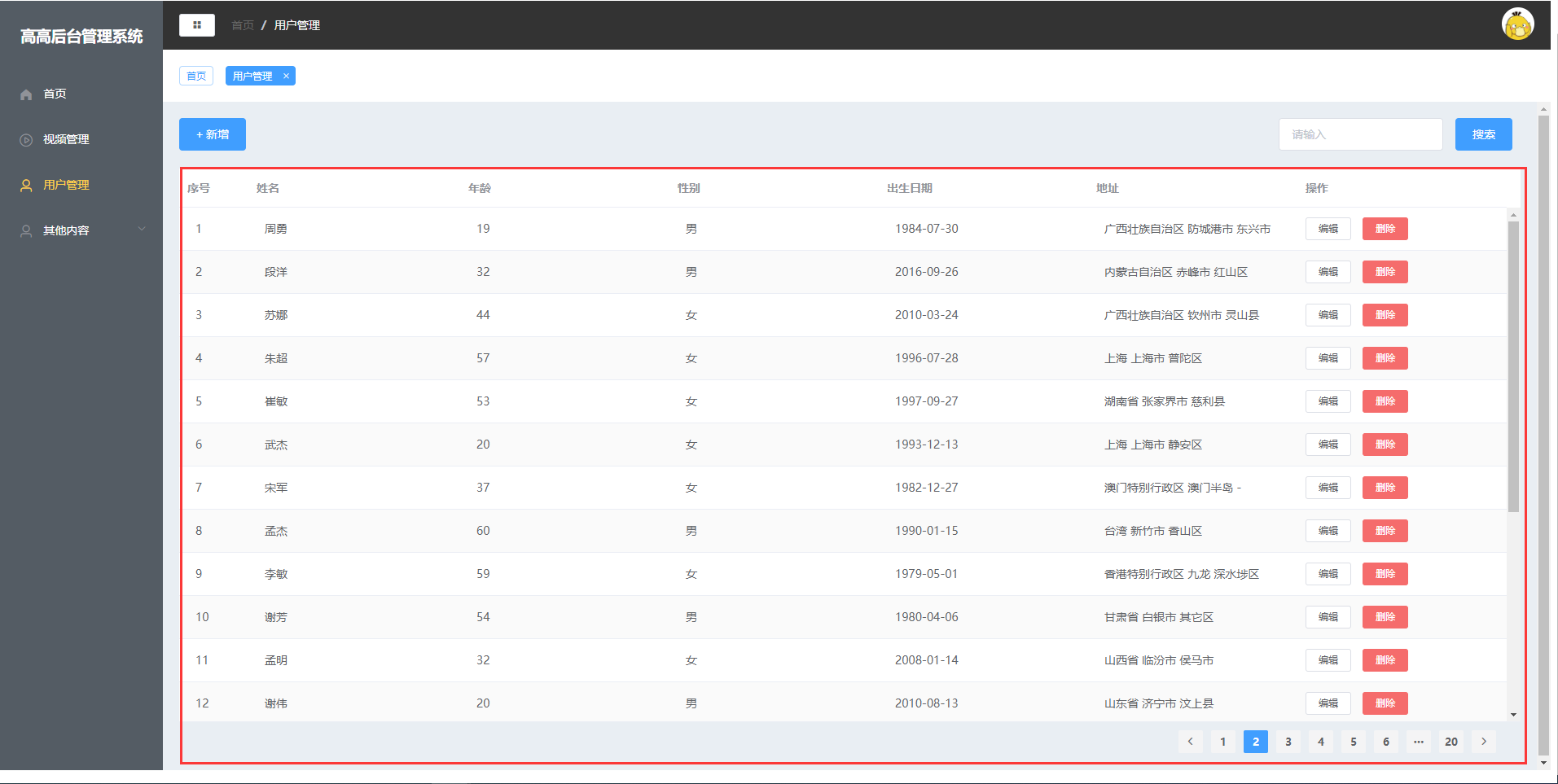
二、表格基本参数分析
这边还是一样的,我们通过Usermange的数据传入的参数,来分析:data: 传入的数据列表、prop: 传入的数据字段、label:列名,废话不多说:编辑UserMange.vue
<template>
    <div class="manage">
      ....
      <Table :tableData="tableData" :tableLabel="tableLabel" :config="config"></Table>
    </div>
</template>

<script>
    ....

    export default {
      components: {
          Form,
          Table
      },
      data(){
        return {
          tableData: [],
          tableLabel: [  //列名参数
            {
              prop: 'name',
              label: '姓名'
            },
            {
              prop: 'age',
              label: '年龄'
            },
            {
              prop: 'sexLabel',
              label: '性别'
            },
            {
              prop: 'birth',
              label: '出生日期'
            },
            {
              prop: 'addr',
              label: '地址'
            },
          ],
          config: {  //初始化页面和数据,以及是否加载
            page: 1,
            total: 30,
            loading: false
          },
          ....
        }
      },
      methods: {
        getList() {  //获取user数据
          this.config.loading = true;
          this.$http.get('/api/user/getUser',{
            params: {
              page: this.config.page
            }
          }).then(res => {
            this.tableData = res.data.list.map(item => {
              item.sexLabel = item.sex === 0 ? '女' : '男';
              return item
            });
            this.config.total = res.data.count;
            this.config.loading = false;
          })
        }
      },
      mounted() { //挂载的时候获取数据
        this.getList()
      }
    }
</script>
三、 表格扩展
编辑Table.vue,主要是父组件传给子组件,子组件根据不同进行渲染,其实都是通用的。主要用的是:
<template>
    <div class="common-table">
      <el-table :data="tableData" height="100%" stripe>  <!--:data=tableData绑定数据-->
        <el-table-column label="序号" width="85"> <!--列名-->
          <template slot-scope="scope">
            <span style="margin-left: 10px">{{ (config.page - 1) * 20 + scope.$index + 1 }}</span>
          </template>
        </el-table-column>
        <el-table-column show-overflow-tooltip  v-for="item in tableLabel" :key="item.prop" :label="item.label">
          <template slot-scope="scope">
            <span style="margin-left: 10px">{{ scope.row[item.prop] }}</span>
          </template>
        </el-table-column>
        <el-table-column label="操作"> <!-编辑和删除-->
          <template slot-scope="scope">
            <el-button
              size="mini"
              @click="handleEdit(scope.row)">编辑</el-button>
            <el-button
              size="mini"
              type="danger"
              @click="handleDelete(scope.row)">删除</el-button>
          </template>
        </el-table-column>
      </el-table>
      <el-pagination class="pager" background layout="prev, pager, next" :total="config.total" :current-page.sync="page">
</el-pagination>
    </div>
</template>

<script>
    export default {
        props: {  //接收父组件传递过来的值
          tableData: Array,
          tableLabel: Array,
          config: Object
        },
         methods: {
          handleEdit(index, row) {
            console.log(index, row);
          },
          handleDelete(index, row) {
            console.log(index, row);
          }
        }
    }
</script>

<style scoped>
  .common-table {
    height: calc(100% - 62px);
    background-color: #fff;
    position: relative;
  }

  .common-table .pager {
    position: absolute;
    bottom: -40px;
    right: 20px;
  }
</style>

 浙公网安备 33010602011771号