
5-4 组件及组件间的通信-组件间数据传递
目录:
- 父子组件定义
- 组件间数据传递(通信):子组件访问父组件中的数据、props验证、父组件访问子组件中的数据
一、父子组件定义
在一个组件内部定义另外一个组件,称为 父子组件。子组件只能在父组件内部使用。
定义过程如图:
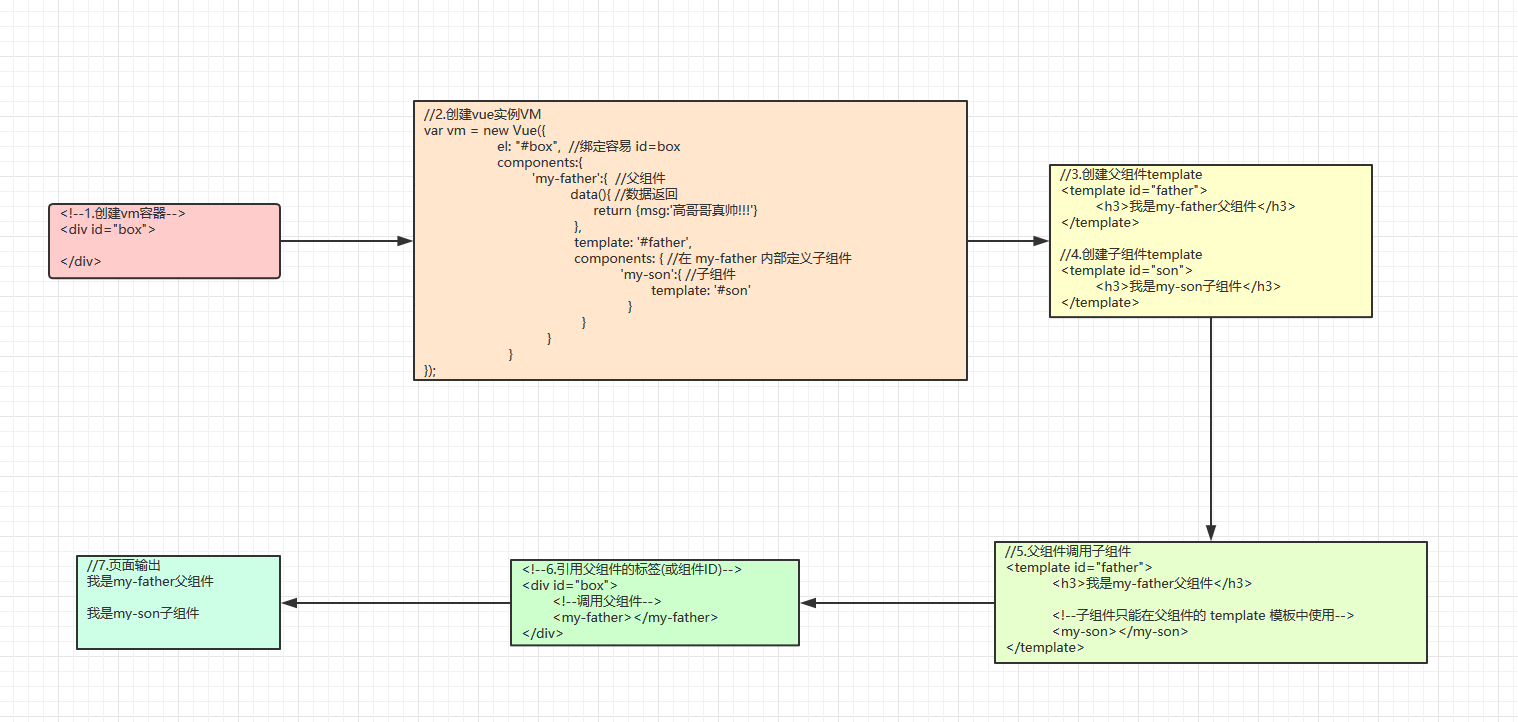
实现代码如下:


<body>
    <div id="box">
        <!--调用父组件标签名-->
        <my-father></my-father>
    </div>

    <!--父组件模板-->
    <template id="father">
        <div>
            <h3>我是my-father父组件</h3>

            <!--子组件只能在父组件的 template 模板中使用-->
            <my-son></my-son>
        </div>
    </template>


    <!--子组件模板-->
    <template id="son">
        <div>
            <h3>我是my-son子组件</h3>
        </div>
    </template>

    <script type="text/javascript" src="../vue.js"></script>
    <script>
        var vm = new Vue({
            el: "#box",
            components:{
                'my-father':{  //父组件
                    data(){ //数据返回
                        return {msg:'高哥哥真帅!!!'}
                    },
                    template: '#father',
                    components: { //在 my-father 内部定义子组件
                        'my-son':{ //子组件
                            template: '#son'
                        }
                    }
                }
            }
        });
    </script>
</body>
注:在默认情况下,子组件是无法访问父组件中的数据,每个组件实例的作用都是独立的。
二、组件间数据传递(通信)
组件意味着协同工作,通常父子组件会是这样的关系:组件 A 在它的模版中使用了组件 B 。它们之间必然需要相互通信:父组件要给子组件传递数据,子组件需要将它内部发生的事情告知给父组件。然而,在一个良好定义的接口中尽可能将父子组件解耦是很重要的。这保证了每个组件可以在相对隔离的环境中书写和理解,也大幅提高了组件的可维护性和可重用性。
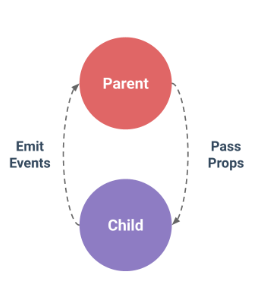
在 Vue.js 中,父子组件的关系可以总结为 props down, events up 。父组件通过 props 向下传递数据给子组件,子组件通过 events 给父组件发送消息。看看它们是怎么工作的。
2.1、子组件访问父组件的数据
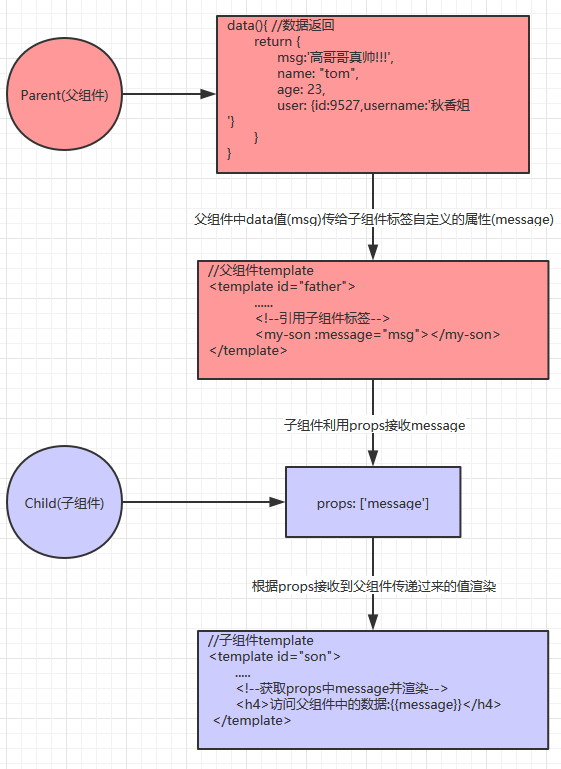
a) 在调用子组件时,绑定要获取的父组件中的数据
b)在子组件内部,使用props(property属性的缩写)选项声明获取的数据,即接收来自父组件的数据。
注:组件中数据共有三种形式:data、props、computed
步骤如图:
实现代码如下:
<body>
    <div id="box">
        <my-father></my-father>
    </div>

    <template id="father">
        <div>
            <h3>我是my-father父组件</h3>
            <h3>访问自己的数据:{{msg}},{{name}},{{age}},{{user.username}}</h3>
            <hr>
            <!--在父组件中模板中给子组件绑定一个属性-->
            <my-son :message="msg" :name="name" :age="age" :user="user"></my-son>
        </div>
    </template>

    <template id="son">
        <div>
            <h3>我是my-son子组件</h3>
            <h4>访问父组件中的数据: {{message}},{{name}},{{age}},{{user.username}}</h4>
        </div>
    </template>

    <script type="text/javascript" src="../vue.js"></script>
    <script>
        var vm = new Vue({
            el: "#box",
            components:{
                'my-father':{  //父组件
                    data(){ //数据返回
                        return {
                            msg:'高哥哥真帅!!!',
                            name: "tom",
                            age: 23,
                            user: {id:9527,username:'秋香姐'}
                        }
                    },
                    template: '#father',
                    components: { //在 my-father 内部定义子组件
                        'my-son':{ //子组件
                            template: '#son',
                            props: ['message','name','age','user']
                        }
                    }
                }
            }
        });
    </script>
</body>
我们已经看到了,子组件是如何访问父组件中的数据的,当然这些都是简单的字符串数据。
2.2、props验证
在子组件访问父组件的数据时,我们还可以进行一些数据的验证,我们可以为组件的 prop 指定验证要求,例如你知道的这些类型。如果有一个需求没有被满足,则 Vue 会在浏览器控制台中警告你。这在开发一个会被别人用到的组件时尤其有帮助。Prop-验证
为了定制 prop 的验证方式,你可以为 props 中的值提供一个带有验证需求的对象,而不是一个字符串数组。例如:
Vue.component('my-component', {
  props: {
    // 基础的类型检查 (`null` 和 `undefined` 会通过任何类型验证)
    propA: Number,
    // 多个可能的类型
    propB: [String, Number],
    // 必填的字符串
    propC: {
      type: String,
      required: true
    },
    // 带有默认值的数字
    propD: {
      type: Number,
      default: 100
    },
    // 带有默认值的对象
    propE: {
      type: Object,
      // 对象或数组默认值必须从一个工厂函数获取
      default: function () {
        return { message: 'hello' }
      }
    },
    // 自定义验证函数
    propF: {
      validator: function (value) {
        // 这个值必须匹配下列字符串中的一个
        return ['success', 'warning', 'danger'].indexOf(value) !== -1
      }
    }
  }
})
tyoe类型一共有如下几种:
String   : 字符串
Number :数字
Boolean :布尔
Array    :数组
Object  :对象
Date     :日期
Function :函数
Symbol
额外的,type 还可以是一个自定义的构造函数,并且通过 instanceof 来进行检查确认。例如,给定下列现成的构造函数:
function Person (firstName, lastName) {
  this.firstName = firstName
  this.lastName = lastName
}
你可以使用:
Vue.component('blog-post', {
  props: {
    author: Person
  }
})
来验证 author prop 的值是否是通过 new Person 创建的。props 示例:
// 简单语法
Vue.component('props-demo-simple', {
  props: ['size', 'myMessage']
})

// 对象语法,提供验证
Vue.component('props-demo-advanced', {
  props: {
    // 检测类型
    height: Number,
    // 检测类型 + 其他验证
    age: {
      type: Number,
      default: 0,
      required: true,
      validator: function (value) {
        return value >= 0
      }
    }
  }
})
所以改进后的子组件访问父组件的数据的代码,其他不变,只是子组件的props的代码变化,变化如下:
.....//父组件
components: { //在 my-father 内部定义子组件
    'my-son':{ //子组件
        template: '#son',
        //props: ['message','name','age','user'] //简单字符串数据
        props:{ //也可以是对象,允许配置高级设置,如类型判断、数据校验、设置默认值
            message: String,
            name: {
                type:String, //类型字符串
                required: true //true必须传值,默认为false
            },
            age: {
                type: Number,
                default: 18,  //默认值
                validator: function(value) {
                    //当前传过来的值作为参数,会返回一个布尔值,如果这个值是true验证通过。
                    return value>=0;

                }
            },
            user: {
                type: Object,
                default: function() { //对象默认值必须这么写,跟普通值写法不一样
                    return {id:3306,username: "傻逼鸿"}
                }
            }

        }
    }
}
总结:父组件通过props向下传递数据给子组件
2.3、父组件访问子组件的数据
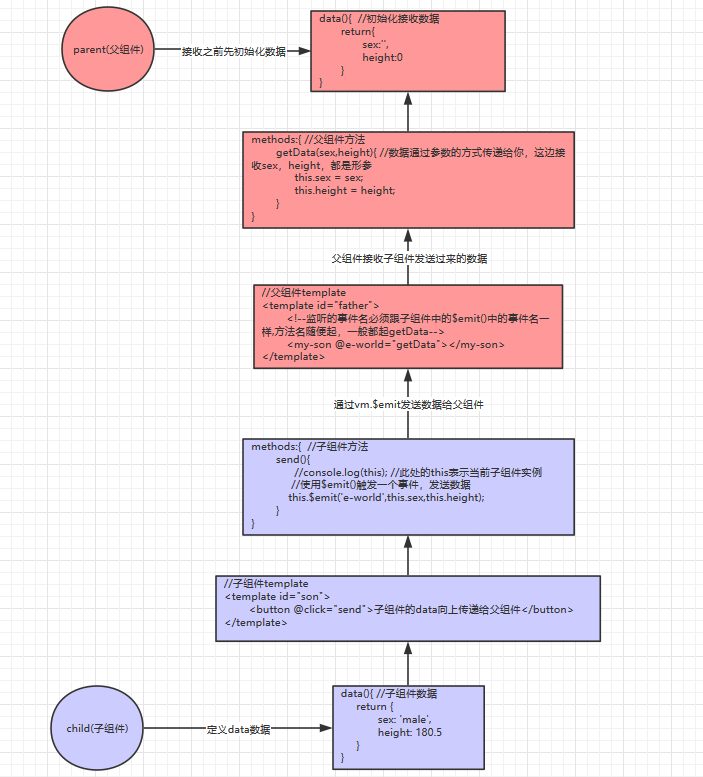
a) 在子组件中使用 vm.$emit(事件名,数据)(emit翻译为 发射的意思)触发一个自定义事件,事件名自定义 。
b) 父组件在使用子组件的地方监听子组件触发的事件。
步骤如图:
实现代码如下:
<body>
    <div id="box">
        <my-father></my-father>
    </div>

    <template id="father">
        <div>
            <h3>我是my-father父组件</h3>
            <h3>访问子组件中的数据:{{sex}},{{height}}</h3>
            <hr>
            <!--监听的事件名必须跟子组件中的$emit()中的事件名一样,方法名随便起,一般都起getData-->
            <my-son :message="msg" @e-world="getData"></my-son>
        </div>
    </template>

<template id="son">
    <div>
        <h3>我是my-son子组件</h3>
        <h3>访问父组件中数据: {{message}}</h3>
        <h4>访问自己的数据: {{sex}},{{height}}</h4>

        <button @click="send">将子组件的数据向上传递给父组件</button>
    </div>
</template>

    <script type="text/javascript" src="../vue.js"></script>
    <script>
        var vm = new Vue({
            el: "#box",
            components:{
                'my-father':{  //父组件
                    template: '#father',
                    methods:{
                        getData(sex,height){ //数据通过参数的方式传递给你,这边接收sex,height,都是形参
                            this.sex = sex;
                            this.height = height;
                        }
                    },
                    data(){
                        return{   //传递过来之前,先出事后接收的数据,不然接收不了。因为props只是父组件向子组件传递数据。computed是计算属性,只能存在data中,所以先初始化,再去函数中袖改值msg;
                            msg: "傻逼鸿真丑!!!",
                            sex: '',
                            height:0
                        }
                    },
                    components: { //在 my-father 内部定义子组件
                        'my-son':{ //子组件
                            template: '#son',
                            data(){
                                return {
                                    sex: 'male',
                                    height: 180.5
                                }
                            },
                            props:['message'],
                            methods:{
                                send(){
                                    //console.log(this); //此处的this表示当前子组件实例
                                    //事件名随便起,参数可以有多个,用逗号隔开
                                    this.$emit('e-world',this.sex,this.height); //使用$emit()触发一个事件,发送数据
                                }
                            }
                        }
                    }
                }
            }
        });
    </script>
</body>
总结:子组件是通过events给父组件发送消息,实际上就是子组件把自己的数据发送到父组件。

 浙公网安备 33010602011771号