

java程序连接HBase
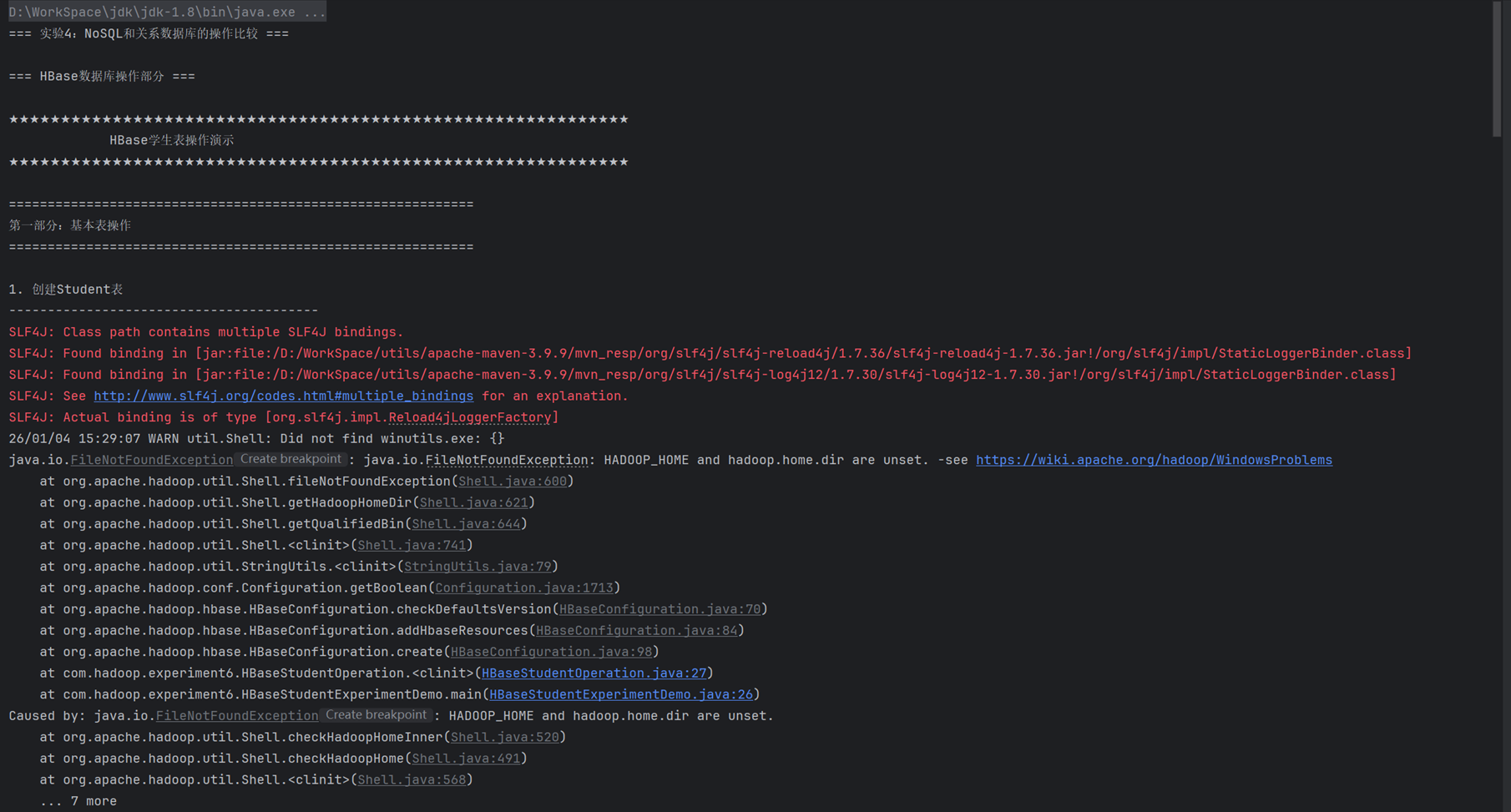
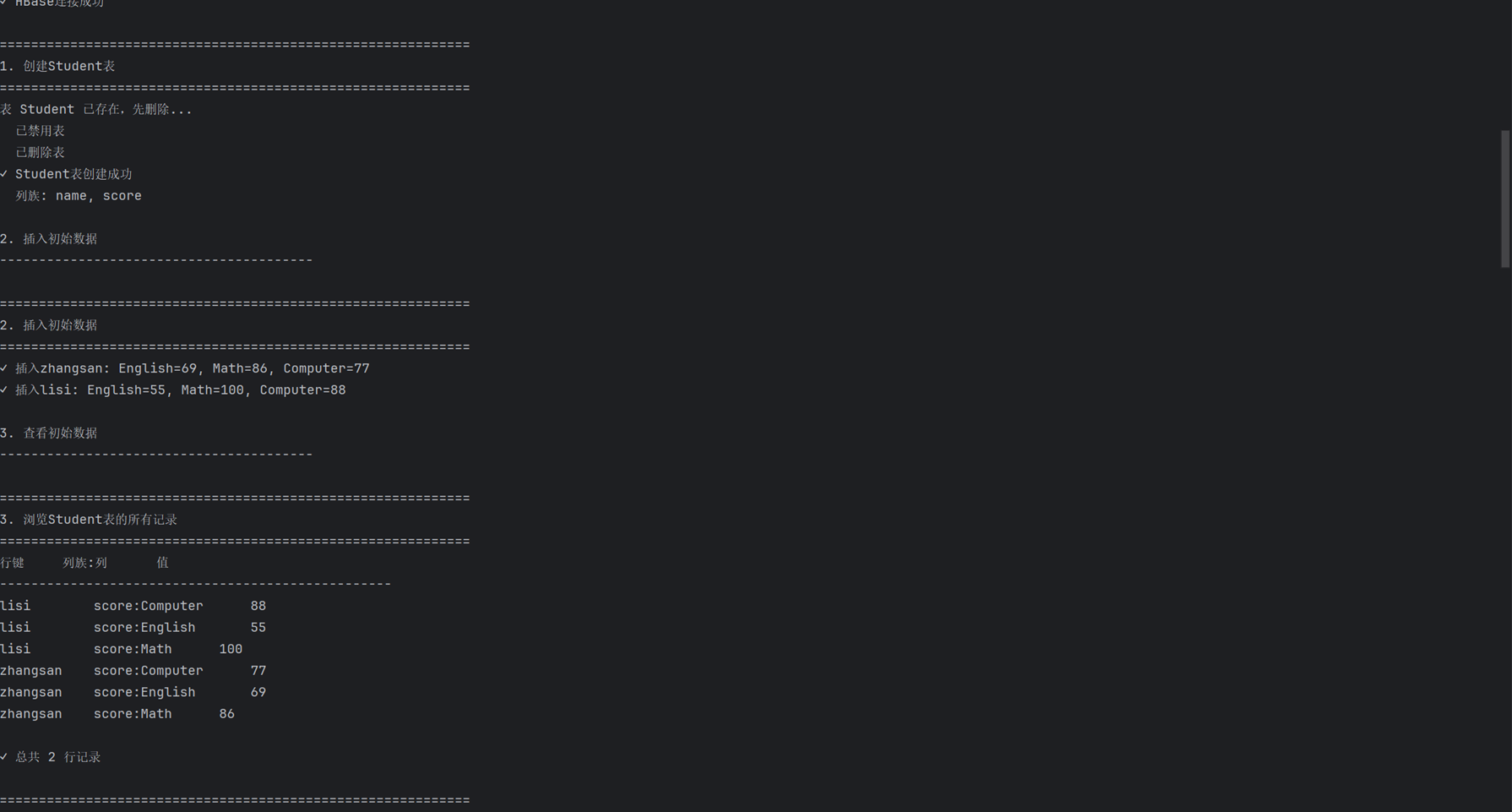
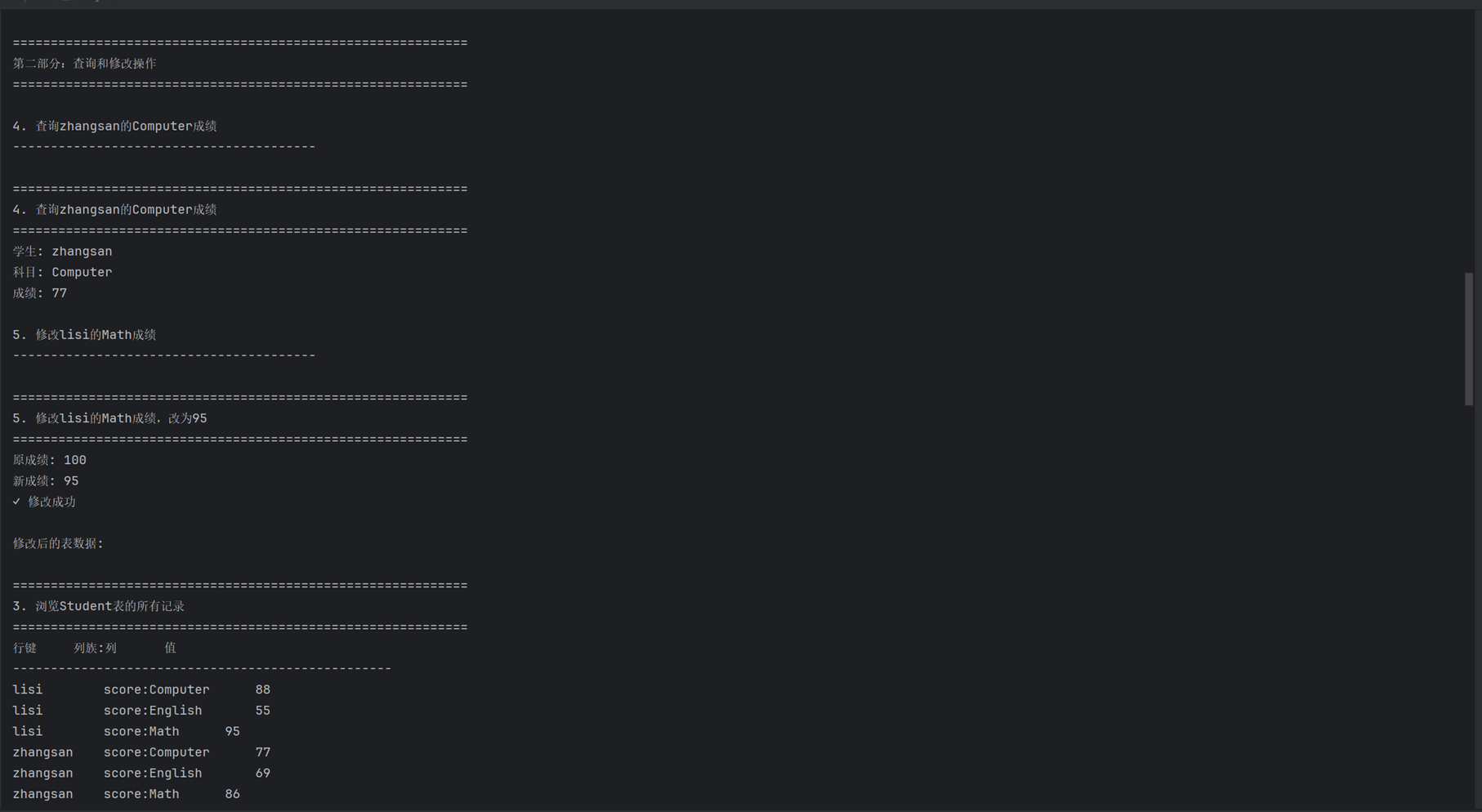
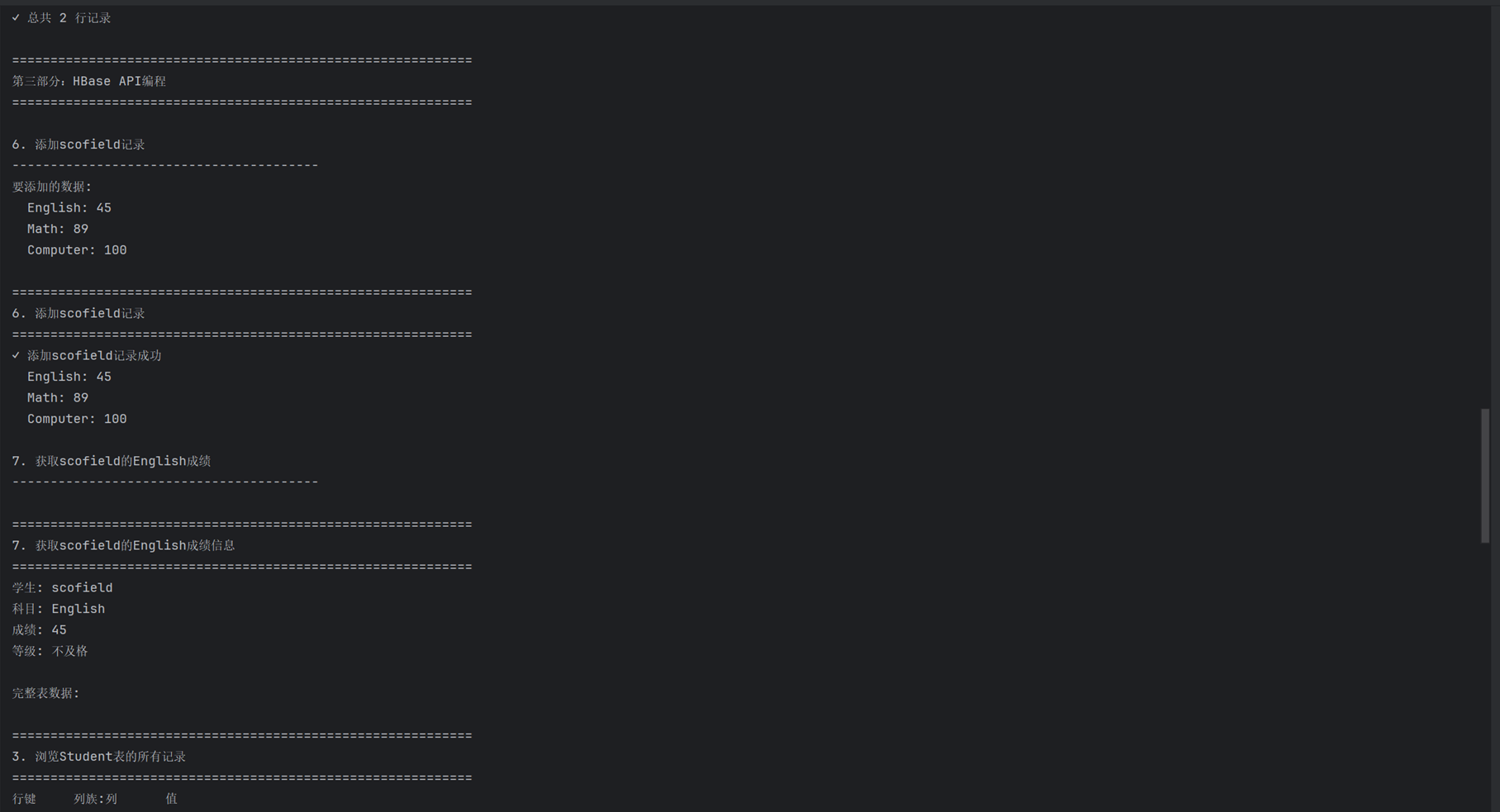
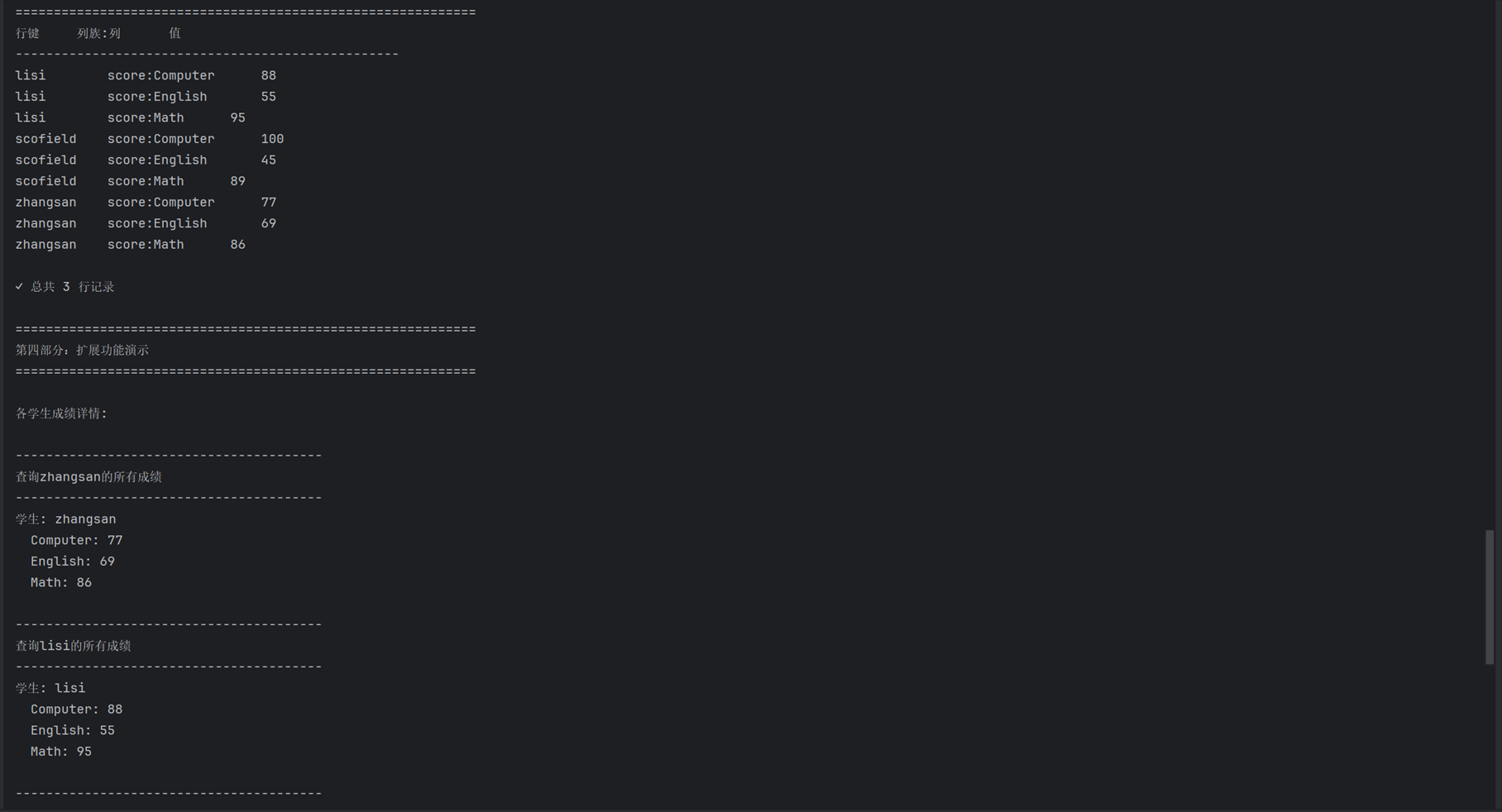
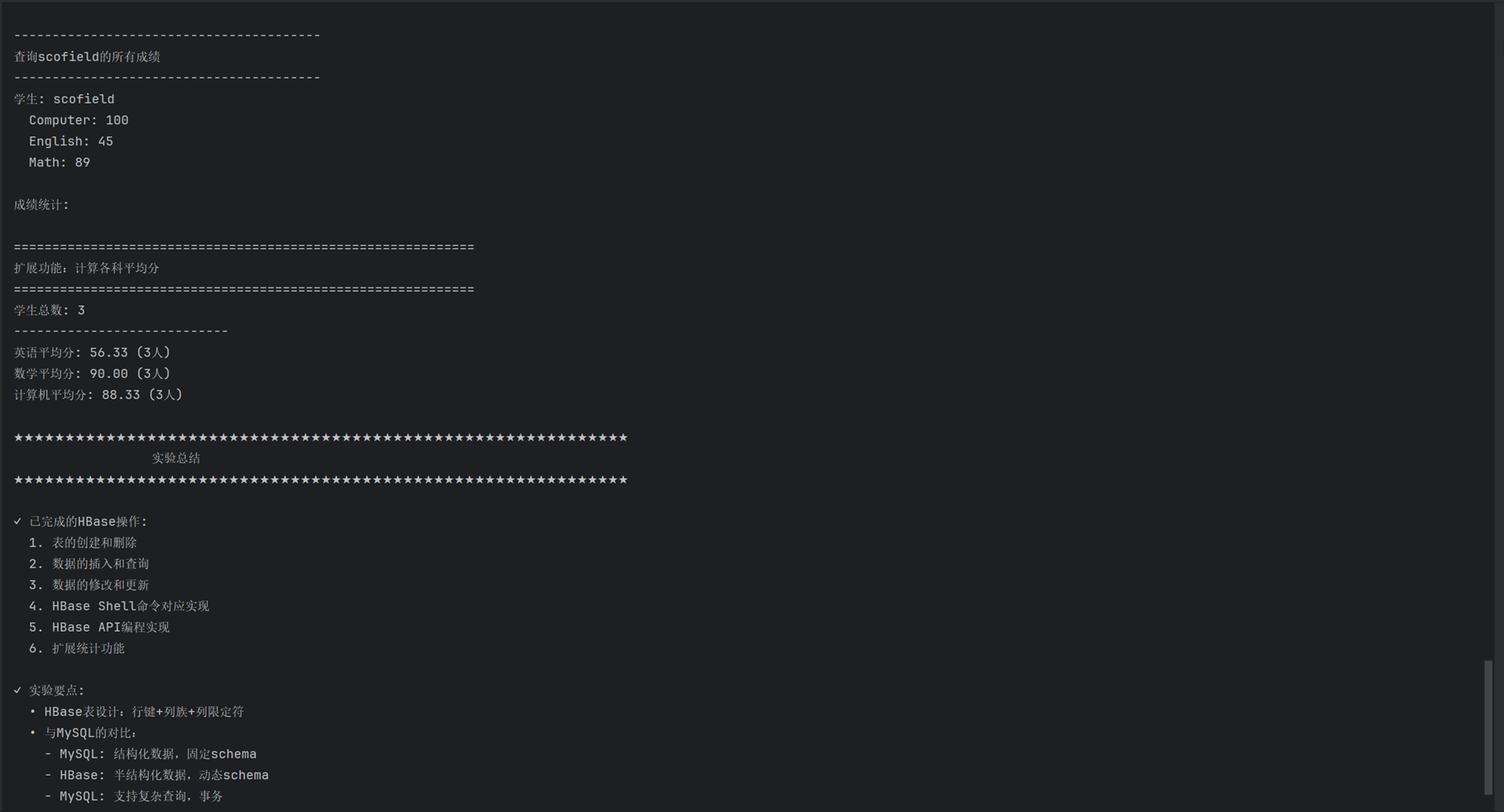
HBaseStudentOperation:
package com.hadoop.experiment6;

import org.apache.hadoop.conf.Configuration;
import org.apache.hadoop.hbase.*;
import org.apache.hadoop.hbase.client.*;
import org.apache.hadoop.hbase.util.Bytes;

import java.io.IOException;
import java.util.ArrayList;
import java.util.List;

/**
 * HBase学生表操作类
 * 完成实验4的HBase部分
 */
public class HBaseStudentOperation {

    private static Configuration conf = null;
    private static Connection connection = null;

    /**
     * 静态初始化块,创建HBase连接
     */
    static {
        try {
            // 创建HBase配置
            conf = HBaseConfiguration.create();
            // 设置ZooKeeper地址(根据你的虚拟机IP)
            conf.set("hbase.zookeeper.quorum", "192.168.249.129");
            conf.set("hbase.zookeeper.property.clientPort", "2181");
            // 设置超时时间
            conf.set("hbase.client.operation.timeout", "30000");
            conf.set("hbase.client.scanner.timeout.period", "30000");

            // 创建连接
            connection = ConnectionFactory.createConnection(conf);
            System.out.println("✓ HBase连接成功");

        } catch (IOException e) {
            System.err.println("✗ HBase连接失败: " + e.getMessage());
            e.printStackTrace();
        }
    }

    /**
     * 关闭连接
     */
    public static void close() {
        if (connection != null) {
            try {
                connection.close();
                System.out.println("✓ HBase连接已关闭");
            } catch (IOException e) {
                System.err.println("关闭连接失败: " + e.getMessage());
            }
        }
    }

    /**
     * 工具方法:打印分隔线
     */
    private static void printSeparator(String title) {
        System.out.println("\n" + repeatString("=", 60));
        System.out.println(title);
        System.out.println(repeatString("=", 60));
    }

    private static void printSubSeparator(String title) {
        System.out.println("\n" + repeatString("-", 40));
        System.out.println(title);
        System.out.println(repeatString("-", 40));
    }

    /**
     * 重复字符串(兼容Java 1.8)
     */
    private static String repeatString(String str, int count) {
        if (count <= 0) {
            return "";
        }

        StringBuilder sb = new StringBuilder();
        for (int i = 0; i < count; i++) {
            sb.append(str);
        }
        return sb.toString();
    }

    /**
     * 1. 创建Student表(如果存在则先删除)
     * 表结构:两个列族 name 和 score
     */
    public static void createStudentTable() throws IOException {
        printSeparator("1. 创建Student表");

        if (connection == null) {
            throw new IOException("HBase连接未建立");
        }

        try (Admin admin = connection.getAdmin()) {
            TableName tableName = TableName.valueOf("Student");

            // 检查表是否存在,存在则删除
            if (admin.tableExists(tableName)) {
                System.out.println("表 Student 已存在,先删除...");

                // 禁用表
                if (admin.isTableEnabled(tableName)) {
                    admin.disableTable(tableName);
                    System.out.println("  已禁用表");
                }

                // 删除表
                admin.deleteTable(tableName);
                System.out.println("  已删除表");
            }

            // 创建表描述符
            TableDescriptorBuilder tableBuilder = TableDescriptorBuilder.newBuilder(tableName);

            // 添加列族:name(用于存储姓名信息,虽然表中name是行键,但这里还是创建列族)
            ColumnFamilyDescriptor nameFamily = ColumnFamilyDescriptorBuilder
                    .newBuilder(Bytes.toBytes("name"))
                    .setMaxVersions(1)
                    .build();
            tableBuilder.setColumnFamily(nameFamily);

            // 添加列族:score(用于存储各科成绩)
            ColumnFamilyDescriptor scoreFamily = ColumnFamilyDescriptorBuilder
                    .newBuilder(Bytes.toBytes("score"))
                    .setMaxVersions(1)
                    .build();
            tableBuilder.setColumnFamily(scoreFamily);

            // 创建表
            TableDescriptor tableDesc = tableBuilder.build();
            admin.createTable(tableDesc);
            System.out.println("✓ Student表创建成功");
            System.out.println("  列族: name, score");

        } catch (Exception e) {
            System.err.println("创建表失败: " + e.getMessage());
            throw e;
        }
    }

    /**
     * 2. 插入初始数据
     * zhangsan: English=69, Math=86, Computer=77
     * lisi: English=55, Math=100, Computer=88
     */
    public static void insertInitialData() throws IOException {
        printSeparator("2. 插入初始数据");

        try (Table table = connection.getTable(TableName.valueOf("Student"))) {

            // 插入zhangsan的数据
            Put put1 = new Put(Bytes.toBytes("zhangsan"));
            put1.addColumn(Bytes.toBytes("score"), Bytes.toBytes("English"), Bytes.toBytes("69"));
            put1.addColumn(Bytes.toBytes("score"), Bytes.toBytes("Math"), Bytes.toBytes("86"));
            put1.addColumn(Bytes.toBytes("score"), Bytes.toBytes("Computer"), Bytes.toBytes("77"));
            table.put(put1);
            System.out.println("✓ 插入zhangsan: English=69, Math=86, Computer=77");

            // 插入lisi的数据
            Put put2 = new Put(Bytes.toBytes("lisi"));
            put2.addColumn(Bytes.toBytes("score"), Bytes.toBytes("English"), Bytes.toBytes("55"));
            put2.addColumn(Bytes.toBytes("score"), Bytes.toBytes("Math"), Bytes.toBytes("100"));
            put2.addColumn(Bytes.toBytes("score"), Bytes.toBytes("Computer"), Bytes.toBytes("88"));
            table.put(put2);
            System.out.println("✓ 插入lisi: English=55, Math=100, Computer=88");

        } catch (Exception e) {
            System.err.println("插入数据失败: " + e.getMessage());
            throw e;
        }
    }

    /**
     * 3. 用scan命令浏览Student表的相关信息
     */
    public static void scanStudentTable() throws IOException {
        printSeparator("3. 浏览Student表的所有记录");

        try (Table table = connection.getTable(TableName.valueOf("Student"))) {
            Scan scan = new Scan();
            ResultScanner scanner = table.getScanner(scan);

            System.out.println("行键\t\t列族:列\t\t值");
            System.out.println(repeatString("-", 50));

            int rowCount = 0;
            for (Result result : scanner) {
                rowCount++;
                String rowKey = Bytes.toString(result.getRow());

                for (Cell cell : result.rawCells()) {
                    String family = Bytes.toString(CellUtil.cloneFamily(cell));
                    String qualifier = Bytes.toString(CellUtil.cloneQualifier(cell));
                    String value = Bytes.toString(CellUtil.cloneValue(cell));

                    System.out.printf("%-10s\t%s:%s\t\t%s\n", rowKey, family, qualifier, value);
                }
            }

            if (rowCount == 0) {
                System.out.println("表为空");
            } else {
                System.out.println("\n✓ 总共 " + rowCount + " 行记录");
            }

            scanner.close();

        } catch (Exception e) {
            System.err.println("扫描表失败: " + e.getMessage());
            throw e;
        }
    }

    /**
     * 4. 查询zhangsan的Computer成绩
     */
    public static void queryZhangsanComputerScore() throws IOException {
        printSeparator("4. 查询zhangsan的Computer成绩");

        try (Table table = connection.getTable(TableName.valueOf("Student"))) {
            Get get = new Get(Bytes.toBytes("zhangsan"));
            get.addColumn(Bytes.toBytes("score"), Bytes.toBytes("Computer"));

            Result result = table.get(get);

            byte[] value = result.getValue(Bytes.toBytes("score"), Bytes.toBytes("Computer"));
            if (value != null) {
                String score = Bytes.toString(value);
                System.out.println("学生: zhangsan");
                System.out.println("科目: Computer");
                System.out.println("成绩: " + score);
            } else {
                System.out.println("未找到zhangsan的Computer成绩");
            }

        } catch (Exception e) {
            System.err.println("查询失败: " + e.getMessage());
            throw e;
        }
    }

    /**
     * 5. 修改lisi的Math成绩,改为95
     */
    public static void updateLisiMathScore() throws IOException {
        printSeparator("5. 修改lisi的Math成绩,改为95");

        try (Table table = connection.getTable(TableName.valueOf("Student"))) {
            // 先获取旧值
            Get get = new Get(Bytes.toBytes("lisi"));
            get.addColumn(Bytes.toBytes("score"), Bytes.toBytes("Math"));

            Result result = table.get(get);
            byte[] oldValue = result.getValue(Bytes.toBytes("score"), Bytes.toBytes("Math"));

            if (oldValue != null) {
                System.out.println("原成绩: " + Bytes.toString(oldValue));
            } else {
                System.out.println("原成绩: 不存在");
            }

            // 修改为95
            Put put = new Put(Bytes.toBytes("lisi"));
            put.addColumn(Bytes.toBytes("score"), Bytes.toBytes("Math"), Bytes.toBytes("95"));
            table.put(put);

            System.out.println("新成绩: 95");
            System.out.println("✓ 修改成功");

        } catch (Exception e) {
            System.err.println("修改失败: " + e.getMessage());
            throw e;
        }
    }

    /**
     * 6. 添加scofield的数据
     * 实验要求2(1): English:45 Math:89 Computer:100
     */
    public static void addScofieldRecord() throws IOException {
        printSeparator("6. 添加scofield记录");

        try (Table table = connection.getTable(TableName.valueOf("Student"))) {
            Put put = new Put(Bytes.toBytes("scofield"));
            put.addColumn(Bytes.toBytes("score"), Bytes.toBytes("English"), Bytes.toBytes("45"));
            put.addColumn(Bytes.toBytes("score"), Bytes.toBytes("Math"), Bytes.toBytes("89"));
            put.addColumn(Bytes.toBytes("score"), Bytes.toBytes("Computer"), Bytes.toBytes("100"));

            table.put(put);

            System.out.println("✓ 添加scofield记录成功");
            System.out.println("  English: 45");
            System.out.println("  Math: 89");
            System.out.println("  Computer: 100");

        } catch (Exception e) {
            System.err.println("添加记录失败: " + e.getMessage());
            throw e;
        }
    }

    /**
     * 7. 获取scofield的English成绩信息
     * 实验要求2(2)
     */
    public static void getScofieldEnglishScore() throws IOException {
        printSeparator("7. 获取scofield的English成绩信息");

        try (Table table = connection.getTable(TableName.valueOf("Student"))) {
            Get get = new Get(Bytes.toBytes("scofield"));
            get.addColumn(Bytes.toBytes("score"), Bytes.toBytes("English"));

            Result result = table.get(get);

            byte[] value = result.getValue(Bytes.toBytes("score"), Bytes.toBytes("English"));
            if (value != null) {
                String score = Bytes.toString(value);
                System.out.println("学生: scofield");
                System.out.println("科目: English");
                System.out.println("成绩: " + score);

                // 显示成绩等级
                int scoreInt = Integer.parseInt(score);
                String grade = getGrade(scoreInt);
                System.out.println("等级: " + grade);
            } else {
                System.out.println("未找到scofield的English成绩");
            }

        } catch (Exception e) {
            System.err.println("查询失败: " + e.getMessage());
            throw e;
        }
    }

    /**
     * 根据分数获取等级
     */
    private static String getGrade(int score) {
        if (score >= 90) return "优秀";
        else if (score >= 80) return "良好";
        else if (score >= 70) return "中等";
        else if (score >= 60) return "及格";
        else return "不及格";
    }

    /**
     * 8. 查询特定学生的所有成绩
     */
    public static void queryStudentAllScores(String studentName) throws IOException {
        printSubSeparator("查询" + studentName + "的所有成绩");

        try (Table table = connection.getTable(TableName.valueOf("Student"))) {
            Get get = new Get(Bytes.toBytes(studentName));

            Result result = table.get(get);

            if (result.isEmpty()) {
                System.out.println("学生 " + studentName + " 不存在");
                return;
            }

            System.out.println("学生: " + studentName);

            List<Cell> cells = result.listCells();
            if (cells != null) {
                for (Cell cell : cells) {
                    String family = Bytes.toString(CellUtil.cloneFamily(cell));
                    String qualifier = Bytes.toString(CellUtil.cloneQualifier(cell));
                    String value = Bytes.toString(CellUtil.cloneValue(cell));

                    if (family.equals("score")) {
                        System.out.println("  " + qualifier + ": " + value);
                    }
                }
            }

        } catch (Exception e) {
            System.err.println("查询失败: " + e.getMessage());
            throw e;
        }
    }

    /**
     * 9. 计算平均分(扩展功能)
     */
    public static void calculateAverageScores() throws IOException {
        printSeparator("扩展功能:计算各科平均分");

        try (Table table = connection.getTable(TableName.valueOf("Student"))) {
            Scan scan = new Scan();
            ResultScanner scanner = table.getScanner(scan);

            int englishTotal = 0, mathTotal = 0, computerTotal = 0;
            int englishCount = 0, mathCount = 0, computerCount = 0;
            int studentCount = 0;

            for (Result result : scanner) {
                studentCount++;
                String rowKey = Bytes.toString(result.getRow());

                // 获取各科成绩
                byte[] englishValue = result.getValue(Bytes.toBytes("score"), Bytes.toBytes("English"));
                byte[] mathValue = result.getValue(Bytes.toBytes("score"), Bytes.toBytes("Math"));
                byte[] computerValue = result.getValue(Bytes.toBytes("score"), Bytes.toBytes("Computer"));

                if (englishValue != null) {
                    englishTotal += Integer.parseInt(Bytes.toString(englishValue));
                    englishCount++;
                }

                if (mathValue != null) {
                    mathTotal += Integer.parseInt(Bytes.toString(mathValue));
                    mathCount++;
                }

                if (computerValue != null) {
                    computerTotal += Integer.parseInt(Bytes.toString(computerValue));
                    computerCount++;
                }
            }

            scanner.close();

            System.out.println("学生总数: " + studentCount);
            System.out.println("----------------------------");

            if (englishCount > 0) {
                double englishAvg = (double) englishTotal / englishCount;
                System.out.printf("英语平均分: %.2f (%d人)\n", englishAvg, englishCount);
            }

            if (mathCount > 0) {
                double mathAvg = (double) mathTotal / mathCount;
                System.out.printf("数学平均分: %.2f (%d人)\n", mathAvg, mathCount);
            }

            if (computerCount > 0) {
                double computerAvg = (double) computerTotal / computerCount;
                System.out.printf("计算机平均分: %.2f (%d人)\n", computerAvg, computerCount);
            }

        } catch (Exception e) {
            System.err.println("计算平均分失败: " + e.getMessage());
            throw e;
        }
    }
}
HbaseStudentExperimentDemo:
package com.hadoop.experiment6;
/**
 * 实验4 HBase部分完整演示
 */
public class HBaseStudentExperimentDemo {

    public static void main(String[] args) {
        System.out.println("=== 实验4:NoSQL和关系数据库的操作比较 ===\n");
        System.out.println("=== HBase数据库操作部分 ===\n");

        try {
            // ==================== 演示开始 ====================
            System.out.println(repeatString("★", 60));
            System.out.println("             HBase学生表操作演示");
            System.out.println(repeatString("★", 60));

            // 第一部分:基本操作演示
            System.out.println("\n" + repeatString("=", 60));
            System.out.println("第一部分:基本表操作");
            System.out.println(repeatString("=", 60));

            // 1. 创建表
            System.out.println("\n1. 创建Student表");
            System.out.println(repeatString("-", 40));
            HBaseStudentOperation.createStudentTable();

            // 2. 插入数据
            System.out.println("\n2. 插入初始数据");
            System.out.println(repeatString("-", 40));
            HBaseStudentOperation.insertInitialData();

            // 查看初始数据
            System.out.println("\n3. 查看初始数据");
            System.out.println(repeatString("-", 40));
            HBaseStudentOperation.scanStudentTable();

            // 第二部分:查询和修改操作
            System.out.println("\n" + repeatString("=", 60));
            System.out.println("第二部分:查询和修改操作");
            System.out.println(repeatString("=", 60));

            // 4. 查询zhangsan的Computer成绩
            System.out.println("\n4. 查询zhangsan的Computer成绩");
            System.out.println(repeatString("-", 40));
            HBaseStudentOperation.queryZhangsanComputerScore();

            // 5. 修改lisi的Math成绩
            System.out.println("\n5. 修改lisi的Math成绩");
            System.out.println(repeatString("-", 40));
            HBaseStudentOperation.updateLisiMathScore();

            // 查看修改后的数据
            System.out.println("\n修改后的表数据:");
            HBaseStudentOperation.scanStudentTable();

            // 第三部分:HBase API编程
            System.out.println("\n" + repeatString("=", 60));
            System.out.println("第三部分:HBase API编程");
            System.out.println(repeatString("=", 60));

            // 6. 添加scofield记录
            System.out.println("\n6. 添加scofield记录");
            System.out.println(repeatString("-", 40));
            System.out.println("要添加的数据:");
            System.out.println("  English: 45");
            System.out.println("  Math: 89");
            System.out.println("  Computer: 100");
            HBaseStudentOperation.addScofieldRecord();

            // 7. 获取scofield的English成绩
            System.out.println("\n7. 获取scofield的English成绩");
            System.out.println(repeatString("-", 40));
            HBaseStudentOperation.getScofieldEnglishScore();

            // 查看完整表数据
            System.out.println("\n完整表数据:");
            HBaseStudentOperation.scanStudentTable();

            // 第四部分:扩展功能
            System.out.println("\n" + repeatString("=", 60));
            System.out.println("第四部分:扩展功能演示");
            System.out.println(repeatString("=", 60));

            // 查询各学生成绩
            System.out.println("\n各学生成绩详情:");
            HBaseStudentOperation.queryStudentAllScores("zhangsan");
            HBaseStudentOperation.queryStudentAllScores("lisi");
            HBaseStudentOperation.queryStudentAllScores("scofield");

            // 统计功能
            System.out.println("\n成绩统计:");
            HBaseStudentOperation.calculateAverageScores();

            // ==================== 演示总结 ====================
            System.out.println("\n" + repeatString("★", 60));
            System.out.println("                  实验总结");
            System.out.println(repeatString("★", 60));

            System.out.println("\n✓ 已完成的HBase操作:");
            System.out.println("  1. 表的创建和删除");
            System.out.println("  2. 数据的插入和查询");
            System.out.println("  3. 数据的修改和更新");
            System.out.println("  4. HBase Shell命令对应实现");
            System.out.println("  5. HBase API编程实现");
            System.out.println("  6. 扩展统计功能");

            System.out.println("\n✓ 实验要点:");
            System.out.println("  • HBase表设计:行键+列族+列限定符");
            System.out.println("  • 与MySQL的对比:");
            System.out.println("    - MySQL: 结构化数据,固定schema");
            System.out.println("    - HBase: 半结构化数据,动态schema");
            System.out.println("    - MySQL: 支持复杂查询,事务");
            System.out.println("    - HBase: 高并发读写,海量数据存储");

        } catch (Exception e) {
            System.err.println("演示过程中出现错误: " + e.getMessage());
            e.printStackTrace();
        } finally {
            // 关闭连接
            HBaseStudentOperation.close();
        }
    }

    /**
     * 重复字符串(兼容Java 1.8)
     */
    private static String repeatString(String str, int count) {
        if (count <= 0) {
            return "";
        }

        StringBuilder sb = new StringBuilder();
        for (int i = 0; i < count; i++) {
            sb.append(str);
        }
        return sb.toString();
    }
}

 浙公网安备 33010602011771号