


web大作业开发记录04
教师页前端代码:
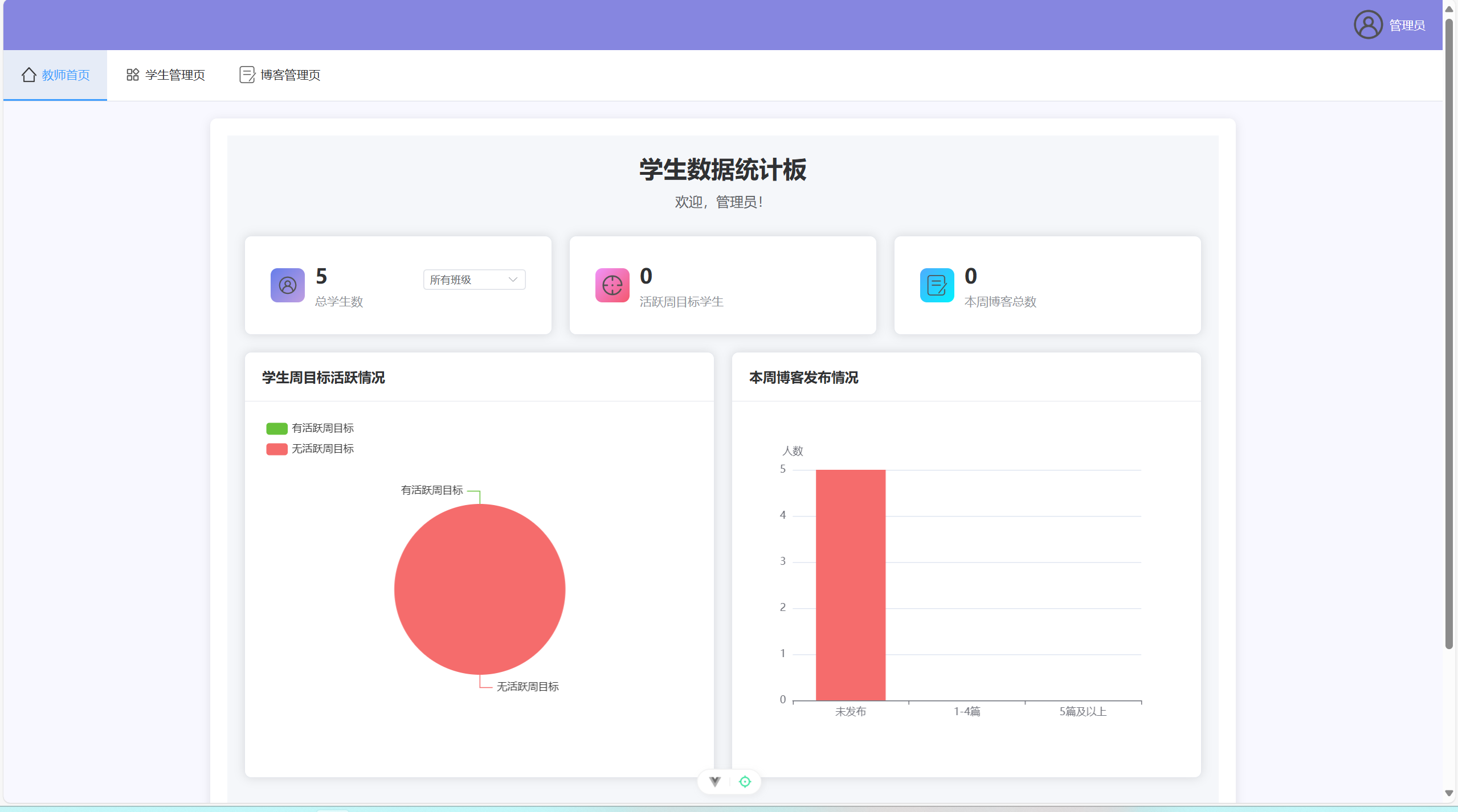
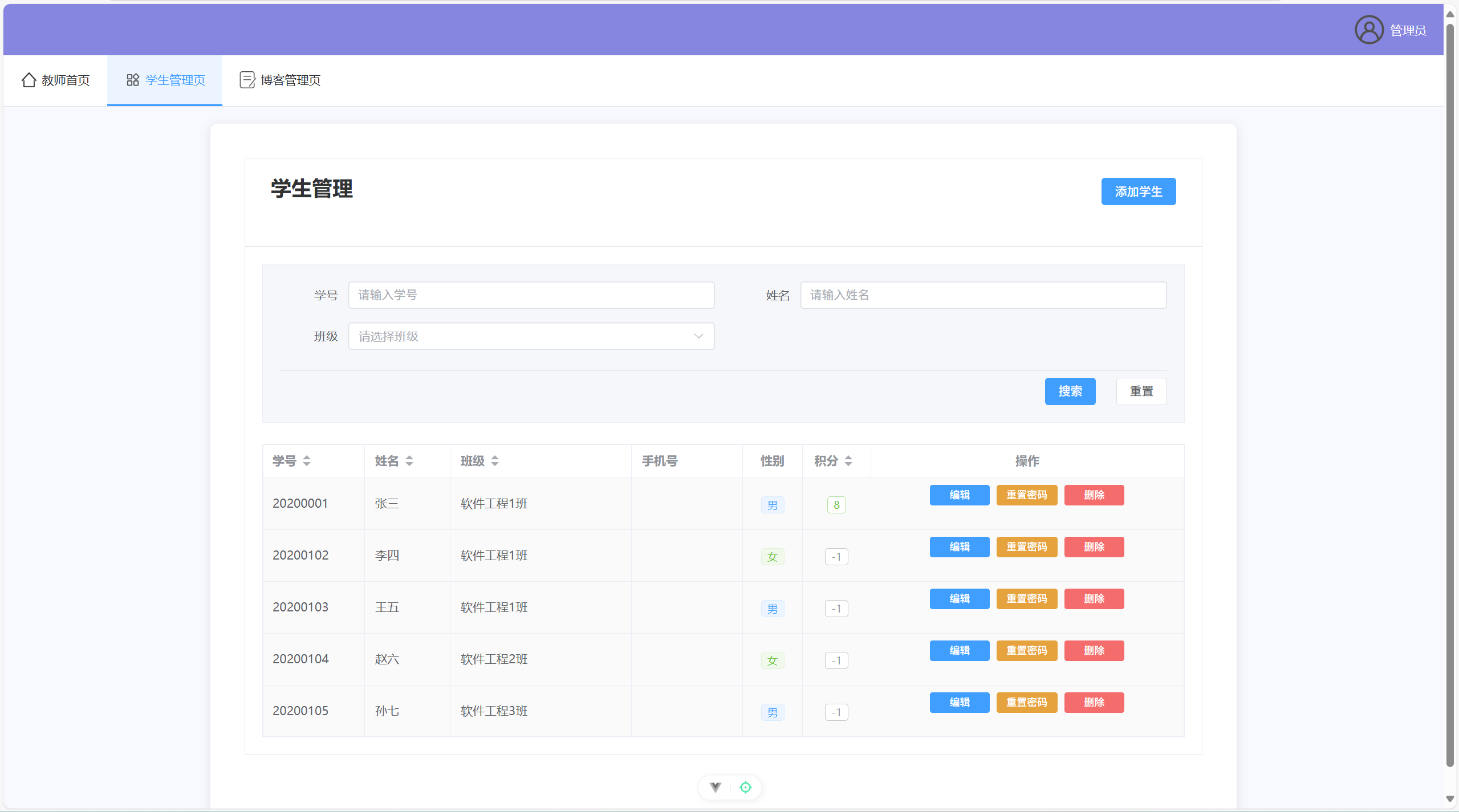
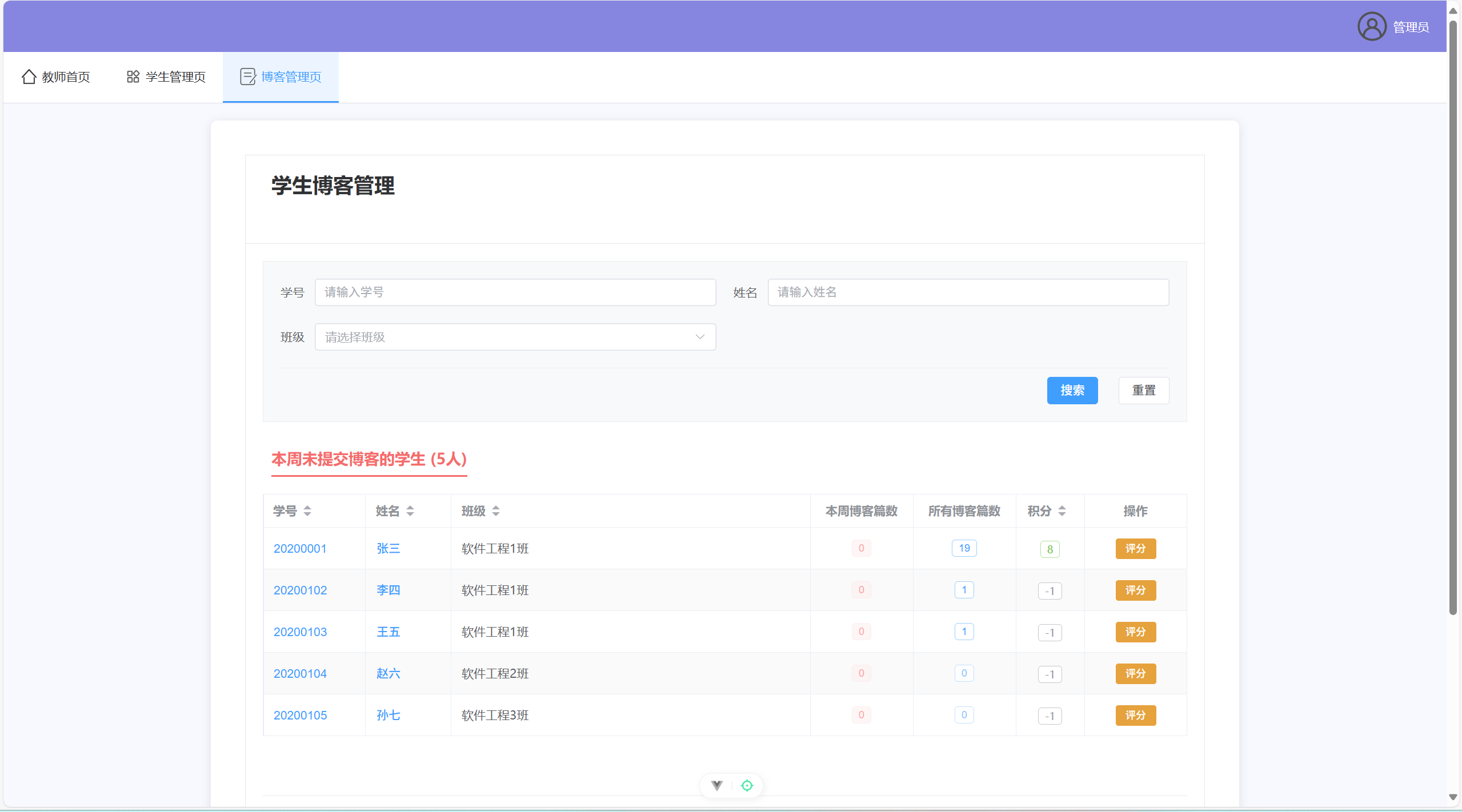
AdminHome.vue:
<template>
  <div class="admin-home-container">
    <div class="dashboard-header">
      <h1>学生数据统计板</h1>
      <p class="welcome-text">欢迎,{{ userInfo?.name || '老师' }}!</p>
    </div>

    <div class="stats-grid">
      <!-- 统计卡片 -->
      <div class="overview-cards">
        <el-row :gutter="20">
          <el-col :span="8">
            <el-card class="stat-card">
              <div class="stat-item">
                <div class="stat-icon students-icon">
                  <img src="@/assets/user.png" alt="学生" class="icon-image" />
                </div>
                <div class="stat-content">
                  <div class="stat-header">
                    <div class="stat-info">
                      <div class="stat-number">{{ totalStudents }}</div>
                      <div class="stat-label">总学生数</div>
                    </div>
                    <!-- 将下拉框移到右侧 -->
                    <div class="class-selector">
                      <el-select
                        v-model="selectedClass"
                        placeholder="选择班级"
                        @change="onClassChange"
                        size="small"
                        style="width: 120px;"
                      >
                        <el-option label="所有班级" value="all"></el-option>
                        <el-option
                          v-for="className in classList"
                          :key="className"
                          :label="className"
                          :value="className"
                        ></el-option>
                      </el-select>
                    </div>
                  </div>
                </div>
              </div>
            </el-card>
          </el-col>
          <el-col :span="8">
            <el-card class="stat-card">
              <div class="stat-item">
                <div class="stat-icon active-goals-icon">
                  <img src="@/assets/goal.png" alt="活跃目标" class="icon-image" />
                </div>
                <div class="stat-content">
                  <div class="stat-number">{{ activeGoalsCount }}</div>
                  <div class="stat-label">活跃周目标学生</div>
                </div>
              </div>
            </el-card>
          </el-col>
          <el-col :span="8">
            <el-card class="stat-card">
              <div class="stat-item">
                <div class="stat-icon blogs-icon">
                  <img src="@/assets/blog.png" alt="博客" class="icon-image" />
                </div>
                <div class="stat-content">
                  <div class="stat-number">{{ totalBlogsThisWeek }}</div>
                  <div class="stat-label">本周博客总数</div>
                </div>
              </div>
            </el-card>
          </el-col>
        </el-row>
      </div>

      <!-- 图表区域 -->
      <div class="charts-section">
        <el-row :gutter="20">
          <!-- 学生周目标活跃情况饼图 -->
          <el-col :span="12">
            <el-card class="chart-card">
              <template #header>
                <div class="card-header">
                  <span>学生周目标活跃情况{{ selectedClass !== 'all' ? ` - ${selectedClass}` : '' }}</span>
                </div>
              </template>
              <div ref="goalsActiveChart" class="chart-container"></div>
            </el-card>
          </el-col>

          <!-- 学生本周博客发布情况条形图 -->
          <el-col :span="12">
            <el-card class="chart-card">
              <template #header>
                <div class="card-header">
                  <span>本周博客发布情况{{ selectedClass !== 'all' ? ` - ${selectedClass}` : '' }}</span>
                </div>
              </template>
              <div ref="blogsDistributionChart" class="chart-container"></div>
            </el-card>
          </el-col>
        </el-row>
      </div>
    </div>
  </div>
</template>

<script setup>
import { ref, reactive, onMounted, nextTick, watch } from 'vue'
import { ElMessage } from 'element-plus'
import * as echarts from 'echarts'
import { getAllStudents } from '@/api/user'
import { getStudentsGoalsActiveStats, getStudentsBlogStats } from '@/api/admin'

// 响应式数据
const userInfo = ref(JSON.parse(localStorage.getItem('userInfo') || '{}'))
const totalStudents = ref(0)
const activeGoalsCount = ref(0)
const totalBlogsThisWeek = ref(0)
const loading = ref(false)

// 班级相关数据
const selectedClass = ref('all')
const classList = ref([])
const allStudentsData = ref([])

// 图表引用
const goalsActiveChart = ref(null)
const blogsDistributionChart = ref(null)

// 统计数据
const goalsActiveStats = ref({})
const blogsDistributionStats = ref({})

// 获取统计数据
const fetchStatistics = async () => {
  loading.value = true
  try {
    // 获取所有学生
    const studentsResponse = await getAllStudents()
    if (studentsResponse.code === 200) {
      allStudentsData.value = studentsResponse.data
      // 提取班级列表
      const classSet = new Set()
      studentsResponse.data.forEach(student => {
        if (student.className) {
          classSet.add(student.className)
        }
      })
      classList.value = Array.from(classSet).sort()

      // 更新统计数据
      updateStatistics()
    }
  } catch (error) {
    console.error('获取统计数据失败:', error)
    ElMessage.error('获取统计数据失败')
  } finally {
    loading.value = false
  }
}

// 根据选择的班级更新统计数据
const updateStatistics = async () => {
  try {
    let filteredStudents = allStudentsData.value

    // 如果选择了特定班级,过滤学生数据
    if (selectedClass.value !== 'all') {
      filteredStudents = allStudentsData.value.filter(student =>
        student.className === selectedClass.value
      )
    }

    // 更新总学生数
    totalStudents.value = filteredStudents.length

    // 获取学生周目标活跃统计(根据班级过滤)
    const goalsStatsResponse = await getStudentsGoalsActiveStats(selectedClass.value !== 'all' ? selectedClass.value : null)
    if (goalsStatsResponse.code === 200) {
      goalsActiveStats.value = goalsStatsResponse.data
      activeGoalsCount.value = goalsStatsResponse.data.activeCount || 0
    }

    // 获取学生本周博客发布统计(根据班级过滤)
    const blogsStatsResponse = await getStudentsBlogStats(selectedClass.value !== 'all' ? selectedClass.value : null)
    if (blogsStatsResponse.code === 200) {
      blogsDistributionStats.value = blogsStatsResponse.data
      totalBlogsThisWeek.value = blogsStatsResponse.data.totalBlogs || 0
    }

    // 等待DOM更新后初始化图表
    await nextTick()
    initCharts()
  } catch (error) {
    console.error('更新统计数据失败:', error)
    ElMessage.error('更新统计数据失败')
  }
}

// 班级选择变化处理
const onClassChange = () => {
  updateStatistics()
}

// 初始化图表
const initCharts = () => {
  initGoalsActiveChart()
  initBlogsDistributionChart()
}

// 学生周目标活跃情况饼图
const initGoalsActiveChart = () => {
  if (!goalsActiveChart.value) return

  const chart = echarts.init(goalsActiveChart.value)
  const stats = goalsActiveStats.value

  const option = {
    tooltip: {
      trigger: 'item',
      formatter: '{b}: {c}人 ({d}%)'
    },
    legend: {
      orient: 'vertical',
      left: 'left'
    },
    series: [
      {
        name: '周目标活跃情况',
        type: 'pie',
        radius: '50%',
        data: [
          { value: stats.activeCount || 0, name: '有活跃周目标', itemStyle: { color: '#67C23A' } },
          { value: stats.inactiveCount || 0, name: '无活跃周目标', itemStyle: { color: '#F56C6C' } }
        ],
        emphasis: {
          itemStyle: {
            shadowBlur: 10,
            shadowOffsetX: 0,
            shadowColor: 'rgba(0, 0, 0, 0.5)'
          }
        }
      }
    ]
  }

  chart.setOption(option)
}

// 学生本周博客发布情况条形图
const initBlogsDistributionChart = () => {
  if (!blogsDistributionChart.value) return

  const chart = echarts.init(blogsDistributionChart.value)
  const stats = blogsDistributionStats.value

  const option = {
    tooltip: {
      trigger: 'axis',
      axisPointer: {
        type: 'shadow'
      },
      formatter: '{b}: {c}人'
    },
    xAxis: {
      type: 'category',
      // 修改:X轴标签与后端数据结构匹配
      data: ['未发布', '1-4篇', '5篇及以上'],
      axisLabel: {
        interval: 0,
        rotate: 0
      }
    },
    yAxis: {
      type: 'value',
      name: '人数',
      minInterval: 1
    },
    series: [
      {
        name: '博客发布情况',
        type: 'bar',
        data: [
          { value: stats.noBlog || 0, itemStyle: { color: '#F56C6C' } },
          { value: stats.lessThan5 || 0, itemStyle: { color: '#E6A23C' } },
          { value: stats.moreThan5 || 0, itemStyle: { color: '#67C23A' } }
        ],
        barWidth: '60%'
      }
    ]
  }

  chart.setOption(option)
}

// 组件挂载时获取数据
onMounted(() => {
  fetchStatistics()
})
</script>

<style scoped>
.admin-home-container {
  padding: 20px;
  background-color: #f5f7fa;
  min-height: 100vh;
}

.dashboard-header {
  text-align: center;
  margin-bottom: 30px;
}

.dashboard-header h1 {
  color: #303133;
  font-size: 28px;
  margin-bottom: 10px;
}

.welcome-text {
  color: #606266;
  font-size: 16px;
}

.overview-cards {
  margin-bottom: 20px;
}

.stat-card {
  border-radius: 8px;
  transition: all 0.3s;
}

.stat-card:hover {
  transform: translateY(-2px);
  box-shadow: 0 4px 12px rgba(0, 0, 0, 0.1);
}

.stat-item {
  display: flex;
  align-items: center;
  padding: 10px;
}

.stat-icon {
  width: 40px;
  height: 40px;
  border-radius: 8px;
  display: flex;
  align-items: center;
  justify-content: center;
  margin-right: 12px;
}

.icon-image {
  width: 24px;
  height: 24px;
  display: block;
}

.students-icon {
  background: linear-gradient(135deg, #667eea 0%, #c09fe1 100%);
}

.active-goals-icon {
  background: linear-gradient(135deg, #f093fb 0%, #f5576c 100%);
}

.blogs-icon {
  background: linear-gradient(135deg, #4facfe 0%, #00f2fe 100%);
}

.stat-content {
  flex: 1;
}

.stat-header {
  display: flex;
  justify-content: space-between;
  align-items: flex-start;
  width: 100%;
}

.stat-info {
  flex: 1;
}

.stat-number {
  font-size: 24px;
  font-weight: bold;
  color: #303133;
  margin-bottom: 5px;
}

.stat-label {
  font-size: 14px;
  color: #909399;
}

.class-selector {
  flex-shrink: 0;
  margin-left: 12px;
}

.class-selector {
  margin-top: 8px;
}

.chart-card {
  border-radius: 8px;
}

.card-header {
  font-weight: bold;
  color: #303133;
}

.chart-container {
  height: 400px;
  width: 100%;
}
</style>
AdminManage.vue:
<template>
  <div class="page-container">
    <el-card class="base-card">
      <template #header>
        <div class="card-header">
          <h2>学生管理</h2>
          <div class="card-actions">
            <el-button type="primary" @click="showAddDialog">添加学生</el-button>
          </div>
        </div>
      </template>

      <!-- 搜索表单 -->
      <div class="search-form">
        <el-form :model="searchForm">
          <div class="search-grid">
            <!-- 第一行 -->
            <div class="search-form-content">
              <el-form-item label="学号" class="search-item">
                <el-input
                  v-model="searchForm.studentId"
                  placeholder="请输入学号"
                  clearable
                  @clear="handleSearch"
                  class="search-input"
                ></el-input>
              </el-form-item>

              <el-form-item label="姓名" class="search-item">
                <el-input
                  v-model="searchForm.name"
                  placeholder="请输入姓名"
                  clearable
                  @clear="handleSearch"
                  class="search-input"
                ></el-input>
              </el-form-item>
            </div>

            <!-- 第二行 -->
            <div class="search-form-content">
              <el-form-item label="班级" class="search-item">
                <el-select
                  v-model="searchForm.className"
                  placeholder="请选择班级"
                  clearable
                  @clear="handleSearch"
                  class="search-select"
                >
                  <el-option
                    v-for="item in classList"
                    :key="item"
                    :label="item"
                    :value="item"
                  ></el-option>
                </el-select>
              </el-form-item>

              <!-- 空白占位,保持布局对齐 -->
              <div class="search-item"></div>
            </div>

            <!-- 操作按钮单独一行 -->
            <div class="search-action">
              <el-button type="primary" @click="handleSearch">搜索</el-button>
              <el-button @click="resetSearch">重置</el-button>
            </div>
          </div>
        </el-form>
      </div>

      <!-- 学生列表 -->
      <el-table
        :data="students"
        style="width: 100%"
        :row-class-name="tableRowClassName"
        border
        stripe
        highlight-current-row
        class="base-table"
      >
        <el-table-column prop="studentId" label="学号" width="120" sortable></el-table-column>
        <el-table-column prop="name" label="姓名" width="100" sortable></el-table-column>
        <el-table-column prop="className" label="班级" min-width="150" sortable></el-table-column>
        <el-table-column prop="phoneNumber" label="手机号" width="130"></el-table-column>
        <el-table-column prop="gender" label="性别" width="70" align="center">
          <template #default="scope">
            <el-tag size="small" :type="scope.row.gender === '男' ? 'primary' : 'success'">
              {{ scope.row.gender }}
            </el-tag>
          </template>
        </el-table-column>
        <el-table-column prop="points" label="积分" width="80" align="center" sortable>
          <template #default="scope">
            <el-tag size="small" effect="plain" :type="scope.row.points > 0 ? 'success' : 'info'">
              {{ scope.row.points }}
            </el-tag>
          </template>
        </el-table-column>
        <el-table-column label="操作" min-width="260" fixed="right" align="center">
          <template #default="scope">
            <div class="operation-buttons">
              <el-button
                type="primary"
                size="small"
                @click="handleEdit(scope.row)"
              >
                编辑
              </el-button>
              <el-button
                type="warning"
                size="small"
                @click="handleResetPassword(scope.row)"
              >
                重置密码
              </el-button>
              <el-button
                type="danger"
                size="small"
                @click="handleDelete(scope.row)"
              >
                删除
              </el-button>
            </div>
          </template>
        </el-table-column>
      </el-table>
    </el-card>

    <!-- 添加学生对话框 -->
    <el-dialog
      title="添加学生"
      v-model="dialogVisible"
      width="500px"
    >
      <el-form :model="studentForm" :rules="rules" ref="studentFormRef" label-width="80px">
        <el-form-item label="学号" prop="studentId">
          <el-input v-model="studentForm.studentId" placeholder="请输入学号"></el-input>
        </el-form-item>
        <el-form-item label="姓名" prop="name">
          <el-input v-model="studentForm.name" placeholder="请输入姓名"></el-input>
        </el-form-item>
        <el-form-item label="班级" prop="className">
          <el-input v-model="studentForm.className" placeholder="请输入班级"></el-input>
        </el-form-item>
        <el-form-item label="手机号" prop="phoneNumber">
          <el-input v-model="studentForm.phoneNumber" placeholder="请输入手机号"></el-input>
        </el-form-item>
        <el-form-item label="性别" prop="gender">
          <el-select v-model="studentForm.gender" placeholder="请选择性别" style="width: 100%">
            <el-option label="男" value="男"></el-option>
            <el-option label="女" value="女"></el-option>
          </el-select>
        </el-form-item>
        <el-form-item label="密码" prop="password">
          <el-input v-model="studentForm.password" type="password" placeholder="请输入密码"></el-input>
        </el-form-item>
      </el-form>
      <template #footer>
        <span class="dialog-footer">
          <el-button @click="handleDialogClose">取消</el-button>
          <el-button type="primary" @click="handleSubmit">确定</el-button>
        </span>
      </template>
    </el-dialog>

    <!-- 编辑学生对话框 -->
    <el-dialog
      title="编辑学生信息"
      v-model="editDialogVisible"
      width="500px"
    >
      <el-form :model="editForm" :rules="editRules" ref="editFormRef" label-width="80px">
        <el-form-item label="学号" prop="studentId">
          <el-input v-model="editForm.studentId" disabled></el-input>
        </el-form-item>
        <el-form-item label="姓名" prop="name">
          <el-input v-model="editForm.name" placeholder="请输入姓名"></el-input>
        </el-form-item>
        <el-form-item label="班级" prop="className">
          <el-input v-model="editForm.className" placeholder="请输入班级"></el-input>
        </el-form-item>
        <el-form-item label="手机号" prop="phoneNumber">
          <el-input v-model="editForm.phoneNumber" placeholder="请输入手机号"></el-input>
        </el-form-item>
        <el-form-item label="性别" prop="gender">
          <el-select v-model="editForm.gender" placeholder="请选择性别" style="width: 100%">
            <el-option label="男" value="男"></el-option>
            <el-option label="女" value="女"></el-option>
          </el-select>
        </el-form-item>
      </el-form>
      <template #footer>
        <span class="dialog-footer">
          <el-button @click="editDialogVisible = false">取消</el-button>
          <el-button type="primary" @click="handleEditSubmit">确定</el-button>
        </span>
      </template>
    </el-dialog>
  </div>
</template>

<script setup>
import { ref, reactive, onMounted, computed } from 'vue'
import { ElMessage, ElMessageBox } from 'element-plus'
import { getAllStudents } from '@/api/user'
import { addStudent, updateStudent, deleteStudent, resetPassword } from '@/api/admin'

const dialogVisible = ref(false)
const editDialogVisible = ref(false)
const studentFormRef = ref(null)
const editFormRef = ref(null)

const studentForm = reactive({
  studentId: '',
  name: '',
  className: '',
  phoneNumber: '',
  gender: '',
  password: ''
})

const editForm = reactive({
  studentId: '',
  name: '',
  className: '',
  phoneNumber: '',
  gender: ''
})

const searchForm = reactive({
  studentId: '',
  name: '',
  className: ''
})

const rules = {
  studentId: [{ required: true, message: '请输入学号', trigger: 'blur' }],
  name: [{ required: true, message: '请输入姓名', trigger: 'blur' }],
  className: [{ required: true, message: '请输入班级', trigger: 'blur' }],
  phoneNumber: [
    { required: true, message: '请输入手机号', trigger: 'blur' },
    { pattern: /^1[3-9]\d{9}$/, message: '请输入正确的手机号', trigger: 'blur' }
  ],
  gender: [{ required: true, message: '请选择性别', trigger: 'change' }],
  password: [{ required: true, message: '请输入密码', trigger: 'blur' }]
}

const editRules = {
  name: [{ required: true, message: '请输入姓名', trigger: 'blur' }],
  className: [{ required: true, message: '请输入班级', trigger: 'blur' }],
  phoneNumber: [
    { required: true, message: '请输入手机号', trigger: 'blur' },
    { pattern: /^1[3-9]\d{9}$/, message: '请输入正确的手机号', trigger: 'blur' }
  ],
  gender: [{ required: true, message: '请选择性别', trigger: 'change' }]
}

const allStudents = ref([])
const students = ref([])

// 获取班级列表
const classList = computed(() => {
  const classes = [...new Set(allStudents.value.map(student => student.className))]
  return classes.filter(className => className)
})

// 显示添加对话框
const showAddDialog = () => {
  dialogVisible.value = true
  Object.assign(studentForm, {
    studentId: '',
    name: '',
    className: '',
    phoneNumber: '',
    gender: '',
    password: ''
  })
}

// 关闭添加对话框
const handleDialogClose = () => {
  dialogVisible.value = false
}

// 获取学生列表
const fetchStudents = async () => {
  try {
    const res = await getAllStudents()
    if (res.code === 200) {
      allStudents.value = res.data
      students.value = res.data
    } else {
      ElMessage.error(res.msg || '获取学生列表失败')
    }
  } catch (error) {
    console.error('获取学生列表失败:', error)
    ElMessage.error('获取学生列表失败')
  }
}

// 添加学生
const handleSubmit = async () => {
  try {
    await studentFormRef.value.validate()

    const res = await addStudent(studentForm)
    if (res.code === 200) {
      ElMessage.success('添加成功')
      dialogVisible.value = false
      fetchStudents()
    } else {
      ElMessage.error(res.msg || '添加失败')
    }
  } catch (error) {
    console.error('添加失败:', error)
    ElMessage.error('请填写完整信息')
  }
}

// 编辑学生
const handleEdit = (row) => {
  Object.assign(editForm, {
    studentId: row.studentId,
    name: row.name,
    className: row.className,
    phoneNumber: row.phoneNumber,
    gender: row.gender
  })
  editDialogVisible.value = true
}

// 提交编辑
const handleEditSubmit = async () => {
  try {
    await editFormRef.value.validate()

    const res = await updateStudent(editForm)
    if (res.code === 200) {
      ElMessage.success('更新成功')
      editDialogVisible.value = false
      fetchStudents()
    } else {
      ElMessage.error(res.msg || '更新失败')
    }
  } catch (error) {
    console.error('更新失败:', error)
    ElMessage.error('请填写完整信息')
  }
}

// 重置密码
const handleResetPassword = async (row) => {
  try {
    await ElMessageBox.confirm(`确定要重置学生 ${row.name} 的密码吗?密码将重置为默认密码123456`, '提示', {
      confirmButtonText: '确定',
      cancelButtonText: '取消',
      type: 'warning'
    })

    const res = await resetPassword(row.studentId)
    if (res.code === 200) {
      ElMessage.success('密码重置成功')
    } else {
      ElMessage.error(res.msg || '密码重置失败')
    }
  } catch (error) {
    if (error !== 'cancel') {
      console.error('密码重置失败:', error)
      ElMessage.error('密码重置失败')
    }
  }
}

// 删除学生
const handleDelete = async (row) => {
  try {
    await ElMessageBox.confirm(`确定要删除学生 ${row.name} 吗?`, '提示', {
      confirmButtonText: '确定',
      cancelButtonText: '取消',
      type: 'warning'
    })

    const res = await deleteStudent(row.studentId)
    if (res.code === 200) {
      ElMessage.success('删除成功')
      fetchStudents()
    } else {
      ElMessage.error(res.msg || '删除失败')
    }
  } catch (error) {
    if (error !== 'cancel') {
      console.error('删除失败:', error)
      ElMessage.error('删除失败')
    }
  }
}

// 搜索
const handleSearch = () => {
  let filteredStudents = allStudents.value

  if (searchForm.studentId) {
    filteredStudents = filteredStudents.filter(student =>
      student.studentId.includes(searchForm.studentId)
    )
  }

  if (searchForm.name) {
    filteredStudents = filteredStudents.filter(student =>
      student.name.includes(searchForm.name)
    )
  }

  if (searchForm.className) {
    filteredStudents = filteredStudents.filter(student =>
      student.className === searchForm.className
    )
  }

  students.value = filteredStudents
}

// 重置搜索
const resetSearch = () => {
  Object.assign(searchForm, {
    studentId: '',
    name: '',
    className: ''
  })
  students.value = allStudents.value
}

// 表格行样式
const tableRowClassName = ({ row, rowIndex }) => {
  return rowIndex % 2 === 0 ? 'even-row' : 'odd-row'
}

// 页面加载时获取数据
onMounted(() => {
  fetchStudents()
})
</script>

<style scoped>
/* 全局基础样式 */
:root {
  --primary-color: #409EFF;
  --success-color: #67C23A;
  --warning-color: #E6A23C;
  --danger-color: #F56C6C;
  --info-color: #909399;
  --border-radius-base: 4px;
  --box-shadow-base: 0 2px 12px 0 rgba(0, 0, 0, 0.1);
  --transition-base: all 0.3s;
}

/* 页面容器基础样式 */
.page-container {
  max-width: 1200px;
  margin: 0 auto;
  padding: 20px;
}

/* 卡片基础样式 */
.base-card {
  margin-bottom: 30px;
  box-shadow: var(--box-shadow-base);
  border-radius: var(--border-radius-base);
  transition: var(--transition-base);
}

.base-card:hover {
  box-shadow: 0 4px 16px 0 rgba(0, 0, 0, 0.15);
}

/* 卡片头部样式 */
.card-header {
  display: flex;
  justify-content: space-between;
  align-items: center;
  margin-bottom: 25px;
  padding: 0 10px;
}

.card-header h2 {
  margin: 0;
  font-size: 24px;
  color: #303133;
  border-bottom: 2px solid var(--primary-color);
  padding-bottom: 10px;
}

/* 按钮组样式 */
.card-actions {
  display: flex;
  gap: 15px;
}

/* 搜索表单样式 - 参考Honor.vue */
.search-form {
  margin-bottom: 25px;
  padding: 20px;
  background-color: #f5f7fa;
  border-radius: var(--border-radius-base);
  border: 1px solid #ebeef5;
}

.search-grid {
  display: flex;
  flex-direction: column;
  gap: 16px;
}

.search-form-content {
  display: flex;
  gap: 20px;
  align-items: flex-end;
}

.search-item {
  margin-bottom: 0;
  display: flex;
  align-items: center;
  flex: 1;
  min-width: 300px;
}

.search-item :deep(.el-form-item__label) {
  width: 80px;
  text-align: right;
  padding-right: 12px;
  color: #606266;
  font-weight: normal;
}

.search-item :deep(.el-form-item__content) {
  flex: 1;
  min-width: 200px;
}

.search-select {
  width: 100%;
}

.search-input {
  width: 100%;
}

/* 搜索按钮样式 - 与Honor.vue一致 */
.search-action {
  display: flex;
  justify-content: flex-end;
  gap: 12px;
  padding-top: 8px;
  border-top: 1px solid #e6e6e6;
  margin-top: 8px;
}

/* 表格样式优化 */
.base-table {
  width: 100%;
  margin-top: 20px;
}

.base-table :deep(.el-table__row) {
  cursor: pointer;
  transition: background-color 0.3s;
}

.base-table :deep(.el-table__row:hover) {
  background-color: #f5f7fa !important;
}

.base-table :deep(.el-table__header-wrapper) {
  background-color: #fafafa;
}

.base-table :deep(.el-table__header) {
  font-weight: 600;
  color: #303133;
}

/* 操作按钮样式优化 */
.operation-buttons {
  display: flex;
  gap: 8px;
  justify-content: center;
  flex-wrap: wrap;
}

.operation-buttons .el-button {
  margin: 0;
  min-width: 70px;
}

/* 对话框样式 */
.dialog-footer {
  display: flex;
  justify-content: flex-end;
  gap: 12px;
}

/* 响应式调整 */
@media (max-width: 768px) {
  .search-item {
    min-width: 100%;
  }

  .search-form-content {
    flex-direction: column;
    gap: 12px;
  }

  .search-action {
    justify-content: center;
  }

  .card-header {
    flex-direction: column;
    align-items: flex-start;
    gap: 15px;
  }

  .card-actions {
    width: 100%;
    justify-content: flex-end;
  }

  .operation-buttons {
    flex-direction: column;
    gap: 4px;
  }

  .operation-buttons .el-button {
    width: 100%;
  }
}

/* 表格行样式 */
:deep(.el-table__row.even-row) {
  background-color: #fafafa;
}

:deep(.el-table__row.odd-row) {
  background-color: #ffffff;
}

/* 标签样式优化 */
.el-tag {
  font-weight: 500;
}
</style>
AdminBlog.vue:
<template>
  <div class="page-container">
    <el-card class="base-card">
      <template #header>
        <div class="card-header">
          <h2>学生博客管理</h2>
        </div>
      </template>

      <!-- 搜索表单 -->
      <div class="search-form">
        <el-form :model="searchForm">
          <div class="search-grid">
            <!-- 第一行 -->
            <div class="search-form-content">
              <el-form-item label="学号" class="search-item">
                <el-input
                  v-model="searchForm.studentId"
                  placeholder="请输入学号"
                  clearable
                  @clear="handleSearch"
                  class="search-input"
                ></el-input>
              </el-form-item>

              <el-form-item label="姓名" class="search-item">
                <el-input
                  v-model="searchForm.name"
                  placeholder="请输入姓名"
                  clearable
                  @clear="handleSearch"
                  class="search-input"
                ></el-input>
              </el-form-item>
            </div>

            <!-- 第二行 -->
            <div class="search-form-content">
              <el-form-item label="班级" class="search-item">
                <el-select
                  v-model="searchForm.className"
                  placeholder="请选择班级"
                  clearable
                  @clear="handleSearch"
                  class="search-select"
                >
                  <el-option
                    v-for="item in classList"
                    :key="item"
                    :label="item"
                    :value="item"
                  ></el-option>
                </el-select>
              </el-form-item>

            </div>

            <!-- 操作按钮单独一行 -->
            <div class="search-action">
              <el-button type="primary" @click="handleSearch">搜索</el-button>
              <el-button @click="resetSearch">重置</el-button>
            </div>
          </div>
        </el-form>
      </div>

      <!-- 未提交博客的学生 -->
      <div class="section-header">
        <h3 style="color: #F56C6C;">本周未提交博客的学生 ({{ filteredNoBlogStudents.length }}人)</h3>
      </div>

      <el-table
        :data="filteredNoBlogStudents"
        style="width: 100%"
        border
        stripe
        highlight-current-row
        class="base-table"
      >
        <el-table-column prop="studentId" label="学号" width="120" sortable>
          <template #default="scope">
            <el-button type="text" @click="viewStudentDetail(scope.row)" class="student-link">
              {{ scope.row.studentId }}
            </el-button>
          </template>
        </el-table-column>
        <el-table-column prop="name" label="姓名" width="100" sortable>
          <template #default="scope">
            <el-button type="text" @click="viewStudentDetail(scope.row)" class="student-link">
              {{ scope.row.name }}
            </el-button>
          </template>
        </el-table-column>
        <el-table-column prop="className" label="班级" min-width="150" sortable></el-table-column>
        <el-table-column prop="weekBlogCount" label="本周博客篇数" width="120" align="center">
          <template #default="scope">
            <el-button
              type="text"
              @click="viewWeekBlogs(scope.row)"
              :disabled="scope.row.weekBlogCount === 0"
              class="blog-count-link"
            >
              <el-tag size="small" type="danger">{{ scope.row.weekBlogCount }}</el-tag>
            </el-button>
          </template>
        </el-table-column>
        <el-table-column prop="allBlogCount" label="所有博客篇数" width="120" align="center">
          <template #default="scope">
            <el-button
                type="text"
                @click="viewAllBlogs(scope.row)"
                :disabled="scope.row.allBlogCount === 0"
                class="blog-count-link"
            >
              <el-tag size="small" effect="plain">{{ scope.row.allBlogCount }}</el-tag>
            </el-button>
          </template>
        </el-table-column>
        <el-table-column prop="points" label="积分" width="80" align="center" sortable>
          <template #default="scope">
            <el-tag size="small" effect="plain" :type="scope.row.points > 0 ? 'success' : 'info'">
              {{ scope.row.points }}
            </el-tag>
          </template>
        </el-table-column>
        <el-table-column label="操作" width="120" align="center">
          <template #default="scope">
            <el-button
              type="warning"
              size="small"
              @click="showScoreDialog(scope.row)"
            >
              评分
            </el-button>
          </template>
        </el-table-column>
      </el-table>

      <!-- 分隔空白 -->
      <div class="section-divider"></div>

      <!-- 已提交博客的学生 -->
      <div class="section-header">
        <h3 style="color: #67C23A;">已提交博客的学生 ({{ filteredHasBlogStudents.length }}人)</h3>
      </div>

      <el-table
        :data="filteredHasBlogStudents"
        style="width: 100%"
        border
        stripe
        highlight-current-row
        class="base-table"
      >
        <el-table-column prop="studentId" label="学号" width="120" sortable>
          <template #default="scope">
            <el-button type="text" @click="viewStudentDetail(scope.row)" class="student-link">
              {{ scope.row.studentId }}
            </el-button>
          </template>
        </el-table-column>
        <el-table-column prop="name" label="姓名" width="100" sortable>
          <template #default="scope">
            <el-button type="text" @click="viewStudentDetail(scope.row)" class="student-link">
              {{ scope.row.name }}
            </el-button>
          </template>
        </el-table-column>
        <el-table-column prop="className" label="班级" min-width="150" sortable></el-table-column>
        <el-table-column prop="weekBlogCount" label="本周博客篇数" width="120" align="center">
          <template #default="scope">
            <el-button
              type="text"
              @click="viewWeekBlogs(scope.row)"
              :disabled="scope.row.weekBlogCount === 0"
              class="blog-count-link"
            >
              <el-tag size="small" type="success">{{ scope.row.weekBlogCount }}</el-tag>
            </el-button>
          </template>
        </el-table-column>
        <el-table-column prop="allBlogCount" label="所有博客篇数" width="120" align="center">
          <template #default="scope">
            <el-button
              type="text"
              @click="viewAllBlogs(scope.row)"
              :disabled="scope.row.allBlogCount === 0"
              class="blog-count-link"
            >
              <el-tag size="small" effect="plain">{{ scope.row.allBlogCount }}</el-tag>
            </el-button>
          </template>
        </el-table-column>
        <el-table-column prop="points" label="积分" width="80" align="center" sortable>
          <template #default="scope">
            <el-tag size="small" effect="plain" :type="scope.row.points > 0 ? 'success' : 'info'">
              {{ scope.row.points }}
            </el-tag>
          </template>
        </el-table-column>
        <el-table-column label="操作" width="120" align="center">
          <template #default="scope">
            <el-button
              type="warning"
              size="small"
              @click="showScoreDialog(scope.row)"
            >
              评分
            </el-button>
          </template>
        </el-table-column>
      </el-table>
    </el-card>

    <!-- 学生详情对话框 -->
    <el-dialog
      :title="`${selectedStudent.name}的详细信息`"
      v-model="detailDialogVisible"
      width="50%"
      top="5vh"
    >
      <div class="student-detail">
        <div class="detail-row">
          <span class="detail-label">学号:</span>
          <span class="detail-value">{{ selectedStudent.studentId }}</span>
        </div>
        <div class="detail-row">
          <span class="detail-label">姓名:</span>
          <span class="detail-value">{{ selectedStudent.name }}</span>
        </div>
        <div class="detail-row">
          <span class="detail-label">班级:</span>
          <span class="detail-value">{{ selectedStudent.className }}</span>
        </div>
        <div class="detail-row">
          <span class="detail-label">积分:</span>
          <span class="detail-value">{{ selectedStudent.points }}</span>
        </div>
        <div class="detail-row">
          <span class="detail-label">本周博客数:</span>
          <span class="detail-value">{{ selectedStudent.weekBlogCount }}</span>
        </div>
        <div class="detail-row">
          <span class="detail-label">总博客数:</span>
          <span class="detail-value">{{ selectedStudent.allBlogCount }}</span>
        </div>
      </div>

      <template #footer>
        <span class="dialog-footer">
          <el-button @click="detailDialogVisible = false">关闭</el-button>
        </span>
      </template>
    </el-dialog>

    <!-- 博客列表对话框 -->
    <el-dialog
      :title="blogListTitle"
      v-model="blogListDialogVisible"
      width="50%"
      top="5vh"
    >
      <div v-loading="blogListLoading">
        <div v-if="blogList.length === 0" class="no-data">
          <el-empty description="暂无博客"></el-empty>
        </div>
        <div v-else>
          <el-table
            :data="blogList"
            style="width: 100%"
            border
            stripe
          >
            <el-table-column prop="title" label="博客标题" min-width="200">
              <template #default="scope">
                <el-link
                  :href="scope.row.url"
                  target="_blank"
                  type="primary"
                  class="blog-title-link"
                >
                  {{ scope.row.title }}
                </el-link>
              </template>
            </el-table-column>
            <el-table-column prop="url" label="博客链接" min-width="250">
              <template #default="scope">
                <el-link
                  :href="scope.row.url"
                  target="_blank"
                  type="info"
                  class="blog-url-link"
                >
                  {{ scope.row.url }}
                </el-link>
              </template>
            </el-table-column>
            <el-table-column prop="publishTime" label="发布时间" width="180" align="center">
              <template #default="scope">
                <el-tag size="small" effect="plain">
                  {{ formatDate(scope.row.publishTime) }}
                </el-tag>
              </template>
            </el-table-column>
          </el-table>
        </div>
      </div>

      <template #footer>
        <span class="dialog-footer">
          <el-button @click="blogListDialogVisible = false">关闭</el-button>
        </span>
      </template>
    </el-dialog>

    <!-- 评分对话框 -->
    <el-dialog
      title="学生评分"
      v-model="scoreDialogVisible"
      width="400px"
    >
      <el-form :model="scoreForm" :rules="scoreRules" ref="scoreFormRef" label-width="100px">
        <el-form-item label="学生姓名">
          <el-input v-model="scoreForm.studentName" disabled></el-input>
        </el-form-item>
        <el-form-item label="当前积分">
          <el-input v-model="scoreForm.currentPoints" disabled></el-input>
        </el-form-item>
        <el-form-item label="评分积分" prop="points">
          <el-input-number
            v-model="scoreForm.points"
            :min="-1000"
            :max="1000"
            placeholder="请输入积分(可为负数)"
            style="width: 100%"
          ></el-input-number>
        </el-form-item>
        <el-form-item label="评分说明">
          <el-input
            v-model="scoreForm.remark"
            type="textarea"
            :rows="3"
            placeholder="请输入评分说明(可选)"
          ></el-input>
        </el-form-item>
      </el-form>

      <template #footer>
        <span class="dialog-footer">
          <el-button @click="scoreDialogVisible = false">取消</el-button>
          <el-button type="primary" @click="handleScore">确定</el-button>
        </span>
      </template>
    </el-dialog>
  </div>
</template>

<script setup>
import { ref, reactive, onMounted, computed } from 'vue'
import { ElMessage } from 'element-plus'
import { getAllStudents } from '@/api/user'
import { getStudentsBlogManageData, scoreStudent } from '@/api/admin'
import { getWeekBlogsByStudentId, getBlogLinksByStudentId } from '@/api/blogLink'

const noBlogStudents = ref([])
const hasBlogStudents = ref([])
const allStudents = ref([])
const detailDialogVisible = ref(false)
const scoreDialogVisible = ref(false)
const blogListDialogVisible = ref(false)
const selectedStudent = ref({})
const scoreFormRef = ref()
const blogList = ref([])
const blogListLoading = ref(false)
const blogListTitle = ref('')

// 搜索表单
const searchForm = reactive({
  studentId: '',
  name: '',
  className: '',
  blogStatus: ''
})

// 评分表单
const scoreForm = reactive({
  studentId: '',
  studentName: '',
  currentPoints: 0,
  points: 0,
  remark: ''
})

// 评分表单验证规则
const scoreRules = {
  points: [
    { required: true, message: '请输入评分积分', trigger: 'blur' },
    { type: 'number', message: '积分必须为数字' }
  ]
}

// 获取班级列表
const classList = computed(() => {
  const classes = [...new Set(allStudents.value.map(student => student.className))]
  return classes.filter(className => className)
})

// 过滤后的未提交博客学生
const filteredNoBlogStudents = computed(() => {
  return filterStudents(noBlogStudents.value)
})

// 过滤后的已提交博客学生
const filteredHasBlogStudents = computed(() => {
  return filterStudents(hasBlogStudents.value)
})

// 学生过滤函数
const filterStudents = (students) => {
  return students.filter(student => {
    const matchStudentId = !searchForm.studentId || student.studentId.includes(searchForm.studentId)
    const matchName = !searchForm.name || student.name.includes(searchForm.name)
    const matchClassName = !searchForm.className || student.className === searchForm.className

    let matchBlogStatus = true
    if (searchForm.blogStatus === 'submitted') {
      matchBlogStatus = student.weekBlogCount > 0
    } else if (searchForm.blogStatus === 'not_submitted') {
      matchBlogStatus = student.weekBlogCount === 0
    }

    return matchStudentId && matchName && matchClassName && matchBlogStatus
  })
}

// 格式化日期
const formatDate = (dateString) => {
  if (!dateString) return ''
  const date = new Date(dateString)
  return date.toLocaleString('zh-CN', {
    year: 'numeric',
    month: '2-digit',
    day: '2-digit',
    hour: '2-digit',
    minute: '2-digit'
  })
}

// 获取所有学生数据
const fetchAllStudents = async () => {
  try {
    const res = await getAllStudents()
    if (res.code === 200) {
      allStudents.value = res.data
    } else {
      ElMessage.error(res.msg || '获取学生列表失败')
    }
  } catch (error) {
    console.error('获取学生列表失败:', error)
    ElMessage.error('获取学生列表失败')
  }
}

// 获取学生博客管理数据
const fetchData = async () => {
  try {
    const res = await getStudentsBlogManageData()
    if (res.code === 200) {
      noBlogStudents.value = res.data.noBlogStudents
      hasBlogStudents.value = res.data.hasBlogStudents
    } else {
      ElMessage.error(res.msg || '获取数据失败')
    }
  } catch (error) {
    console.error('获取数据失败:', error)
    ElMessage.error('获取数据失败')
  }
}

// 搜索处理
const handleSearch = () => {
  // 搜索逻辑已通过computed属性实现
}

// 重置搜索
const resetSearch = () => {
  searchForm.studentId = ''
  searchForm.name = ''
  searchForm.className = ''
  searchForm.blogStatus = ''
}

// 查看学生详情
const viewStudentDetail = (student) => {
  selectedStudent.value = student
  detailDialogVisible.value = true
}

// 查看学生本周博客列表
const viewWeekBlogs = async (student) => {
  if (student.weekBlogCount === 0) {
    ElMessage.info('该学生本周暂无博客')
    return
  }

  selectedStudent.value = student
  blogListTitle.value = `${student.name}的本周博客列表`
  blogListDialogVisible.value = true
  blogListLoading.value = true
  blogList.value = []

  try {
    const res = await getWeekBlogsByStudentId(student.studentId)
    if (res.code === 200) {
      blogList.value = res.data || []
    } else {
      ElMessage.error(res.msg || '获取博客列表失败')
    }
  } catch (error) {
    console.error('获取博客列表失败:', error)
    ElMessage.error('获取博客列表失败')
  } finally {
    blogListLoading.value = false
  }
}

// 查看学生所有博客列表
const viewAllBlogs = async (student) => {
  if (student.allBlogCount === 0) {
    ElMessage.info('该学生暂无博客')
    return
  }

  selectedStudent.value = student
  blogListTitle.value = `${student.name}的所有博客列表`
  blogListDialogVisible.value = true
  blogListLoading.value = true
  blogList.value = []

  try {
    const res = await getBlogLinksByStudentId(student.studentId)
    if (res.code === 200) {
      blogList.value = res.data || []
    } else {
      ElMessage.error(res.msg || '获取博客列表失败')
    }
  } catch (error) {
    console.error('获取博客列表失败:', error)
    ElMessage.error('获取博客列表失败')
  } finally {
    blogListLoading.value = false
  }
}

// 显示评分对话框
const showScoreDialog = (student) => {
  scoreForm.studentId = student.studentId
  scoreForm.studentName = student.name
  scoreForm.currentPoints = student.points
  scoreForm.points = student.weekBlogCount // 默认一篇博客一分
  scoreForm.remark = ''
  scoreDialogVisible.value = true
}

// 处理评分
const handleScore = async () => {
  try {
    await scoreFormRef.value.validate()

    const res = await scoreStudent({
      studentId: scoreForm.studentId,
      points: scoreForm.points,
      remark: scoreForm.remark
    })

    if (res.code === 200) {
      ElMessage.success('评分成功')
      scoreDialogVisible.value = false
      // 重新获取数据
      await fetchData()
    } else {
      ElMessage.error(res.msg || '评分失败')
    }
  } catch (error) {
    console.error('评分失败:', error)
    ElMessage.error('评分失败')
  }
}

// 页面加载时获取数据
onMounted(() => {
  fetchAllStudents()
  fetchData()
})
</script>

<style scoped>
/* 全局基础样式 */
:root {
  --primary-color: #409EFF;
  --success-color: #67C23A;
  --warning-color: #E6A23C;
  --danger-color: #F56C6C;
  --info-color: #909399;
  --border-radius-base: 4px;
  --box-shadow-base: 0 2px 12px 0 rgba(0, 0, 0, 0.1);
  --transition-base: all 0.3s;
}

/* 页面容器基础样式 */
.page-container {
  max-width: 1200px;
  margin: 0 auto;
  padding: 20px;
}

/* 卡片基础样式 */
.base-card {
  box-shadow: var(--box-shadow-base);
  border-radius: var(--border-radius-base);
  transition: var(--transition-base);
}

.base-card:hover {
  box-shadow: 0 4px 16px 0 rgba(0, 0, 0, 0.15);
}

/* 卡片头部样式 */
.card-header {
  display: flex;
  justify-content: space-between;
  align-items: center;
  margin-bottom: 25px;
  padding: 0 10px;
}

.card-header h2 {
  margin: 0;
  font-size: 24px;
  color: #303133;
  border-bottom: 2px solid var(--primary-color);
  padding-bottom: 10px;
}

/* 搜索表单样式 */
.search-form {
  margin-bottom: 30px;
  padding: 20px;
  background-color: #f8f9fa;
  border-radius: var(--border-radius-base);
  border: 1px solid #e9ecef;
}

.search-grid {
  display: flex;
  flex-direction: column;
  gap: 20px;
}

.search-form-content {
  display: grid;
  grid-template-columns: 1fr 1fr;
  gap: 20px;
  align-items: end;
}

.search-item {
  margin-bottom: 0;
}

.search-input,
.search-select {
  width: 100%;
}

.search-action {
  display: flex;
  justify-content: flex-end;
  gap: 12px;
  padding-top: 10px;
  border-top: 1px solid #e9ecef;
}

/* 区块头部样式 */
.section-header {
  margin: 30px 0 20px 0;
  padding: 0 10px;
}

.section-header h3 {
  margin: 0;
  font-size: 18px;
  border-bottom: 2px solid currentColor;
  padding-bottom: 8px;
  display: inline-block;
}

/* 分隔空白 */
.section-divider {
  height: 40px;
  border-bottom: 1px solid #e9ecef;
  margin: 30px 0;
}

/* 表格样式 */
.base-table {
  width: 100%;
  margin-bottom: 20px;
}

.base-table :deep(.el-table__row) {
  cursor: pointer;
  transition: background-color 0.3s;
}

.base-table :deep(.el-table__row:hover) {
  background-color: #f5f7fa !important;
}

.base-table :deep(.el-table__header-wrapper) {
  background-color: #fafafa;
}

.base-table :deep(.el-table__header) {
  font-weight: 600;
  color: #303133;
}

/* 博客链接样式 */
.blog-link {
  color: var(--primary-color);
  text-decoration: none;
  font-weight: 500;
  transition: all 0.3s;
}

.blog-link:hover {
  color: #66b1ff;
  text-decoration: underline;
}

/* 对话框样式 */
.dialog-footer {
  display: flex;
  justify-content: flex-end;
  gap: 12px;
}

/* 响应式调整 */
@media (max-width: 768px) {
  .search-form-content {
    grid-template-columns: 1fr;
  }

  .search-action {
    justify-content: center;
  }
}

/* 博客数量链接样式 */
.blog-count-link {
  padding: 0;
  border: none;
  background: none;
}

.blog-count-link:hover:not(:disabled) {
  background: none;
}

.blog-count-link:disabled {
  cursor: not-allowed;
  opacity: 0.6;
}

/* 博客标题链接样式 */
.blog-title-link {
  font-weight: 500;
  word-break: break-all;
}

/* 博客URL链接样式 */
.blog-url-link {
  font-size: 12px;
  word-break: break-all;
}

/* 无数据样式 */
.no-data {
  text-align: center;
  padding: 40px 0;
}

/* 学生详情样式 */
.student-detail {
  padding: 20px 0;
}

.detail-row {
  display: flex;
  margin-bottom: 15px;
  align-items: center;
}

.detail-label {
  font-weight: 600;
  color: #606266;
  width: 120px;
  flex-shrink: 0;
}

.detail-value {
  color: #303133;
  flex: 1;
}
</style>

 浙公网安备 33010602011771号