


web大作业开发记录02
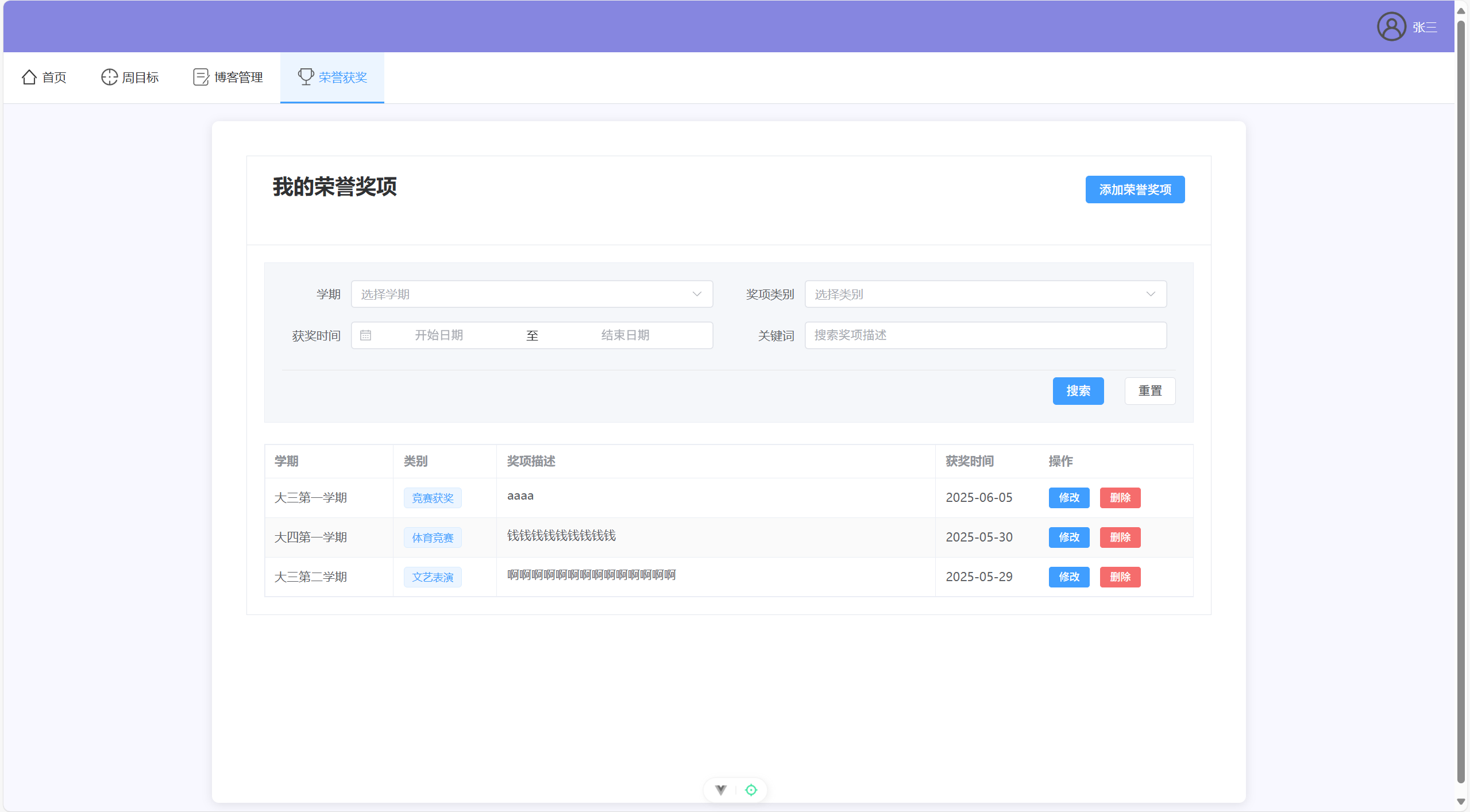
home.vue:
<template>
  <div class="home-container">
    <div class="dashboard-header">
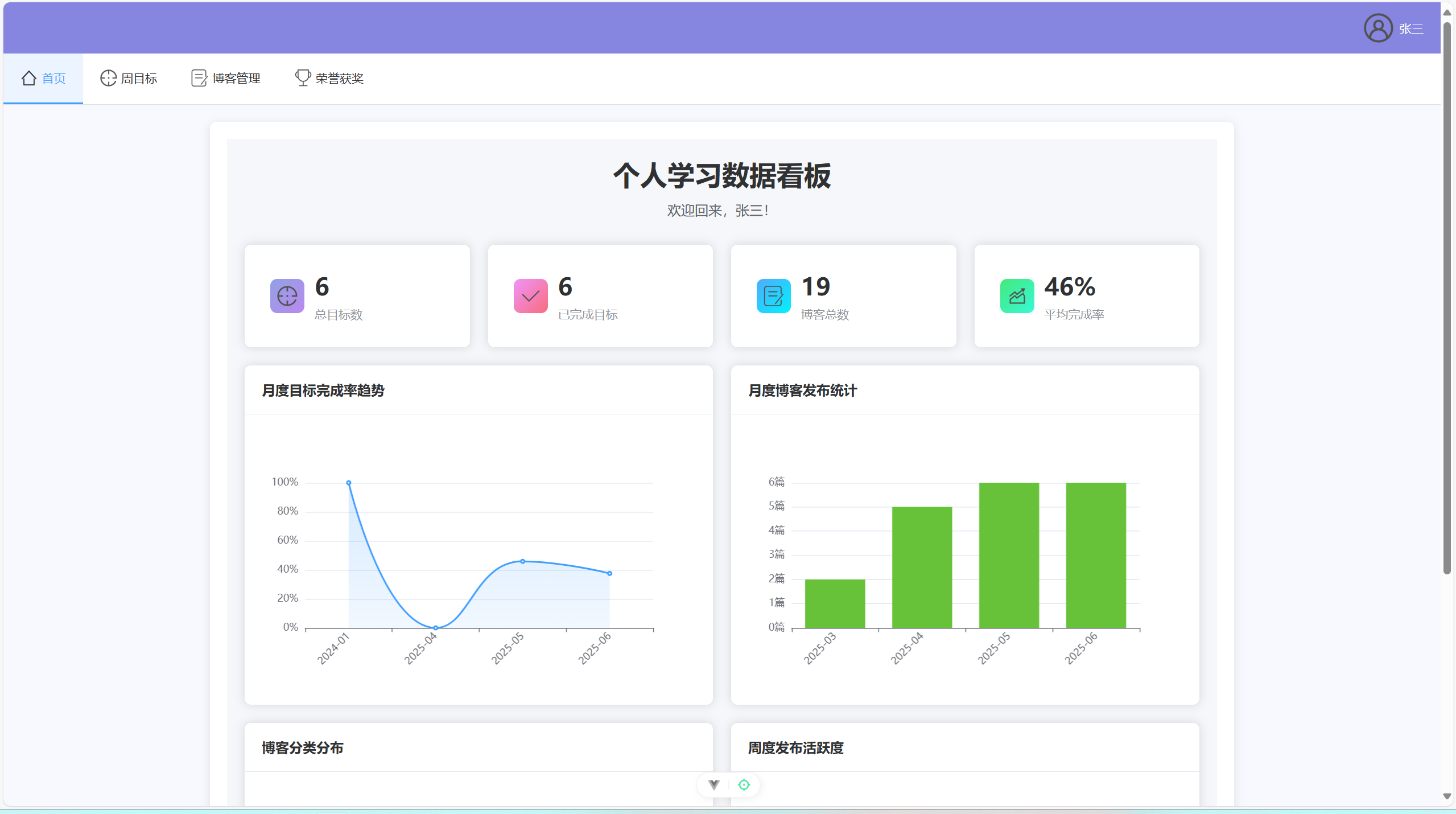
      <h1>个人学习数据看板</h1>
      <p class="welcome-text">欢迎回来,{{ userInfo?.name || '同学' }}!</p>
    </div>

    <div class="stats-grid">
      <!-- 总览卡片 -->
      <div class="overview-cards">
        <el-row :gutter="20">
          <el-col :span="6">
            <el-card class="stat-card">
              <!-- 总目标数卡片 -->
              <div class="stat-item">
                <div class="stat-icon goals-icon">
                  <img src="@/assets/goal.png" alt="目标" class="icon-image" />
                </div>
                <div class="stat-content">
                  <div class="stat-number">{{ goalsStats.totalGoals || 0 }}</div>
                  <div class="stat-label">总目标数</div>
                </div>
              </div>

            </el-card>
          </el-col>
          <el-col :span="6">
            <el-card class="stat-card">
              <!-- 已完成目标卡片 -->
              <div class="stat-item">
                <div class="stat-icon completed-icon">
                  <img src="@/assets/check.png" alt="完成" class="icon-image" />
                </div>
                <div class="stat-content">
                  <div class="stat-number">{{ goalsStats.completedGoals || 0 }}</div>
                  <div class="stat-label">已完成目标</div>
                </div>
              </div>
            </el-card>
          </el-col>
          <el-col :span="6">
            <el-card class="stat-card">
              <!-- 博客总数卡片 -->
              <div class="stat-item">
                <div class="stat-icon blogs-icon">
                  <img src="@/assets/blog.png" alt="博客" class="icon-image" />
                </div>
                <div class="stat-content">
                  <div class="stat-number">{{ blogStats.totalBlogs || 0 }}</div>
                  <div class="stat-label">博客总数</div>
                </div>
              </div>
            </el-card>
          </el-col>
          <el-col :span="6">
            <el-card class="stat-card">
              <!-- 平均完成率卡片 -->
              <div class="stat-item">
                <div class="stat-icon rate-icon">
                  <img src="@/assets/TrendCharts.png" alt="趋势" class="icon-image" />
                </div>
                <div class="stat-content">
                  <div class="stat-number">{{ averageCompletionRate }}%</div>
                  <div class="stat-label">平均完成率</div>
                </div>
              </div>
            </el-card>
          </el-col>
        </el-row>
      </div>

      <!-- 图表区域 -->
      <div class="charts-section">
        <el-row :gutter="20">
          <!-- 目标完成率趋势图 -->
          <el-col :span="12">
            <el-card class="chart-card">
              <template #header>
                <div class="card-header">
                  <span>月度目标完成率趋势</span>
                </div>
              </template>
              <div ref="goalsChart" class="chart-container"></div>
            </el-card>
          </el-col>

          <!-- 博客发布统计 -->
          <el-col :span="12">
            <el-card class="chart-card">
              <template #header>
                <div class="card-header">
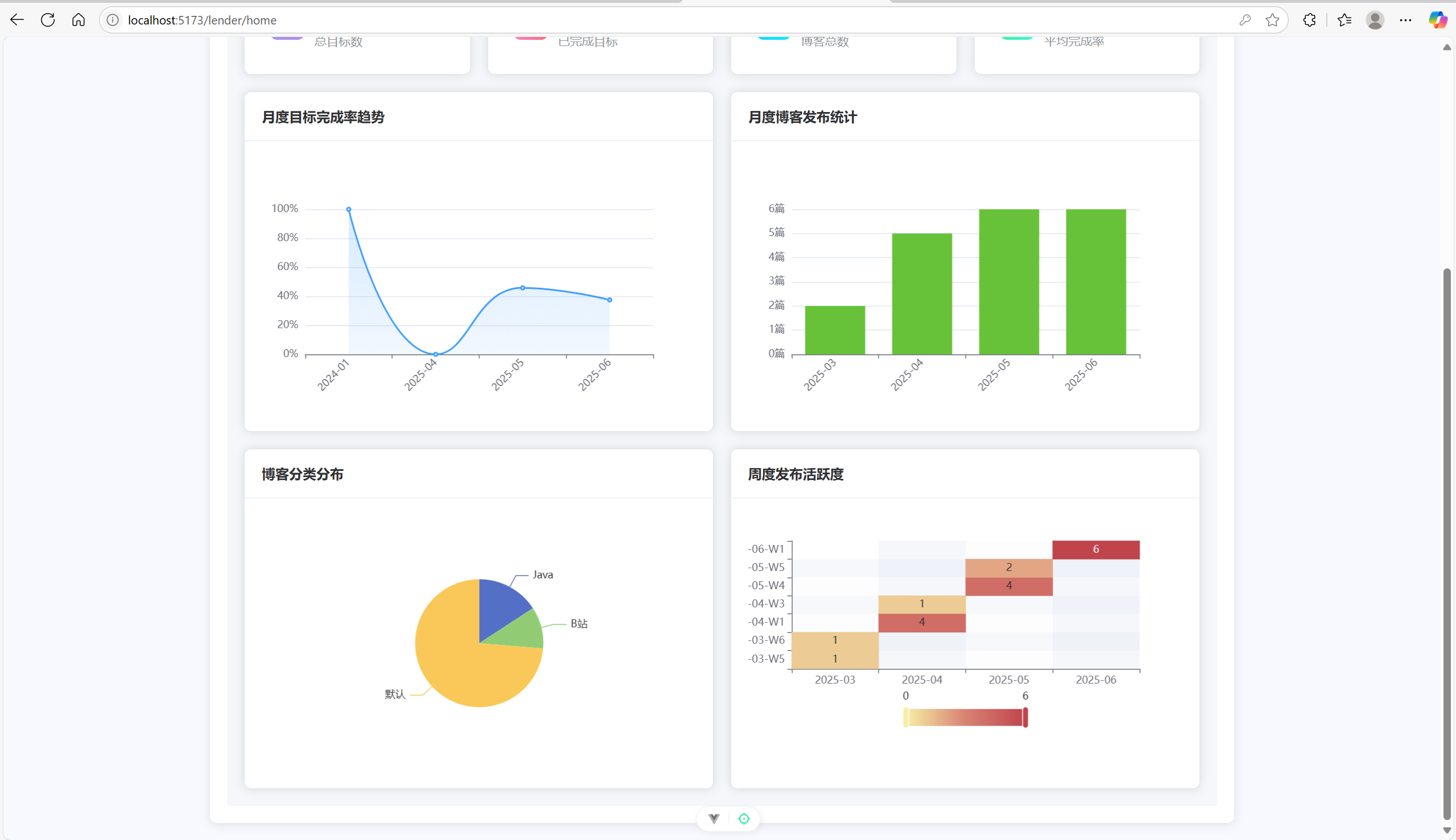
                  <span>月度博客发布统计</span>
                </div>
              </template>
              <div ref="blogsChart" class="chart-container"></div>
            </el-card>
          </el-col>
        </el-row>

        <el-row :gutter="20" style="margin-top: 20px;">
          <!-- 博客分类分布 -->
          <el-col :span="12">
            <el-card class="chart-card">
              <template #header>
                <div class="card-header">
                  <span>博客分类分布</span>
                </div>
              </template>
              <div ref="categoryChart" class="chart-container"></div>
            </el-card>
          </el-col>

          <!-- 周度博客发布热力图 -->
          <el-col :span="12">
            <el-card class="chart-card">
              <template #header>
                <div class="card-header">
                  <span>周度发布活跃度</span>
                </div>
              </template>
              <div ref="heatmapChart" class="chart-container"></div>
            </el-card>
          </el-col>
        </el-row>
      </div>
    </div>
  </div>
</template>

<script setup>
import { ref, reactive, onMounted, computed, nextTick } from 'vue'
import { ElMessage } from 'element-plus'
// 移除这一行: import { Target, Check, Document, TrendCharts } from '@element-plus/icons-vue'
import * as echarts from 'echarts'
import { getGoalsStatistics } from '@/api/goals'
import { getBlogStatistics } from '@/api/blogLink'

// 响应式数据
const userInfo = ref(JSON.parse(localStorage.getItem('userInfo') || '{}'))
const goalsStats = ref({})
const blogStats = ref({})
const loading = ref(false)

// 图表引用
const goalsChart = ref(null)
const blogsChart = ref(null)
const categoryChart = ref(null)
const heatmapChart = ref(null)

// 计算平均完成率
const averageCompletionRate = computed(() => {
  const monthlyCompletion = goalsStats.value.monthlyCompletion || {}
  const rates = Object.values(monthlyCompletion)
  if (rates.length === 0) return 0
  const average = rates.reduce((sum, rate) => sum + rate, 0) / rates.length
  return Math.round(average)
})

// 获取统计数据
const fetchStatistics = async () => {
  if (!userInfo.value.studentId) {
    ElMessage.warning('请先登录')
    return
  }

  loading.value = true
  try {
    const [goalsResponse, blogsResponse] = await Promise.all([
      getGoalsStatistics(userInfo.value.studentId),
      getBlogStatistics(userInfo.value.studentId)
    ])

    if (goalsResponse.code === 200) {
      goalsStats.value = goalsResponse.data || {}
    }

    if (blogsResponse.code === 200) {
      blogStats.value = blogsResponse.data || {}
    }

    // 等待DOM更新后初始化图表
    await nextTick()
    initCharts()
  } catch (error) {
    console.error('获取统计数据失败:', error)
    ElMessage.error('获取统计数据失败')
  } finally {
    loading.value = false
  }
}

// 初始化图表
const initCharts = () => {
  initGoalsChart()
  initBlogsChart()
  initCategoryChart()
  initHeatmapChart()
}

// 目标完成率趋势图
const initGoalsChart = () => {
  if (!goalsChart.value) return

  const chart = echarts.init(goalsChart.value)
  const monthlyCompletion = goalsStats.value.monthlyCompletion || {}

  const months = Object.keys(monthlyCompletion).sort()
  const rates = months.map(month => monthlyCompletion[month])

  const option = {
    tooltip: {
      trigger: 'axis',
      formatter: '{b}: {c}%'
    },
    xAxis: {
      type: 'category',
      data: months,
      axisLabel: {
        rotate: 45
      }
    },
    yAxis: {
      type: 'value',
      min: 0,
      max: 100,
      axisLabel: {
        formatter: '{value}%'
      }
    },
    series: [{
      data: rates,
      type: 'line',
      smooth: true,
      itemStyle: {
        color: '#409EFF'
      },
      areaStyle: {
        color: {
          type: 'linear',
          x: 0,
          y: 0,
          x2: 0,
          y2: 1,
          colorStops: [{
            offset: 0, color: 'rgba(64, 158, 255, 0.3)'
          }, {
            offset: 1, color: 'rgba(64, 158, 255, 0.1)'
          }]
        }
      }
    }]
  }

  chart.setOption(option)
}

// 博客发布统计图
const initBlogsChart = () => {
  if (!blogsChart.value) return

  const chart = echarts.init(blogsChart.value)
  const monthlyCount = blogStats.value.monthlyCount || {}

  const months = Object.keys(monthlyCount).sort()
  const counts = months.map(month => monthlyCount[month])

  const option = {
    tooltip: {
      trigger: 'axis',
      formatter: '{b}: {c}篇'
    },
    xAxis: {
      type: 'category',
      data: months,
      axisLabel: {
        rotate: 45
      }
    },
    yAxis: {
      type: 'value',
      axisLabel: {
        formatter: '{value}篇'
      }
    },
    series: [{
      data: counts,
      type: 'bar',
      itemStyle: {
        color: '#67C23A'
      }
    }]
  }

  chart.setOption(option)
}

// 博客分类分布饼图
const initCategoryChart = () => {
  if (!categoryChart.value) return

  const chart = echarts.init(categoryChart.value)
  const categoryCount = blogStats.value.categoryCount || {}

  const data = Object.entries(categoryCount).map(([name, value]) => ({ name, value }))

  const option = {
    tooltip: {
      trigger: 'item',
      formatter: '{a} <br/>{b}: {c} ({d}%)'
    },
    series: [{
      name: '博客分类',
      type: 'pie',
      radius: '50%',
      data: data,
      emphasis: {
        itemStyle: {
          shadowBlur: 10,
          shadowOffsetX: 0,
          shadowColor: 'rgba(0, 0, 0, 0.5)'
        }
      }
    }]
  }

  chart.setOption(option)
}

// 周度发布热力图
const initHeatmapChart = () => {
  if (!heatmapChart.value) return

  const chart = echarts.init(heatmapChart.value)
  const weeklyCount = blogStats.value.weeklyCount || {}

  // 构造热力图数据
  const data = []
  Object.entries(weeklyCount).forEach(([month, weeks]) => {
    Object.entries(weeks).forEach(([week, count]) => {
      data.push([month, week, count])
    })
  })

  const option = {
    tooltip: {
      position: 'top',
      formatter: function (params) {
        return params.data[0] + ' ' + params.data[1] + ': ' + params.data[2] + '篇'
      }
    },
    grid: {
      height: '50%',
      top: '10%'
    },
    xAxis: {
      type: 'category',
      data: [...new Set(data.map(item => item[0]))].sort(),
      splitArea: {
        show: true
      }
    },
    yAxis: {
      type: 'category',
      data: [...new Set(data.map(item => item[1]))].sort(),
      splitArea: {
        show: true
      }
    },
    visualMap: {
      min: 0,
      max: Math.max(...data.map(item => item[2]), 1),
      calculable: true,
      orient: 'horizontal',
      left: 'center',
      bottom: '15%'
    },
    series: [{
      name: '发布数量',
      type: 'heatmap',
      data: data,
      label: {
        show: true
      },
      emphasis: {
        itemStyle: {
          shadowBlur: 10,
          shadowColor: 'rgba(0, 0, 0, 0.5)'
        }
      }
    }]
  }

  chart.setOption(option)
}

// 页面挂载时获取数据
onMounted(() => {
  fetchStatistics()
})
</script>

<style scoped>
.home-container {
  padding: 20px;
  background-color: #f5f7fa;
  min-height: 100vh;
}

.dashboard-header {
  text-align: center;
  margin-bottom: 30px;
}

.dashboard-header h1 {
  color: #303133;
  margin-bottom: 10px;
}

.welcome-text {
  color: #606266;
  font-size: 16px;
}

.overview-cards {
  margin-bottom: 20px;
}

.stat-card {
  border-radius: 8px;
  transition: all 0.3s;
}

.stat-card:hover {
  transform: translateY(-2px);
  box-shadow: 0 4px 12px rgba(0, 0, 0, 0.1);
}

.stat-item {
  display: flex;
  align-items: center;
  padding: 10px;
}

.stat-icon {
  width: 40px;
  height: 40px;
  border-radius: 8px;
  display: flex;
  align-items: center;
  justify-content: center;
  margin-right: 12px;
}

.icon-image {
  width: 24px;
  height: 24px;
  display: block;
}

.goals-icon {
  background: linear-gradient(135deg, #91a1e4 0%, #ba89ef 100%);
}

.completed-icon {
  background: linear-gradient(135deg, #f093fb 0%, #f86d7c 100%);
}

.blogs-icon {
  background: linear-gradient(135deg, #4facfe 0%, #00f2fe 100%);
}

.rate-icon {
  background: linear-gradient(135deg, #43e97b 0%, #38f9d7 100%);
}

.stat-content {
  flex: 1;
}

.stat-number {
  font-size: 28px;
  font-weight: bold;
  color: #303133;
  margin-bottom: 5px;
}

.stat-label {
  color: #909399;
  font-size: 14px;
}

.chart-card {
  border-radius: 8px;
}

.card-header {
  font-weight: bold;
  color: #303133;
}

.chart-container {
  width: 100%;
  height: 300px;
}

.charts-section {
  margin-top: 20px;
}
</style>
goals.vue:
<template>
<div class="page-container">
<!-- 目标卡片 -->
<el-card class="base-card">
<template #header>
<div class="card-header">
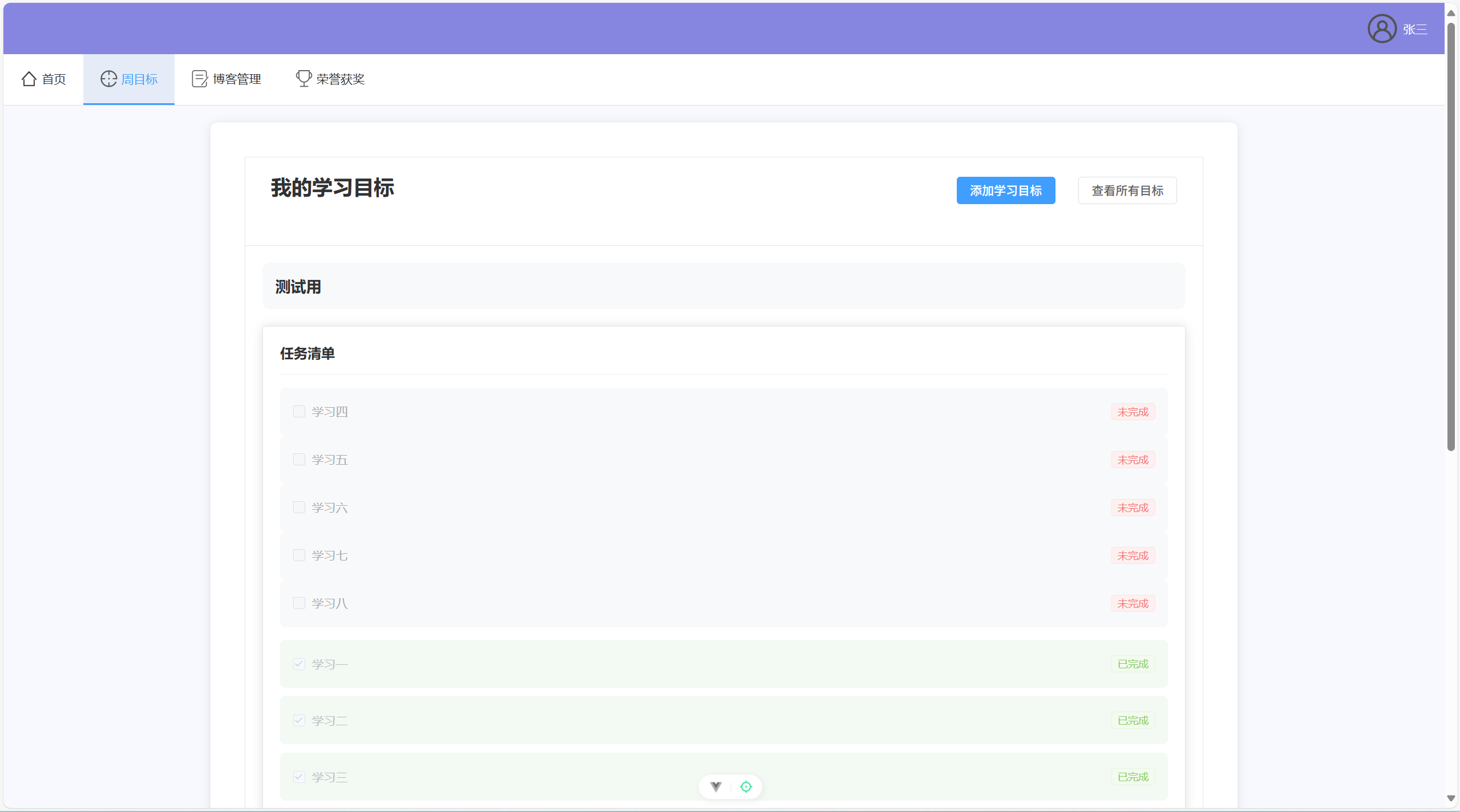
<h2>我的学习目标</h2>
<div class="card-actions">
<el-button type="primary" @click="showAddGoalDialog">添加学习目标</el-button>
<el-button @click="showGoalsList = !showGoalsList">
{{ showGoalsList ? '返回当前目标' : '查看所有目标' }}
</el-button>
</div>
</div>
</template>
<!-- 目标列表视图 -->
<div class="search-form" v-if="showGoalsList">
<!-- 修改搜索表单布局 -->
<el-form :model="searchForm">
<div class="search-grid">
<!-- 第一行 -->
<div class="search-form-content">
<el-form-item label="目标标题" class="search-item">
<el-input
v-model="searchForm.title"
placeholder="请输入目标标题"
clearable
@clear="handleSearch"
class="search-input"
></el-input>
</el-form-item>
<el-form-item label="时间范围" class="search-item">
<el-date-picker
v-model="searchForm.dateRange"
type="daterange"
range-separator="至"
start-placeholder="开始日期"
end-placeholder="结束日期"
value-format="YYYY-MM-DD"
@clear="handleSearch"
class="search-date-picker"
></el-date-picker>
</el-form-item>
</div>
<!-- 操作按钮单独一行 -->
<div class="search-action">
<el-button type="primary" @click="handleSearch">搜索</el-button>
<el-button @click="resetSearch">重置</el-button>
</div>
</div>
</el-form>
<el-table class="base-table" :data="goals" @row-click="selectGoal" style="width: 100%">
<el-table-column prop="goal.title" label="目标标题" />
<el-table-column label="时间范围" width="220">
<template #default="scope">
{{ formatDate(scope.row.goal.startDate) }} 至 {{ formatDate(scope.row.goal.endDate) }}
</template>
</el-table-column>
<el-table-column label="状态" width="100">
<template #default="scope">
<el-tag :type="getStatusType(scope.row.goal.status)">
{{ getStatusText(scope.row.goal.status) }}
</el-tag>
</template>
</el-table-column>
<el-table-column label="操作" width="100" align="center">
<template #default="scope">
<el-button
type="danger"
link
@click.stop="handleDeleteGoal(scope.row.goal.goalId)">
<img src="../assets/delete.png" alt="" class="icon"/>
</el-button>
</template>
</el-table-column>
</el-table>
</div>
<!-- 目标详情视图 -->
<div v-else-if="currentGoal" class="goal-detail">
<div class="goal-header">
<div class="goal-title-container">
<span class="goal-title">{{ currentGoal.goal.title }}</span>
<el-button
v-if="isActiveGoal"
type="primary"
link
@click="showEditDialog"
class="edit-button">
<img src="../assets/edit.png" alt="" class="icon"/>
</el-button>
</div>
</div>
<!-- 添加编辑目标对话框 -->
<el-dialog
title="编辑周目标"
v-model="editDialogVisible"
width="500px"
>
<el-form :model="editForm" ref="editFormRef" label-width="100px" :rules="rules">
<el-form-item label="目标标题" prop="title">
<el-input v-model="editForm.title" placeholder="请输入目标标题"></el-input>
</el-form-item>
<el-form-item label="现有子目标">
<div v-for="subgoal in currentGoal.subGoals.incomplete" :key="subgoal.subgoalId" class="subgoal-input">
<div class="subgoal-actions">
<img src="../assets/move.png" alt="" class="icon" @click="handleDeleteSubGoal(subgoal.subgoalId)"/>
</div>
<el-input v-model="subgoal.content"></el-input>
</div>
<div v-for="subgoal in currentGoal.subGoals.completed" :key="subgoal.subgoalId" class="subgoal-input">
<div class="subgoal-actions">
<img src="../assets/move.png" alt="" class="icon" @click="handleDeleteSubGoal(subgoal.subgoalId)"/>
</div>
<el-input v-model="subgoal.content" disabled></el-input>
</div>
</el-form-item>
<el-form-item label="新增子目标">
<div v-for="(newSubgoal, index) in editForm.newSubGoals" :key="index" class="subgoal-input">
<div class="subgoal-actions">
<img src="../assets/move.png" alt="" class="icon" @click="removeNewSubGoal(index)"/>
</div>
<el-input
v-model="editForm.newSubGoals[index]"
placeholder="请输入子目标描述">
</el-input>
</div>
<div class="subgoal-input">
<div class="subgoal-actions">
<img src="../assets/add.png" alt="" class="icon" @click="addNewSubGoal"/>
</div>
</div>
</el-form-item>
</el-form>
<template #footer>
<el-button @click="editDialogVisible = false">取消</el-button>
<el-button type="primary" @click="submitEdit">保存修改</el-button>
</template>
</el-dialog>
<!-- 修改任务清单区域,添加卡片样式 -->
<el-card class="task-list-card">
<div class="task-list-header">
<h4>任务清单</h4>
<div class="header-actions" v-if="isActiveGoal">
<el-button
type="primary"
@click="completeSelectedSubGoals"
v-if="checkedSubGoals.length > 0">
完成选中的任务
</el-button>
<el-button
type="success"
@click="handleCompleteGoal"
v-if="canCompleteGoal">
完成本周目标
</el-button>
</div>
</div>
<div class="task-list">
<!-- 未完成的子目标 -->
<div class="task-section">
<el-checkbox-group v-model="checkedSubGoals" @change="handleSubGoalsChange">
<div v-for="subgoal in currentGoal.subGoals.incomplete"
:key="subgoal.subgoalId"
class="task-item">
<div class="task-content">
<el-checkbox
:label="subgoal.subgoalId"
:disabled="!isActiveGoal">
{{ subgoal.content }}
</el-checkbox>
</div>
<el-tag size="small" type="danger">未完成</el-tag>
</div>
</el-checkbox-group>
</div>
<!-- 已完成的子目标 -->
<div class="task-section completed">
<div v-for="subgoal in currentGoal.subGoals.completed"
:key="subgoal.subgoalId"
class="task-item completed">
<div class="task-content">
<el-checkbox checked disabled>{{ subgoal.content }}</el-checkbox>
</div>
<el-tag size="small" type="success">已完成</el-tag>
</div>
</div>
</div>
</el-card>
<!-- 修改时间信息区域,添加卡片样式 -->
<el-card class="info-card">
<div class="info-header">
<h4>基本信息</h4>
<el-tag :type="getStatusType(currentGoal.goal.status)">
{{ getStatusText(currentGoal.goal.status) }}
</el-tag>
</div>
<div class="goal-info">
<div class="info-content">
<div class="date-info">
<p>开始日期: {{ formatDate(currentGoal.goal.startDate) }}</p>
<p>结束日期: {{ formatDate(currentGoal.goal.endDate) }}</p>
</div>
<div v-if="currentGoal.goal.status === 1" class="remaining-time-container">
<div class="remaining-time-box" :class="{ 'urgent': getRemainingTime === '已到期' }">
<span class="remaining-label">剩余时间</span>
<span class="remaining-value">{{ getRemainingTime }}</span>
</div>
</div>
</div>
</div>
</el-card>
<!-- 移动到最后的进度图表 -->
<el-card class="chart-card">
<div class="chart-header">
<h4>目标完成进度</h4>
</div>
<div class="chart-container" ref="pieChart"></div>
</el-card>
</div>
<!-- 空状态 -->
<el-empty v-else description="暂无学习目标"></el-empty>
</el-card>
<!-- 添加目标对话框 -->
<el-dialog
title="添加周目标"
v-model="addGoalDialogVisible"
width="500px"
>
<el-form :model="goalForm" ref="goalFormRef" label-width="100px" :rules="rules">
<el-form-item label="目标标题" prop="title">
<el-input v-model="goalForm.title" placeholder="请输入目标标题"></el-input>
</el-form-item>
<el-form-item label="子目标">
<div v-for="(subgoal, index) in goalForm.subGoals" :key="index" class="subgoal-input">
<div class="subgoal-actions">
<img src="../assets/move.png" alt="" class="icon" @click="removeSubGoal(index)"/>
</div>
<el-input v-model="goalForm.subGoals[index]" placeholder="请输入子目标描述"></el-input>
<img v-if="index === goalForm.subGoals.length - 1" src="../assets/add.png" alt="" class="icon" @click="addSubGoal"/>
</div>
</el-form-item>
</el-form>
<template #footer>
<el-button @click="addGoalDialogVisible = false">取消</el-button>
<el-button type="primary" @click="submitGoal">确定</el-button>
</template>
</el-dialog>
</div>
</template>
<script setup>
const showGoalsList = ref(false)
// 添加选择目标方法
const selectGoal = (row) => {
const index = goals.value.findIndex(g => g.goal.goalId === row.goal.goalId)
if (index !== -1) {
currentIndex.value = index
showGoalsList.value = false
checkedSubGoals.value = []
}
}
import { ref, onMounted, reactive, computed, watch, nextTick, onUnmounted } from 'vue'
import * as echarts from 'echarts'
import { ElMessage, ElMessageBox } from 'element-plus'
import { getGoalsList, addGoal, updateGoalsStatus, batchUpdateSubGoals, completeGoal,
updateGoalTitle, deleteSubGoal, addSubGoalToExisting, deleteGoal, searchGoals } from '@/api/goals'
// 搜索表单数据
const searchForm = reactive({
title: '',
dateRange: null
})
// 搜索方法
const handleSearch = async () => {
try {
const params = {
studentId: userInfo.value.studentId,
title: searchForm.title,
startDate: searchForm.dateRange ? searchForm.dateRange[0] : null,
endDate: searchForm.dateRange ? searchForm.dateRange[1] : null
}
// 验证搜索条件
if (!params.title && (!params.startDate || !params.endDate)) {
ElMessage.warning('请至少输入标题或完整的时间范围')
return
}
const res = await searchGoals(params)
if (res.code === 200) {
goals.value = res.data
} else {
ElMessage.error(res.msg || '搜索失败')
}
} catch (error) {
console.error('搜索失败:', error)
ElMessage.error('搜索失败')
}
}
// 重置搜索
const resetSearch = async () => {
searchForm.title = ''
searchForm.dateRange = null
await fetchGoals()
}
const userInfo = ref({})
const goals = ref([])
const currentIndex = ref(0)
const checkedSubGoals = ref([])
const addGoalDialogVisible = ref(false)
const goalFormRef = ref(null)
// 当前目标
const currentGoal = computed(() => {
return goals.value[currentIndex.value] || null
})
// 是否为活跃目标(本周目标)
const isActiveGoal = computed(() => {
if (!currentGoal.value) return false
return currentGoal.value.goal.status === 1 // 1 表示进行中
})
// 表单数据
const goalForm = reactive({
title: '',
subGoals: ['']
})
// 表单验证规则
const rules = {
title: [{ required: true, message: '请输入目标标题', trigger: 'blur' }]
}
// 获取状态文本
const getStatusText = (status) => {
const statusMap = {
0: '未开始',
1: '进行中',
2: '已完成'
}
return statusMap[status] || '未知状态'
}
// 获取状态类型
const getStatusType = (status) => {
const typeMap = {
0: 'info',
1: 'warning',
2: 'success'
}
return typeMap[status] || 'info'
}
// 完成选中的子目标
const completeSelectedSubGoals = async () => {
try {
if (!checkedSubGoals.value || checkedSubGoals.value.length === 0) {
ElMessage.warning('请选择要完成的子目标')
return
}
const res = await batchUpdateSubGoals({
subgoalIds: checkedSubGoals.value,
completed: true
})
if (res.code === 200) {
ElMessage.success('更新成功')
fetchGoals() // 重新获取数据
checkedSubGoals.value = [] // 清空选中项
} else {
ElMessage.error(res.msg || '更新失败')
}
} catch (error) {
console.error('更新子目标状态失败:', error)
ElMessage.error('操作失败')
}
}
// 修改获取目标列表方法
const fetchGoals = async () => {
try {
const studentId = userInfo.value.studentId
if (!studentId) {
ElMessage.warning('请先登录')
return
}
// 先获取并更新目标状态
await updateGoalsStatus(studentId)
// 获取最新的目标列表
const res = await getGoalsList(studentId)
if (res.code === 200) {
goals.value = res.data.sort((a, b) => {
if (a.goal.status !== b.goal.status) {
const statusOrder = { 1: 0, 0: 1, 2: 2 }
return statusOrder[a.goal.status] - statusOrder[b.goal.status]
}
return new Date(b.goal.startDate) - new Date(a.goal.startDate)
})
currentIndex.value = 0
if (goals.value.length === 0) {
ElMessage.info('暂无学习目标,请添加新的目标')
} else if (!goals.value.some(g => g.goal.status === 1)) {
ElMessage.info('当前没有进行中的周目标,可以添加新的目标')
}
}
} catch (error) {
console.error('获取目标失败:', error)
ElMessage.error('获取目标失败')
}
}
// 子目标状态变更处理方法
const handleSubGoalsChange = (value) => {
// value 是当前选中的子目标 ID 数组
checkedSubGoals.value = value;
}
// 添加子目标方法
const addSubGoal = () => {
goalForm.subGoals.push('');
}
// 移除子目标方法
const removeSubGoal = (index) => {
if (goalForm.subGoals.length > 1) {
goalForm.subGoals.splice(index, 1);
} else {
ElMessage.warning('至少需要保留一个子目标');
}
}
// 显示添加目标对话框
const showAddGoalDialog = async () => {
// 检查是否存在活跃目标
const hasActiveGoal = goals.value.some(g => g.goal.status === 1)
if (hasActiveGoal) {
ElMessage.warning('当前已有进行中的周目标,无法添加新目标')
return
}
goalForm.title = ''
goalForm.subGoals = ['']
addGoalDialogVisible.value = true
}
// 提交目标
// 添加日期工具函数
const dateUtils = {
getWeekStart() {
const now = new Date()
const day = now.getDay() || 7
const monday = new Date(now)
monday.setDate(now.getDate() - day + 1)
monday.setHours(0, 0, 0, 0)
return monday
},
getWeekEnd() {
const now = new Date()
const day = now.getDay() || 7
const sunday = new Date(now)
sunday.setDate(now.getDate() - day + 7)
sunday.setHours(23, 59, 59, 999)
return sunday
}
}
const submitGoal = async () => {
try {
await goalFormRef.value.validate()
const filteredSubGoals = goalForm.subGoals.filter(sg => sg.trim() !== '')
if (filteredSubGoals.length === 0) {
ElMessage.warning('请至少添加一个子目标')
return
}
const params = {
studentId: userInfo.value.studentId,
title: goalForm.title,
subGoals: filteredSubGoals,
startDate: formatDate(dateUtils.getWeekStart()),
endDate: formatDate(dateUtils.getWeekEnd())
}
const res = await addGoal(params)
if (res.code === 200) {
ElMessage.success('添加目标成功')
addGoalDialogVisible.value = false
fetchGoals()
} else {
ElMessage.error(res.msg || '添加目标失败')
}
} catch (error) {
console.error('提交目标失败:', error)
ElMessage.error('请填写完整信息')
}
}
// 格式化日期
const formatDate = (dateStr) => {
if (!dateStr) return ''
const date = new Date(dateStr)
return `${date.getFullYear()}-${String(date.getMonth() + 1).padStart(2, '0')}-${String(date.getDate()).padStart(2, '0')}`
}
// 修改 onMounted 钩子
onMounted(async () => {
const storedUserInfo = localStorage.getItem('userInfo')
if (storedUserInfo) {
userInfo.value = JSON.parse(storedUserInfo)
await fetchGoals()
nextTick(() => {
initChart()
})
}
})
// 添加是否可以完成目标的计算属性
const canCompleteGoal = computed(() => {
if (!currentGoal.value || !isActiveGoal.value) return false
// 检查是否所有子目标都已完成
const allSubGoals = [
...(currentGoal.value.subGoals.incomplete || []),
...(currentGoal.value.subGoals.completed || [])
]
const completedCount = currentGoal.value.subGoals.completed?.length || 0
// 允许在所有子目标完成时,或用户主动选择提前完成时显示按钮
return isActiveGoal.value && (completedCount === allSubGoals.length || allSubGoals.length > 0)
})
// 添加完成目标的方法
const handleCompleteGoal = async () => {
// 获取未完成的子目标数量
const incompleteCount = currentGoal.value.subGoals.incomplete?.length || 0
let shouldComplete = true
// 如果还有未完成的子目标,显示确认对话框
if (incompleteCount > 0) {
try {
await ElMessageBox.confirm(
'还有未完成的子目标,确定要提前完成本周目标吗?',
'提示',
{
confirmButtonText: '确定',
cancelButtonText: '取消',
type: 'warning'
}
)
} catch (e) {
shouldComplete = false
}
}
if (shouldComplete) {
try {
const res = await completeGoal(currentGoal.value.goal.goalId)
if (res.code === 200) {
ElMessage.success('目标已完成')
await fetchGoals() // 重新获取数据
} else {
ElMessage.error(res.msg || '操作失败')
}
} catch (error) {
console.error('完成目标失败:', error)
ElMessage.error('操作失败')
}
}
}
// 添加编辑相关的响应式变量
const editDialogVisible = ref(false)
const editFormRef = ref(null)
const editForm = reactive({
title: '',
newSubGoals: []
})
// 显示编辑对话框
const showEditDialog = () => {
editForm.title = currentGoal.value.goal.title
editForm.newSubGoals = []
editDialogVisible.value = true
}
// 删除子目标
const handleDeleteSubGoal = async (subgoalId) => {
try {
await ElMessageBox.confirm('确定要删除这个子目标吗?', '提示', {
confirmButtonText: '确定',
cancelButtonText: '取消',
type: 'warning'
})
const res = await deleteSubGoal(subgoalId)
if (res.code === 200) {
ElMessage.success('删除成功')
await fetchGoals()
} else {
ElMessage.error(res.msg || '删除失败')
}
} catch (error) {
if (error !== 'cancel') {
console.error('删除子目标失败:', error)
ElMessage.error('删除失败')
}
}
}
// 添加新子目标输入框
const addNewSubGoal = () => {
// 如果没有新增子目标,先添加一个空的
if (editForm.newSubGoals.length === 0) {
editForm.newSubGoals.push('')
} else {
// 检查最后一个子目标是否为空
const lastSubGoal = editForm.newSubGoals[editForm.newSubGoals.length - 1]
if (lastSubGoal.trim() !== '') {
editForm.newSubGoals.push('')
} else {
ElMessage.warning('请先填写当前子目标')
}
}
}
// 移除新子目标输入框
const removeNewSubGoal = (index) => {
editForm.newSubGoals.splice(index, 1)
}
// 提交编辑
const submitEdit = async () => {
try {
await editFormRef.value.validate()
// 更新标题
if (editForm.title !== currentGoal.value.goal.title) {
const titleRes = await updateGoalTitle({
goalId: currentGoal.value.goal.goalId,
title: editForm.title
})
if (titleRes.code !== 200) {
ElMessage.error(titleRes.msg || '更新标题失败')
return
}
}
// 添加新子目标
const newSubGoals = editForm.newSubGoals.filter(sg => sg.trim() !== '')
for (const content of newSubGoals) {
const addRes = await addSubGoalToExisting({
goalId: currentGoal.value.goal.goalId,
content
})
if (addRes.code !== 200) {
ElMessage.error(addRes.msg || '添加子目标失败')
return
}
}
ElMessage.success('修改成功')
editDialogVisible.value = false
await fetchGoals()
} catch (error) {
console.error('提交修改失败:', error)
ElMessage.error('保存修改失败')
}
}
// 删除目标
const handleDeleteGoal = async (goalId) => {
try {
await ElMessageBox.confirm(
'确定要删除这个目标吗?相关的子目标也会被删除。',
'提示',
{
confirmButtonText: '确定',
cancelButtonText: '取消',
type: 'warning'
}
)
const res = await deleteGoal(goalId)
if (res.code === 200) {
ElMessage.success('删除成功')
await fetchGoals()
} else {
ElMessage.error(res.msg || '删除失败')
}
} catch (error) {
if (error !== 'cancel') {
console.error('删除目标失败:', error)
ElMessage.error('删除失败')
}
}
}
// 计算剩余时间
const getRemainingTime = computed(() => {
if (!currentGoal.value || currentGoal.value.goal.status !== 1) return null
const now = new Date()
const endDate = new Date(currentGoal.value.goal.endDate)
const timeDiff = endDate - now
if (timeDiff <= 0) return '已到期'
const days = Math.floor(timeDiff / (1000 * 60 * 60 * 24))
const hours = Math.floor((timeDiff % (1000 * 60 * 60 * 24)) / (1000 * 60 * 60))
return `${days}天${hours}小时`
})
// 图表实例
const pieChart = ref(null)
let chartInstance = null
// 计算完成进度
const progressData = computed(() => {
if (!currentGoal.value) return { completed: 0, incomplete: 0 }
const completed = currentGoal.value.subGoals.completed?.length || 0
const incomplete = currentGoal.value.subGoals.incomplete?.length || 0
const total = completed + incomplete
return {
completed,
incomplete,
total,
percentage: total > 0 ? Math.round((completed / total) * 100) : 0
}
})
// 初始化图表
const initChart = () => {
if (!pieChart.value) return
// 检查是否已经有图表实例,如果有则先销毁
if (chartInstance) {
chartInstance.dispose()
chartInstance = null
}
// 确保当前有目标数据且不在"查看所有目标"视图
if (currentGoal.value && !showGoalsList.value) {
chartInstance = echarts.init(pieChart.value)
updateChart()
// 添加窗口大小变化监听器
window.addEventListener('resize', handleResize)
}
}
// 更新图表数据
const updateChart = () => {
if (!chartInstance || !currentGoal.value) return
const { completed, incomplete, percentage } = progressData.value
const option = {
tooltip: {
trigger: 'item',
formatter: '{b}: {c} ({d}%)'
},
legend: {
orient: 'horizontal',
bottom: 0
},
series: [
{
name: '目标进度',
type: 'pie',
radius: ['60%', '80%'],
avoidLabelOverlap: false,
label: {
show: false,
position: 'center'
},
emphasis: {
label: {
show: true,
fontSize: '20',
fontWeight: 'bold',
formatter: `{c}\n完成率: ${percentage}%`
}
},
data: [
{ value: completed, name: '已完成', itemStyle: { color: '#67C23A' } },
{ value: incomplete, name: '未完成', itemStyle: { color: '#909399' } }
]
}
]
}
chartInstance.setOption(option)
}
// 监听目标变化,更新图表
watch(() => currentGoal.value, () => {
nextTick(() => {
initChart()
})
})
// 监听 showGoalsList 变化
watch(showGoalsList, (newVal) => {
if (!newVal) { // 当从"查看所有目标"返回"当前目标"时
nextTick(() => {
// 确保 DOM 更新完成后再重新初始化图表
initChart()
})
}
})
// 监听窗口大小变化
window.addEventListener('resize', () => {
if (chartInstance) {
chartInstance.resize()
}
})
// 处理窗口大小变化
const handleResize = () => {
if (chartInstance) {
chartInstance.resize()
}
}
// 在组件卸载时清理
onUnmounted(() => {
if (chartInstance) {
chartInstance.dispose()
window.removeEventListener('resize', handleResize)
}
window.removeEventListener('resize', () => {
if (chartInstance) {
chartInstance.resize()
}
})
})
</script>
<style scoped>
/* 全局基础样式 */
:root {
--primary-color: #409EFF;
--success-color: #67C23A;
--warning-color: #E6A23C;
--danger-color: #F56C6C;
--info-color: #909399;
--border-radius-base: 4px;
--box-shadow-base: 0 2px 12px 0 rgba(0, 0, 0, 0.1);
--transition-base: all 0.3s;
}
/* 页面容器基础样式 */
.page-container {
max-width: 1200px;
margin: 0 auto;
padding: 20px;
}
/* 卡片基础样式 */
.base-card {
margin-bottom: 30px;
box-shadow: var(--box-shadow-base);
border-radius: var(--border-radius-base);
transition: var(--transition-base);
}
.base-card:hover {
box-shadow: 0 4px 16px 0 rgba(0, 0, 0, 0.15);
}
/* 卡片头部样式 */
.card-header {
display: flex;
justify-content: space-between;
align-items: center;
margin-bottom: 25px;
padding: 0 10px;
}
.card-header h2 {
margin: 0;
font-size: 24px;
color: #303133;
border-bottom: 2px solid var(--primary-color);
padding-bottom: 10px;
}
/* 按钮组样式 */
.card-actions {
display: flex;
gap: 15px;
}
/* 搜索表单样式 */
.search-form {
margin-bottom: 25px;
padding: 20px;
background-color: #f5f7fa;
border-radius: var(--border-radius-base);
border: 1px solid #ebeef5;
}
.search-form-content {
display: flex;
flex-wrap: wrap;
gap: 16px;
}
.search-form-item {
flex: 1;
min-width: 200px;
}
.search-form-item .label {
display: block;
margin-bottom: 8px;
font-size: 14px;
color: #606266;
}
.search-action {
display: flex;
justify-content: flex-end;
gap: 12px;
padding-top: 8px;
border-top: 1px solid #e6e6e6;
margin-top: 8px;
}
/* 表格样式 */
.base-table {
width: 100%;
margin-top: 20px;
}
.base-table :deep(.el-table__row) {
cursor: pointer;
}
.base-table :deep(.el-table__row:hover) {
background-color: #f5f7fa !important;
}
/* 对话框样式 */
.base-dialog :deep(.el-dialog__header) {
border-bottom: 1px solid #ebeef5;
padding-bottom: 15px;
margin-bottom: 15px;
}
.base-dialog :deep(.el-dialog__body) {
padding: 20px;
}
/* 添加Honor.vue样式的搜索表单样式 */
.search-grid {
display: flex;
flex-direction: column;
gap: 16px;
}
.search-form-content {
display: flex;
gap: 20px;
align-items: flex-end;
}
.search-item {
margin-bottom: 0;
display: flex;
align-items: center;
flex: 1;
min-width: 300px;
}
.search-item :deep(.el-form-item__label) {
width: 80px;
text-align: right;
padding-right: 12px;
color: #606266;
font-weight: normal;
}
.search-item :deep(.el-form-item__content) {
flex: 1;
min-width: 200px;
}
.search-input {
width: 100%;
}
.search-date-picker {
width: 100%;
}
.search-action {
display: flex;
justify-content: flex-end;
gap: 12px;
padding-top: 8px;
border-top: 1px solid #e6e6e6;
margin-top: 8px;
}
/* 响应式调整 */
@media (max-width: 768px) {
.search-form-item {
min-width: 100%;
}
.search-item {
min-width: 100%;
}
.search-form-content {
flex-direction: column;
gap: 12px;
}
.search-action {
justify-content: center;
}
.card-header {
flex-direction: column;
align-items: flex-start;
gap: 15px;
}
.card-actions {
width: 100%;
justify-content: flex-end;
}
}
.goal-card h2 {
margin: 0 0 20px;
color: #303133;
font-size: 24px;
border-bottom: 2px solid #409EFF;
padding-bottom: 10px;
}
.card-header {
display: flex;
justify-content: space-between;
align-items: center;
margin-bottom: 25px;
padding: 0 10px;
}
.card-header h2 {
margin: 0;
color: #303133;
font-size: 24px;
}
.card-actions {
display: flex;
gap: 15px;
}
.goal-header {
display: flex;
justify-content: space-between;
align-items: center;
margin-bottom: 20px;
padding: 15px;
background-color: #f8f9fa;
border-radius: 8px;
}
.goal-title-container {
display: flex;
align-items: center;
gap: 10px;
}
.goal-title {
font-size: 18px;
font-weight: 600;
color: #303133;
}
.info-card,
.task-list-card,
.chart-card {
margin-bottom: 20px;
}
.info-header,
.chart-header {
display: flex;
justify-content: space-between;
align-items: center;
padding-bottom: 15px;
margin-bottom: 15px;
border-bottom: 1px solid #ebeef5;
}
.task-list-header {
display: flex;
justify-content: space-between;
align-items: center;
padding-bottom: 15px;
margin-bottom: 15px;
border-bottom: 1px solid #ebeef5;
}
.header-actions {
display: flex;
gap: 15px;
}
.info-header h4,
.task-list-header h4,
.chart-header h4 {
margin: 0;
color: #303133;
font-size: 16px;
font-weight: 600;
}
.goal-info {
padding: 0;
background-color: #fff;
}
.goal-info p {
margin: 8px 0;
color: #606266;
font-size: 14px;
}
.task-list {
display: flex;
flex-direction: column;
gap: 15px;
}
.task-section {
display: flex;
flex-direction: column;
gap: 10px;
}
.task-item {
display: flex;
justify-content: space-between;
align-items: center;
padding: 12px 15px;
background-color: #f8f9fa;
border-radius: 6px;
transition: all 0.3s;
}
.task-item:hover {
background-color: #f0f2f5;
}
.task-item.completed {
opacity: 0.8;
background-color: #f0f7f0;
}
.task-content {
flex: 1;
}
.task-item:hover {
opacity: 1;
}
.subgoal-input {
display: flex;
align-items: center;
margin-bottom: 15px;
gap: 15px;
padding: 5px;
}
.search-form {
margin-bottom: 25px;
padding: 20px;
background-color: #f5f7fa;
border-radius: 8px;
border: 1px solid #ebeef5;
}
.goal-info {
padding: 0;
background-color: #fff;
}
.info-content {
display: flex;
justify-content: space-between;
align-items: center;
}
.date-info {
flex: 1;
}
.date-info p {
margin: 8px 0;
color: #606266;
font-size: 14px;
}
.remaining-time-container {
padding-left: 40px;
border-left: 1px solid #ebeef5;
}
.remaining-label {
font-size: 14px;
color: #606266;
margin-bottom: 8px;
}
.remaining-value {
font-size: 20px;
font-weight: 600;
color: #409EFF;
}
.remaining-time-box.urgent .remaining-value {
color: #F56C6C;
}
.remaining-time .urgent {
color: #F56C6C;
}
.chart-container {
height: 300px;
width: 100%;
margin: 10px 0;
}
.icon {
width: 20px;
height: 20px;
vertical-align: middle;
}
.remaining-time-box {
display: flex;
flex-direction: column;
align-items: center;
padding: 15px 25px;
background-color: #ecf5ff;
border-radius: 8px;
transition: all 0.3s;
}
.remaining-time-box.urgent {
background-color: #fef0f0;
}
</style>
blog.vue:
<template>
  <div class="page-container">
    <el-card class="base-card">
      <template #header>
        <div class="card-header">
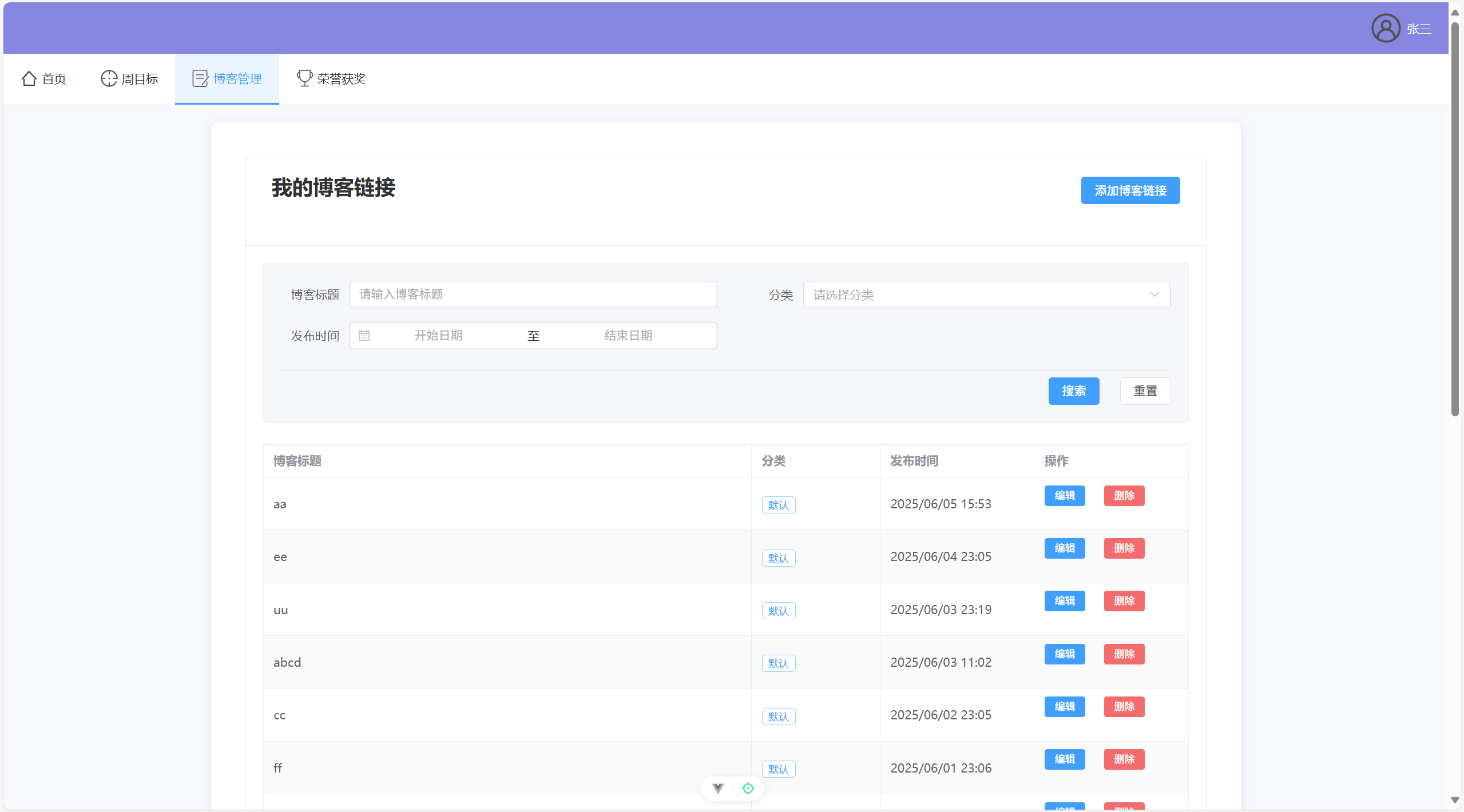
          <h2>我的博客链接</h2>
          <div class="card-actions">
            <el-button type="primary" @click="showAddDialog">添加博客链接</el-button>
          </div>
        </div>
      </template>

      <!-- 修改搜索表单布局 -->
      <div class="search-form">
        <el-form :model="searchForm">
          <div class="search-grid">
            <!-- 第一行 -->
            <div class="search-form-content">
              <el-form-item label="博客标题" class="search-item">
                <el-input
                  v-model="searchForm.title"
                  placeholder="请输入博客标题"
                  clearable
                  @clear="handleSearch"
                  class="search-input"
                ></el-input>
              </el-form-item>

              <el-form-item label="分类" class="search-item">
                <el-select
                  v-model="searchForm.category"
                  placeholder="请选择分类"
                  clearable
                  @clear="handleSearch"
                  class="search-select"
                >
                  <el-option
                    v-for="item in categories"
                    :key="item"
                    :label="item"
                    :value="item"
                  ></el-option>
                </el-select>
              </el-form-item>
            </div>

            <!-- 第二行 -->
            <div class="search-form-content">
              <el-form-item label="发布时间" class="search-item">
                <el-date-picker
                  v-model="searchForm.dateRange"
                  type="daterange"
                  range-separator="至"
                  start-placeholder="开始日期"
                  end-placeholder="结束日期"
                  value-format="YYYY-MM-DD"
                  @clear="handleSearch"
                  class="search-date-picker"
                ></el-date-picker>
              </el-form-item>

              <!-- 空白占位,保持布局对齐 -->
              <div class="search-item"></div>
            </div>

            <!-- 操作按钮单独一行 -->
            <div class="search-action">
              <el-button type="primary" @click="handleSearch">搜索</el-button>
              <el-button @click="resetSearch">重置</el-button>
            </div>
          </div>
        </el-form>
      </div>

      <!-- 博客链接列表 -->
      <el-table
          :data="blogLinks"
          style="width: 100%"
          :row-class-name="tableRowClassName"
          border
          stripe
          highlight-current-row
          class="base-table"
      >
        <el-table-column label="博客标题" min-width="250">
          <template #default="scope">
            <div class="blog-title-container">
              <el-tooltip :content="scope.row.title" placement="top" :show-after="1000">
                <a :href="scope.row.url" target="_blank" class="blog-title">
                  {{ scope.row.title }}
                </a>
              </el-tooltip>
            </div>
          </template>
        </el-table-column>
        <el-table-column prop="category" label="分类" width="150">
          <template #default="scope">
            <el-tag size="small" effect="plain">{{ scope.row.category }}</el-tag>
          </template>
        </el-table-column>
        <el-table-column label="发布时间" width="180">
          <template #default="scope">
            <div class="time-container">
              <i class="el-icon-time"></i>
              <span>{{ formatDate(scope.row.publishTime) }}</span>
            </div>
          </template>
        </el-table-column>
        <el-table-column label="操作" width="180" fixed="right">
          <template #default="scope">
            <div class="operation-buttons">
              <el-button
                  type="primary"
                  size="small"
                  @click="handleEdit(scope.row)"
              >
                编辑
              </el-button>
              <el-button
                  type="danger"
                  size="small"
                  @click="handleDelete(scope.row)"
              >
                删除
              </el-button>
            </div>
          </template>
        </el-table-column>
      </el-table>
    </el-card>

    <!-- 添加博客链接对话框 -->
    <el-dialog
        title="添加博客链接"
        v-model="dialogVisible"
        width="500px"
    >
      <el-form :model="blogForm" :rules="rules" ref="blogFormRef" label-width="80px">
        <el-form-item label="标题" prop="title">
          <el-input v-model="blogForm.title" placeholder="请输入博客标题"></el-input>
        </el-form-item>

        <el-form-item label="地址" prop="url">
          <el-input v-model="blogForm.url" placeholder="请输入博客链接地址"></el-input>
        </el-form-item>

        <el-form-item label="分类" prop="category">
          <el-select
              v-model="blogForm.category"
              placeholder="请选择分类"
              @change="handleCategoryChange"
          >
            <el-option
                v-for="item in categories"
                :key="item"
                :label="item"
                :value="item"
            ></el-option>
            <el-option
                key="add-new"
                label="添加新分类"
                value="add-new"
            ></el-option>
          </el-select>
          <!-- 新增分类输入框 -->
          <el-input
              v-if="showNewCategoryInput"
              v-model="newCategory"
              placeholder="请输入新分类名称"
              class="new-category-input"
              @blur="handleNewCategory"
          ></el-input>
        </el-form-item>
      </el-form>
      <template #footer>
        <span class="dialog-footer">
          <el-button @click="handleDialogClose">取消</el-button>
          <el-button type="primary" @click="handleSubmit">确定</el-button>
        </span>
      </template>
    </el-dialog>

    <!-- 添加编辑对话框到这里 -->
    <el-dialog
        title="编辑博客链接"
        v-model="editDialogVisible"
        width="500px"
    >
      <el-form :model="editForm" :rules="rules" ref="editFormRef" label-width="80px">
        <el-form-item label="标题" prop="title">
          <el-input v-model="editForm.title" placeholder="请输入博客标题"></el-input>
        </el-form-item>

        <el-form-item label="地址" prop="url">
          <el-input v-model="editForm.url" placeholder="请输入博客链接地址"></el-input>
        </el-form-item>

        <el-form-item label="分类" prop="category">
          <el-select
              v-model="editForm.category"
              placeholder="请选择分类"
              @change="handleEditCategoryChange"
          >
            <el-option
                v-for="item in categories"
                :key="item"
                :label="item"
                :value="item"
            ></el-option>
            <el-option
                key="add-new"
                label="添加新分类"
                value="add-new"
            ></el-option>
          </el-select>
          <el-input
              v-if="showEditCategoryInput"
              v-model="newEditCategory"
              placeholder="请输入新分类名称"
              class="new-category-input"
              @blur="handleNewEditCategory"
          ></el-input>
        </el-form-item>
      </el-form>
      <template #footer>
        <span class="dialog-footer">
          <el-button @click="editDialogVisible = false">取消</el-button>
          <el-button type="primary" @click="handleEditSubmit">确定</el-button>
        </span>
      </template>
    </el-dialog>
  </div>
</template>

<script setup>

import { ref, reactive, onMounted } from 'vue'
import { ElMessage, ElMessageBox } from 'element-plus'
import {addBlogLink, getBlogLinks, getAllCategories, deleteBlogLink, updateBlogLink, searchBlogLinks } from '@/api/blogLink'

const dialogVisible = ref(false)
const blogFormRef = ref(null)

const blogForm = reactive({
  title: '',
  url: '',
  category: ''
})

const rules = {
  title: [{ required: true, message: '请输入标题', trigger: 'blur' }],
  url: [
    { required: true, message: '请输入链接地址', trigger: 'blur' },
    { type: 'url', message: '请输入有效的URL地址', trigger: 'blur' }
  ],
  category: [{ required: true, message: '请选择或输入分类', trigger: 'change' }]
}

const showAddDialog = () => {
  dialogVisible.value = true
  blogForm.title = ''
  blogForm.url = ''
  blogForm.category = ''
  showNewCategoryInput.value = false  // 添加这行
  newCategory.value = ''  // 添加这行
}

// 添加对话框关闭的处理方法
const handleDialogClose = () => {
  dialogVisible.value = false
  showNewCategoryInput.value = false
  newCategory.value = ''
}

const blogLinks = ref([])

// 格式化日期
const formatDate = (dateStr) => {
  const date = new Date(dateStr)
  return date.toLocaleString('zh-CN', {
    year: 'numeric',
    month: '2-digit',
    day: '2-digit',
    hour: '2-digit',
    minute: '2-digit'
  })
}

// 获取博客链接列表
const fetchBlogLinks = async () => {
  try {
    const userInfo = JSON.parse(localStorage.getItem('userInfo'))
    if (!userInfo || !userInfo.studentId) {
      ElMessage.warning('请先登录')
      return
    }

    const res = await getBlogLinks(userInfo.studentId)
    if (res.code === 200) {
      blogLinks.value = res.data
    } else {
      ElMessage.error(res.msg || '获取数据失败')
    }
  } catch (error) {
    console.error('获取博客链接失败:', error)
    ElMessage.error('获取数据失败')
  }
}

// 修改初始化分类列表
const categories = ref([])

// 添加获取分类列表的方法
const fetchCategories = async () => {
  try {
    const userInfo = JSON.parse(localStorage.getItem('userInfo'))
    if (!userInfo || !userInfo.studentId) {
      return
    }
    const res = await getAllCategories(userInfo.studentId)
    if (res.code === 200) {
      categories.value = res.data || ['默认']
    }
  } catch (error) {
    console.error('获取分类列表失败:', error)
    categories.value = ['默认']
  }
}

// 修改 onMounted
onMounted(() => {
  fetchBlogLinks()
  fetchCategories()
})

// 修改 handleSubmit,添加成功后刷新分类列表
const handleSubmit = async () => {
  try {
    await blogFormRef.value.validate()

    const userInfo = JSON.parse(localStorage.getItem('userInfo'))
    if (!userInfo || !userInfo.studentId) {
      ElMessage.warning('请先登录')
      return
    }

    const res = await addBlogLink({
      title: blogForm.title,
      url: blogForm.url,
      category: blogForm.category,
      studentId: userInfo.studentId
    })

    if (res.code === 200) {
      ElMessage.success('添加成功')
      dialogVisible.value = false
      fetchBlogLinks()
      fetchCategories() // 刷新分类列表
    } else {
      ElMessage.error(res.msg || '添加失败')
    }
  } catch (error) {
    console.error('提交失败:', error)
    ElMessage.error('请填写完整信息')
  }
}

// 页面加载时获取数据
onMounted(() => {
  fetchBlogLinks()
  fetchCategories()
})

const showNewCategoryInput = ref(false)
const newCategory = ref('')

// 处理分类选择变化
const handleCategoryChange = (value) => {
  if (value === 'add-new') {
    showNewCategoryInput.value = true
    blogForm.category = ''
  }
}

// 处理新分类输入
const handleNewCategory = () => {
  if (newCategory.value.trim()) {
    if (!categories.value.includes(newCategory.value)) {
      categories.value.push(newCategory.value)
    }
    blogForm.category = newCategory.value
  }
  showNewCategoryInput.value = false
  newCategory.value = ''
}

// 添加删除处理方法
const handleDelete = async (row) => {
  try {
    await ElMessageBox.confirm('确定要删除这个博客链接吗?', '提示', {
      confirmButtonText: '确定',
      cancelButtonText: '取消',
      type: 'warning'
    })

    const res = await deleteBlogLink(row.id)
    if (res.code === 200) {
      ElMessage.success('删除成功')
      await fetchBlogLinks() // 刷新列表
      await fetchCategories() // 刷新分类列表
    } else {
      ElMessage.error(res.msg || '删除失败')
    }
  } catch (error) {
    if (error !== 'cancel') {
      console.error('删除失败:', error)
      ElMessage.error('删除失败')
    }
  }
}

// 编辑相关的变量
const editDialogVisible = ref(false)
const editFormRef = ref(null)
const showEditCategoryInput = ref(false)
const newEditCategory = ref('')
const editForm = reactive({
  id: null,
  title: '',
  url: '',
  category: ''
})

// 处理编辑按钮点击
const handleEdit = (row) => {
  editForm.id = row.id
  editForm.title = row.title
  editForm.url = row.url
  editForm.category = row.category
  editDialogVisible.value = true
}

// 处理编辑分类变化
const handleEditCategoryChange = (value) => {
  if (value === 'add-new') {
    showEditCategoryInput.value = true
    editForm.category = ''
  }
}

// 处理编辑新分类输入
const handleNewEditCategory = () => {
  if (newEditCategory.value.trim()) {
    if (!categories.value.includes(newEditCategory.value)) {
      categories.value.push(newEditCategory.value)
    }
    editForm.category = newEditCategory.value
  }
  showEditCategoryInput.value = false
  newEditCategory.value = ''
}

// 处理编辑提交
const handleEditSubmit = async () => {
  try {
    await editFormRef.value.validate()

    const res = await updateBlogLink(editForm)
    if (res.code === 200) {
      ElMessage.success('更新成功')
      editDialogVisible.value = false
      await fetchBlogLinks()
      await fetchCategories()
    } else {
      ElMessage.error(res.msg || '更新失败')
    }
  } catch (error) {
    console.error('更新失败:', error)
    ElMessage.error('请填写完整信息')
  }
}

// 添加搜索相关的变量
const searchForm = reactive({
  title: '',
  category: '',
  dateRange: []
})

// 处理搜索
const handleSearch = async () => {
  try {
    const userInfo = JSON.parse(localStorage.getItem('userInfo'))
    if (!userInfo || !userInfo.studentId) {
      ElMessage.warning('请先登录')
      return
    }

    const params = {
      studentId: userInfo.studentId,
      title: searchForm.title || undefined,
      category: searchForm.category || undefined,
      startDate: searchForm.dateRange?.[0] || undefined,
      endDate: searchForm.dateRange?.[1] || undefined
    }

    const res = await searchBlogLinks(params)
    if (res.code === 200) {
      blogLinks.value = res.data
    } else {
      ElMessage.error(res.msg || '搜索失败')
    }
  } catch (error) {
    console.error('搜索失败:', error)
    ElMessage.error('搜索失败')
  }
}

// 重置搜索
const resetSearch = async () => {
  searchForm.title = ''
  searchForm.category = ''
  searchForm.dateRange = []
  await fetchBlogLinks()
}

// 添加表格行样式方法
const tableRowClassName = ({ row, rowIndex }) => {
  return rowIndex % 2 === 0 ? 'even-row' : 'odd-row'
}
</script>

<style scoped>
/* 全局基础样式 */
:root {
  --primary-color: #409EFF;
  --success-color: #67C23A;
  --warning-color: #E6A23C;
  --danger-color: #F56C6C;
  --info-color: #909399;
  --border-radius-base: 4px;
  --box-shadow-base: 0 2px 12px 0 rgba(0, 0, 0, 0.1);
  --transition-base: all 0.3s;
}

/* 页面容器基础样式 */
.page-container {
  max-width: 1200px;
  margin: 0 auto;
  padding: 20px;
}

/* 卡片基础样式 */
.base-card {
  margin-bottom: 30px;
  box-shadow: var(--box-shadow-base);
  border-radius: var(--border-radius-base);
  transition: var(--transition-base);
}

.base-card:hover {
  box-shadow: 0 4px 16px 0 rgba(0, 0, 0, 0.15);
}

/* 卡片头部样式 */
.card-header {
  display: flex;
  justify-content: space-between;
  align-items: center;
  margin-bottom: 25px;
  padding: 0 10px;
}

.card-header h2 {
  margin: 0;
  font-size: 24px;
  color: #303133;
  border-bottom: 2px solid var(--primary-color);
  padding-bottom: 10px;
}

/* 按钮组样式 */
.card-actions {
  display: flex;
  gap: 15px;
}

/* 搜索表单样式 */
.search-form {
  margin-bottom: 25px;
  padding: 20px;
  background-color: #f5f7fa;
  border-radius: 4px;
  border: 1px solid #ebeef5;
}

.search-grid {
  display: flex;
  flex-direction: column;
  gap: 16px;
}

.search-form-content {
  display: flex;
  gap: 20px;
  align-items: flex-end;
}

.search-item {
  margin-bottom: 0;
  display: flex;
  align-items: center;
  flex: 1;
  min-width: 300px;
}

.search-item :deep(.el-form-item__label) {
  width: 80px;
  text-align: right;
  padding-right: 12px;
  color: #606266;
  font-weight: normal;
}

.search-item :deep(.el-form-item__content) {
  flex: 1;
  min-width: 200px;
}

.search-select {
  width: 100%;
}

.search-date-picker {
  width: 100%;
}

.search-input {
  width: 100%;
}

.search-action {
  display: flex;
  justify-content: flex-end;
  gap: 12px;
  padding-top: 8px;
  border-top: 1px solid #e6e6e6;
  margin-top: 8px;
}

/* 响应式调整 */
@media (max-width: 768px) {
  .search-item {
    min-width: 100%;
  }

  .search-form-content {
    flex-direction: column;
    gap: 12px;
  }

  .search-action {
    justify-content: center;
  }
}

.blog-title {
  color: var(--primary-color);
  text-decoration: none;
  font-weight: 500;
  transition: all 0.3s;
  overflow: hidden;
  text-overflow: ellipsis;
  white-space: nowrap;
}

.blog-title:hover {
  color: #66b1ff;
  text-decoration: underline;
}

.new-category-input {
  margin-top: 10px;
}
</style>
honor.vue:
<template>
  <div class="page-container">
    <el-card class="base-card">
      <template #header>
        <div class="card-header">
          <h2>我的荣誉奖项</h2>
          <div class="card-actions">
            <el-button type="primary" @click="showAddDialog">添加荣誉奖项</el-button>
          </div>
        </div>
      </template>

      <!-- 高级检索 -->
      <div class="search-form">
        <el-form :model="searchForm">
          <div class="search-grid">
            <!-- 第一行 -->
            <div class="search-form-content">
              <el-form-item label="学期" class="search-item">
                <el-select
                    v-model="searchForm.semester"
                    placeholder="选择学期"
                    clearable
                    class="search-select"
                >
                  <el-option
                      v-for="item in semesters"
                      :key="item"
                      :label="item"
                      :value="item"
                  ></el-option>
                </el-select>
              </el-form-item>

              <el-form-item label="奖项类别" class="search-item">
                <el-select
                    v-model="searchForm.category"
                    placeholder="选择类别"
                    clearable
                    class="search-select"
                >
                  <el-option
                      v-for="item in categories"
                      :key="item.code"
                      :label="item.desc"
                      :value="item.code"
                  ></el-option>
                </el-select>
              </el-form-item>
            </div>

            <!-- 第二行 -->
            <div class="search-form-content">
              <el-form-item label="获奖时间" class="search-item">
                <el-date-picker
                    v-model="searchForm.timeRange"
                    type="daterange"
                    range-separator="至"
                    start-placeholder="开始日期"
                    end-placeholder="结束日期"
                    value-format="YYYY-MM-DD"
                    clearable
                    class="search-date-picker"
                ></el-date-picker>
              </el-form-item>

              <el-form-item label="关键词" class="search-item">
                <el-input
                    v-model="searchForm.keyword"
                    placeholder="搜索奖项描述"
                    clearable
                    class="search-input"
                ></el-input>
              </el-form-item>
            </div>

            <!-- 操作按钮单独一行 -->
            <div class="search-action">
              <el-button type="primary" @click="handleSearch">搜索</el-button>
              <el-button @click="resetSearch">重置</el-button>
            </div>
          </div>
        </el-form>
      </div>

      <!-- 现有的表格部分 -->
      <el-table
        :data="honorList"
        class="base-table"
        style="width: 100%"
        border
        stripe
        @row-click="handleRowClick"
      >
        <el-table-column prop="semester" label="学期" width="150"></el-table-column>
        <el-table-column prop="category" label="类别" width="120">
          <template #default="scope">
            <el-tag>{{ getCategoryDesc(scope.row.category) }}</el-tag>
          </template>
        </el-table-column>
        <el-table-column prop="description" label="奖项描述" min-width="200">
          <template #default="scope">
            <el-tooltip
              class="box-item"
              effect="dark"
              :content="scope.row.description"
              placement="top-start"
            >
              <span class="truncate-text">{{ scope.row.description }}</span>
            </el-tooltip>
          </template>
        </el-table-column>
        <el-table-column label="获奖时间" width="120">
          <template #default="scope">
            {{ formatDate(scope.row.honorTime) }}
          </template>
        </el-table-column>
        <el-table-column label="操作" width="180" fixed="right">
          <template #default="scope">
            <el-button type="primary" size="small" @click.stop="editHonor(scope.row)">修改</el-button>
            <el-button type="danger" size="small" @click.stop="deleteHonor(scope.row)">删除</el-button>
          </template>
        </el-table-column>
      </el-table>

    <!-- 查看荣誉奖项对话框 -->
    <el-dialog
      title="荣誉奖项详情"
      class="base-dialog"
      v-model="viewDialogVisible"
      width="700px"
    >
      <el-descriptions :column="1" border>
        <el-descriptions-item label="学期">{{ currentHonor.semester }}</el-descriptions-item>
        <el-descriptions-item label="奖项类别">{{ getCategoryDesc(currentHonor.category) }}</el-descriptions-item>
        <el-descriptions-item label="获奖时间">{{ formatDate(currentHonor.honorTime) }}</el-descriptions-item>
        <el-descriptions-item label="奖项描述">{{ currentHonor.description }}</el-descriptions-item>
        <el-descriptions-item label="奖项材料">
          <div v-if="currentHonor.material" class="honor-image">
            <el-image
              :src="currentHonor.material"
              :preview-src-list="[currentHonor.material]"
              fit="contain"
              style="max-width: 100%; max-height: 400px;"
              :initial-index="0"
            >
              <template #placeholder>
                <div class="image-slot">
                  加载中<span class="dot">...</span>
                </div>
              </template>
            </el-image>
          </div>
          <div v-else>无材料</div>
        </el-descriptions-item>
      </el-descriptions>
    </el-dialog>

    <!-- 添加荣誉奖项对话框 -->
    <el-dialog
      title="添加荣誉奖项"
      v-model="dialogVisible"
      width="650px"
      :close-on-click-modal="false"
    >
      <el-form :model="honorForm" :rules="rules" ref="honorFormRef" label-width="100px">
        <el-form-item label="学期" prop="semester">
          <el-select v-model="honorForm.semester" placeholder="请选择学期" style="width: 100%">
            <el-option
              v-for="item in semesters"
              :key="item"
              :label="item"
              :value="item"
            ></el-option>
          </el-select>
        </el-form-item>

        <el-form-item label="奖项类别" prop="category">
          <el-select v-model="honorForm.category" placeholder="请选择奖项类别" style="width: 100%">
            <el-option
              v-for="item in categories"
              :key="item.code"
              :label="item.desc"
              :value="item.code"
            ></el-option>
          </el-select>
        </el-form-item>

        <el-form-item label="获奖时间" prop="honorTime">
          <el-date-picker
            v-model="honorForm.honorTime"
            type="date"
            placeholder="选择获奖时间"
            style="width: 100%"
            value-format="YYYY-MM-DD"
          ></el-date-picker>
        </el-form-item>

        <el-form-item label="奖项描述" prop="description">
          <el-input
            v-model="honorForm.description"
            type="textarea"
            :rows="3"
            placeholder="请输入奖项描述"
          ></el-input>
        </el-form-item>

        <el-form-item label="奖项材料">
          <div class="upload-section">
            <input
              type="file"
              ref="fileInput"
              style="display: none"
              accept="image/*"
              @change="handleFileChange"
            />
            <div
              class="upload-area"
              @click="triggerFileInput"
              @dragover.prevent
              @drop.prevent="handleDrop"
            >
              <template v-if="fileList.length === 0">
                <el-icon class="upload-icon"><Upload /></el-icon>
                <div class="upload-text">
                  <span>点击选择或拖拽图片到此处</span>
                  <p>支持 jpg、png 格式图片</p>
                </div>
              </template>

              <div v-else class="image-preview-container">
                <div v-for="(img, index) in fileList" :key="index" class="image-preview-item">
                  <el-image :src="img.url" fit="cover" />
                  <div class="image-actions">
                    <el-button
                      type="danger"
                      icon="Delete"
                      circle
                      @click.stop="removeImage(index)"
                    />
                  </div>
                </div>
              </div>
            </div>
          </div>
        </el-form-item>
      </el-form>
      <template #footer>
        <span class="dialog-footer">
          <el-button @click="dialogVisible = false">取消</el-button>
          <el-button type="primary" @click="submitForm">确定</el-button>
        </span>
      </template>
    </el-dialog>
    </el-card>
  </div>
</template>

<script setup>
import { ref, reactive, onMounted } from 'vue'
import { ElMessage, ElMessageBox } from 'element-plus'
import { Upload } from '@element-plus/icons-vue'
import {
  addStudentHonor,
  getStudentHonorsByStudentId,
  deleteStudentHonor,
  updateStudentHonor
} from '@/api/studentHonor'

// 荣誉奖项列表
const honorList = ref([])
// 对话框显示状态
const dialogVisible = ref(false)
const viewDialogVisible = ref(false)
// 表单引用
const honorFormRef = ref(null)
// 当前查看的荣誉奖项
const currentHonor = ref({})
// 文件上传相关
const fileInput = ref(null)
const fileList = ref([])

// 学期列表
const semesters = ref([
  '大一第一学期',
  '大一第二学期',
  '大二第一学期',
  '大二第二学期',
  '大三第一学期',
  '大三第二学期',
  '大四第一学期',
  '大四第二学期'
])

// 奖项类别列表
const categories = ref([
  { code: 'ACADEMIC', desc: '学业学术' },
  { code: 'SOCIAL_PRACTICE', desc: '社会实践' },
  { code: 'COMPETITION', desc: '竞赛获奖' },
  { code: 'INNOVATION', desc: '创新创业' },
  { code: 'VOLUNTEER', desc: '志愿服务' },
  { code: 'LEADERSHIP', desc: '学生干部' },
  { code: 'SPORTS', desc: '体育竞赛' },
  { code: 'ARTS', desc: '文艺表演' },
  { code: 'OTHER', desc: '其他荣誉' }
])

// 表单数据
const honorForm = reactive({
  studentId: '',
  semester: '',
  honorTime: new Date(),
  category: '',
  description: '',
  material: ''
})

// 表单验证规则
const rules = {
  semester: [{ required: true, message: '请选择学期', trigger: 'change' }],
  category: [{ required: true, message: '请选择奖项类别', trigger: 'change' }],
  honorTime: [{ required: true, message: '请选择获奖时间', trigger: 'change' }],
  description: [{ required: true, message: '请输入奖项描述', trigger: 'blur' }]
}

// 格式化日期
const formatDate = (dateTime) => {
  if (!dateTime) return ''
  const date = new Date(dateTime)
  const year = date.getFullYear()
  const month = String(date.getMonth() + 1).padStart(2, '0')
  const day = String(date.getDate()).padStart(2, '0')
  return `${year}-${month}-${day}`
}

// 获取类别描述
const getCategoryDesc = (code) => {
  const category = categories.value.find(item => item.code === code)
  return category ? category.desc : code
}

// 获取荣誉奖项列表
const fetchHonorList = async () => {
  try {
    const userInfo = JSON.parse(localStorage.getItem('userInfo'))
    if (!userInfo || !userInfo.studentId) {
      ElMessage.warning('请先登录')
      return
    }

    const response = await getStudentHonorsByStudentId(userInfo.studentId)
    if (response.code === 200) {
      honorList.value = response.data || []
    } else {
      ElMessage.error(response.msg || '获取荣誉奖项列表失败')
    }
  } catch (error) {
    console.error('获取荣誉奖项列表失败:', error)
    ElMessage.error('获取荣誉奖项列表失败')
  }
}

// 处理行点击
const handleRowClick = (row) => {
  viewHonor(row)
}

// 查看荣誉奖项
const viewHonor = (row) => {
  currentHonor.value = { ...row }
  viewDialogVisible.value = true
}

// 删除荣誉奖项
const deleteHonor = async (row) => {
  try {
    await ElMessageBox.confirm('确定要删除该荣誉奖项吗?', '提示', {
      confirmButtonText: '确定',
      cancelButtonText: '取消',
      type: 'warning'
    })

    const response = await deleteStudentHonor(row.id)
    if (response.code === 200) {
      ElMessage.success('删除成功')
      // 关闭详情对话框(如果正在查看)
      if (viewDialogVisible.value && currentHonor.value.id === row.id) {
        viewDialogVisible.value = false
      }
      // 重新获取列表
      fetchHonorList()
    } else {
      ElMessage.error(response.msg || '删除失败')
    }
  } catch (error) {
    if (error !== 'cancel') {
      console.error('删除失败:', error)
      ElMessage.error('删除失败')
    }
  }
}

// 触发文件选择
const triggerFileInput = () => {
  fileInput.value.click()
}

// 处理文件选择
const handleFileChange = (e) => {
  const file = e.target.files[0]
  if (file) {
    processImage(file)
  }
}

// 处理拖拽
const handleDrop = (e) => {
  const file = e.dataTransfer.files[0]
  if (file && file.type.startsWith('image/')) {
    processImage(file)
  } else {
    ElMessage.warning('请上传图片文件')
  }
}

// 处理图片
const processImage = (file) => {
  const reader = new FileReader()
  reader.onload = (e) => {
    const img = new Image()
    img.onload = () => {
      const canvas = document.createElement('canvas')
      canvas.width = img.width
      canvas.height = img.height
      const ctx = canvas.getContext('2d')

      // 绘制原图
      ctx.drawImage(img, 0, 0)

      // 设置水印样式
      ctx.font = '24px Arial'
      ctx.fillStyle = '#000000'
      ctx.globalAlpha = 0.5
      ctx.textAlign = 'right'

      // 添加时间水印
      const timeText = new Date().toLocaleString('zh-CN')
      const x = canvas.width - 20
      const timeY = canvas.height - 20

      // 绘制水印
      ctx.fillText(timeText, x, timeY)

      // 转换为 base64 并添加到列表
      const watermarkedImage = canvas.toDataURL(file.type)
      fileList.value = [{
        url: watermarkedImage,
        name: file.name
      }]
      honorForm.material = watermarkedImage // 将 base64 字符串保存到表单中
    }
    img.src = e.target.result
  }
  reader.readAsDataURL(file)
}

// 移除图片
const removeImage = (index) => {
  fileList.value.splice(index, 1)
  honorForm.material = ''
}

// 编辑荣誉奖项
const editHonor = (row) => {
  // 复制当前行数据到表单
  honorForm.semester = row.semester
  honorForm.category = row.category
  honorForm.honorTime = formatDate(row.honorTime)
  honorForm.description = row.description
  honorForm.material = row.material

  // 如果有图片,添加到预览列表
  if (row.material) {
    fileList.value = [{
      url: row.material,
      name: '当前图片'
    }]
  } else {
    fileList.value = []
  }

  // 保存当前编辑的记录ID
  honorForm.id = row.id
  honorForm.studentId = row.studentId

  // 修改对话框标题
  dialogTitle.value = '编辑荣誉奖项'

  // 显示对话框
  dialogVisible.value = true
}

// 添加响应式变量用于对话框标题
const dialogTitle = ref('添加荣誉奖项')

// 修改 showAddDialog 方法
const showAddDialog = () => {
  // 重置表单
  honorForm.id = null
  honorForm.studentId = ''
  honorForm.semester = ''
  honorForm.honorTime = new Date()
  honorForm.category = ''
  honorForm.description = ''
  honorForm.material = ''
  fileList.value = []

  // 设置对话框标题
  dialogTitle.value = '添加荣誉奖项'

  // 显示对话框
  dialogVisible.value = true
}

// 修改提交表单方法
const submitForm = async () => {
  try {
    await honorFormRef.value.validate()

    const userInfo = JSON.parse(localStorage.getItem('userInfo'))
    if (!userInfo || !userInfo.studentId) {
      ElMessage.warning('请先登录')
      return
    }

    // 构造提交数据
    const submitData = {
      id: honorForm.id, // 添加ID字段
      studentId: honorForm.id ? honorForm.studentId : userInfo.studentId, // 如果是编辑则使用原studentId
      semester: honorForm.semester,
      honorTime: honorForm.honorTime,
      category: honorForm.category,
      description: honorForm.description,
      material: honorForm.material
    }

    let response
    if (honorForm.id) {
      // 更新
      response = await updateStudentHonor(submitData)
    } else {
      // 新增
      response = await addStudentHonor(submitData)
    }

    if (response.code === 200) {
      ElMessage.success(honorForm.id ? '更新成功' : '添加成功')
      dialogVisible.value = false
      fetchHonorList()
    } else {
      ElMessage.error(response.msg || (honorForm.id ? '更新失败' : '添加失败'))
    }
  } catch (error) {
    console.error(honorForm.id ? '更新失败:' : '添加失败:', error)
    if (error.response && error.response.data) {
      ElMessage.error(error.response.data.message || (honorForm.id ? '更新失败' : '添加失败'))
    } else {
      ElMessage.error('请填写完整信息')
    }
  }
}

onMounted(() => {
  fetchHonorList()
})

// 搜索表单数据
const searchForm = reactive({
  semester: '',
  category: '',
  timeRange: [],
  keyword: ''
})

// 处理搜索
const handleSearch = () => {
  const filteredList = honorList.value.filter(item => {
    // 学期筛选
    if (searchForm.semester && item.semester !== searchForm.semester) {
      return false
    }

    // 类别筛选
    if (searchForm.category && item.category !== searchForm.category) {
      return false
    }

    // 时间范围筛选
    if (searchForm.timeRange && searchForm.timeRange.length === 2) {
      const honorDate = new Date(item.honorTime).getTime()
      const startDate = new Date(searchForm.timeRange[0]).getTime()
      const endDate = new Date(searchForm.timeRange[1]).getTime()
      if (honorDate < startDate || honorDate > endDate) {
        return false
      }
    }

    // 关键词筛选
    if (searchForm.keyword && !item.description.toLowerCase().includes(searchForm.keyword.toLowerCase())) {
      return false
    }

    return true
  })

  honorList.value = filteredList
}

// 重置搜索
const resetSearch = async () => {
  searchForm.semester = ''
  searchForm.category = ''
  searchForm.timeRange = []
  searchForm.keyword = ''
  await fetchHonorList()
}
</script>

<style scoped>

/* 全局基础样式 */
:root {
  --primary-color: #409EFF;
  --success-color: #67C23A;
  --warning-color: #E6A23C;
  --danger-color: #F56C6C;
  --info-color: #909399;
  --border-radius-base: 4px;
  --box-shadow-base: 0 2px 12px 0 rgba(0, 0, 0, 0.1);
  --transition-base: all 0.3s;
}

/* 页面容器基础样式 */
.page-container {
  max-width: 1200px;
  margin: 0 auto;
  padding: 20px;
}

/* 卡片基础样式 */
.base-card {
  margin-bottom: 30px;
  box-shadow: var(--box-shadow-base);
  border-radius: var(--border-radius-base);
  transition: var(--transition-base);
}

.base-card:hover {
  box-shadow: 0 4px 16px 0 rgba(0, 0, 0, 0.15);
}

/* 卡片头部样式 */
.card-header {
  display: flex;
  justify-content: space-between;
  align-items: center;
  margin-bottom: 25px;
  padding: 0 10px;
}

.card-header h2 {
  margin: 0;
  font-size: 24px;
  color: #303133;
  border-bottom: 2px solid var(--primary-color);
  padding-bottom: 10px;
}

/* 按钮组样式 */
.card-actions {
  display: flex;
  gap: 15px;
}

/* 搜索表单样式 */
.search-form {
  margin-bottom: 25px;
  padding: 20px;
  background-color: #f5f7fa;
  border-radius: var(--border-radius-base);
  border: 1px solid #ebeef5;
}

.search-form-content {
  display: flex;
  flex-wrap: wrap;
  gap: 16px;
}

.search-form-item {
  flex: 1;
  min-width: 200px;
}

.search-form-item .label {
  display: block;
  margin-bottom: 8px;
  font-size: 14px;
  color: #606266;
}

.search-action {
  display: flex;
  justify-content: flex-end;
  gap: 12px;
  padding-top: 8px;
  border-top: 1px solid #e6e6e6;
  margin-top: 8px;
}

/* 表格样式 */
.base-table {
  width: 100%;
  margin-top: 20px;
}

.base-table :deep(.el-table__row) {
  cursor: pointer;
}

.base-table :deep(.el-table__row:hover) {
  background-color: #f5f7fa !important;
}

/* 对话框样式 */
.base-dialog :deep(.el-dialog__header) {
  border-bottom: 1px solid #ebeef5;
  padding-bottom: 15px;
  margin-bottom: 15px;
}

.base-dialog :deep(.el-dialog__body) {
  padding: 20px;
}

/* 响应式调整 */
@media (max-width: 768px) {
  .search-form-item {
    min-width: 100%;
  }

  .search-action {
    justify-content: center;
  }

  .card-header {
    flex-direction: column;
    align-items: flex-start;
    gap: 15px;
  }

  .card-actions {
    width: 100%;
    justify-content: flex-end;
  }
}

.card-header {
  display: flex;
  justify-content: space-between;
  align-items: center;
}

.upload-section {
  width: 100%;
}

.upload-icon {
  font-size: 48px;
  color: #8c939d;
  margin-bottom: 10px;
}

.upload-text {
  text-align: center;
  color: #606266;
}

.image-preview-item {
  position: relative;
  width: 150px;
  height: 150px;
  border-radius: 4px;
  overflow: hidden;
}

.image-preview-item .el-image {
  width: 100%;
  height: 100%;
}

.image-actions {
  position: absolute;
  top: 5px;
  right: 5px;
  display: flex;
  gap: 5px;
}

.truncate-text {
  display: inline-block;
  max-width: 300px;
  overflow: hidden;
  text-overflow: ellipsis;
  white-space: nowrap;
}

.honor-detail-dialog :deep(.el-dialog__body) {
  padding: 20px;
}

.honor-image {
  display: flex;
  justify-content: center;
  align-items: center;
  width: 100%;
  min-height: 200px;
  background-color: #f5f7fa;
  border-radius: 4px;
}

.image-slot {
  display: flex;
  justify-content: center;
  align-items: center;
  width: 100%;
  height: 100%;
  color: #909399;
  font-size: 14px;
}

.dot {
  animation: dot 1.5s infinite;
  display: inline-block;
  width: 20px;
  text-align: left;
}

@keyframes dot {
  0% { content: '.'; }
  33% { content: '..'; }
  66% { content: '...'; }
}

:deep(.el-table__row) {
  cursor: pointer;
}

:deep(.el-table__row:hover) {
  background-color: #f5f7fa !important;
}

.search-form {
  display: flex;
  flex-wrap: wrap;
  gap: 10px;
}

.search-form :deep(.el-form-item) {
  margin-bottom: 0;
  margin-right: 10px;
}

.search-form :deep(.el-form-item__label) {
  font-weight: normal;
}

.search-form {
  display: flex;
  flex-direction: column;
  gap: 15px;
}

.search-item {
  margin-bottom: 0;
  display: flex;
  align-items: center;
}

.search-form {
  width: 100%;
}

.search-grid {
  display: flex;
  flex-direction: column;
  gap: 16px;
}

.search-item {
  margin-bottom: 0;
  display: flex;
  align-items: center;
  flex: 1;
  min-width: 300px;
}

.search-item :deep(.el-form-item__label) {
  width: 80px;
  text-align: right;
  padding-right: 12px;
  color: #606266;
  font-weight: normal;
}

.search-item :deep(.el-form-item__content) {
  flex: 1;
  min-width: 200px;
}

.search-select {
  width: 100%;
}

.search-date-picker {
  width: 100%;
}

.search-input {
  width: 100%;
}

.search-action {
  display: flex;
  justify-content: flex-end;
  gap: 12px;
  padding-top: 8px;
  border-top: 1px solid #e6e6e6;
  margin-top: 8px;
}

/* 响应式调整 */
@media (max-width: 768px) {
  .search-item {
    min-width: 100%;
  }

  .search-action {
    justify-content: center;
  }
}

.upload-area {
  display: flex;
  flex-direction: column;
  align-items: center;
  justify-content: center;
  border: 1px dashed #d9d9d9;
  border-radius: 6px;
  cursor: pointer;
  background-color: #fafafa;
  transition: border-color 0.3s;
  padding: 20px;
  min-height: 180px;
}

.upload-area:hover {
  border-color: var(--primary-color);
}

.image-preview-container {
  display: flex;
  flex-wrap: wrap;
  gap: 10px;
  width: 100%;
}
</style>

 浙公网安备 33010602011771号