


squid代理与缓存实践(二)
第6章 squid代理模式案例
6.1 squid传统正向代理生产使用案例
6.1.1 squid传统正向代理两种方案
(1)普通代理服务器
- 作为代理服务器,这是SQUID的最基本功能;通过在squid.conf文件里添加一系列访问及控制规则,用户在客户端设置服务器地址和端口,即可通过SQUID访问INTERNET,在下面的规则里,squid实现局域网用户代理和高速缓存功能:
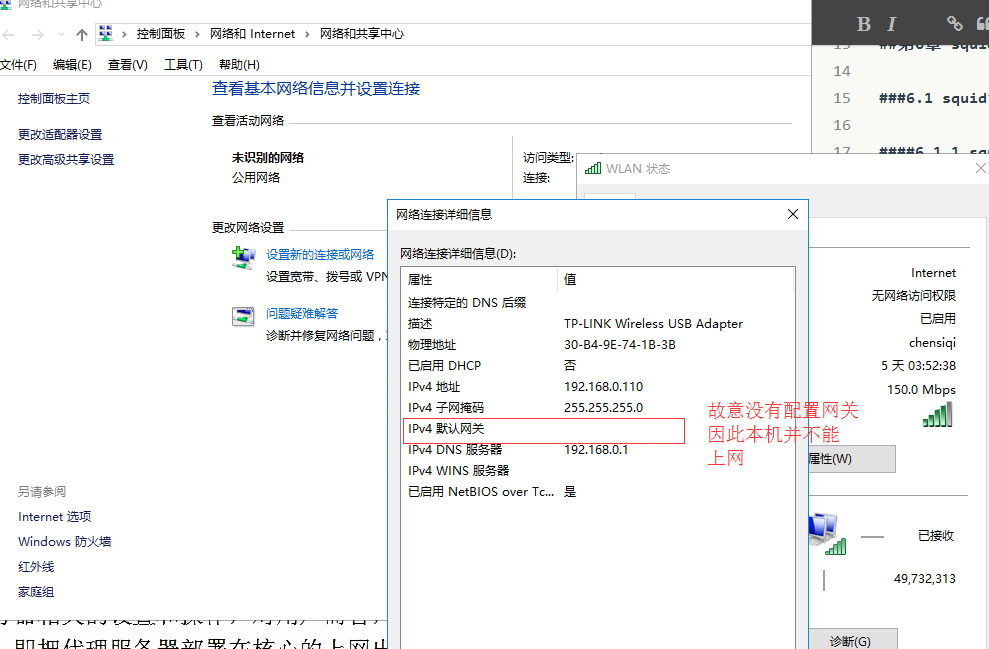
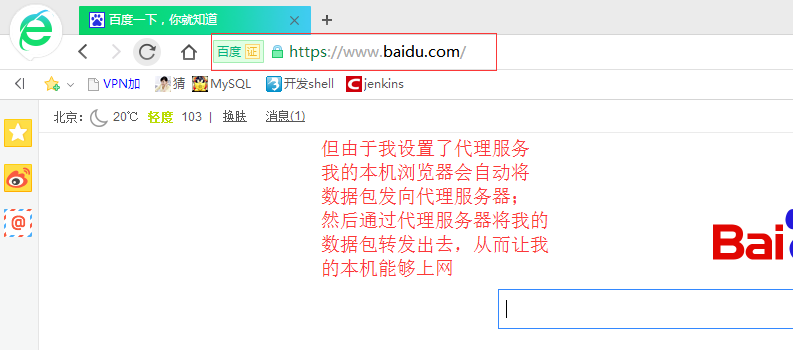
- 即通过浏览器设置代理服务器地址实现共享上网,这种方式不需要代理服务器在网络的出入口位置,只要代理服务器可以上网,其他的客户机就可以通过IE等客户端设置代理服务器的地址及端口进行上网(客户机不能上网,但是可以通过代理服务器来达到上网的目的)。本章节最开头的默认配置就是这样的例子,但是这个技术已经落后了,我们也仅仅提及下而已。
(2)透明代理服务器
另一种就是透明代理,所谓透明代理,是相对于代理服务器而言,客户端不需要做任何和代理服务器相关的设置和操作,对用户而言,感觉不到代理服务器的存在,所以称之为透明代理。即把代理服务器部署在核心的上网出口,当用户上网浏览页面时,会交给代理服务器向外请求,如果结合iptables可以实现代理+网关+内容过滤+流量安全控制等完整的上网解决方案。
透明代理流程说明:
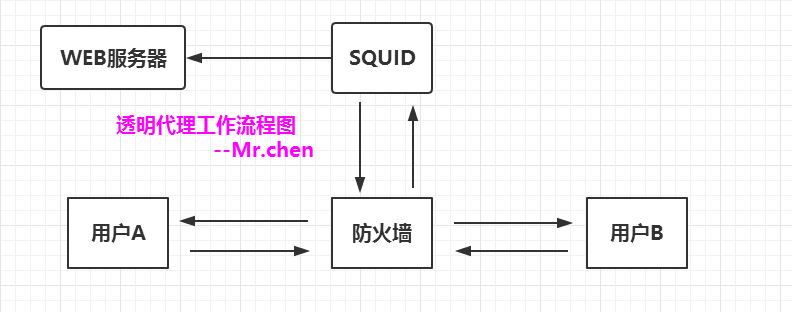
用户A发送一个访问请求到防火墙,由防火墙将该用户的访问请求转发到SQUID,SQUID在先检查自身缓存中有无该用户请求的访问内容,如果没有,则请求远端目的服务器,获取该用户的访问内容,再返回给用户的同时,在自身缓存保留一份记录以备下次调用;当用户B发送一个和用户A相同的访问请求时,由防火墙将转发该用户请求到SQUID,SQUID检查自身缓存发现有同样内容后,直接将该内容返回给用户。
注意:
在实际使用中,通常将SQUID和防火墙放在同一台机器上,为了更清楚的向浏览者描述其工作流程,在以下的流程图中将防火墙和SQUID分开显示。
6.1.2 squid透明代理案例说明
本例实现通过squid正向透明代理,实现企业单位,内部共享上网。
案例说明:
- 我曾经在一家知名的IT公司,整个集团有900人左右,曾经有这么一位网管,用一台配置256M内存,40G硬盘的pc机,为900多人提供安全的上网,而且网络高速稳定,半年基本没有发生网络异常。
- 那么,他是如何做到的呢?原来他用的是iptables与squid的完美统一,实现透明代理上网。
(1)上网行为控制
(2)节约网站带宽成本
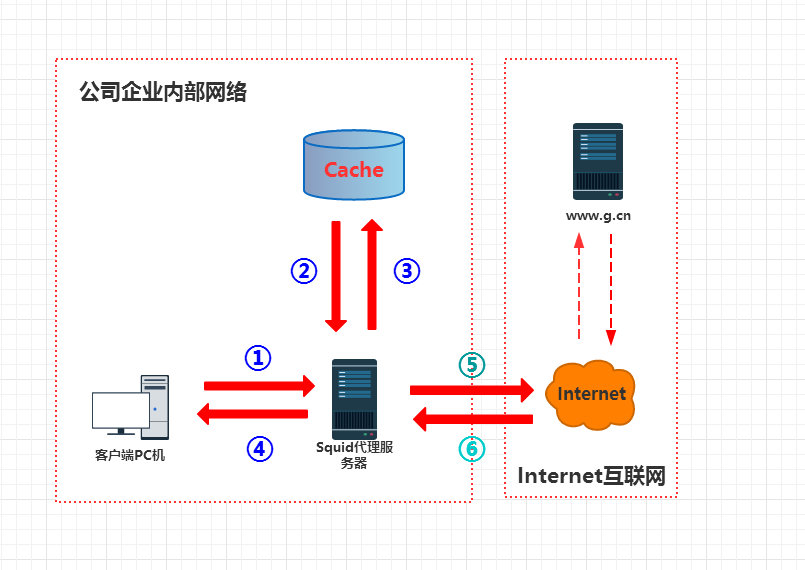
(3)提升员工上网速度- squid可以为局域网中的客户机做代理,用来加速用户的网页访问,第一次访问的时候,squid会把数据缓存到服务器上,当客户端第二次访问的时候,squid会对比文件的新旧,如果文件没有发生变化,则squid直接返回给用户数据,不需要在互联网上重新下载一份。整个上网代理的原理前面已经讲解过了。图形如下:
6.1.3 squid透明代理物理拓扑说明
作为透明代理的服务器,一般和公司上网网关放一起,即所有的客户机的网关都设置为代理服务器的IP。具体需求如下:
1)至少有两块网卡,一块连接路由器,一块连接内部公司网络
2)所有的上网请求都必须经过代理服务器(即把代理服务器设置为网关)
6.1.4 squid透明代理实战配置(学生实验)
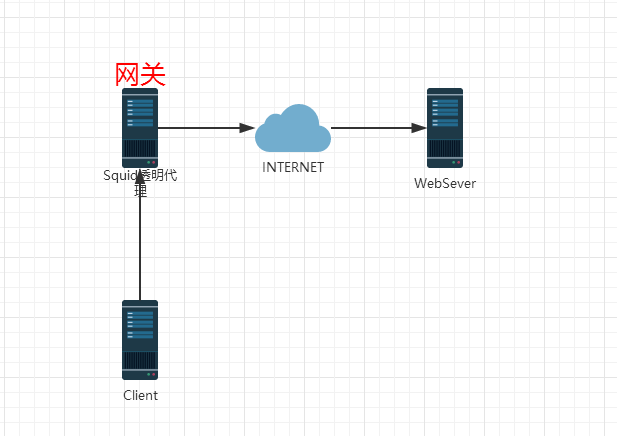
| 主机名 | 内网卡 | 外网卡 | 网关IP | 用途 |
|---|---|---|---|---|
| Squid | 192.168.200.100 | 192.168.0.190 | 无网关 | 透明代理,网关 |
| WebServer | 192.168.0.220 | 无网关 | Web服务器 | |
| Client | 192.168.200.200 | 192.168.200.100 | 内网客户端 |
配置squid透明代理需要加上如下编译参数,否则日志报错
--enable-linux-netfilter    #激活透明代理对Linux的支持
--enable-linux-tproxy       #激活真实的透明代理对网站的支持

 如果没编译日志会报错:
/usr/local/squid/var/logs/cache.log
2017-9-22 17:44:40| WARNING:transparent proxying not supported
2017-9-22 17:44:42| WARNING:transparent proxying not supported
Squid做正向代理如何设置呢,我们以实例给大家解析:
#修改squid.conf,在squid监听端口后加transparent
[root@localhost ~]# awk '/http_port/{print NR,$0}' /usr/local/squid/etc/squid.conf
29 http_port 3128
[root@localhost ~]# sed -i '29 s#$# transparent#' /usr/local/squid/etc/squid.conf
[root@localhost ~]# sed -n '29p' /usr/local/squid/etc/squid.conf
http_port 3128 transparent
squid.conf添加如下代码:
[root@localhost ~]# tail -7 /usr/local/squid/etc/squid.conf
cache_mem 128 MB    #内存缓存大小
cache_swap_low 90
cache_swap_high 95
maximum_object_size 8192 KB #最大缓存对象大小
minimum_object_size 0 KB    #最小缓存对象大小
maximum_object_size_in_memory 4096 KB
memory_replacement_policy lru   #缓存算法
emulate_httpd_log on    #日志
启动squid服务,出现报错
[root@localhost ~]# killall squid
[root@localhost ~]# netstat -antup | grep 3128
[root@localhost ~]# squid -D
2017/09/22 02:57:25| WARNING cache_mem is larger than total disk cache space!

#报错的原因是cache_mem设置小了。
[root@localhost ~]# tail -8 /usr/local/squid/etc/squid.conf
cache_mem 99 MB    #调小
cache_swap_low 90
cache_swap_high 95
maximum_object_size 8192 KB
minimum_object_size 0 KB
maximum_object_size_in_memory 4096 KB
memory_replacement_policy lru
emulate_httpd_log on

#启动squid服务
[root@localhost ~]# killall squid
[root@localhost ~]# killall squid
squid: no process killed
[root@localhost ~]# killall squid
squid: no process killed
[root@localhost ~]# squid -D
[root@localhost ~]# netstat -antup | grep 3128
tcp        0      0 0.0.0.0:3128                0.0.0.0:*                   LISTEN      1666/(squid)
6.1.5 防火墙的设置
#在网关上操作(Squid)
[root@localhost ~]# /etc/init.d/iptables stop
[root@localhost ~]# iptables -t nat -A PREROUTING -i eth1 -p tcp --dport 80 -j REDIRECT --to-ports 3128        #eth1为内网网卡
[root@localhost ~]# iptables -t nat -L -nv
Chain PREROUTING (policy ACCEPT 0 packets, 0 bytes)
 pkts bytes target     prot opt in     out     source               destination
    0     0 REDIRECT   tcp  --  eth1   *       0.0.0.0/0            0.0.0.0/0           tcp dpt:80 redir ports 3128

Chain POSTROUTING (policy ACCEPT 1 packets, 136 bytes)
 pkts bytes target     prot opt in     out     source               destination

Chain OUTPUT (policy ACCEPT 1 packets, 136 bytes)
 pkts bytes target     prot opt in     out     source               destination

#做出网转换
[root@localhost ~]# iptables -t nat -A POSTROUTING -o eth0 -s 192.168.200.0/24 -j MASQUERADE
[root@localhost ~]# iptables -t nat -L -nv
Chain PREROUTING (policy ACCEPT 0 packets, 0 bytes)
 pkts bytes target     prot opt in     out     source               destination
    0     0 REDIRECT   tcp  --  eth1   *       0.0.0.0/0            0.0.0.0/0           tcp dpt:80 redir ports 3128

Chain POSTROUTING (policy ACCEPT 0 packets, 0 bytes)
 pkts bytes target     prot opt in     out     source               destination
    0     0 MASQUERADE  all  --  *      eth0    192.168.200.0/24     0.0.0.0/0

Chain OUTPUT (policy ACCEPT 0 packets, 0 bytes)
 pkts bytes target     prot opt in     out     source               destination

#开启网关的转发功能

[root@localhost ~]# sed -n '7p' /etc/sysctl.conf
net.ipv4.ip_forward = 1
[root@localhost ~]# sysctl -p
net.ipv4.ip_forward = 1
net.ipv4.conf.default.rp_filter = 1
net.ipv4.conf.default.accept_source_route = 0
kernel.sysrq = 0
kernel.core_uses_pid = 1
net.ipv4.tcp_syncookies = 1
error: "net.bridge.bridge-nf-call-ip6tables" is an unknown key
error: "net.bridge.bridge-nf-call-iptables" is an unknown key
error: "net.bridge.bridge-nf-call-arptables" is an unknown key
kernel.msgmnb = 65536
kernel.msgmax = 65536
kernel.shmmax = 68719476736
kernel.shmall = 4294967296
net.ipv4.ip_local_port_range = 4000 65000
6.1.6 测试透明代理
注意,请查看Web服务器是否关闭了iptables
(1)路由检查
#内网客户端(192.168.200.100为网关内网卡eth1)
[root@localhost ~]# route -n
Kernel IP routing table
Destination     Gateway         Genmask         Flags Metric Ref    Use Iface
192.168.200.0   0.0.0.0         255.255.255.0   U     0      0        0 eth0
169.254.0.0     0.0.0.0         255.255.0.0     U     1002   0        0 eth0
0.0.0.0         192.168.200.100 0.0.0.0         UG    0      0        0 eth0

#网关squid服务器(eth0网段192.168.0.0/24,eth1网段192.168.200.0/24,网关服务器无需设置网关)
[root@localhost logs]# route -n
Kernel IP routing table
Destination     Gateway         Genmask         Flags Metric Ref    Use Iface
192.168.0.0     0.0.0.0         255.255.255.0   U     0      0        0 eth0
192.168.200.0   0.0.0.0         255.255.255.0   U     0      0        0 eth1
169.254.0.0     0.0.0.0         255.255.0.0     U     1002   0        0 eth0
169.254.0.0     0.0.0.0         255.255.0.0     U     1003   0        0 eth1


#WebServer(无需设置任何网关,模拟公网)
[root@www ~]# route -n
Kernel IP routing table
Destination     Gateway         Genmask         Flags Metric Ref    Use Iface
192.168.0.0     0.0.0.0         255.255.255.0   U     0      0        0 eth0
169.254.0.0     0.0.0.0         255.255.0.0     U     1002   0        0 eth0
(2)代理测试
#在内网客户端上测试
[root@localhost ~]# echo "192.168.0.220 www.yunjisuan.com bbs.yunjisuan.com" >> /etc/hosts
[root@localhost ~]# tail -1 /etc/hosts
192.168.0.220 www.yunjisuan.com bbs.yunjisuan.com
[root@localhost ~]# curl www.yunjisuan.com
192.168.0.220  www                          #測試成功
[root@localhost ~]# curl www.yunjisuan.com
192.168.0.220  www                          #測試成功
[root@localhost ~]# curl bbs.yunjisuan.com
192.168.0.220  bbs
[root@localhost ~]# curl bbs.yunjisuan.com
192.168.0.220  bbs
[root@localhost ~]# curl bbs.yunjisuan.com
192.168.0.220  bbs

#查看squiid服务器代理日志
[root@localhost logs]# cat /usr/local/squid/var/logs/access.log
1506339377.298   2004 192.168.200.200 TCP_REFRESH_FAIL/200 462 GET http://www.yunjisuan.com/ - DIRECT/www.yunjisuan.com text/html
1506339378.421      0 192.168.200.200 TCP_REFRESH_FAIL/200 462 GET http://www.yunjisuan.com/ - DIRECT/www.yunjisuan.com text/html
1506339379.117      0 192.168.200.200 TCP_REFRESH_FAIL/200 462 GET http://www.yunjisuan.com/ - DIRECT/www.yunjisuan.com text/html
1506339399.213      0 192.168.200.200 TCP_REFRESH_FAIL/200 462 GET http://www.yunjisuan.com/ - DIRECT/www.yunjisuan.com text/html
1506339399.845      0 192.168.200.200 TCP_REFRESH_FAIL/200 462 GET http://www.yunjisuan.com/ - DIRECT/www.yunjisuan.com text/html
1506339405.320   2002 192.168.200.200 TCP_REFRESH_FAIL/200 462 GET http://bbs.yunjisuan.com/ - DIRECT/bbs.yunjisuan.com text/html
1506339406.182      0 192.168.200.200 TCP_REFRESH_FAIL/200 462 GET http://bbs.yunjisuan.com/ - DIRECT/bbs.yunjisuan.com text/html
1506339406.774      0 192.168.200.200 TCP_REFRESH_FAIL/200 462 GET http://bbs.yunjisuan.com/ - DIRECT/bbs.yunjisuan.com text/html
1506339409.957      0 192.168.200.200 TCP_REFRESH_FAIL/200 462 GET http://www.yunjisuan.com/ - DIRECT/www.yunjisuan.com text/html
1506339410.629      0 192.168.200.200 TCP_REFRESH_FAIL/200 462 GET http://www.yunjisuan.com/ - DIRECT/www.yunjisuan.com text/html
1506339411.205      0 192.168.200.200 TCP_REFRESH_FAIL/200 462 GET http://www.yunjisuan.com/ - DIRECT/www.yunjisuan.com text/html
1506339412.253      0 192.168.200.200 TCP_REFRESH_FAIL/200 462 GET http://bbs.yunjisuan.com/ - DIRECT/bbs.yunjisuan.com text/html
1506339412.885      0 192.168.200.200 TCP_REFRESH_FAIL/200 462 GET http://bbs.yunjisuan.com/ - DIRECT/bbs.yunjisuan.com text/html
1506339413.317      0 192.168.200.200 TCP_REFRESH_FAIL/200 462 GET http://bbs.yunjisuan.com/ - DIRECT/bbs.yunjisuan.com text/html
1506339468.616   2003 192.168.200.200 TCP_REFRESH_FAIL/200 462 GET http://www.yunjisuan.com/ - DIRECT/www.yunjisuan.com text/html
1506339469.525      0 192.168.200.200 TCP_REFRESH_FAIL/200 462 GET http://www.yunjisuan.com/