


Eclipse Xml 注释不格式化和其它设置
一, Xml文件的注释,按Ctrl+Shift+F时会把注释的内容也格式, 如果不想把注释内容格式化;
操作步骤:Window-->Perferenes-->Xm-->Xml Files-->Eidtor--> Format commnets 勾去掉
二,Line Width 设置Xml文件每行显示宽度
三,Window -> Preferences -> XML ->XML Files -> Editor :
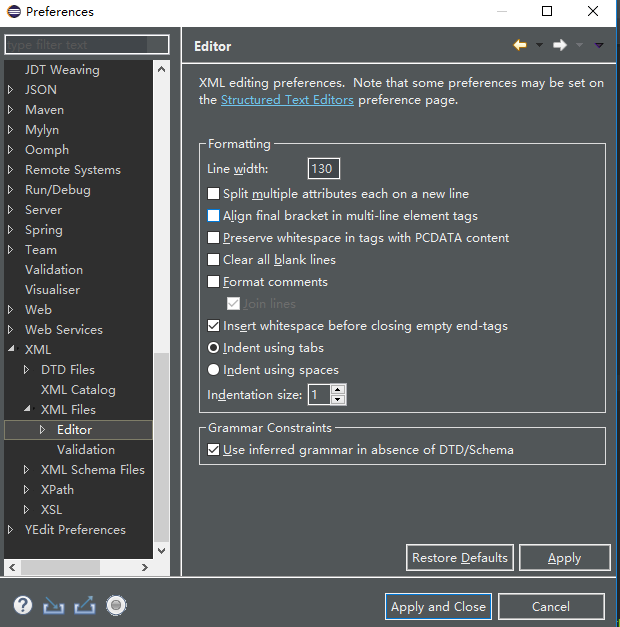
1.1设置每行宽度
Line width 设定为80到100个字符。
1.2标签的每个属性都单独一行显示:
选中Split multiple attributes each on a new line
1.3 标签结束符不单独占用一行:
不选中Align final bracket in multi-line element tags
1.4去掉所有空行:
选中Clear all blank lines
1.5 在标签结束符前添加空格:
选中Insert whitespace before closing empty end-tags
1.6缩进使用空格代替tab:
选中Indent using spaces
1.7 设定缩进宽度
Indentation size 设定为4,即缩进4个空格。
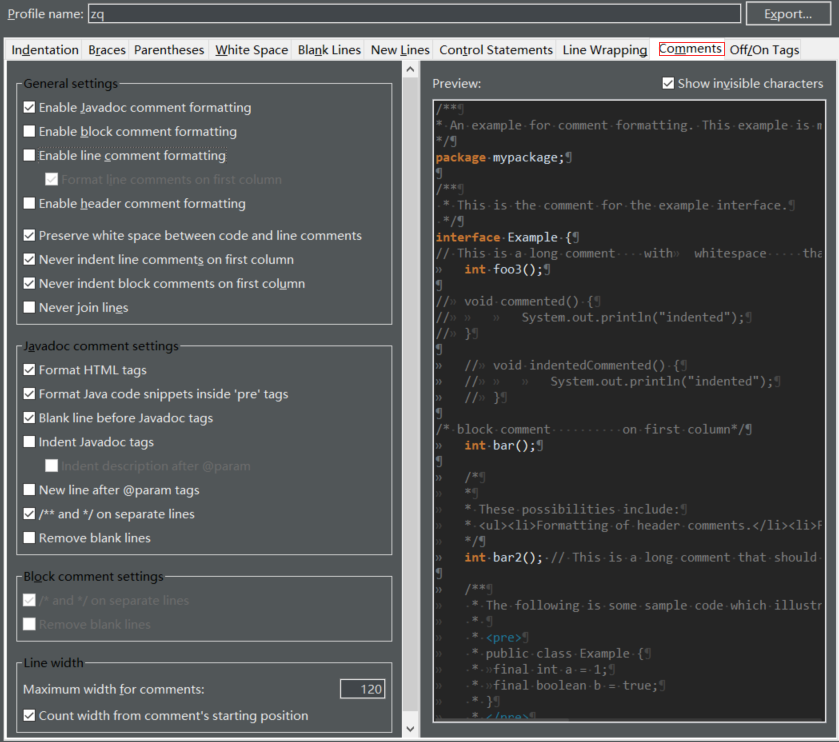
四,Java注释格式化设置

 浙公网安备 33010602011771号