


环境:aliyun centos8
在 Nginx 下配置 Basic 认证需要依靠 Nginx 的 http_auth_basic_module 模块(官方文档:http://nginx.org/en/docs/http/ngx_http_auth_basic_module.html)
配置过程:
1.生成认证文件,形式为 用户名:密码
密码采用 crypt 方式加密(用户名:user ,密码:123456)
在nginx目录/etc/nginx/下创建auth文件夹:mkdir auth
文件保存在 /etc/nginx/auth 下:
[root@localhost auth ]# printf "zdpz:$(openssl passwd -crypt 123456)\n" >>eshead
结构:printf "user:$(openssl passwd -crypt 123456)\n" >>espasswd
查看该文件cat espasswd
2.配置nginx
vim /etc/nginx/nginx.conf
在 location 段中加上 auth_basic 和 auth_basic_user_file :
                location \ {
                        auth_basic "login";
                        auth_basic_user_file /etc/nginx/auth/htpasswd;
              }
验证nginx配置:nginx -t
平滑重启nginx:nginx -s reload
success
问题:
1.nginx: [error] invalid PID number "" in "/run/nginx.pid"
  表明nginx未启动
  解决:nginx -c /etc/nginx/nginx.conf
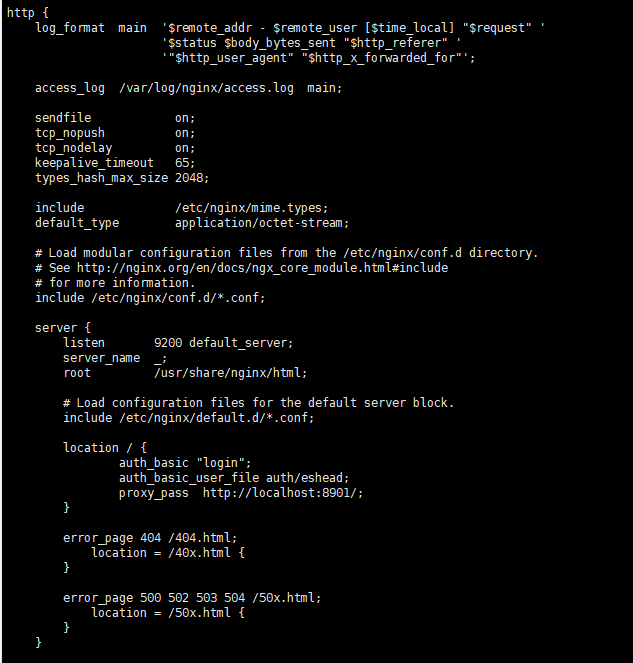
2.代理端口配置:
  如es端口映射8901:9200
#########简易模板
server {
listen 3012;
server_name _;
auth_basic "Input Password";
auth_basic_user_file "/etc/nginx/logspasswd";
root /home/workspace/crontabDir/logs;
charset utf-8;
location / {
autoindex on;
autoindex_exact_size on;
autoindex_localtime on;
types {
text/plain log;
}
}
}
