

导入项目遇到的问题: Some projects cannot be imported because they already exist in the workspace.
导入项目遇到的问题:
Some projects cannot be imported because they already exist in the workspace.
翻译:有的项目由于在此工作空间中已经存在而不能导入到此工作空间中。
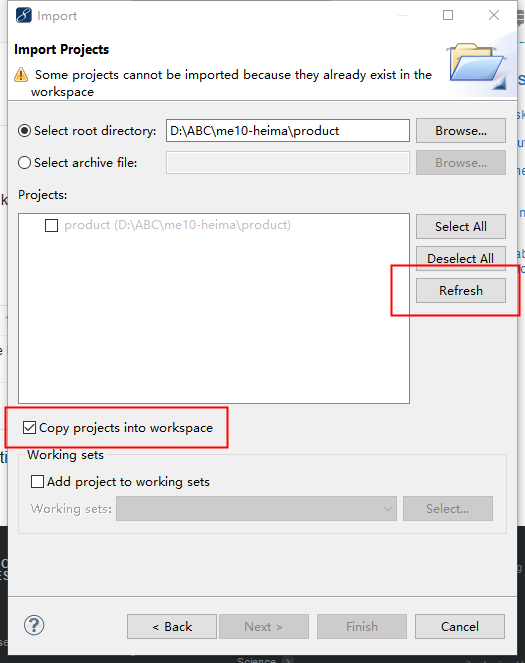
原因:
因为我已经拷贝此项目到这个工作空间中了,如果“Copy projects into workspace”前面的复选框被选中的话,项目将被再一次复制到此项目,故存在两个同名的项目了,所以,
自然会报出项目已经存在“already exist”的异常错误了。
解决方法:
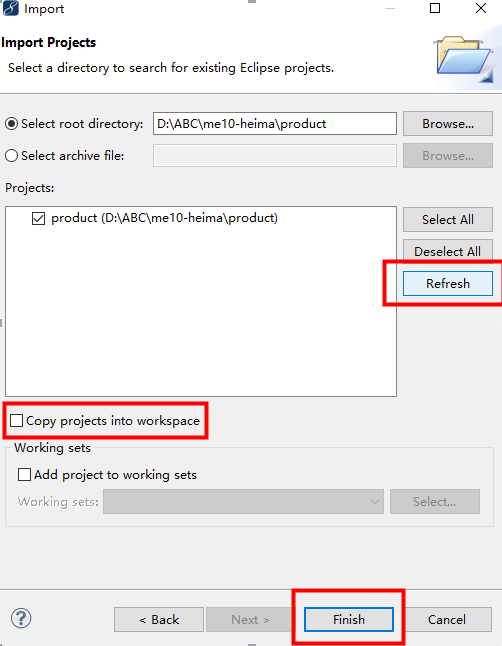
去掉“Copy projects into workspace”前面的复选框,并点击“Refresh”按钮,点击“Finish”按钮。
——Or, you can resolve this problem as the way. Uncheck the "copy projects into workspace" checkbox, and then click "refresh" button.
From Stack Overflow.
OK!问题解决!

 浙公网安备 33010602011771号