
nfs实现自动挂载
1、DR模式下vip不在同一网段上实现过程(夸网段)
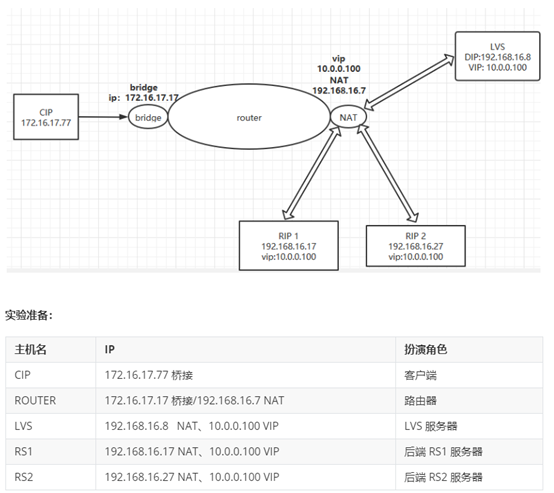
[root@CIP ~]#cat /etc/sysconfig/network-scripts/ifcfg-eth0
DEVICE=eth0
NAME=eth0
BOOTPROTO=static
IPADDR=172.16.17.77
PREFIX=24
GATEWAY=172.16.17.17
ONBOOT=yes
[root@CIP ~]#route -n
Kernel IP routing table
Destination Gateway Genmask Flags Metric Ref Use Iface
0.0.0.0 172.16.17.17 0.0.0.0 UG 100 0 0 eth0
172.16.17.0 0.0.0.0 255.255.255.0 U 100 0 0 eth0
[root@ROUTER ~]#cat /etc/sysconfig/network-scripts/ifcfg-eth0
DEVICE=eth0
NAME=eth0
BOOTPROTO=static
IPADDR=172.16.17.17
PREFIX=24
ONBOOT=yes
[root@ROUTER ~]#cat /etc/sysconfig/network-scripts/ifcfg-eth1
DEVICE=eth1
NAME=eth1
BOOTPROTO=static
IPADDR=192.168.16.7
PREFIX=24
ONBOOT=yes
[root@ROUTER ~]#ip a add 10.0.0.100/24 dev eth1
[root@ROUTER ~]#route -n
Kernel IP routing table
Destination Gateway Genmask Flags Metric Ref Use Iface
10.0.0.0 0.0.0.0 255.255.255.0 U 0 0 0 eth1
172.16.17.0 0.0.0.0 255.255.255.0 U 100 0 0 eth0
192.168.16.0 0.0.0.0 255.255.255.0 U 101 0 0 eth1
192.168.122.0 0.0.0.0 255.255.255.0 U 0 0 0 virbr0
[root@LVS ~]#cat /etc/sysconfig/network-scripts/ifcfg-eth0
DEVICE=eth0
NAME=eth0
BOOTPROTO=static
IPADDR=192.168.16.8
PREFIX=24
GATEWAY=192.168.16.7
ONBOOT=yes
[root@LVS ~]#route -n
Kernel IP routing table
Destination Gateway Genmask Flags Metric Ref Use Iface
0.0.0.0 192.168.16.7 0.0.0.0 UG 100 0 0 eth0
192.168.16.0 0.0.0.0 255.255.255.0 U 100 0 0 eth0
[root@RS1 ~]#cat /etc/sysconfig/network-scripts/ifcfg-eth0
DEVICE=eth0
NAME=eth0
BOOTPROTO=static
IPADDR=192.168.16.17
PREFIX=24
GATEWAY=192.168.16.7
ONBOOT=yes
[root@RS1 ~]#route -n
Kernel IP routing table
Destination Gateway Genmask Flags Metric Ref Use Iface
0.0.0.0 192.168.16.7 0.0.0.0 UG 100 0 0 eth0
192.168.16.0 0.0.0.0 255.255.255.0 U 100 0 0 eth0
[root@RS2 ~]#cat /etc/sysconfig/network-scripts/ifcfg-eth0
DEVICE=eth0
NAME=eth0
BOOTPROTO=static
IPADDR=192.168.16.27
PREFIX=24
GATEWAY=192.168.16.7
ONBOOT=yes
[root@RS2 ~]#route -n
Kernel IP routing table
Destination Gateway Genmask Flags Metric Ref Use Iface
0.0.0.0 192.168.16.7 0.0.0.0 UG 100 0 0 eth0
192.168.16.0 0.0.0.0 255.255.255.0 U 100 0 0 eth0
#在LVS主机运行的脚本
[root@LVS ~]#cat lvs_dr_vs.sh
#!/bin/bash
vip='10.0.0.100'
iface='lo:1'
mask='255.255.255.255'
port='80'
rs1='192.168.16.17'
rs2='192.168.16.27'
scheduler='wrr'
type='-g'
rpm -q ipvsadm &> /dev/null || yum -y install ipvsadm &> /dev/null
case $1 in
start)
ifconfig $iface $vip netmask $mask #broadcast $vip up
iptables -F
ipvsadm -A -t ${vip}:${port} -s $scheduler
ipvsadm -a -t ${vip}:${port} -r ${rs1} $type -w 1
ipvsadm -a -t ${vip}:${port} -r ${rs2} $type -w 1
echo "The VS Server is Ready!"
;;
stop)
ipvsadm -C
ifconfig $iface down
echo "The VS Server is Canceled!"
;;
*)
echo "Usage: $(basename $0) start|stop"
exit 1
;;
esac
#在RS后端服务器运行的脚本
[root@RS1 ~]#cat lvs_dr_rs.sh
#!/bin/bash
vip=10.0.0.100
mask='255.255.255.255'
dev=lo:1
rpm -q httpd &> /dev/null || yum -y install httpd &>/dev/null
service httpd start &> /dev/null && echo "The httpd Server is Ready!"
echo "`hostname -I`" > /var/www/html/index.html
case $1 in
start)
echo 1 > /proc/sys/net/ipv4/conf/all/arp_ignore
echo 1 > /proc/sys/net/ipv4/conf/lo/arp_ignore
echo 2 > /proc/sys/net/ipv4/conf/all/arp_announce
echo 2 > /proc/sys/net/ipv4/conf/lo/arp_announce
ifconfig $dev $vip netmask $mask #broadcast $vip up
#route add -host $vip dev $dev
echo "The RS Server is Ready!"
;;
stop)
ifconfig $dev down
echo 0 > /proc/sys/net/ipv4/conf/all/arp_ignore
echo 0 > /proc/sys/net/ipv4/conf/lo/arp_ignore
echo 0 > /proc/sys/net/ipv4/conf/all/arp_announce
echo 0 > /proc/sys/net/ipv4/conf/lo/arp_announce
echo "The RS Server is Canceled!"
;;
*)
echo "Usage: $(basename $0) start|stop"
exit 1
;;
esac
2、CentOS7.6 中 nfs 客户端使用 /etc/fatab 实现开机自动挂载
nfs服务端:
[root@centos7 ~]#yum -y install nfs-utils
[root@centos7 ~]#mkdir /data/nfs
[root@centos7 ~]#vim /etc/exports
/data/nfs *(rw)
[root@centos7 ~]#systemctl enable --now nfs-server
Created symlink from /etc/systemd/system/multi-user.target.wants/nfs-server.service to /usr/lib/systemd/system/nfs-server.service.
nfs客户端:
[root@centos7 ~]#yum -y install nfs-utils
[root@centos7 ~]#vim /etc/fstab
10.0.0.7/nfs /mnt nfs defaults,_netdev 0 0
3、CentOS7.6 中 nfs 客户端使用 autofs 实现使用 nfs 时实时挂载
nfs 服务端:
[root@centos7 ~]#yum -y install nfs-utils
[root@centos7 ~]#mkdir /data/nfs
[root@centos7 ~]#vim /etc/exports
/data/nfs *(rw)
[root@centos7 ~]#systemctl enable --now nfs-server
Created symlink from /etc/systemd/system/multi-user.target.wants/nfs-server.service to /usr/lib/systemd/system/nfs-server.service.
nfs客户端:
[root@centos7 ~]#yum -y install nfs-utils autofs
[root@centos7 ~]#vim /etc/auto.master
/- /etc/auto.nfs
[root@centos7 ~]#vim /etc/auto.nfs
/mnt -fstype=nfs,vers=3 10.0.0.7:/data/nfs
[root@centos7 ~]#systemctl enable --now autofs
[root@centos7 ~]#df
Filesystem 1K-blocks Used Available Use% Mounted on
/dev/sda2 104806400 4421384 100385016 5% /
/dev/sda5 52403200 32992 52370208 1% /data
/dev/sda1 1038336 172600 865736 17% /boot
[root@centos7 ~]#ls /mnt
[root@centos7 ~]#df
Filesystem 1K-blocks Used Available Use% Mounted on
/dev/sda2 104806400 4421384 100385016 5% /
/dev/sda5 52403200 32992 52370208 1% /data
/dev/sda1 1038336 172600 865736 17% /boot
10.0.0.7:/data/nfs 52403200 32896 52370304 1% /mnt

 浙公网安备 33010602011771号