
【Code Monkey 代码猴子】使用 DOTS 制作完整RTS游戏系列教程の学习笔记
14-0:学到一个理念,没有UI游戏逻辑也要能正常运行。
14-1:
EntityQueryBuilder.WithAll<T> 得到的是enable的T,而WithPresent<T>则只要有T就会返回
14-2:适配画布缩放
float canvasScale = canvas.transform.localScale.x;
selectionAreaRectTransform.anchoredPosition = new Vector2(selectionAreaRect.x, selectionAreaRect.y) / canvasScale;
selectionAreaRectTransform.sizeDelta = new Vector2(selectionAreaRect.width, selectionAreaRect.height) / canvasScale;
14-3:鼠标左键按下时立即更新单位选择框UI
private void UnitSelectionManager_OnSelectionAreaStart(object sender, EventArgs e)
{
  selectionAreaRectTransform.gameObject.SetActive(true);
  UpdateVisual();
}
15-1:以下两种写法作用一样
entityQuery = new EntityQueryBuilder(Allocator.Temp).WithAll<PhysicsWorldSingleton>().Build(entityManager);
entityQuery = entityManager.CreateEntityQuery(typeof(PhysicsWorldSingleton));
15-2:要搞清楚三个参数都是什么意思
Filter = new CollisionFilter {
GroupIndex = 0,
BelongsTo = ~0u,
CollidesWith = 1 << 6
}
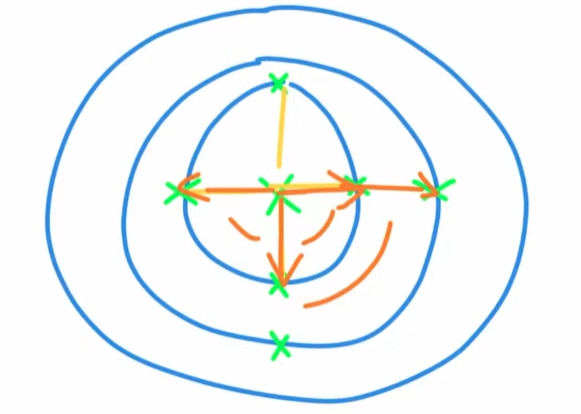
16-1:关键代码,生成圆环阵型中的下一个位置
float3 ringVector = math.rotate(quaternion.RotateY(angle), new float3(ringSize * (ring + 1), 0f, 0f));
 .
.
17-1:System顺序半随机,在每个unity编辑器种可能不同,但Build后确定
17-2:这一节有bug,连续框选同一个物体,会取消选中
18-1:prefab variant,覆盖本体的字段,一个小技巧是修改本体的字段值,然后改变体的字段值,再把本体的字段值改回来,会发现变体的字段值变粗体了
19-1:计时器
            shootAttack.ValueRW.timer -= SystemAPI.Time.DeltaTime;
            if (shootAttack.ValueRO.timer > 0)
            {
                continue;
            }
            shootAttack.ValueRW.timer = shootAttack.ValueRO.timerMax;
20-1:WithEntityAccess可以通过组件获得实体,注意迭代器声明的entity放在最后一个参数
        foreach ((
            RefRO<Health> health,
            Entity entity
            )
            in SystemAPI.Query<
                RefRO<Health>>().WithEntityAccess())
        {

        }
20-2:禁用burst更好调试
20-3:EntityCommandBuffer解决循环后销毁entity
//EntityCommandBuffer entityCommandBuffer = new EntityCommandBuffer(Allocator.Temp); ---> entityCommandBuffer.Playback(state.EntityManager);
        EntityCommandBuffer entityCommandBuffer =
            SystemAPI.GetSingleton<EndSimulationEntityCommandBufferSystem.Singleton>().CreateCommandBuffer(state.WorldUnmanaged);//会在帧的末尾自动调用playback
20-3:给预制在场景中的gameobject添加LinkedEntityGroupAuthoring,即可解决无法销毁子物体的问题,而代码生成的实体已有改组件,所以不需要手动添加
21-1:给子弹加上刚体才能移动,不然localPosition虽然值在改变,但是实际物体没有要移动
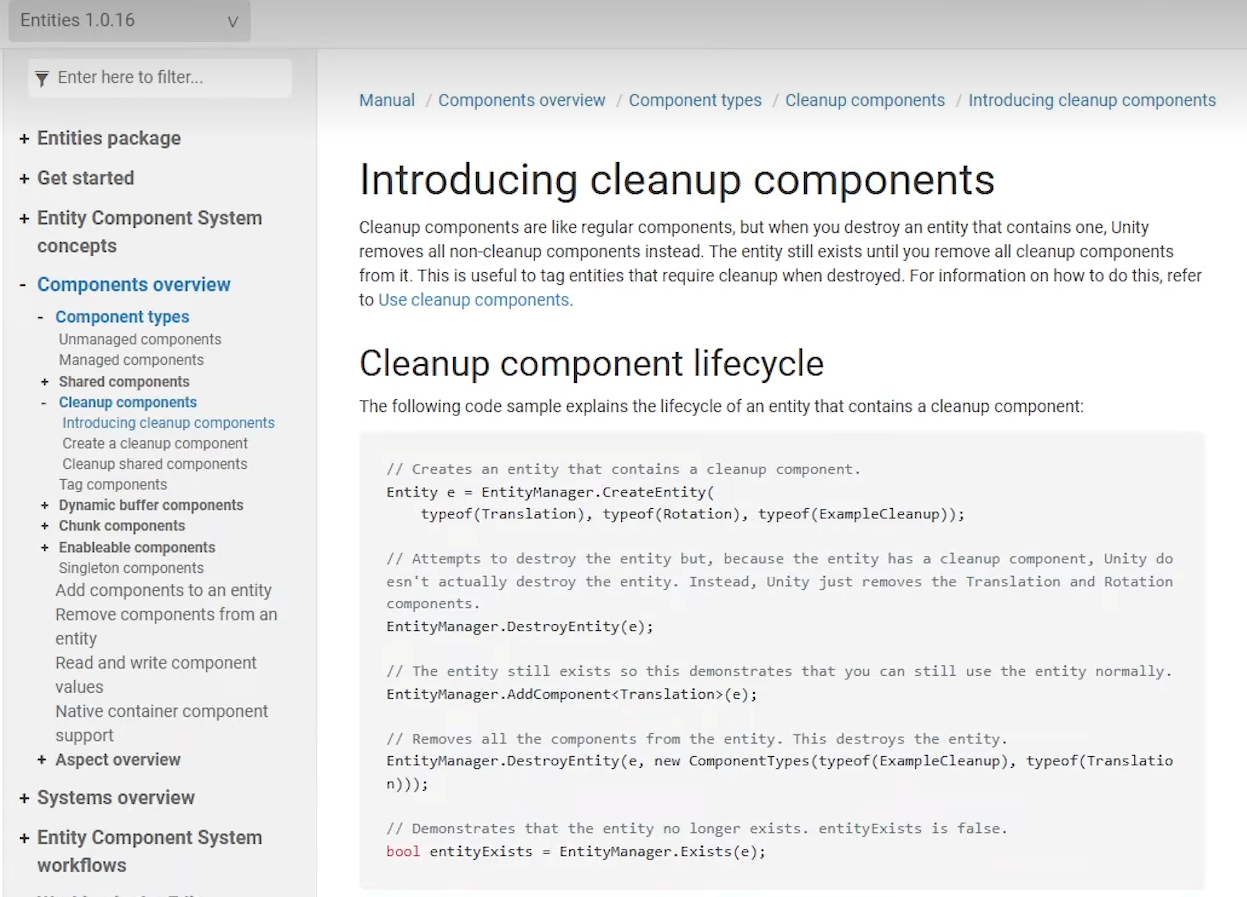
22-1:entityCommandBuffer.DestroyEntity(entity)在下一帧的ParentSystem中销毁实体,实际是要等到cleanup组件被销毁,才会最终销毁实体
22-2:判断实体无效的方法
                if (!SystemAPI.Exists(target.ValueRO.targetEntity) || !SystemAPI.HasComponent<LocalTransform>(target.ValueRO.targetEntity))
                {
                    target.ValueRW.targetEntity = Entity.Null;
                }
评论区有人提出可以用state.EntityManager.Exists,但也有人说SystemAPI效率显著优于EntityManager,SystemAPI是基于Burst 编译的,EntityManager是传统的管理器对象
并且提到,用Exists其实也有类似的问题,Unity在这一帧的末尾只是销毁了LocalTransform组件,在下一帧的中间才销毁Entity,尝试获取LocalTransform的时候就会发现实体还在,组件没了
23-1:设置子弹世界坐标
            float3 bulletSpawnWorldPosition = localTransform.ValueRO.TransformPoint(shootAttack.ValueRO.bulletSpawnLocalPosition);
            SystemAPI.SetComponent<LocalTransform>(bulletEntity, LocalTransform.FromPosition(bulletSpawnWorldPosition));
            //SystemAPI.SetComponent(bulletEntity, LocalTransform.FromPosition(localTransform.ValueRO.Position + shootAttack.ValueRO.bulletSpawnLocalPosition));//我认为这样也可以
24-1:collisionWorld.OverlapSphere 有可能检测到待销毁的Entity。所以要判空
                    if (!SystemAPI.Exists(distanceHit.Entity) || !SystemAPI.HasComponent<LocalTransform>(distanceHit.Entity))
                    {
                        continue;
                    }
25-1:持久化保存Random随机对象,不然每次new Random或者不存RW回去的话,都是相同的值
Random random = randomWalking.ValueRO.random;
//do something
randomWalking.ValueRW.random = random;
25-2:使用EntityCommandBuffer进行AddComponent操作,否则会报错
25-3:此节有个bug,僵尸生成时,会在世界坐标原点闪一下再回到生成器的位置,这个看后续有没有处理
26-1:把对象的TransformUsageFlags设置为NonUniformScale(或者预制体本身缩放不均匀,在Bake时会自动添加PostTransformMatrix组件),然后设置PostTransformMatrix,即可实现对单一轴缩放
barVisualPostTransformMatrix.ValueRW.Value = float4x4.Scale(healthNormalized,0f,0f);
26-2:rotation设置要本地化
localTransform.ValueRW.Rotation = quaternion.LookRotation(parentLocalTransform.InverseTransformDirection(cameraForward), math.up());
26-3:Camera.main与[BurstCompile]冲突,期待后面用job的重构
27-1:一种事件的实现方式
    public OnShootEvent onShoot;

    public struct OnShootEvent
    {
        public bool isTriggered;
        public float3 shootFromPosition;
    }
28-1:从僵尸中心发射线,判断是否碰到了攻击对象的碰撞体,射线长度是僵尸的colliderSize和一个偏移量,其中这个colliderSize是胶囊碰撞体的的半径而不是直径
28-2:发现一个神奇的现象,如果把胶囊碰撞体radius调的大于height,就无法发生碰撞了,
评论区早就有人遇到这个问题了,害我查了半天:
胶囊碰撞体由两个半球体和一个圆柱体组成,其有效高度要求 圆柱部分的长度 ≥ 0。当半径超过高度的一半时,圆柱部分的长度会变为负数(Height - 2*Radius < 0),导致胶囊的几何形状无法正常生成,进而破坏碰撞检测逻辑
29-1:初始设置的一种方法:创建一个空的组建来标记设置某些东西,然后再对应的系统中运行一次后移除组件
29-2:SystemAPI之外,另一种启用或禁用组件的方式
EnabledRefRW<MoveOverride> moveOverrideEnabled

moveOverrideEnabled.ValueRW = false
29-3:WithDisabled:让查询匹配某个组件被禁用的情况

 浙公网安备 33010602011771号