
Spring
1、 SpringMVC
1.1 简介
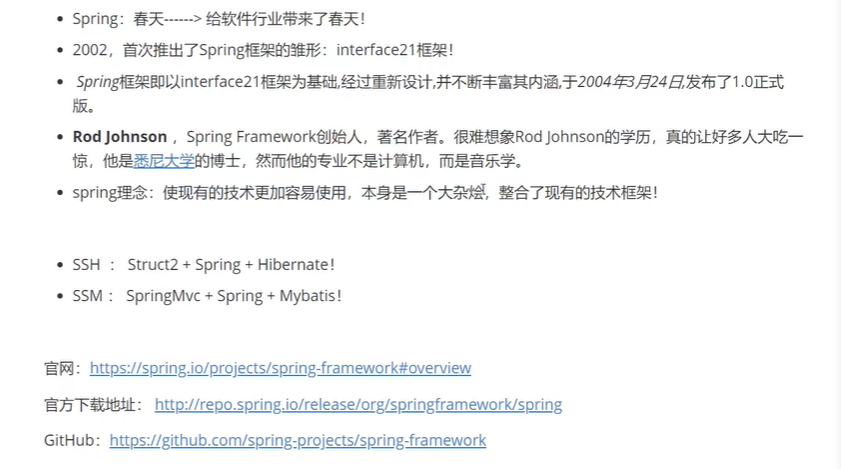
<!-- https://mvnrepository.com/artifact/org.springframework/spring-webmvc -->
<dependency>
    <groupid>org.springframework</groupid>
    <artifactid>spring-webmvc</artifactid>
    <version>5.3.9</version>
</dependency>

<!-- https://mvnrepository.com/artifact/org.springframework/spring-webmvc -->
<dependency>
    <groupid>org.springframework</groupid>
    <artifactid>spring-jdbc</artifactid>
    <version>5.3.9</version>
</dependency>
<!--beans文件-->
<!--?xml version="1.0" encoding="UTF-8"?-->
<beans xmlns="http://www.springframework.org/schema/beans" xmlns:xsi="http://www.w3.org/2001/XMLSchema-instance" xsi:schemalocation="http://www.springframework.org/schema/beans
        https://www.springframework.org/schema/beans/spring-beans.xsd">

    <bean id="..." class="...">
        <!-- collaborators and configuration for this bean go here -->
    </bean>

    <bean id="..." class="...">
        <!-- collaborators and configuration for this bean go here -->
    </bean>

    <!-- more bean definitions go here -->

</beans>
1.2 优点
- spring是一个开源的免费的框架(容器)!
- Spring是一个轻量级的、非入侵式的框架
- 控制反转(IOC),面向切面编程(AOP)
- 支持事务的处理,对框架整合的支持!
总结一句话:Spring就是一个轻量级的控制反转(IOC)和面向切面编程(AOP)的框架
1.3 组成
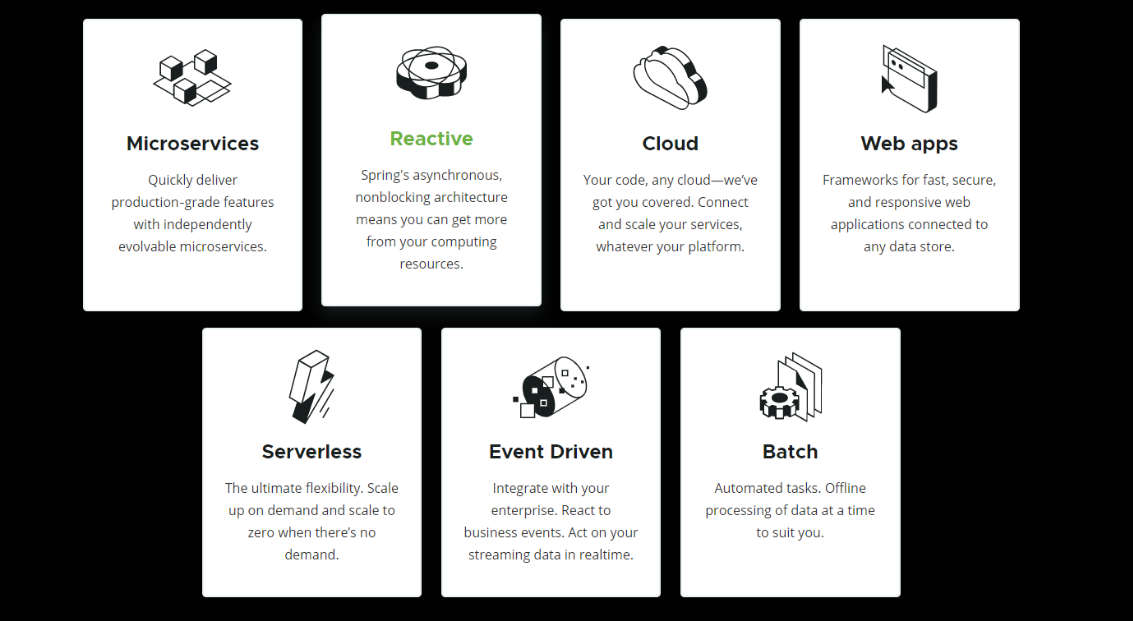
1.4 扩展
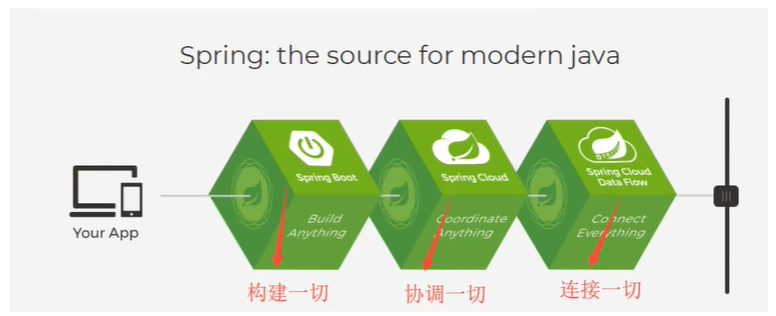
在Spring的官网有这个介绍:现代化的Java开发!说白就是基于Spring的开发!
-
Spring Boot
- 一个快速开发的脚手架
- 基于SpringBoot可以快速的开发单个微服务
- 约定大于配置
-
Spring Cloud
- SpringCloud是基于SpringBoot实现的
因为现在大多数公司都在使用SpringBoot进行快速开发,学习SpringBoot的前提,需要完全掌握SpringMVC!承上启下的作用!
弊端:发展了太久之后,违背了原来的原理!配置十分繁琐,人称:“配置地狱·······”
2、 IOC理论推导
1.USerDao 接口
2.UserDaoImpl 实现类
3.UserService 业务接口
4.UserServiceImpl 业务实现类
在我们之前的业务中,用户的需求可能会影响我们原来的代码,我们需要根据用户的需求去修改源代码!如果程序代码量十分打,修改一次的成本代价十分昂贵!
我们使用一个Set接口实现,已经发生了革命性的改变
    private UserDao userDao;

    //利用set进行动态实现值的注入!
    public void setUserDao(UserDao userDao) {
        this.userDao = userDao;
    }
- 之前,程序是主动创建对象!控制权在程序员手上!
- 使用set注入后,程序不在具有主动性,而是变成了被动的接受对象
这种思想,从本质上解决 了问题,我们程序员不用再去管理对象的创建了。系统的耦合性大大降低,可以更加专注业务的扩展
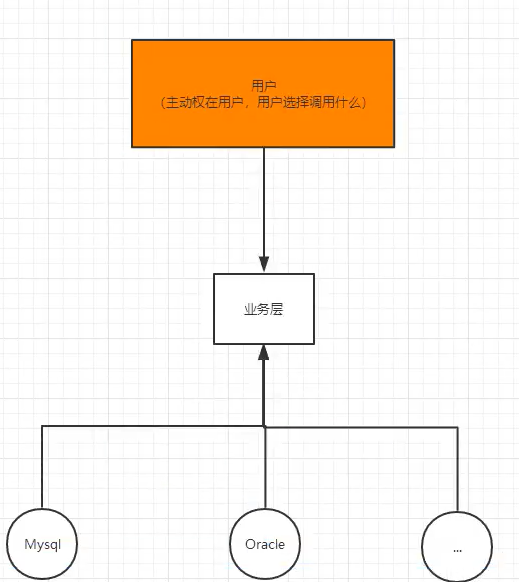
IOC本质

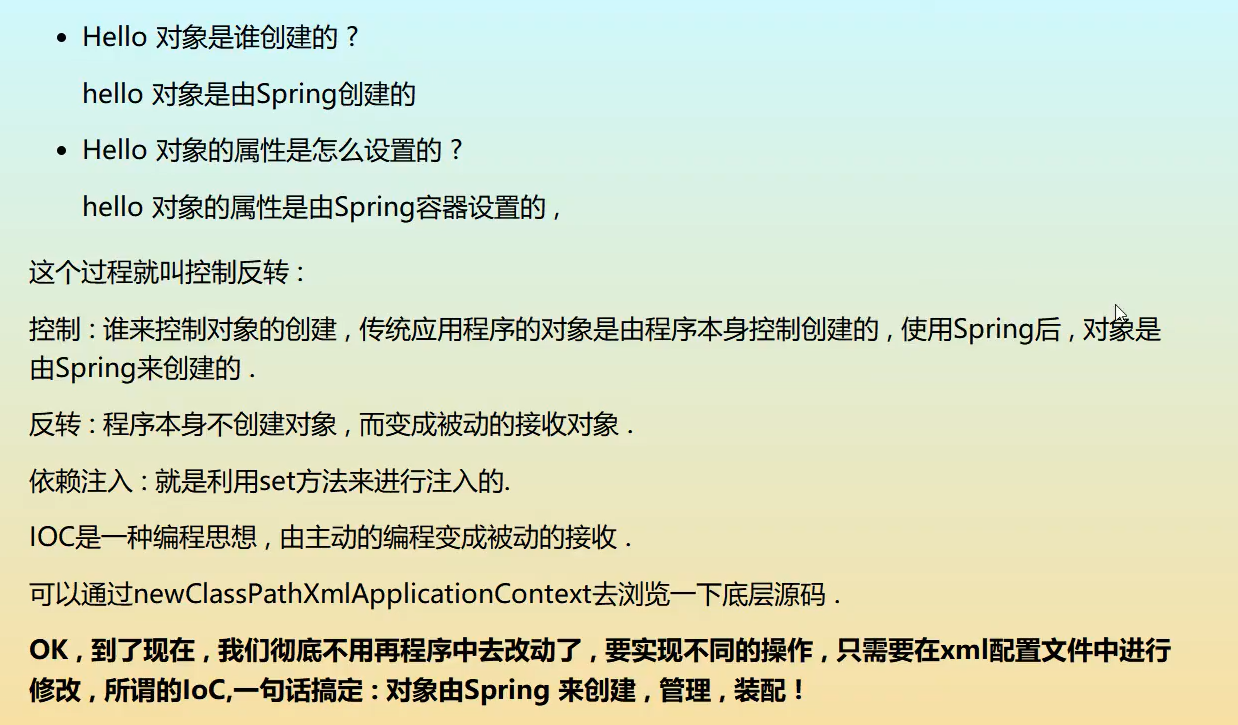
3、 HelloSpring
//获取Spring的上下文对象!
ApplicationContext app = new ClassPathXmlApplicationContext("beans.xml");

//我们的对象现在都在Spring中的管理,我们要使用,直接去里面取出来就可以
Hello hello = (Hello) app.getBean("hello");
System.out.println(hello.toString());
4、 IOC创建对象的方式
1.使用无参构造创建对象,默认!
<!--无参-->
<bean id="hello" class="com.zeng.pojo.Hello">
        <property name="str" value="Spring">
    </property></bean>
2.假设我们要使用有参构造创建对象
1.下标赋值
<!--下标赋值-->
<bean id="user" class="com.zeng.pojo.User">
    <constructor-arg index="0" value="Halo">
</constructor-arg></bean>
2.类型
<!--第二种类型不建议使用-->
<bean id="user" class="com.zeng.pojo.User">
    <constructor-arg type="java.lang.String" value="Halo">
</constructor-arg></bean>
3.参数名
 <!--第三种,直接通过参数名来设置-->
    <bean id="user" class="com.zeng.pojo.User">
        <constructor-arg name="name" value="Halo">
    </constructor-arg></bean>
总结:在配置文件被加载的时候,容器中管理的对象就已经初始化了!
5、 Spring配置
5.1 别名
<!--别名,如果添加了别名,我们也可以使用别名获取到这个对象--> <alias name="user" alias="userNew">
5.2 Bean的配置
<!-- id : bean 的唯一标识符,也就是相当于我们学的对象名 class : bean对象所对应的全限定名 :报名* 类型 name : 也是别名 --> <bean id="userT" class="com.zeng.pojo.UserT" name="user2 u1,u2;u3 u4"> <property name="name" value="Halo"> </property></bean>
5.3 import
这个import,一般用于团队开发使用,他 可以将多个配置文件,导入合并为一个
假设,现在项目中有多个开发,这三个人复制不同的类开发,不同的类需要注册在不同的bean中,我们可以利用import将所有人的beans.xml合并为一个总的!
- 张三
- 李四
- 王五
- applicationContext.xml
<import resource="beans.xml"> <import resource="beans2.xml"> <import resource="beans3.xml">
使用的时候,直接使用总的配置就可以了
6、 依赖注入
6.1 构造器注入
6.2 Set方式注入(重点)
- 依赖注入:Set注入!
- 依赖:bean对象的创建依赖于容器!
- 注入:bean对象中的所有属性,由容器来注入!
【环境搭建】
1.复杂类型
package com.zeng.pojo;public class Address { private String address; public String getAddress() { return address; } public void setAddress(String address) { this.address = address; }}
2.真实测试对象
package com.zeng.pojo;import java.util.*;public class Student { private String name; private Address address; private String[] books; private List<string> hobbys; private Map<string,string> card; private Set<string> games; private String wife; private Properties info;}
3.neams.xml
<!--?xml version="1.0" encoding="UTF-8"?--><beans xmlns="http://www.springframework.org/schema/beans" xmlns:xsi="http://www.w3.org/2001/XMLSchema-instance" xsi:schemalocation="http://www.springframework.org/schema/beans https://www.springframework.org/schema/beans/spring-beans.xsd"> <bean id="student" class="com.zeng.pojo.Student"> <!--第一种,普通值注入,value--> <property name="name" value="halo"> </property></bean></beans>
4.测试类
import com.zeng.pojo.Student;import org.springframework.context.ApplicationContext;import org.springframework.context.support.ClassPathXmlApplicationContext;public class MyTest { public static void main(String[] args) { ApplicationContext context = new ClassPathXmlApplicationContext("beans.xml"); Student student = (Student) context.getBean("student"); System.out.println(student.getAddress()); }}
完善注入信息
<!--?xml version="1.0" encoding="UTF-8"?--><beans xmlns="http://www.springframework.org/schema/beans" xmlns:xsi="http://www.w3.org/2001/XMLSchema-instance" xsi:schemalocation="http://www.springframework.org/schema/beans https://www.springframework.org/schema/beans/spring-beans.xsd"> <bean id="address" class="com.zeng.pojo.Address"> <property name="address" value="西安"> </property></bean> <bean id="student" class="com.zeng.pojo.Student"> <!--第一种,普通值注入,value--> <property name="name" value="halo"> <!--第二种,Bean注入,ref--> <property name="address" ref="address"> <!--数组注入,ref--> <property name="books"> <array> <value>红楼梦</value> <value>西游记</value> <value>水浒传</value> <value>三国演义</value> </array> </property> <!--List--> <property name="hobbys"> <list> <value>听歌</value> <value>敲代码</value> <value>看电影</value> </list> </property> <!--map--> <property name="card"> <map> <entry key="身份证" value="111111111111111"> <entry key="银行卡" value="222222222222222"> </entry></entry></map> </property> <!--set--> <property name="games"> <set> <value>LOL</value> <value>DNF</value> <value>BOB</value> </set> </property> <!--null--> <property name="wife"> <null> </null></property> <!--properties key=value--> <property name="info"> <props> <prop key="学号">202020202020</prop> <prop key="password">202020202020</prop> </props> </property> </property></property></bean></beans>
6.3 扩展方式注入
我们可以使用p命名空间和c命名空间进行注入
官方解释:
p命名空间:带有 p 命名空间的 XML 快捷方式
p-namespace 允许您使用bean元素的属性(而不是嵌套 <property>元素)来描述协作 bean 的属性值,或两者兼而有之。
Spring 支持具有命名空间的可扩展配置格式,这些格式基于 XML 模式定义。beans本章讨论的配置格式是在 XML Schema 文档中定义的。但是,p 命名空间并未在 XSD 文件中定义,仅存在于 Spring 的核心中。
以下示例显示了两个解析为相同结果的 XML 片段(第一个使用标准 XML 格式,第二个使用 p 命名空间):
<beans xmlns="http://www.springframework.org/schema/beans" xmlns:xsi="http://www.w3.org/2001/XMLSchema-instance" xmlns:p="http://www.springframework.org/schema/p" xsi:schemalocation="http://www.springframework.org/schema/beans https://www.springframework.org/schema/beans/spring-beans.xsd"> <bean name="john-classic" class="com.example.Person"> <property name="name" value="John Doe"> <property name="spouse" ref="jane"> </property></property></bean> <bean name="john-modern" class="com.example.Person" p:name="John Doe" p:spouse-ref="jane"> <bean name="jane" class="com.example.Person"> <property name="name" value="Jane Doe"> </property></bean></bean></beans>
c命名空间:
与带有 p-namespace的XML Shortcut类似,Spring 3.1 中引入的 c-namespace 允许内联属性来配置构造函数参数而不是嵌套constructor-arg元素。
下面的示例使用c:命名空间来做与 from Constructor-based Dependency Injection相同的事情 :
<beans xmlns="http://www.springframework.org/schema/beans" xmlns:xsi="http://www.w3.org/2001/XMLSchema-instance" xmlns:c="http://www.springframework.org/schema/c" xsi:schemalocation="http://www.springframework.org/schema/beans https://www.springframework.org/schema/beans/spring-beans.xsd"> <bean id="beanTwo" class="x.y.ThingTwo"> <bean id="beanThree" class="x.y.ThingThree"> <!-- traditional declaration with optional argument names --> <bean id="beanOne" class="x.y.ThingOne"> <constructor-arg name="thingTwo" ref="beanTwo"> <constructor-arg name="thingThree" ref="beanThree"> <constructor-arg name="email" value="something@somewhere.com"> </constructor-arg></constructor-arg></constructor-arg></bean> <!-- c-namespace declaration with argument names --> <bean id="beanOne" class="x.y.ThingOne" c:thingtwo-ref="beanTwo" c:thingthree-ref="beanThree" c:email="something@somewhere.com"></bean></bean></bean></beans>
<!--?xml version="1.0" encoding="UTF-8"?--><beans xmlns="http://www.springframework.org/schema/beans" xmlns:xsi="http://www.w3.org/2001/XMLSchema-instance" xmlns:p="http://www.springframework.org/schema/p" xmlns:c="http://www.springframework.org/schema/c" xsi:schemalocation="http://www.springframework.org/schema/beans https://www.springframework.org/schema/beans/spring-beans.xsd"> <!--p命名空间,可以直接注入属性的值:property--> <bean id="user" class="com.zeng.pojo.User" p:name="Halo" p:age="108"> <!--c命名空间,通过构造器注入:construct-args--> <bean id="user2" class="com.zeng.pojo.User" c:name="c" c:age="50"></bean></bean></beans>
测试:
@Test public void test2() { ApplicationContext context = new ClassPathXmlApplicationContext("userBeans.xml"); User user =context.getBean("user2",User.class); System.out.println(user); }
注意点:p命名和c命名空间不能直接使用,需要导入xml约束
xmlns:p="http://www.springframework.org/schema/p"xmlns:c="http://www.springframework.org/schema/c"
6.4 bean的作用域

1.单例模式(Spring默认机制)
<bean id="user2" class="com.zeng.pojo.User" c:name="c" c:age="50" scope="singleton">
2.原型模式:每次从容器中get的时候,都会产生一个新对象!
<bean id="accountService" class="com.something.DefaultAccountService" scope="prototype">
3.其余的request、
session、application、这些个只能在web开发中使用到
7、 Bean自动装配
- 自动装配是Spring满足bean依赖一种方式!
- Spring会在上下文中自动寻找,并自动给bean装配属性!
在Spring中有三种装配的方式
- 在xml中显示的配置
- 在java中显示配置
- 隐式的自动装配bean【重要】
7.1 测试
环境搭建:一个人有两个宠物
7.2 ByName自动装配
<!--Bean自动装配 byName:会自动在容器上下文中查找,和自己对象set方法后面的值对应的beanid! --> <bean id="people" class="com.zeng.pojo.People" autowire="byName"> <property name="name" value="Halo">
7.3 ByType自动装配
<bean id="cat" class="com.zeng.pojo.Cat"> <bean id="dog" class="com.zeng.pojo.Dog"><!--Bean自动装配 byType:会自动在容器上下文中查找,和自己对象属性类型相同的bean!(可以省略id) --> <bean id="people" class="com.zeng.pojo.People" autowire="byType"> <property name="name" value="Halo"> </property></bean>
小结:
- byName的时候,需要保证所以bean的id唯一,并且这个bean需要和自动注入的属性的set方法的值一致~
- byType的时候,需要保证所有bean的class唯一,并且这个bean需要和自动注入的属性的类型一致!
7.4 使用注解实现自动装配
jdk1.5支持的注解,Spring2.5就支持注解了!
基于注释配置的引入提出了这样一个问题,即这种方法是否比 XML"更好"。简短的回答是"视情况而定"。长答案是,每种方法都有其利弊,通常,由开发人员决定哪种策略更适合他们。由于它们的定义方式,注释在申报中提供了大量上下文,导致配置更短、更简洁。但是,XML 擅长在不接触源代码或重新编译组件的情况下连接组件。一些开发人员更喜欢将布线靠近源,而另一些开发人员则认为注释类不再是 POPO,此外,配置变得分散且难以控制。
无论选择如何,Spring 都可以同时适应这两种风格,甚至将它们混合在一起。值得指出的是,通过其JavaConfig选项,Spring 允许以非侵入性的方式使用注释,而无需触及目标组件源代码,并且,在工具方面,所有配置样式都由Eclipse 的弹簧工具支持。
要使用注解须知:
1.导入约束。context约束
2.配置注解的支持context:annotation-config【重要!】
<!--?xml version="1.0" encoding="UTF-8"?--><beans xmlns="http://www.springframework.org/schema/beans" xmlns:xsi="http://www.w3.org/2001/XMLSchema-instance" xmlns:context="http://www.springframework.org/schema/context" xsi:schemalocation="http://www.springframework.org/schema/beans https://www.springframework.org/schema/beans/spring-beans.xsd http://www.springframework.org/schema/context https://www.springframework.org/schema/context/spring-context.xsd"> <context:annotation-config></context:annotation-config></beans>
@Autowired
直接在属性上使用即可!也可以在set方式上使用!
使用Autowired我们可以不用编写Set方法了,前提是你这个自动装配的属性在IOC(Spring) 容器中存在,且符合名字byname!
科普:
@Nullable 字段标记了这个注解,说明这个字段可以为null
public @interface Autowired { boolean required() default true;}
测试代码
public class People { //如果显示定义了Autowired的required属性为false,说明这个对象可以为null,否则不允许为空 @Autowired(required = false) private Cat cat; @Autowired private Dog dog; private String name;}
如果@Autowired自动装配的环境比较复杂,自动装配无法通过一个注解【@Autowired】完成的时候,我们可以使用@Qualifier(value="xxx")去配置@Autowired的使用,制定一个唯一的bean对象注入!
public class People { //如果显示定义了Autowired的required属性为false,说明这个对象可以为null,否则不允许为空 @Autowired(required = false) @Qualifier(value="cat111") private Cat cat; @Autowired @Qualifier(value="dog222") private Dog dog; private String name;
@Resource注解
public class People { @Resource(name = "cat2") private Cat cat; @Resource private Dog dog;
小结:
@Resource和@Autowired的区别:
- 都是自动装配的,都可以放在属性字段上
- @Autowired通过byname的方式实现,而且必须要求这个对象存在!
- @Resource默认通过byname的方式实现,如果找不到名字,则通过byType实现!如果两个都找不到的情况下,就报错~【常用】
- 执行顺序不同:@Autowired通过byType的方式实现。Resource默认通过byname的方式实现
8、 注解开发
在Spring4之后,要使用注解开发,必须要保证apo的包的导入了
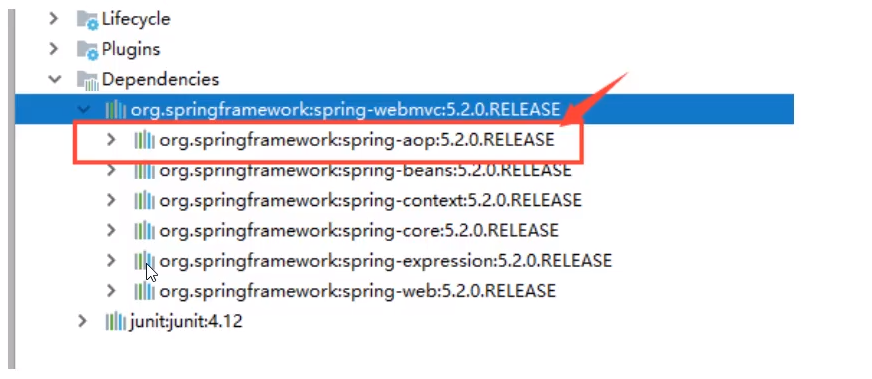
使用注解需要导入context约束,增加注解的支持!
1.bean
2.属性如何注入
//等价与 <bean id="user" class="com.zeng.pojo.User">@Componentpublic class User { /*<bean id="user" class="com.zeng.pojo.User"> <property name="name" value="娃娃"> </property></bean>*/ public String name; @Value("娃娃") public void setName(String name) { this.name = name; }}
3.衍生的注解
@Component有几个衍生注解,我们在web开发中,会按照mvc三层结构分层!
-
dao【@Repository】
-
service【@Service】
-
controller【@Controller】
这四个注解功能都是一样的,都是代表将某个类注册到Spring中,装配到Bean
4.自动装配
- @Autowired : 自动装配通过类型、名字
如果Autowired不能唯一自动装配上属性,则需要通过@Qualifier(value="xxx") - @Nullable : 字段标记了这个注解,说明这个字段可以为null
- @Resource : 自动装配通过名字,类型。
- @Component :组件,放在类上,说明这个类被Spring管理了,就bean!
5.作用域
//等价与 <bean id="user" class="com.zeng.pojo.User">@Component@Scope("singleton")//prototypepublic class User { /*<bean id="user" class="com.zeng.pojo.User"> <property name="name" value="娃娃"> </property></bean>*/ public String name; @Value("娃娃") public void setName(String name) { this.name = name; }}
6.小结
xml与注解:
- xml更加万能,适合于任何场合!维护简单方便
- 注解不是自己类使用不了,维护相对复杂
xml与注解最佳实践:
- xml用来管理bean
- 注解值负责完成属性的注入;
- 我们在使用的过程中,只需要注意一个问题:必须让注解生效,就需要开启注解的支持
<!--指定要扫描的包,这个包下的注解就会生效--> <context:component-scan base-package="com.zeng.pojo"> <context:annotation-config>
9、 使用Java的方式配置Spring
我们现在要完全不使用Spring 的xml配置了,全权交给Java来做!
JavaConfig是Spring的一个子项目,在Spring4之后,它成为一个核心功能
实体类
//这里这个注解的意思,就是说明这个类被Spring接管了,注册到了容器中@Componentpublic class User { private String name; public String getName() { return name; } @Value("hALO") public void setName(String name) { this.name = name; } @Override public String toString() { return "User{" +0 "name='" + name + '\'' + '}'; }}
配置文件
package com.zeng.config;import com.zeng.pojo.User;import org.springframework.context.annotation.Bean;import org.springframework.context.annotation.ComponentScan;import org.springframework.context.annotation.Configuration;//这个也会Spring容器托管,注册到容器中,因为他本来就是一个@Component//@Configuration代表这是一个配置类,就和我们之前看的beans.xml@Configuration@ComponentScan("com.zeng.pojo")@import(myconfig.class)public class myconfig { //注册一个bean,就相当于我们之前写的一个bean标签 //这个方法的名字,就相当于bean标签中的id属性 //这个方法的返回值,就相当于bean标签中的class属性 @Bean public User getUser() { return new User();//就是要返回注入到bean的对象! }}
测试类
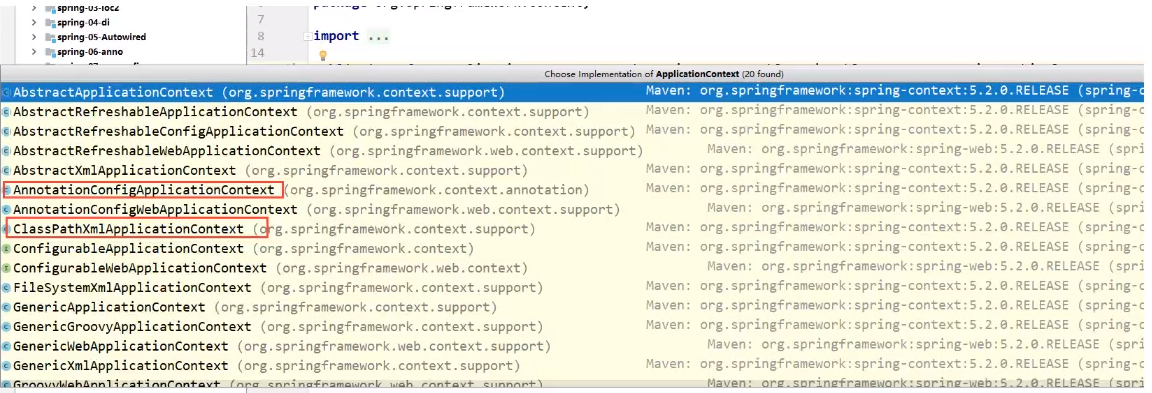
import com.zeng.config.myconfig;import com.zeng.pojo.User;import org.springframework.context.ApplicationContext;import org.springframework.context.annotation.AnnotationConfigApplicationContext;public class MyTest { public static void main(String[] args) { //如果完全使用了配置类方式去做,我们就只能通过AnnotationConfig上下文来获取容器,通过配置类的class对象加载! ApplicationContext context = new AnnotationConfigApplicationContext(myconfig.class); User getUser = (User) context.getBean("getUser"); System.out.println(getUser.getName() ); }}
这种纯java的配置方式,在SpringBoot中随处可见
10、代理模式
为什么学习代理模式?因为这是SpringAOP的底层!【SpringAOP和SpringMVC】
代理模式的分类
- 静态代理
- 动态代理
10.1 静态代理
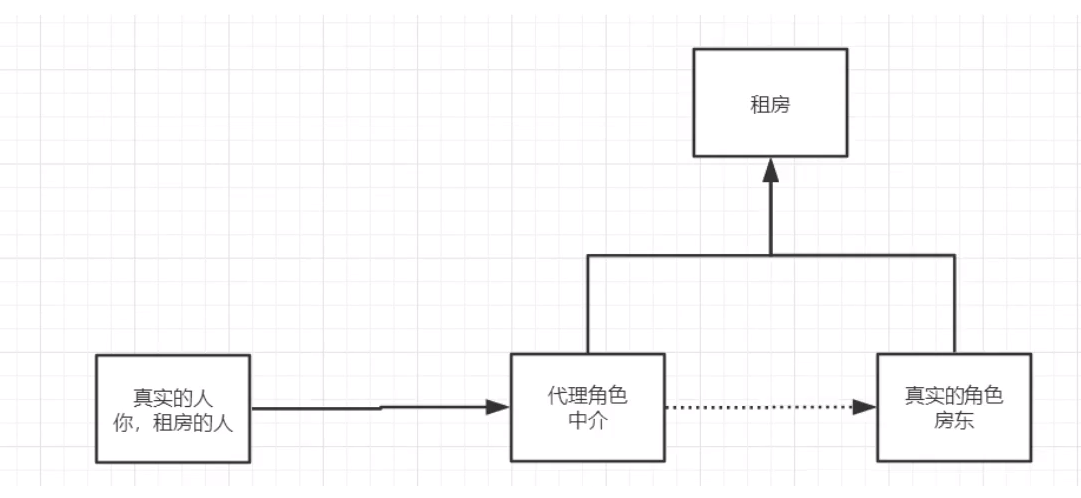
角色分析:
抽象角色:一般会使用接口或者抽象类来解决
真实角色:被代理的角色
代理角色:代理真实模式,代理真实模式后
客户:访问代理对象的人!
代理步骤:
-
接口
//租房public interface Rent { public void rent();}2.真色角色
public class Host implements Rent { public void rent() { System.out.println("房东要出租房子!"); }}3.代理角色
public class Proxy implements Rent{ private Host host; public Proxy() { } public Proxy(Host host) { this.host = host; } public void rent() { host.rent(); hetong(); seeHourse(); fare(); } //看房 public void seeHourse() { System.out.println("中介带你看房"); } //看房 public void hetong() { System.out.println("签租赁合同"); } //看房 public void fare() { System.out.println("收中介费"); }}4.客户端访问代理角色
public class Client { public static void main(String[] args) { //房东要租房子 Host host = new Host(); //代理。中介帮房东租房子,但是呢?代理角色一般会有一些附属操作 Proxy proxy = new Proxy(host); //你不用面对房东,直接找中介租房即可 proxy.rent(); }}代理模式的好处:
- 可以使真色角色的操作更加纯粹!不用去关注一些公共的业务
- 公共也就交给代理角色!实现了业务的分工!
- 公共业务发生扩展的时候,方便集中管理
缺点:
一个真实角色就会产生一个代理角色;代码量会翻倍,开发效率会变低~
10.2 加深理解
代码:
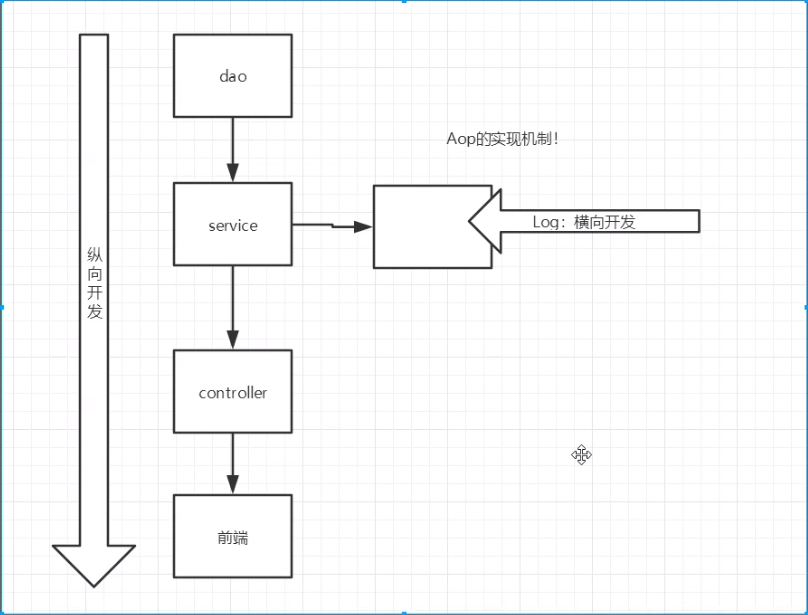
聊聊AOP
10.3 动态代理
- 动态代理和静态代理角色一样
- 动态代理的代理类是动态生成的,不是我们直接写好的!
- 动态代理分为两大类:基于接口的动态代理,基于类的动态代理
- 基于接口--JDK动态代理
- 基于类:cglib
- java字节码实现:javasist
需要了解连个类:Proxy:代理,InvocationHandler:调用处理程序
动态处理的好处:
- 可以使真实角色的操作更加纯粹!不用去关注一些公共的业务
- 公共也就交给代理角色!实现了业务的分工!
- 公共业务发生扩展的时候,方便集中管理
- 一个动态代理类代理的是一个接口,一般就是对应的一类业务
- 一个动态代理类可以代理多个类,只要是实现了同一个接口即可
11、 AOP
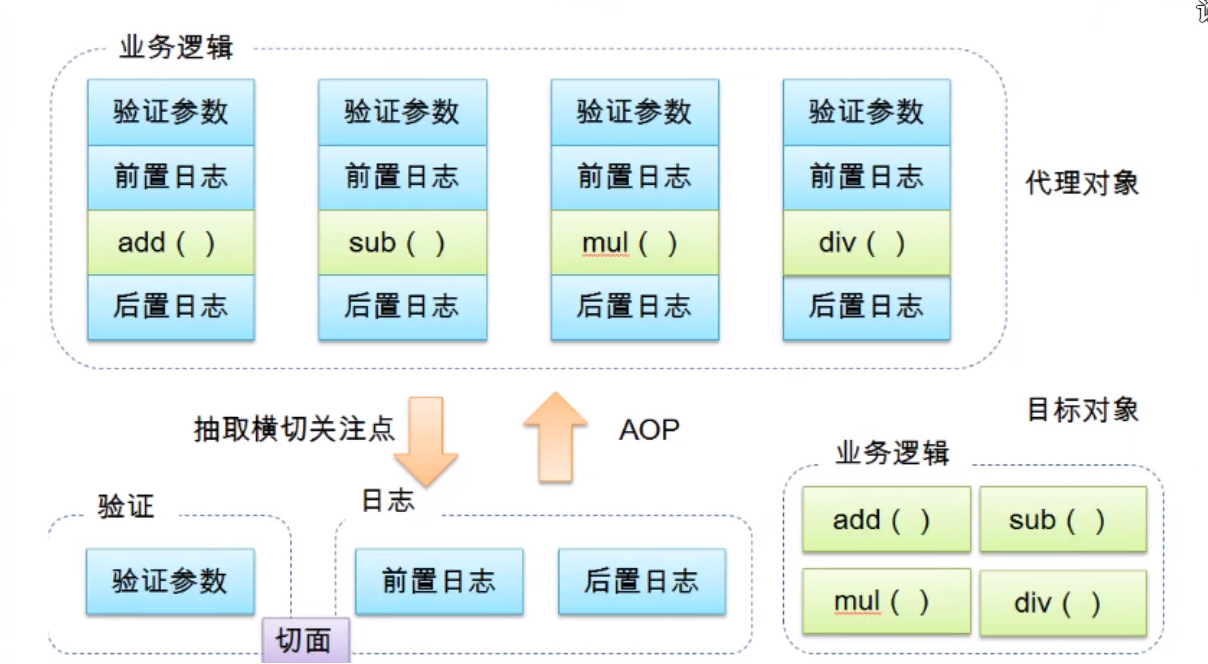
11.1 什么是AOP

11.2 Aop在Spring中的作用
提供生命式事务:允许用户自定义切面
- 横切关注点:跨越应用程序多个模块的方法或功能。即是,与我们业务逻辑无关的,但是我们需要关注的部分,就是横切关注点。如日志、安全、缓存、事务等等。。。
- 切面(ASPECT):切面关注点被模块化的特殊对象。即,他是一个类。
- 通知(Advice):切面必须要完成的工作。即,他是类中的一个方法。
- 目标(Target):被通知的对象。
- 代理(Proxy):向目标对象应用通知之后创建的对象。
- 切入点(PiontCut):切面通知执行的“地点”的定义。
- 连接点(jointPoint):与切入点匹配的执行点。
11.3 使用Spring实现Aop
【重点】使用AOP置入,需要导入一个依赖包!
<!-- https://mvnrepository.com/artifact/org.aspectj/aspectjweaver --><dependency> <groupid>org.aspectj</groupid> <artifactid>aspectjweaver</artifactid> <version>1.9.7</version> <scope>runtime</scope></dependency>
方式一:使用Spring的API接口【主要SpringAPI接口实现】
方式二:使用自定义来实现AOP【主要切面定义】
方式三:使用注解实现
<!--?xml version="1.0" encoding="UTF-8"?--><beans xmlns="http://www.springframework.org/schema/beans" xmlns:xsi="http://www.w3.org/2001/XMLSchema-instance" xmlns:aop="http://www.springframework.org/schema/aop" xsi:schemalocation="http://www.springframework.org/schema/beans https://www.springframework.org/schema/beans/spring-beans.xsd http://www.springframework.org/schema/aop https://www.springframework.org/schema/aop/spring-aop.xsd"> <!--注册bean--> <bean id="userService" class="com.zeng.service.UserServiceImpl"> <bean id="log" class="com.zeng.log.Log"> <bean id="afterLog" class="com.zeng.log.AfterLog"> <!--方式一:使用原生Spring API接口--> <!--配置aop:需要导入aop的约束--> <aop:config> <!--切入点:expression:表达式--> <aop:pointcut id="pointcut" expression="execution(* com.zeng.service.UserServiceImpl.*(..))"> <!--执行环绕增加--> <aop:advisor advice-ref="log" pointcut-ref="pointcut"> <aop:advisor advice-ref="afterLog" pointcut-ref="pointcut"> </aop:advisor></aop:advisor></aop:pointcut></aop:config> <!--方式二:自定义类--> <bean id="diy" class="com.zeng.diy.DiyPointCut"> <aop:config> <!--自定义切面,ref 要引用的类--> <aop:aspect ref="diy"> <!--切入点--> <aop:pointcut id="point" expression="execution(* com.zeng.service.UserServiceImpl.*(..))"> <!--通知--> <aop:before method="before" pointcut-ref="point"> <aop:after method="after" pointcut-ref="point"> </aop:after></aop:before></aop:pointcut></aop:aspect> </aop:config> <!--方式三--> <bean id="AnnotationPointCut" class="com.zeng.diy.AnnotationPointCut"> <!--开启注解支持! JDK(默认 proxy-target-class="false") cglib(proxy-target-class="true")--> <aop:aspectj-autoproxy></aop:aspectj-autoproxy></bean></bean></bean></bean></bean></beans>
12、 整合Mybatis
步骤:
1.导入相关jar包
- junit
- mybatis
- mysql数据库
- spring相关的
- aop织入
- mybatis-spring【new】
2.编写配置文件
3.测试
12.1 回忆Mybatis
1.编写实体类
2.编写核心配置文件
3.编写接口
4.编写Mapper.xml
5.编写测试类
12.2 Mybatis-spring
1.编写数据源配置
2.sqlSessionFactory
3.sqlSessionTemplate
4.需要给接口加实现类【】
5.将自己写的实现类,注入到Spring中
6.测试使用即可!
13、 声明事务
1、回顾事务
要么都成功,要么都失败!
事务在项目开发中,十分重要,涉及到数据的一致性问题,不能马虎!
确保完整性和一致性;
事务ACID原则
- 原子性
- 一致性
- 隔离性
- 多个业务可能操作同一个资源,防止数据损坏
- 持久性
- 事务一旦提交,无论系统发生什么问题,结果都不会在被影响,被持久化的写到存储器中!
2、spring中的事务管理
声明式事务:AOP
编程式事务:需要在代码中,进行事务的管理
思考:
为什么需要事务?
- 如果不需要配置事务,可能存在数据提交不一致的情况下;
- 如果我们不在Spring中去配置声明式事务,我们就需要在代码中收到配置事务!
- 事务在项目的开发中十分重要,设计到数据的一致性和完整性问题,不容马虎!
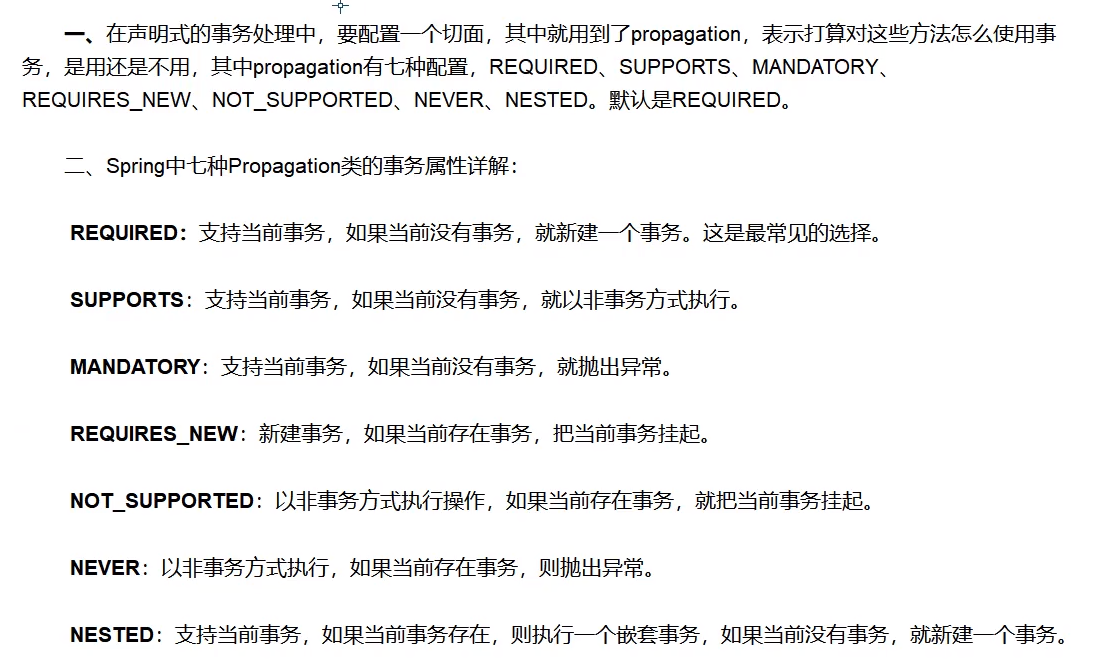
编织事务:
<!--配置声明式事务--> <bean id="transactionManager" class="org.springframework.jdbc.datasource.DataSourceTransactionManager"> <property name="dataSource" ref="dataSource"> </property></bean> <!--结合AOP实现事务的织入--> <!--配置事务通知:--> <tx:advice id="txAdvice" transaction-manager="transactionManager"> <!--给哪些方法配置事务--> <!--配置事务的传播特效:new propagation= --> <tx:attributes> <tx:method name="add" propagation="REQUIRED"> <tx:method name="delete" propagation="REQUIRED"> <tx:method name="update" propagation="REQUIRED"> <tx:method name="query" read-only="true"> <tx:method name="*" propagation="REQUIRED"> </tx:method></tx:method></tx:method></tx:method></tx:method></tx:attributes> </tx:advice> <!--配置事务切入--> <aop:config> <aop:pointcut id="txPiontcut" expression="execution(* com.zeng.mapper.*.*(..))"> <aop:advisor advice-ref="txAdvice" pointcut-ref="txPiontcut"> </aop:advisor></aop:pointcut></aop:config>
</context:annotation-config></context:component-scan></context:annotation-config></string,string>

 浙公网安备 33010602011771号