【python+Fiddler+夜神模拟器+Mongodb】抖音1w+账号的批量数据爬取+数据清洗+数据分析
1,用Fiddler和夜神模拟器进行抓包
Fiddler+夜神模拟器+xposed+justTrustMe手机抖音抓包
2,找到所需内容的抓包信息
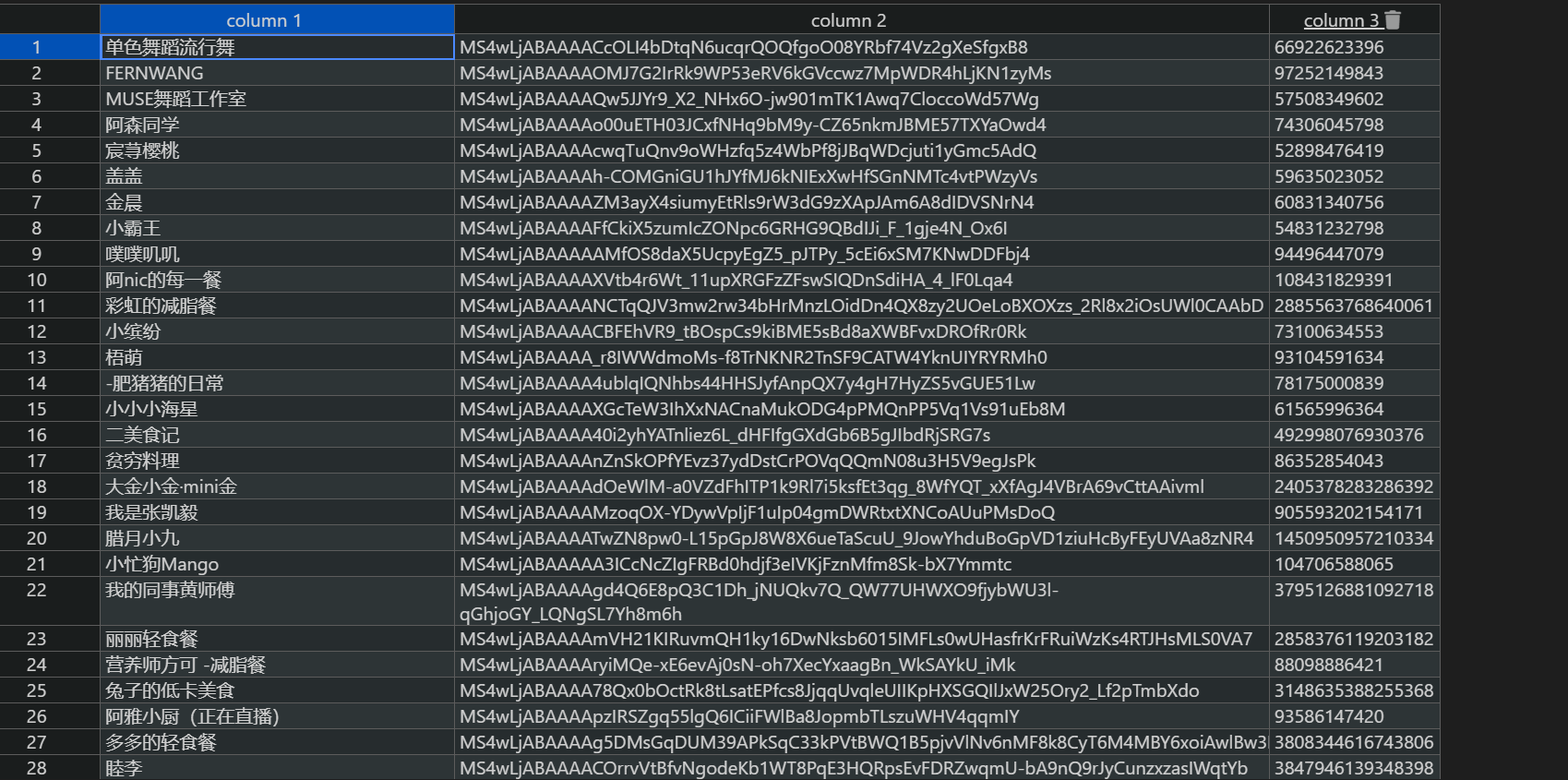
1,找到不同类别的账号ID
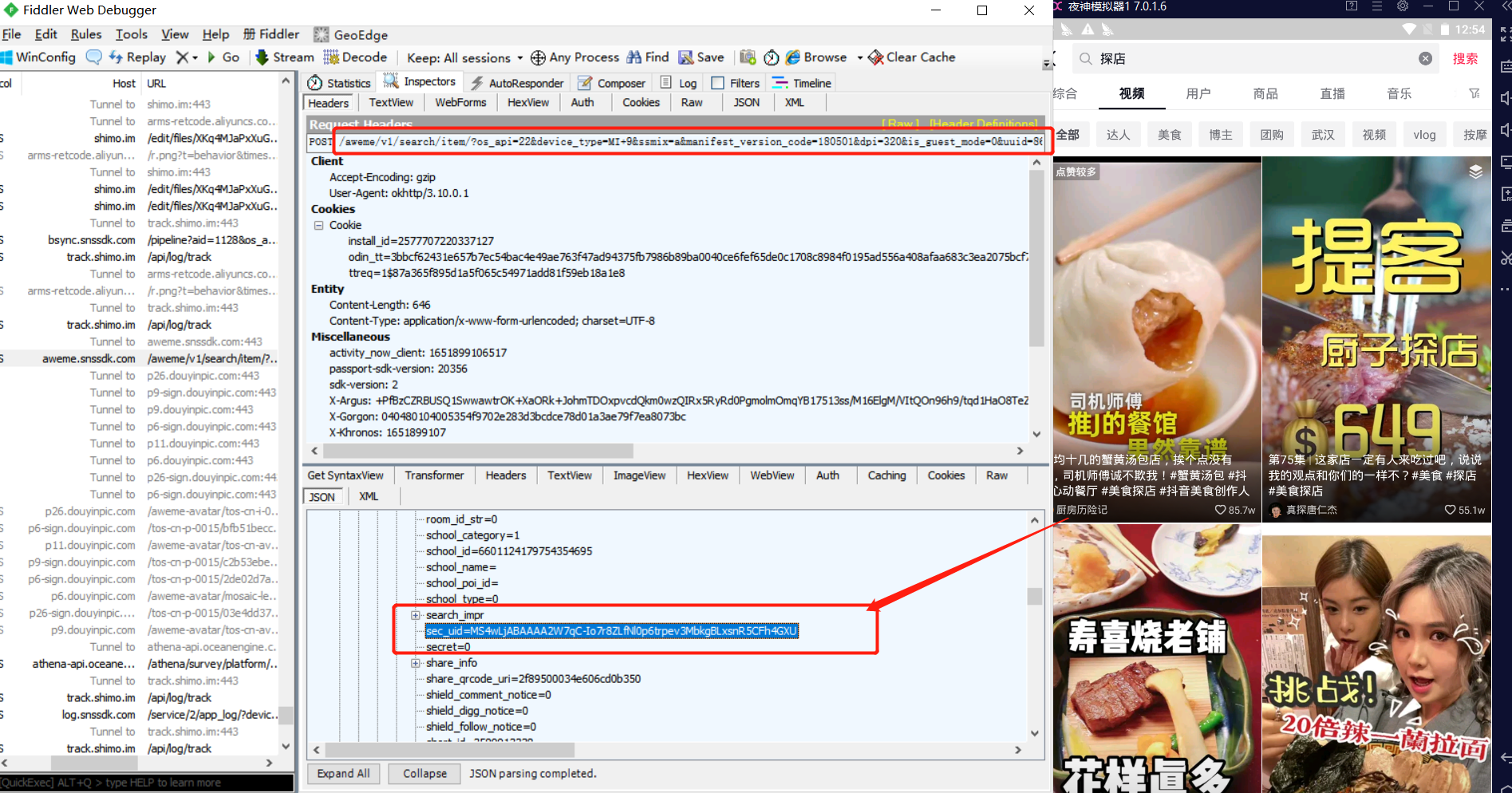
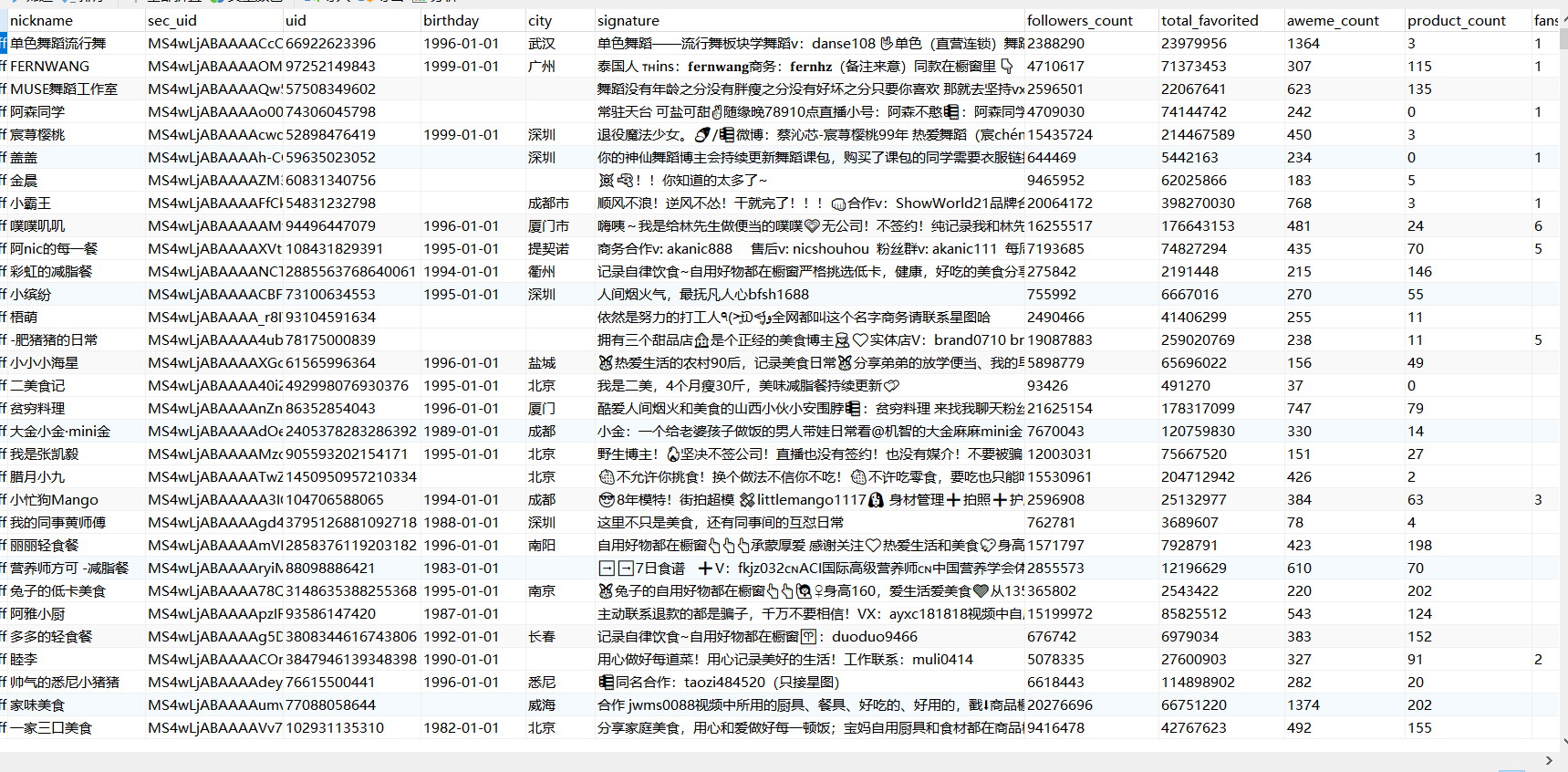
2,单一账号下的昵称、简介、关注数、点赞数、粉丝数数据
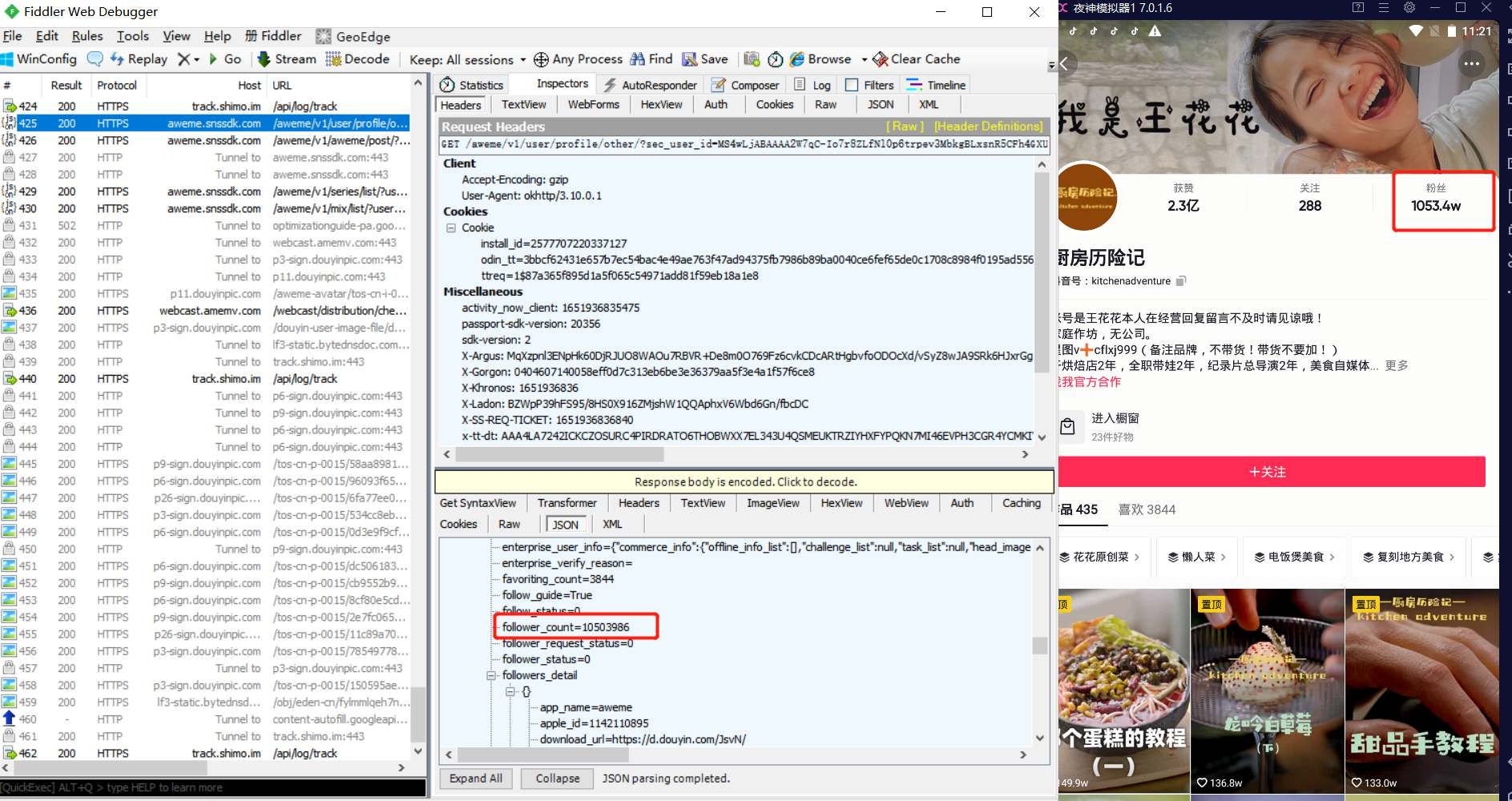
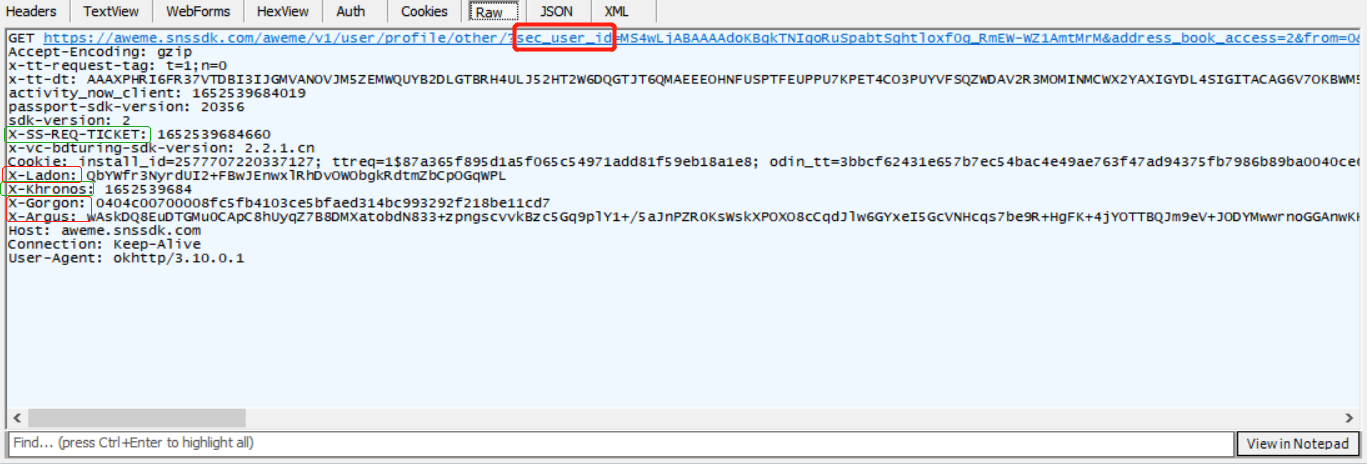
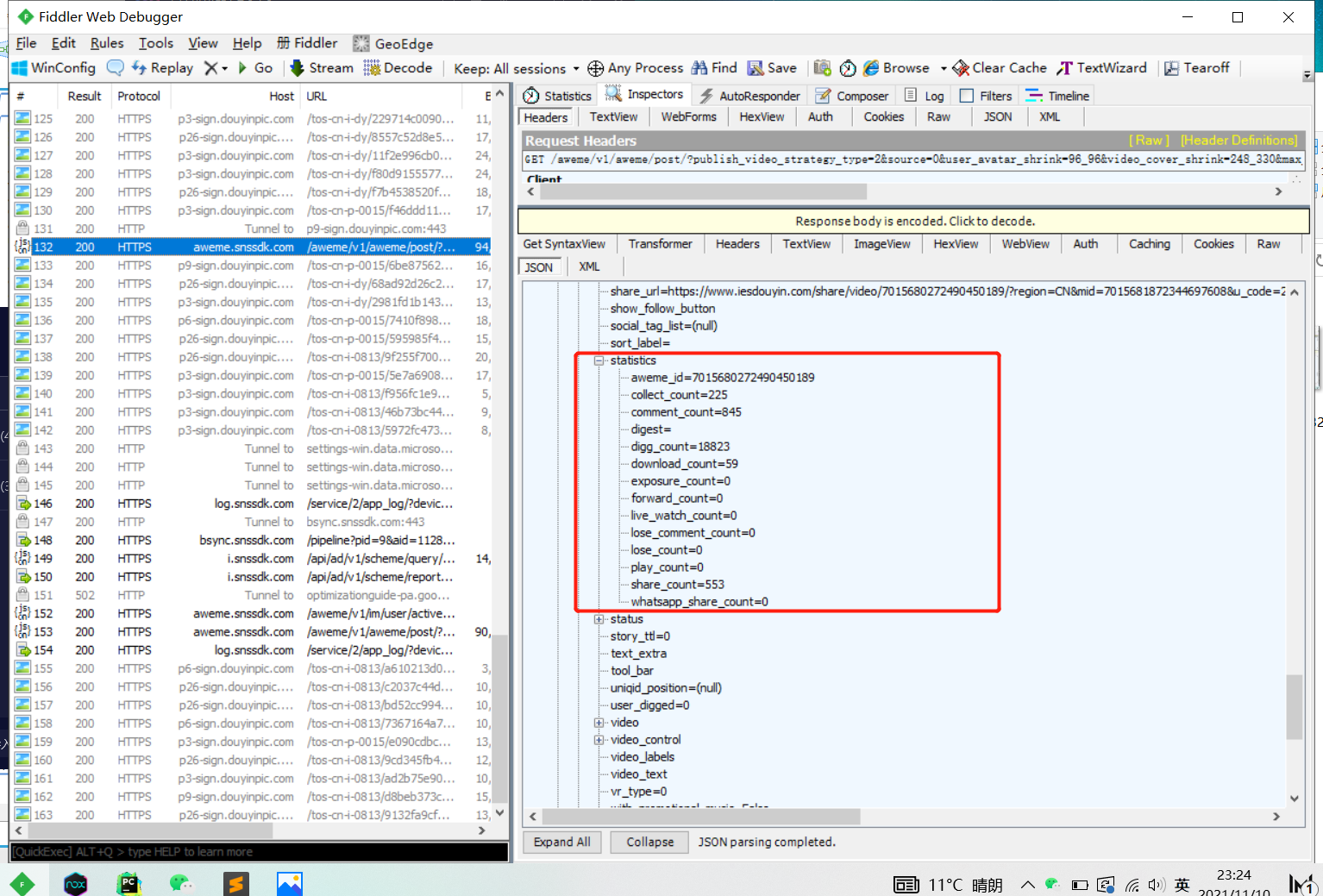
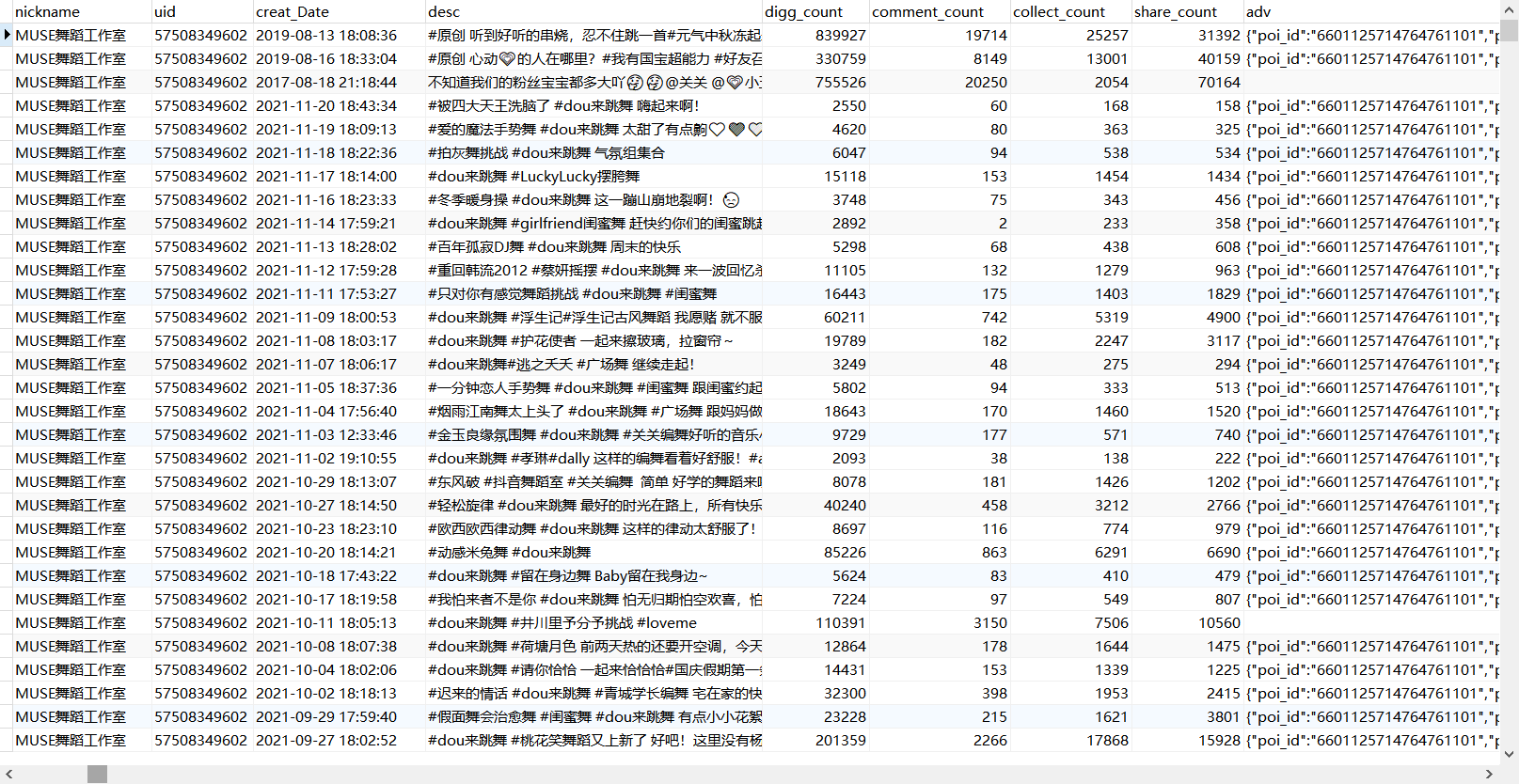
3.抖音账号下所有视频的日期、点赞数、评论数、收藏数、分享数
抖音账号下的视频信息,抓包发现是一个POST请求
/aweme/v1/aweme/post/?publish_video_strategy_type=2&source=0&user_avatar_shrink=96_96&video_cover_shrink=248_330&max_cursor=
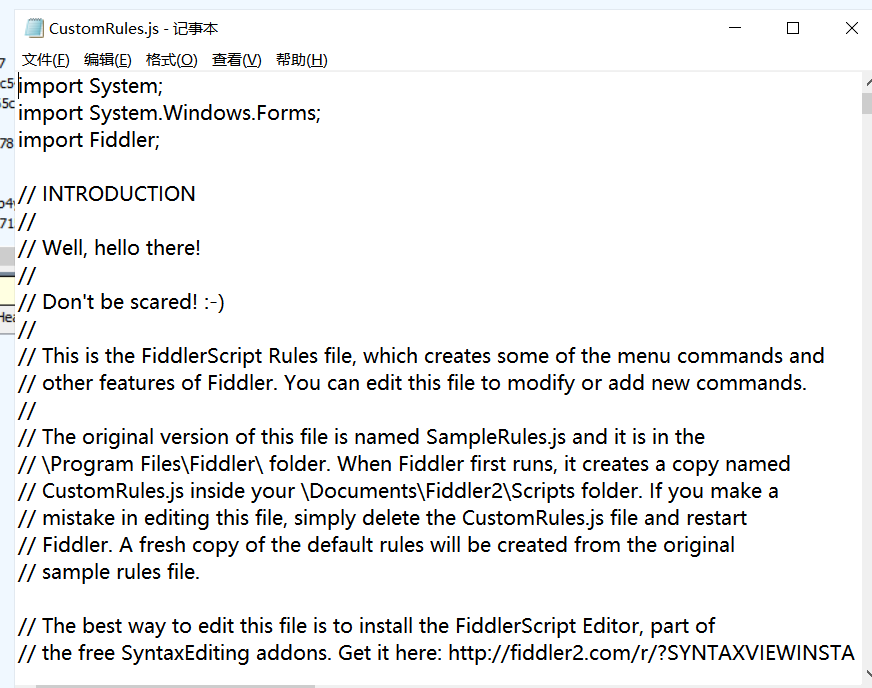
1,fiddler识别/aweme/v1/search/item/的包数据,
       //过滤无关请求,只关注特定请求返回的信息

   if (oSession.fullUrl.Contains("/aweme/v1/search/item/")) {

            oSession.utilDecodeResponse();

            //消除保存的请求可能存在乱码的情况

            var fso;

            var file;

            fso = new ActiveXObject("Scripting.FileSystemObject");

            //文件保存路径,可自定义

            file = fso.OpenTextFile("D:/douyin_data/douyin_user_id/response.txt",8 ,true, true);

            file.writeLine(oSession.GetResponseBodyAsString());

            file.close();

        }
2,通过uiautomator2进行自动化搜索关键词
在搜索过程中,fiddler会自动将出现的/aweme/v1/search/item/返回的数据保存到本地文件,自动搜索代码如下:
import uiautomator2 as u2
import time
d=u2.connect()
#创建一个已搜索过的关键词的文件,防止重复搜索
open('D:/douyin_data/douyin_user_id/keyword_used.txt','a')
#读取关键词文件,开始逐条搜索获取视频账号ID
with open('D:/douyin_data/douyin_user_id/keyword.txt','r',encoding='utf-8') as f:
    for i in f:
        print("正在搜索:"+i)
        # 判断该关键词是否历史搜索过,是则跳过,否则开始搜索
        with open('D:/douyin_data/douyin_user_id/keyword_used.txt', 'r',encoding='utf-8') as s:
            txt = s.read()
        if i in txt:
            print("该关键词历史已搜索,搜索下个关键词")
            pass
        else:
            try:
                #启动模拟器的抖音应用
                d.app_start('com.ss.android.ugc.aweme')
                time.sleep(60)#需要一定的等待时间,防止卡顿
                d(description="搜索").click()#找到并点击搜索框
                time.sleep(10)
                d.set_fastinput_ime(True)#切换成FastInputIME输入法
                d.send_keys(i)#向搜索框输入关键词
                d.set_fastinput_ime(False) # 输入法用完关掉
                d(text='搜索').click()#点击搜索按钮
                time.sleep(20)
                d(text='视频').click()#点击视频按钮
                time.sleep(15)
                #搜索成功,写入已搜索关键词文件
                with open('D:/douyin_data/douyin_user_id/keyword_used.txt','a',encoding='utf-8') as f:
                    f.write(i+'\n')

                #向上滑动的动作重复40下,每次间隔3s
                for i in range(0,40):
                    d.swipe_ext("up")
                    time.sleep(3)
                d.app_stop('com.ss.android.ugc.aweme')
                #关闭抖音应用
            except Exception as err: #若中间出现异常卡顿情况,则关闭应用,for循环重启应用重新检索关键词
                print("出现异常,关闭程序")
                print(err)
                d.app_stop('com.ss.android.ugc.aweme')
import csv
import json


#将信息储存在文件里
def downmeg(list,location):
    with open(location, 'a', newline='',encoding='utf-8-sig') as a:
        doc = csv.writer(a)
        docw = doc.writerow(list)

#读取抓包返回数据
def get_sec_uid():
    with open("D:/douyin_data/douyin_user_id/response.txt","rt",encoding='utf-16') as f:
        for x in f:
            dic=json.loads(x)#转为json格式
            #获取数据
            for info in dic['data']:
                try:
                    sec_uid = info['aweme_info']['author']['sec_uid']
                    nick_name = info['aweme_info']['author']['nickname']
                    uid = info['aweme_info']['author']['uid']
                    list=[nick_name,sec_uid,uid]
                    locationtxt='D:/douyin_data/douyin_user_id/username.txt'
                    location = 'D:/douyin_data/douyin_user_id/userinfo.csv'
                    #判断该数据是否已清洗储存,是则略过,否则储存入文件
                    with open(locationtxt,'r') as f:
                        txt= f.read()
                        if uid in txt:
                            pass
                        else:
                            with open(locationtxt,'a') as d:
                                d.write(uid+'\n')
                            downmeg(list,location)
                except:
                    pass
1,绕开密钥
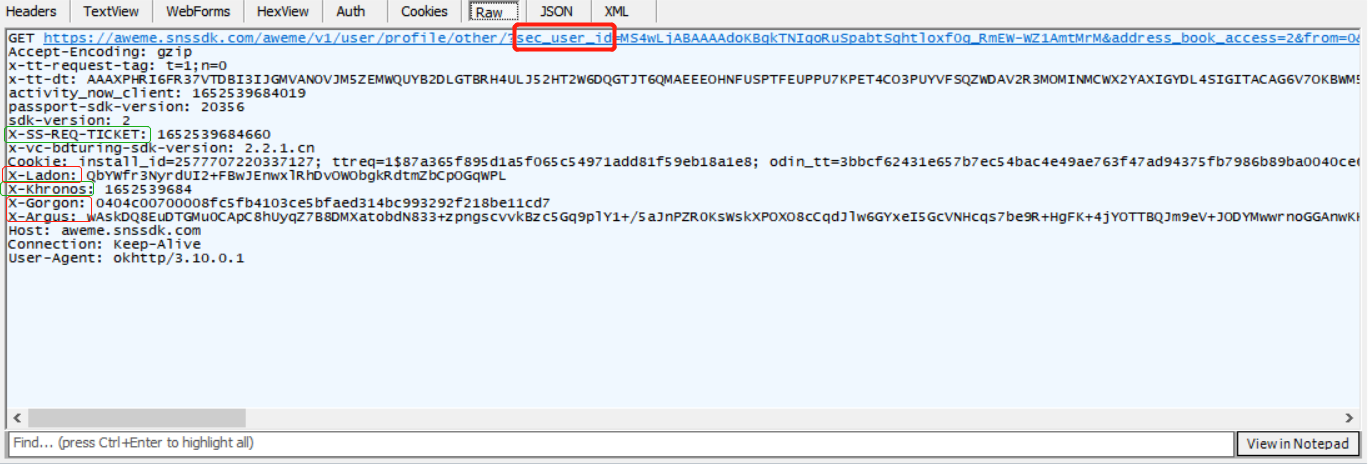
那只需要定时打开抖音,获取密钥,抓包储存下来用即可
if (oSession.fullUrl.Contains("/aweme/v1/user/profile")) {

            var fso;

            var file;

            fso = new ActiveXObject("Scripting.FileSystemObject");

            //文件保存路径,可自定义

            if(fso.FileExists("D:/douyin_data/douyin_cookie/request.txt")){

//需要先删除已存在的请求头信息,以便更新最新的请求头信息

fso.DeleteFile("D:/douyin_data/douyin_cookie/request.txt")

file = fso.OpenTextFile("D:/douyin_data/douyin_cookie/request.txt",8 ,true, true);

            file.writeLine(" " + oSession.oRequest.headers);

            file.close();

}

            else{

            file = fso.OpenTextFile("D:/douyin_data/douyin_cookie/request.txt",8 ,true, true);

            file.writeLine("\n" + oSession.oRequest.headers);

            file.close();

}

        }
2,爬取抖音账号主页数据+储存+数据清洗
# encoding: utf-8


import csv
import time
import requests
import json
import random
import os
import uiautomator2 as u2
import urllib.request
import urllib.parse
import gzip
import codecs


open('D:/douyin_data/douyin_user_id/username.txt','a')
open('D:/douyin_data/douyin_userinfo/read_username.txt', 'a')
open('D:/douyin_data/douyin_userinfo/readvedio_username.txt', 'a')


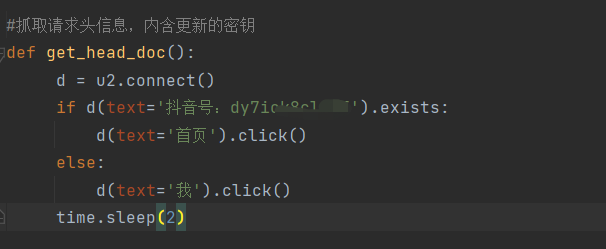
#抓取请求头信息,内含更新的密钥
def get_head_doc():
     d = u2.connect()
     if d(text='抖音号:dy7io自己的抖音号').exists:
         d(text='首页').click()
     else:
         d(text='我').click()
     time.sleep(2)


#解压
def ungzip(data):
    try:
        data=gzip.decompress(data)
    except:
        pass
    return data


#将信息储存在文件里
def downmeg(list,location):
    with open(location, 'a', newline='',encoding='utf-8-sig') as a:
        doc = csv.writer(a)
        docw = doc.writerow(list)


#读取账号ID数据
def get_sec_uid():


    with open("D:/douyin_data/douyin_user_id/response.txt","rt",encoding='utf-16') as f:
        for x in f:
            dic=json.loads(x)#转为json格式
            #获取数据
            for info in dic['data']:
                try:
                    sec_uid = info['aweme_info']['author']['sec_uid']
                    nick_name = info['aweme_info']['author']['nickname']
                    uid = info['aweme_info']['author']['uid']
                    list=[nick_name,sec_uid,uid]
                    locationtxt='D:/douyin_data/douyin_user_id/username.txt'
                    location = 'D:/douyin_data/douyin_user_id/userinfo.csv'
                    #判断该数据是否已清洗储存,是则略过,否则储存入文件
                    with open(locationtxt,'r') as f:
                        txt= f.read()
                        if uid in txt:
                            pass
                        else:
                            with open(locationtxt,'a') as d:
                                d.write(uid+'\n')
                            downmeg(list,location)
                except:
                    pass


#获取请求头
def get_head(file_path='D:/douyin_data/douyin_cookie/request.txt'):
    with open(file_path, 'r',encoding='utf-16') as f:
        lines = f.readlines()
    head_dict = {}
    for ln in lines:
        if ln.find(':') != -1:
            seq = ln.split(':')
            key = seq[0].strip()
            val = seq[1].strip()
            head_dict[key] = val
    try:
        head_dict.pop('X-Khronos')
    except:
        pass
    try:
        head_dict.pop('X-SS-REQ-TICKET')
    except:
        pass
    return head_dict


#开始爬取账号信息
def person_Mesggage(sec_user_id, _rticket,ts,head_dict):
    user_url = 'https://aweme.snssdk.com/aweme/v1/user/profile/other/?sec_user_id={}.0&ts={}&cpu_support64=false&app_type=normal&appTheme=light&ac=wifi&host_abi=armeabi-v7a&update_version_code=18409900&channel=douyin_tengxun_wzl_1108&_rticket={}&device_platform=android这里直接复制爬取包体的请求链接,把需要更改的参数改为{}'.format(sec_user_id, ts,_rticket)
    user_req = urllib.request.Request(user_url, headers=head_dict)
    Res = urllib.request.urlopen(user_req)
    html = ungzip(Res.read()).decode('utf8')
    #把打印结果保存下来,防止后需要深入分析
    with open('D:/douyin_data/douyin_userinfo/user_request_record.txt','a',encoding='gb18030') as f:
        f.write(html)
    info=json.loads(html)
    return info


#清洗数据
def get_person_Mesggage(info):
    mplatform_followers_count=info['user']['mplatform_followers_count']#粉丝数
    nickname=info['user']['nickname']#昵称
    total_favorited = info['user']['total_favorited']#获赞数
    uid=info['user']['uid']
    sec_uid = info['user']['sec_uid']
    signature = info['user']['signature']#个人描述
    aweme_count =info['user']['aweme_count']#作品数
    try:
        birthday = info['user']['birthday']#作者生日
    except:
        birthday = ''
    try:
        city = info['user']['city']  # 所在城市
    except:
        city = ''
    try:#这里需要回去看看橱窗、地址信息
        product=info['user']['card_entries']
        for i in product:
            if i['title']== "进入橱窗":
                product_count= json.loads(i['card_data'])['product_count']  # 橱窗商品数
            else:
                try:
                    if product_count :
                        pass
                except:
                    product_count = ''


            if i['title']=="粉丝群":
                fans_num = i['sub_title'].split('个')[0]
            else:
                try:
                    if fans_num :
                        pass
                except:
                    fans_num = ''
            if i['title']=="探店推荐":
                store_num =i['card_data'].split('个')[0]
            else:
                try:
                    if store_num :
                        pass
                except:
                    store_num = ''


    except:
        product_count =0
        fans_num = 0
        store_num = 0


    list=[nickname,sec_uid,uid,birthday,city,signature,mplatform_followers_count,total_favorited,aweme_count,product_count,fans_num,store_num]
    print(nickname+" "+"主页信息打印成功")
    location='D:/douyin_data/douyin_userinfo/user_detail_info.csv'
    #存入数据
    downmeg(list,location)


if __name__ == '__main__':
    #读取账号ID
    with open('D:/douyin_data/douyin_user_id/userinfo.csv','r',encoding='utf-8') as f:
        listid=csv.reader(f)
        num=1
        for  i in listid:
            with open('D:/douyin_data/douyin_userinfo/read_username.txt', 'r') as f:
                txt = f.read()
            if i[2] in txt:
                print(i[0]+"用户信息历史已搜索,继续搜索下一个")
                pass
            else:
                if num <10:
                    a=time.time()
                    sec_user_id=str(i[1])
                    _rticket=str(time.time() * 1000).split(".")[0]
                    ts=str(time.time()).split(".")[0]
                    head_dict = get_head()
                    head_dict["X-SS-REQ-TICKET"] = _rticket
                    head_dict["X-Khronos"] = ts
                    try:
                        info=person_Mesggage(sec_user_id, _rticket, ts,head_dict)
                        get_person_Mesggage(info)
                        num = num+1
                        with open('D:/douyin_data/douyin_userinfo/read_username.txt', 'a') as d:
                            d.write(i[2] + '\n')
                        time.sleep(random.randint(1, 2))
                    except:
                        print(i[0]+"爬取失败,搜索下一个")
                        pass

                else:
                    #重新刷新请求头
                    get_head_doc()
                    num = 1
                    a = time.time()
                    sec_user_id = str(i[1])
                    _rticket = str(time.time() * 1000).split(".")[0]
                    ts = str(time.time()).split(".")[0]
                    head_dict = get_head()
                    print("传入新header参数"+head_dict['X-Gorgon'])
                    head_dict["X-SS-REQ-TICKET"] = _rticket
                    head_dict["X-Khronos"] = ts
                    info=person_Mesggage(sec_user_id, _rticket, ts, head_dict)
                    get_person_Mesggage(info)
                    with open('D:/douyin_data/douyin_userinfo/read_username.txt', 'a') as d:
                        d.write(i[2] + '\n')
                    time.sleep(random.randint(1, 2))
# encoding: utf-8
import csv
import time
import requests
import json
import random
import os
import uiautomator2 as u2
import urllib.request
import urllib.parse
import gzip
import codecs
import pymongo


#mongodb数据库建表
client =pymongo.MongoClient(host="127.0.0.1",port=27017)
cilen = client['douyin']#表名
user_vedio_info = cilen['user_vedio']#视频信息集合
vedio_response_info = cilen['user_vedio_reponse']#发送请求返回信息集合
read_vedio_info = cilen['readvedio_username']#已浏览用户集合
vedio_fail=cilen['vedio_fail']#搜索失败用户集合
crawling_vedio1= cilen['crawling_vedio1']#重新爬取的列表(1000差距以内)


# 解压
def ungzip(data):
     try:
         data = gzip.decompress(data)
     except:
         pass
     return data
#将信息储存在文件里
def downmeg(list, location):
     with open(location, 'a', newline='', encoding='utf-8-sig') as a:
         doc = csv.writer(a)
         docw = doc.writerow(list)


#抓取请求头信息,内含更新的密钥
def get_head_doc():
     d = u2.connect()
     if d(text='抖音号:dy7iok8clx9f').exists:
         d(text='首页').click()
     else:
         d(text='我').click()
     time.sleep(2)
#获取最新的请求头
def get_head(file_path='D:/douyin_data/douyin_cookie/request.txt'):
     with open(file_path, 'r', encoding='utf-16') as f:
         lines = f.readlines()
     head_dict = {}
     for ln in lines:
         if ln.find(':') != -1:
             seq = ln.split(':')
             key = seq[0].strip()
             val = seq[1].strip()
             head_dict[key] = val
     try:
         head_dict.pop('X-Khronos')
     except:
         pass
     try:
         head_dict.pop('X-SS-REQ-TICKET')
     except:
         pass
     return head_dict
#请求数据
def vedio_info(max_cursor, sec_user_id, _rticket, ts, head_dict):
     try:
         vedio_url = 'https://aweme.snssdk.com/aweme/v1/aweme/post/?publish_video_strategy_type=2&source=0&user_avatar_shrink=96_96&video_cover_shrink=248_330&max_cursor={}&sec_user_id={}&count=20&show_live_replay_strategy=1&is_order_flow=0&page_from=2&location_permission=1&os_api=22&device_type=SM-G977N&ssmix=a&manifest_version_code=180401&dpi=320&is_guest_mode=0&app_name=aweme&version_name=18.4.0&ts={}&cpu_support64=false&app_type=normal&appTheme=light&ac=wifi&host_abi=armeabi-v7a&update_version_code=18409900&channel=douyin_tengxun_wzl_1108&_rticket={}&device_platform=android&iid=2683259615710270&version_code=180400&cdid=350f9823-2b78-4bb4-9f43-3eb085b572af&os=android&is_android_pad=0&device_id=2145836845780120&package=com.ss.android.ugc.aweme&resolution=900*1600&os_version=5.1.1&language=zh&device_brand=Android&need_personal_recommend=1&aid=1128&minor_status=0&mcc_mnc=46007'.format(max_cursor, sec_user_id, ts, _rticket)
         proxy_list = [
             {'http': 'http://27.22.85.58:8100'},
             {'http': 'http://159.75.25.176:81'},
             {'http': 'http://183.47.237.251:80'},
             {'http': 'http://111.231.86.149:7890'},
             {'http': 'http://47.243.190.108:7890'},
             {'http': 'http://113.125.128.4:8888'},
             {'http': 'http://182.84.144.80:3256'},
             {'http': 'http://112.74.17.146:8118'},
             {'http': 'http://121.232.148.102:9000'},
             {'http': 'http://61.216.185.88:60808'},
             {'http': 'http://210.75.240.136:1080'},
             {'http': 'http://183.247.211.151:30001'},
             {'http': 'http://47.243.190.108:8083'}
         ]
         proxy = random.choice(proxy_list)
         print(proxy)
         proxy_handler = urllib.request.ProxyHandler(proxy)
         opener = urllib.request.build_opener(proxy_handler)
         request = urllib.request.Request(url=vedio_url, headers=head_dict)
         print("开始爬取时间" + str(time.strftime("%Y-%m-%d %H:%M:%S", time.localtime())))
         res = opener.open(request)
         print("结束爬取时间"+str(time.strftime("%Y-%m-%d %H:%M:%S",time.localtime())))
         html = ungzip(res.read()).decode('utf8')
         htmldic={
             "html":html,
         }
         vedio_response_info.insert_one(htmldic)
         info = json.loads(html)
         list = info['aweme_list']
         for i in list:
             try:
                 adv = i['anchor_info']['extra']  # 返回的是字符串
             except:
                 adv = ''
             try:
                 text_extra_list = i['text_extra']
                 text_extra = []  # 作品标签集合
                 for ii in text_extra_list:
                     extra = ii['hashtag_name']
                     text_extra.append(extra)
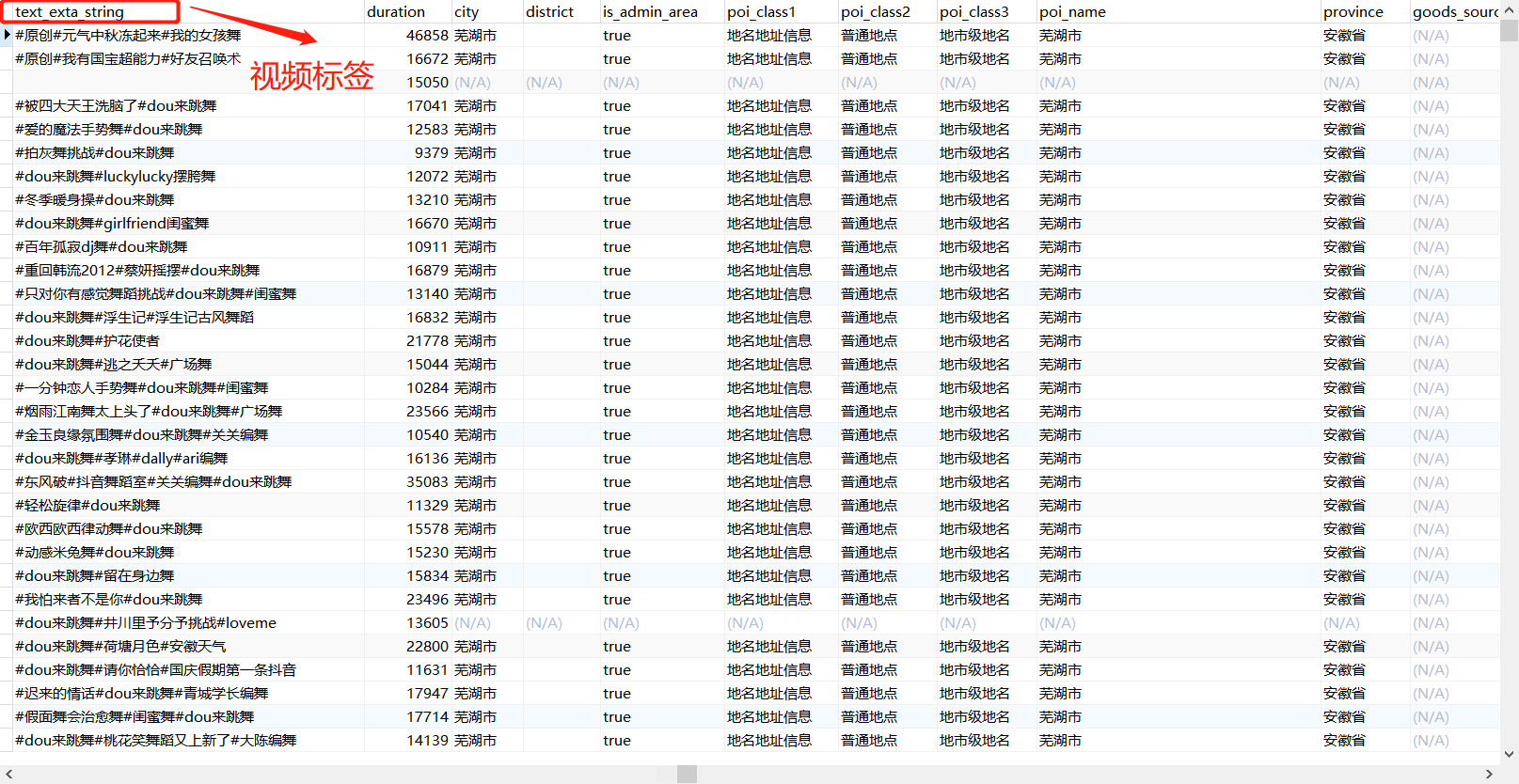
                 text_exta_string = '#'.join(text_extra)  # 标签list转string
             except:
                 text_exta_string = ''
             nickname = i['author']['nickname']
             uid = i['author']['uid']
             desc = i['desc']  # 视频文案
             creat_time = i['create_time']  # 发布时间戳
             creat_Date = time.strftime('%Y-%m-%d %H:%M:%S', time.localtime(creat_time))  # 发布日期
             try:
                 duration = i['duration']  # 视频时长,毫秒
             except:
                 duration = 0
             digg_count = i['statistics']['digg_count']  # 点赞数
             comment_count = i['statistics']['comment_count']  # 评论数
             collect_count = i['statistics']['collect_count']  # 收藏数
             share_count = i['statistics']['share_count']  # 分享数
             list1= dict(nickname=nickname, uid=uid, creat_Date=creat_Date,desc= desc,digg_count=digg_count,comment_count=comment_count,collect_count=collect_count,share_count=share_count,adv=adv,text_exta_string=text_exta_string,duration=duration)
             user_vedio_info.insert_one(list1)
             print(list1)

         # 判断has_more参数,以便知道是否继续爬取下一波视频数据
         if info["has_more"] == 1:
             max_cursor = info["max_cursor"]
             vedio_info(max_cursor, sec_user_id, _rticket, ts, head_dict)
     except Exception as err:
         print(err)
         print(sec_user_id + "视频信息写入失败,手动删除已写入信息,以便重新爬虫")
         fail_info={
             "sec_user_id":sec_user_id
         }
         vedio_fail.insert_one(fail_info)
if __name__ == '__main__':
     with open('D:/douyin_data/douyin_user_id/userinfo.csv', 'r', encoding='utf-8') as f:
         listid = csv.reader(f)
         num = 1
         for i in listid:
             with open('D:/douyin_data/douyin_userinfo/readvedio_username.txt', 'r') as w:
                 txt = w.read()
             if i[2] in txt:
                 print(i[0] + "视频信息历史已搜索,继续搜索下一个")
                 pass
             else:
                 #通过筛选,部分作品数目过大的账号不爬取,防止效率太低,这类账号大多为新闻类账号,意义不大
                 with open('D:/douyin_data/douyin_userinfo/noCrawling_user.csv','r',encoding='utf-8') as p:
                     txtp=p.read()
                 if i[2] in txtp:
                     print(i[0]+'账号发布数过大,不爬取')
                 else:
                     if num < 2:
                         a = time.time()
                         sec_user_id = str(i[1])
                         _rticket = str(time.time() * 1000).split(".")[0]
                         ts = str(time.time()).split(".")[0]
                         head_dict = get_head()
                         head_dict["X-SS-REQ-TICKET"] = _rticket
                         head_dict["X-Khronos"] = ts
                         max_cursor = "0"
                         print("------------"+i[0]+"爬虫开始,"+"时间:"+str(time.strftime("%Y-%m-%d %X",time.localtime()))+"------------")
                         vedio_info(max_cursor, sec_user_id, _rticket, ts, head_dict)
                         with open('D:/douyin_data/douyin_userinfo/readvedio_username.txt', 'a') as d:
                             d.write(i[2] + '\n')
                         print("------------"+i[0]+"爬虫已完成,"+"时间:"+str(time.strftime("%Y-%m-%d %X",time.localtime()))+"------------")
                         num = num + 1
                     else:
                         get_head_doc()
                         num = 1
                         a = time.time()
                         sec_user_id = str(i[1])
                         _rticket = str(time.time() * 1000).split(".")[0]
                         ts = str(time.time()).split(".")[0]
                         head_dict = get_head()
                         print("传入新header参数" )
                         head_dict["X-SS-REQ-TICKET"] = _rticket
                         head_dict["X-Khronos"] = ts
                         max_cursor = "0"
                         print("------------"+i[0]+"爬虫开始,"+"时间:"+str(time.strftime("%Y-%m-%d %X",time.localtime()))+"------------")
                         vedio_info(max_cursor, sec_user_id, _rticket, ts, head_dict)
                         with open('D:/douyin_data/douyin_userinfo/readvedio_username.txt', 'a') as d:
                             d.write(i[2] + '\n')
                         time.sleep(random.randint(1,2))
                         print("------------"+i[0]+"爬虫已完成。"+"时间:"+str(time.strftime("%Y-%m-%d %X",time.localtime()))+"------------")
# encoding: utf-8
import json
import bson
import pymongo
import numpy
import pandas as pd
import csv
from nltk import *
import jieba
import time


# 正则对字符串清洗
def textParse(str_doc):
    # 去掉字符
    str_doc = re.sub('\u3000', '', str_doc)
    # 去除空格
    str_doc = re.sub('\s+', '', str_doc)
    # 去除换行符
    str_doc = str_doc.replace('\n', '')
    # 正则过滤掉特殊符号、标点、英文、数字等
    r1 = '[a-zA-Z0-9’!"#$%&\'()*+,-./::;;|<=>?@,—。?★、…【】《》?“”‘’![\\]^_`{|}~]+'
    str_doc = re.sub(r1, '', str_doc)
    return str_doc


#获取停用词
def get_stop_words(path=r'C:/Users/贼粉冰/Desktop/text/停用词.txt'):
    file = open(path, 'r', encoding='utf-8').read().split('\n')
    return set(file)  # 去重


#进行数据清洗
def rm_tokens(words, stwlist):
    words_list = list(words)
    stop_words = stwlist
    for i in range(words_list.__len__())[::-1]:
        if words_list[i] in stop_words:  # 去除停用词
            words_list.pop(i)
        elif words_list[i].isdigit():  # 去除数字
            words_list.pop(i)
        elif len(words_list[i]) == 1:  # 去除单个字符
            words_list.pop(i)
        elif words_list[i] == ' ':  # 去除空字符
            words_list.pop(i)
    return words_list


# 利用jieba对文本进行分词,返回切词后的list
def seg_doc(str_doc):
    # 正则处理文本
    sent_list = str_doc.split('#')
    sent_list = map(textParse, sent_list)
    # 获取停用词
    stwlist = get_stop_words()
    # 分词并去除停用词
    word_2dlist = [rm_tokens(jieba.cut(part, cut_all=False), stwlist) for part in
                   sent_list]  # 列表表达式 [x**2 for x in y] 遍历y集合中的值赋予x,用x**2表达式运算后返回新列表
    # 合并列表
    word_list = sum(word_2dlist, [])
    return word_list


#词频统计
def keyword_count():
    client = pymongo.MongoClient(host="127.0.0.1", port=27017)
    cilen = client['douyin']  # 表名
    detail_info = cilen['user_vedio']
    user_detail_info = cilen['user_detail_info']
    userinfo_label=cilen['userinfo_label']


    #载入视频的标签
    a = detail_info.find({}, {'uid': 1, 'text_exta_string': 1})
    data = pd.DataFrame(a)
    c = data.groupby('uid')['text_exta_string', '_id'].sum()
    top_exta_list = []
    top_exta_count = []
    for i in c.index:
        # 这里需要进行停用词处理
        # 读取文本
        str_doc = c.loc[i, 'text_exta_string']
        # 词频特征统计
        exta_list = seg_doc(str_doc)
        search = {'uid': i}
        user_detail_info.update_one(search,{'$set': {'exta_list': exta_list}})


if __name__ == '__main__':
    keyword_count() #遍历关键词,进行词频统计
import pandas as pd
import time
import csv
import sys
import os
from sklearn.feature_extraction.text import TfidfVectorizer
from sklearn.cluster import KMeans


csv.field_size_limit(sys.maxsize)
SAVE_ROOT = 'outputs-30'
ORIGIN_DATA_PATH = 'userinfo.csv'
CLASS_NUM = 30


if not os.path.exists(SAVE_ROOT):
    os.makedirs(SAVE_ROOT)
def do_cluster(origin_data_path, class_num=8):
    print('Start text load...')
    with open(ORIGIN_DATA_PATH, 'r', encoding='utf-8') as f:
        reader = csv.reader(f)
        dataset = [item[17] for item in reader]
        dataset = dataset[1:]  # exclude titles
    print('Done!')
    # Execute clauster
    print('Start TF-IDF vectorize words list...')
    tfvec = TfidfVectorizer()
    print('Done!')
    print('Start KMeans...')
    model = KMeans(n_clusters=CLASS_NUM, init='k-means++',
                   random_state=9)
    cv_fit = tfvec.fit_transform(dataset).toarray()
    y_pred = model.fit_predict(cv_fit)
    print('Done!')
    return y_pred


print(time.asctime(time.localtime(time.time())))
labels = do_cluster(ORIGIN_DATA_PATH, CLASS_NUM)
with open('result.txt', 'w') as f:
    for x in labels:
        f.write('{}\n'.format(x))
print(time.asctime(time.localtime(time.time())))
with open('result.txt', 'r') as f:
    lines = f.readlines()
    labels = [int(line.strip()) for line in lines]
data = pd.read_csv(ORIGIN_DATA_PATH, header=0, index_col=0)
data['labels'] = labels
data.to_csv(os.path.join(SAVE_ROOT, 'userinfo_label.csv'))
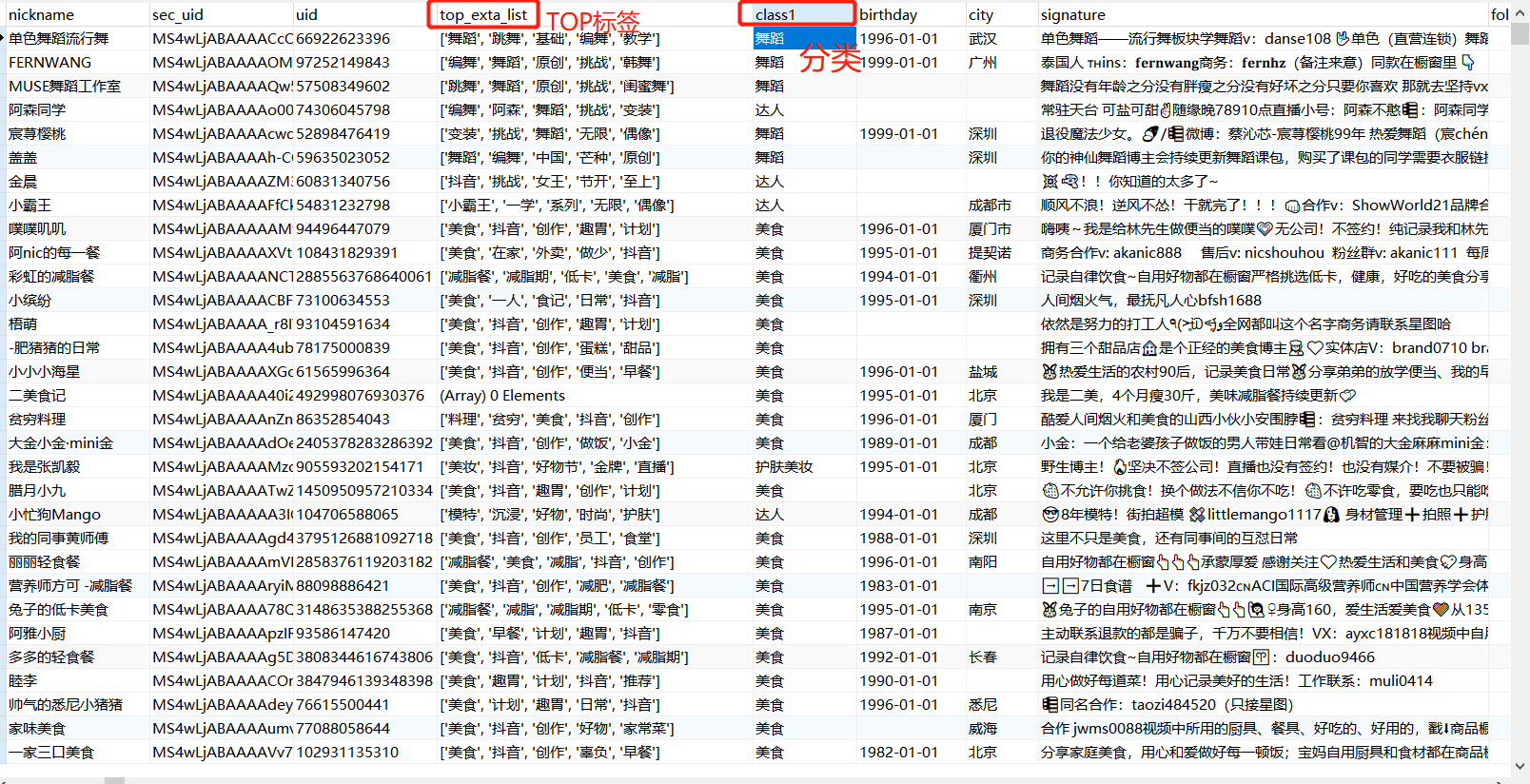
最终分类结果如下:
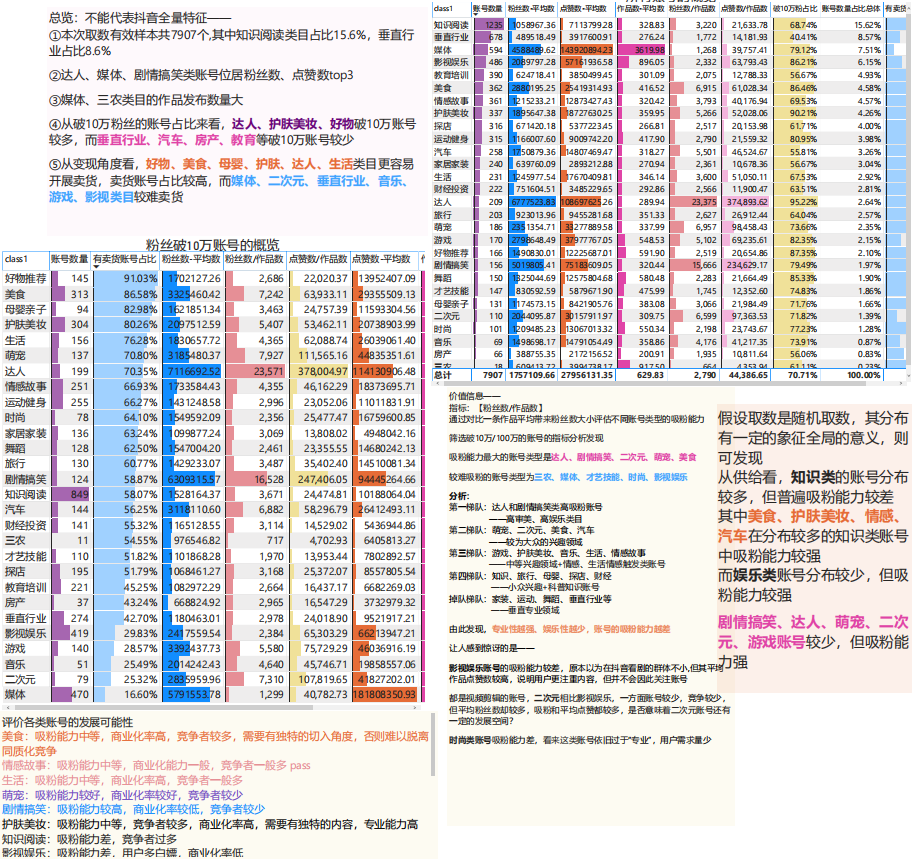
链接: https://pan.baidu.com/s/1he_gtbSuh_AamMUL4AC5Zw 提取码: 7ep4 复制这段内容后打开百度网盘手机App,操作更方便哦
posted on 2022-05-15 02:00 zeifenbing 阅读(5504) 评论(2) 收藏 举报


 浙公网安备 33010602011771号