
《ESP32-S3使用指南—IDF版 V1.6》第六十二章 颜色识别实验
第六十二章 颜色识别实验
1)实验平台:正点原子DNESP32S3开发板
2)章节摘自【正点原子】ESP32-S3使用指南—IDF版 V1.6
3)购买链接:https://detail.tmall.com/item.htm?&id=768499342659
4)全套实验源码+手册+视频下载地址:http://www.openedv.com/docs/boards/esp32/ATK-DNESP32S3.html
5)正点原子官方B站:https://space.bilibili.com/394620890
6)正点原子DNESP32S3开发板技术交流群:132780729


ESP32可以使用图像处理技术进行颜色识别。通过摄像头采集图像,使用图像处理算法对图像进行分析和处理,提取出物体的颜色特征,并与预设的颜色阈值进行比较,判断物体的颜色。这种方法可以用于实现智能监控、自动识别等功能。本章,我们使用乐鑫AI库来实现颜色识别功能。
本章分为如下几个部分:
62.1 硬件设计
62.2 软件设计
62.3 下载验证
62.1 硬件设计
1.例程功能
本章实验功能简介:使用乐鑫官方的ESP32-WHO AI库对OV2640和OV5640摄像头输出的数据进行颜色识别。
2.硬件资源
1)LED灯
LED-IO1
2)XL9555
IIC_INT-IO0(需在P5连接IO0)
IIC_SDA-IO41
IIC_SCL-IO42
3)SPILCD
CS-IO21
SCK-IO12
SDA-IO11
DC-IO40(在P5端口,使用跳线帽将IO_SET和LCD_DC相连)
PWR- IO1_3(XL9555)
RST- IO1_2(XL9555)
4)CAMERA
OV_SCL-IO38
OV_SDA- IO39
VSYNC- IO47
HREF- IO48
PCLK- IO45
D0- IO4
D1- IO5
D2- IO6
D3- IO7
D4- IO15
D5- IO16
D6- IO17
D7- IO18
RESET-IO0_5(XL9555)
PWDN-IO0_4(XL9555)
3.原理图
本章实验使用的KPU为ESP32-S3的内部资源,因此并没有相应的连接原理图。
62.2 软件设计
62.2.1 程序流程图
程序流程图能帮助我们更好的理解一个工程的功能和实现的过程,对学习和设计工程有很好的主导作用。下面看看本实验的程序流程图:
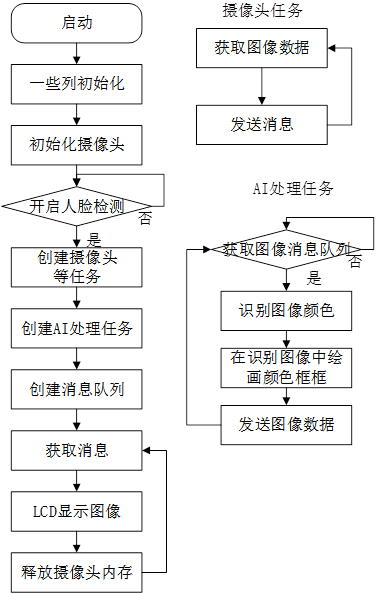
图62.2.1.1 程序流程图
62.2.2 程序解析
在本章节中,我们将重点关注两个文件:esp_color_detection.cpp和esp_color_detection.hpp。其中,esp_color_detection.hpp主要声明了esp_color_detection函数,其内容相对简单,因此我们暂时不作详细解释。本章节的核心关注点是esp_color_detection.cpp文件中的函数。
接下来,我们将详细解析esp_color_detection_ai_strat函数的工作原理。
vector<color_info_t> std_color_info = {{{156, 10, 70, 255, 90, 255}, 64,"red"},
                                       {{11, 22, 70, 255, 90, 255}, 64, "orange"},
                                       {{23, 33, 70, 255, 90, 255}, 64, "yellow"},
                                       {{34, 75, 70, 255, 90, 255}, 64, "green"},
                                       {{76, 96, 70, 255, 90, 255}, 64, "cyan"},
                                       {{97, 124, 70, 255, 90, 255}, 64, "blue"},
                                       {{125, 155, 70, 255, 90, 255}, 64, "purple"},
                                       {{0, 180, 0, 40, 220, 255}, 64, "white"},
                                       {{0, 180, 0, 50, 50, 219}, 64, "gray"},
                                        {{0, 180, 0, 255, 0, 45}, 64, "black"}
                                       };

static void esp_draw_color_detection_result(uint16_t *image_ptr,
int image_height,
int image_width,
vector<color_detect_result_t>
&results, uint16_t color)
{
    for (int i = 0; i < results.size(); ++i)
    {
        dl::image::draw_hollow_rectangle(image_ptr, image_height, image_width,
                                         results[i].box[0],
                                         results[i].box[1],
                                         results[i].box[2],
                                         results[i].box[3],
                                         color);
    }
}

/**
 * @brief       摄像头图像数据获取任务
 * @param       arg:未使用
 * @retval      无
 */
static void esp_camera_process_handler(void *arg)
{
    arg = arg;
    camera_fb_t *camera_frame = NULL;

    while (1)
    {
        /* 获取摄像头图像 */
        camera_frame = esp_camera_fb_get();

        if (camera_frame)
        {
            /* 以队列的形式发送 */
            xQueueSend(xQueueFrameO, &camera_frame, portMAX_DELAY);
        }
    }
}

/**
 * @brief       摄像头图像数据传入AI处理任务
 * @param       arg:未使用
 * @retval      无
 */
static void esp_ai_process_handler(void *arg)
{
    arg = arg;
    camera_fb_t *face_ai_frameI = NULL;

    ColorDetector detector;
    detector.set_detection_shape({80, 80, 1});

    for (int i = 0; i < std_color_info.size(); ++i)
    {
        detector.register_color( std_color_info[i].color_thresh,
                                      std_color_info[i].area_thresh,
std_color_info[i].name);
    }

vector<vector<int>> color_thresh_boxes = {{110, 110, 130, 130},
{100, 100, 140, 140},
{90, 90, 150, 150},
{80, 80, 160, 160},
{60, 60, 180, 180},
{40, 40, 200, 200},
{20, 20, 220, 220}};
    int color_thresh_boxes_num = color_thresh_boxes.size();
    int color_thresh_boxes_index = color_thresh_boxes_num / 2;
    vector<int> color_area_threshes = {1, 4, 16, 32, 64, 128, 256, 512, 1024};
    int color_area_thresh_num = color_area_threshes.size();
    int color_area_thresh_index = color_area_thresh_num / 2;

    detector.set_area_thresh({color_area_threshes[color_area_thresh_index]});


    vector<uint16_t> draw_lcd_colors = {RGB565_LCD_RED,
                                        RGB565_LCD_ORANGE,
                                        RGB565_LCD_YELLOW,
                                        RGB565_LCD_GREEN,
                                        RGB565_LCD_CYAN,
                                        RGB565_LCD_BLUE,
                                        RGB565_LCD_PURPLE,
                                        RGB565_LCD_WHITE,
                                        RGB565_LCD_GRAY,
                                        RGB565_LCD_BLACK
                                        };

    int draw_colors_num = draw_lcd_colors.size();
    vector<uint8_t> color_thresh;

    while(1)
    {
        if (xQueueReceive(xQueueFrameO, &face_ai_frameI, portMAX_DELAY))
        {
            std::vector<std::vector<color_detect_result_t>> &results =
detector.detect((uint16_t *)face_ai_frameI->buf,
{(int)face_ai_frameI->height,
(int)face_ai_frameI->width, 3});

            if (draw_box)
            {
                for (int i = 0; i < results.size(); ++i)
                {
                    esp_draw_color_detection_result
((uint16_t *)face_ai_frameI->buf,
(int)face_ai_frameI->height,
(int)face_ai_frameI->width,
results[i], draw_lcd_colors[i % draw_colors_num]);
                }
            }
            else
            {
                detector.draw_segmentation_results
((uint16_t *)face_ai_frameI->buf,
{(int)face_ai_frameI->height,
(int)face_ai_frameI->width, 3},
draw_lcd_colors, true, 0x0000);
            }
            /* 以队列的形式发送AI处理的图像 */
            xQueueSend(xQueueAIFrameO, &face_ai_frameI, portMAX_DELAY);
        }
    }
}

/**
 * @brief       AI图像数据开启
 * @param       无
 * @retval      1:创建任务及队列失败;0:创建任务及对了成功
 */
uint8_t esp_color_detection_ai_strat(void)
{
    /* 创建队列及任务 */
    xQueueFrameO = xQueueCreate(5, sizeof(camera_fb_t *));
    xQueueAIFrameO = xQueueCreate(5, sizeof(camera_fb_t *));
xTaskCreatePinnedToCore(esp_camera_process_handler,
"esp_camera_process_handler", 6 * 1024,
NULL, 5, &camera_task_handle, 1);
xTaskCreatePinnedToCore(esp_ai_process_handler,
"esp_ai_process_handler", 6 * 1024,
NULL, 5, &ai_task_handle, 1);

    if (xQueueFrameO != NULL
        || xQueueAIFrameO != NULL
        || camera_task_handle != NULL
        || ai_task_handle != NULL)
    {
        return 0;
    }

    return 1;
}
首先,我们创建了两个消息队列和两个任务。这两个消息队列的主要功能是传输图像数据,它们的区别在于一个用于传输原始图像数据,另一个用于传输经过AI处理后的图像数据或者未检测到的图像数据(原始图像数据)。而这两个任务则分别负责图像数据的获取和AI处理。在AI处理任务中,当检测到颜色时,系统会在图像数据中添加颜色框框用来识别当前颜色,最后使用消息队列将AI处理后的图像数据或未检测到的图像数据(原始图像数据)发送到LCD上进行显示。
62.3 下载验证
如果在检测过程中发现比较明显的颜色物体,该系统会将此帧的图像数据发送给颜色识别API进行处理。处理成功后,此帧的图像将被显示在LCD上,如下图所示
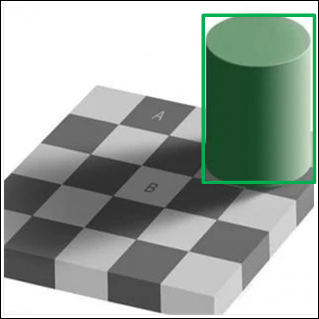
图62.3.1 颜色识别效果图

 浙公网安备 33010602011771号