
vue-cli
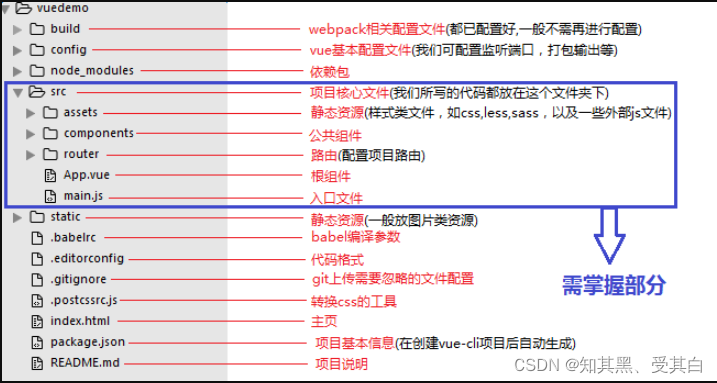
1.项目结构
2.webpack:打包工具
main.js:
var hello=require("./hello");
hello.sayHello2();

hello.js
//暴露一个方法
exports.sayHello1=function () {
document.write("<h1>你好1</h1>")
};
exports.sayHello2=function () {
    document.write("<h1>你好2</h1>")
};
exports.sayHello3=function () {
    document.write("<h1>你好3</h1>")
};
exports.sayHello4=function () {
    document.write("<h1>你好4</h1>")
};
index.html
<!DOCTYPE html>
<html lang="en">
<head>
    <meta charset="UTF-8">
    <title>Title</title>
</head>
<body>

</body>
<script src="dist/js/bundle.js"></script>
</html>

webpack.config.js
module.exports={
  entry: './modules/main.js',
  output:{
      filename:"./js/bundle.js"
  }
};
3.组件传输
暴露组件接口
组件的名字叫HelloWorld
<template>
<h1>{{ msg }}</h1>
</template>
<script>
export default {
name: 'HelloWorld',
data () {
return {
msg: 'Welcome to Your Vue.js App'
}
}
}
</script>
接收组件
接收的组件可以以<组件名>的形式写在模组中
<template>
  <div id="app">
    <img src="./assets/logo.png">
    <HelloWorld/>
  </div>
</template>
<script>
import HelloWorld from './components/HelloWorld'

export default {
  name: 'App',
  components: {
    HelloWorld
  }
}
</script>
4.vue-router
(1)被路由的组件,写在components目录下,如下Main.vue和HelloWorld.vue
Main.vue
<template>
  <h1>首页</h1>
</template>
<script>
    export default {
        name: "Main"
    }
</script>
<style scoped>
</style>
Helloworld.vue
<template>
  <h1>HelloWorld</h1>
</template>

<script>
export default {
  name: 'HelloWorld',
}
</script>
<!-- Add "scoped" attribute to limit CSS to this component only -->
<style scoped>
</style>
(2)配置/安装路由,写在router目录下
import Vue from 'vue'
//导入vue-router
import VueRouter from 'vue-router'
//导入要引用的模板
import HelloWorld from "../components/HelloWorld"
import Main from "../components/Main"
Vue.config.productionTip = false
//安装路由
Vue.use(VueRouter)

//配置导出路由
export default new VueRouter({
  routes:[
    {
      //  路由路径类似@RequestMapping
      path:'/helloworld',
      name:'helloworld',
      component:HelloWorld
    },
    {
      //  路由路径类似@RequestMapping
      path:'/main',
      name:'main',
      component:Main
    }
  ]
});
(2)界面,App.vue
<template>
  <div id="app">
    <router-link to="/main">首页</router-link>
    <router-link to="/helloworld">内容页</router-link>
    <router-view></router-view>
  </div>
</template>

<script>


export default {
  name: 'App',

}
</script>

<style>
#app {
  font-family: 'Avenir', Helvetica, Arial, sans-serif;
  -webkit-font-smoothing: antialiased;
  -moz-osx-font-smoothing: grayscale;
  text-align: center;
  color: #2c3e50;
  margin-top: 60px;
}
</style>
(4)导入界面的js,注意:自动扫描路由路径,配置路由
import Vue from 'vue'
import App from './App'
import router from './router' //自动扫描路由配置

Vue.config.productionTip = false
new Vue({
  el: '#app',
  //配置路由
  router,
  components: { App },
  template: '<App/>'
})

 浙公网安备 33010602011771号