
ffmpeg 使用
1.ffmpeg 简述
    FFmpeg是一套可以用来记录、转换数字音频、视频,并能将其转化为流的开源计算机程序。采用LGPL或GPL许可证。它提供了录制、转换以及流化音视频的完整解决方案。它包含了非常先进的音频/视频编解码库libavcodec,为了保证高可移植性和编解码质量,libavcodec里很多code都是从头开发的
    多媒体视频处理工具FFmpeg有非常强大的功能包括视频采集功能、视频格式转换、视频抓图、给视频加水印等。
    构成FFmpeg主要有以下部分:
    第一部分是四个作用不同的工具软件,分别是:ffmpeg.exe,ffplay.exe,ffserver.exe和ffprobe.exe。
    ffmpeg.exe:音视频转码、转换器
    ffplay.exe:简单的音视频播放器
    ffserver.exe:流媒体服务器
    ffprobe.exe:简单的多媒体码流分析器
    第二部分是可以供开发者使用的SDK,为各个不同平台编译完成的库。如果说上面的四个工具软件都是完整成品形式的玩具,那么这些库就相当于乐高积木一样,我们可以根据自己的需求使用这些库开发自己的应用程序。这些库有:
    libavcodec:包含音视频编码器和解码器
    libavutil:包含多媒体应用常用的简化编程的工具,如随机数生成器、数据结构、数学函数等功能
    libavformat:包含多种多媒体容器格式的封装、解封装工具
    libavfilter:包含多媒体处理常用的滤镜功能
    libavdevice:用于音视频数据采集和渲染等功能的设备相关
    libswscale:用于图像缩放和色彩空间和像素格式转换功能
    libswresample:用于音频重采样和格式转换等功能
2.ffmpeg安装
-
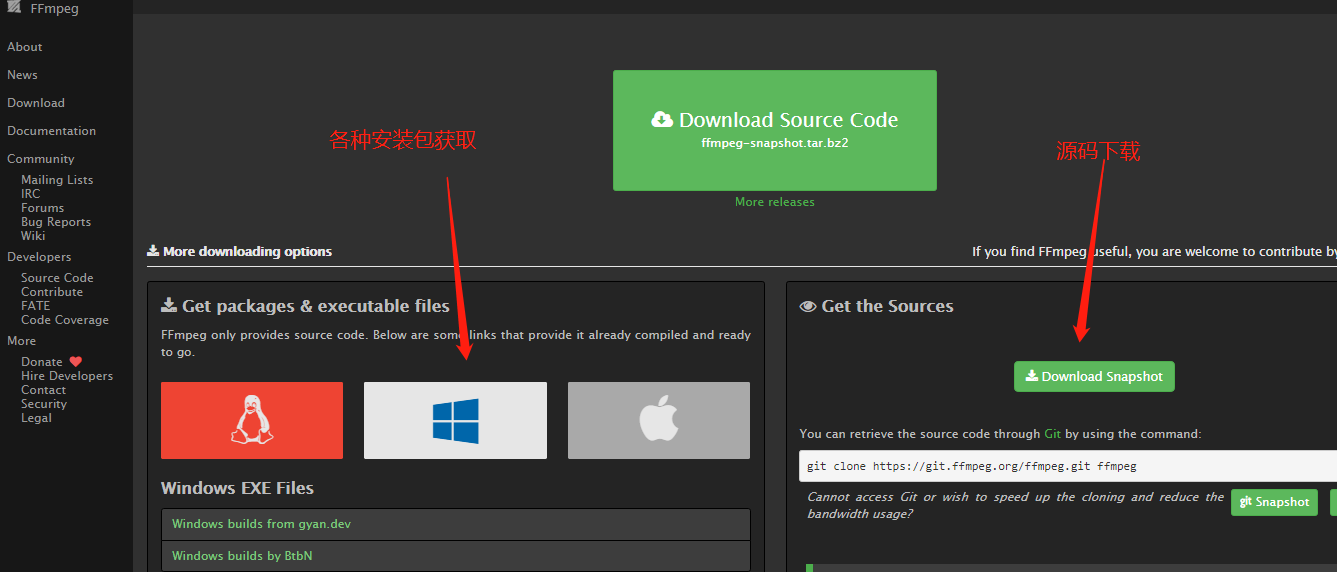
下载ffmpeg,下载路径:
首先打开网址:
![]()
-
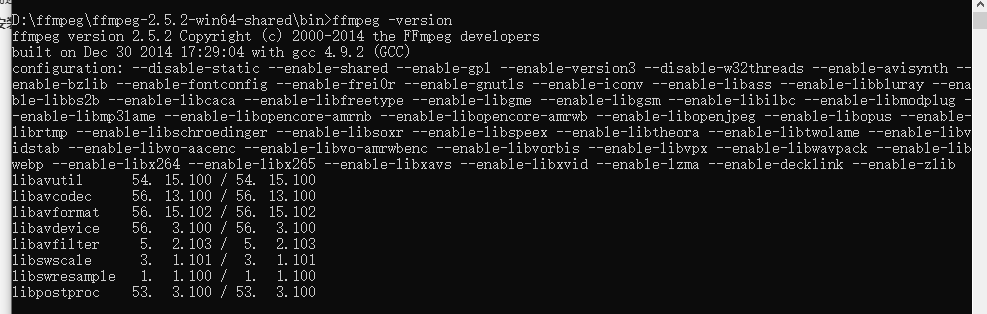
安装 下载后解压到指定目录(如D盘),如:D:\ffmpeg\bin,把这个地址设置成环境变量 验证是否安装成功: 运行cmd命令,在控制台输入命令:ffmpeg -version,
![]()
3.测试使用
-
具体代码测试可参考
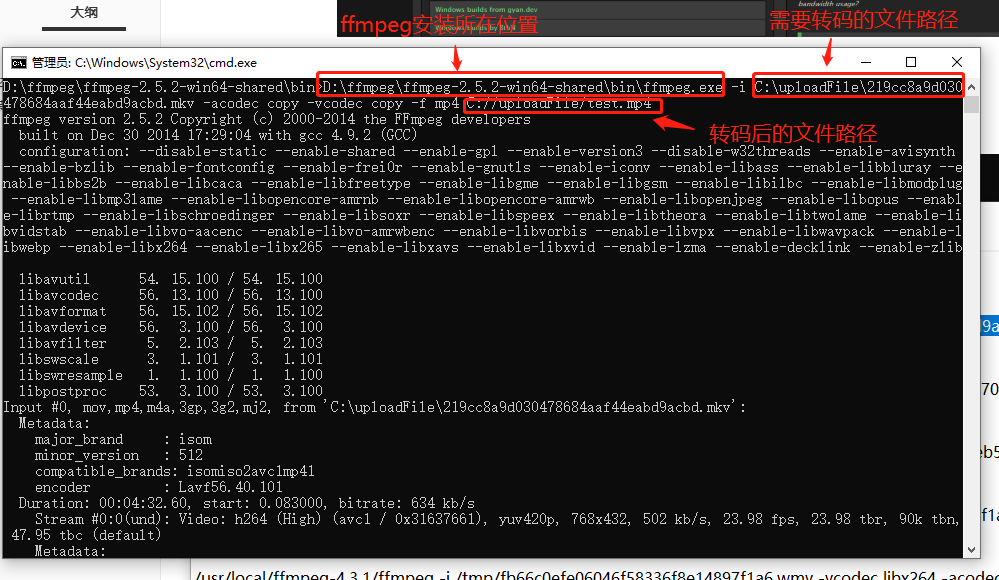
本地测试转码MP4截屏如图:
![]()
4.项目中的使用
-
具体代码查看UploadController,实现逻辑
/**
 * 上传流程:
 * 1.将符合格式的上传文件下载到服务器临时文件夹
 * 2.获取上传的文件类型,将不是MP4文件格式的文件转码为 mp4,并截图(除了MP3格式的文件),也存放在临时文件夹,记录时长,分辨率,大小数据
 * 3.将转码后的mp4文件和视频截图 上传至minio ,记录访问路径
* 4.删除所有临时文件 - 工具类:
-
import com.alibaba.druid.util.StringUtils;
import org.springblade.core.tool.utils.Func;
import org.springblade.video.entity.Video;

import java.io.*;
import java.util.ArrayList;
import java.util.List;
import java.util.regex.Matcher;
import java.util.regex.Pattern;

public class VideoUtil {

        private static boolean geti(){
        boolean t = true;
            long t1 = System.currentTimeMillis();
            while(true){
                long t2 = System.currentTimeMillis();
                //10秒转换不成功退出
                if(t2-t1 > 10*1000){
                    t=false;
                    break;
                }
            }
        return t;
        };
    /**
     * 处理process输出流和错误流,防止进程阻塞
     * 在process.waitFor();前调用
     * @param process
     */
    private static void dealStream(Process process) {
        if (process == null) {
            return;
        }
        // 处理InputStream的线程
        new Thread() {
            @Override
            public void run() {
                BufferedReader in = new BufferedReader(new InputStreamReader(process.getInputStream()));
                String line = null;
                try {
                    while ((line = in.readLine()) != null) {
                    }
                } catch (IOException e) {
                    e.printStackTrace();
                } finally {
                    try {
                        in.close();
                    } catch (IOException e) {
                        e.printStackTrace();
                    }
                }
            }
        }.start();
        // 处理ErrorStream的线程
        new Thread() {
            @Override
            public void run() {
                BufferedReader err = new BufferedReader(new InputStreamReader(process.getErrorStream()));
                String line = null;
                try {
                    while ((line = err.readLine()) != null) {
                    }
                } catch (IOException e) {
                    e.printStackTrace();
                } finally {
                    try {
                        err.close();
                    } catch (IOException e) {
                        e.printStackTrace();
                    }
                }
            }
        }.start();
    }

    /**
     *  视频音频转码mp4
     * @param ffmpegPath 转码工具的存放路径
     * @param infile 用于指定要转换格式的文件,视频源文件
     * @param outfile  格式转换后的的文件保存路径
     * @return
     */
    public static boolean transfer(String ffmpegPath,String infile,String outfile) throws  Exception {
//        String h264tomp4 = ffmpegPath + " -i " + infile + " -qscale 6 -ab 64 -ac 2 -ar 22050 -r 24 -y  "+outfile;
        final String WMV = "wmv";
        String suffix = infile.substring(infile.lastIndexOf(".") + 1);
        //第二种转换方式
        boolean t = false;
        String h264tomp4 = null;
        Runtime rt = null;
        Process proc = null;
        InputStream stderr = null;
        InputStreamReader isr = null;
        BufferedReader br = null;
        String line = null;
        if(Func.isNotBlank(suffix) && WMV.equalsIgnoreCase(suffix)){
            /**
             * 命令格式:ffmpeg -i [输入文件名] [参数选项] -f [格式] [输出文件]
             * ffmpeg [[options][`-i' input_file]]... {[options] output_file}...
             *     1、参数选项:
             *     (1) -an: 去掉音频
             *     (2) -acodec: 音频选项, 一般后面加copy表示拷贝
             *     (3) -vcodec:视频选项,一般后面加copy表示拷贝
             *     2、格式:
             *     (1) h264: 表示输出的是h264的视频裸流
             *     (2) mp4: 表示输出的是mp4的视频
             *     * -f ... 强迫采用 ...格式
             *
             * ffmpeg -i "20090401010.mp4" -y -ab 32 -ar 22050 -qscale 10 -s 640*480 -r 15 /opt/a.flv
             * -i 是 要转换文件名
             * -y是 覆盖输出文件
             * -ab 是 音频数据流,大家在百度听歌的时候应该都可以看到 128 64
             * -ar 是 声音的频率 22050 基本都是这个。
             * -qscale 是视频输出质量,后边的值越小质量越高,但是输出文件就越“肥”(文件越大)
             * -s 是输出 文件的尺寸大小!
             * -r 是 播放侦数。
             */
            h264tomp4 = ffmpegPath + " -i " + infile + " -vcodec libx264 -acodec libvo_aacenc -f mp4 "+outfile;
            t = true;
        }else{
//            -y -qscale 0 -vcodec libx264

                //提取音视频
            h264tomp4 = ffmpegPath + " -i " + infile + " -acodec copy -vcodec copy -f mp4 "+outfile;
        }
        rt = Runtime.getRuntime();
        proc = rt.exec(h264tomp4);
        stderr = proc.getErrorStream();
        isr = new InputStreamReader(stderr);
        br = new BufferedReader(isr);
        while ( (line = br.readLine()) != null) {
            System.out.println(line);
//            if((endTime-startTime)>1000*60){
//                break;
//            }
        }
        dealStream(proc);
        int exitVal = proc.waitFor();
        System.out.println("Process exitValue: " + exitVal);
        //若转换异常,采用另一种转码命令
        if(exitVal>0){
            h264tomp4 = ffmpegPath + " -i " + infile + " -y -qscale 0 -vcodec libx264 "+outfile;
            rt = Runtime.getRuntime();
            proc = rt.exec(h264tomp4);
            stderr = proc.getErrorStream();
            isr = new InputStreamReader(stderr);
            br = new BufferedReader(isr);
            while ( (line = br.readLine()) != null) {
                System.out.println(line);
            }
            dealStream(proc);
            exitVal = proc.waitFor();
            System.out.println("Process exitValue: " + exitVal);
            if(exitVal>0){
                throw new RuntimeException("文件转换错误");
            }
        }
        return true;
    }

    /**
     *  音频转码mp4
     * @param ffmpegPath 转码工具的存放路径
     * @param infile 用于指定要转换格式的文件,视频源文件
     * @param outfile  格式转换后的的文件保存路径
     * @return
     */
    public static boolean mp3toTransfer(String ffmpegPath,String infile,String outfile) throws IOException{
        String h264tomp4 = ffmpegPath +"  -i " +infile + " "+outfile;
        InputStream stderr = null;
        InputStreamReader isr = null;
        BufferedReader br = null;
        try {
            Runtime rt = Runtime.getRuntime();
            Process proc = rt.exec(h264tomp4);
             stderr = proc.getErrorStream();
             isr = new InputStreamReader(stderr);
             br = new BufferedReader(isr);
            String line = null;
            while ( (line = br.readLine()) != null) {
                System.out.println(line);
            }
            int exitVal = proc.waitFor();
            System.out.println("Process exitValue: " + exitVal);

        } catch (Exception e) {
            e.printStackTrace();
            return false;
        }finally {
            if(stderr!=null){
                stderr.close();
            }
            if(isr!=null){
                isr.close();
            }
            if(br!=null){
                br.close();
            }
        }
        return true;
    }


    /**
     * 获取时长和分辨率
     * @param ffmpegPath    转码工具的存放路径
     * @param upFilePath    用于指定要转换格式的文件,视频源文件
     * @param video
     * @return
     */
    public static Video getVideoDurationAndVideoPower(String ffmpegPath, String upFilePath,Video video,String pref){
        //拼接cmd命令语句
        StringBuffer buffer = new StringBuffer();
        buffer.append(ffmpegPath);
        //注意要保留单词之间有空格
        buffer.append(" -i ");
        buffer.append(upFilePath);
        try {
            Process process = Runtime.getRuntime().exec(buffer.toString());
            InputStream in = process.getErrorStream();
            BufferedReader br = new BufferedReader(new InputStreamReader(in));
            String line ;
            while((line=br.readLine())!=null) {
                String str = "Duration:";
                if (line.trim().startsWith(str)) {
                    //根据字符匹配进行切割 (时分秒.毫秒的正则表达式)
                    String regex  = "\\s([0-1]?[0-9]|2[0-3]):([0-5][0-9]):([0-5][0-9]\\.\\d{1,3})";
                    Pattern p = Pattern.compile(regex);
                    Matcher matcher = p.matcher(line.trim());
                    if (matcher.find()) {
                        String videoDuration = matcher.group(0).trim();
                        if(!StringUtils.isEmpty(videoDuration)){
                            video.setVideoDuration(ConvertorTime.timeToInt(videoDuration.substring(0,8)));
                        }
                    }
                }
                //一般包含fps的行就包含分辨率
                if (!"mp3".equals(pref)&&line.contains("fps")) {
                    System.out.println(line);
                    String pattern = "(?!=\\d)\\d{2,}x\\d{2,}(?!=\\d)";
                    Pattern r = Pattern.compile(pattern);
                    Matcher m = r.matcher(line);
                    if (m.find( )) {
                        video.setVideoPower(m.group(0));
                    }
                }
            }
        }catch (Exception e){
            e.printStackTrace();
        }finally {
            return video;
        }
    }

    /**
     * 视频转码
     * @param ffmpegPath    转码工具的存放路径
     * @param upFilePath    用于指定要转换格式的文件,要截图的视频源文件
     * @param codcFilePath    格式转换后的的文件保存路径
     * @param mediaPicPath    截图保存路径
     * @return
     * @throws Exception
     */
    public static boolean executeCodecsAndImage(String ffmpegPath, String upFilePath, String codcFilePath,String mediaPicPath) throws Exception {
        // 创建一个List集合来保存转换视频文件为flv格式的命令
        List<String> convert = new ArrayList<String>();
        // 添加转换工具路径
        convert.add(ffmpegPath);
        // 添加参数"-i",该参数指定要转换的文件
        convert.add("-i");
        // 添加要转换格式的视频文件的路径
        convert.add(upFilePath);
        //指定转换的质量
        convert.add("-qscale");
        convert.add("6");
        //设置音频码率
        convert.add("-ab");
        convert.add("64");
        //设置声道数
        convert.add("-ac");
        convert.add("2");
        //设置声音的采样频率
        convert.add("-ar");
        convert.add("22050");
        //设置帧频
        convert.add("-r");
        convert.add("24");
        // 添加参数"-y",该参数指定将覆盖已存在的文件
        convert.add("-y");
        convert.add(codcFilePath);

        // 创建一个List集合来保存从视频中截取图片的命令
        List<String> cutpic = new ArrayList<String>();
        cutpic.add(ffmpegPath);
        cutpic.add("-i");
        // 同上(指定的文件即可以是转换为flv格式之前的文件,也可以是转换的flv文件)
        cutpic.add(upFilePath);
        cutpic.add("-y");
        cutpic.add("-f");
        cutpic.add("image2");
        // 添加参数"-ss",该参数指定截取的起始时间
        cutpic.add("-ss");
        // 添加起始时间为第1秒
        cutpic.add("1");
        // 添加参数"-t",该参数指定持续时间
        cutpic.add("-t");
        // 添加持续时间为1毫秒
        cutpic.add("0.001");
        // 添加参数"-s",该参数指定截取的图片大小
        cutpic.add("-s");
        // 添加截取的图片大小为300*200
        cutpic.add("300*200");
        // 添加截取的图片的保存路径
        cutpic.add(mediaPicPath);

        boolean mark = true;
        ProcessBuilder builder = new ProcessBuilder();
        try {
            builder.command(convert);
            builder.redirectErrorStream(true);
            builder.start();

            builder.command(cutpic);
            builder.redirectErrorStream(true);
            // 如果此属性为 true,则任何由通过此对象的 start() 方法启动的后续子进程生成的错误输出都将与标准输出合并,
            //因此两者均可使用 Process.getInputStream() 方法读取。这使得关联错误消息和相应的输出变得更容易
            builder.start();
        } catch (Exception e) {
            mark = false;
            System.out.println(e);
            e.printStackTrace();
        }
        return mark;
    }
        /**
     *
     * @param ffmpegPath    转码工具的存放路径
     * @param upFilePath    要截图的视频源文件
     * @param mediaPicPath    添加截取的图片的保存路径
     * @param width            截图的宽
     * @param height        截图的高
     * @return
     */
    public static boolean screenImage(String ffmpegPath, String upFilePath, String mediaPicPath, String width, String height) {

        // 创建一个List集合来保存从视频中截取图片的命令
        List<String> cutpic = new ArrayList<String>();
        cutpic.add(ffmpegPath);
        cutpic.add("-i");
        // 要截图的视频源文件
        cutpic.add(upFilePath);
        cutpic.add("-y");
        cutpic.add("-f");
        cutpic.add("image2");
        // 添加参数"-ss",该参数指定截取的起始时间
        cutpic.add("-ss");
        //这个参数是设置截取视频多少秒时的画面
        cutpic.add("1");
//        // 添加参数"-t",该参数指定持续时间
//        cutpic.add("-t");
//        // 添加持续时间为2毫秒
//        cutpic.add("0.002");
        // 添加参数"-s",该参数指定截取的图片大小
        cutpic.add("-s");
        // 添加截取的图片大小为350*240
        cutpic.add(width + "*" + height);
        // 添加截取的图片的保存路径
        cutpic.add(mediaPicPath);

        ProcessBuilder builder = new ProcessBuilder();
        boolean t = true;
        try {
            builder.command(cutpic);
            builder.redirectErrorStream(true);
            builder.start();
            long t1 = System.currentTimeMillis();
            while(!new File(mediaPicPath).exists()){
                long t2 = System.currentTimeMillis();
                //10秒转换不成功退出
                if(t2-t1 > 10*1000){
                    t = false;
                    break;
                }
            }
        } catch (Exception e) {
            e.printStackTrace();
            return false;
        }
        return t;
    }
}
-
参考链接:
http://www.manongjc.com/article/111313.html](http://www.manongjc.com/article/111313.html)
https://my.oschina.net/lwaif/blog/372623

 浙公网安备 33010602011771号