
关于SpringBoot报错:Failed to configure a DataSource: 'url' attribute is not specified and no embedded
SpringBoot集成Mybatis等可能会报错如下:
***************************
APPLICATION FAILED TO START
***************************
Description:
Failed to configure a DataSource: 'url' attribute is not specified and no embedded datasource could be configured.
Reason: Failed to determine a suitable driver class
Action:
Consider the following:
If you want an embedded database (H2, HSQL or Derby), please put it on the classpath.
If you want an embedded database (H2, HSQL or Derby), please put it on the classpath.
If you have database settings to be loaded from a particular profile you may need to activate it (no profiles are currently active).
Process finished with exit code
问题分析及解决方案
1、DataSourceAutoConfiguration会自动加载.可以排除此类的自动配置,在启动类中加入
@SpringBootApplication(exclude= {DataSourceAutoConfiguration.class})2、在application.properties或者application.yml文件中没有添加数据库配置信息.导致错误,加入数据源即可
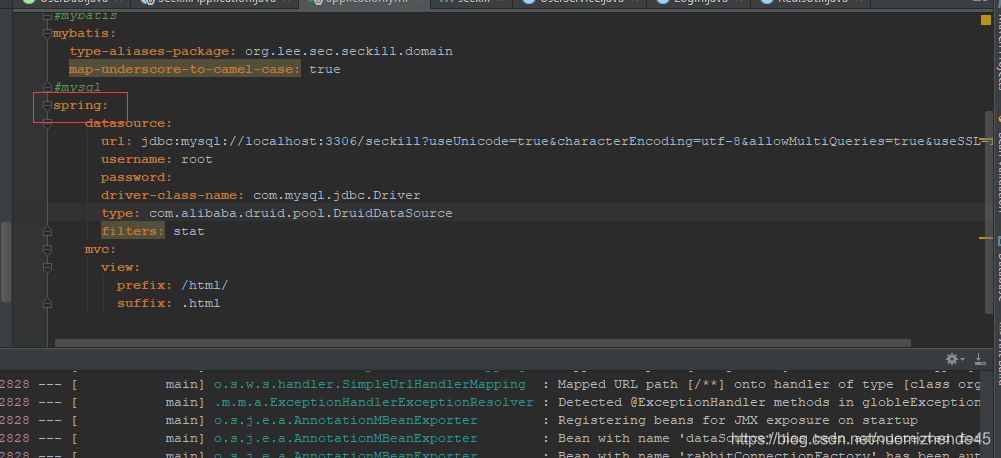
3、还有一种错误,是基于第二种的,自己配置了数据源发现还是报同样的错误,新手也很容易犯的错误,就是在使用yml文件配置的时候在配置属性的前面习惯性的有一个或者几个空格或是一个“Tab”,如下:
在yml文件中配置的属性前面是不允许有缩进的,解决办法就是不缩进,该问题解决。改成如下。将缩进去掉即可,使用yml文件配置一定要注意格式,不然细节将会引起大错误

还有一种使pom中为引入jar包,这里比较关键的jar包如下:
<dependency>
<groupId>mysql</groupId>
<artifactId>mysql-connector-java</artifactId>
</dependency>
<dependency>
<groupId>org.mybatis.spring.boot</groupId>
<artifactId>mybatis-spring-boot-starter</artifactId>
<version>1.3.0</version>
</dependency>
<!-- 我这里用的数据源使druid -->
<dependency>
<groupId>com.alibaba</groupId>
<artifactId>druid</artifactId>
<version>1.0.5</version>
</dependency>

 浙公网安备 33010602011771号