

debian sysctl: cannot open "/etc/sysctl.conf": 没有那个文件或目录
系统正常使用,却弹出inotify的警告
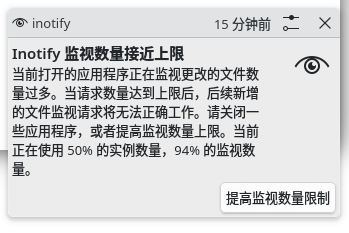
查询当前配置
cat /proc/sys/fs/inotify/max_user_watches
cat /proc/sys/fs/inotify/max_user_instances
系统默认配置第一项12W多,第二项256
linux inotify 是一种高效的文件监控机制,它允许用户监视文件或目录的变化。例如,tail -f 命令通过 inotify 机制实时跟踪文件内容的变化。当系统中有大量文件或应用程序需要同时监视时,可能会遇到 tail: inotify 资源耗尽 错误。
在这篇文章中,我们将介绍如何快速解决该问题,并避免因资源耗尽导致 inotify 机制回退到轮询模式,影响性能。
错误分析:tail: inotify 资源耗尽
当你在 Linux 系统中使用 tail -f 等命令监视文件变化时,tail 会使用 inotify 机制来实时获取文件的变化。如果系统已达到 inotify 的资源限制,就会看到以下错误消息:
tail: inotify 资源耗尽
tail: 无法使用 inotify 机制,回归为 polling 机制
这个错误表示 inotify 监视实例的数量已经达到系统配置的上限,导致无法继续使用 inotify 机制来高效地监视文件变化,从而退回到低效的轮询(polling)机制。
个人没有显示的调用tail操作;按解释应该保留该机制,所以修改参数;
ls /etc/sysctl.conf
文件不存在
找到/etc/sysctl.d下面有一个
50-kde-inotify-survey-max_user_instances.conf
里面只有一个配置项fs.inotify.max_user_instances=256
所以修改这个文件
fs.inotify.max_user_watches = 262144
fs.inotify.max_user_instances = 512
参考值:
sudo sysctl fs.inotify.max_user_watches=524288
sudo sysctl fs.inotify.max_user_instances=1024
调用sudo systemctl -p刷新配置,却提示
sysctl: cannot open "/etc/sysctl.conf": 没有那个文件或目录
使用sudo sysctl --system全部打印参数可以看到设置成功
单独查询参数,也是更改后的值
cat /proc/sys/fs/inotify/max_user_watches
cat /proc/sys/fs/inotify/max_user_instances
参考:
1.https://blog.csdn.net/u012899618/article/details/144075981
2.https://trustcomputing.com.cn/bbs/redirect.php?tid=2139&goto=lastpost

 浙公网安备 33010602011771号