
fedora 下使用 oh-my-posh 美化 bash
fedora 下使用 oh-my-posh 美化 bash
一、为什么选择 oh-my-posh
oh-my-posh 有着跨平台统一主题,Windows PowerShell 和 Linux Bash 用同一套 .omp.json 配置。而且配置简单,一个 JSON 文件搞定一切。
二、安装 oh-my-posh
sudo dnf install oh-my-posh
检查是否安装成功:
# 查看版本
oh-my-posh --version
# 示例输出为
28.10.0
完成安装。
三、安装 Nerd Fonts
oh-my-posh 的箭头、Git 图标等依赖 Nerd Fonts。可以用 oh-my-posh 内置命令安装:
oh-my-posh font install Meslo
它会自动下载并安装 MesloLGM Nerd Font(最兼容的主题字体)。
然后在终端上设置字体即可。
四、配置 oh-my-posh 到 Bash
编辑 bash 配置文件:
nano ~/.bashrc
在文件末尾添加:
# 启用 oh-my-posh(使用默认主题)
eval "$(oh-my-posh init bash)"
保存退出后,重载配置:
source ~/.bashrc
五、使用自定义主题
# 创建主题目录
mkdir -p ~/.config/oh-my-posh/themes
# 进入主题目录
cd ~/.config/oh-my-posh/themes
在官网(oh-my-posh themes)上选择自己喜欢的主题并下载:
# 以 powerlevel10k_rainbow 主题为例
wget https://raw.githubusercontent.com/JanDeDobbeleer/oh-my-posh/main/themes/powerlevel10k_rainbow.omp.json
修改 ~/.bashrc 使用自定义主题:
eval "$(oh-my-posh init bash --config ~/.config/oh-my-posh/themes/powerlevel10k_rainbow.omp.json)"
重载配置即可:
source ~/.bashrc
六、修改主题使 conda 环境可见
以 powerlevel10k_rainbow 这一主题为例,当激活 conda 环境之后 bash 并不会显示环境。所以需要对该主题的 .json 文件做一定修改以适配 conda 的显示。
首先复制一份文件到 powerlevel10k_rainbow_with-conda.omp.json 再进行修改,避免污染原文件:
cp ~/.config/oh-my-posh/themes/powerlevel10k_rainbow.omp.json ~/.config/oh-my-posh/themes/powerlevel10k_rainbow_with-conda.omp.json
修改:
nano .config/oh-my-posh/themes/powerlevel10k_rainbow_with-conda.omp.json
找到 python 的 segment :
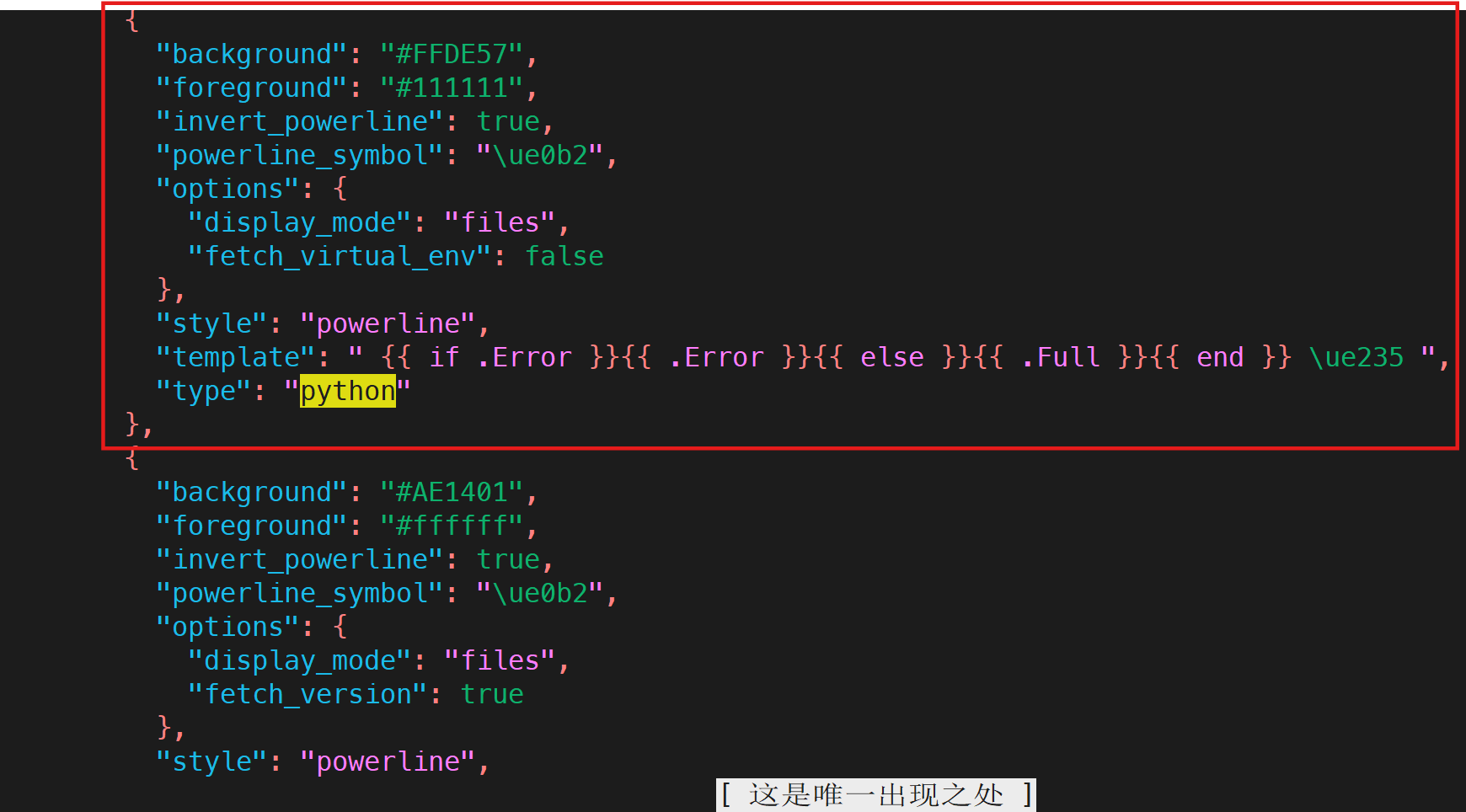
将这一块替换为下面的段落(也可以按照自己需求编写):
	{
	"type": "python",
	"style": "powerline",
	"powerline_symbol": "\ue0b2",
	"foreground": "#111111",
	"background": "#FFDE57",
	"invert_powerline": true,
	"properties": {
		"display_mode": "environment",
		"fetch_virtual_env": true,
		"display_version": true,
		"home_enabled": true,
		"prefix": " \ue235 ",
		"postfix": ""
	},
	"template": "{{ if .Venv }}\ue73f{{ .Venv }}{{ else if .Version }}\ue73f{{ .Version }}{{ end }}"
	},
编辑 ~/.bashrc, 将 eval "$(oh-my-posh init bash --config ~/.config/oh-my-posh/themes/powerlevel10k_rainbow.omp.json)" 修改为:
eval "$(oh-my-posh init bash --config ~/.config/oh-my-posh/themes/powerlevel10k_rainbow_with-conda.omp.json)"
重载配置即可:
source ~/.bashrc
效果:

版权声明: 本文为博主「张火火isgudi」的原创文章,遵循 CC 4.0 BY-SA 版权协议,转载请附上原文出处链接及本声明。
原文链接: https://www.cnblogs.com/zbyisgudi/p/19507440

 浙公网安备 33010602011771号