

【Java】Map
个人主页:https://github.com/zbhgis
前言
1.之前学过,因此本文是个人复习笔记,为视频的总结以及个人思考,可能不是很详细。
2.教程是b站黑马程序员的JAVASE基础课程,笔记中的大部分图片来自于视频中的PPT截图。
3.Java环境为Java SE 17.0.3.1,IntelliJ IDEA版本为2025.2
https://www.bilibili.com/video/BV1Cv411372m
内容概览
1.本文内容主要包括Map概述与常用方法、Map的遍历方法、HashMap、LinkedHashMap、TreeMap,以及集合的嵌套
2.笔记对应视频145~148节
更新记录
无
Map概述与常用方法
Map集合成为双列集合,格式为:{key1=value1, key2=value2, key3=value3},一次需要存一对数据作为一个元素
Map集合的每个元素"key=value"称为键值对/键值对对象/Entry对象,因此Map集合也称为"键值对集合"
Map集合的键不可重复,但值可以重复。
HashMap:无序,不重复,无索引
LinkedHashMap:有序,不重复,无索引
TreeMap:按照大小默认升序排序,不重复,无索引
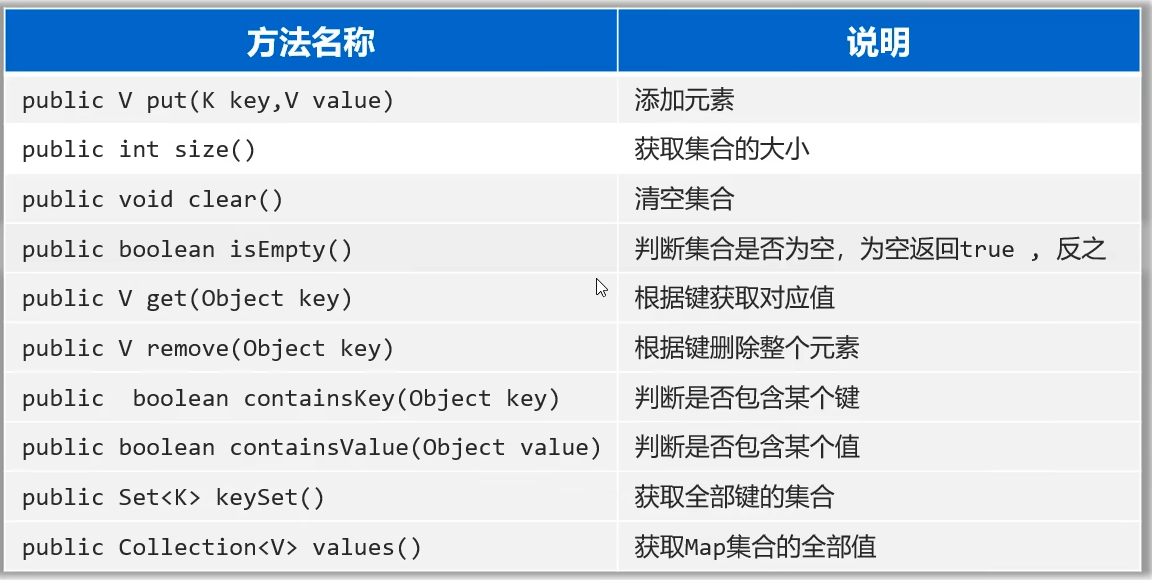
Sets7.java
package com.zbhgis.sets;

import java.util.*;

public class Sets7 {
    public static void main(String[] args) {
        Map<String, Integer> map1 = new LinkedHashMap<>();
        map1.put("手表", 100);
        map1.put("手表", 200);
        map1.put("手机", 2);
        map1.put("java", 2);
        map1.put(null, null);
        System.out.println(map1);

        Map<Integer, String> map2 = new TreeMap<>();
        map2.put(23, "Java");
        map2.put(23, "C#");
        map2.put(19, "Python");
        map2.put(20, "C");
        // 不可以放null
        // map2.put(null, null);
        System.out.println(map2);

        System.out.println(map1.size());

        // 清空集合
        // map1.clear();
        // System.out.println(map1);

        System.out.println(map1.isEmpty());

        int v1 = map1.get("手表");
        System.out.println(v1);
        System.out.println(map1.get("手机"));
        System.out.println(map1.get("java"));

        System.out.println(map1.remove("手表"));
        System.out.println(map1);

        System.out.println(map1.containsKey("手表"));
        System.out.println(map1.containsKey("java"));
        System.out.println(map1.containsKey("Java"));

        System.out.println(map1.containsValue(2));
        System.out.println(map1.containsValue(1));

        Set<String> keys = map1.keySet();
        System.out.println(keys);
        Collection<Integer> values = map1.values();
        System.out.println(values);

        Map<String, Integer> map3 = new HashMap<>();
        map3.put("java1", 10);
        map3.put("java2", 20);

        Map<String, Integer> map4 = new HashMap<>();
        map4.put("java3", 10);
        map4.put("java2", 20);
        map3.putAll(map4);
        System.out.println(map3);
        System.out.println(map4);
    }
}
打印结果
{手表=200, 手机=2, java=2, null=null}
{19=Python, 20=C, 23=C#}
Map集合的遍历方法
键找值
先获取Map集合全部的键,再通过遍历键来找值
键值对
把“键值对”看成一个整体进行遍历
Lambda
JDK1.8之后可行
Sets8.java
package com.zbhgis.sets;

import java.sql.SQLOutput;
import java.util.HashMap;
import java.util.Map;
import java.util.Set;

public class Sets8 {
    public static void main(String[] args) {
        Map<String, Integer> map = new HashMap<>();
        map.put("山", 1);
        map.put("水", 3);
        map.put("重", 2);
        map.put("复", 4);
        System.out.println(map);

        Set<String> keys = map.keySet();
        for (String key : keys) {
            int value = map.get(key);
            System.out.println(key + ":" + value);
        }
        System.out.println();

        Set<Map.Entry<String, Integer>> entries = map.entrySet();
        for (Map.Entry<String, Integer> entry : entries) {
            String key = entry.getKey();
            int value = entry.getValue();
            System.out.println(key + ":" + value);
        }
        System.out.println();

        map.forEach((k, v) -> System.out.println(k + ":" + v));
    }
}
打印结果
{山=1, 水=3, 重=2, 复=4}
山:1
水:3
重:2
复:4

山:1
水:3
重:2
复:4

山:1
水:3
重:2
复:4
综合案例
票数统计
Sets9.java
package com.zbhgis.sets;

import java.util.*;

public class Sets9 {
    public static void main(String[] args) {
        List<String> data = new ArrayList<>();
        String[] selects = {"A", "B", "C", "D"};
        Random r = new Random();
        for (int i = 0; i < 20; i++) {
            int idx = r.nextInt(4);
            data.add(selects[idx]);
        }
        System.out.println(data);

        Map<String, Integer> res = new HashMap<>();
        for (String s : data) {
            if(res.containsKey(s)) res.put(s, res.get(s) + 1);
            else res.put(s, 1);
        }
        System.out.println(res);
    }
}
打印结果
[D, C, B, C, B, D, A, B, A, A, B, D, D, C, B, C, D, A, B, B]
{A=4, B=7, C=4, D=5}
HashMap,LinkedHashMap,TreeMap
HashMap:
底层原理类似于HashSet,通过键来生成哈希值
HashMap的键依赖hashCode方法和equals方法保证键的唯一
如果键存储的是自定义类型的对象,可以通过重写hashCode和equals方法,这样可以保证多个对象内容一样时,HashMap集合就能认为是重复的
LinkedHashMap:
底层原理类似于LinkedHashSet
TreeMap:
底层原理类似于TreeSet
Sets10.java
package com.zbhgis.sets;

import java.util.HashMap;
import java.util.LinkedHashMap;
import java.util.Map;
import java.util.TreeMap;

public class Sets10 {
    public static void main(String[] args) {
        Map<Student, String> map = new HashMap<>();
        Student s1 = new Student("山", 16, new int[]{60, 99});
        Student s2 = new Student("重", 15, new int[]{59, 100});
        Student s3 = new Student("山", 16, new int[]{60, 99});
        Student s4 = new Student("复", 17, new int[]{61, 100});

        map.put(s1, "柳");
        map.put(s2, "暗");
        map.put(s3, "花");
        map.put(s4, "明");
        System.out.println(map);

        Map<Student, String> map2 = new LinkedHashMap<>();
        map2.put(s1, "柳");
        map2.put(s2, "暗");
        map2.put(s3, "花");
        map2.put(s4, "明");
        System.out.println(map2);

        Map<Student, String> map3 = new TreeMap<>();
        map3.put(s1, "柳");
        map3.put(s2, "暗");
        map3.put(s3, "花");
        map3.put(s4, "明");
        System.out.println(map3);
    }
}
打印结果
{Student{name='山', age=16, scores=[60, 99]}=花, Student{name='重', age=15, scores=[59, 100]}=暗, Student{name='复', age=17, scores=[61, 100]}=明}
{Student{name='山', age=16, scores=[60, 99]}=花, Student{name='重', age=15, scores=[59, 100]}=暗, Student{name='复', age=17, scores=[61, 100]}=明}
{Student{name='重', age=15, scores=[59, 100]}=暗, Student{name='山', age=16, scores=[60, 99]}=花, Student{name='复', age=17, scores=[61, 100]}=明}
集合的嵌套
Sets11.java
package com.zbhgis.sets;

import java.util.*;

public class Sets11 {
    public static void main(String[] args) {
        Map<String, List<String>> map = new HashMap<>();
        List<String> cities1 = new ArrayList<>();
        Collections.addAll(cities1, "南京市", "苏州市");
        map.put("江苏省", cities1);
        System.out.println(map);

        List<String> cities2 = new ArrayList<>();
        Collections.addAll(cities2, "福州市", "厦门市");
        map.put("福建省", cities2);
        System.out.println(map);

        List<String> cities = map.get("福建省");
        for (String city : cities) {
            System.out.println(city);
        }

        map.forEach((p, c) -> System.out.println(p + ":" + c));
    }
}
打印结果
{江苏省=[南京市, 苏州市]}
{福建省=[福州市, 厦门市], 江苏省=[南京市, 苏州市]}
福州市
厦门市
福建省:[福州市, 厦门市]
江苏省:[南京市, 苏州市]
总结
1.Map类似于Collection,一些api的使用类似
2.Map中存储的是键值对对象
3.Map中添加元素用的是put,Collection中添加元素用的是add

 浙公网安备 33010602011771号