
uni-vue 组件选中和动态数据图标的使用
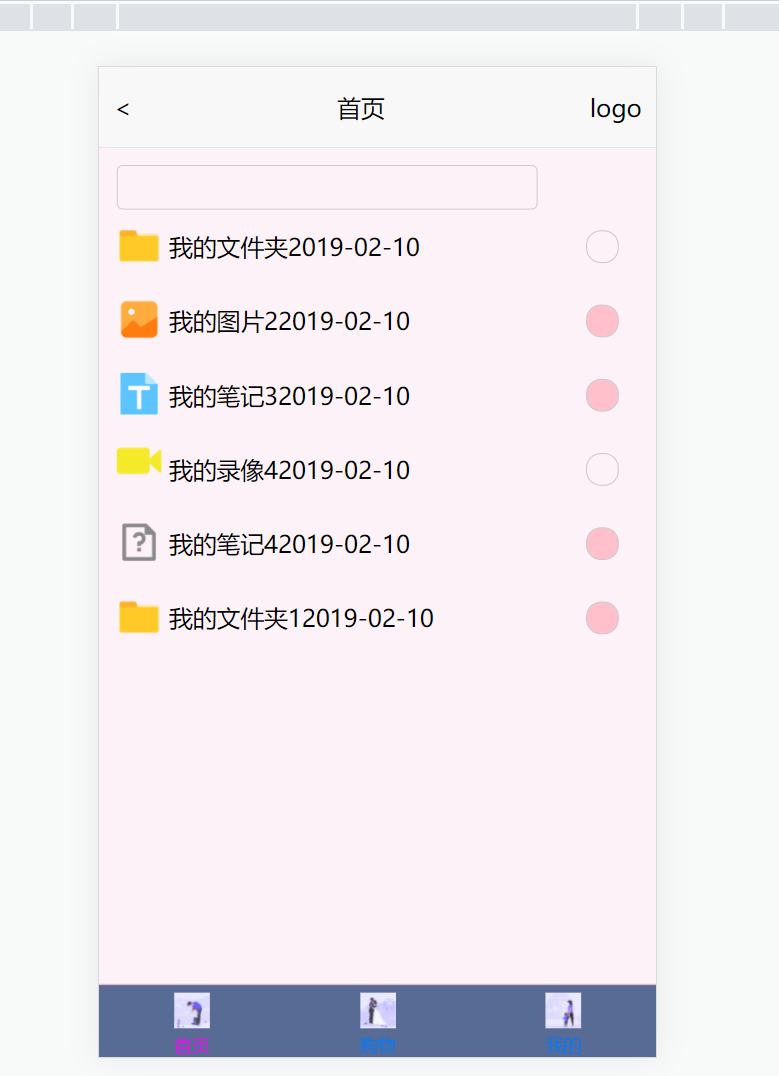
index.vue内使用list组件,组件的功能主要包含1:根据不同数据显示不同图标,2:选中事件
实现1:利用:class="iconClass"
实现2:vue基础 子传父$emit,父传子prop
代码:父组件index.vue
<template>
    <view class="content">
        <nav-bar></nav-bar>
        <view class="dg">
            <view class="content">
                <!-- 搜索框 -->
                <view>
                    <input type="text" v-model="search" class="inp">
                </view>
                <!-- <text>{{search}}</text> -->
                <!-- 列表 -->
                <f-list v-for="(item,index) in list"
                :key="index"
                :item="item"
                :index="index"
                @select="select"
                ></f-list>
            </view>
        </view>
    </view>
</template>
<script>
    import navBar from '@/components/common/nav-bar.vue';
    import fList from '@/components/common/f_list.vue';

    export default {
        data() {
            return {
                title: 'Hello',
                search: '',
                list: [{
            "type": "dir",
            "name": "我的文件夹",
            "create_time": "2019-02-10",
            "checked": false
        },
        {
            "type": "images",
            "name": "我的图片2",
            "create_time": "2019-02-10",
            "checked": false
        },
        {
            "type": "text",
            "name": "我的笔记3",
            "create_time": "2019-02-10",
            "checked": true
        },
        {
            "type": "vedio",
            "name": "我的录像4",
            "create_time": "2019-02-10",
            "checked": false
        },
        {
            "type": "none",
            "name": "我的笔记4",
            "create_time": "2019-02-10",
            "checked": false
        },
        {
            "type": "dir",
            "name": "我的文件夹1",
            "create_time": "2019-02-10",
            "checked": false
        }
                ]
            }
        },
        components: {
            navBar,
            fList
        },
        onLoad() {

        },
        methods: {
            select(e){
                console.log(e)
                this.list[e.index].checked = e.item
            }
        }
    }
</script>
<style>
    @import url("/common/uni.css");
    @import url("/common/my.css");
</style>
子组件代码:
<template>
    <view class="list">
        <view class="item">
            <view style="width: 10%;text-align: center;line-height: 50rpx;">
                <view class="iconClsCon" :class="iconClass"></view>
            </view>
            <view style="width: 80%;">
                <text>{{item.name}}</text>
                <text>{{item.create_time}}</text>
            </view>
            <view class="radioconten" @click="selectfn" style="width: 10%;align-items: center;">
                <text v-if="!item.checked" class="radioicon"></text>
                <text v-else class="radioicon radioiconed"></text>
            </view>
        </view>
        <!-- {{iconClass}} -->
    </view>
</template>
<script>
    export default {
        name:'f-list',
        data(){
            return {
                icons:{
                    dir:"dirCls",
                    images:"imagesCls",
                    vedio:"vedioCls",
                    text:"textCls",
                    none:"noneCls"
                }
            }
        },
        props:{
            item:Object,
            index:[String,Number]
        },
        computed:{
            iconClass(){
                return this.icons[`${this.item.type}`]
            }
        },
        methods:{
            selectfn(){
                this.$emit('select',{
                    index:this.index,
                    item:!this.item.checked
                })
            }
        },
        created(){
            console.log("item-inconclass",this.iconClass,this.item.type)
        }
    }
</script>
<style>
    @import url("/common/uni.css");
    @import url("/common/my.css");
    .iconClsCon{
        width:30px;
        height:28px;
        margin-top:10px;
    }
    .dirCls{
        background: url(../../static/images/iconwjj.png);
        background-position: center;
        background-repeat: no-repeat;
        background-size:100%;
    }
    .imagesCls{
        background: url(../../static/images/imagesicon.png);
        background-position: center;
        background-repeat: no-repeat;
        background-size:100%;
    }
    .vedioCls{
        background: url(../../static/images/vedioicon.png);
        background-position: center;
        background-repeat: no-repeat;
        background-size:100%;
    }
    .textCls{
        background: url(../../static/images/texticon.png);
        background-position: center;
        background-repeat: no-repeat;
        background-size:100%;
    }
    .noneCls{
        background: url(../../static/images/nofindtext.png);
        background-position: center;
        background-repeat: no-repeat;
        background-size:100%;
    }
</style>

 浙公网安备 33010602011771号