
h5实现录音功能(navigator.mediaDevices)
封装组件(soundRecording.vue):
<template>
  <view class="recorder"> </view>
</template>

<script>
export default {
  data() {
    return {
      isUserMedia: false,
      stream: null,
      audio: null,
      recorder: null,
      chunks: []
    };
  },
  mounted() {
    /**
     * 	error 事件的返回状态
     * 	100: 请在HTTPS环境中使用
     * 	101: 浏览器不支持
     *  201: 用户拒绝授权
     *  500: 未知错误
     * */
    if (origin.indexOf('https') === -1) {
      this.$emit('error', '100');
      uni.showModal({
        title: '提示',
        content: '请在https环境中使用录音功能,确认返回上一个页面',
        showCancel: false,
        success: (res) => {
          if (res.confirm) {
            uni.navigateBack();
          }
        }
      });
    }
    if (!navigator.mediaDevices || !window.MediaRecorder) {
      this.$emit('error', '101');
      uni.showModal({
        title: '提示',
        content: '当前浏览器不支持录音功能,确认返回上一个页面',
        showCancel: false,
        success: (res) => {
          if (res.confirm) {
            uni.navigateBack();
          }
        }
      });
    }
    this.getRecorderManager();
  },
  methods: {
    getRecorderManager() {
      this.audio = document.createElement('audio');
      navigator.mediaDevices
        .getUserMedia({ audio: true })
        .then((stream) => {
          this.isUserMedia = true;
          stream.getTracks().forEach((track) => {
            track.stop();
          });
        })
        .catch((err) => {
          this.onErrorHandler(err);
        });
    },
    start() {
      if (!this.isUserMedia) {
        uni.showModal({
          title: '提示',
          content: '当前设备不支持,确认返回上一个页面',
          showCancel: false,
          success: (res) => {
            if (res.confirm) {
              uni.navigateBack();
            }
          }
        });
      }
      navigator.mediaDevices
        .getUserMedia({ audio: true })
        .then((stream) => {
          this.stream = stream;
          this.recorder = new MediaRecorder(stream);
          this.recorder.ondataavailable = this.getRecordingData;
          this.recorder.onstop = this.saveRecordingData;
          this.recorder.start();
        })
        .catch((err) => {
          this.onErrorHandler(err);
        });
    },
    stop() {
      if (this.recorder) {
        this.recorder.stop();
        this.stream.getTracks().forEach((track) => {
          track.stop();
        });
      }
    },
    getRecordingData(e) {
      this.chunks.push(e.data);
    },
    saveRecordingData() {
      const blob = new Blob(this.chunks, { type: 'audio/mpeg' }),
        localUrl = URL.createObjectURL(blob);
      this.chunks = [];
      let lock = true;
      const temporaryAudio = document.createElement('audio');
      temporaryAudio.src = localUrl;
      temporaryAudio.muted = true;
      temporaryAudio.load();
      temporaryAudio.play();
      temporaryAudio.addEventListener('timeupdate', (e) => {
        if (!Number.isFinite(temporaryAudio.duration)) {
          temporaryAudio.currentTime = Number.MAX_SAFE_INTEGER;
          temporaryAudio.currentTime = 0;
        } else {
          document.body.append(temporaryAudio);
          document.body.removeChild(temporaryAudio);
          if (lock) {
            lock = false;
            const recorder = {
              data: blob,
              duration: temporaryAudio.duration,
              localUrl: localUrl
            };
            this.$emit('success', recorder);
          }
        }
      });
    },
    onErrorHandler(err) {
      console.log(err);
      if (err.name === 'NotAllowedError') {
        this.$emit('error', '201');
        uni.showModal({
          title: '提示',
          content: '用户拒绝了当前浏览器的访问请求,确认返回上一个页面',
          showCancel: false,
          success: (res) => {
            if (res.confirm) {
              uni.navigateBack();
            }
          }
        });
      }

      if (err.name === 'NotReadableError') {
        this.$emit('error', '101');
        uni.showModal({
          title: '提示',
          content: '当前浏览器不支持,确认返回上一个页面',
          showCancel: false,
          success: (res) => {
            if (res.confirm) {
              uni.navigateBack();
            }
          }
        });
      }

      this.$emit('error', '500');
      uni.showModal({
        title: '提示',
        content: '调用失败,确认返回上一个页面',
        showCancel: false,
        success: (res) => {
          if (res.confirm) {
            uni.navigateBack();
          }
        }
      });
    }
  },
  destroyed() {
    this.stop();
  }
};
</script>
基础使用组件:
<template>
  <view>
    <view class="audio" v-if="recorder">
      <audio :src="recorder.localUrl" name="本地录音" controls="true"></audio>
      <br />
      <button type="primary" @click="handlerSave">保存录音</button>
    </view>
    <h3 v-else>点击下方按钮录音</h3>
    <div class="container" v-if="status">
      <div class="wave0"></div>
      <div class="wave1"></div>
    </div>
    <view @click="handlerOnCahnger" class="statusBox" :class="{ active: status }">
      <view class="status"></view>
    </view>
    <sound-recording ref="recorder" @success="handlerSuccess" @error="handlerError"></sound-recording>
  </view>
</template>

<script>
import SoundRecording from '@/components/soundRecording/soundRecording.vue';
export default {
  components: {
    SoundRecording
  },
  data() {
    return {
      status: false,
      recorder: null
    };
  },
  methods: {
    handlerSave() {
      uni.downloadFile({
        url: this.recorder.localUrl, //仅为示例,并非真实的资源
        success: (res) => {
          if (res.statusCode === 200) {
            var oA = document.createElement('a');
            oA.download = ''; // 设置下载的文件名,默认是'下载'
            oA.href = res.tempFilePath; //临时路径再保存到本地
            document.body.appendChild(oA);
            oA.click();
            oA.remove(); // 下载之后把创建的元素删除
          }
        },
        fail: (err) => {
          uni.showToast({
            title: `下载失败${err}`
          });
        }
      });
    },
    handlerOnCahnger() {
      if (this.status) {
        this.$refs.recorder.stop();
      } else {
        this.$refs.recorder.start();
      }
      this.status = !this.status;
    },
    handlerSuccess(res) {
      console.log(res);
      this.recorder = res;
    },
    handlerError(code) {
      switch (code) {
        case '101':
          uni.showModal({
            content: '当前浏览器版本较低,请更换浏览器使用,推荐在微信中打开。'
          });
          break;
        case '201':
          uni.showModal({
            content: '麦克风权限被拒绝,请刷新页面后授权麦克风权限。'
          });
          break;
        default:
          uni.showModal({
            content: '未知错误,请刷新页面重试'
          });
          break;
      }
    }
  }
};
</script>

<style lang="scss" scoped>
.audio {
  display: flex;
  flex-direction: column;
  align-items: center;
  justify-content: center;
  padding: 20rpx;
}

h3 {
  text-align: center;
  padding: 20rpx;
}

.statusBox {
  z-index: 11;
  width: 120rpx;
  height: 120rpx;
  background-color: aliceblue;
  border-radius: 50%;
  box-shadow: 5rpx 5rpx 10rpx rgba(000, 000, 000, 0.35);
  display: flex;
  align-items: center;
  justify-content: center;
  position: fixed;
  left: 50%;
  bottom: 120rpx;
  transform: translateX(-50%);

  .status {
    width: 60rpx;
    height: 60rpx;
    background-color: aliceblue;
    border-radius: 50%;
    border: 10rpx solid #5c5c66;
  }

  &.active {
    background-color: rgba(118, 218, 255, 0.45);

    .status {
      background-color: rgba(118, 218, 255, 0.45);
      border: 10rpx solid rgba(255, 255, 255, 0.75);
    }
  }
}

.container {
  z-index: 10;
  position: fixed;
  bottom: -200rpx;
  padding: 0;
  border: 0;
  width: 750rpx;
  height: 750rpx;
  background-color: rgb(118, 218, 255);
}

.wave0,
.wave1,
.wave2 {
  position: absolute;
  width: 750rpx * 2;
  height: 750rpx * 2;
  margin-top: -150%;
  margin-left: -50%;
  background-color: rgba(255, 255, 255, 0.4);
  border-radius: 45%;
  animation: spin 15s linear -0s infinite;
  z-index: 1;
  /*            border: 1px solid;*/
}

.wave1 {
  margin-top: -152%;
  background-color: rgba(255, 255, 255, 0.9);
  border-radius: 47%;
  animation: spin 30s linear -15s infinite;
  z-index: 2;
}

@keyframes spin {
  0% {
    transform: translate(-0%, -0%) rotate(0deg) scale(1);
  }

  25% {
    transform: translate(-1%, -1%) rotate(90deg) scale(1);
  }

  50% {
    transform: translate(-0%, -2%) rotate(180deg) scale(1);
  }

  75% {
    transform: translate(1%, -1%) rotate(270deg) scale(1);
  }

  100% {
    transform: translate(-0%, -0%) rotate(360deg) scale(1);
  }
}
</style>
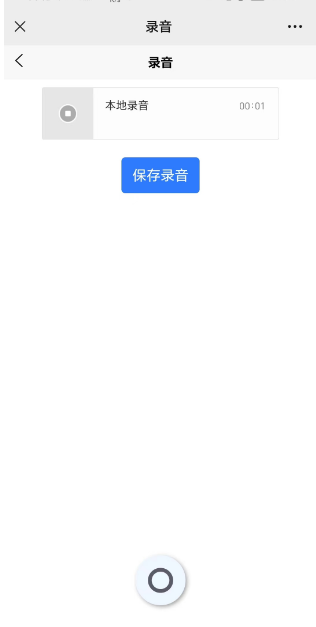
效果:
按照这个功能写了一个类似微信语音聊天功能:
<template>
  <view>
    <view class="record">
      <block v-for="(item, index) in records" :key="index">
        <view class="item">
          <view class="content" v-if="item.type === 'text'">{{ item.content }}</view>
          <view class="content" v-else-if="item.type === 'img'">
            <image :src="item.content" mode="widthFix" @click="openImg(item.content)"></image>
          </view>
          <view class="content" :class="{ active: playItemIndex === index }" v-else-if="item.type === 'recorder'" @click="playRecorder(index)">
            <view class="recorder">
              <view class="time" :style="{ marginRight: changerWidth(item.content.duration) }"> {{ item.content.duration | integer }}" </view>
              <view class="icon">
                <text class="on1">(</text>
                <text class="on2">(</text>
                <text class="on3">(</text>
              </view>
            </view>
          </view>
          <!-- <image class="hander" src="/static/imitate_weChat/logo.jpg" /> -->
        </view>
      </block>
    </view>

    <view class="toolBox">
      <view class="recorder" :class="{ active: isUseRecorder }" @touchstart.prevent="startRecorder" @touchend.prevent="endRecorder">
        {{ isUseRecorder ? '松开 结束' : '按住 说话' }}
      </view>
      <!-- <view class="camrea" @click="camera">55</view> -->
    </view>
    <view class="toolBg"></view>

    <sound-recording ref="recorderRef" @success="handlerSuccess" @error="handlerError"></sound-recording>
  </view>
</template>

<script>
import SoundRecording from '@/components/soundRecording/soundRecording.vue';
export default {
  components: { SoundRecording },
  data() {
    return {
      audio: null,
      records: [
        {
          type: 'text',
          content: 'Hello World!'
        },
        {
          type: 'text',
          content: 'Hello!'
        }
      ],

      isUseRecorder: false,
      playItemIndex: -1,
      currentAudio: ''
    };
  },
  mounted() {
    this.audio = document.createElement('audio');
    this.audio.addEventListener('ended', () => {
      this.playItemIndex = -1;
      this.currentAudio = '';
    });
  },
  methods: {
    openImg(img) {
      uni.previewImage({
        urls: [img]
      });
    },
    startRecorder() {
      this.$refs.recorderRef.start();
      this.isUseRecorder = true;
    },
    endRecorder() {
      this.$refs.recorderRef.stop();
      this.isUseRecorder = false;
    },
    playRecorder(index) {
      this.playItemIndex = index;
      this.currentAudio = this.records[index].content.localUrl;
      this.audio.src = this.currentAudio;
      this.audio.play();
    },
    handlerSuccess(res) {
      if (res.duration < 1)
        return uni.showToast({
          title: '语言时间小于1秒',
          icon: 'error'
        });

      this.records.push({
        type: 'recorder',
        content: res
      });
    },

    changerWidth(v) {
      let a = 40;
      let b = v * 20;
      if (b > 450) b = 450;
      return a + b + 'rpx';
    },

    handlerError(code) {
      switch (code) {
        case '101':
          uni.showModal({
            content: '当前浏览器版本较低,请更换浏览器使用,推荐在微信中打开。'
          });
          break;
        case '201':
          uni.showModal({
            content: '麦克风权限被拒绝,请刷新页面后授权麦克风权限。'
          });
          break;
        default:
          uni.showModal({
            content: '未知错误,请刷新页面重试'
          });
          break;
      }
    },

    camera() {
      uni.showToast({
        title: '录像模块开发中',
        icon: 'none'
      });
    }
  },
  filters: {
    integer(v) {
      return Math.ceil(v);
    }
  }
};
</script>

<style lang="scss" scoped>
page {
  background-color: #f1eded;
}

.record {
  padding: 20rpx;
  font-size: 28rpx;

  .item {
    display: flex;
    justify-content: flex-end;
    padding: 10rpx;
    margin-bottom: 15rpx;

    .content {
      margin-right: 20rpx;
      position: relative;
      background-color: rgba(107, 197, 107, 0.85);
      padding: 20rpx 30rpx;
      border-radius: 10rpx;

      &::before {
        position: absolute;
        right: -8px;
        top: 8px;
        content: '';
        display: inline-block;
        width: 0;
        height: 0;
        border: 4px solid transparent;
        border-left-color: rgba(107, 197, 107, 0.85);
      }

      image {
        max-width: 400rpx;
      }

      .recorder {
        display: flex;
        align-items: center;

        .time {
          margin-right: 40rpx;
        }

        .icon {
          font-weight: bold;
          color: #fff;
          font-size: 32rpx;
          display: flex;
          align-items: center;

          text {
            display: block;
          }

          & text:nth-of-type(1) {
            transform: scale(1.2);
          }

          & text:nth-of-type(2) {
            transform: scale(0.8);
          }

          & text:nth-of-type(3) {
            transform: scale(0.6);
          }
        }
      }

      &.active {
        .recorder {
          .icon {
            animation: play 1.5s ease-in-out infinite backwards;
          }
        }
      }
    }

    .hander {
      width: 80rpx;
      height: 80rpx;
      border-radius: 50%;
    }
  }
}

.toolBg {
  height: 140rpx;
}

.toolBox {
  border-top: 1px solid #ccc;
  position: fixed;
  bottom: 0;
  left: 0;
  right: 0;
  display: flex;
  align-items: center;
  padding: 0rpx 30rpx;
  height: 140rpx;
  background-color: rgba(255, 255, 255, 0.45);

  .recorder {
    width: 550rpx;
    display: flex;
    align-items: center;
    justify-content: center;
    background-color: #fff;
    padding: 17rpx;
    border-radius: 10rpx;
    font-size: 28rpx;
    box-shadow: 2rpx 3rpx 10rpx rgba(0, 0, 0, 0.2);
    position: relative;

    &.active {
      background-color: #95a5a6;

      &::before {
        position: absolute;
        left: 50%;
        transform: translate(-50%);
        top: -3px;
        content: '';
        width: 0;
        height: 3px;
        background-color: #7bed9f;
        animation: loading-data 1.25s ease-in-out infinite backwards;
      }
    }
  }

  @keyframes loading-data {
    0% {
      width: 0;
    }

    100% {
      width: 100%;
    }
  }

  @keyframes play {
    0% {
      color: #fff;
    }

    50% {
      color: #c3c3c3;
    }

    100% {
      columns: #fff;
    }
  }

  .camrea {
    flex: 1;
    display: flex;
    align-items: center;
    justify-content: center;
  }
}
</style>
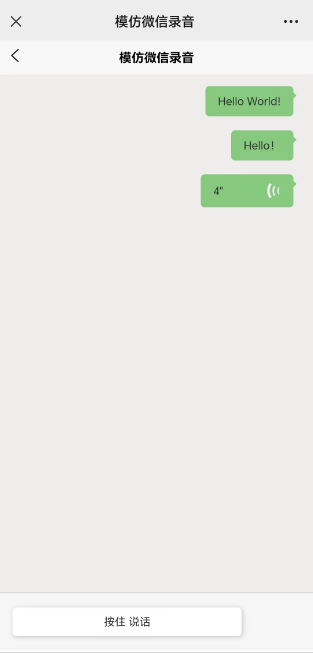
效果:
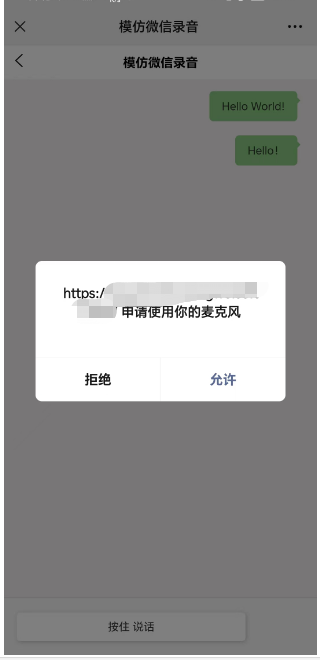
注意:需要调用录音功能的域名必须是https,否则调用失败!
希望大佬看到有不对的地方,提出博主予以改正!

 浙公网安备 33010602011771号