
C#模拟表单上传文件及参数时报错
使用C#模拟表单提交文件和参数,代码如下
string serviceUrl = string.Format("http://" + IP + "/api/wj.kc?act=UploadFile");
HttpWebRequest myRequest = (HttpWebRequest)WebRequest.Create(serviceUrl);
//把用户传过来的数据转成“UTF-8”的字节流
string filePath = @"C://High//Manual.jpg";
string fileName = "Manual.jpg";
byte[] fileContentByte = new byte[1024]; // 文件内容二进制
FileStream fs = new FileStream(filePath, FileMode.Open, FileAccess.Read);
fileContentByte = new byte[fs.Length]; // 二进制文件
fs.Read(fileContentByte, 0, Convert.ToInt32(fs.Length));
fs.Close();
dynamic s =
new
{
parms =
new
{
s_yonghuh = yonghuh,
i_wjlx = wjlx,
i_year = year
}
};
string json = JsonConvert.SerializeObject(s);
var buf = System.Text.Encoding.GetEncoding("UTF-8").GetBytes(json);
string boundary = "----" + DateTime.Now.Ticks.ToString("x");
string Enter = "\r\n";
string modelIdStr = "--" + boundary + Enter
+ "Content-Disposition: form-data; name="parms"" + Enter + Enter
+ json + Enter;
string fileContentStr = "--" + boundary + Enter
+ "Content-Type:image/jpeg" + Enter
+ "Content-Disposition: form-data; name="fileContent"; filename="" + fileName + """ + Enter + Enter;
//myRequest.ContentLength = fileContentByte.Length+ modelIdStr.Length+ fileContentStr.Length;
myRequest.Method = "POST";
myRequest.Timeout = 70000;
myRequest.ContentType = string.Format("multipart/form-data; boundary={0}", boundary);
myRequest.MaximumAutomaticRedirections = 1;
myRequest.AllowAutoRedirect = true;
myRequest.KeepAlive = true;
myRequest.UserAgent = "Mozilla/5.0 (Windows NT 6.1; WOW64) AppleWebKit/537.36 (KHTML, like Gecko) Chrome/31.0.1650.57 Safari/537.36";
myRequest.Accept = "text/html,application/xhtml+xml,application/xml;q=0.9,image/webp,/;q=0.8";
Stream myRequestStream = myRequest.GetRequestStream();
var modelIdStrByte = Encoding.UTF8.GetBytes(modelIdStr);//modelId所有字符串二进制
var fileContentStrByte = Encoding.UTF8.GetBytes(fileContentStr);//fileContent一些名称等信息的二进制(不包含文件本身)
myRequestStream.Write(modelIdStrByte, 0, modelIdStrByte.Length);
myRequestStream.Write(fileContentStrByte, 0, fileContentStrByte.Length);
myRequestStream.Write(fileContentByte, 0, fileContentByte.Length);
// 获取接口返回值
// 通过Web访问对象获取响应内容
HttpWebResponse myResponse = (HttpWebResponse)myRequest.GetResponse();
//通过响应内容流创建StreamReader对象,因为StreamReader更高级更快
StreamReader reader = new StreamReader(myResponse.GetResponseStream(), Encoding.UTF8);
string returnXml = reader.ReadToEnd();//利用StreamReader就可以从响应内容从头读到尾
reader.Close();
myResponse.Close();
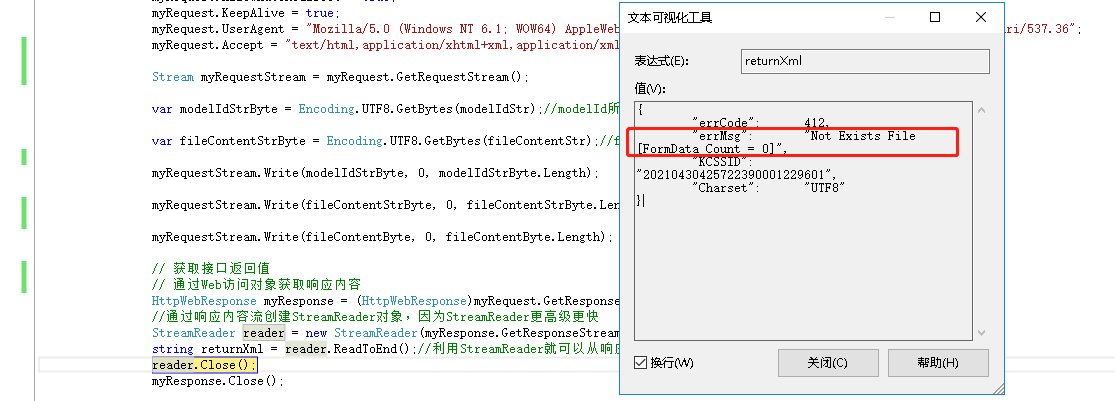
调试时报错 no exists file [formdata count=0],这个是什么问题啊?请教下各位大佬

 浙公网安备 33010602011771号